
- Base URL:
https://api.flexwash.com - Interactive reference: api.flexwash.com/rest-docs/external
How access works
Three layers control access. All three are required.
Credentials on their own grant no data access. An organization admin has to
enable the integration first.
Get started
1
Request credentials
Contact FlexWash support with the name of your integration and the
organizations it needs to access. That name is what organization admins see
when they approve access.
2
Download your credentials
You receive an email with a Download Credentials button. It downloads
flexwash-api-credentials.json, which contains your client ID and client
secret. Store the file in a secrets manager.3
Have each organization enable access
An admin in each organization goes to Admin > Setup > External API
Access, finds your integration, and clicks Enable. FlexWash records
who enabled it and when. The same page has a Revoke button that removes
your access to that organization immediately.Users other than full admins need the Manage External API Approvals
permission on their role.
4
Get an access token
Exchange your credentials for an access token. See
Authentication.
5
Call the API
Send the token as a bearer token on every request. See
Making requests.
Authentication
Request a token fromPOST /external/access-token. This endpoint takes your
credentials and does not need a bearer token.
- Tokens are valid for 24 hours and can be reused across any number of requests.
- Refresh the token every 12 hours so a valid token is always available.
- The token endpoint is limited to 75 requests per day per client ID. Do not
request a new token for each API call. Over the limit, the endpoint returns
429. - Get tokens only from
POST /external/access-token. Do not request tokens directly from FlexWash’s identity provider with your client ID and secret. Direct requests are not supported and will stop working. - Store the token in one shared place, such as a cache or secrets store, that all of your servers, workers, and scheduled jobs read from. Do not have each job or worker request its own token. The daily limit counts every request made with your client ID.
- If a request returns
401, request one new token, save it to the shared place, and retry. - The
audiencevalue inflexwash-api-credentials.jsonis not used. You only needclientIdandclientSecret.
Making requests
Send the access token in theAuthorization header:
- Organization-scoped endpoints take an
organizationIdquery parameter. - Car wash-scoped endpoints take a car wash ID as a query or path parameter.
Many also accept a
carWashIdslist in the request body.
403 Forbidden.
Find your IDs
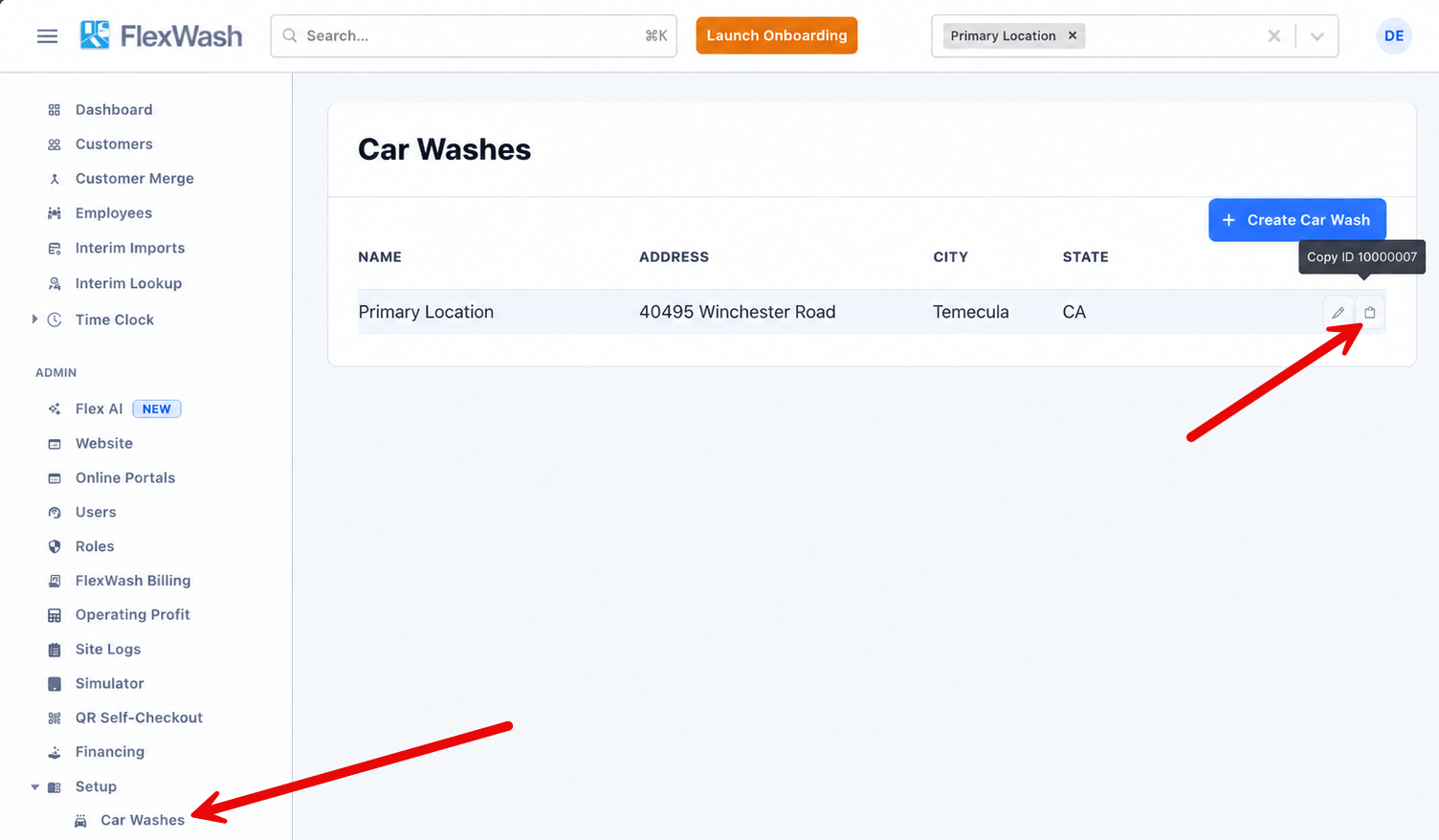
To copy a car wash ID, go to Admin > Setup > Car Washes and click the copy button on the car wash row. The ID also appears in thecarWashIds[] parameter
of the dashboard URL while you view that car wash.
Available endpoints
The interactive reference lists every available endpoint with its full request and response schema. FlexWash adds endpoints over time, so check the reference for the current list. To try a call, click Authorize, paste your access token, open an endpoint, edit the request, and click Execute. Copy the generatedcurl command as the starting point for
your integration.
Creating a customer or recording a downsell response writes an entry to the
customer’s timeline that names your integration.
Errors
Security requirements
- Keep the client ID and secret private. They are your master credentials. Never commit them to source control or log them.
- Treat access tokens as short-lived. A token expires after 24 hours, which limits the damage if one leaks.
- IP allowlisting is not available. Access is controlled by credentials and organization approval.