First confirm the gate itself works. On the Pay Tablet, open Gate Control and tap Open for the lane. If the gate does not open, the fault is the gate, not the camera. Go to Gates Not Opening.
Let a waiting member through now
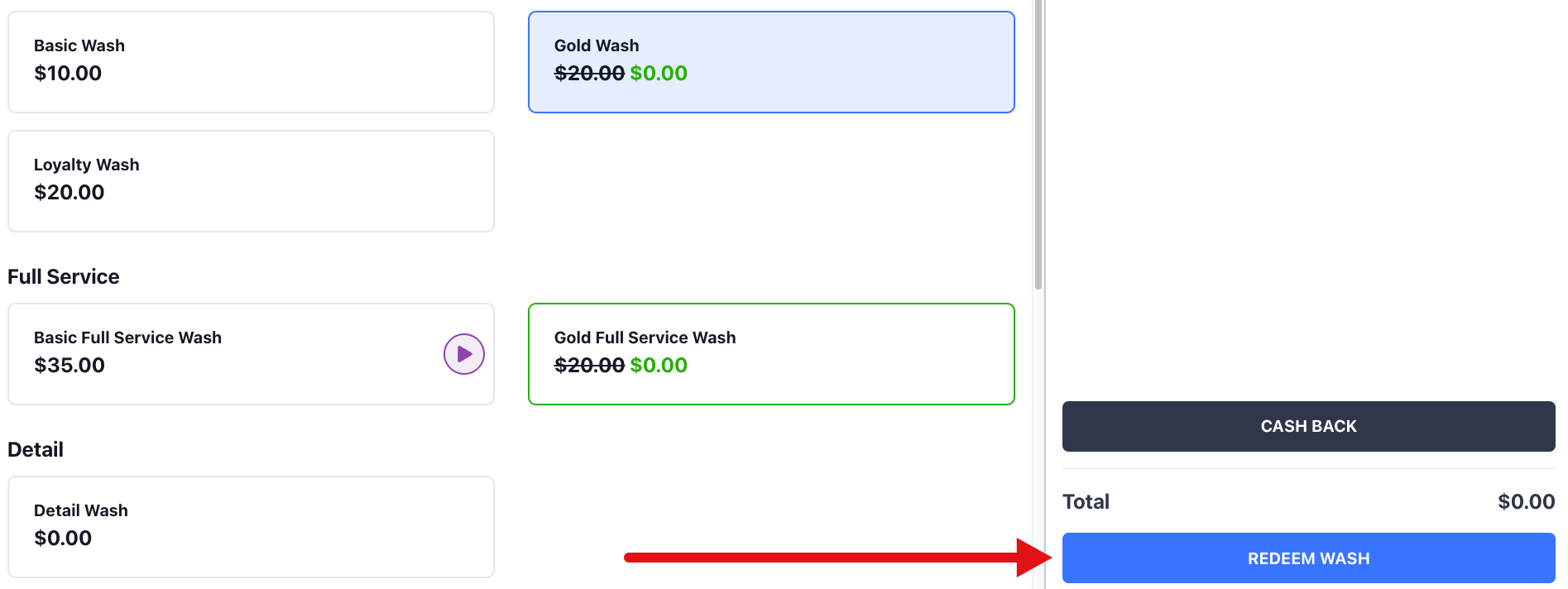
If a member is waiting at the gate, redeem the wash on the Pay Tablet while you troubleshoot:1
Select the vehicle
On the checkout screen, tap Select on the vehicle card in its lane.
2
Fix the plate if needed
If LPR misread the plate, tap Edit on the selected card, enter the correct plate, and tap Save.
3
Redeem the wash
Tap REDEEM WASH. FlexWash records a $0 order for the member and opens the gate for that lane.
No plates read early in the morning or in the evening
LPR runs only during your site’s business hours, in your site’s local time. It starts 30 minutes before opening time and stops 30 minutes after closing time. Outside that window, the LPR cameras do not read plates, so members identified by plate are not recognized. RFID tags, REDEEM WASH, and Gate Control keep working outside business hours. Business hours are 6:00 AM to 8:00 PM unless Support has set different hours for your site. With the 30 minute margin, LPR runs from 5:30 AM to 8:30 PM. If members arrive outside this window, contact Support to change your site’s business hours.Members appear in the lane but the gate stays closed
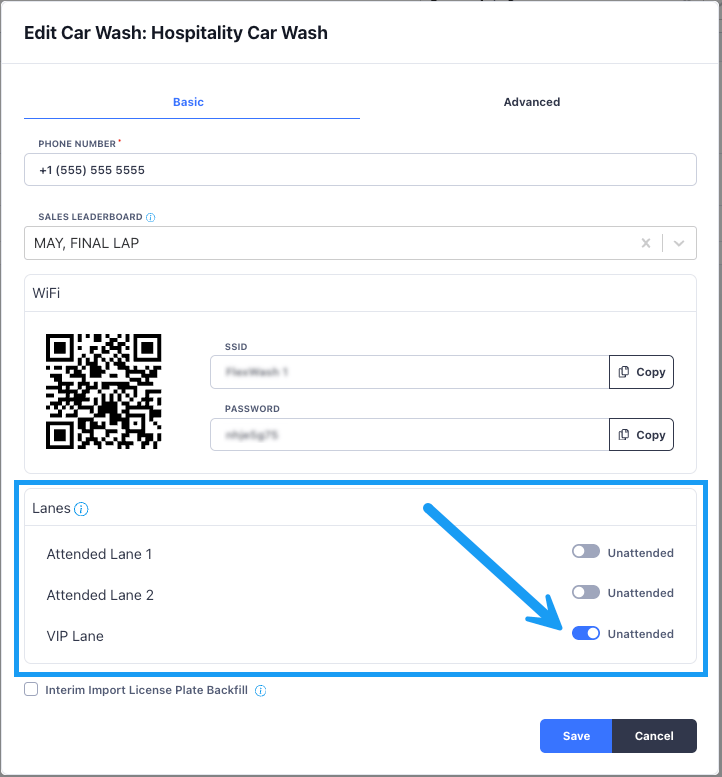
FlexWash opens the gate on its own only when both of these are true:- The lane is set to Unattended.
- The vehicle belongs to an active member whose membership includes a wash package.
A corrected plate leaves the old read in the lane
After you fix a misread plate and redeem the wash, the original read can stay in the lane. Remove it in the Coordinator app:1
Open the Coordinator app
On the Pay Tablet home screen, open Coordinator.
2
Go to Checkout Queue
Tap Checkout Queue. The page lists each vehicle waiting at checkout with its license plate, status, and photo.
3
Delete the stale entry
Tap Delete next to the vehicle that should not be there. FlexWash removes it right away, with no confirmation.
No read appears for the vehicle
If the vehicle never appears in its lane during business hours, the camera is likely off or offline.- Confirm the ethernet cable is fully seated at the camera and at the FlexWash switch.
- Check camera placement and angle. See LPR and RFID.
The wrong gate opens after a gate board swap
FlexWash reaches each gate through the network address of its control board, and the address belongs to the board. If you move a board to a different gate, for example to replace a failed board, FlexWash keeps sending the original lane’s opens to that board. Members in Lane 1 can then open the Lane 2 gate. After any board swap:1
Contact Support
Tell Support which board moved to which gate. Support remaps the gates in FlexWash.
2
Power cycle the gate
Turn the gate off and back on after Support confirms the change.
Still not opening
Power cycle the Coordinator. See On Prem Issues. If the lane still does not open, contact Support. Support can restart individual Coordinator services remotely and check the camera feed for your lane.Related
Gates Not Opening
The gate ignores FlexWash, even when opened from the Pay Tablet.
Gates Opening Randomly
The gate opens with no car present and the queue backs up.