
How FlexWash Counts a Membership
Every membership count in FlexWash is a count of vehicle memberships. A customer with three vehicles on a plan counts as three memberships. A vehicle membership counts as active when its status is one of these:
House account memberships are not counted.
Payment Failed memberships are included because FlexWash is still retrying the charge. A membership leaves the count when it moves to Invalid Card, Cancelled, Frozen, or Prepaid Expired.
Snapshot Time
Active counts are a snapshot of each membership’s status at midnight, site time:- The start count is taken at the start of the first day of the date range.
- The end count is taken at the end of the last day, so it includes every change made on that day.
Sales and Churn
Sales and churn are counted from events in the date range:- New: the first paid membership charge for a vehicle membership.
- Re-Up: a paid membership charge for a vehicle membership whose last status was Cancelled or Invalid Card.
- Prepaid: each prepaid membership sold.
- Churn: an Active membership that moves to Cancelled (voluntary), Invalid Card (involuntary), or Frozen, plus every move to Prepaid Expired.
Site
In a multi-site organization, each number counts toward a site as follows:
Active counts always use the site the membership belongs to today. If a membership moves to another site, it also moves out of past active counts at the old site.
Dashboard
The Aggregate view shows three membership cards:
The KPI by Site and Comparison views show these numbers for each site:
Membership Analytics
Open Reports > Memberships > Analytics, or click any membership card on the Dashboard.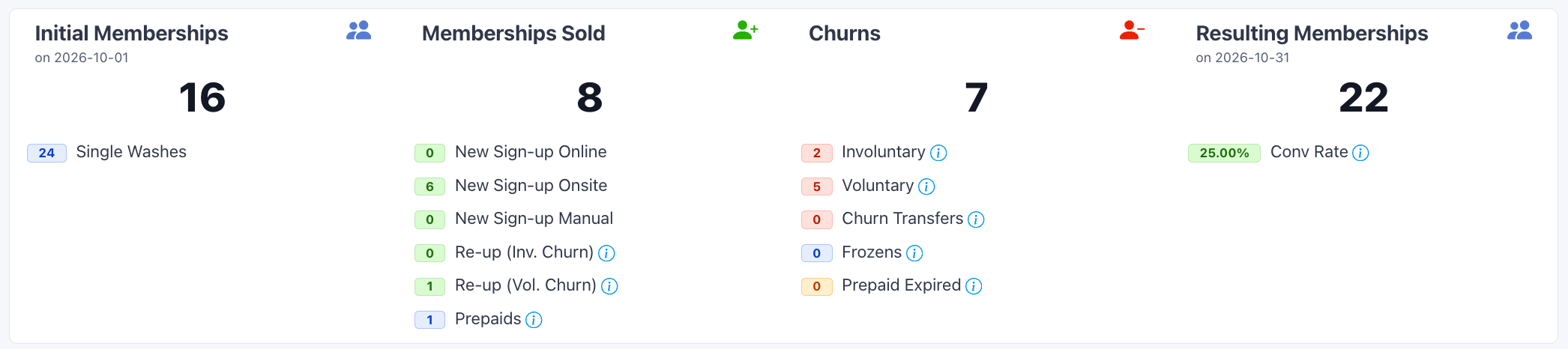
Churns also shows Churn Transfers: Invalid Card memberships that are then cancelled. They are not added to the total. When an Invalid Card membership is cancelled, its move to Invalid Card also stops counting as Involuntary churn, so the number for an earlier date range can drop.
Member Behavior Report
The Member Behavior Report (Reports > Member Behavior Report) answers a different question: which customers are or were members, and how they wash. Its rows do not reconcile with the Dashboard because:- One row per customer. A customer with several vehicle memberships appears once. The report does not show a per-vehicle Valid Until date.
- Current and lapsed members. It includes customers with a membership that is Active, Prepaid Active, Payment Failed, Invalid Card, Cancelled, Frozen, or Prepaid Expired.
- No date range. It always shows members as of now.
- Customer home site. It filters by the customer’s home site, not the site each membership belongs to.
- Different exclusions. Fleet customers are excluded. House account memberships are included.
Why Net Members Can Differ
There are two ways to measure membership growth for a date range:- Snapshot difference: Resulting Memberships minus Initial Memberships in Membership Analytics.
- Net Members: sales minus churn, in the Dashboard KPI by Site and Comparison views.
In a multi-site organization, a single site can also differ because active counts, sales, and churn can count toward different sites. See Site. Totals across all sites are not affected.