
Accessing the Report
Navigate to Accounting > Deposits, select a date range, and click Run.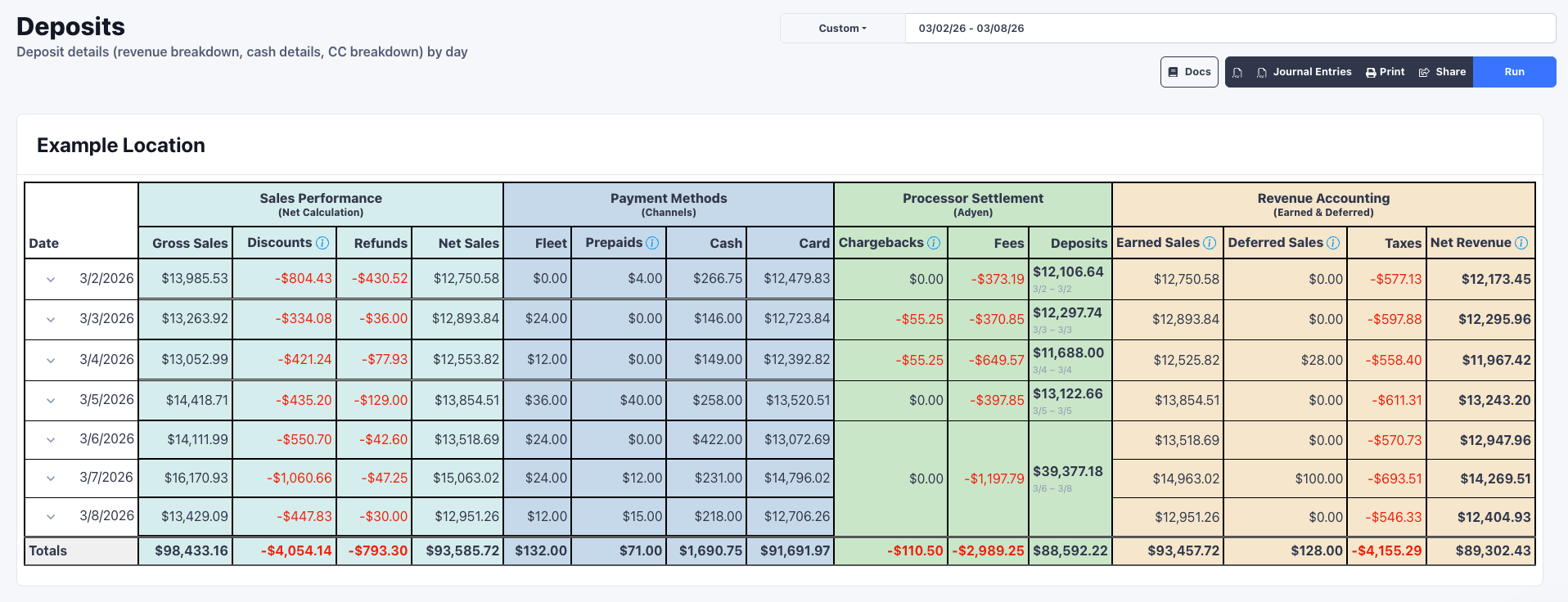
Sales Performance
Shows what was operationally sold each day.
Net Sales matches your dashboard and represents what was collected that day.
Payment Methods
Breaks down Net Sales by how customers paid.Processor Settlement
Shows how Adyen calculates your deposit. Adyen deposits net of fees, so: Card - Chargebacks - Fees = Deposit
FlexWash includes built-in chargeback management through Adyen. The Chargebacks
column reflects both directions: negative when a chargeback is filed or you lose
a dispute, positive when you win a defense and funds are returned.
The Deposits column displays the settlement date range (e.g., “3/2 - 3/2”).
Adyen uses a T+2 deposit schedule with funds arriving by 1:30 PM PST via ACH.
Bank holidays will delay deposits by one business day.
This amount should match your bank statement exactly.
Revenue Accounting
Calculates net revenue using accrual accounting principles.
Net Revenue represents the true revenue earned that day, excluding
prepaid sales that will be recognized when redeemed.
* Taxes reflects your tax liability for the day, not just the sales
tax collected that day. When an order is refunded, the tax charged on that
order is returned to the customer, so it reduces your tax
liability. That reversal is applied on the day the refund is issued.
Example: On April 1st a cutsomer pays $47.93 and $2.97 in taxes. You refunded
this order on May 1st. On May 1st your tax liability decreases by $2.97.