
- Checkout Queue
- Gate Queue
- Wash Queue
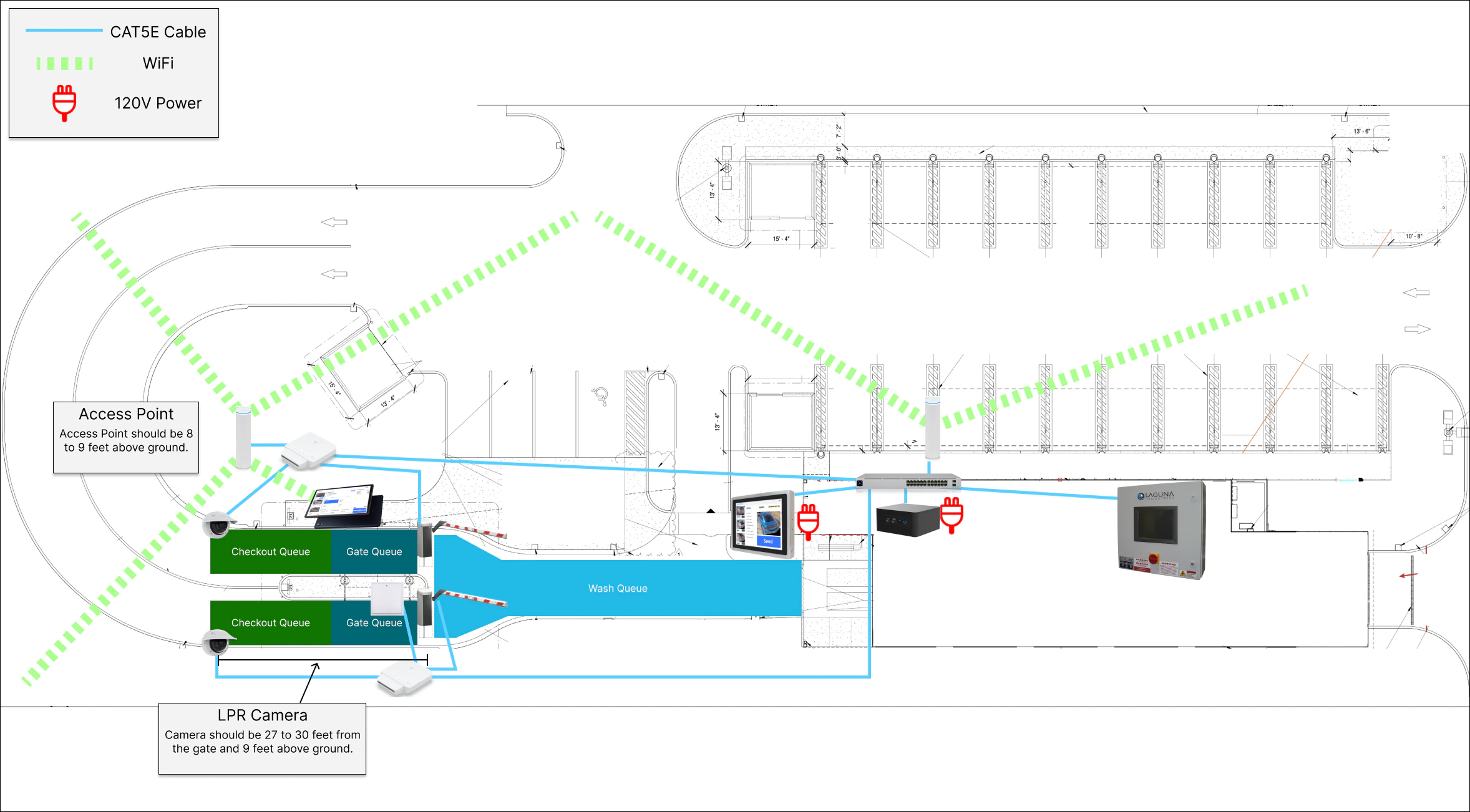
Check the Example installation section of our Network article.
Checkout Queue
The Checkout Queue is the first step in the wash process. This queue is split into lanes. A vehicle enters this queue when recognized by the LPR (License Plate Recognition) camera. The vehicle remains in this queue until one of the following occurs:- A member is recognized, and a wash order is created automatically.
- A single-wash customer pays for their wash.
Gate Queue
The Gate Queue follows the Checkout Queue and is also split into lanes. The main purpose of the Gate Queue is to load cars one by one into the Wash Queue.- Gates open automatically, but only one gate opens at a time, in the order that vehicles were added to this queue.
- The gate closes itself when the vehicle crosses its induction loop, and the next vehicle in the queue is processed.
- This queuing system ensures vehicles enter the Wash Queue in a known order with the appropriate wash package.
Gate Closing
FlexWash opens gates. Gates close themselves. FlexWash sends the open command when a vehicle reaches the front of the Gate Queue. Closing is not a FlexWash command. The gate controller closes the boom on its own once a vehicle clears its induction loop, and it is left that way by design, for safety. A gate that stays open after a vehicle passes through is therefore a gate-side issue. Two causes account for most of them:- The induction loop did not detect the vehicle. The loop needs recalibrating. Vehicles with high ground clearance are the common case, since a loop that is tuned too low can miss them entirely.
- A setting on the gate controller. Close timers and close behavior live on the gate, not in FlexWash.
1
Check whether it is always the same gate
One gate sticking points at that gate’s loop or its settings. All gates
sticking points at something shared, such as power or a common configuration.
2
Check what drove through
Review security footage for the vehicles that were passing when the gate
stuck. A pattern by vehicle type, such as lifted trucks or vehicles with high
ground clearance, points at loop calibration.
A gate that ignores close commands entirely, rather than sometimes missing a
vehicle, is a different problem. See
Gate Stuck Open, where a keyed
override switch on the barrier housing holds the boom up and blocks every close
command.
Gate Status Detection
The system determines a gate is closed by receiving a close signal from the gate controller. A gate will only open automatically if all other gates report as closed. If a gate is unreachable or not responding, the system assumes it is closed. This allows continued operation when a lane with a malfunctioning gate is taken offline. If more than one gate opens at the same time, this typically indicates a gate communication issue that should be investigated with the gate manufacturer.Example of Incorrect Workflow
A common mistake occurs when a Customer Service Associate (CSA) manually opens the gate early:The CSA recognizes a member and preemptively opens the gate to be courteous.
The vehicle is recognized by the Checkout Queue but not by the Gate Queue,
because the gate did not cycle automatically.
The system can no longer track where the vehicle sits in the workflow.
If this occurs, transition to a Skip Queue Wash.
Manual gate opens are tracked and can be reviewed in the Suspicious Activity
Report in the FlexWash Portal.
Wash Queue
The Wash Queue is the final step, displayed on the tunnel loading screen.- Vehicles must pass through the Checkout Queue and Gate Queue in the correct order to enter this queue properly.
- If vehicles become out of order, for example through improper merging, the loader can select the correct vehicle based on its photo displayed in the system.