
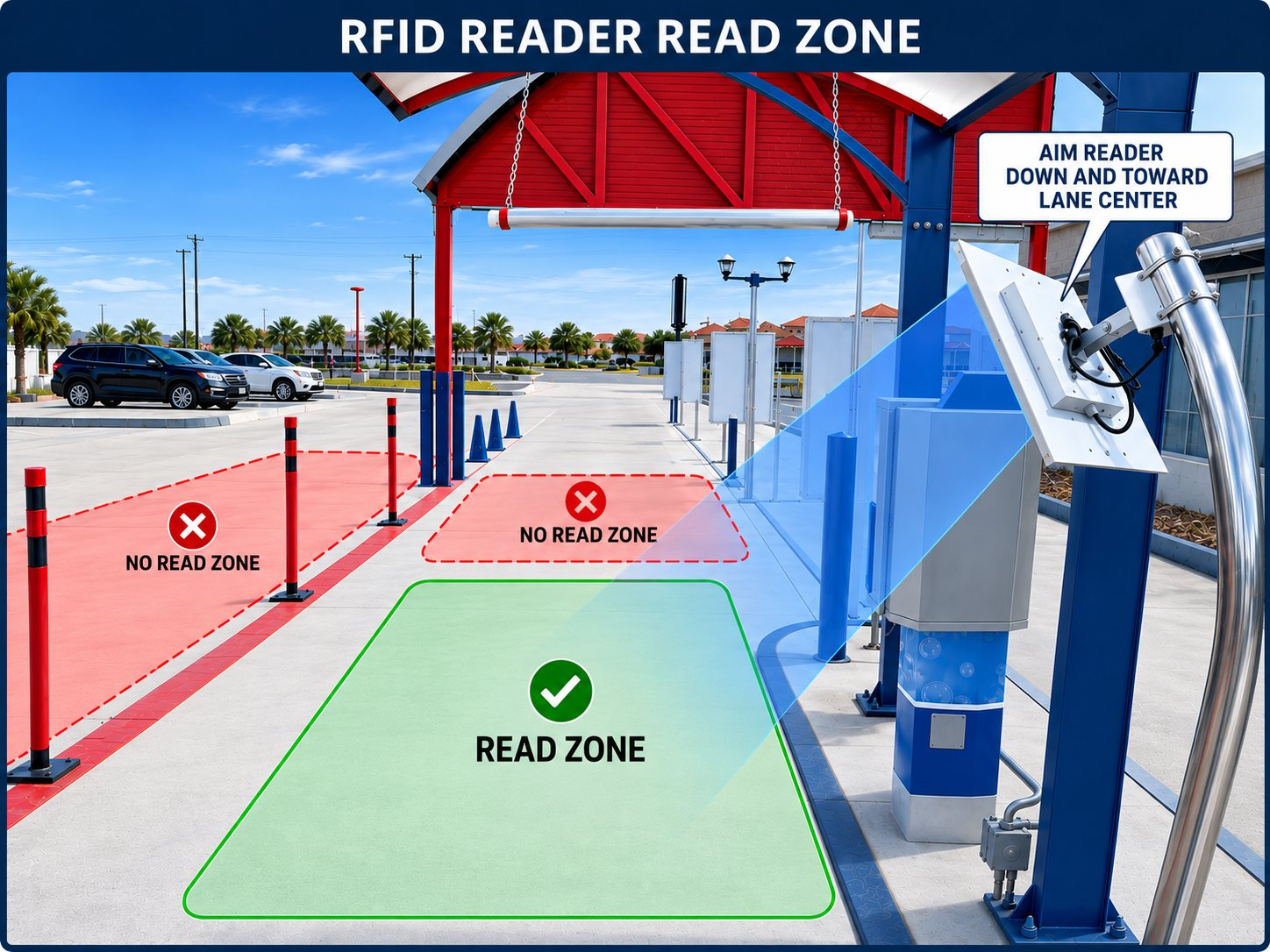
Read Zone
The RFID reader emits a directional beam of radio energy, typically referred to as the read zone. A tag is detected only when it sits inside this zone with enough signal strength to be picked up.What to Avoid
- Bad aiming and calibration can cause the reader to detect the second vehicle in line, behind the lead car, opening the gate for the wrong member.
- Drive-by traffic in adjacent lanes, parking areas, or the street. A stray read of a member tag opens the gate unnecessarily, inflates the car count, and confuses the queue.
Mounting and Aim
There are two mounting approaches that reliably contain the read zone to the lead vehicle.Side Mount, Angled Down and Inward
Mount the reader on a post or pole beside the lane, at roughly windshield height. Aim the antenna down and toward the center of the lane, so the beam meets the pavement just in front of the gate. This is the most common installation. The downward tilt prevents the beam from reaching the next car in line. The inward angle keeps it off adjacent traffic.Overhead Mount, Pointing Straight Down
Mount the reader on a canopy or arch directly above the stop position, with the antenna pointing straight down. The read zone forms a tight footprint on the pavement directly under the antenna. Overhead mounting is the cleanest option when the site has existing structure to support it.Tag Placement
Mount the tag on the inside of the windshield, usually in the bottom driver-side corner. Some makes and models need a different position because of thicker glass or RFID-blocking coatings. Windshield glass and body metal both weaken the signal, so where the tag sits changes how it reads. Always test with the tag mounted on an actual vehicle. A tag held in open air or walked through the lane reads far stronger than the same tag behind glass, and any tuning done against it will not hold up with real traffic.Network
Our RFID readers are PoE (Power over Ethernet). A single CAT5E cable carries both power and data, so the only wire you run to the mounting location is the CAT5E. There is no need for a separate power circuit or outlet at the reader. Terminate the CAT5E at a PoE switch or PoE injector on the network side. The unit ships with black and red leads for non-PoE power. On a PoE install these leads are unused. Remove them during installation so they are never mistaken for a required connection.RFID Calibration
Calibration sets how strong a tag’s signal has to be before the lane accepts it, which is what stops the reader picking up the car behind or the lane next door. Two levers control what a lane reads. The physical aim of the unit sets where it looks; the slider sets how sensitive it is. Confirm the aim first, then use the slider to fine-tune. A slider cannot correct a beam pointed at the wrong place.Signal Strength and RSSI Thresholds
Signal strength appears in dBm, and the values are negative, so closer to zero is stronger. A -35 read is much stronger than a -60 read, and a tag reads stronger the closer it sits to the antenna. Each reader has a threshold, the weakest read it will accept. The coordinator discards anything below it, so a weak read never opens a gate and never appears in the table. The slider sets that threshold, anywhere from -80 to 0.- Toward -80, the lane accepts weaker, more distant reads, which widens the read zone. Go this way when valid member tags get missed within the read zone.
- Toward 0, the lane accepts only strong, close-up reads, which tightens the read zone. Go this way when the reader picks up the car behind or the adjacent lane.
Opening the Page
On the pay tablet, open the Coordinator app, then tap RFID Calibration.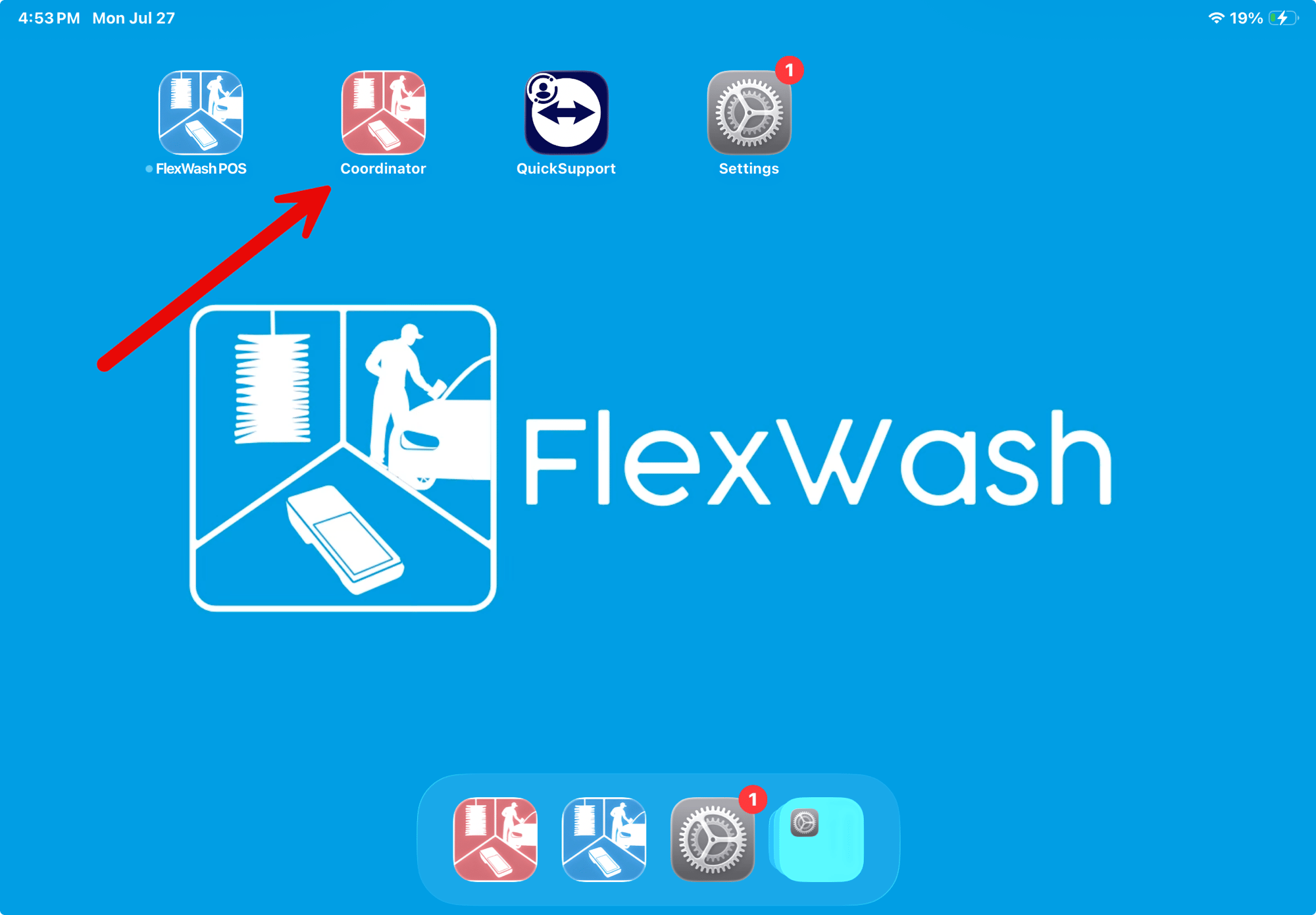
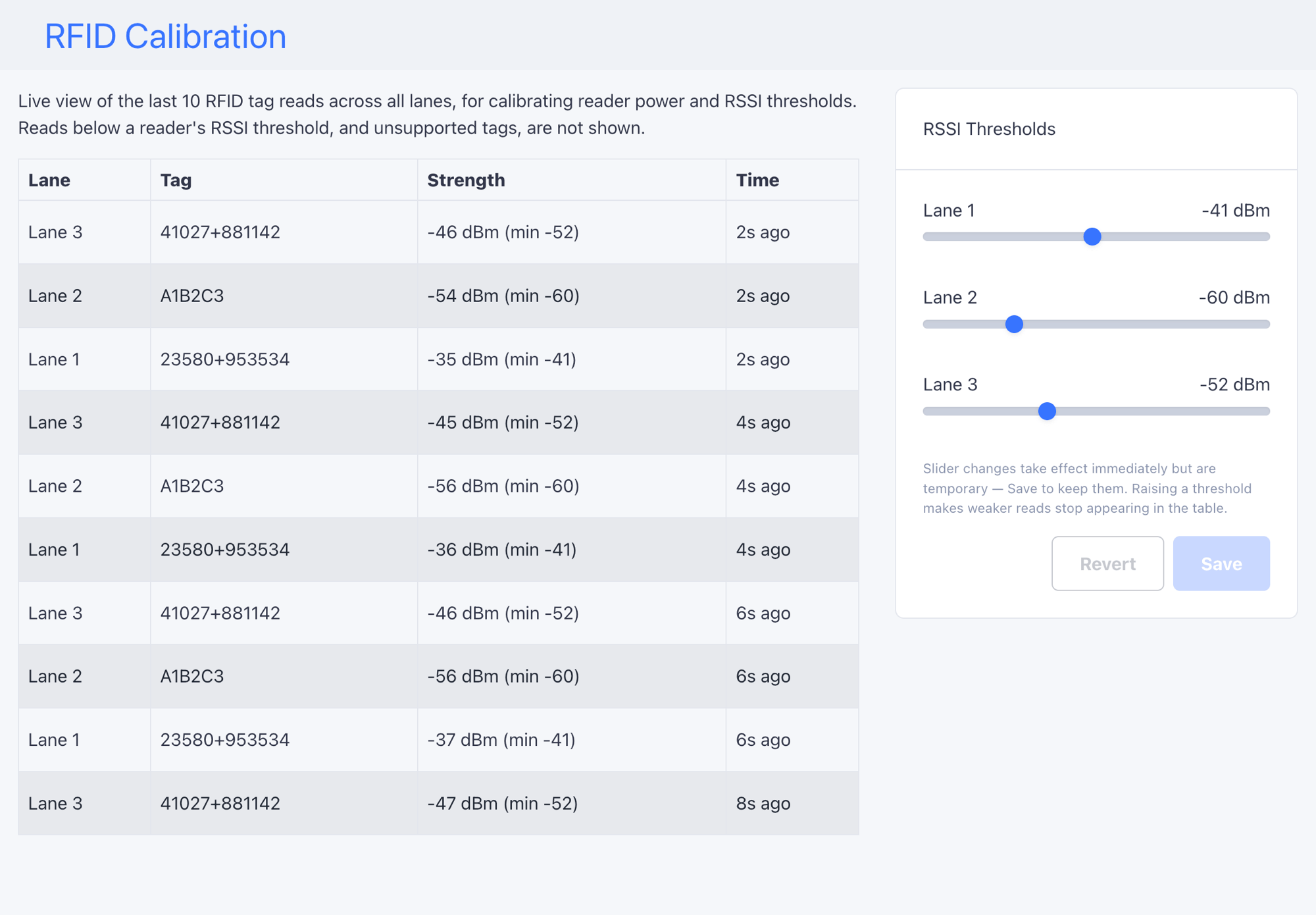
Calibrating a Lane
Each lane is calibrated independently. Work from inside a vehicle with the tag mounted as described in Tag Placement. Never walk a tag through the lane.Prepare the test vehicle
With the tag mounted and the vehicle parked in the read zone, have the pay
tablet ready. You will read the table and move the slider from the
driver’s seat.
Open the slider all the way
Drag the lane’s slider left to -80. The lane now accepts almost any
read, so you can see everything the reader picks up. Slider changes apply
immediately but are discarded unless you save.
Read at 6 feet
Stop 6 feet from the gate, where members stop for checkout. Note the
weakest Strength value you see. This is the read you must never lose.
Read at 13 feet and from adjacent lanes
Back up to 13 feet from the gate, where the next vehicle waits, and
note the strongest read. Then drive through each adjacent lanes and note
the strongest read from there.
Set the slider between the two
Pick a value above everything you saw at 13 feet and from the adjacent
lanes, but comfortably below your weakest read at 6 feet. For example, with -37 at 6
feet and -58 at 13 feet, -45 is a good setting.
Verify and save
Drive it again. Reads at 6 feet must appear consistently. Reads at 13 feet
and from adjacent lanes must not appear at all. Adjust and repeat until
both hold, then tap Save. Until you do the setting is temporary, and
Revert undoes it.
When Nothing Reads
- Open the slider all the way to -80. If reads appear, the setting was too strict.
- Try another tag, ideally one already working at a different lane.
- Try another vehicle. Some windshields block RFID outright. See Known Interference and Limitations.
- Check the hardware if a known-good tag shows no reads at -80 from inside two different vehicles. At that point the fault is in the reader, the cabling, or the PoE port, not the calibration. Work through RFID Reader troubleshooting, and contact support if the reader still will not read.
Known Interference and Limitations
Some vehicles and environments defeat RFID no matter how the lane is tuned. Check this list before spending time on the slider.- RFID-blocking windshields. Some windshields have metallic or infrared coatings that block the signal outright. These vehicles are better served by LPR. See LPR and RFID Limitations.
- Toll transponders. A toll tag mounted next to the member tag can interfere with reads.
- Garage door openers clipped near the tag position.
- Nearby transformers. Electrical equipment close to the lane raises the noise floor and weakens reads.
- Unsupported tags. Tags that are not ours never appear in the read table at all, no matter the slider setting.