> ## Documentation Index
> Fetch the complete documentation index at: https://docs.flexwash.com/llms.txt
> Use this file to discover all available pages before exploring further.
# Gates Stuck Open
> A gate that will not move is usually a key switch someone left turned, not a fault. Check it before anything else.
A gate that will not respond to open or close commands is usually held by the key switch on the barrier housing, not by a controller or loop fault. Check the switch before anything else.
## The key switch
Magnetic barriers ship with a keyed override switch on the housing, marked with an up arrow and a down arrow. Up holds the barrier open. Down closes it. The switch is wired to the controller's **Open High Priority** input.
This is a safety device, commonly called a fire fighter switch. It exists so emergency services can force the barrier open and keep it open, which is why it overrides every other command.
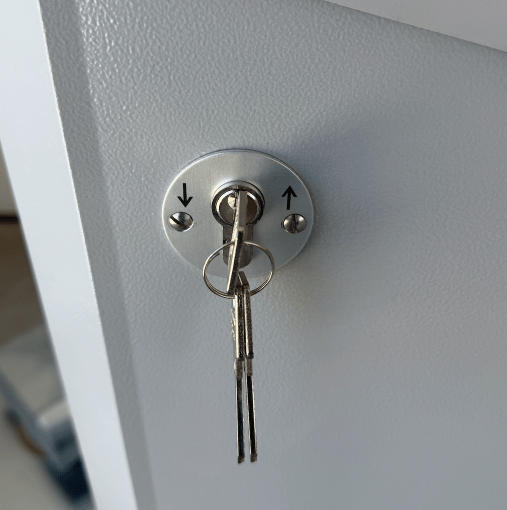 A key switch left in the up position holds the barrier open and blocks every close command. Nothing in FlexWash reports this. The gate simply stops responding to open and close commands.
Keys are often left sitting in the switch, so anyone can turn it. Confirm the switch is turned down before troubleshooting anything else.
## Open High Priority
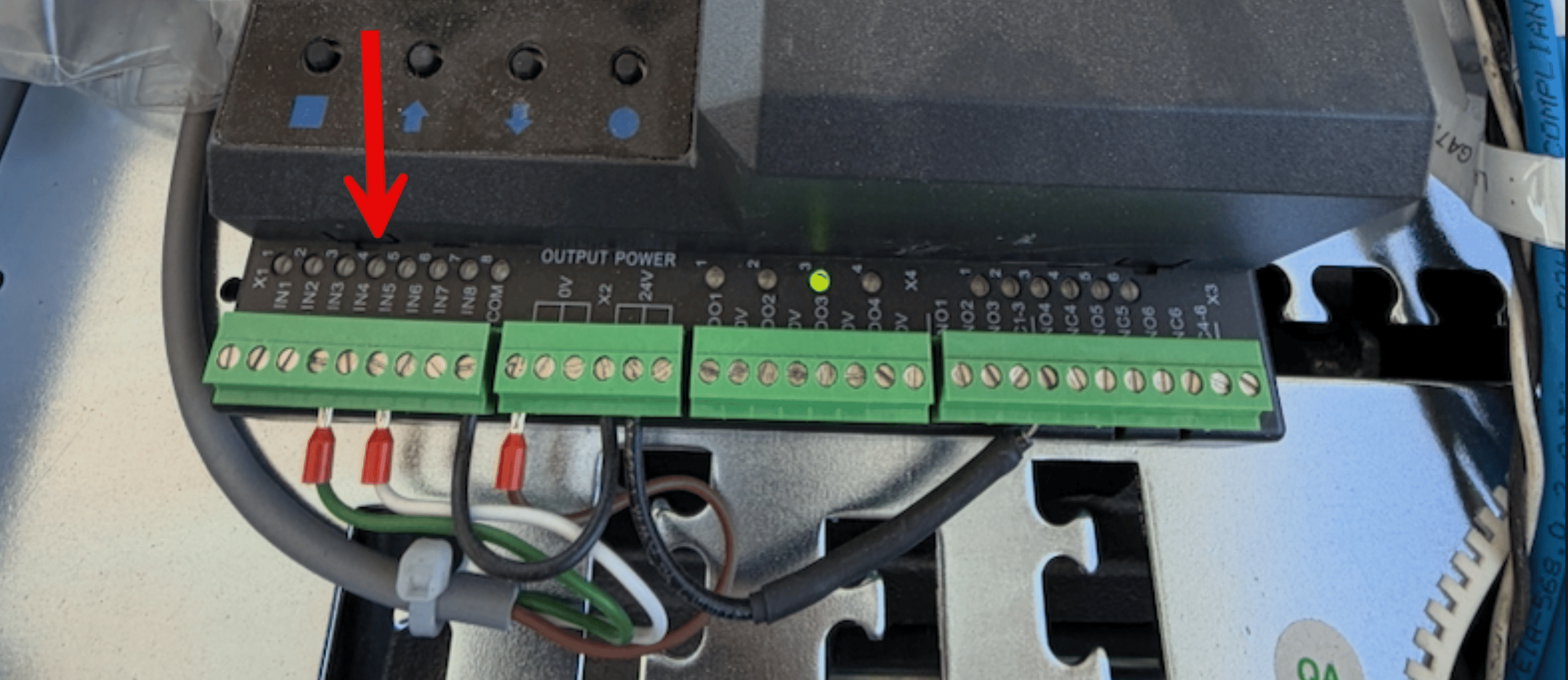
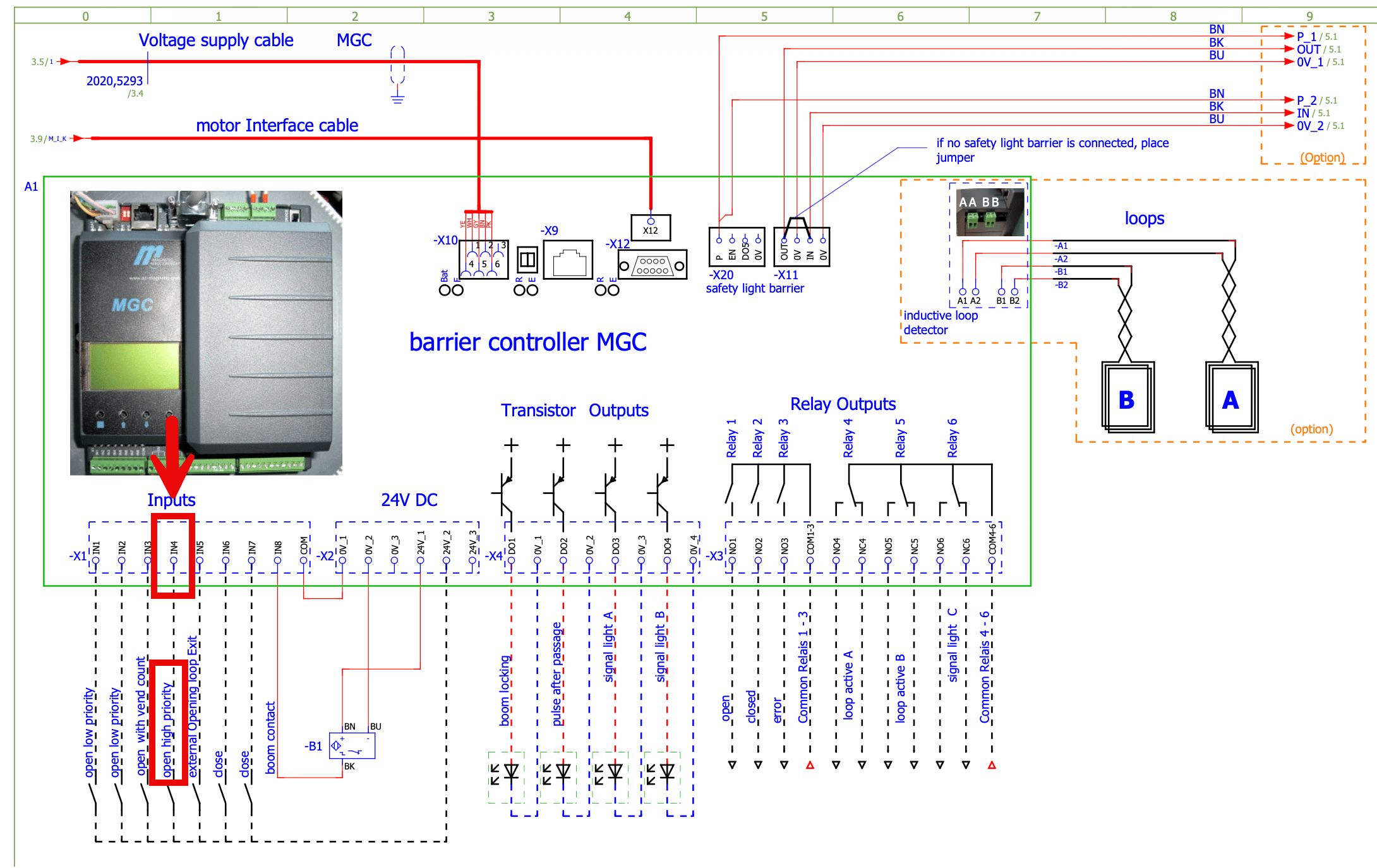
`IN4` on terminal block `-X1` is **Open High Priority**. Key switches, fire fighter switches, and emergency opening contacts all wire to this input.
While a signal is present on IN4 the barrier opens and stays open, ignoring every close command until the signal clears.
A red LED above IN4 lights whenever the input is active. Pop the lid and look. If it is lit, something is holding the input on, and that is your answer. If the LED is on while the key switch is turned down, the signal is coming from somewhere else and it is a wiring problem.
A key switch left in the up position holds the barrier open and blocks every close command. Nothing in FlexWash reports this. The gate simply stops responding to open and close commands.
Keys are often left sitting in the switch, so anyone can turn it. Confirm the switch is turned down before troubleshooting anything else.
## Open High Priority
`IN4` on terminal block `-X1` is **Open High Priority**. Key switches, fire fighter switches, and emergency opening contacts all wire to this input.
While a signal is present on IN4 the barrier opens and stays open, ignoring every close command until the signal clears.
A red LED above IN4 lights whenever the input is active. Pop the lid and look. If it is lit, something is holding the input on, and that is your answer. If the LED is on while the key switch is turned down, the signal is coming from somewhere else and it is a wiring problem.
 ## Input reference
| Input | Function |
| ----- | -------------------------- |
| `IN1` | Open low priority |
| `IN2` | Open low priority |
| `IN3` | Open with vend count |
| `IN4` | **Open high priority** |
| `IN5` | External opening loop exit |
| `IN6` | Close |
| `IN7` | Close |
| `IN8` | Boom contact |
If the gate cycles open repeatedly with no car present and the queue backs up, that is a different problem. See [Gates Opening Randomly](/technical/troubleshooting/gates-opening-randomly).
## Other gate symptoms
The gate works by hand but ignores FlexWash. Usually the programming mode.
The gate cycles open with no car present and the queue backs up.
## Input reference
| Input | Function |
| ----- | -------------------------- |
| `IN1` | Open low priority |
| `IN2` | Open low priority |
| `IN3` | Open with vend count |
| `IN4` | **Open high priority** |
| `IN5` | External opening loop exit |
| `IN6` | Close |
| `IN7` | Close |
| `IN8` | Boom contact |
If the gate cycles open repeatedly with no car present and the queue backs up, that is a different problem. See [Gates Opening Randomly](/technical/troubleshooting/gates-opening-randomly).
## Other gate symptoms
The gate works by hand but ignores FlexWash. Usually the programming mode.
The gate cycles open with no car present and the queue backs up.