> ## Documentation Index
> Fetch the complete documentation index at: https://docs.flexwash.com/llms.txt
> Use this file to discover all available pages before exploring further.
# RFID Reader
> This article describes how to verify and troubleshoot the FlexWash RFID reader.
## Power
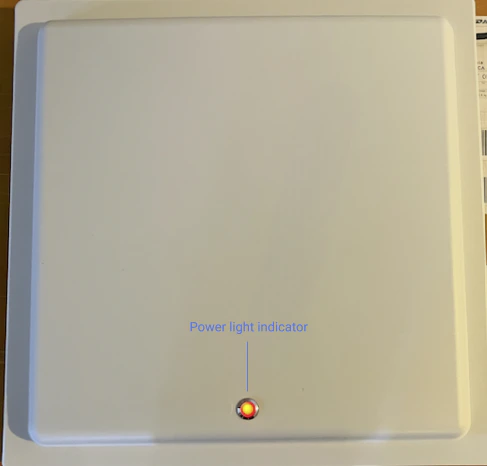
**Verify Power Indicator:**
* Confirm that the power indicator light on the RFID reader is illuminated.
* If the indicator is off, trace the power cable to its source and test the power outlet with another device to ensure functionality.
* Try connecting the RFID reader to a different, known-working power outlet.
 **Check Cable Connections:**
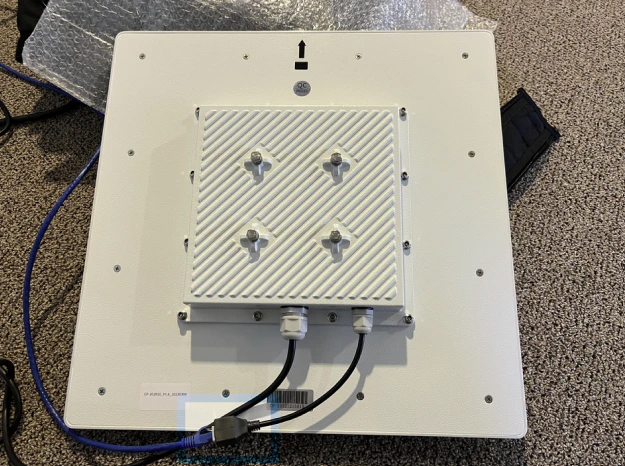
* Ensure all cables, including power and Ethernet, are securely connected to the RFID scanner.
* Inspect cables for any visible damage or corrosion, as they are often exposed.
**Check Cable Connections:**
* Ensure all cables, including power and Ethernet, are securely connected to the RFID scanner.
* Inspect cables for any visible damage or corrosion, as they are often exposed.
 ## Data
**Inspect Ethernet Port Connection:**
* Trace the Ethernet cable from the scanner to the network switch, and make sure it is connected.
* Verify that the cable is connected to a functional port on the switch. A functional port typically has an illuminated light indicator next to it.
## Data
**Inspect Ethernet Port Connection:**
* Trace the Ethernet cable from the scanner to the network switch, and make sure it is connected.
* Verify that the cable is connected to a functional port on the switch. A functional port typically has an illuminated light indicator next to it.
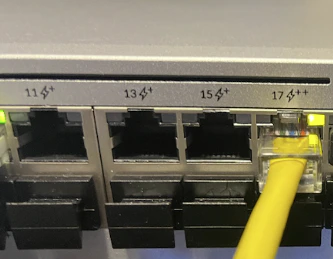 * If there is no light, the port is likely faulty; connect the RFID scanner's Ethernet cable to a different port that is available on the switch.
**Test with a Different Ethernet Cable:**
* Try using a different Ethernet cable.
* If there is a significant distance between the scanner and the switch, temporarily bring the scanner down and place it near the network switch to test it with a shorter, pre-tested Ethernet cable.
**Contact Support:**
* If the issue persists after completing all the above steps, please contact the support team for further assistance.
* If there is no light, the port is likely faulty; connect the RFID scanner's Ethernet cable to a different port that is available on the switch.
**Test with a Different Ethernet Cable:**
* Try using a different Ethernet cable.
* If there is a significant distance between the scanner and the switch, temporarily bring the scanner down and place it near the network switch to test it with a shorter, pre-tested Ethernet cable.
**Contact Support:**
* If the issue persists after completing all the above steps, please contact the support team for further assistance.