> ## Documentation Index
> Fetch the complete documentation index at: https://docs.flexwash.com/llms.txt
> Use this file to discover all available pages before exploring further.
# Relay Stoplights
> Control any entrance stoplight from FlexWash with a two-wire relay interface.
Stoplights use the same ioLogik relay interface as gates. For gates, see [Relay Gates](/technical/hardware/relay-gates).
Work with a licensed electrician when wiring stoplights. Incorrect wiring can damage equipment or cause injury or death.
Read the manuals from the fixture manufacturer, the logic relay manufacturer, and Moxa before you start.
FlexWash uses the [Moxa ioLogik E1214](https://www.moxa.com/en/products/industrial-edge-connectivity/controllers-and-ios/universal-controllers-and-i-os/iologik-e1200-series/iologik-e1214) to control stoplights. FlexWash supplies and configures the unit. It gives FlexWash six relay outputs to send go commands and six digital inputs to read the state of your lights.
## Requirements
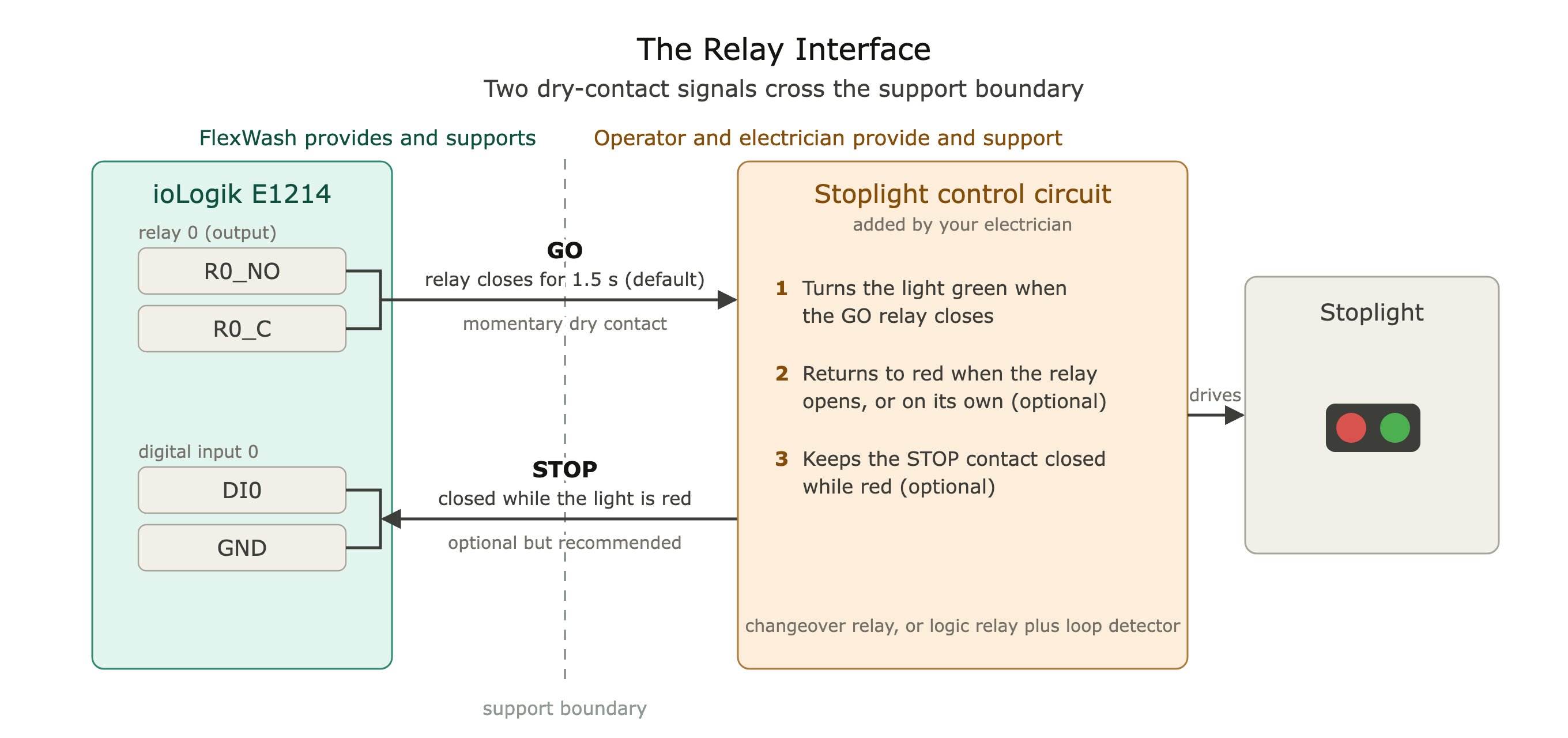
The FlexWash-provided ioLogik does two things:
1. **Sends a go command.** When a vehicle is cleared to proceed, FlexWash closes a relay contact. The pulse lasts 1.5 seconds by default. FlexWash support can configure it longer.
2. **Reads the stop state.** Optional. FlexWash reads a dry contact on a digital input that is closed while the light is red. Most sites skip this. See [Optional](#optional).
FlexWash only sends the go command. It never sends a stop command. If you use the digital input, your stoplight must return to red on its own. Otherwise it must return to red when the go command relay opens again.
Without the stop input, the light follows the relay: green while the relay is closed, red while it is open. The pulse length sets the green time. Your electrician wires the ioLogik relay to a changeover relay: the normally open contact feeds the green arrow and the normally closed contact feeds the red X.
 ### Responsibilities
| FlexWash | You and your electrician |
| :- | :- |
| Supplies and configures the ioLogik E1214 | Supply the stoplight fixture |
| Connects the ioLogik to the FlexWash network | Wire the light to the ioLogik relay, and build the control circuit if you use the stop input |
| Sends go commands, reads the stop state, and runs the gate queue | Supply induction loops and loop detectors |
| Supports the ioLogik interface described on this page | Supply power, enclosures, conduit, and all wiring, including the wiring to the ioLogik terminals |
| | Commission and maintain the stoplight and its control circuit |
FlexWash supports the ioLogik interface described on this page. We do not design, install, troubleshoot, or support the control circuit or the stoplight.
## How the Interface Works
### Responsibilities
| FlexWash | You and your electrician |
| :- | :- |
| Supplies and configures the ioLogik E1214 | Supply the stoplight fixture |
| Connects the ioLogik to the FlexWash network | Wire the light to the ioLogik relay, and build the control circuit if you use the stop input |
| Sends go commands, reads the stop state, and runs the gate queue | Supply induction loops and loop detectors |
| Supports the ioLogik interface described on this page | Supply power, enclosures, conduit, and all wiring, including the wiring to the ioLogik terminals |
| | Commission and maintain the stoplight and its control circuit |
FlexWash supports the ioLogik interface described on this page. We do not design, install, troubleshoot, or support the control circuit or the stoplight.
## How the Interface Works
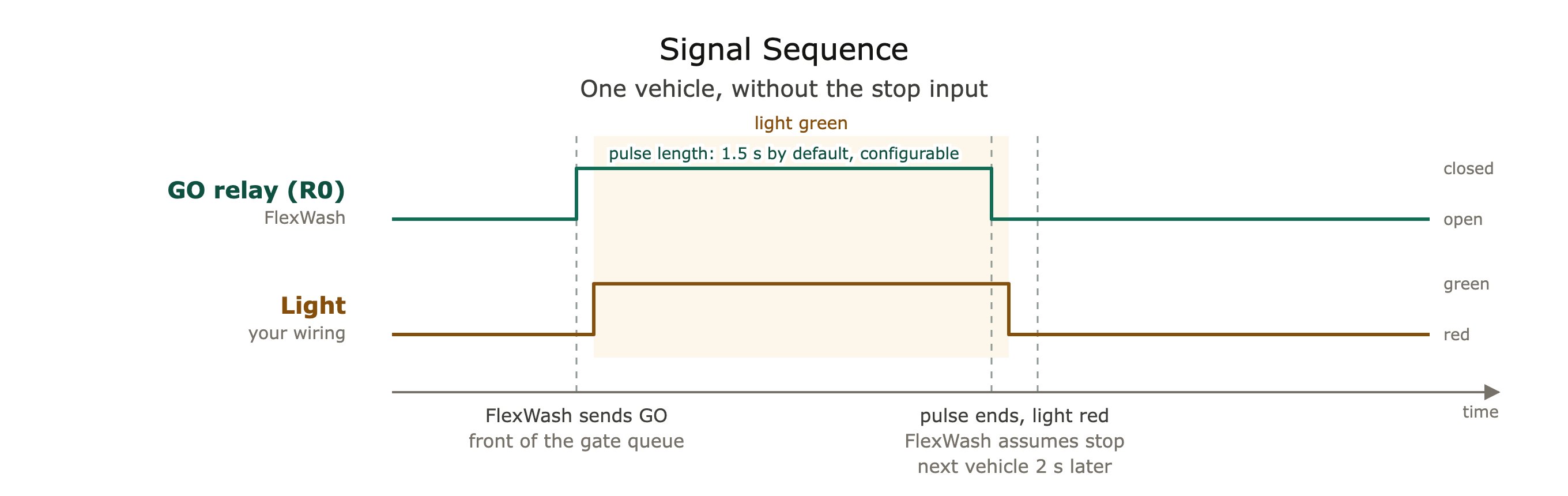 1. **At rest**, the light is red.
2. When a vehicle reaches the front of the gate queue, **FlexWash closes the relay** for the configured pulse length. The light turns green.
3. **The pulse ends.** The relay opens and the light returns to red. FlexWash treats the light as stopped.
4. After a 2 second settling period, FlexWash releases the next vehicle.
With the optional stop input, FlexWash instead waits until the light reports red. See [Optional](#optional).
## Optional
Wire the stop input if you want FlexWash to pace vehicles on the real state of the light instead of the pulse length. The light can then stay green until the vehicle has actually left, and FlexWash waits for red before it releases the next vehicle. We recommend it, but it needs a control circuit.
Most stoplight fixtures are only lamps. They have no input for a go command, no timer, no loop, and no status output. Your electrician adds a control circuit that:
* Turns the light green when the relay closes.
* Returns the light to red on its own, triggered by an induction loop, a timer, or both.
* Closes a dry contact while the light is red. A programmable logic relay provides this with a spare output.
1. **At rest**, the light is red.
2. When a vehicle reaches the front of the gate queue, **FlexWash closes the relay** for the configured pulse length. The light turns green.
3. **The pulse ends.** The relay opens and the light returns to red. FlexWash treats the light as stopped.
4. After a 2 second settling period, FlexWash releases the next vehicle.
With the optional stop input, FlexWash instead waits until the light reports red. See [Optional](#optional).
## Optional
Wire the stop input if you want FlexWash to pace vehicles on the real state of the light instead of the pulse length. The light can then stay green until the vehicle has actually left, and FlexWash waits for red before it releases the next vehicle. We recommend it, but it needs a control circuit.
Most stoplight fixtures are only lamps. They have no input for a go command, no timer, no loop, and no status output. Your electrician adds a control circuit that:
* Turns the light green when the relay closes.
* Returns the light to red on its own, triggered by an induction loop, a timer, or both.
* Closes a dry contact while the light is red. A programmable logic relay provides this with a spare output.
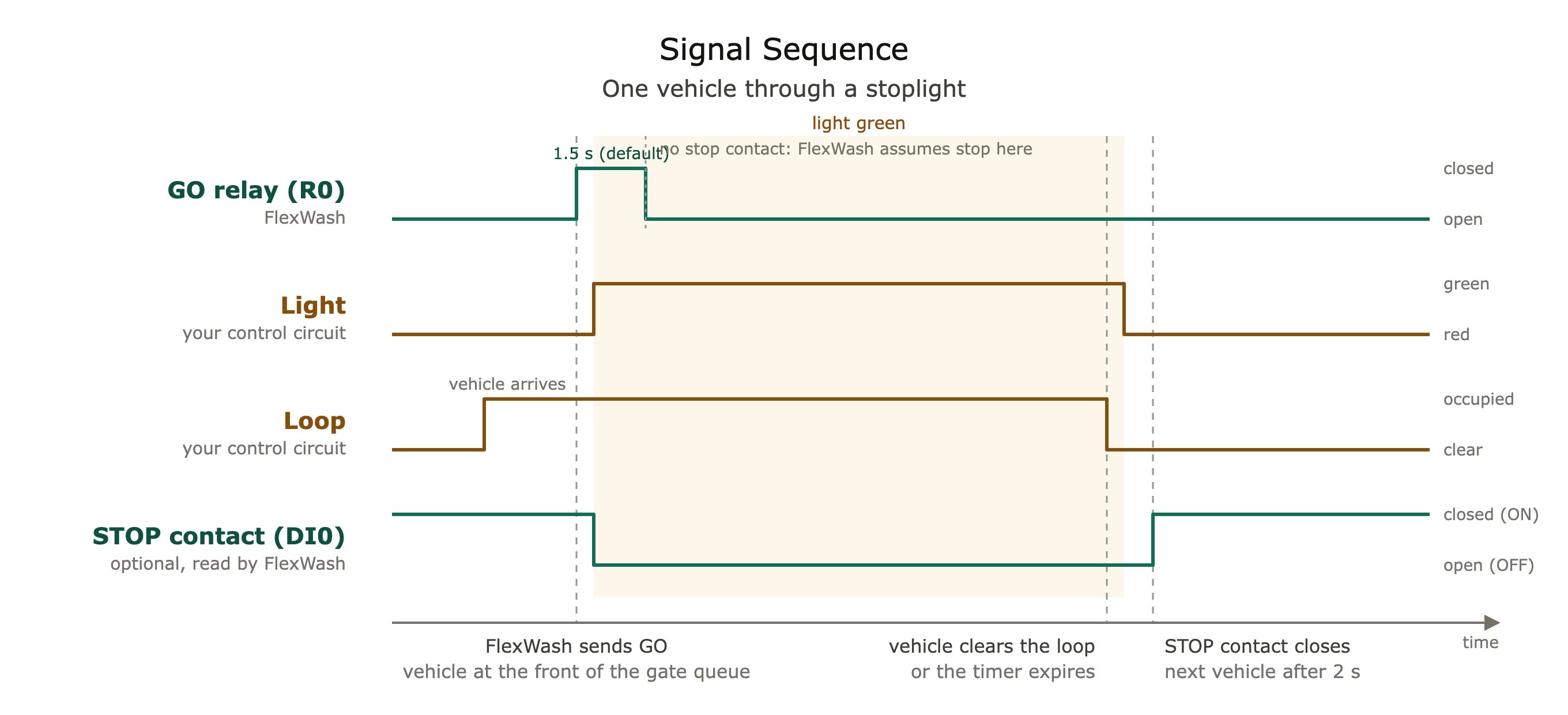 1. **At rest**, the light is red. The stop contact is closed, so the digital input reads ON.
2. **FlexWash closes the relay.** The control circuit turns the light green and opens the stop contact.
3. The vehicle drives through. **The control circuit returns the light to red** when the loop clears or the timer expires.
4. **The stop contact closes again.** FlexWash marks the light stopped and, after a 2 second settling period, releases the next vehicle.
### Recommended Design
A small programmable logic relay does the job of a gate controller. We recommend the [Siemens LOGO! 8](https://www.siemens.com/global/en/products/automation/systems/industrial/plc/logo.html). Schneider Zelio Logic and IDEC SmartRelay are equivalent alternatives. A loop detector tells it when the vehicle has left, and the fixture needs one line input per symbol.
1. **At rest**, the light is red. The stop contact is closed, so the digital input reads ON.
2. **FlexWash closes the relay.** The control circuit turns the light green and opens the stop contact.
3. The vehicle drives through. **The control circuit returns the light to red** when the loop clears or the timer expires.
4. **The stop contact closes again.** FlexWash marks the light stopped and, after a 2 second settling period, releases the next vehicle.
### Recommended Design
A small programmable logic relay does the job of a gate controller. We recommend the [Siemens LOGO! 8](https://www.siemens.com/global/en/products/automation/systems/industrial/plc/logo.html). Schneider Zelio Logic and IDEC SmartRelay are equivalent alternatives. A loop detector tells it when the vehicle has left, and the fixture needs one line input per symbol.
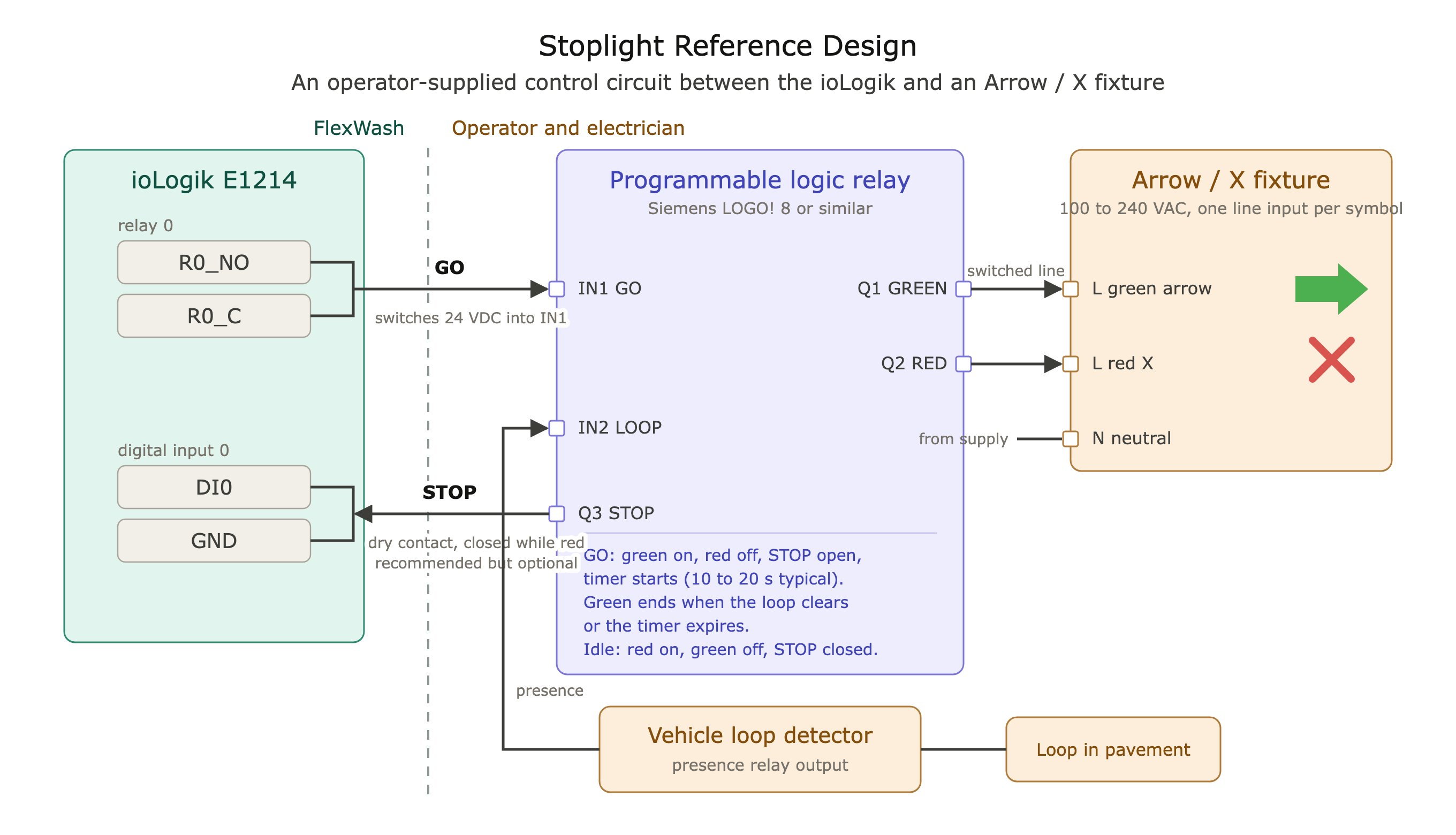 * **Siemens LOGO! 8** with relay outputs: the 12/24RCE on a 24 VDC supply, or the 230RCE powered from line voltage. It holds the go state, runs the timer, drives the fixture, and provides the stop contact.
* **Vehicle loop detector** with a relay output, and a loop where the waiting vehicle stops. Ends the green as soon as the vehicle leaves.
* **Arrow / X fixture** with one line input per symbol.
Program the logic relay to run this sequence:
1. **Idle.** Red on, green off, stop output closed.
2. **Go.** When the ioLogik relay closes the GO input: red off, green on, stop output open, timer started.
3. **Release.** Green ends when the vehicle leaves the loop or the timer expires (10 to 20 seconds is typical), whichever comes first. Then back to idle.
Wire `R0_NO` and `R0_C` to the logic relay's GO input. Wire a dedicated logic relay output, with no voltage on it, between `DI0` and `GND` as the stop contact.
FlexWash does not provide installation steps, power supply specifications, or vendor-specific wiring for stoplights, loop detectors, or logic relays. We support the ioLogik interface only.
## The ioLogik E1214
* **Siemens LOGO! 8** with relay outputs: the 12/24RCE on a 24 VDC supply, or the 230RCE powered from line voltage. It holds the go state, runs the timer, drives the fixture, and provides the stop contact.
* **Vehicle loop detector** with a relay output, and a loop where the waiting vehicle stops. Ends the green as soon as the vehicle leaves.
* **Arrow / X fixture** with one line input per symbol.
Program the logic relay to run this sequence:
1. **Idle.** Red on, green off, stop output closed.
2. **Go.** When the ioLogik relay closes the GO input: red off, green on, stop output open, timer started.
3. **Release.** Green ends when the vehicle leaves the loop or the timer expires (10 to 20 seconds is typical), whichever comes first. Then back to idle.
Wire `R0_NO` and `R0_C` to the logic relay's GO input. Wire a dedicated logic relay output, with no voltage on it, between `DI0` and `GND` as the stop contact.
FlexWash does not provide installation steps, power supply specifications, or vendor-specific wiring for stoplights, loop detectors, or logic relays. We support the ioLogik interface only.
## The ioLogik E1214
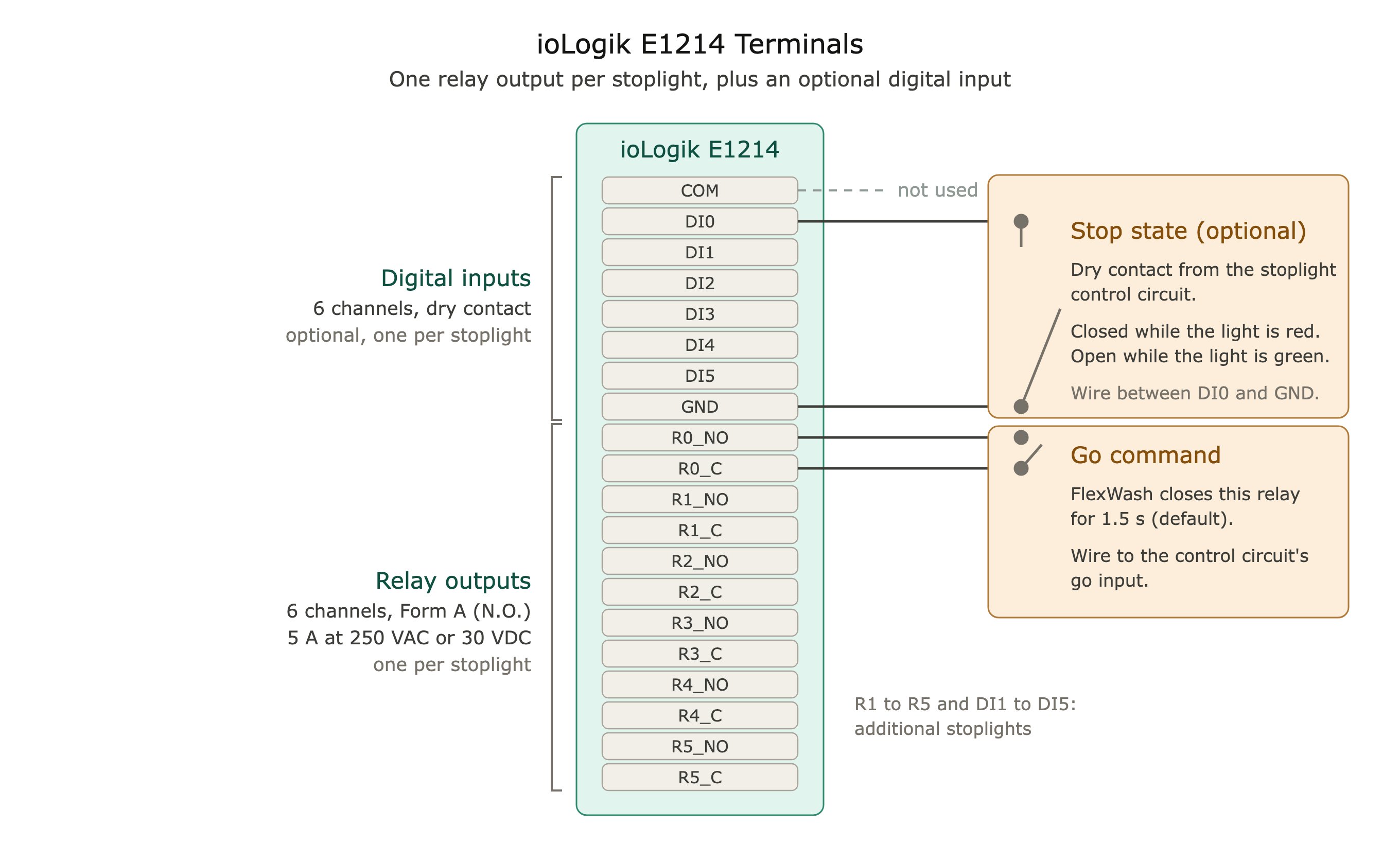 Mount the unit on a DIN rail inside a climate-controlled enclosure.
| Item | Specification |
| :- | :- |
| Digital inputs | 6 channels, dry contact. A channel reads ON when shorted to GND. |
| Relay outputs | 6 channels, Form A (normally open). Rated 5 A resistive at 250 VAC or 30 VDC. |
| I/O wiring | 16 to 22 AWG, screw terminals |
| Power | 12 to 36 VDC |
| Network | Two Ethernet ports, connected to the FlexWash network |
| Operating temperature | -10 to 60 °C (14 to 140 °F), non-condensing |
FlexWash configures the relay channels for pulse output and manages the network settings. Do not change the ioLogik configuration.
## Relay Output Wiring
Wire the changeover relay coil, or the control circuit's go input, to the NO and C terminals of the assigned relay. The first stoplight uses `R0_NO` and `R0_C`.
The relay is a dry contact. It carries whatever your control circuit puts on it, up to 5 A resistive at 250 VAC or 30 VDC. Use a 24 VDC control circuit where possible and keep line voltage off the ioLogik terminals.
Before you connect the wires to the ioLogik, short them together by hand. The light should turn green, then return to red when you let go, or on its own if you built the control circuit. If it does not, fix the wiring first.
## Digital Input Wiring
The stop input is optional. See [Optional](#optional). If your control circuit provides a stop contact, wire it between `DI0` and `GND`. Leave `COM` unconnected. If it does not, leave the input empty and tell FlexWash support, so we configure the light without it.
Mount the unit on a DIN rail inside a climate-controlled enclosure.
| Item | Specification |
| :- | :- |
| Digital inputs | 6 channels, dry contact. A channel reads ON when shorted to GND. |
| Relay outputs | 6 channels, Form A (normally open). Rated 5 A resistive at 250 VAC or 30 VDC. |
| I/O wiring | 16 to 22 AWG, screw terminals |
| Power | 12 to 36 VDC |
| Network | Two Ethernet ports, connected to the FlexWash network |
| Operating temperature | -10 to 60 °C (14 to 140 °F), non-condensing |
FlexWash configures the relay channels for pulse output and manages the network settings. Do not change the ioLogik configuration.
## Relay Output Wiring
Wire the changeover relay coil, or the control circuit's go input, to the NO and C terminals of the assigned relay. The first stoplight uses `R0_NO` and `R0_C`.
The relay is a dry contact. It carries whatever your control circuit puts on it, up to 5 A resistive at 250 VAC or 30 VDC. Use a 24 VDC control circuit where possible and keep line voltage off the ioLogik terminals.
Before you connect the wires to the ioLogik, short them together by hand. The light should turn green, then return to red when you let go, or on its own if you built the control circuit. If it does not, fix the wiring first.
## Digital Input Wiring
The stop input is optional. See [Optional](#optional). If your control circuit provides a stop contact, wire it between `DI0` and `GND`. Leave `COM` unconnected. If it does not, leave the input empty and tell FlexWash support, so we configure the light without it.
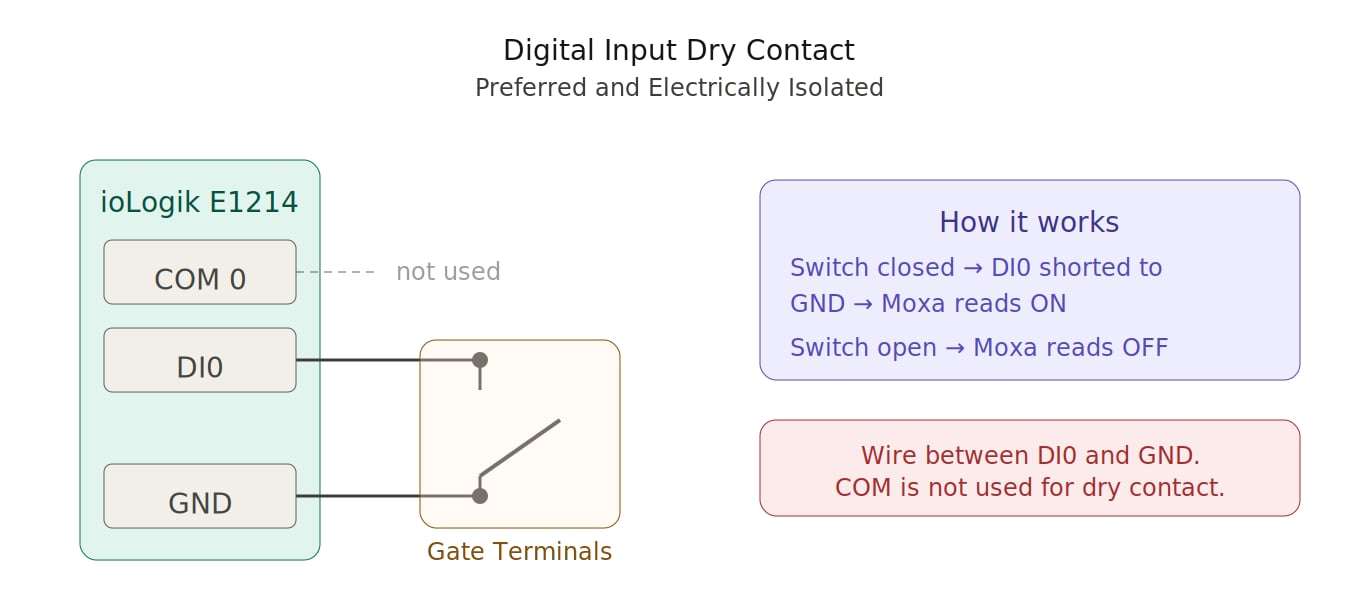 Before wiring, check the stop contact with a multimeter. There must be no voltage across it. There must be continuity while the light is red and none while it is green.
**Connections:**
* `DI0` to one side of the stop contact
* `GND` to the other side of the stop contact
* `COM` not used
**How it works:**
* Contact closed: DI0 is shorted to GND. The ioLogik reads ON. FlexWash shows the light stopped.
* Contact open: the ioLogik reads OFF. FlexWash shows the light as go.
Dry contact wiring is electrically isolated and needs no external power supply. The ioLogik also accepts powered (wet contact) inputs, but FlexWash does not support or recommend them.
## Multiple Channels
The E1214 has six relays (`R0` to `R5`) and six digital inputs (`DI0` to `DI5`). Each stoplight uses one relay and, if wired, one digital input. Wire additional stoplights to `R1` and `DI1`, `R2` and `DI2`, and so on. Tell FlexWash support which channels you wired so our configuration matches.
This documentation is built and hosted on [Mintlify](https://mintlify.com), a developer documentation platform.
Before wiring, check the stop contact with a multimeter. There must be no voltage across it. There must be continuity while the light is red and none while it is green.
**Connections:**
* `DI0` to one side of the stop contact
* `GND` to the other side of the stop contact
* `COM` not used
**How it works:**
* Contact closed: DI0 is shorted to GND. The ioLogik reads ON. FlexWash shows the light stopped.
* Contact open: the ioLogik reads OFF. FlexWash shows the light as go.
Dry contact wiring is electrically isolated and needs no external power supply. The ioLogik also accepts powered (wet contact) inputs, but FlexWash does not support or recommend them.
## Multiple Channels
The E1214 has six relays (`R0` to `R5`) and six digital inputs (`DI0` to `DI5`). Each stoplight uses one relay and, if wired, one digital input. Wire additional stoplights to `R1` and `DI1`, `R2` and `DI2`, and so on. Tell FlexWash support which channels you wired so our configuration matches.
This documentation is built and hosted on [Mintlify](https://mintlify.com), a developer documentation platform.