> ## Documentation Index
> Fetch the complete documentation index at: https://docs.flexwash.com/llms.txt
> Use this file to discover all available pages before exploring further.
# Upsell Analytics
> Prove which upsell offers actually earn their place: what was pitched, what converted, and what those conversions are worth.
The Upsell Analytics report answers three questions about your upsell offers:
what was pitched, what converted, and what those conversions are worth. It is the
companion to [Upsells](/configuration/pricing-and-promotions/upsells), where the
offers themselves are configured.
You can find Upsell Analytics in the sidebar menu under the Reports section.
Access is controlled by the **Upsell Analytics** report permission on the user's
[role](/configuration/users-and-admin/roles). Pair it with the
**Customers** permission, which would be required to drill-in and open
customer records from the report.
## Running the report
Select your location in the top navigation bar. The report runs immediately for today. To see any other period, pick a date range and click **Run**.
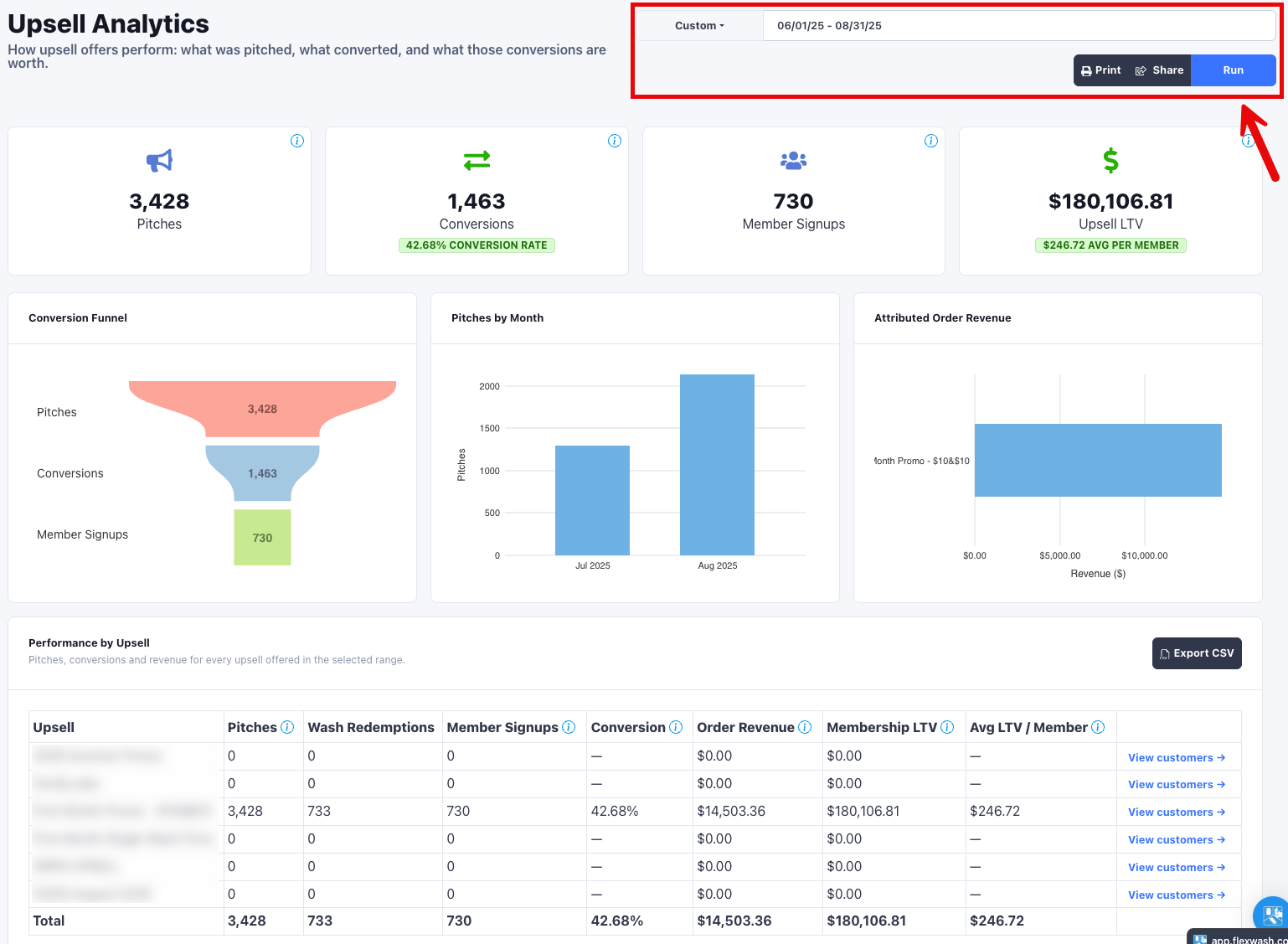 The date range picker opens on **Today**. Widen it (Last 90 Days, Year to Date,
or a custom range) before you draw conclusions, since a single day rarely holds
enough pitches to be meaningful.
The date range selects a **cohort**: the pitches, redeeming orders, and member
sign-ups that happened during the range. Revenue those sign-ups go on to earn is
not limited to the range, so it keeps accruing after the end date. Selecting several locations rolls them up into one set of numbers.
## Summary tiles
Four tiles summarize the cohort. Each carries an information icon with the
same definition documented here.
| Tile | What it counts |
| ------------------ | ------------------------------------------------------------------------------------------------------------------------------------------------------------------------------------------------------------------------------------------------------------------------------------------ |
| **Pitches** | Upsell opportunities an attendant recorded pitching at checkout, dated in each car wash's own timezone. Quiet upsells, meaning price changes recorded without a pitch, are not counted here. |
| **Conversions** | Wash orders that redeemed the upsell, plus memberships started on it. Member Signups are included in this count, so the two tiles overlap rather than sum. Because quiet upsells convert with no pitch, the conversion rate can exceed 100%, and it shows a dash when nothing was pitched. |
| **Member Signups** | Subscriptions whose first membership billing carried this upsell. These are the customers behind the **View customers** drill-in. |
| **Upsell LTV** | Membership billing on the subscription that signed up on the upsell, from signup, accruing to today. It stops at a reactivation, so billing after a member cancels and comes back is not credited to the upsell. |
### Quiet upsells and conversion rate
Conversion rate is conversions divided by pitches. Two results surprise people
the first time they see them, and both are correct:
* **A rate above 100%.** A price change recorded without a pitch, sometimes called
a quiet upsell, converts without ever being pitched. Those conversions land in
the numerator with nothing added to the denominator.
* **A dash instead of a rate.** When nothing was pitched, the rate is undefined
rather than zero.
Read pitches as "what attendants recorded", not "every time the offer was
applied". If an offer converts steadily with few or no pitches, that is a
configuration and coaching signal, not a data error.
### How LTV is calculated
**Upsell LTV** is the net sum of membership billing on the subscription that
signed up on the upsell, from the sign-up onward, accrued to today. Three
consequences are worth knowing:
* **It is not clamped to the date range.** The range picks which sign-ups are in the
cohort. Their revenue keeps accumulating past the end date, so the same range
run again next month reports a higher LTV.
* **It is net.** The upsell's own discount is a negative line item on the
subscription, so it reduces LTV.
* **It stops at a reactivation.** If the member later cancels and comes back,
billing from the reactivation onward is not credited to the upsell.
A member sign-up is identified by the upsell recorded on the subscription's first
membership billing, so sign-ups stay attributed even after the membership
cancels.
## Charts
Three charts sit below the tiles.
* **Conversion Funnel** stacks Pitches, Conversions, and Member Signups. It is a
funnel by shape only: quiet upsells can push conversions above pitches, so the
stages are not guaranteed to shrink as you go down.
* **Pitches by Month** plots pitches per calendar month.
* **Attributed Order Revenue** ranks the top eight upsells by attributed order
revenue, largest at the top. Upsells with no attributed revenue are left out,
so this chart can be shorter than the table below it.
## Performance by Upsell
The table breaks pitches, conversions, and revenue out for every upsell offered
in the selected range.
| Column | Definition |
| -------------------- | ------------------------------------------------------------------------------------------------------------------------------------------------------------ |
| **Upsell** | The offer's name. A **Deleted** badge marks an offer that has since been deleted from your configuration. |
| **Pitches** | Opportunities an attendant recorded pitching this upsell in the range. |
| **Wash Redemptions** | Distinct completed orders in the range where the upsell was applied to a wash. Membership billing is excluded here and counted under Member Signups instead. |
| **Member Signups** | Subscriptions whose first membership billing carried this upsell. |
| **Conversion** | Wash redemptions plus member sign-ups, divided by pitches. A dash when nothing was pitched. |
| **Order Revenue** | Revenue on the orders this upsell was attributed to, after the offer's own discount and before any refunds. |
| **Membership LTV** | Membership billing earned by this row's sign-ups, accrued to today. |
| **Avg LTV / Member** | Membership LTV divided by member sign-ups. A dash when there were no sign-ups. |
A bold total row closes the table. The total Conversion is recalculated from the
totals rather than averaged across rows.
**Order Revenue** and **Membership LTV** answer different questions and should
not be added together. Order Revenue is what rang up at the register on the
attributed orders. Membership LTV is recurring billing those sign-ups have
produced since, and it keeps growing after the range closes.
Orders still open or pending are excluded, so an unfinished cart never counts as
a conversion. Every upsell you currently have configured gets a row, even one
with no activity in the range. A deleted upsell appears only when it saw activity
during the range, because that activity still counts toward the summary tiles and
the table has to explain it.
Tables longer than fifteen rows paginate, and the total row reflects the whole
range rather than the page on screen.
## View customers
Each row has a **View customers** link. It opens the customer list filtered to
the distinct customers who signed up for a membership on that upsell, at the
selected car washes, inside the selected date range. The list shows name, email,
phone, and vehicle plates, sorted by most recent sign-up. Click any customer to
open their profile, or use the CSV button to export the whole cohort rather than
the page on screen.
The drill-in covers member sign-ups only. Customers who redeemed the upsell on a
single wash are counted in Wash Redemptions but are not part of this list.
## Exporting
**Export CSV** in the table header downloads one row per table row, with the same
columns plus a **Deleted** flag. The file covers every upsell in the table, not
just the current page, and is named for the range you ran, for example
`upsell-analytics-2026-06-01-to-2026-08-31.csv`.
Run this report and
[Downsells Analytics](/reports/downsells-analytics) over the same range to see
both halves of your offer program: what upsells add on the way in, and what
downsells save on the way out.
The date range picker opens on **Today**. Widen it (Last 90 Days, Year to Date,
or a custom range) before you draw conclusions, since a single day rarely holds
enough pitches to be meaningful.
The date range selects a **cohort**: the pitches, redeeming orders, and member
sign-ups that happened during the range. Revenue those sign-ups go on to earn is
not limited to the range, so it keeps accruing after the end date. Selecting several locations rolls them up into one set of numbers.
## Summary tiles
Four tiles summarize the cohort. Each carries an information icon with the
same definition documented here.
| Tile | What it counts |
| ------------------ | ------------------------------------------------------------------------------------------------------------------------------------------------------------------------------------------------------------------------------------------------------------------------------------------ |
| **Pitches** | Upsell opportunities an attendant recorded pitching at checkout, dated in each car wash's own timezone. Quiet upsells, meaning price changes recorded without a pitch, are not counted here. |
| **Conversions** | Wash orders that redeemed the upsell, plus memberships started on it. Member Signups are included in this count, so the two tiles overlap rather than sum. Because quiet upsells convert with no pitch, the conversion rate can exceed 100%, and it shows a dash when nothing was pitched. |
| **Member Signups** | Subscriptions whose first membership billing carried this upsell. These are the customers behind the **View customers** drill-in. |
| **Upsell LTV** | Membership billing on the subscription that signed up on the upsell, from signup, accruing to today. It stops at a reactivation, so billing after a member cancels and comes back is not credited to the upsell. |
### Quiet upsells and conversion rate
Conversion rate is conversions divided by pitches. Two results surprise people
the first time they see them, and both are correct:
* **A rate above 100%.** A price change recorded without a pitch, sometimes called
a quiet upsell, converts without ever being pitched. Those conversions land in
the numerator with nothing added to the denominator.
* **A dash instead of a rate.** When nothing was pitched, the rate is undefined
rather than zero.
Read pitches as "what attendants recorded", not "every time the offer was
applied". If an offer converts steadily with few or no pitches, that is a
configuration and coaching signal, not a data error.
### How LTV is calculated
**Upsell LTV** is the net sum of membership billing on the subscription that
signed up on the upsell, from the sign-up onward, accrued to today. Three
consequences are worth knowing:
* **It is not clamped to the date range.** The range picks which sign-ups are in the
cohort. Their revenue keeps accumulating past the end date, so the same range
run again next month reports a higher LTV.
* **It is net.** The upsell's own discount is a negative line item on the
subscription, so it reduces LTV.
* **It stops at a reactivation.** If the member later cancels and comes back,
billing from the reactivation onward is not credited to the upsell.
A member sign-up is identified by the upsell recorded on the subscription's first
membership billing, so sign-ups stay attributed even after the membership
cancels.
## Charts
Three charts sit below the tiles.
* **Conversion Funnel** stacks Pitches, Conversions, and Member Signups. It is a
funnel by shape only: quiet upsells can push conversions above pitches, so the
stages are not guaranteed to shrink as you go down.
* **Pitches by Month** plots pitches per calendar month.
* **Attributed Order Revenue** ranks the top eight upsells by attributed order
revenue, largest at the top. Upsells with no attributed revenue are left out,
so this chart can be shorter than the table below it.
## Performance by Upsell
The table breaks pitches, conversions, and revenue out for every upsell offered
in the selected range.
| Column | Definition |
| -------------------- | ------------------------------------------------------------------------------------------------------------------------------------------------------------ |
| **Upsell** | The offer's name. A **Deleted** badge marks an offer that has since been deleted from your configuration. |
| **Pitches** | Opportunities an attendant recorded pitching this upsell in the range. |
| **Wash Redemptions** | Distinct completed orders in the range where the upsell was applied to a wash. Membership billing is excluded here and counted under Member Signups instead. |
| **Member Signups** | Subscriptions whose first membership billing carried this upsell. |
| **Conversion** | Wash redemptions plus member sign-ups, divided by pitches. A dash when nothing was pitched. |
| **Order Revenue** | Revenue on the orders this upsell was attributed to, after the offer's own discount and before any refunds. |
| **Membership LTV** | Membership billing earned by this row's sign-ups, accrued to today. |
| **Avg LTV / Member** | Membership LTV divided by member sign-ups. A dash when there were no sign-ups. |
A bold total row closes the table. The total Conversion is recalculated from the
totals rather than averaged across rows.
**Order Revenue** and **Membership LTV** answer different questions and should
not be added together. Order Revenue is what rang up at the register on the
attributed orders. Membership LTV is recurring billing those sign-ups have
produced since, and it keeps growing after the range closes.
Orders still open or pending are excluded, so an unfinished cart never counts as
a conversion. Every upsell you currently have configured gets a row, even one
with no activity in the range. A deleted upsell appears only when it saw activity
during the range, because that activity still counts toward the summary tiles and
the table has to explain it.
Tables longer than fifteen rows paginate, and the total row reflects the whole
range rather than the page on screen.
## View customers
Each row has a **View customers** link. It opens the customer list filtered to
the distinct customers who signed up for a membership on that upsell, at the
selected car washes, inside the selected date range. The list shows name, email,
phone, and vehicle plates, sorted by most recent sign-up. Click any customer to
open their profile, or use the CSV button to export the whole cohort rather than
the page on screen.
The drill-in covers member sign-ups only. Customers who redeemed the upsell on a
single wash are counted in Wash Redemptions but are not part of this list.
## Exporting
**Export CSV** in the table header downloads one row per table row, with the same
columns plus a **Deleted** flag. The file covers every upsell in the table, not
just the current page, and is named for the range you ran, for example
`upsell-analytics-2026-06-01-to-2026-08-31.csv`.
Run this report and
[Downsells Analytics](/reports/downsells-analytics) over the same range to see
both halves of your offer program: what upsells add on the way in, and what
downsells save on the way out.