> ## Documentation Index
> Fetch the complete documentation index at: https://docs.flexwash.com/llms.txt
> Use this file to discover all available pages before exploring further.
# Auto-Queue
> Send members through the wash hands-free.
Auto-Queue is FlexWash's hands-free dispatch mode for unattended lanes. When a
member's vehicle pulls up and is recognized by LPR or RFID, the gate opens and
the wash is queued and sent to the controller automatically. No tablet press,
no loader on the lane.
The result is faster throughput at peak hours, lower labor cost on quiet
shifts, and a frictionless experience for your members. They drive up, get
washed, and drive away.
Auto-Queue runs on the same wash queue your loader already knows, with the
tablet UI automatically switching to a layout designed for self-running lanes.
Auto-Queue requires a supported wash controller. See [Controller
Integrations](/technical/controllers/controller-integrations) for the current list of
controllers that support it.
## When Auto-Queue applies
A vehicle is auto-queued when **all four** of the following are true at the
moment of detection:
The vehicle's plate or RFID tag resolves to a customer with an active
membership that includes a wash package.
LPR or RFID picks up the vehicle at a configured entry gate.
The membership's package maps to a wash on your menu. See [Membership
Packages](/configuration/wash-menu/membership-package).
The lane is set to **Unattended** in [Lane
Config](set-up/unattended-lane-mode.mdx).
If any one of these is missing, the vehicle does not auto-queue. The most
common reasons a member's car does not dispatch automatically:
* The lane is set to **Attended**. Auto-Queue is intentionally off when an
attendant is on the lane.
* The membership lapsed, was paused, or has no wash package attached.
* The LPR or RFID read missed the vehicle. The next vehicle in line will
trigger normally.
Non-members are never auto-queued. They go through your normal pay tablet or
attended flow.
## What the operator sees
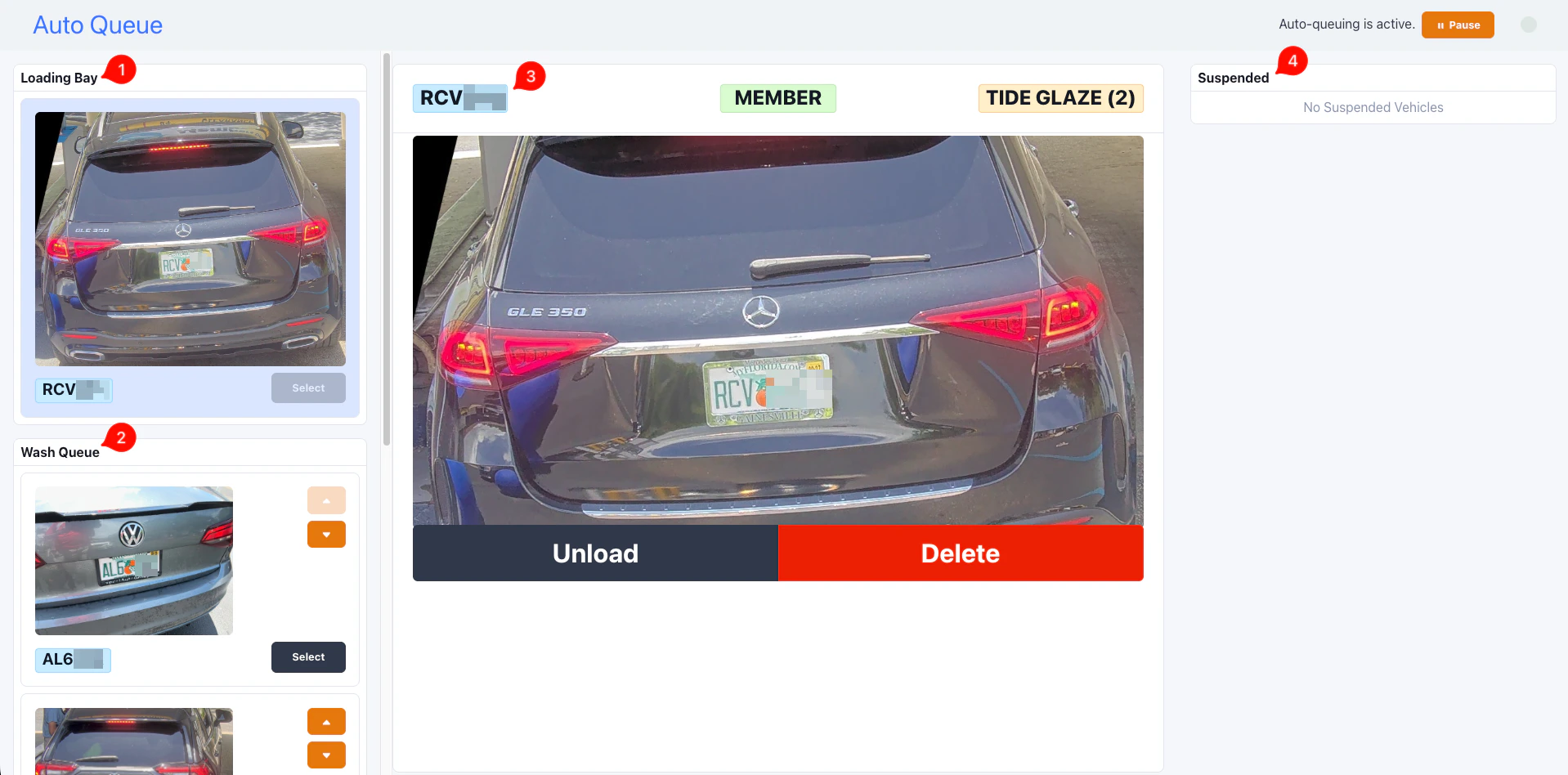 When Auto-Queue is enabled for a site, the [wash queue
tablet](/operations/transactions/wash-queue) switches to the Auto-Queue layout. Three
panes:
1. **Loading Bay** (top left) shows the vehicle currently being washed. In
Auto-Queue mode the loading bay is a single slot. Each new dispatch
replaces the previous occupant.
2. **Current Queue** (bottom left) shows vehicles waiting to be sent, oldest
first. Re-order with the up and down arrows on each row.
3. **Selected Car** (center) shows the vehicle picked from either pane: plate,
photo, package, member badge, and a set of action buttons that changes
based on where the vehicle currently sits.
4. **Suspended Queue** (right) shows vehicles the operator has held back.
### Action buttons
The buttons under the selected vehicle change with the vehicle's queue state:
| Vehicle in | Buttons |
| --------------- | --------------------- |
| Wash queue | Load, Suspend, Delete |
| Loading bay | Unload, Delete |
| Suspended queue | Unsuspend, Delete |
* **Load** dispatches the wash immediately, ahead of the Auto-Queue's own
pick. Useful when the operator wants to override order.
* **Unload** pulls the loading-bay vehicle back to the front of the queue and
pauses Auto-Queue. See below.
* **Suspend** moves the vehicle to the suspended pane without sending it.
Useful for problem vehicles you want to deal with later.
* **Delete** removes the vehicle from the queue entirely.
## Pause and resume
The header on the Auto-Queue tablet shows whether the queue is active or
paused, and a Pause / Resume button to flip it.
When Auto-Queue is enabled for a site, the [wash queue
tablet](/operations/transactions/wash-queue) switches to the Auto-Queue layout. Three
panes:
1. **Loading Bay** (top left) shows the vehicle currently being washed. In
Auto-Queue mode the loading bay is a single slot. Each new dispatch
replaces the previous occupant.
2. **Current Queue** (bottom left) shows vehicles waiting to be sent, oldest
first. Re-order with the up and down arrows on each row.
3. **Selected Car** (center) shows the vehicle picked from either pane: plate,
photo, package, member badge, and a set of action buttons that changes
based on where the vehicle currently sits.
4. **Suspended Queue** (right) shows vehicles the operator has held back.
### Action buttons
The buttons under the selected vehicle change with the vehicle's queue state:
| Vehicle in | Buttons |
| --------------- | --------------------- |
| Wash queue | Load, Suspend, Delete |
| Loading bay | Unload, Delete |
| Suspended queue | Unsuspend, Delete |
* **Load** dispatches the wash immediately, ahead of the Auto-Queue's own
pick. Useful when the operator wants to override order.
* **Unload** pulls the loading-bay vehicle back to the front of the queue and
pauses Auto-Queue. See below.
* **Suspend** moves the vehicle to the suspended pane without sending it.
Useful for problem vehicles you want to deal with later.
* **Delete** removes the vehicle from the queue entirely.
## Pause and resume
The header on the Auto-Queue tablet shows whether the queue is active or
paused, and a Pause / Resume button to flip it.
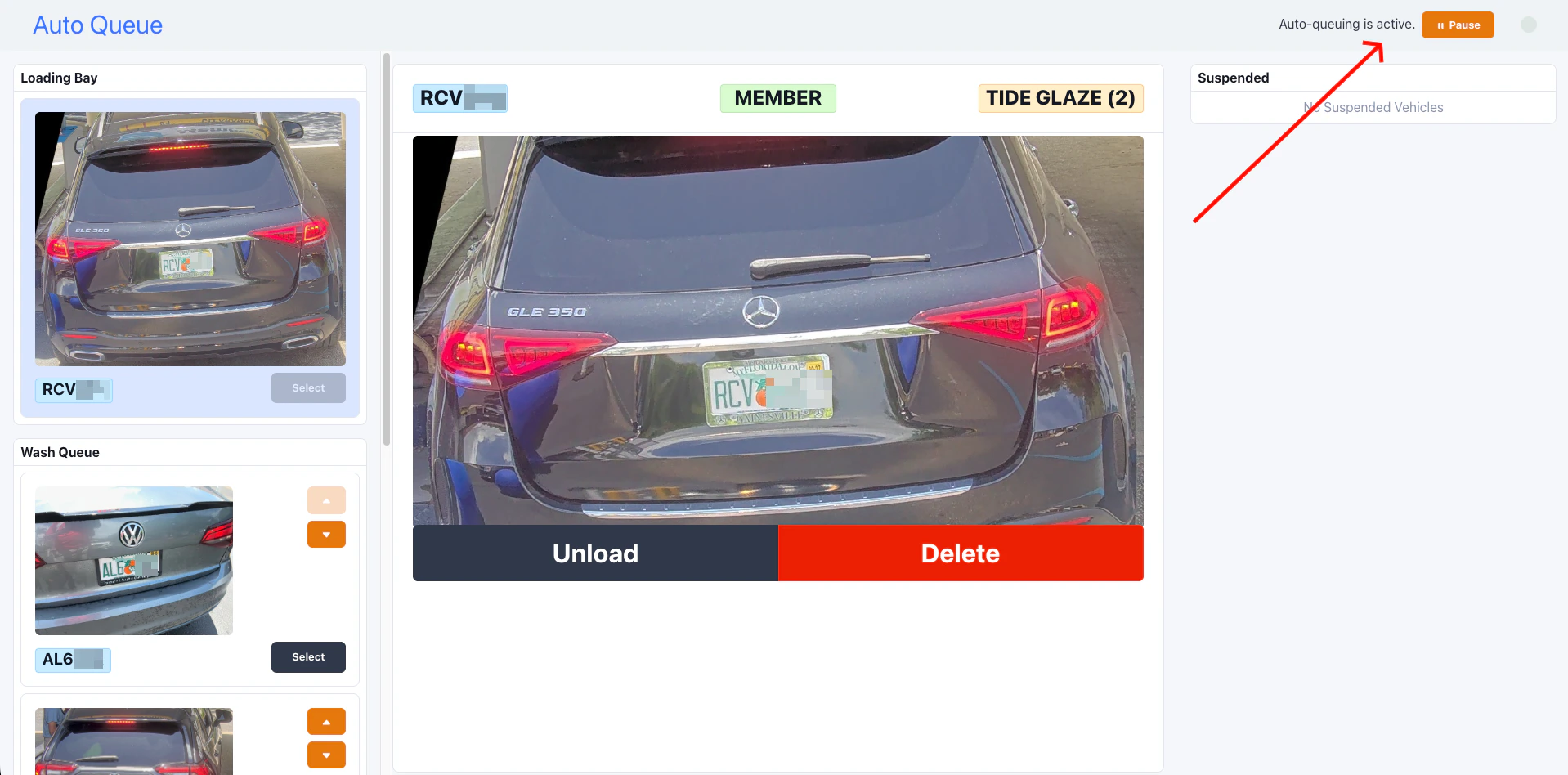 Header reads **"Auto-queuing is active."** New members are detected,
queued, and dispatched without operator action.
Header reads **"Auto-queuing is paused"** with a flashing warning. New
members still queue up, but no wash is sent until the operator taps
Resume.
### Auto-pause and auto-resume
Auto-Queue manages pause state on its own in two cases:
* **Auto-pause on Unload.** When the operator pulls the loading-bay vehicle
back, the queue pauses. The assumption is that something needs attention
(the car was not ready, the customer changed their mind) and the operator
wants control before the next car is sent.
* **Auto-resume on a manual send.** When the operator taps **Load** on a
vehicle, or uses [Skip Queue](/marketing-and-ai/flex-assist/skip-queue), the queue
resumes automatically. There is no need to manually un-pause after
intervening.
Pause state lives on the on-site coordinator and is not persisted. If the
on-prem server restarts (for example, after a power blip), Auto-Queue
starts in the active state.
## Configuration
### Enabling Auto-Queue per site
Auto-Queue is enabled site by site. Contact FlexWash support to turn it on or
off for a given car wash. Once enabled, the wash queue tablet automatically
switches to the Auto-Queue layout. Operators do not need to change anything
on their end.
Toggling Auto-Queue on or off requires a brief restart of the on-site
coordinator. We schedule this with you to avoid impacting active washes.
### Controller support
Auto-Queue depends on the wash controller exposing a "ready for next wash"
signal. The current support matrix is on the [Controller
Integrations](/technical/controllers/controller-integrations) page in the **Auto Queue
support** column.
If a controller is replaced or reconfigured, restart the on-site coordinator
so Auto-Queue can re-detect controller capability. Auto-Queue checks once at
startup.
### Unattended lane mode
Each lane has an Attended / Unattended toggle in **Setup**, **Car Washes**,
**Edit**. Auto-Queue only applies to lanes set to **Unattended**. See [Lane
Config](set-up/unattended-lane-mode.mdx) for the toggle.
Switching a lane between Attended and Unattended takes effect immediately and
does not require a restart.
## Limitations to know about
A few specifics that operators and support reps should be aware of:
* **Members only.** Auto-Queue does not handle non-member traffic. Pay tablet
or attended flow still applies for those customers.
* **No retracts.** Auto-Queue dispatches the member's wash package as-is.
Retract codes (for example, to skip an arch for a tall vehicle) require a
manual Load from the operator.
* **One coordinator per site.** Auto-Queue runs as a single process on the
on-site coordinator. There is exactly one queue per car wash.
* **Restart to change site flag.** Flipping the per-site Auto-Queue flag
requires a coordinator restart. Lane-level Attended / Unattended changes
do not.
## Troubleshooting
### A member drove up but no wash dispatched
Check the four conditions in order:
1. **Was the plate or tag read?** Open the wash queue tablet. If the vehicle
is not there, LPR or RFID missed the read.
2. **Did the gate open?** If the gate opened but the wash did not queue,
Auto-Queue may be disabled for the site, or the controller may not
support it.
3. **Is the lane Unattended?** A lane in Attended mode never auto-queues.
4. **Does the membership include a wash package?** Lapsed, frozen, or
non-wash memberships do not auto-queue.
### Auto-Queue stopped sending washes after a controller swap
Restart the on-site coordinator. Auto-Queue checks controller capability once
at startup and will not pick up a new controller live.
### The queue is paused and no one knows why
The most common cause is an Unload from the loading bay, which auto-pauses.
Tap **Resume** in the header, or send a wash manually with **Load** to
auto-resume.
Header reads **"Auto-queuing is active."** New members are detected,
queued, and dispatched without operator action.
Header reads **"Auto-queuing is paused"** with a flashing warning. New
members still queue up, but no wash is sent until the operator taps
Resume.
### Auto-pause and auto-resume
Auto-Queue manages pause state on its own in two cases:
* **Auto-pause on Unload.** When the operator pulls the loading-bay vehicle
back, the queue pauses. The assumption is that something needs attention
(the car was not ready, the customer changed their mind) and the operator
wants control before the next car is sent.
* **Auto-resume on a manual send.** When the operator taps **Load** on a
vehicle, or uses [Skip Queue](/marketing-and-ai/flex-assist/skip-queue), the queue
resumes automatically. There is no need to manually un-pause after
intervening.
Pause state lives on the on-site coordinator and is not persisted. If the
on-prem server restarts (for example, after a power blip), Auto-Queue
starts in the active state.
## Configuration
### Enabling Auto-Queue per site
Auto-Queue is enabled site by site. Contact FlexWash support to turn it on or
off for a given car wash. Once enabled, the wash queue tablet automatically
switches to the Auto-Queue layout. Operators do not need to change anything
on their end.
Toggling Auto-Queue on or off requires a brief restart of the on-site
coordinator. We schedule this with you to avoid impacting active washes.
### Controller support
Auto-Queue depends on the wash controller exposing a "ready for next wash"
signal. The current support matrix is on the [Controller
Integrations](/technical/controllers/controller-integrations) page in the **Auto Queue
support** column.
If a controller is replaced or reconfigured, restart the on-site coordinator
so Auto-Queue can re-detect controller capability. Auto-Queue checks once at
startup.
### Unattended lane mode
Each lane has an Attended / Unattended toggle in **Setup**, **Car Washes**,
**Edit**. Auto-Queue only applies to lanes set to **Unattended**. See [Lane
Config](set-up/unattended-lane-mode.mdx) for the toggle.
Switching a lane between Attended and Unattended takes effect immediately and
does not require a restart.
## Limitations to know about
A few specifics that operators and support reps should be aware of:
* **Members only.** Auto-Queue does not handle non-member traffic. Pay tablet
or attended flow still applies for those customers.
* **No retracts.** Auto-Queue dispatches the member's wash package as-is.
Retract codes (for example, to skip an arch for a tall vehicle) require a
manual Load from the operator.
* **One coordinator per site.** Auto-Queue runs as a single process on the
on-site coordinator. There is exactly one queue per car wash.
* **Restart to change site flag.** Flipping the per-site Auto-Queue flag
requires a coordinator restart. Lane-level Attended / Unattended changes
do not.
## Troubleshooting
### A member drove up but no wash dispatched
Check the four conditions in order:
1. **Was the plate or tag read?** Open the wash queue tablet. If the vehicle
is not there, LPR or RFID missed the read.
2. **Did the gate open?** If the gate opened but the wash did not queue,
Auto-Queue may be disabled for the site, or the controller may not
support it.
3. **Is the lane Unattended?** A lane in Attended mode never auto-queues.
4. **Does the membership include a wash package?** Lapsed, frozen, or
non-wash memberships do not auto-queue.
### Auto-Queue stopped sending washes after a controller swap
Restart the on-site coordinator. Auto-Queue checks controller capability once
at startup and will not pick up a new controller live.
### The queue is paused and no one knows why
The most common cause is an Unload from the loading bay, which auto-pauses.
Tap **Resume** in the header, or send a wash manually with **Load** to
auto-resume.