# Discounted Unlimiteds
Source: https://docs.flexwash.com/configuration/fleets/discounted-unlimiteds
Offer fleet accounts member-style unlimited washing at a contract rate, without putting the deal on your retail menu.
Discounted unlimiteds let a fleet account wash as often as it likes at a price you negotiate, billed like any other unlimited member. The package never appears on your public menu, so the rate stays private and only authorized staff can assign it.
## Set up the package
Create a [Membership package](/configuration/wash-menu/membership-package) and leave it **disabled** on the wash menu. Name and price it for that fleet. Disabled packages do not appear on pay tablets; only staff with the right roles can assign them from the admin website.
> [!TIP]
>
> Use a clear, account-specific name (for example "Acme Rentals Unlimited") so
> staff and reporting can tell fleet packages apart at a glance.
## Assign it to the account
Create a customer profile, then attach the package to the vehicles that should wash under it.
## Billing
Save a card on file with a fixed bill date when the account should pay like an unlimited member at the agreed rate per vehicle. From there it bills automatically on schedule, just like a retail membership.
# Fleet Invoices
Source: https://docs.flexwash.com/configuration/fleets/fleet-invoices
Bill fleet accounts from the washes you already track. Create, adjust, and download numbered invoices, then collect by card on file or mark them paid.
Fleet invoices turn an account's tendered washes into a numbered invoice you can adjust, download as a PDF, and track until it is paid. Every invoice is created from the [Fleet Activity report](/reports/fleet-activity), so it starts from exactly the washes you reconciled.
Invoice numbers are sequential for your organization, starting at 100. Numbers are never reused, so a deleted invoice leaves a gap.
## Permissions
Users with the **Fleet Activity** permission can view, create, edit, delete, and mark invoices paid. Charging a card also requires the **Charge Now Ability** permission. For how to edit permissions, see [Roles](/configuration/users-and-admin/roles).
## Create an invoice
1. Open the [Fleet Activity report](/reports/fleet-activity), choose the locations and date range, and click **Run**.
2. Click **Create invoice** on the account's row.

FlexWash pre-fills the invoice with the account's fleet washes for the selected locations, date range, and [rewash window](/reports/fleet-activity#rewash-filtering), then opens it. Washes that are already on another invoice are skipped, and the confirmation message says how many.
If the account already has an invoice whose period overlaps your date range, the row shows **Open invoice #N** instead. To invoice the remaining days, narrow the date range to them.
## The invoice list
**Fleet Invoices** in the Reports section lists every invoice with its number, customer, period, number of lines, total, status, how it was paid, and when it was created. The list opens on **Unpaid** invoices, the ones still to collect. Use the status filter to see **Paid** or **All**.

## Adjust an invoice
Open an invoice to review and change it.

* **See what each wash covers.** Each wash line lists its services, the package and any add-on services, so the account can see what the amount covers.
* **Remove a wash.** Each wash is billed at its amount when the invoice was created. Remove a wash that should not be billed, such as one the customer already paid for by card. A removed wash is free to appear on another invoice.
* **Add an adjustment.** Add a surcharge or a credit with a description and an amount. Use a negative amount for a credit.
* **Edit the note.** The note prints on the PDF. Use it for payment terms, a PO number, or remittance details. You can edit it at any time, even after the invoice is paid.
> [!NOTE]
>
> A wash refunded after it was invoiced keeps its invoiced amount, and the
> invoice marks the row so you can remove it.
Line items lock once an invoice is paid, so the total can no longer change after money has been collected. To change a paid invoice, reopen it first. Click **Mark as unpaid** if it was paid outside FlexWash, or fully refund the payment order if it was charged to a card (see [Refunds](#refunds)).
## Delete an invoice
You can delete an unpaid invoice. Its washes become available to invoice again.
You cannot delete an invoice that is paid or that has had a card charge attempt, even a declined one. FlexWash keeps it as the payment record. To free its washes for another invoice, remove them from the invoice instead.
## Download the PDF
Click **Download PDF** to get a printable invoice with your logo, the invoice number, issue and period dates, the Bill To details, the washes with their services, adjustments, total, the **Paid** or **Unpaid** status, and the note.

The logo comes from your organization's logo, which FlexWash support sets. Contact support to add or change it.
## Collect payment
### Mark as paid
If the account paid outside FlexWash, by check or bank transfer for example, click **Mark as paid** and confirm. The invoice shows **Paid via** **External** and its line items lock. If you marked it by mistake, click **Mark as unpaid** to reopen it. **Mark as unpaid** is only available on invoices paid outside FlexWash.

### Charge card on file
If the customer has a card on file, click the charge button, labeled with the card's last four digits (for example **Charge •••• 4242**), and confirm to charge the invoice total.
The charge button only shows for users with the **Charge Now Ability** permission. It is disabled, with the reason shown, when:
* The customer has no card on file.
* The card on file is not stored with Adyen.
* The invoice is paid or its total is \$0.
* An earlier charge attempt is still settling.
When the charge succeeds, the invoice is marked paid automatically, its line items lock, and the payment appears as a **Fleet Invoice Payment** order that you can open from the invoice. The payment is recorded at the invoice's **Billing car wash**.
When the card is declined, the invoice stays unpaid. The attempt is listed under **Payment attempts** on the invoice with the failure reason, and you can try again once the card is updated or mark the invoice paid by hand.
## Refunds
Refund the **Fleet Invoice Payment** order from the order's page like any other order. A full refund, or a void, reopens the invoice as unpaid, and the refunded attempt stays listed under **Payment attempts**.
Partial refunds are not allowed on fleet invoice payments. Refund the full amount, then adjust the invoice and collect again.
## Accounting
A fleet wash counts as a sale on the day it happens, under the **Fleet** payment channel. Collecting an invoice later is money moving, not a second sale, so:
* The [Deposits report](/reports/deposits) shows card payments of invoices in a separate **Fleet Invoice Payments** column, at the invoice's billing car wash. They are not counted in Card or in Net Sales.
* Dashboard, Revenue Analytics, and the sales summary show the same numbers with or without an invoice payment.
Invoice payment orders still appear on the Orders page and in the customer's order history.
> [!NOTE]
>
> For accountants: the accounting journal records a **DAILY SALES ENTRY - FLEET
> ACCT PAYMENTS** credit that clears the receivable the Fleet tender created.
# Overview
Source: https://docs.flexwash.com/configuration/fleets/overview
Win commercial and fleet volume with contract-friendly pricing. FlexWash supports discounted unlimited memberships, fleet tender billing, and pre-sold wash bundles, with a dedicated report to reconcile it all.
Fleet and commercial accounts rarely fit a single retail menu. FlexWash gives you several ways to match how you price, bill, and reconcile those deals on site and in reporting.
## Supported options
Operators use different strategies to win fleet business. In FlexWash you can use:
* **[Discounted unlimited memberships](/configuration/fleets/discounted-unlimiteds)** that stay off your standard pay-tablet menu
* **[Tender to fleet](/configuration/fleets/tender-to-fleet)** so vehicles wash now and you [invoice later](/configuration/fleets/fleet-invoices)
* **[Pre-sold wash bundles](/configuration/fleets/pre-sold-wash-bundles)** purchased in advance, then redeemed over time
## Choosing an approach
| Approach | Best for | How they pay |
| - | - | - |
| Discounted unlimiteds | Accounts that behave like members at an agreed per-vehicle rate | Card on file **OR** you invoice out of FlexWash |
| Tender to fleet | Wash now, invoice later, including open or changing plate lists | Fleet invoice in FlexWash, paid by card on file or marked paid |
| Pre-sold wash bundles | Volume sold up front and redeemed over time | Paid in advance |
> [!NOTE]
>
> These options are not mutually exclusive. Many operators run discounted
> unlimiteds for their steady accounts and use tender to fleet for rentals and
> one-off commercial vehicles, then reconcile everything in the Fleet Activity
> report.
# Pre-Sold Wash Bundles
Source: https://docs.flexwash.com/configuration/fleets/pre-sold-wash-bundles
Collect fleet revenue up front by selling washes in bulk, then let the account redeem them over time.
Pre-sold wash bundles flip the billing model: the account pays for a block of washes in advance, then draws them down visit by visit. You get the cash up front and a simple way to ring them up on site.
## Sell the bundle
Sell wash bundles ahead of time, inside FlexWash or elsewhere, then give the account passes or cards to redeem at the lane.
## Redeem at the lane
Each visit is rung up under a package, typically priced at **\$0**, since the account already paid for the bundle up front. Use [Roles](/configuration/users-and-admin/roles) so only trusted staff can apply the deal, keeping the bundle from being redeemed incorrectly.
## Keep these off your retail metrics
Build the redemption package with the package type **Fleet** (see [Single Wash Package](/configuration/wash-menu/single-wash-package) for package setup). Fleet packages are tracked separately from your retail sales, so they **do not count toward ticket average or conversion rate**. This helps keep them from dragging down your staff and site numbers, which would otherwise look like a wave of low-value or non-converting tickets.
> [!NOTE]
>
> Pre-sold bundle redemptions are simply \$0 (or low-value) package sales. They are
> **not** fleet-tendered washes, so they do **not** appear in the [Fleet Activity
> report](/reports/fleet-activity). FlexWash does not automatically
> keep track of over usage.
# Tender to Fleet
Source: https://docs.flexwash.com/configuration/fleets/tender-to-fleet
Let fleet vehicles wash now and invoice later, even where the license plates are not fixed like a rental fleet.
Tender to fleet defers billing: the vehicle washes today, the order is recorded against the fleet account at full value, and you invoice the account on your own cycle, right from FlexWash. It works for a fixed roster of plates or with a **fleet code** for an open list of plates that changes constantly, such as a rental company's vehicles.
## Set up the account
On the customer profile, check **Fleet Account**.
When Fleet Account is enabled, a **Fleet Code** field appears. Enter a short, memorable code (or print it as a barcode) that staff will use to ring vehicles up against this account at the lane. A fleet code is **not required** and should only be used if the account will be ringing up a non fixed list of vehicles.

For a fixed roster of vehicles also add the account's license plates or RFID tags.
## Tender at the lane
There are two ways a wash gets tendered to a fleet account:
1. **Known vehicle on site.** When a vehicle on the account comes through and is looked up by LPR/RFID, the pay tablet presents a **Fleet** tender. Billing is deferred, and you invoice the account from FlexWash later.

2. **Open plate list (the Fleet button).** Tap **Fleet** on the checkout menu to enter or scan a fleet code. FlexWash looks up the account, confirms the match, and tenders the order to that fleet account.

The Fleet button is what makes open rosters work: a rental agency can run any plate through under one fleet code without you maintaining a vehicle list.
> [!NOTE]
>
> When you ring up a plate this way, FlexWash saves the license plate
> details **on the order**, but it does **not** create a vehicle on the fleet
> account. The wash is attributed to the account for billing, while the plate is
> captured for that order's record only. This is by design for open, changing
> fleets.
## Invoice and reconcile
Fleet-tendered washes count as revenue on the day they happen. Later, you invoice the account and track collection in FlexWash:
1. Run the [Fleet Activity report](/reports/fleet-activity) for the billing period and click **Create invoice** on the account.
2. Adjust the invoice if needed, then download the PDF or charge the card on file.
3. If the account pays outside FlexWash, mark the invoice paid when the money arrives. A card charge marks it paid automatically.
See [Fleet invoices](/configuration/fleets/fleet-invoices) for the full flow.
The deposits report attributes these washes to the **Fleet** payment channel on the day the wash happened. Collecting an invoice later does not count the wash twice: the payment is tracked on the invoice and shown separately in the deposits report.

For a roll-up across every fleet account and location, including how much is still unbilled, use the [Fleet Activity report](/reports/fleet-activity).
## Unattended lane usage
Fleet tender also works hands-free at unattended lanes, just like an unlimited
member. With the right setup, a fleet vehicle is recognized by LPR or RFID,
washes at its contract rate, and the charge is recorded against the account
automatically, with no attendant and no card on file.
To set this up for an account with a fixed roster of plates or RFID tags:
1. **Set the contract rate with a membership package.** Create a [Membership package](/configuration/wash-menu/membership-package) whose benefit discounts the wash to the agreed price using a membership benefit. Make this package disabled so it can't be sold to non-fleet customers on the pay tablet.
2. **Check Fleet Account** on the customer profile, and add the account's license plates and RFID tags as vehicles.
3. **Assign the membership package** to those vehicles.
4. **Set House Account on the membership.** Because the account pays per wash and should not be billed monthly like a normal member, mark the membership as a house account.

Once configured, when one of these vehicles comes on site, LPR or RFID recognizes it and, because **Fleet Account** is set, FlexWash records a paid fleet tendered order at the contract rate for the account. **House Account** keeps the membership out of the monthly billing cycle, so the account is only ever billed per wash through its [fleet invoices](/configuration/fleets/fleet-invoices).
> [!NOTE]
>
> The wash still counts as a member wash and appears in the [Fleet Activity
> report](/reports/fleet-activity) and deposits, so unattended fleet
> visits reconcile the same way as attended ones.
> [!WARNING]
>
> House Account stops the monthly membership charge. If you forget it, the account
> will be billed for the membership on its bill date in addition to washing at the
> contract rate. Always set House Account for per-wash fleet vehicles.
## Managing fleet accounts in bulk
Setting up plates, RFID tags, and packages one vehicle at a time is slow for a large fleet. Use [Vehicle Import](/data-import/vehicles-import) to upload and manage fleet vehicles in bulk: add an account's full roster, assign packages, and apply changes across many vehicles at once instead of editing each profile by hand.
# Member Portal
Source: https://docs.flexwash.com/configuration/portals/management-portal
Reduce support volume by letting members manage their own accounts online.
> [!WARNING]
>
> To embed iFrames your domain has to be whitelisted. Please reach out to
> support to do so.
### **iFrame**
In the Website page under the Admin section you can copy the HTML for the member portal iFrame. A preview box for testing is available in the same section.
### **Login**
Members log in to the portal via their phone number. We text them a 6-digit authorization code to complete login.

If they are an imported member and we do not have a phone number on file, they can enter the license plate and last 4 digits of the card on file to log in.

### **Management**
Once logged in a member will have access to the following:
* View bill date and card on file
* View calculated savings **only if they have saved money as a member**
* Change plans, freeze, or cancel
* Add additional vehicles
* Update the card on file
* View order history

### **Cancellation**
If a member cancels they select from the following list of reasons. The order is randomized to distribute arbitrary selections evenly. Cancellation reason data is available in the Membership Analytics report.

### **Changing Plans**
If a member downgrades plans this will be saved and applied on the next bill date. This ensures they continue to get the current membership they have already paid for.
If a member upgrades plans they will be prompted & charged the prorated amount.
# Promotion Portal
Source: https://docs.flexwash.com/configuration/portals/promotion-portal
Capture leads and distribute unique promotion codes directly from your website.
> [!WARNING]
>
> To embed iFrames your domain has to be whitelisted. Please reach out to
> support to do so. Promotional messaging also requires subscription to the
> FlexWash CRM.
### **iFrame**
After you create a Single Use promotion the bottom of the page will have an iFrame section.

### **Configuration**
You can toggle whether to require email or not.
### **Opt In**
When someone fills in the iFrame they will receive a double opt-in request. They will need to reply "YES" in order to receive the promotion. This gives you a double opt-in record and now you can legally send promotional content to their phone number.
Submitting the form opts the customer in to both SMS and email marketing in a single step. The double opt-in confirmation only applies to SMS, but the email opt-in is recorded immediately so future email campaigns from FlexEngage can reach the customer.
### **Redemption**
Once the customer comes on site and uses the promotion we will automatically save the contact information (that was originally submitted online) to their profile. This will give you wash history with a opted in phone number so you can re-target customers based on behavior.
### **Callbacks**
You can have your webpage listen for success/fail callbacks from the iFrame to respond accordingly. For example to redirect to a branded thank you page, or to feed the data into ads or 3rd party systems. There are two types of messages posted to the parent site:
* **flexwash-promotion-portal-success** with the name, and email of the member
* **flexwash-promotion-portal-error**
Below is example Javascript that can be used for sign up portal events.
```js theme={null}
```
# Purchase Portal
Source: https://docs.flexwash.com/configuration/portals/purchase-portal
Sell washes, gift cards, and wash books online with an embeddable purchase portal.
> [!WARNING]
>
> To embed iFrames your domain has to be whitelisted. Please reach out to
> support to do so.
### **iFrame**
In the Website page under the Admin section you can copy the HTML for the Purchase Portal iFrame. A preview box for testing is available in the same section.

### **Configuration**
You must select a location and package for the iFrame. That is the location to which the money will be deposited.
You can optionally have a promotion pre-selected if you want to run ads and allow for easy sign up.
The portal always shows a phone number field, which is optional by default. Turn on **Require Phone Number** under **Options** to make customers enter one before they continue to payment. When a customer gives a phone number that already belongs to a customer in your organization, the purchase attaches to that existing customer.
### **Callbacks**
You can have your webpage listen for success/fail callbacks from the iFrame to respond accordingly. For example to redirect to a branded thank you page, or to feed the data into ads or 3rd party systems. There are two types of messages posted to the parent site:
* **flexwash-purchase-portal-success** with the name, email, and phone number of the customer. The phone number is `null` when the customer leaves it blank.
* **flexwash-purchase-portal-error**
Below is example Javascript that can be used for sign up portal events.
```js theme={null}
```
# Sign Up Portal
Source: https://docs.flexwash.com/configuration/portals/sign-up-portal
Convert website visitors into members with a sign-up form you embed on your website.
> [!WARNING]
>
> To embed iFrames your domain has to be whitelisted. Please reach out to
> support to do so.
### **iFrame**
In the Website page under the Admin section you can copy the HTML for the Sign Up portal iFrame. A preview box for testing is available in the same section.

Sign Up Portal settings under Admin > Website
### **Configuration**
By default the portal will have a way to select the location and package. If you pre-select these then the form will go straight to the sign up flow. For a branded experience we recommend having the selection of the site and package be built in your website and then you present the different iFrame URLs according to what was selected.
You can optionally have a promotion pre-selected if you want to run ads and allow for easy sign up.
If an Auto Tag is selected then any member who signs up through that iFrame will have that tag applied to their account. For example if you want a dedicated sign up page with a partner organization (charity, partner business, etc.) you would use the auto tag to be able to identify those members.
### **Streamlined Sign Up**
Customers who sign up away from the wash often do not know their license plate number. The streamlined option lets them buy a membership with only an email, an optional phone number, and a card. The customer links the membership to a vehicle on their first visit.
#### Turn on streamlined sign up
1. Go to **Admin > Website**.
2. In the Sign Up Portal card, select the location, package, promotion, and Auto Tag as usual.
3. Under **Options**, select **Streamlined (Adyen only)**.
4. Optionally, select **Require Phone Number** to make the phone number field required. This option appears only while Streamlined is on.
5. Copy the iFrame HTML or the portal URL.

The Streamlined (Adyen only) and Require Phone Number options
The streamlined form asks for the customer's email, an optional phone number, terms acceptance, and card. Apple Pay and Google Pay also work.
When the customer gives a phone number that already belongs to a customer in your organization, the new membership joins that customer's account. FlexWash still sends the membership code to the email the customer typed.

The streamlined sign-up form
#### What the customer gets after sign up
After payment, the sign-up page shows the customer a QR code and a membership code. The customer can save the QR code or use the copy FlexWash sends by email. On the first visit, the customer shows the code to an attendant. The membership does not work at the wash until it is linked to a vehicle.

Shown on the sign-up page after payment

Sent to the customer by email
Each time FlexWash emails a membership code, it records the address on the sign-up order's **Note** and on the customer's **Timeline**. This includes codes resent with **Send Email** on the order page.
#### Activate the membership on the first visit
The attendant links the membership to the vehicle on the pay tablet.
1. Load the customer's vehicle at checkout so the license plate shows on the order.
2. Tap **Membership Code** on the checkout menu.
3. Tap **Scan Code** and scan the QR code in the customer's email. You can also type the code.
4. Confirm the details under **Membership Found**, then tap **Continue**.
5. Enter the customer's name and phone number. The phone number is pre-filled when the customer gave one online, and the name is pre-filled when your organization already has it on file for that number. Confirm both with the customer and edit them if needed. If the customer agrees to marketing texts, check the opt-in box. If the package has membership terms, the customer also accepts the terms and signs. Tap **Assign Membership**.
The membership is now active on that license plate.

Tap Membership Code on the checkout menu

Confirm the details under Membership Found

Enter the customer's name and phone number
### **Marketing Opt-In**
When a member checks the marketing opt-in box during sign up, FlexWash opts them in to both SMS and email marketing in one step. SMS opt-in still requires the standard double opt-in confirmation reply. Email opt-in is recorded immediately, so the member is eligible for future FlexEngage email campaigns.
A streamlined sign up does not collect marketing consent. The attendant asks for it when activating the membership on the first visit, and the same SMS and email opt-in applies.
### **Callbacks**
You can have your webpage listen for success/fail callbacks from the iFrame to respond accordingly. For example to redirect to a branded thank you page, or to feed the data into ads or 3rd party systems. There are two types of messages posted to the parent site:
* **flexwash-sign-up-portal-success** with the name, phone number, and email of the member. For a streamlined sign up, name is `null` and phone number is the number the customer gave, or `null` if they left it blank.
* **flexwash-sign-up-portal-error**
Below is example Javascript that can be used for sign up portal events.
```js theme={null}
```
# ECommerce
Source: https://docs.flexwash.com/configuration/portals/signup-and-member-portals
You can control what packages are available online in the sign up and purchase portals.
### To make a wash package visible
Go edit the wash package template.

Enable the 'Ecommerce option,' then save your changes.

Return to the wash package template and ensure the wash package is enabled for E-commerce in the Car Wash Package section.

To preview visible memberships on the Sign-up Portal, navigate to Admin, then Website, and use the preview box in the Admin App.
# Deductions
Source: https://docs.flexwash.com/configuration/pricing-and-promotions/deductions
Understand exactly how pricing adjustments work in FlexWash, and when to use each deduction type with confidence.
\
In FlexWash, a **deduction** is any adjustment that reduces the price of a wash or membership by creating a negative line item on an order. Deductions are intentionally separated by **purpose**, not just by amount.
Using the correct deduction type ensures accurate reporting, cleaner operations, and a better experience for both customers and staff.
## Discounts
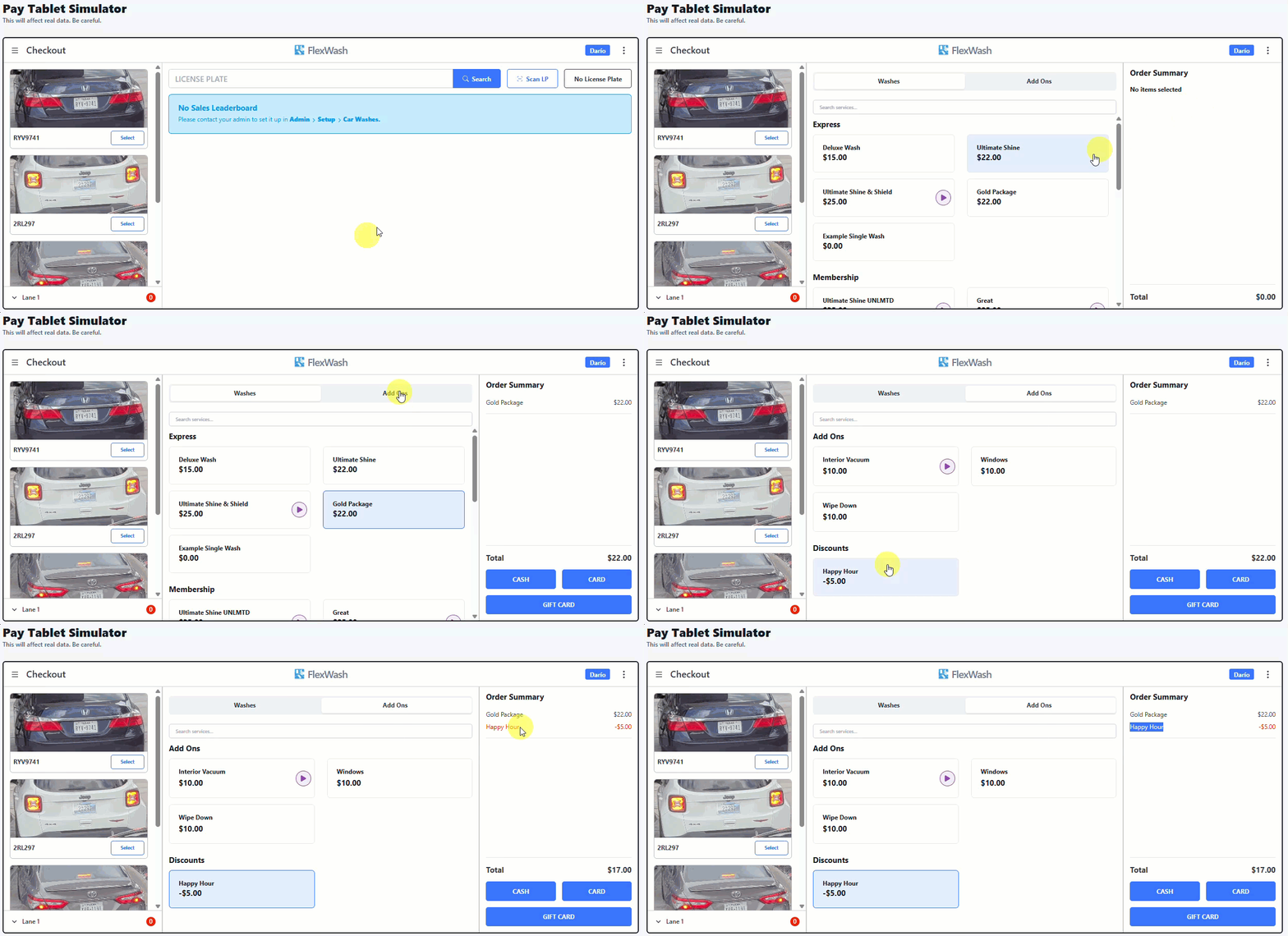
**Discounts** are staff-applied deductions used for quick, manual price adjustments at the point of sale.
**Use Discounts when:**
* An attendant needs flexibility.
* The situation is one-off or situational.
* No tracking or automation is required.
**Common use cases:**
* Local customer courtesy.
* Manager-approved price adjustments.
> [!TIP]
>
> [Click here for more information on how to set up Discounts.](/configuration/pricing-and-promotions/discounts)
**Example:**

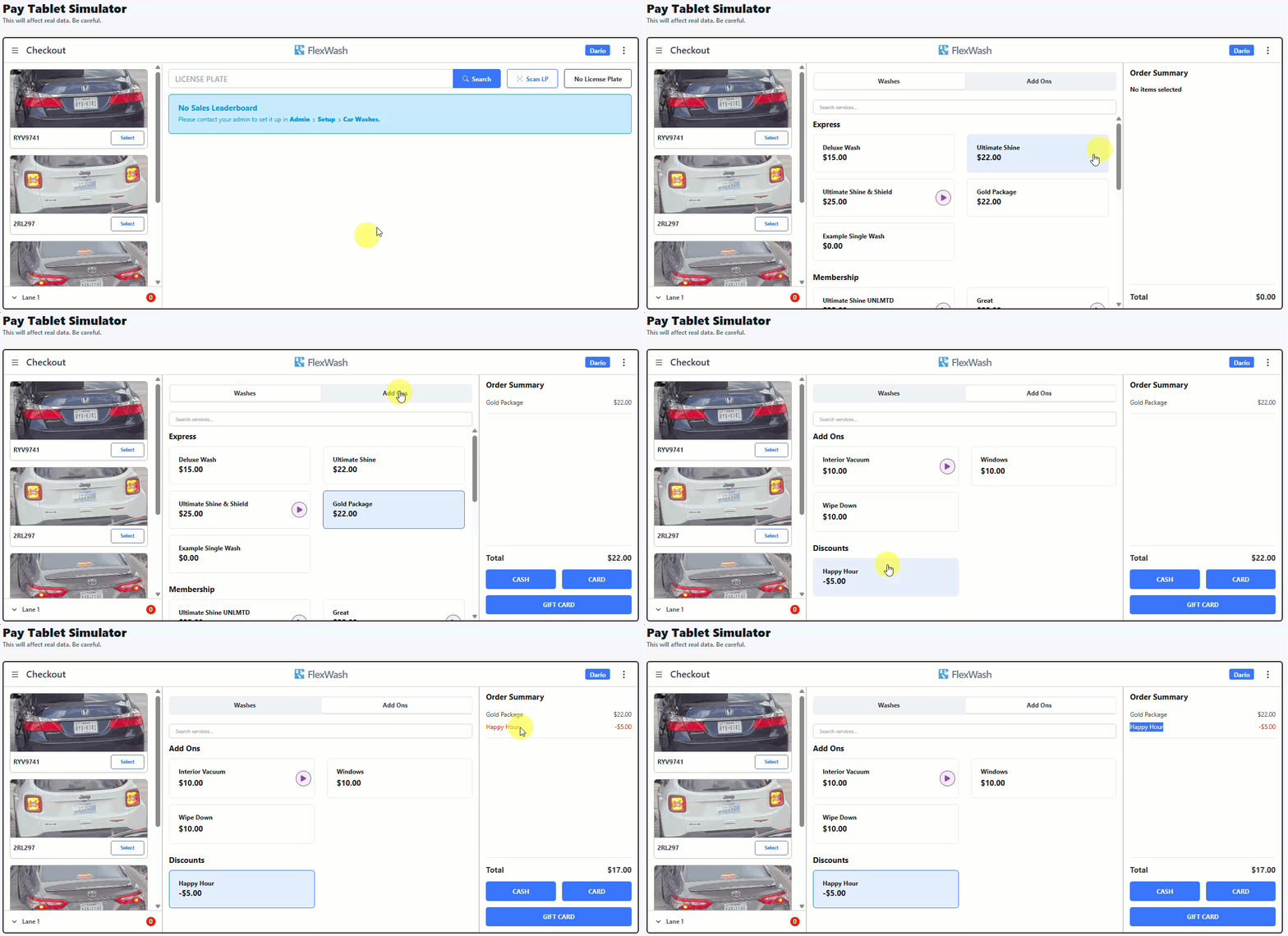
The example above shows a **Discount** configured to give a \$5 deduction to the wash package called "Gold package".
* Manually applied.
* Available on the Pay Tablet.
* No eligibility rules.
* Applies immediately.
Once the qualifying wash is selected, the discount appears in the Add-Ons section as shown below:
## Membership Benefits
**Membership Benefits** provide added value to memberships through controlled discounts, free services, or special pricing. These benefits reward loyalty, and encourage continued enrollment.
Benefits can be applied **automatically** or **offered manually by attendants** when a member visits, depending on how the benefit is configured.
Benefits can also be configured as **recurring** or **interval-based**. An interval-based benefit can be used **once every N days, calendar weeks, or calendar months**. For example, an interval of 2 months means one use every two calendar months, not two uses per month. [See how intervals are counted](/configuration/wash-menu/membership-package#interval-benefits).
This flexibility allows operators to balance automation, personalization, and cost control while delivering consistent member value.
**Use Membership Benefits when:**
* You want to reward loyalty.
* You want to offer add-ons or different wash packages at special prices to your members exclusively.
> [!TIP]
>
> [Click here for more information about Membership Benefits.](/configuration/wash-menu/membership-package#membership-benefits)
**Example:**

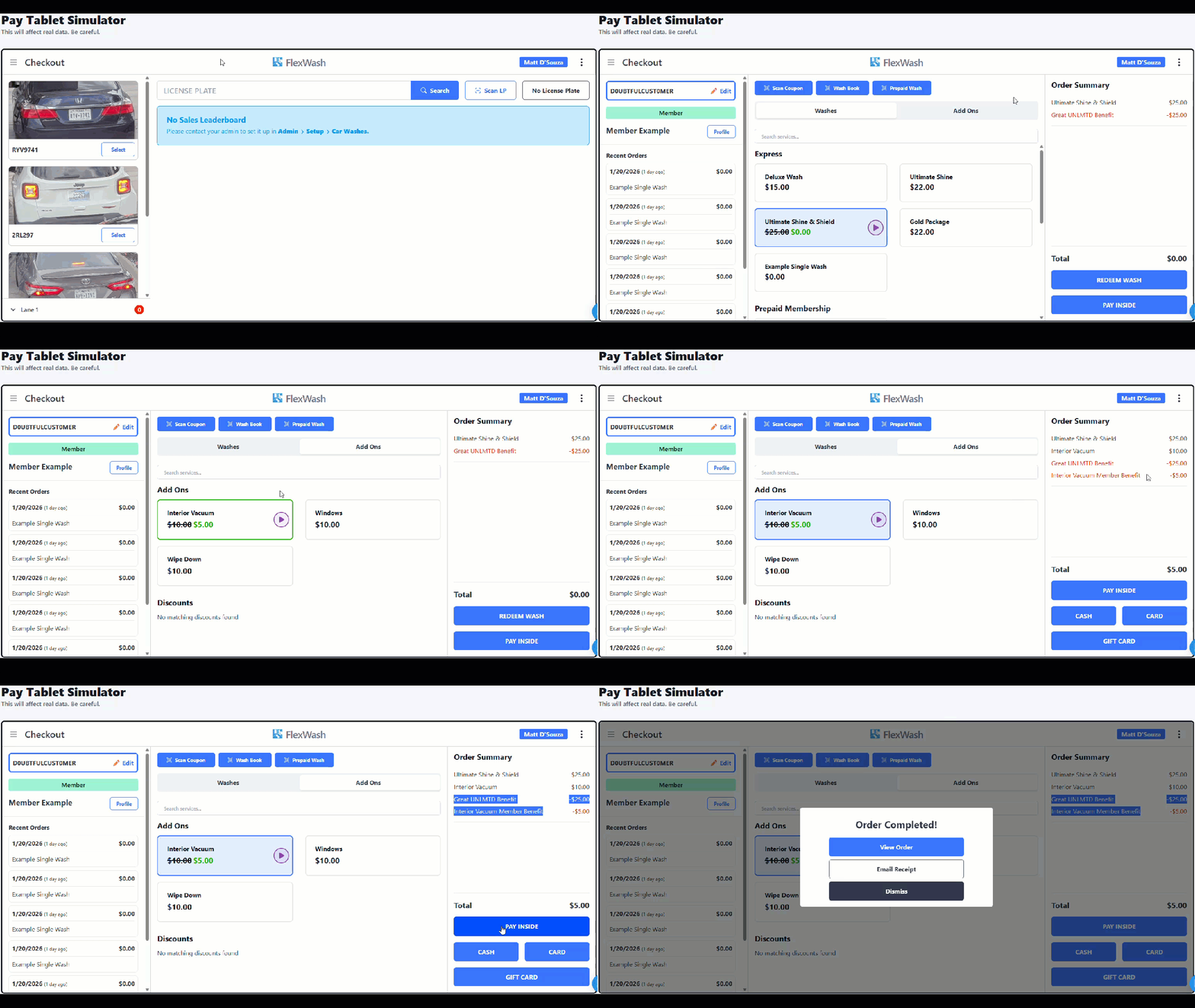
Active members receive **50% off Interior Vacuum services**.
* Applies automatically.
* Visible at checkout.
* Not available to non-members.
* Encourages add-on usage.
See below how this member gets the Interior Vacuum at a better price than a non member would:
## Upsells
**Upsells** are guided deductions designed to move customers to a higher-value wash or membership package.
**Use Upsells when:**
* You want to increase your gross revenue.
* Attendants are actively selling.
* The higher tier provides more value long-term.
* Upsells reduce the *upgrade gap* rather than the base price.
> [!TIP]
>
> [Click here for more information on how to configure Upsells.](/configuration/pricing-and-promotions/upsells)
**Example:**

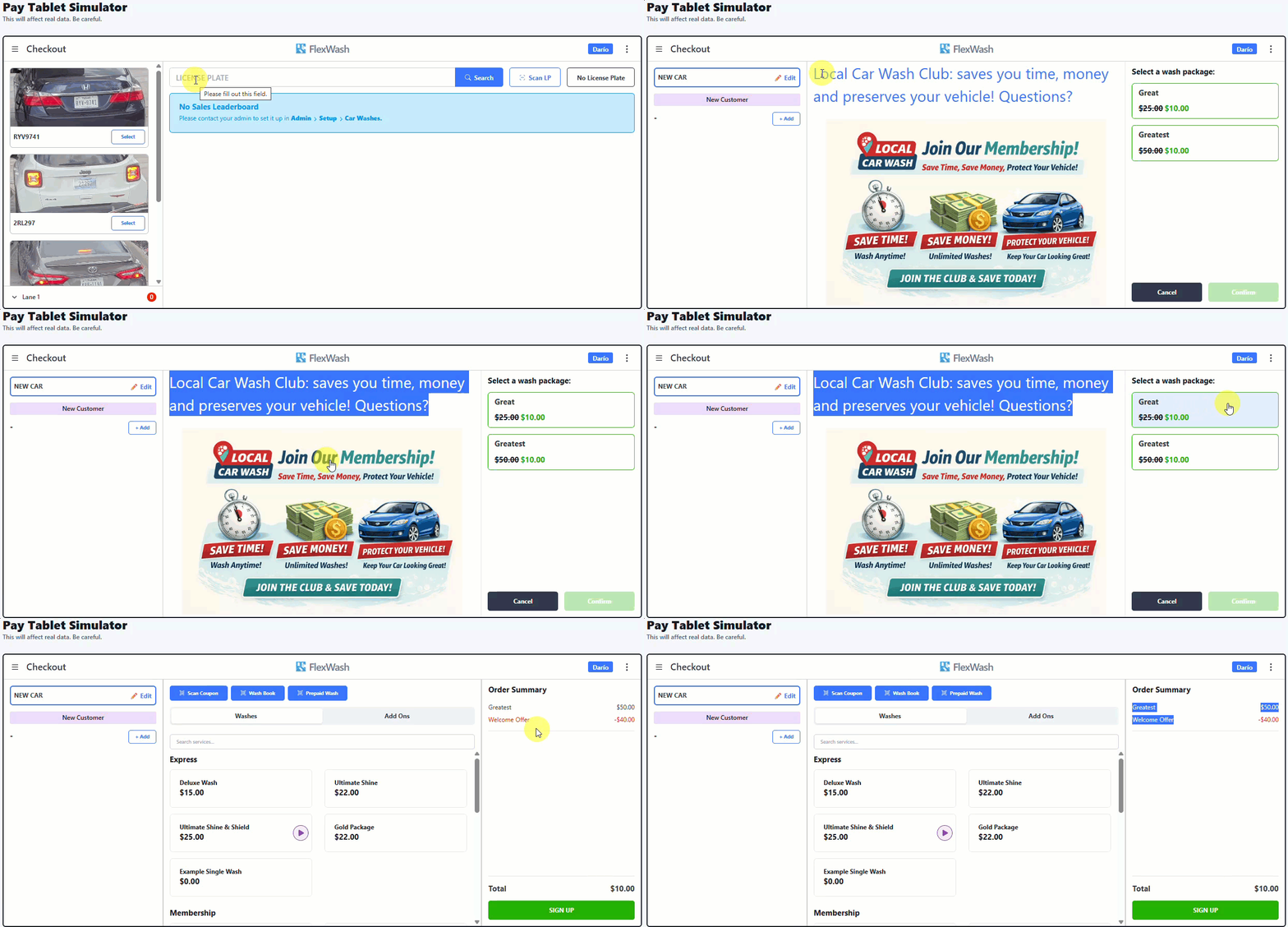
The example above shows an **Upsell** configured to offer a deducted price on the first month for the top two membership packages.
As shown below, the attendant is prompted to offer the top-tier memberships for **\$10 on the first month**.
* Includes a scripted pitch.
* Optional image shown to the customer.
* Normal pricing resumes after the promo period.
## Downsells
**Downsells** are retention-focused deductions offered when a customer attempts to cancel a membership.
**Use Downsells when:**
* A customer is at risk of churning.
* You want to preserve recurring revenue.
* The customer would accept a lower tier rather than cancel entirely.
> [!TIP]
>
> [Click here for more information about Downsells.](/configuration/pricing-and-promotions/downsells)
**Example:**

In the example above, the **Downsell** is configured for customers enrolled in the "Greatest" membership package.
* Triggered during cancellation.
* Targets specific source packages.
* Can include eligibility rules (LTV, wash count, etc.).
* Optional pitch or prompt for staff.
This keeps the customer active while reducing churn.
## Promotions
**Promotions** are customer-initiated deductions, typically redeemed via a QR code, application code, or online checkout.
**Use Promotions when:**
* The customer discovers the offer outside the wash (ads, email, flyers).
* You want redemption to be controlled or limited.
* The offer should not be applied manually by staff.
**Common use cases:**
* Social media or Google Ads.
* Introductory membership offers.
* Online-only pricing.
> [!TIP]
>
> [Click here for more information on how to set up Promotions.](/configuration/pricing-and-promotions/promotions)
**Example:**

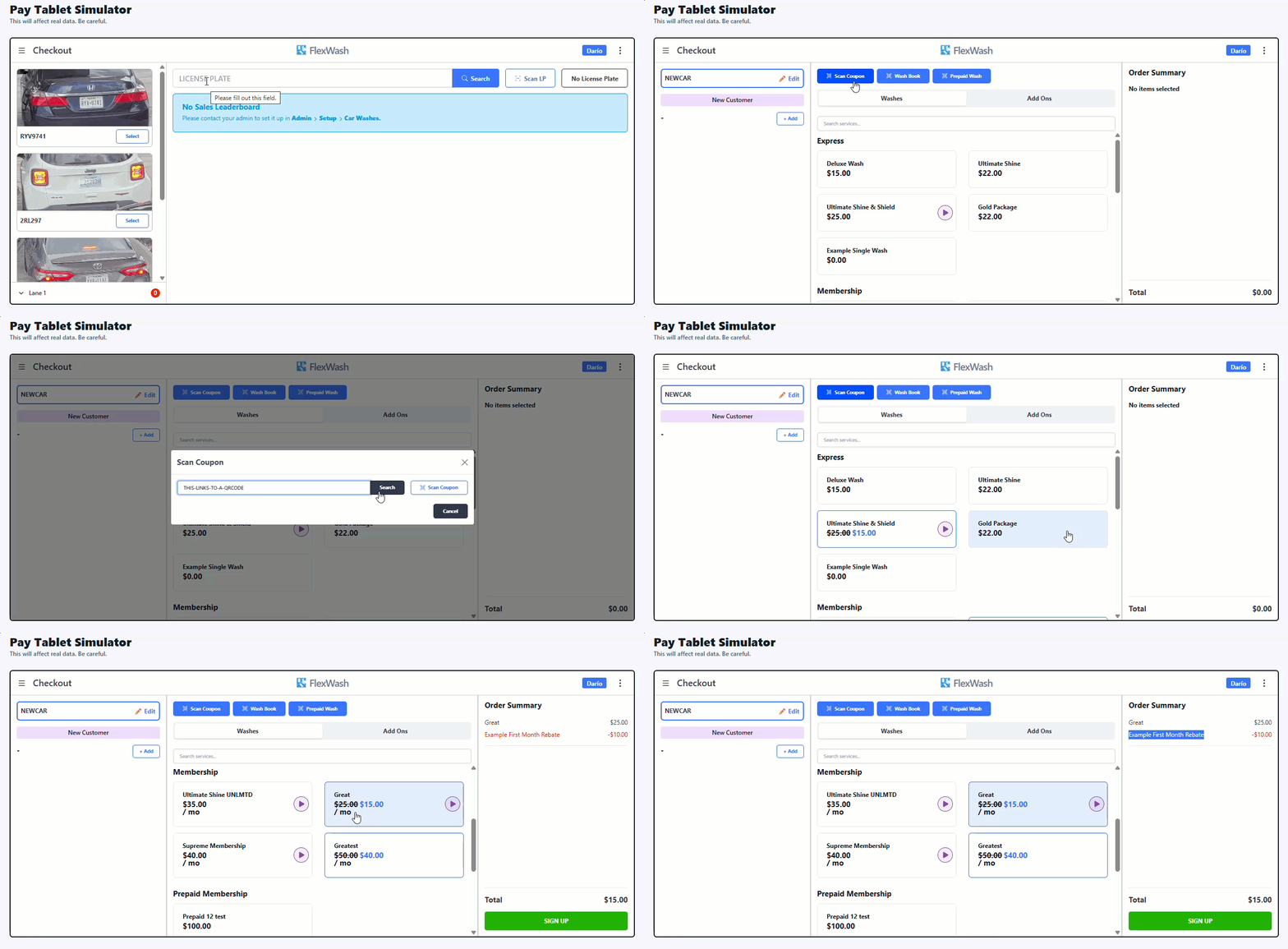
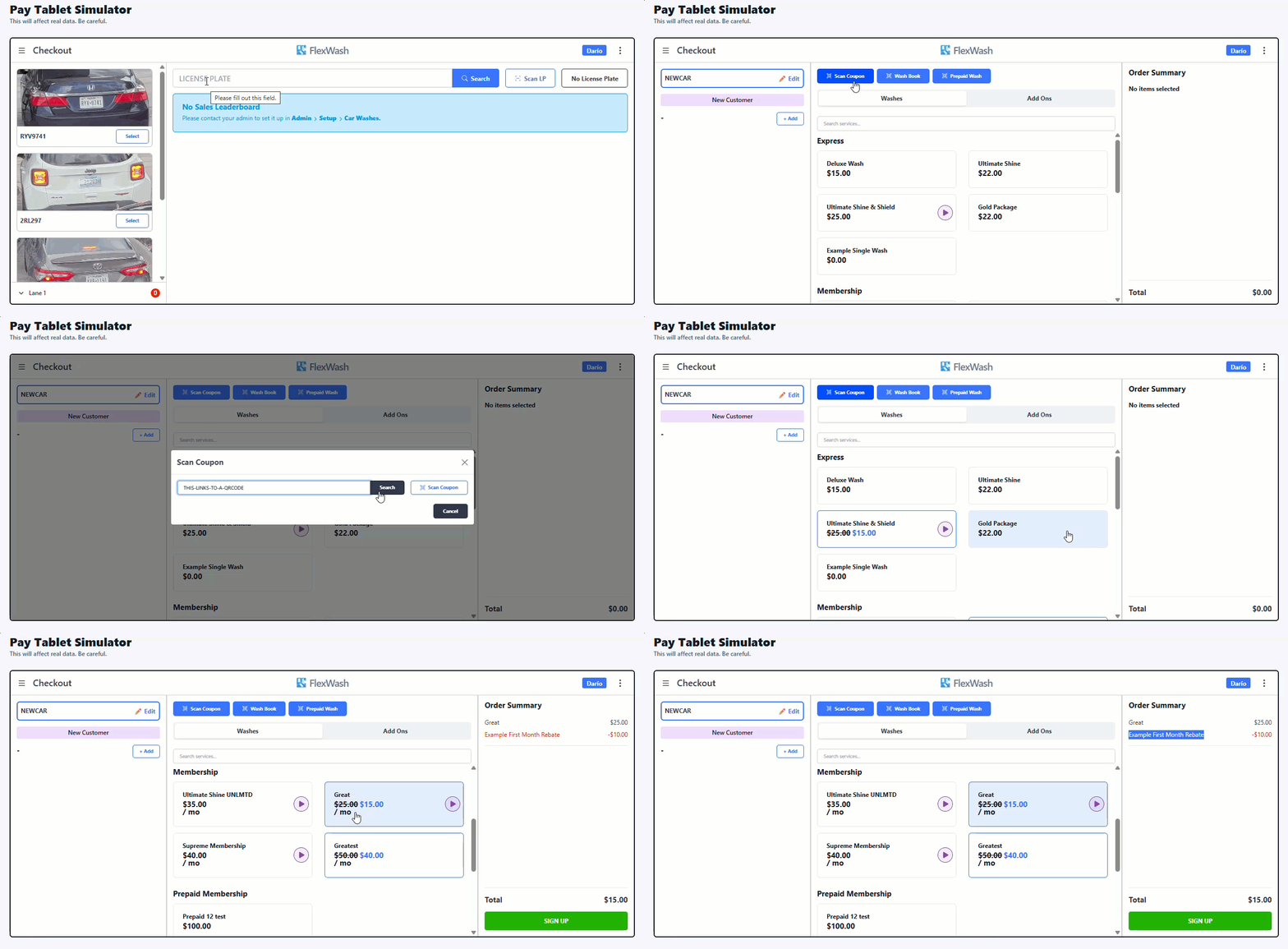
The example above shows a **Promotion** configured to give **\$10 off the first month of a membership**, redeemable once per vehicle with a QR code.
* Applies only to membership packages.
* Fixed \$10 deduction.
* First billing cycle only.
* Requires an application code.
When the code is scanned at the Pay Tablet, the deduction is automatically applied. See below how the attendant scans the code on the Pay Tablet and the special price is applied afterwards:
## Choosing the Right Deduction
| **Goal** | **Use This:** |
| - | - |
| Market an offer externally | Promotion |
| Apply a one-off price adjustment | Discount |
| Upgrade customers to higher tiers | Upsell |
| Prevent membership cancellation | Downsell |
| Reward active members | Membership Benefit |
If you’re unsure which deduction to use, start with the **customer’s intent**:
* Did they discover the offer themselves? → Promotion.
* Is staff intervening? → Discount, Upsell, or Downsell.
* Are they already a member? → Membership Benefit.
# Discounts
Source: https://docs.flexwash.com/configuration/pricing-and-promotions/discounts
Configure staff-applied price reductions on wash packages with clear controls, role-based access, and consistent pricing behavior.
## Overview
Discounts are **manually applied deductions** used by staff to adjust pricing at checkout. They are designed for controlled, operational use cases where authorized team members apply a price reduction directly on FlexWash devices.
Discounts do not require customer action and are never applied automatically. This ensures pricing adjustments remain intentional and role-restricted.
> [!WARNING]
>
> Discounts used during a membership sign up will only apply to the first month
> and they DO NOT show up in the reports like normal discounts. Therefore
> discounts on membership sign up are a workaround that should be rarely used.
## Creating a Discount
When creating a Discount, you define how the price adjustment works and who is allowed to apply it.

### Name
Enter a clear, descriptive name for the Discount. This name appears on FlexWash devices and in transaction records, so it should reflect the purpose of the pricing adjustment.
### Discount Type
Choose how the discount value is determined:
* **Fixed** — Applies a predefined dollar and cent amount.
* **Percentage** — Applies a percentage-based reduction, *not supported for membership packages*.
* **Variable** — Allows the discount amount to be entered manually on the FlexWash device at the time of checkout.
Variable discounts are typically used when staff discretion is required.
> [!WARNING]
>
> We recommend using promotions and upsells for memberhsip packages to have more qualificaiton control. If you do use
> a discount for a membership **only** used fixed pricing. Create copies of a discount with the right price and package
> combo to satisfy a % discount on different packages.
### Roles
Select the minimum organizational role required to apply this Discount. Only staff members with the selected role (or higher) will see and be able to use the Discount on FlexWash devices.
### Wash Packages
Choose which wash packages are eligible for this Discount. The Discount can only be applied to the selected packages.
### Enable
Ensure the **Enabled** option is checked. Disabled Discounts are not visible and cannot be applied on FlexWash devices.
## Setting Display Order
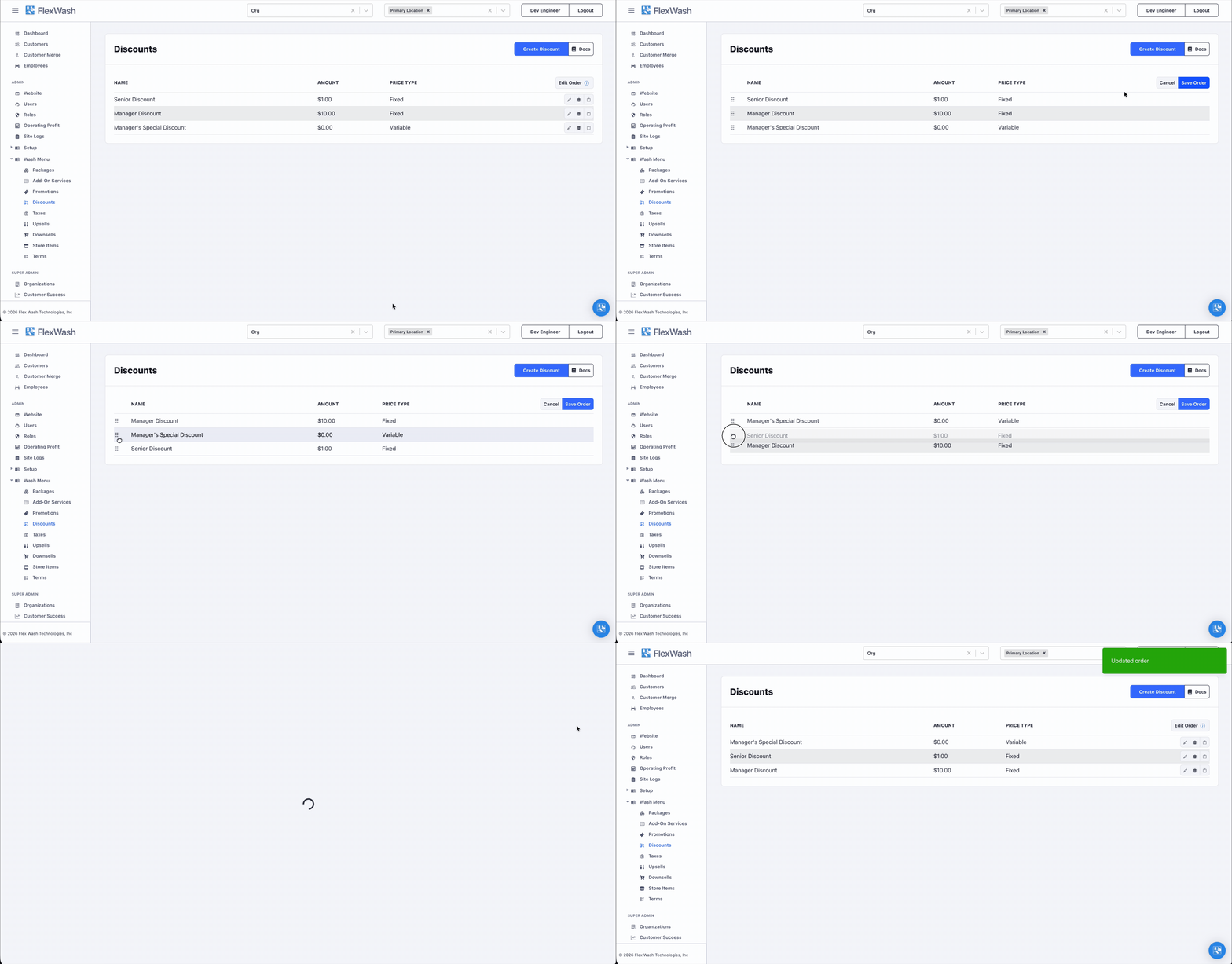
Control the order in which Discounts appear on the POS. By default, Discounts display in the order they were created.
To change the display order:
1. Navigate to **Wash Menu** > **Discounts**.
2. Click **Edit Order** in the top-right corner of the table.
3. Drag and drop rows using the handle that appears on the left of each row.
4. Click **Save Order** to apply your changes, or **Cancel** to discard them.
Place the most frequently used Discounts at the top for faster access at checkout.
## How Discounts Are Applied
1. A staff member initiates checkout on a FlexWash device.
2. An authorized role selects a Discount from the available options.
3. The Discount value is applied to an eligible wash package.
4. The adjusted price is reflected immediately before payment.
All Discount usage is recorded for reporting and review.
## Key Benefits
* Full control through manual, role-based application.
* Flexible pricing using fixed, percentage, or variable values.
* Clear accountability for staff-applied adjustments.
* Consistent behavior across locations and devices.
# Downsells
Source: https://docs.flexwash.com/configuration/pricing-and-promotions/downsells
Reduce churn and protect recurring revenue by offering customers targeted alternatives before they cancel their membership.
Downsells allow you to present tailored alternatives when a customer attempts to cancel a membership. Instead of losing the subscription entirely, attendants can guide customers toward a lower-tier package or a limited-time offer directly from the pay tablet.
Downsells are configured as a [Deduction](/configuration/pricing-and-promotions/deductions) and are designed specifically to improve retention while maintaining a consistent, operator-controlled experience.
## How Downsells Work
When a customer initiates a membership cancellation:
* The attendant receives an on-screen prompt on the pay tablet.
* A scripted pitch appears, allowing the attendant to confidently explain the alternative.
* Eligible lower-tier memberships or promotional offers are displayed.
* Optional incentives, such as temporary discounts, can be applied automatically.
This flow keeps the interaction personal, fast, and effective, with no manual overrides or external tools.
## Example

In this example, the Downsell targets customers enrolled in the **Greatest** membership.
If the customer attempts to cancel, FlexWash presents the **Great UNLMTD** membership as an alternative at a lower monthly price.
To further encourage retention, the Downsell includes a **\$5 discount for the first month**, increasing the likelihood that the customer stays enrolled rather than canceling.
> [!WARNING]
>
> Only 1 Downsell can be displayed per cancellation. If more than 1 enabled Downsell targets the same subscribed package at a location, FlexWash displays only one and does not guarantee which, so keep 1 enabled Downsell per subscribed package.
## Additional Qualification Options
Downsells can be refined using additional criteria, including:
* **Minimum Member Lifetime Value (LTV).**
* **Monthly Wash Maximum.**
These controls ensure that Downsells are offered only when they make financial and operational sense for your wash.
## Measuring Your Downsells
Once downsells are running, [Downsells Analytics](/reports/downsells-analytics)
shows what each offer is actually saving you: how many were presented, how many
members accepted, and the recurring revenue those saves went on to earn. Access
requires the **Downsell Analytics** report permission.
# Promotions
Source: https://docs.flexwash.com/configuration/pricing-and-promotions/promotions
Create controlled, customer-initiated offers that increase conversion, protect revenue, and provide clear attribution across marketing channels.
Promotions are customer-initiated deductions that apply only when a valid code is presented. They require an explicit customer action—such as scanning a QR code or entering an application code—ensuring predictable redemption and clean reporting.
Promotions are commonly used for marketing-driven offers where pricing should never be applied without intentional redemption.
## When to Use Promotions
**Use Promotions when:**
* The customer discovers the offer outside the wash (ads, email, SMS, flyers).
* Redemption should be controlled, tracked, or limited.
* The discount should only apply when a valid code is presented.
* The offer is tied to a specific campaign or acquisition channel.
## How Promotions Work
1. A Promotion is configured with eligibility rules and a deduction.
2. The customer presents a valid QR code or application code.
3. The code is scanned at the Pay Tablet or entered during online checkout.
4. FlexWash validates the Promotion and applies the deduction automatically.
Promotions are designed for offers that must be intentionally redeemed by the customer and applied automatically by FlexWash.
**Example:**

A common use case is an introductory incentive for new members:
* Applies only to membership packages.
* Fixed \$10 deduction.
* First billing cycle only.
* Redeemable once per vehicle.
* Requires an application code.
When the customer scans the QR code at the Pay Tablet, FlexWash validates the Promotion and applies the special price automatically before checkout:
## Stacking
**Default:** A Promotion's discount applies to every matching item in an order. For example, a "\$2.50 off" Promotion on a wash and three add-ons takes \$10.00 off an order that has all four.
**Do Not Stack:** When a markdown has Do Not Stack turned on, only the first matching item selected on the Pay Tablet gets the discount. Other matching items stay at full price.
* **Stackable add-ons.** If the discounted item is a [Stackable add-on](/configuration/wash-menu/addon-services), every unit gets the discount. This is the same with or without Do Not Stack.
* **The wash counts first.** The Pay Tablet selects a wash before any add-on. If the discount covers the selected wash, the wash gets it.
### What the Cashier Sees
After the first matching item is selected, the other matching items stop showing the discounted price. If the cashier removes that item, the discount moves to the next matching item in the order.
### When to Use Which
* **"10% off any one add-on":** turn Do Not Stack on.
* **"10% off the whole order":** leave it off.
### Where to Set It
Go to **Promotions**, open the Promotion, and find the **Markdowns** section. The **Do Not Stack** checkbox appears once the markdown includes an add-on service.

The setting applies per markdown. A Promotion with two Do Not Stack markdowns can discount one item from each.
## Wash Codes
Wash Codes allow you to generate unique, single-use promotion codes in bulk.
When Wash Codes are enabled, a Wash Codes section appears at the bottom of the Promotion configuration page where you can generate and download a file containing unique codes tied to the configured wash package and deduction.
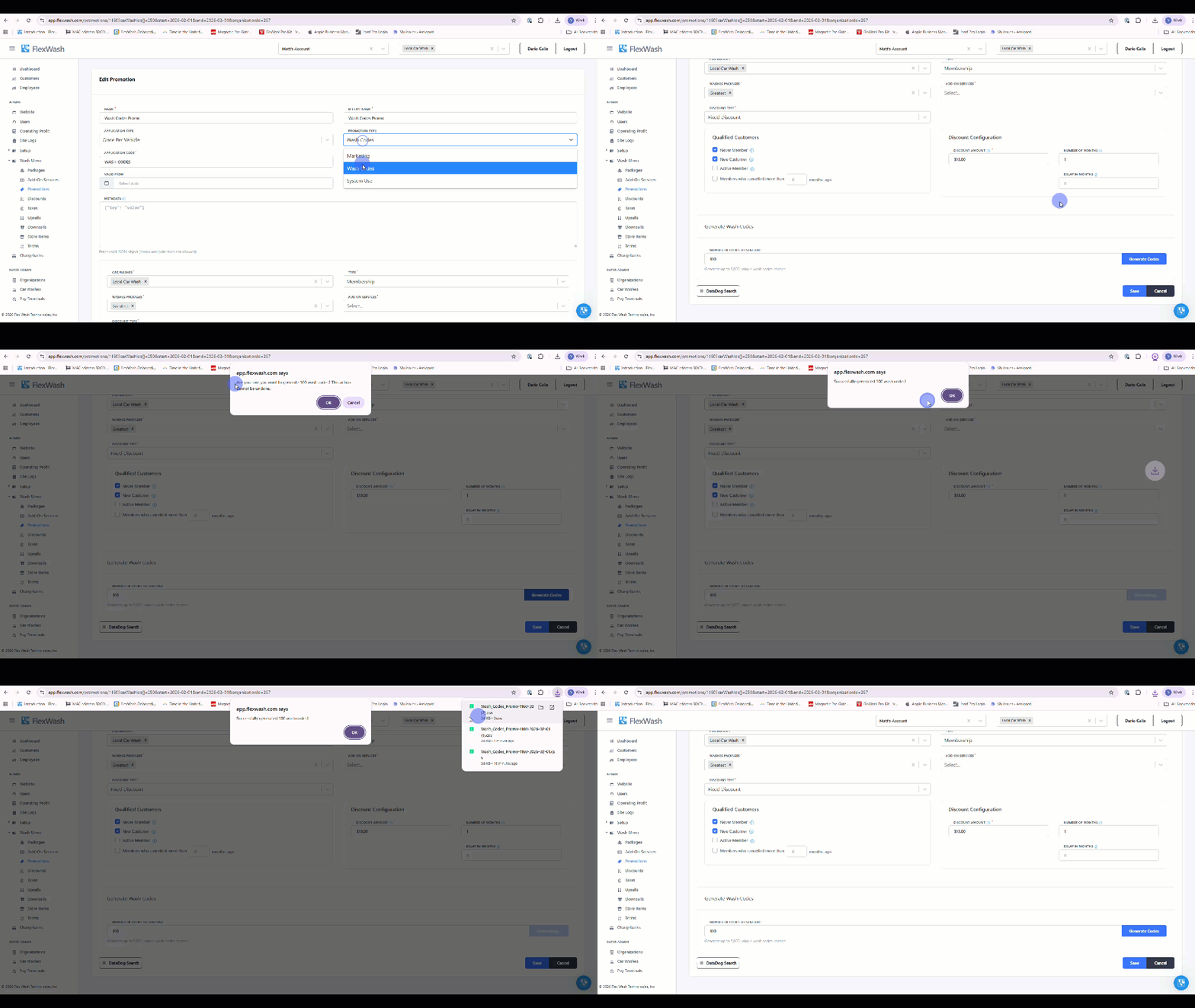
This is commonly used for direct mail campaigns, flyers, partner promotions, and one-time digital offers.
## Key Benefits
* Revenue protection through controlled redemption.
* Clear attribution for marketing campaigns.
* Faster checkout with automated application.
* Consistent pricing across locations and channels.
## Marketing Tools
If you have FlexEngage enabled you can set a promotion to be of application type
`Single Use` and promotion type `Marketing`. This will give you an iFrame at the
bottom of the page when you create the promotion.
FlexEngage powers these iFrames to collect contact information and send unique
coupon codes to the customer. iFrames are snippets of HTML code that can embed
the form into your own website. This gives you creative and brand control around
the promotion form. For example:
[https://www.express-auto-spa.com/facebook/express-ad](https://www.express-auto-spa.com/facebook/express-ad)
The coupon codes sent from these iFrames embed the contact information, so when
customers redeem on site we automatically associate the contact information to
their license plate. This allows us to track in depth promotion information. See
[promotions reporting docs](/reports/promotions) for more details.
# Upsells
Source: https://docs.flexwash.com/configuration/pricing-and-promotions/upsells
Increase revenue and membership conversions with targeted upsell offers that appear at checkout when customers qualify.
Upsells help you increase average ticket value and grow membership conversions by presenting relevant upgrade and offer options at the point of sale.
When a customer qualifies, FlexWash displays upsell offers directly on the Pay Tablet.
Upsells work with both **single washes** and **membership packages**, giving you flexible ways to drive incremental revenue.
The upsell also applies when the attendant adds a vehicle to a customer's existing membership during checkout. The upsell discount is attached to the newly added vehicle only. Adding a vehicle from the customer profile does not apply an upsell.
## Qualification Rules
Upsells are shown only when a customer meets qualifying conditions. FlexWash supports the following common qualification types:
* **Never Member.** The customer has never held a membership.
* **New Customer.** The customer has no wash purchase history.
* **Active Member.** The customer currently has an active membership.
* **Former Member.** The customer cancelled more than *X* months ago.
> [!NOTE]
>
> The **Active Member** qualification lets you offer existing members additional services. A promotion or upsell cannot be applied to a customer's active subscription.
## Discount Configuration
Upsells can include pricing incentives that make the offer compelling at checkout:
* **Fixed Discount.** A specific dollar amount off the upsell item.
* **Percentage Discount.** A relative discount based on the upsell price.
* **Fixed Price.** A set price for the upsell offer, regardless of the original price.
For membership upsells, you can also define:
* **Discount Amount.** The value of the discount per billing cycle.
* **Number of Months.** How long the discount should remain active.
* **Delay Months.** How many months after purchase before the discount begins.
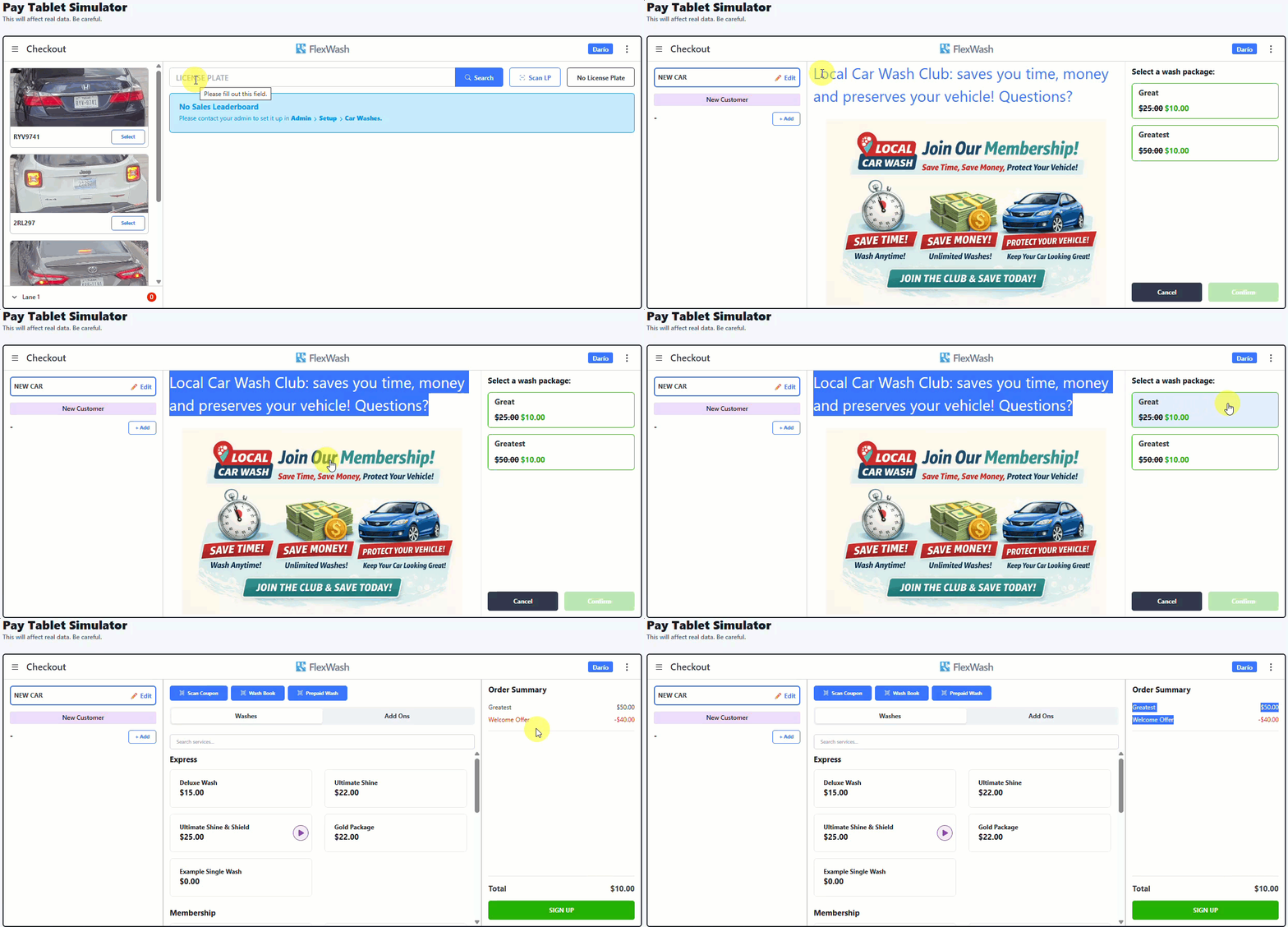
**Example:**

The example above shows an **Upsell** configured to offer a deducted price on the first month for the top two membership packages.
As shown below, the attendant is prompted to offer the top-tier memberships for **\$10 on the first month**.
* Includes a scripted pitch.
* Optional image shown to the customer.
* Normal pricing resumes after the promo period.
> [!WARNING]
>
> Only 1 Upsell can be displayed on the Pay Tablets. If more than 1 Upsell is created and enabled, the first one will be the one displayed.
## Best Practices
* **Use targeted offers** for specific customer groups, such as New Customers or Former Members.
* **Show relevant visuals and clear pitches** to increase customer engagement.
* **Balance discount depth with margin impact.** Meaningful offers perform better without eroding profitability.
## Measuring Your Upsells
Once upsells are live, [Upsell Analytics](/reports/upsell-analytics) shows how
each offer performs: pitches recorded, conversions, member signups, and the
membership revenue those signups earned. Access requires the **Upsell Analytics**
report permission.
# Pay Tablet Simulator
Source: https://docs.flexwash.com/configuration/testing/pay-tablet-simulator
Test your wash menu, pricing, and promotions against live data from your browser, no lane required.
The Pay Tablet Simulator runs the same checkout software your team uses on the lot, right inside the FlexWash web app. It connects to your live data, so you can build real orders and confirm your wash menu, pricing, discounts, promotions, and taxes behave exactly as you expect.
It does everything a physical Pay Tablet does except the hardware-specific actions that depend on on-prem equipment: it cannot open gates or capture card payments through a physical card reader.
> [!WARNING]
>
> The simulator runs against your production environment. Every order you complete, every customer you edit, and every cash sale you record changes real data and shows up in your reports. Treat it exactly like a live Pay Tablet.
## Open the simulator
In the left navigation, under **Admin**, select **Simulator**.

The simulator loads a Pay Tablet from the car wash selected in the top navigation bar. Switch car washes from that bar to simulate a different location. The lane shows stub vehicles for testing purposes, they are not related to your site.
> [!NOTE]
>
> The simulator is available to admin users, and the selected car wash must have a Pay Tablet device configured.
## Build and test an order
The checkout works just like a physical Pay Tablet.

* Look up a vehicle the same way you would on a physical tablet. The stub vehicles in the lane on the left are also selectable for testing.
* Add washes, add-ons, and store items from the menu to confirm pricing, taxes, discounts, promotions, upsells, and downsells calculate correctly.
* Watch the **Order Summary** for the running total. Promotional discounts appear as their own lines, so you can verify a promotion fires and applies the right amount.
## Verify members and gift cards
* Look up a member by license plate and confirm they are recognized, their package and benefits apply, and their recent orders appear.
* Scan or key a gift card to confirm FlexWash finds it and redeems the correct balance.
## Record a cash sale
Complete an order with **Cash** to record a real cash transaction against the car wash.
> [!WARNING]
>
> Cash and gift card are the only tenders that finalize a sale in the simulator. Card payments and new membership signups depend on the physical card reader, which is not available here.
## Look up and edit customers
Open any customer's profile from the checkout and update their details just as you would on a Pay Tablet. For the lookup options, see [Customer Profile Search](/operations/pay-tablets/customer-profile-search). Because the simulator uses live data, every change you make is saved to the real customer record.
# Guide to the Flexwash Admin Site
Source: https://docs.flexwash.com/configuration/users-and-admin/admin-guide
This video gives you a quick walktrough to your Flexwash Admin Site.
[YouTube video player](https://www.youtube.com/embed/2GlPSg_hoKk?si=6Hd37AdVPd7HNvGP)
> [!TIP]
>
> For a breakdown on how the Dashboard categories are calculated, visit our [Dashboard article](/getting-started/dashboard).
##
# Car Wash Config
Source: https://docs.flexwash.com/configuration/users-and-admin/car-wash-config
Manage site-level settings to streamline operations and maintain a consistent on-site experience.
Under the **Setup** section in the left sidebar, click **Car Washes**, then select **Edit** next to the site you want to configure.

## Phone Number
Update the phone number displayed on both digital and printed receipts. Enter the new number and save your changes.

## Sales Leaderboard
Select which leaderboard is displayed on Pay Tablets to track and motivate sales performance.

## FlexWash WiFi
View the WiFi password for the selected site and access the QR code for quick connection.

## Lane Config

Dynamically switch self-checkout lanes between attended and unattended modes to match operational needs in real time.
* **Attended Mode**: An attendant is present to assist customers.
* **Unattended Mode**: The lane operates independently without continuous supervision.
> [!NOTE]
>
> This change takes effect immediately; no system restart required.
## License Plate Backfill
Members brought in through [interim imports](/data-import/interim-import) often have an RFID tag
but no license plate on file. Turn on **License Plate Backfill** and FlexWash reads the plate from
the LPR camera photo on the member's next wash and fills in the blank.
> [!NOTE]
>
> There is a 30 minute delay between when the order processed and when we try to update the
> license plate with LPR.

The setting is off by default and applies to one car wash at a time. In Car Wash Config it appears
as **Interim Import License Plate Backfill**.
### Migrating From an RFID-Based System
If your old system identified members by tag rather than by
[license plate](/technical/hardware/lpr-rfid), your import files often repeat the tag in the
License Plate column. A row might list `80843+056175` as both the plate and the tag.
FlexWash reads a plate that equals the tag as a placeholder, matches the row by tag, and keeps any
real plate already on file. Tag matching is canonical, so leading zeroes, letter-O forms, and
Glide-prefixed encodings all resolve to the same tag.
This runs on every interim import and needs no configuration. The backfill setting is only what
starts the camera filling in the missing plates.
### The Rules FlexWash Follows
* **A plate that equals the tag is not a plate.** FlexWash matches the row by tag instead.
* **A real plate wins.** Whichever side holds one, the file or the record, keeps it.
* **A blank RFID Tag cell never removes a tag.** An empty cell means the file does not know the
tag, so the vehicle keeps the one it has, including a tag your team applied at the pay tablet.
* **One car, one vehicle record.** When a plate and a tag point at the same car held in two
records, FlexWash merges them and the wash history follows.
* **A tag found on a different car is treated as moved.** The imported member gets the vehicle from
the file. The other vehicle keeps its plate, its owner, and its history, and gives up only the tag.
When FlexWash reuses a vehicle already on file, the subscription from the file becomes **Active**.
The table below gives the outcome for each case.
### How FlexWash Resolves Clashes
| Import row | Already on file | Result |
| - | - | - |
| Tag in both columns | Same tag on a vehicle with a real plate, another customer | Vehicle reused, real plate kept, customer merged. Make, model, year, and package come from the file. No duplicate vehicle. |
| Real plate and tag | Tag-only vehicle with no real plate | Vehicle reused, gains the real plate |
| Real plate and tag | Tag sits on a different car that has its own plate | New vehicle for the member, other car gives up only the tag. That customer is not merged or deleted. |
| Real plate and tag | Plate on one vehicle, tag on a separate tag-only vehicle | Records merge, the file's plate survives, history follows |
| Tag in both columns | Placeholder plate on one vehicle, tag on a vehicle with a real plate | Records merge, the real plate on file wins |
| Plate and tag | One vehicle already holds both | Updated in place, no merge |
| Blank tag | Vehicle already has a tag | Existing tag kept |
| Plate, no tag | Plate on a single-wash customer | Vehicle moves to the member, customer merged |
| Plate, no tag | Plate on an interim vehicle created by external LPR | Vehicle updated with make, model, and year |
### Validation
FlexWash validates the file before it writes anything. If two rows carry the same license plate, or
carry tags that normalize to the same value, FlexWash rejects the whole import with a
**Duplicate Data** error and changes nothing. Correct the file and upload it again.
### Token Transfer and Ordering
You do not need to wait for [token transfer](/data-import/member-token-migration) to turn this on.
FlexWash resolves each row against your current records as it goes, so the order does not matter:
* A real plate is on file first and the interim file follows. The plate on file stays.
* The interim file lands first and LPR captures the plate later. The next file matches by tag and
keeps the captured plate.
* A later file brings the real plate to a tag-only record. The record gains the plate.
[Token transfer](/glossary/operations#token-transfer) moves payment tokens and touches nothing about
plates or tags, so the two run independently.
### Repeat Imports
Re-importing an existing member updates them in place, keeps their membership, and adds any new
vehicles. FlexWash trims whitespace around a tag and stores an empty tag cell as no tag.
> [!NOTE]
>
> Turn the backfill on while most of your member base is still tag-only and expect more manual
> merges. When LPR reads a plate that another vehicle in your organization already holds, FlexWash
> records the capture as a duplicate and leaves the vehicle unchanged for someone to resolve.
# Email Reports and Alerts
Source: https://docs.flexwash.com/configuration/users-and-admin/email-alerts
Get your daily numbers, deposit details, and alerts on chargebacks, refunds, discounts, and gate opens in your inbox, so problems reach you before they cost you.
FlexWash emails reports and alerts to any user in your organization. Each user
picks the emails they want and the car washes each email covers. FlexWash sends
the email to the address on the user's profile.
## Email types
| Report Type | Delivery | What it sends |
| - | - | - |
| **Daily Performance** | Scheduled | Revenue, washes, members, labor, deposits, expected cash deposit, cash back, and cash over / short |
| **Accounting Daily Csv Export** | Scheduled | The accounting data for the latest completed deposit, as attached CSV files |
| **Accounting Monthly Csv Export** | Scheduled | The accounting data for the previous month, as attached CSV files |
| **Liability Monthly Csv Export** | Scheduled | Every wash book, gift card, and prepaid membership in your organization, as attached CSV files |
| **Notification Of Chargeback** | Instant | The order, amount, and reason for a new chargeback, and the defense deadline if it can be defended |
| **Manual Gate Opens** | Threshold | An alert when manual gate opens reach a percentage of the day's washes |
| **Discounts** | Threshold | An alert when the day's total discounts reach a dollar amount |
| **Refunds** | Threshold | An alert when the day's total refunds reach a dollar amount |
| **Skip Queue Washes** | Threshold | An alert when the day's skip queue washes reach a count |
## Setting up an email
Users with **Admin** access or higher can set up emails for other users. The
**Email Reports** section appears when you edit an existing user, not when you
create one.
1. In the left sidebar, click **Users** in the **Admin** section, then open the user.
2. In the **Email Reports** section, click **Add**.
3. Select the **Report Type**.
4. Select the car washes. The two accounting exports cover one car wash. All
other types can cover several. The liability export has no car wash
selection and covers the whole organization.
5. Complete the settings for the delivery type. See below.
6. Click **Save**.

When an email covers several car washes, FlexWash combines them into one email.
Threshold alerts compare one combined total across those car washes.
To send a saved report right away, click **Send Now** on it. To stop an email,
click **Delete** on it and save the user.

For more on user profiles, see [Users](/configuration/users-and-admin/users).
## Scheduled reports
Scheduled reports send at the **Send Time** you choose, in the user's time
zone. Send times are on the hour. The default is 10:00 AM.
* **Daily Performance** covers the current day up to the send time. Choose a
send time after the car wash closes to get the full day.
* **Accounting Daily Csv Export** sends at the send time when a new deposit has
completed since the last email. If no new deposit completed, FlexWash skips
that day.
* **Accounting Monthly Csv Export** sends on the 1st of each month and covers
the previous month.
* **Liability Monthly Csv Export** sends on the last day of each month. The
user's time zone decides both the day and the send time. The send time
defaults to 11:00 PM.
Both accounting exports attach four CSV files: accounting, journal entries,
journal entries import, and revenue analytics. For what the deposit figures
mean, see [Deposits](/reports/deposits).
The liability export attaches three CSV files: wash books, gift cards, and
prepaid memberships. Each file matches the **Export CSV** on the same tab of
**Reports -> Liabilities** and covers every car wash in the organization. The
organization is the one the user's **Primary Car Wash** belongs to.
The files show balances at the time FlexWash sends the email, and the email
states that time. Activity after the send time on the last day is not
included, so keep the send time late to capture month-end balances. The
default is 11:00 PM. A type with no records still attaches a file with only
the column headers.
## Chargeback notifications
**Notification Of Chargeback** sends as soon as a chargeback opens. It has no
schedule or threshold. The email shows whether the chargeback can be defended
and the deadline to respond.
> [!WARNING]
>
> FlexWash sends chargeback notifications to users whose **Primary Car Wash** is
> the car wash with the chargeback. The car washes selected on the email do not
> change who receives it. To get chargeback alerts for a car wash, set it as the
> user's **Primary Car Wash**.
For what to do with a chargeback, see [Chargebacks](/reports/chargebacks).
## Threshold alerts
Threshold alerts watch a number for the current day, in the user's time zone,
and email the user when it reaches the **Threshold Value**.
| Report Type | Threshold Value |
| - | - |
| **Manual Gate Opens** | A percentage: manual gate opens divided by washes |
| **Discounts** | A dollar amount of total discounts |
| **Refunds** | A dollar amount of total refunds |
| **Skip Queue Washes** | A number of skip queue washes |
FlexWash checks thresholds every 10 minutes from 6:00 AM to 10:59 PM Pacific
time (9:00 AM to 1:59 AM Eastern). The count starts over each day.
**Alert Cooldown Hours** sets the minimum time between two alerts for the same
email. For example, with a cooldown of 4, the user gets at most one alert every
4 hours. After the cooldown, the user gets another alert if the total is still
at or above the threshold.
**Send Now** on a threshold alert sends the alert right away, without checking
the threshold or the cooldown.
> [!TIP]
>
> Set threshold alerts for the owner or manager who acts on them. A refunds or
> discounts alert at a low threshold catches unusual activity on the same day.
# Employees
Source: https://docs.flexwash.com/configuration/users-and-admin/employees
Give every team member a personal POS login and control exactly what they can do.
Employees are the staff who sign in at the point of sale with a punch code.
Managing them lets you give each person their own login, control which
actions they can take, and attribute sales to the right team member.
> [!NOTE]
>
> Employees are separate from
> [Users](/configuration/users-and-admin/users). An employee signs in at the
> POS with a punch code, while a user signs in to the FlexWash admin site with
> an email and password.
## The Employees List
In the left sidebar, click **Employees** to open the list. It shows every
employee for the car wash selected in the top navigation, with their role,
punch code, and assigned car wash.

Each row has three actions: a pencil to **edit**, a trash can to **delete**,
and a clipboard to **copy the employee's ID**.
## Create an Employee
**1. Click Create employee**
Open the **Employees** page and click **Create employee** on the top
right.
**2. Enter the basics**
Fill in the required **Name** and **Punch Code**, then choose the
employee's **Role** and **Car Wash**.

* **Punch Code**: A 4-digit number the employee enters to sign in at the
POS. It must be unique within the car wash.
* **Role**: Select the employee's role.
* **Car Wash**: The site this employee works at. Required.
**3. Set POS permissions**
Use the toggles to control what the employee can do at the point of sale:
* **Can Refund Orders**: Issue refunds on the POS.
* **Can Edit Vehicle Details**: Change a vehicle's details, such as its
license plate, on the POS.
* **Can Edit Customer Tags**: Add or remove customer tags on the POS.
**4. Add a photo (optional)**
Under **Employee Photo**, choose **Upload File** to select an image or
**Take Photo** to capture one with the device camera.
**5. Save**
Click **Save** to create the employee. They can now sign in at the POS
with their punch code.
## Edit an Employee
On the **Employees** list, click the pencil icon on the employee's row. Update
any field, then click **Save**.
> [!TIP]
>
> If you change the punch code, the new code must be unique within that car
> wash.
## Delete an Employee
On the **Employees** list, click the trash icon on the employee's row, then
confirm in the dialog. The employee can no longer sign in at the POS, and their
punch code becomes available for reuse.
# Roles
Source: https://docs.flexwash.com/configuration/users-and-admin/roles
Give every user the access they need, and nothing more.
User Roles let you define exactly what each user can see and do in
FlexWash. Build a role once, apply it to as many users as you need, and adjust
access for the entire group with a single edit.
This keeps sensitive data such as revenue reports, refund tools, and FlexEngage
campaigns in the right hands, while still giving CSAs, managers, and
specialists the tools they need to do their jobs.
## Why Use Roles
> [card] Granular Access
>
> Choose from a wide range of individual permissions covering reports,
> customer actions, menu configuration, FlexEngage, and more. Grant only
> what each employee needs.
> [card] Reusable Templates
>
> Define a role once and apply it to every user in that job function.
> Update the role, and access changes for everyone assigned to it.
Common examples:
* A **CSA** role that allows viewing customers and washes, but not refunds or
revenue reports.
* A **Site Manager** role that adds access to local performance reports and
cash deposits.
* A **Marketing** role that unlocks FlexEngage tools and customer analytics
without exposing financial data.
## How Roles Work
FlexWash separates roles from the **Admin** role:
* **Admin** is a built-in role with full access to every feature in your
organization. Use it for owners and trusted operators.
* **Custom roles** are roles you create with a specific set of permissions.
Apply one or more custom roles to any non-admin user.
A user assigned multiple custom roles receives the combined permissions of
all of them. If any role grants a permission, the user has it.
## Create a Role
**1. Open the Roles page**
In the left sidebar, click **Roles** in the **Admin** section.

**2. Click Create**
Click the **Create** button on the top right of the Roles page to open
the role form.
**3. Name the role**
Enter a clear, descriptive name such as `CSA`, `Site Manager`, or
`Marketing Lead`. Role names must be unique within your organization.
**4. Select permissions**
Check the box next to each permission this role should grant. Permissions
are grouped by category, including Dashboards & Reports, Customer Actions,
Menu Configuration, and FlexEngage.

**5. Save**
Click **Save** to create the role. It is now available to assign to any
user in your organization.
## Edit or Delete a Role
Open **Admin** > **Roles** and click the role you want to change.
* **Edit**: Update the name or adjust the permission set. Changes apply to
every user assigned to the role on their next sign-in.
* **Delete**: Roles can only be deleted if no active users are assigned to
them. Reassign affected users first, then delete.
> [!WARNING]
>
> Permission changes affect every user assigned to a role. Review who is
> assigned before tightening or expanding access.
## Apply a Role to a User
You can assign roles when creating a new user or when editing an existing
one from the [users page](/configuration/users-and-admin/users).
# Time Clock
Source: https://docs.flexwash.com/configuration/users-and-admin/time-clock
Schedule your crew, track every punch, and see labor cost against the schedule you published, without paying for a separate workforce app.
Time Clock covers the weekly schedule, employee punches, and the hours that feed your labor cost. Employees clock in and out on any device. Admins build the schedule, correct punches, and pull labor reports from **Time Clock** in the sidebar.
## What you set up first
Three things have to exist before anyone can punch in.
**1. Give every employee a punch code and a wage**
Go to **Employees** and open an employee, or [create a new one](/configuration/users-and-admin/employees#create-an-employee). **Punch Code** is a required 4 digit code and it is what the employee enters at the kiosk.
Turn on **Include in Schedule Builder** for anyone you want to schedule. Scheduled employees appear as rows in the weekly schedule builder. Clearing the checkbox does not stop them clocking in at the kiosk.

**External Payroll ID** is not used by Time Clock. It holds the employee's ID in your payroll provider and appears in the commissions summary export.
**2. Create your break types**
Go to **Time Clock > Break Types** and select **Create Break Type**. Each break type has a title, a paid or unpaid setting, and a length in minutes, for example a 30 minute unpaid meal break and a 10 minute paid rest break. These are the breaks employees can clock into at the kiosk.

**3. Turn on the clock-in kiosk**
The kiosk link does not live under Time Clock. Go to **Setup > Car Washes**, open the car wash, and find the **Time Clock Kiosk** section on the **Basic** tab. Select **Copy** to take the link, then open it on the tablet, phone, or computer your crew will punch from.


> [!WARNING]
>
> The kiosk link is a standalone punch in and out page that needs no FlexWash login. Anyone holding the link can reach it, so treat it like a password. **Regenerate** issues a new link and breaks the old one immediately, so every device you have set up needs the new link. **Clear** turns the kiosk off.
## Build and publish a schedule
Go to **Time Clock > Schedule** to open the Schedule Builder. It shows one week at a time, one row per scheduled employee, and a **Labor Cost** row across the bottom.
1. Pick the week with **Previous** and **Next**. Weeks run Monday to Sunday.
2. Select **+ Add** in a day cell to place a shift, or select **Copy Prior Week** to carry last week's pattern forward.
3. Select **Save** to keep your work. The week stays marked **DRAFT**.
4. Select **Publish** when the schedule is final.

> [!NOTE]
>
> Publishing is what makes the schedule count. A published week drives scheduled coverage on the Attendance page and the late and no show tracking that goes with it, and absences can only be recorded against a published schedule. A saved draft week is yours to keep editing and tracks nothing.
The **Labor Cost** row projects what the week costs. It subtracts scheduled unpaid breaks before costing the hours. Day totals and the week total are calculated under different overtime rules, so the week total can differ from the sum of the day cells when weekly overtime applies.
## Run the day
**Time Clock > Attendance** is the screen to keep open. Pick a date and it shows:
* **Time Cards** for that day, with a count of employees, total hours, who is clocked in, and who is on break.
* **Scheduled Coverage**, counting who was **Expected**, **On Time**, **Late**, and **No Show** against the published schedule.

**Time Clock > Absences** records sick leave and no shows against today's scheduled shifts. Use it to send a sick employee home early, or to mark someone who called in sick or never showed up. The page needs a published schedule for the day.

## Fix punches and close out the pay period
**Time Clock > Time Cards** is where you correct what the kiosk captured. Pick an employee and a date range, then fix forgotten clock-outs, add a missed break, or remove a time card created by mistake.


**Time Clock > Timesheets** shows one employee's hours for a pay period, including daily punches, breaks, overtime, and weekly totals. Choose a **1 Week** or **2 Weeks** period and the week it starts in.
Once the period is correct, the employee signs the timesheet to confirm the hours. Select **Sign Timesheet**, have the employee sign, and the screen captures a photo of them alongside the signature.


## Reports
**Time Clock > Reports** holds five reports.
| Report | What it answers |
| - | - |
| **Labor Summary** | Hours and labor cost per employee, with overtime computed over full workweeks. Overtime at 1.5x and double overtime at 2x are included in the cost. Select an employee to jump to their time cards. |
| **[Tip Pool](/reports/tip-pool)** | Tips collected across your locations, pooled and split across everyone who worked, with each employee's tip share and any top up to their tip wage. |
| **Daily Summary** | Hours worked on a chosen day, and in that workweek so far, per employee. The workweek counts from Monday. |
| **Break Violations** | Days where an employee took fewer rest or meal breaks than required. |
| **Sick / No-Show** | Sick days and no-call absences per employee over a date range, with year to date and last year comparisons. |
# Users
Source: https://docs.flexwash.com/configuration/users-and-admin/users
This article shows you how to create an admin user for an employee.
## Users

In order to grant access to your employees to the Flexwash admin site, you have to create a user first. Different employees might have different levels of access, we will show how to set this up.
The first step is to select the "Users" option located under the "Admin" section on the sidebar menu on the left. Then click on the "Create user" button on the right to start.
## Name, Email and Password

The name, email and password are mandatory fields. Enter your employee's name, valid email and a password that they will use to log in. If they forget the password, there will be a "Forgot password" option available for them to receive a link to their email. Please remember to enter a valid email to avoid any issues.\
\
There is also an optional field there to add a phone number.
## Role

The role you choose determines what this user can see and do in FlexWash.
* Pick **Admin** to grant full access to every feature in your organization.
* Pick one or more **custom roles** to grant a specific set of permissions
tailored to a job function such as CSA, Site Manager, or Marketing Lead.
To learn how to build and manage custom roles, see [User Roles](/configuration/users-and-admin/roles).
> [!TIP]
>
> Need a one-off exception? You can grant additional permissions directly to
> an individual user on top of their assigned roles, without changing the
> roles themselves. Make these adjustments on the **Permissions** tab when
> editing the user.
## Primary Car Wash

If your organization has multiple sites, you will see them on this drop down menu. Select the primary site for this employee.
## Email Reports

In the last section, click **Add** to email this user a report or an alert. Choose the **Report Type** and the car washes it covers (the liability export covers the whole organization). For example, set a **Daily Performance** report to send after closing to get the day's numbers.
For every report type and its settings, see [Email Reports and Alerts](/configuration/users-and-admin/email-alerts).
# Add-On Services
Source: https://docs.flexwash.com/configuration/wash-menu/addon-services
Raise ticket value with services customers add to their wash package at checkout.
> [!WARNING]
>
> Add-on services do not send a code to your tunnel controller. Selling an add-on records the sale but does not fire any equipment, and it does not select a retract. For a service the controller must fire, such as Ceramic, Tire Shine, or a mud fee, create a [Retract](/configuration/wash-menu/retracts) with the controller code. Staff select it on the tunnel tablet when they send the car, or FlexWash applies it automatically with [Auto Retracts](/configuration/wash-menu/auto-retracts).
## Create Add-on
1. Go to **Wash Menu > Add-On Services** and click **Create Add-On Service**. Fill in the fields on the template, then click **Save**.

## Settings
**Name:** Service name displayed on FlexWash devices.
**Price Type:**
* **Fixed:** Set price.
* **Stackable:** Can be added multiple times per wash.
* **Variable:** Employees enter price (e.g., for varying vehicle sizes).
**Revenue Type:** For reports only, what revenue class to report under in FlexWash.
**Commission Type:** Can be fixed or a percentage.
**Stackable Limit:** Optional limit on how many times a service can be stacked.
**Loyalty Points Earned** and **Loyalty Points Cost:** Reward customers with points, or let them redeem points for the service.
**Roles:** Limit service applicability by employee access level.
**Enabled:** Check to activate the service on FlexWash devices.
> [!NOTE]
>
> You can upload a presentation image to display graphics on the Pay Tablet. The **Metadata** field holds a custom message for the add-on.

## Add-On Services
2. From the add-on list, edit your add-on. At the bottom, click **Create add on service**, then select the car wash.


3. Choose a wash package, enter its price, and specify the applicable tax. Verify that all entries match the template, then save.

## Setting Display Order
You can customize the order in which add-on services appear on the POS using the Edit Order feature.
By default, add-on services display in the order they were created. To change this:
1. Navigate to **Wash Menu** > **Add-On Services**.
2. Click **Edit Order** in the top-right corner of the table.
3. The table enters reorder mode and a drag handle appears to the left of each row.
4. Drag and drop rows to arrange add-on services in your preferred order.
5. Click **Save Order** to apply your changes, or **Cancel** to discard them.
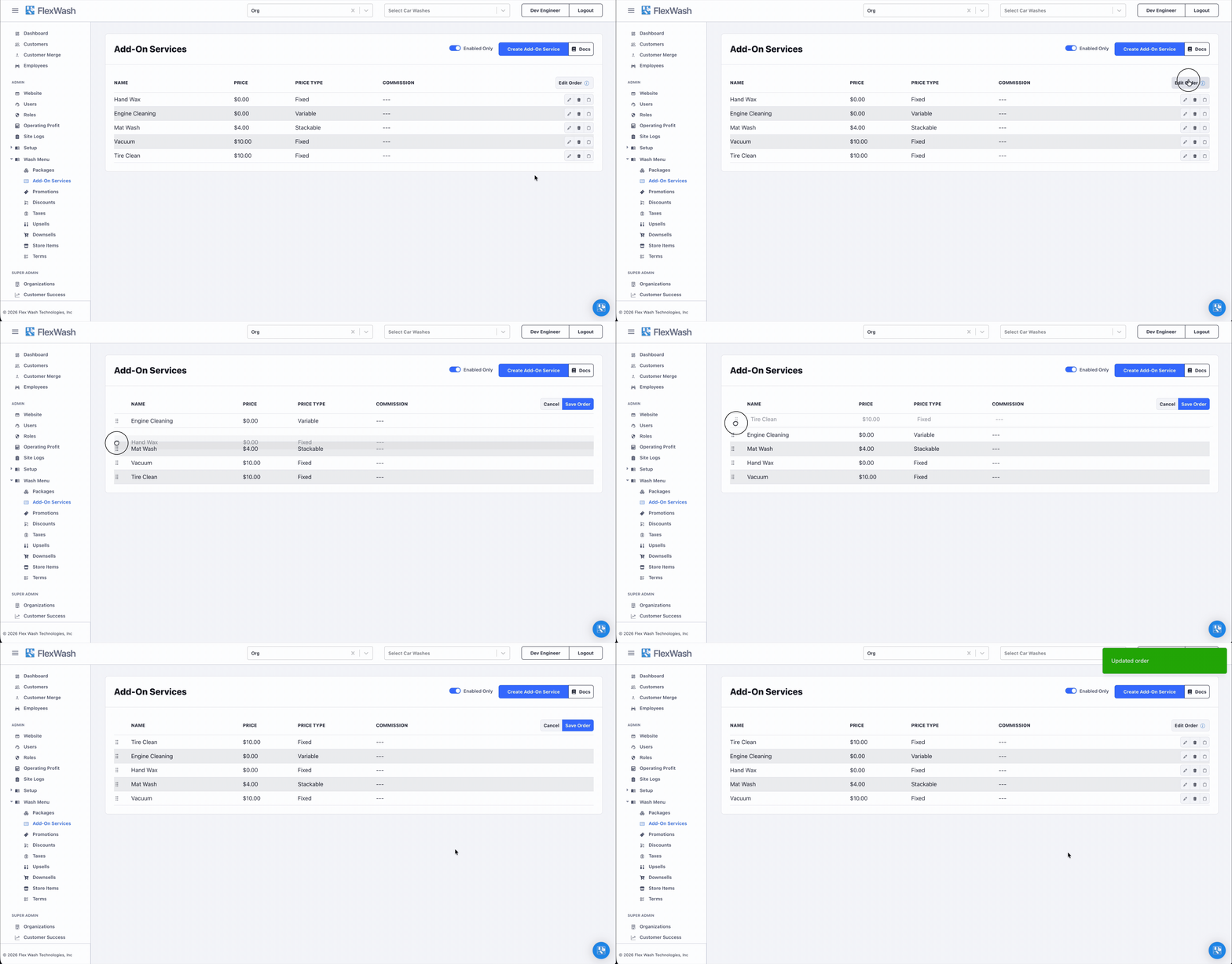
# Auto Retracts
Source: https://docs.flexwash.com/configuration/wash-menu/auto-retracts
Save retract settings to a vehicle so the right equipment retracts automatically, on every visit, at every site.
Some vehicles need equipment retracted before they go through the tunnel. Lifted trucks, luxury vehicles, oversized mirrors, aftermarket accessories. Traditionally that depended on a loader remembering the vehicle and hitting the retract manually.
Auto retracts save the retract to the vehicle instead. Tag the vehicle once and the right retracts are applied on every future visit, at any of your sites, before the car reaches the equipment.
## Why it matters
> [card] No reliance on memory
>
> The setting travels with the vehicle, so it does not depend on which loader is working the lane that day.
> [card] Consistent across sites
>
> The tag is on the vehicle, not the site controller, so a customer gets the same treatment at every location.
> [card] Fewer damage claims
>
> Retracts get applied when they should, which removes a common cause of avoidable damage.
> [card] Loaded ahead of time
>
> Settings are read at identification, before the vehicle reaches the equipment.
## How it works
**1. Retracts are defined in your controller**
Each retract is configured individually in your site controller (DRB, RTC, or similar). FlexWash reads those definitions and applies settings against them. If a retract does not exist in the controller, it cannot be tagged.
**2. Retracts are linked to tags**
Retracts are attached to tags in the **loading** tag category. A tag can cover one retract or several, so you can group them for a vehicle type rather than selecting each one individually.
**3. A vehicle gets tagged**
Either a loader selects the retract at the site, or an attendant adds the tag to the vehicle profile. Both write to the same place.
**4. Every future visit applies it automatically**
On the next arrival, the vehicle is identified and its loading tags are read. The tagged retracts fire without anyone doing anything.
## Automatic and manual sites
A site runs in one of two modes, never both. Everything above describes
automatic mode.
| Mode | Saved tags apply | A change made during a visit |
| - | - | - |
| **Automatic** | Every visit | Saved, and becomes the vehicle's new setting |
| **Manual** | Every visit | Applies to that wash only, saved setting unchanged |
Automatic is the right default for a vehicle whose needs do not change, such as
a lifted truck that always needs the same retracts. Manual suits sites that make
frequent one-off adjustments and do not want each one becoming permanent.
## Setting up your tags
Group retracts by the kind of vehicle or by individual equipment, whichever way works best for your operation.
Common groupings:
* **Lifted trucks.** Retract equipment that catches on raised bodies and oversized tires.
* **Luxury vehicles.** Go touchless. Retract anything the customer would not want contacting their paint or trim.
* **One to one.** A tag can apply a single retract when you want to be precise about one piece of equipment. A "No Tire Shine" tag linked only to the tire shine retract at each of your locations.
In the **Flex Engage** section of your dashboard, go to **Tags** and create a new tag in the **Loading** category. Give it a name that describes the retracts it applies, then select those retracts from the list.
The retracts available here were defined during your controller setup. If one is missing or needs renaming, manage them under **Wash Menu > Retracts**.

**Grouped Tag**

**One to one.**

After saving, the tag appears in the list. You can edit it later to add or remove retracts, rename it, or delete it entirely.

> [!TIP]
>
> Use the same tag names across all your sites. Because the tag lives on the vehicle rather than the site, consistent naming is what makes the cross-site behavior obvious to your staff. That consistency starts in the controller, so check your specific retract names outside of FlexWash match across locations before you build the tags.
## Applying and removing retracts
A retract stays on the vehicle until someone takes it off. Once applied it fires
on every visit, so there is nothing to re-enable. On a manual site, a change a
loader makes at the lane applies to that wash only and does not change what is
saved.
Two places to manage it, and both write to the same vehicle:
| Where | Who | Use it when |
| - | - | - |
| Loader screen at the site | Loader | The vehicle is in front of you and needs a retract now |
| Vehicle profile in the admin interface | Attendant or admin | Setting it up ahead of time, or correcting a mistake |
In both places it is the same control. Select the tag to apply the retract, unselect it to remove it.
On the **Wash Queue** page, you can see the currently saved tag at the top, below the plate number, check or uncheck the tag on the vehicle. The change saves immediately.

In the admin interface, open **Customers** in the left sidebar, search for the customer, and open their profile. Under **Vehicles**, click the edit button on the vehicle you want to tag.

In the **Tags** box, select the tags you created earlier, then click **Continue**.

Leave a comment recording why the tag is being added. Comments are saved to the vehicle's timeline.

Timeline entries can be referred back to later if there is a dispute about whether a retract was applied correctly along with context.

> [!WARNING]
>
> On an automatic site, a retract applied by mistake keeps firing on every visit
> until it is removed. If a customer reports their vehicle is getting
> unnecessary retracts, check the vehicle's loading tags first.
# Loyalty Points
Source: https://docs.flexwash.com/configuration/wash-menu/loyalty-points
Increase repeat visits and average ticket value with a flexible, built-in loyalty program.
A well-designed loyalty program keeps customers coming back, and spending more each time they visit.
FlexWash Loyalty Points are built directly into your POS and wash menu, allowing you to reward repeat customers without external tools, manual tracking, or operational overhead.
## How Loyalty Points Work
Loyalty Points are earned when a customer purchases an eligible **wash package
or add-on**. Points accumulate on the customer profile and can later be redeemed for free items once a defined threshold is reached.
Points are a fixed amount per item that you set, not a percentage of what the customer paid.
Membership signup and monthly renewal orders earn the membership package's points the same way, so a member accrues points every billing cycle. Points post when the order is paid.
## When Points Are Not Earned
Points are earned only on paid orders. These cases earn nothing:
* **The order is not paid.** Open, pending, and voided orders earn nothing. Points post when the order is paid.
* **No customer on the order.** Guest and walk-up sales with no customer profile earn nothing.
* **The order redeems points.** An order that redeems Loyalty Points earns none, even if it also contains eligible items.
* **A wash book or membership benefit is redeemed.** The redeemed wash earns nothing. Add-ons on the same order still earn.
* **Items with no points configured**, and non-wash lines such as tax, tips, store items, and gift cards.
> [!NOTE]
>
> A refund does not remove points. Once an order is paid the points are on the customer's balance and stay there, including after a partial refund.
### Promotions
Any item discounted by a promotion earns no points on that order, no matter how small the discount. A one dollar promotion suppresses points exactly as much as a free wash.
This includes membership orders. A signup with a promotion applied to the membership package earns **zero** points for that membership, not fewer points.
Other items on the same order earn normally. Upsells and downsells do not affect points.
## Configuring Loyalty Points
Loyalty Points are configured from the **Wash Package** and **Add-Ons** configuration pages.
For each eligible item, you define:
* **Points Earned** per purchase.
* **Points Required** to redeem that wash package or Add-On for free.
## Example

* A customer earns **10 points** for each purchase of the *Deluxe* wash.
* The *Deluxe* wash requires **40 points** to redeem.
After four qualifying purchases, this customer becomes eligible for a free *Deluxe* wash. This is how it will show up on the Pay tablets:
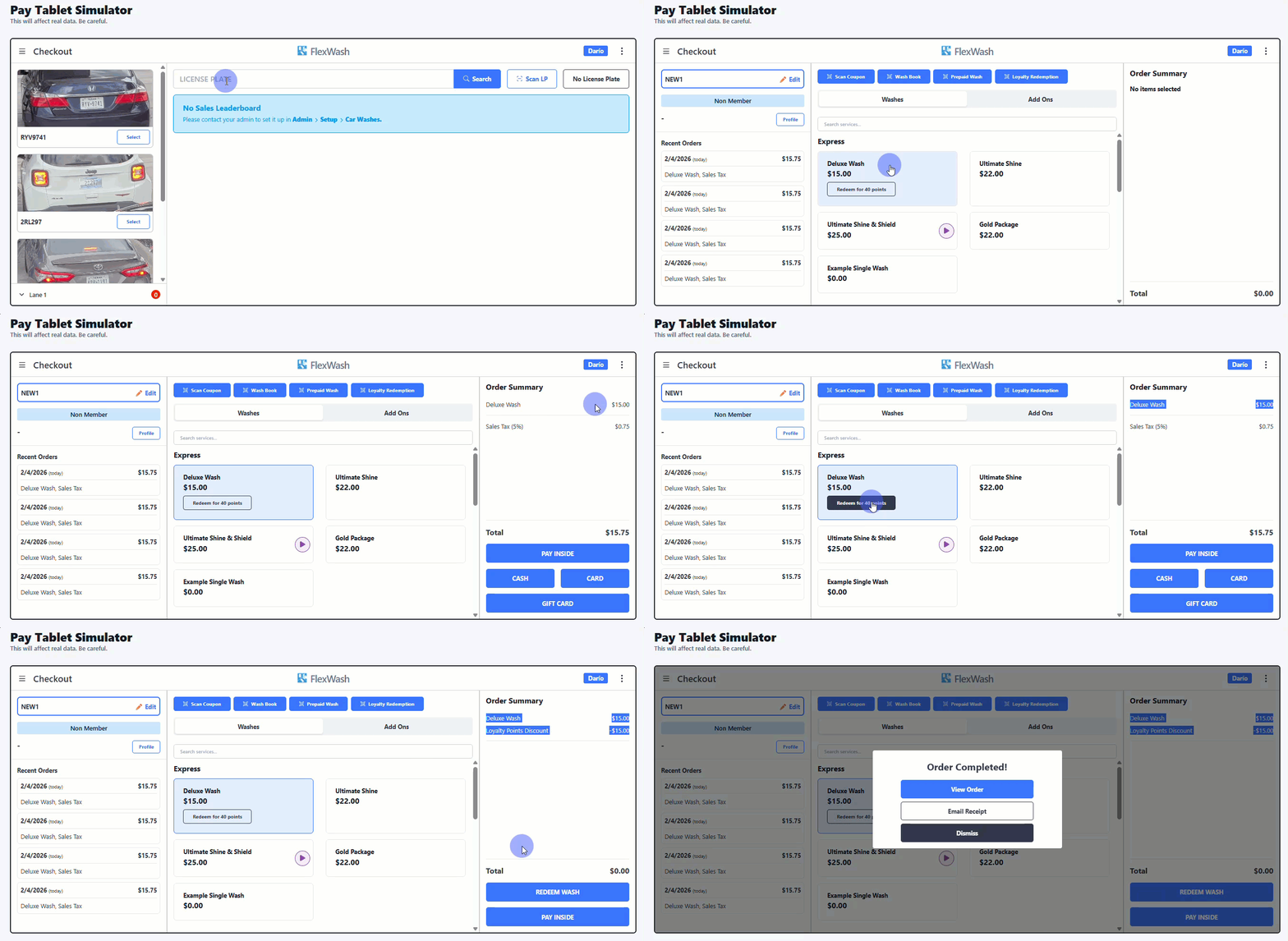
## Optional Redemption
Redemption is **always optional**.
Customers can choose to:
* Redeem points as soon as they qualify.
* Continue accumulating points to redeem higher-value washes or add-ons later.
This flexibility encourages continued engagement while giving customers control over when and how they redeem rewards.
## Operational Benefits
* Encourages repeat visits without relying on discounts.
* Increases perceived value while protecting margins.
* Requires no manual tracking or reconciliation.
* Can be configured for single washes, membership packages and add-ons.
Loyalty Points in FlexWash are simple for customers, effortless for staff, and designed to drive long-term retention without complicating operations.
# Membership Packages
Source: https://docs.flexwash.com/configuration/wash-menu/membership-package
Launch a new membership plan in minutes: set what members get, what they pay at each location, and where it shows at checkout.
A membership package is the plan a member subscribes to. You set it up once in
the web app, in five steps, and FlexWash then offers it on your FlexWash devices.
To sign up a member at the pay tablet, see
[Memberships and Single Washes](/operations/pay-tablets/memberships-and-single-washes).
## Step 1: Create the Package Template
Go to **Wash Menu > Packages** and click **Create Package Template**.

On the **Config** tab:
* **Name.** The membership name, for example "Express Membership".
* **Package Type.** Select **Membership**.

> [!TIP]
>
> To have members sign Terms & Conditions when they buy the membership, select
> the terms in **Term ID**. See
> [Terms & Conditions](/configuration/wash-menu/terms-and-conditions).
## Step 2: Set Access, Reporting, and License Plate
Check these settings before you save:
* **Require License Plate** on the **Config** tab. Recommended for memberships,
so your cameras and RFID readers recognize the vehicle as a member.
* **Enabled** on the **Access Control** tab. It is checked by default. A package
that is not enabled does not appear on your FlexWash devices.
* **Roles** on the **Access Control** tab. Optional. Only the selected roles can
sell the package. Leave it empty to let every employee sell it.
* **Revenue Type** on the **Reporting** tab. Select **Membership**. FlexWash does
not change it when you pick the Package Type, and a new template starts as
**Express**.


Click **Save**.
## Step 3: Create a Membership Benefit
After you save, a **Membership Benefits** card appears below the package
settings. Click **Create membership benefit**.

Fill in the benefit:
* **Name.** For example "Express Unlimited".
* **Benefit Type.** There are two options, **Recurring** and **Interval**.
Select **Recurring** so members can redeem washes during every billing period.
**Interval** limits how often a member can use the benefit. See
[Interval Benefits](/memberships/membership#interval-benefits).
* **Benefit Wash Package.** The wash the tunnel runs when the member comes in,
for example "Express Wash".
* **Discount Percentage.** Set it to **100%** so members are not charged on each
visit. They pay the monthly membership price instead.

Click **Save**.
## Step 4: Add a Car Wash Package
Below the Membership Benefits card, the **Car Wash Packages** card sets the
price and other settings for each location. Click **Create Car Wash Package**.

In **Select Car Wash**, choose the location.

Then fill in the car wash package:
* **Name.** The package name at this location.
* **Price.** The monthly membership price.
* **Taxes.** Select the taxes that apply at this location. See
[Taxes](/configuration/wash-menu/taxes).
* **Bulk Price.** Optional. A lower price for a member's additional vehicles.
See [Bulk Membership Discount](/memberships/bulk-discount).
* **Enabled.** Must be checked so the package appears on your FlexWash devices.

Click **Save**. Repeat for each location that sells the membership.
## Step 5: Set the Display Order (Optional)
Control the order in which packages appear on the POS with **Edit Order**.
On the Packages page, packages are grouped by **Package Type**, for example
Express, Full Service, and Membership. You reorder packages within each group.
The groups always display in a fixed order.
1. Go to **Wash Menu > Packages**.
2. Click **Edit Order** in the top-right corner of the group you want to
reorder.
3. Drag the rows into the order you want, using the handle on the left of each
row.
4. Click **Save Order**, or **Cancel** to discard your changes.
The new order appears right away on all FlexWash devices in the organization.
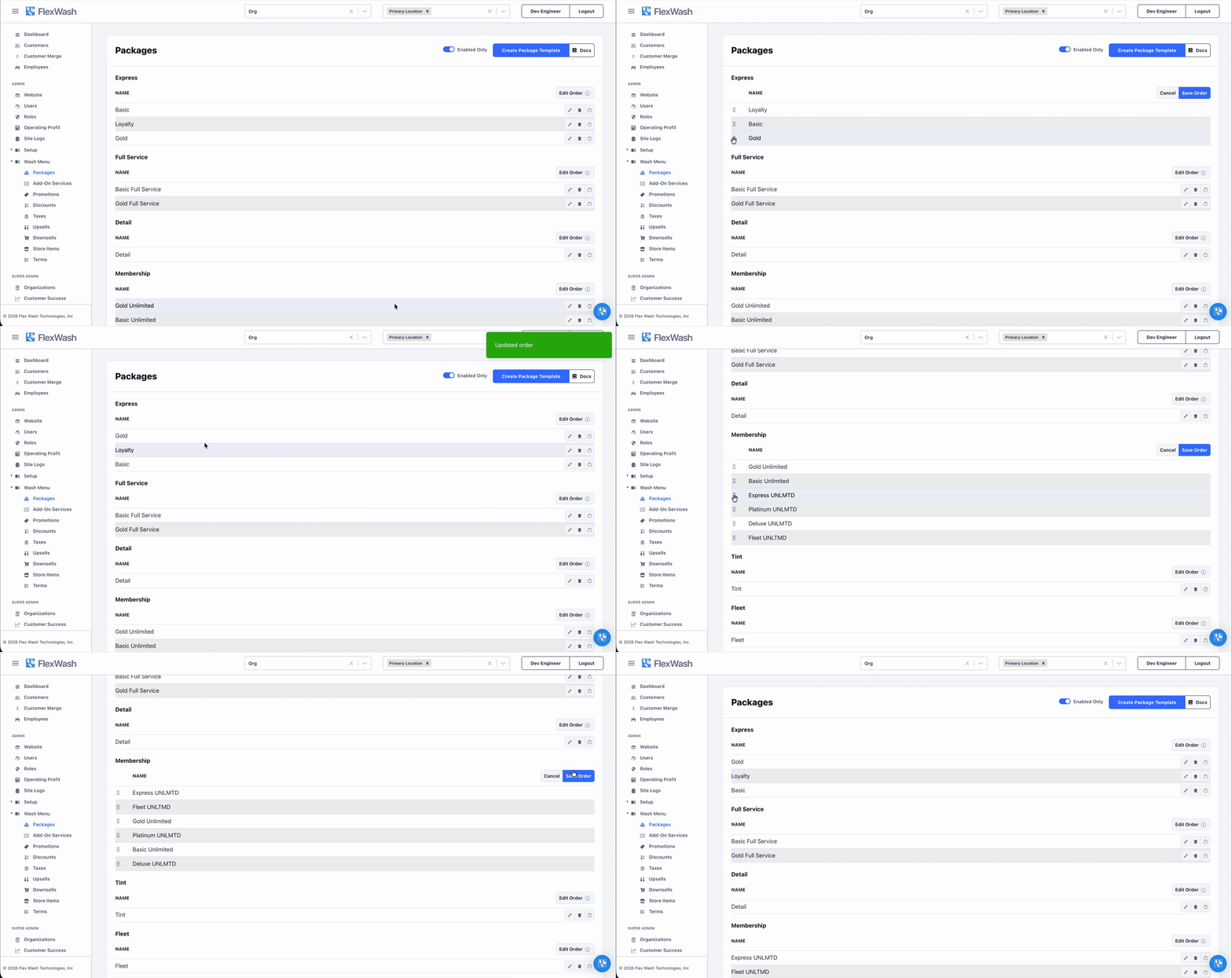
## Related Articles
* [Memberships](/memberships/membership)
* [Freeze Memberships](/memberships/freeze-memberships)
* [Cancellations](/memberships/valid-until#cancellations)
* [Prorating](/memberships/prorating)
* [Terms & Conditions](/configuration/wash-menu/terms-and-conditions)
* [Prepaid Memberships](/memberships/prepaid-memberships)
# Retracts
Source: https://docs.flexwash.com/configuration/wash-menu/retracts
Protect the vehicles your equipment should not touch. Skip any piece of the tunnel for a single car, without slowing the line.
A retract tells your tunnel controller to pull back or skip a piece of equipment for one vehicle. The car still gets its wash, but whatever you retracted does not touch it.
Operators use retracts both to protect vehicles from equipment and to protect equipment from vehicles. Lifted trucks, oversized mirrors, roof racks, aftermarket accessories, convertibles, classic cars, and customers who do not want a specific service applied.
**Common retracts:**
* Top Brush
* Side/Rear Wraps
* All Wraps
* Tire Shine/Wheel Cleaner
* Undercarriage
## How retracts work
Retracts live in two places, and both are required.
| Where | What it holds | Who sets it up |
| - | - | - |
| Your tunnel controller | The retract itself, its behavior, and its code number | You or your controller vendor |
| FlexWash | A name and the matching code, so FlexWash can trigger it | You, under **Wash Menu > Retracts** |
FlexWash does not create retracts. It references retracts that already exist in your controller. If a retract is not configured and enabled in the controller, adding it to FlexWash will not make it work.
Once a retract exists in both places, you can trigger it manually from the Wash Queue, or apply it automatically to a vehicle on every visit. See [Auto Retracts](/configuration/wash-menu/auto-retracts).
## Step 1. Configure the retract in your controller
Every controller handles this differently. r-TC, TunnelWatch, and ICS each have their own screens, terminology, and setup steps, so follow your controller's documentation or work with your controller vendor.
What matters is the outcome. When you are done, you need two things:
1. **The retract is enabled** in the controller and does what you expect when triggered.
2. **The retract's code number**, which is how FlexWash tells the controller which retract to fire.
For example, in an r-TC controller a retract named "No Tire Shine" might be code `5`. In TunnelWatch or ICS the same retract could carry a different number. The name and the number both come from the controller, not from FlexWash.
> [!WARNING]
>
> Codes are specific to each controller. The same retract can be code `5` at one site and a different number at another, even within the same organization. Pull the code from each site's controller rather than assuming they match.
## Step 2. Add the retract in FlexWash
Go to **Wash Menu > Retracts** and click **Create retract**.

* **Name.** Use the same name the controller uses. If the controller calls it "No Tire Shine," call it "No Tire Shine" here too.
* **Controller Code** or **Relay Numbers.** Enter the code number from the controller, or the relay numbers if you use a relay-based controller with binary programming. Each retract needs one or the other.
* **Set by Default.** Preselects the retract for every car on the tunnel tablet. Staff can clear it before they send the car. [Auto-Queue](/operations/transactions/auto-queue) sends no retracts, including default ones.
* **Reverse of Add-on.** Inverts the button on the tunnel tablet's Skip Queue screen: FlexWash sends the code when the retract is **not** selected, and skips it when staff select it. The Wash Queue ignores this option and sends the retract only when it is selected.
* **Sonny's Service.** On Sonny's controllers, check this for items the controller classifies as services instead of retracts.
Click **Save**.

## Naming
Your staff see these names on the Wash Queue, and tags attach to them, so set them before building anything on top.
* **Match the controller.** A retract with one name in the controller and another in FlexWash makes troubleshooting harder than it needs to be.
* **Match across sites.** If "No Tire Shine" is code `5` at one site and `7` at another, that is fine, but the name should be identical at both. Consistent names are what make a retract behave predictably for a customer who visits more than one of your locations.
* **Describe the outcome, not the equipment.** "No Tire Shine" tells a loader what happens. "Retract 5" does not.
## Verify it works
Run a vehicle through with the retract triggered before you rely on it.
**1. Trigger the retract**
Load a vehicle and apply the retract to a single wash from the Wash Queue.
**2. Watch the equipment**
Confirm the correct piece of equipment retracts, and that nothing else changed.
**3. Repeat at each site**
Codes differ per controller, so a retract that works at one location proves nothing about another.
## Troubleshooting
| Symptom | Likely cause | What to check |
| - | - | - |
| Nothing happens when the retract is triggered | Wrong code or not configured in the controller | Compare the code in FlexWash against the controller and test sending the retract outside of FlexWash |
| Retract is not configured in the controller | It was added to FlexWash only | Confirm the retract exists and is enabled in the controller |
| The wrong equipment retracts | Code belongs to a different retract | Verify the code against the controller's retract list |
| Works at one site, not another | Site-specific code | Pull the code from that site's controller |
| Retract missing from the list when building a tag | Not added in FlexWash yet | Add it under **Wash Menu > Retracts** |
## Next step
With retracts configured, you can attach them to tags so they apply to a vehicle automatically on every visit, at every site. See [Auto Retracts](/configuration/wash-menu/auto-retracts).
# Single Wash Package
Source: https://docs.flexwash.com/configuration/wash-menu/single-wash-package
We show you how to set up a new single Wash Package.
## Wash Menu
The first option on the Wash Menu section allows you to create and set up new wash packages.

Then click on the "Create Wash Package" button.

## Single Wash Package

For a single wash package, select the **"Express"** option on the **"Package type"** dropdown menu. Also select "Express" on the "Revenue Type" dropdown menu for the stats to reflect accordingly on the reports.
The "Roles" menu allows you to make the packge visible only to certain level of employees. If you leave this option empty it will appear for everyone by default.
### Other options

Always make sure that the **"Enabled"** option is checked here, otherwise the wash package will not appear on your Flexwash devices.\
\
Other recommended settings are "Count as Wash", "Count towards Car Count", and "Count towards Ticket Average". Check these to keep track of this wash package sales in your reports.
### Car Wash Package

After the Wash Package is created, you will find this new section on the bottom of the settings called **"Car Wash Packages".** This gives you the ability to offer different prices and other settings per site or location.
### Select Car Wash

A new window will appear. Select the correct **Car Wash**.
### Create Wash Package

Fill in the name, price and taxes if required on your location.
> [!WARNING]
>
> Make sure that the **"Enabled"** option is checked here as well to ensure that the wash package appears on your Flexwash devices.
### Controller Config

The **Controller Config** section tells your car wash controller which wash to run for this package. Set one of the two fields, depending on your controller type:
* **Controller Code:** The number your controller uses to identify this package.
* **Relay Numbers:** The relay or relays to fire to trigger this wash. Separate multiple relays with commas (for example, `3,7`). FlexWash sorts the list, removes duplicates, and ignores anything that isn't a number.
Leave both fields empty if this package never triggers a wash on your controller.
Each car wash has its own Controller Config for the package, so you can map the same package differently at each site.
When you save, FlexWash sends the update to your site's controller automatically. You don't need to restart anything.
> [!TIP]
>
> Not sure which field your controller uses? Contact FlexWash support.
## Display Order
Control the order in which Wash Packages appear on the POS using the **Edit Order** feature.
On the Packages page, packages are grouped by **Package Type** (for example, Express, Full Service, Membership). Reordering works independently within each Package Type group. The groups themselves always display in a fixed order.
To change the display order:
1. Navigate to **Wash Menu** > **Packages**.
2. Click **Edit Order** in the top-right corner of the Package Type group you want to reorder.
3. Drag and drop rows using the handle that appears on the left of each row.
4. Click **Save Order** to apply your changes, or **Cancel** to discard them.
> [!TIP]
>
> Place your most frequently sold packages at the top of each group so staff can find them quickly at checkout.
The new order is immediately reflected on all FlexWash devices tied to the organization.
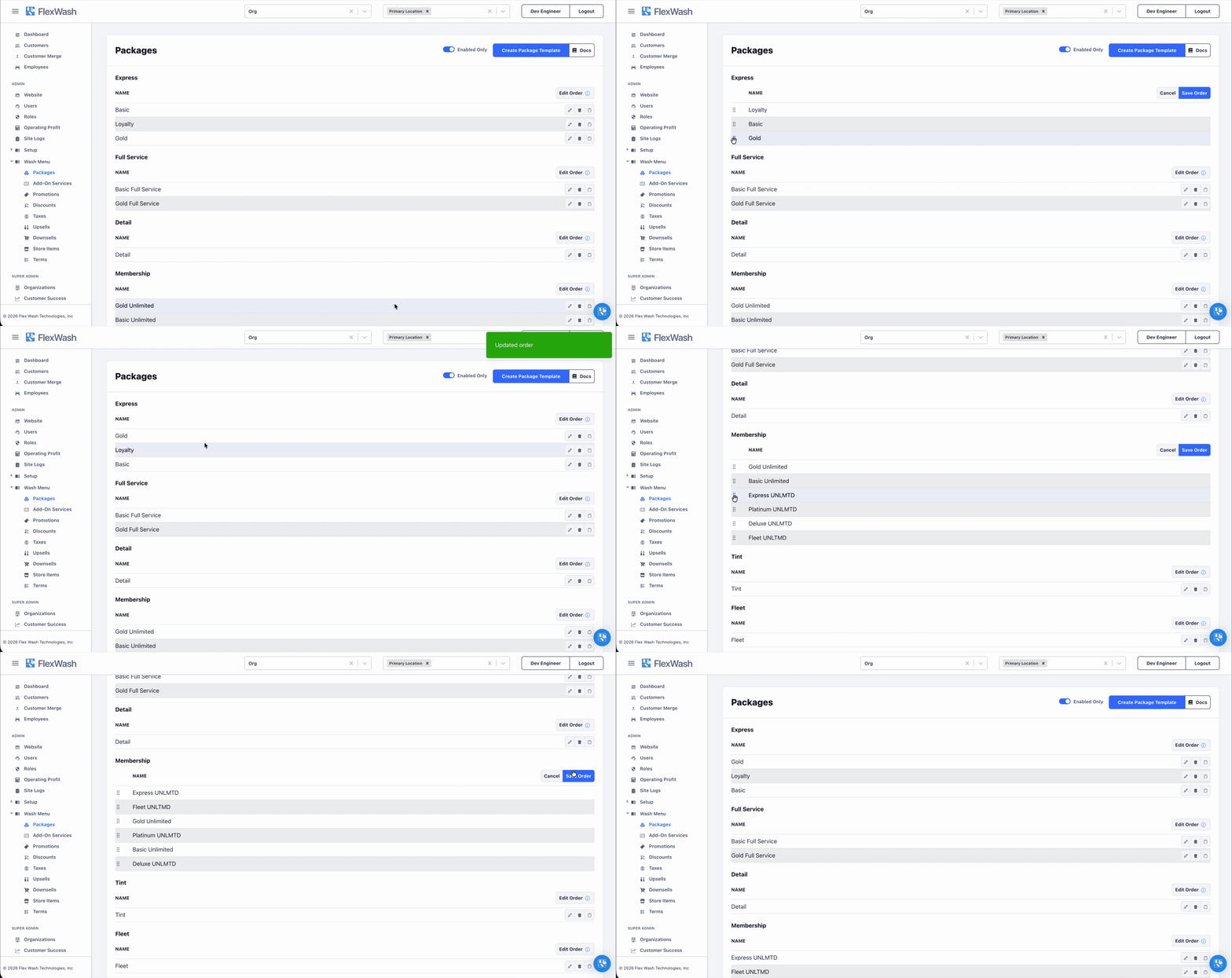
# Store Items
Source: https://docs.flexwash.com/configuration/wash-menu/store-items
These products are available for purchase within the car wash facility and include a variety of items such as beverages, snacks, and air fresheners.
### To create a store item:
From the wash menu section, navigate to "store items" and then select "create store item."

### Fields:
1. Name.
2. Price.
3. Barcode: You can scan a barcode or input the numerals for the item to be redeemed through the pay terminal.
4. Revenue Type: for reports only, what revenue class to report under in FlexWash.
After you have filled in all the fields, select "Save."
> [!NOTE]
>
> Check or uncheck the enable toggle to control the store item's visibility on the pay tablet.

# Taxes
Source: https://docs.flexwash.com/configuration/wash-menu/taxes
We show you how to set up taxes for the wash packages you sell.
Taxes can be created in the system, and then assigned to each package. This allows us to apply the appropriate tax rates based on the package and its location.
## Wash Menu
Select the Taxes option:

## Name and percentage
You can now set up a name for the tax and its percentage:

## Apply to Wash Packages

Once the tax is created, it is time to apply it to your wash packages. Open your "Packages" and select the edit option.

Scroll to the bottom until you find the **Car Wash Packages** section. Click again on the edit button.

A new window will appear. You will find the taxes section there. Click and select the correct one. Save your changes before you close the window.
# Terms and Conditions
Source: https://docs.flexwash.com/configuration/wash-menu/terms-and-conditions
Upload the Terms & Conditions that your customers will sign when they enroll in a membership.
### Terms and Conditions
Add your membership terms to FlexWash once, then attach them to your membership packages. Customers read, accept, and sign the terms when they sign up for a package that has them.

Terms shown during membership sign up on the pay tablet
### Terms
Open **Wash Menu > Terms** in the left navigation. The list shows each term's **Name** and **Description**. Click **Create term** to add a new one.

### Create Term
1. Enter a **Name**, such as "Unlimited Club Terms". You use this name to pick the terms on a wash package.
2. Enter the terms in **Description**. The field starts with sample terms. Review them and change them to fit your business and local regulations. You can format the text with [Markdown](https://www.markdownguide.org/basic-syntax/).
3. Click **Save**.

> [!TIP]
>
> Read our ["Signed Terms and Conditions" article](https://docs.flexwash.com/memberships/signatures) if you want to learn how to find the signed Terms and Conditions on a customer's account.
### Term ID
To apply the terms to a wash package:
1. Open the package in **Wash Menu > Packages**.
2. In **Term ID**, select the terms by name. The field appears only when **Package Type** is **Membership** or **Prepaid Membership**.
3. Click **Save**.

To stop asking customers to accept and sign terms for a package, clear **Term ID** and save.
> [!TIP]
>
> For the changes to take effect on your Pay Tablets, select the "Refresh Config" option as shown in our [Refresh Config on Pay Devices](https://docs.flexwash.com/essentials/refresh-menu) article.
# Washbooks
Source: https://docs.flexwash.com/configuration/wash-menu/washbooks
Learn how to create and configure Washbooks, including pricing and location-specific settings.
## Overview
Washbooks are prepaid, discounted bundles of car washes. They often include promotions such as **“buy 5, get 1 free”**, allowing customers to save compared to purchasing individual washes.
***
## Create a Washbook
Within the **Wash Menu**, you can create and configure a new Washbook.
1. Click **Create Wash Package**

***
## Set Up a Washbook
Follow these steps to configure your Washbook:
1. Select **Washbook** from the **Package Type** dropdown
2. Choose a Washbook template
3. Enter the number of wash applications (total washes included)
4. Ensure **Enabled** is checked
5. Select **Washbook** from the **Revenue Type** dropdown
6. (Optional) Use **Roles** to restrict visibility
7. Click **Save**

> [!NOTE]
>
> If the **Enabled**
>
> option is unchecked, the Washbook will not be available on FlexWash devices.
> [!NOTE]
>
> By default, Washbooks are visible to all employees. Use **Roles**
>
> to limit access by employee level.
***
## Configure Location Settings
After creating a Washbook, a **Car Wash Packages** section will appear at the bottom of the settings page. This allows you to define pricing and configurations for each location.
1. Select the appropriate car wash location

2. In the configuration window:
* Enter the **Name**
* Set the **Price**
* Apply **Taxes** (if required)
* Ensure **Enabled** is checked
3. Click **Save**

***
> [!WARNING]
>
> Make sure the Washbook is enabled both globally and at the location level. Otherwise, it will not be available for purchase.
> [!NOTE]
>
> To make the wash book accessible, refresh the config on the payment tablet.
Refer to the [**Gift Card & Washbook Balance**](/operations/transactions/card-balance) article to check on the balance of existing.
***
## Best Practices
* Double-check pricing for each location before saving
* Ensure reporting accuracy by selecting the correct **Revenue Type**
* Use **Roles** to control employee access where needed
* Verify all settings after setup to avoid availability issues
***
# Contact Import
Source: https://docs.flexwash.com/data-import/contacts-import
Bring your contacts into FlexWash in minutes and start marketing to consent-verified lists right away.
Your contact list is the foundation of every marketing campaign you run. The
Contact Import tool lets you upload that list yourself, in minutes, without
waiting on a migration ticket.
Import is self-serve, consent-aware, and safe. FlexWash validates your file
before writing anything, tracks SMS and email consent on every contact, and
drops the whole list straight into a CRM List that is ready to use the moment
the import finishes.
> [card] Self-serve and fast
>
> Upload a CSV and import in minutes. No onboarding ticket required.
> [card] Consent built in
>
> Capture SMS and email consent per contact, with a signed attestation on
> every import.
> [card] Campaign ready
>
> Every contact lands in the CRM List you choose, ready for marketing.
## Before You Start
> [!NOTE]
>
> Contact Import is available to **Admin** users. You will find it in the
> FlexWash app under **Import** then **Contacts**.
You import contacts from a CSV file. Keep these limits in mind:
* The file must be a `.csv` file.
* The maximum file size is **50MB**.
* Every row needs at least a phone number or an email address.
## Prepare Your File
Your CSV may contain the columns below. Every value is optional on its own, but
the row-level rules that follow still apply. The Contacts import page includes a
downloadable sample CSV so you can see the exact format.
| Column | Description |
| - | - |
| `name` | The contact's name. |
| `phone` | The contact's phone number. Reduced to digits automatically. |
| `email` | The contact's email address. |
| `smsConsent` | SMS consent status. One of `opted_out`, `opted_in`, `double_opted_in`, or blank. |
| `emailConsent` | Email consent status. One of `opted_out`, `opted_in`, or blank. |
### Row Rules
FlexWash checks each row against a small set of rules so your data lands clean:
* **Reachable contact.** Each row must have a `phone`, an `email`, or both.
* **Consent needs its channel.** Set `smsConsent` only when the row has a
`phone`. Set `emailConsent` only when the row has an `email`.
> [!NOTE]
>
> `double_opted_in` applies to SMS only. The `emailConsent` column accepts
> `opted_out`, `opted_in`, or blank.
## How It Works
**1. Upload your CSV**
Drag and drop your file onto the Contacts import page, or click to select
it. FlexWash validates the file before writing any data.
**2. Review the preview**
FlexWash shows how many contacts it found and a full breakdown of SMS and
email consent. Any problem rows are listed
with the row number and the reason.
**3. Choose a CRM List**
Pick the CRM List that every imported contact will be added to. This is
where your new contacts live and where your campaigns draw from.
**4. Certify and sign**
Confirm that you have verifiable proof of opt-in and double-opt-in consent
for the relevant contacts, then sign to attest. The import button stays
disabled until a CRM List, both certifications, and a signature are
provided.
**5. Import**
The import runs in the background. When it finishes, you receive a summary
of everything that was created.
## Validation Catches Problems First
Nothing is written to your database until you confirm the import, and a file
with any errors cannot be imported at all. FlexWash reports each problem row
with its row number, the contact's name, and a clear message, such as:
* `phone or email is required`
* `phone is required when smsConsent is set`
* `duplicate phone "..." in file`
Fix the flagged rows in your CSV, then upload the file again. Once the preview
is clean, you can proceed.
## Duplicate Handling
FlexWash protects your existing data by skipping contacts you already have:
* **Existing phone or email.** If a row's phone or email already exists in your
organization, that row is skipped. No identity is created, and the existing
contact is not added to the CRM List.
* **Duplicates in the file.** A phone or email can appear only once per file. A
repeat is reported as an error.
> [!TIP]
>
> The import summary reports how many contacts were actually created, so the effect of skipped duplicates is always visible.
## Compliance and Audit Trail
Marketing to imported contacts carries consent obligations, so FlexWash records
the proof alongside the data:
* You certify verifiable proof of opt-in and double-opt-in before importing.
* Your signature is captured and saved with the import.
* The consent breakdown is preserved in the import summary.
This gives you a durable record of who imported the list, what they attested to,
and the consent state of every contact at the time of import.
## Upload History
The **History** tab lists every contact import for your organization, showing
the file name, rows processed, who uploaded it, and when. From there you can:
* Open the **Details** view to see the import summary, the captured signature,
and the consent attestation.
* **Download** the original CSV file.
This keeps a complete, reviewable trail of every list you have brought into
FlexWash.
# Voucher Code Import
Source: https://docs.flexwash.com/data-import/external-voucher-codes-import
Turn a partner's spreadsheet of codes into ready-to-send offers in minutes, with validation that catches bad codes before a customer ever sees one.
The Voucher Code importer loads a CSV of one-time-use codes from a partner
business into an [external voucher](/marketing-and-ai/flex-engage/external-vouchers)'s
pool. Once imported, FlexEngage assigns each code to a single customer at send
time, so every code redeems exactly once at the partner's point of sale.

## Where to Find It
Open **Admin -> Import -> Voucher Codes** in the left navigation, or click
**Import Codes** on the External Vouchers page. The page has two tabs:
**Import** for new uploads and **History** for every prior upload in this
organization. You need at least the Admin role.
> [!NOTE]
>
> Only **Single Use** vouchers accept code imports. Multi Use vouchers share
> one code across all recipients and need no import.
## File Format
Your CSV must contain a single required column:
| Column | Description |
| - | - |
| `code` | The one-time-use code the customer presents at the partner business |
Every code is validated against the target voucher's barcode type, so an
unscannable code is rejected before it can ever be sent:
| Barcode type | Allowed characters |
| - | - |
| Code 39 | Digits, uppercase letters, spaces, and `- . $ / + %` |
| Code 128 | Printable ASCII characters |
| QR Code | Any non-empty text |
A sample CSV is available on the import page itself.
## Running an Import
**1. Select the target voucher**
Choose the Single Use voucher the codes belong to. The dropdown shows how
many codes each voucher has left.
**2. Upload the CSV**
Drag and drop the file, or click to select it. The maximum file size is
50MB. FlexWash validates the whole file first; nothing is written yet.
**3. Review and confirm**
A confirmation dialog shows the number of codes about to be imported and
the target voucher. Type your organization name to enable the import
button.

**4. Track the import**
The import runs in the background with a live progress bar. Large files
process in batches, and the finished import reports how many codes were
newly added and how many already existed.
## Validation Rules
The validation pass must come back clean before the import button unlocks:
* The header row must contain the `code` column. Empty rows are ignored.
* Every code must be renderable in the voucher's barcode type (see the
charset table above). Invalid codes are listed row by row.
* The same code may not appear on multiple rows of one file. In-file
duplicates block the import until you remove them.
Codes that already exist on the voucher from an earlier upload are **not**
errors: the import skips them and reports them as "already existed". An
existing code is never modified, because it may already be assigned to a
customer.
This makes re-importing safe. If an upload is interrupted or the partner
sends an updated batch that overlaps the old one, upload the full file again
and only the new codes are added.
## History and Rollback
The **History** tab lists every voucher code upload with a link to download
the original file, and lets you roll back an upload.
A rollback deletes the codes that upload added, with one exception: a code
already sent to a customer is kept, because deleting it would break the
voucher page that customer received. The rollback report shows exactly how
many codes were deleted and how many were kept.
> [!WARNING]
>
> Codes already sent to customers cannot be recalled. Verify the file
> carefully before confirming an import.
## Verify the Import
After the import completes, open **FlexEngage -> External Vouchers** and check
the voucher's **Total Codes** and **Remaining** columns against your CSV row
count. The import summary also breaks the upload down into newly imported
codes and codes that already existed, so the numbers should reconcile exactly.
> [!NOTE]
>
> The channel form's **Test Send** button sends your message text as-is, so
> `{{voucherUrl}}` is not replaced and no code is consumed. To see the
> customer-facing voucher page end to end, run a real Scheduled Blast filtered
> to a test customer.
# Gift Card Import
Source: https://docs.flexwash.com/data-import/gift-cards-import
Pre-load gift cards in minutes so your team can start selling and redeeming on day one.
The [Gift Card](/operations/transactions/gift-cards) importer turns a CSV of codes and starting balances into live,
redeemable gift cards in your FlexWash organization. Use it to onboard a
batch of physical cards from a print vendor, to migrate balances from a
legacy system, or to seed promotional cards for a campaign.

## Where to Find It
Open **Admin -> Import -> Gift Cards** in the left navigation. The page has
two tabs: **Import** for new uploads, **History** for every prior upload in
this organization. You need at least the Admin role to access this page.
> [!NOTE]
>
> FlexWash gift cards do **not** support expiration. Once active, a card
> holds its balance until it is fully redeemed or manually deactivated.
## Where Imported Cards Show Up
Imported gift cards land in the organization's gift card pool but are
**not attached to a customer**. To find them, open
**Reports -> Liabilities** and switch to the **Gift Cards** tab. Cards are
searchable by code or by the cardholder's last four (the latter is empty
for imported cards).
## Re-Importing and Updating Balances
Re-import the same file as many times as you need. Gift cards are matched
by code, and the latest upload wins: a code already in your organization
has its balance overwritten, while new codes are added. Re-running never
creates duplicate cards.
This makes it safe to fix a bad balance column or refresh balances that
changed in your legacy system since the first import. Correct the CSV and
upload it again.
## Verify the Import
Run an end-to-end test before committing to a full file:
1. Upload a 5 to 10 row test CSV.
2. On the pay tablet, start a sale for any package and select **Gift Card**
as the tender. See [Redeem from a pay tablet](/operations/transactions/gift-cards#redeem-from-a-pay-tablet)
for the full flow.
3. Enter one of the imported codes and confirm the balance matches the CSV.
## Tips
* Always open the CSV in a plain-text editor before uploading to verify
Excel has not stripped leading zeros from your card codes or rewritten
long codes in scientific notation.
* The combined balance shown in the confirm dialog is the cleanest sanity
check available before you commit. If it looks off by an order of
magnitude, you almost certainly have a decimal-point issue in the CSV.
# Interim Import
Source: https://docs.flexwash.com/data-import/interim-import
Switch POS systems without the usual migration headaches.
[Token migrations](/data-import/member-token-migration) start after launch and
take 4-6 weeks. After you go live with FlexWash (sign up all new memberships in
FlexWash) you need a streamlined way to recognize members still being billed in
your ex-POS. Interim Imports is our solution for that problem.

> [!WARNING]
>
> Without Interim Imports, after launching a new POS operators run into these issues:
>
> * Members appearing inactive at the pay station
> * Staff manually overriding washes
> * Incorrect wash access
> * Long lines and member frustration
>
> Interim Imports removes this risk by temporarily syncing active membership data
> from the legacy POS into FlexWash until migration is complete.
### Benefits
* **Immediate recognition** - Members are recognized right after go-live.
* **Frictionless for staff** - No manual lookups or overrides by staff.
* **Fast daily workflow** - Each import takes less than a minute.
* **One-time mapping** - Legacy plans only need to be mapped once.
* **Vendor-agnostic** - Works with most major car wash POS export formats.
* **Safe and secure** - Encrypted uploads with automated file processing.
### How It Works
Day before you launch you need to start doing these steps every day until
your [token migration](/data-import/member-token-migration) is complete.
**1. Export your members**
Export your active membership list from your previous POS as a CSV or XLSX
file.
**2. Upload the file**
Upload the file in the Interim Imports section of FlexWash.

**3. Map your plans**
Map legacy membership plans to your FlexWash packages.
**4. Run the import daily**
Repeat the upload each day until token migration is complete.
**5. Members stay recognized**
Active members continue to be recognized correctly at the pay station.
### Plan Mapping
The first time you upload an Interim Import, FlexWash asks you to map plans from
the old POS to packages in FlexWash. This step is important because FlexWash uses
these mappings to determine which package each member receives.

Use the **Frozen** checkbox when the old POS requires a separate plan to
represent frozen members. A frozen membership has temporarily suspended billing,
so members on this plan cannot redeem a wash. Marking the plan as frozen, rather
than mapping it to a package, tells FlexWash to recognize these members without
granting wash access.
> [!NOTE]
>
> Once plans are mapped, FlexWash remembers them for future imports, so you only
> need to map each plan once.
### License Plate Backfill
If you are importing members with RFID tags, you can have the FlexWash LPR camera
automatically detect each customer's license plate and populate the vehicle's
license plate field. To enable this feature, turn on
**Interim Import License Plate Backfill** in your [Car Wash Config](/configuration/users-and-admin/car-wash-config).
If your files carry the RFID tag in the License Plate column, see
[License Plate Backfill](/configuration/users-and-admin/car-wash-config#license-plate-backfill)
for how FlexWash resolves plate and tag clashes at import time.
### How to Test
Before launching FlexWash do a sample import and use the
[simulator](/configuration/testing/pay-tablet-simulator) to verify an Interim
Import member is recognized.
Enter the license plate in the simulator and verify the vehicle is recognized
as an Interim Import member, with the membership benefit automatically applied
and the ability to redeem the wash.

### Troubleshooting
#### Active Member Issues
If a member who is active in your Ex-POS does not appear as an Interim Import
member in FlexWash, check the following.
**1. Search for the license plate**
Go to the **Manage** tab and search for the vehicle's license plate.
If the plate does not appear in the results, it was never imported. Open
the export file that was uploaded, confirm the plate is present, and
verify the correct file was uploaded.
**2. Check the Status column**
Hover the status icon to see why the vehicle is or isn't recognized as
active.

**3. Check Valid Until**
**Valid Until** is the date through which the vehicle is recognized as an
active member. If this date is in the past, the record has expired and
needs a fresh import from your Ex-POS.
**4. Verify the plan mapping**
Confirm the **Mapped Package** column shows a valid FlexWash package. If
it is empty, the plan needs to be mapped under **Plan Mappings** on the
**Import** tab before the member can be recognized.
> [!NOTE]
>
> Click the details button under **Actions** to open a record's full history,
> including the plan name, recharge date (what it represents for that import),
> and the date the record was inserted.
>
> 
#### Non-Active Member Issues
If a member is not active in your Ex-POS but is treated as active in FlexWash,
search for the member in the **Manage** tab, open their details, and check whether the
Ex-POS records indicate the member is active.

### What Interim Imports Does *Not* Do
Interim Imports does not:
* Change anything in the legacy POS.
* Handle billing.
* Replace token migration.
* Require downtime.
* Interrupt normal operations.
It is simply a temporary recognition layer used during migration.
## Summary
With Interim Imports, operators can migrate to FlexWash confidently, knowing
active members stay recognized throughout the migration period. By running daily
imports and keeping plan mappings up to date, you avoid recognition issues and
provide a smoother experience for both staff and members.
# Interim Lookup
Source: https://docs.flexwash.com/data-import/interim-lookup
Recognize a member at a site that has not converted yet, from any phone, using nothing but their license plate.
When you convert sites to FlexWash one at a time, there is a stretch where some
of your locations are live and others are not. A member who normally washes at a
converted site pulls into one that has not converted yet, and the staff there
have no way to see that the customer exists.
Interim Lookup closes that gap. An admin generates a link, staff open it on a
phone, and a license plate returns the customer's membership status and package.
For example, sites A and B are on FlexWash and site C is not yet. Staff at site
C can look up a plate and see the membership that customer holds at A or B, and
treat them accordingly until C converts.
Use it when someone at the pay station or in the lane needs to answer one
question fast: is this car a member, and what did they pay for?
## Generate the lookup link
This is done once per shift by anyone with access to the FlexWash back office.
**1. Open Interim Lookup**
Go to **Interim Lookup** in the sidebar.
**2. Click Generate**
FlexWash creates a QR code and a link.

**3. Get the link onto a phone**
Scan the QR code with the phone's camera, or click **Copy** and send the
link to staff.
> [!WARNING]
>
> The link expires 12 hours after it is generated. Generate a new one at the
> start of each shift rather than reusing an old link.
## Look up a vehicle
The lookup page opens with a license plate field and a **Scan LP** button.

Manually enter a plate or scan it with the camera.
> [tab] Type the plate
>
> Enter the license plate and tap **Search**.
> [tab] Scan the plate
>
> **1. Tap Scan LP**
>
> The camera opens in a **Scan License Plate** window.
>
> **2. Frame the plate and capture**
>
> Fill the frame with the rear of the vehicle so the plate is readable,
> then tap **Capture**.
>
> 
>
> Frame the plate within the viewfinder.
>
> **3. Check the read, then confirm**
>
> FlexWash shows the characters it detected. Compare them against the
> plate before tapping **Confirm**. Tap **Retake** if the read is wrong or
> the image is blurry.
>
> 
>
> Plate detected. Confirm or retake.
>
> > [!TIP]
> >
> > Characters like 0 and O, 1 and I, and 8 and B are easy to confuse, and
> > dirt, snow, and plate covers make it worse. See
> > [LPR and RFID limitations](/technical/hardware/lpr-rfid)
> > for what affects a read.
## Read the result
**Member Details** returns the customer's subscription status and package.

**Subscription Status** tells you how FlexWash knows about this customer.
**Package** is the plan they hold, which is what determines the wash they can
redeem.
A status of `Interim import` means the membership came in through an
[Interim Import](/data-import/interim-import) rather than being created in
FlexWash directly. For those customers, the package shown is the FlexWash
package their legacy plan was mapped to under **Plan Mappings**. If it looks
wrong, the plan mapping is the place to check.
# Manual Member Migration
Source: https://docs.flexwash.com/data-import/manual-member-migration
Re-tokenize members at the pay tablet and sidestep per-token exit fees.
FlexWash makes it easy to migrate members by re-tokenizing their cards at the
pay tablet. Use this as an alternative to, or alongside,
[member token migration](/data-import/member-token-migration).
Some POS vendors, faced with mounting churn, now charge an exit fee for every
token you migrate out. Even though these are **your** members and **your** data.
Manual member migration helps you reduce that cost: re-tokenize a large share of
your membership base at the lane, then run a formal token migration only for the
remaining balance.
## Prerequisites
**1. Turn off unattended mode**
If your lane is gated, turn off
[unattended mode](/configuration/users-and-admin/car-wash-config#lane-config)
so the gate does not open automatically for members.
**2. Run a recent Interim Import**
Make sure you have recently completed an
[Interim Import](/data-import/interim-import). FlexWash uses this data to
populate your CRM, including each customer's name, phone, and email, during
the tokenization process.
## The Process
### Identify the Member
**1. The member pulls up to the pay station**
With unattended mode off, staff check the vehicle in manually.
**2. Check in the vehicle**
After check-in, look at the customer name.
**3. Confirm the interim import**
If the name shows **Interim Import**, proceed with the re-tokenization process
below.

### Tokenize the Card
**1. Open the profile**
Select **Profile** to open the customer profile.
**2. Add the card**
Select **Add Card** and ask the member for their card.
**3. Capture the card**
Tap or insert the card on the payment reader.
**4. Confirm the save**
Wait for the system to save the card to the account.

### Complete the Wash
**1. Return the card**
Hand the member's card back.
**2. Redeem the wash**
Redeem the wash as normal and send the vehicle through.
### Cancel in the Ex-POS
Open the **Tokenized Interim Members** report for each day. Here you can bulk
apply promotions, if any, to the members you tokenized.

Make sure you manually cancel every one of these subscriptions in your ex-POS.
> [!WARNING]
>
> If you skip this step, you will double charge your members. Cancel each
> tokenized subscription in your ex-POS the same day you re-tokenize it.
## Tips
One of our customers, [Rising Tide](https://www.risingtidecarwash.com/),
manually migrated most of their impressive membership base. Their advice for
others follows.
### Schedule for Success
Minimize disruption to your members' routine. Assign an employee to each lane
you run this on.
Schedule dedicated time outside your busiest hours and staff it well. If a lane
gets too busy, turn unattended mode back on. Do not hold up a long line.
### Standardize the Explanation
Give your staff a short pitch to memorize:
> "Hey! We upgraded our system recently and your card didn't carry over. I just
> need to swipe it for \$0 to keep your membership active. It won't charge you."
Hand each customer a printed postcard.


### Incentivize the Outcome
If your ex-POS imposes an exit fee of \$2 per token, offer your employees
something less than that for each re-tokenization they complete.
The Tokenized Interim Members report records which employee performed each
re-tokenization, so calculating commissions is straightforward.
# Member Token Migration
Source: https://docs.flexwash.com/data-import/member-token-migration
Switch POS systems safely with zero downtime.

Member imports are often the most stressful part of upgrading a car wash POS.
You’ve invested years building your membership base, and recurring revenue is
the backbone of your business.
At FlexWash, token migration is something we specialize in.
We’ve successfully migrated 100+ sites with an above 98% membership
transfer rate, while avoiding the common issues operators fear most:
double billing, missed charges, and forced card re-entry.
We achieve this because FlexWash operates higher up the payment stack than
most car wash POS providers, allowing us to coordinate secure, processor-level
token transfers instead of relying on brittle workarounds.
### Key Terms
* **Ex-POS**: Your current POS system
* **Ex-Processor**: The payment processor used by your Ex-POS (e.g. TSYS, Fiserv)
* **FlexWash**: Your new POS
* **Adyen**: FlexWash’s payments platform
## Export
In most cases, the Ex-POS will request a shutoff date for recurring billing.
We recommend setting this at least **30 days out**. If timelines change, ask
for adjustments with a **minimum of 7 days’ notice**.
During this period, we set up [interim imports](/data-import/interim-import)
to ensure your site continues operating smoothly and members remain active
without disruption.
### POS Data Export
You notify your Ex-POS that you are migrating to FlexWash and CC our team on an
email thread. They provide a data export containing all membership details
except credit card numbers.
### Credit Card Data
You request an introduction to your Ex-Processor to export existing card tokens.
Once connected, you CC your FlexWash onboarding specialist.
From there, **we coordinate a secure, encrypted processor-to-processor transfer**
directly between your Ex-Processor and Adyen. This minimizes data handling and
avoids unnecessary exposure.
## Import
Once all export files are received, we begin the import process.
### Phase 1: Controlled Test Import
We start with a **small, representative** sample of approximately 10 members.
These are intentionally chosen to reflect real-world edge cases, such as:
* Members due to be re-charged tomorrow
* Members who recently declined
* Members with multiple vehicles and/or [bulk discounts](/memberships/bulk-discount)
* Members on promotional pricing (e.g. \$1 intro periods)
These members are imported first, then you manually cancel them in the Ex-POS to
prevent double billing. The following morning, we manually verify that **all
charges processed exactly as expected**.
This step allows us to validate the migration under real conditions before
touching your full membership base.
### Phase 2: Full Migration
Once recurring billing is fully disabled in the Ex-POS, we migrate the remaining
members on the **same day**.
After completion, you receive a **detailed migration report** showing:
* How many memberships transferred successfully
* Which memberships (if any) failed and why
This ensures full transparency and allows targeted follow-up where needed.
## The Result
The result is a measured, audited migration process with multiple safeguards,
designed to protect your revenue and your customer relationships.
Token migration doesn’t have to be a leap of faith. With FlexWash, it’s a
controlled, proven process, and one you can feel confident putting in front
of your customers.
# Non-Member Imports
Source: https://docs.flexwash.com/data-import/non-member-imports
Bulk-load gift cards, wash books, promotion codes, and vehicles into FlexWash with a validate-first workflow that protects your data.
FlexWash provides four self-serve CSV importers for the data that operators
most often arrive with: gift cards, wash books, promotion codes, and vehicles
(including fleet and house accounts). Each importer follows the same
validate-then-confirm flow, retains the original file for audit, and writes
nothing to your database until you explicitly confirm. If any rows fail
during the import, FlexWash imports the rest and gives you a file of the
failed rows to fix and re-upload.
## Where to Find the Importers
Open the left navigation, expand **Admin**, then expand **Import**. The four
importers appear as direct links.

## Choosing the Right Importer
Operators routinely confuse the importers because the source data often looks
similar. Use this table to pick the right tool before building a file.
| You have... | Use this |
| - | - |
| A list of pre-printed gift card codes with starting balances in dollars | [Gift Cards](/data-import/gift-cards-import) |
| Prepaid wash bundles (e.g. "Buy 5, get 1 free" books) | [Wash Books](/data-import/wash-books-import) |
| A batch of single-use promo codes for a Wash Codes promotion | [Promotion Instances](/data-import/promotion-instances-import) |
| A fleet roster, house accounts, or any vehicle list with optional memberships | [Vehicles](/data-import/vehicles-import) |
| A daily membership feed from your legacy POS | [Interim Imports](/data-import/interim-import) |
| Existing credit card tokens from your previous processor | [Member Token Migration](/data-import/member-token-migration) |
> [card] Re-import anytime, last write wins
>
> Re-import the same file as often as you need. Each row is matched by
> its code (or license plate for vehicles), and the most recent upload
> wins: records already in your organization are updated in place and
> new rows are added. Re-running never creates duplicates.
## Upload History
Every importer has a **History** tab next to **Import** at the top of the
page. The tab shows every file ever uploaded for that importer in this
organization, who uploaded it, when, and how many rows were imported.

Click **Download** on any row to retrieve the original CSV. This is the
canonical record for audits, accounting reconciliation, and after-the-fact
debugging.
## Failed Rows
A failure partway through a file never stops the whole import. FlexWash
writes rows in batches. If a batch fails, FlexWash skips every row in
that batch, records why, and continues with the next batch. Rows in
batches that succeed stay imported.
When rows fail, the import summary shows both counts, for example
"Imported 5 vehicles; 3 rows failed." Click **Download failed
rows** to get a CSV of the rows that did not import.

To download the file later, open the **History** tab and find the upload
with the **FAILED** badge.

Click the **Details** (info) icon on that row, then click **Download
failed rows**.

### Fix and Re-upload Failed Rows
The file contains only the failed rows, in your original column order,
with a **Failure Reason** column added at the end. The file is always a
CSV, even if you uploaded an Excel file.

1. Fix each row based on its **Failure Reason**.
2. Upload the corrected file on the **Import** tab of the same importer.
You can leave the **Failure Reason** column in place. The importer
ignores it.
Re-uploading is safe. Rows that already imported are matched and
updated, never duplicated.
## Rolling Back an Import
Every row in the **History** tab has a **Rollback** option in the **Actions**
column. Rollback removes what a specific upload created, so you can remove a
bad file's imports yourself.

The confirmation modal shows exactly what will happen before you commit:
* **How many rows will be deleted.** These are rows the upload created that
are not referenced anywhere else in FlexWash.
* **How many rows will be kept, and why.** A row is kept if it's already in
use, for example as a payment, on an order line item, or assigned to a
customer. FlexWash never deletes a record that would break existing data.
Rollback is permanent. To confirm, type your organization name into the field
provided, then click **Roll back \[n] rows**.
## Per-Importer Guides
> [card] [Gift Cards](/data-import/gift-cards-import)
>
> Bulk-load pre-printed gift cards with starting balances.
> [card] [Wash Books](/data-import/wash-books-import)
>
> Import prepaid wash bundles tied to a package template.
> [card] [Promotion Instances](/data-import/promotion-instances-import)
>
> Generate batches of single-use codes for a Wash Codes promotion.
> [card] [Vehicles](/data-import/vehicles-import)
>
> Load fleets, house accounts, and one-shot vehicle rosters with optional memberships.
# Prepaid Members & Loyalty Points
Source: https://docs.flexwash.com/data-import/prepaid-members-import
Carry every prepaid membership and loyalty balance into FlexWash so day-one customers feel no disruption at the gate.
Prepaid membership bases and loyalty programs are some of the stickiest parts
of a car wash business, and they are also the parts customers notice fastest
when a migration goes wrong. FlexWash imports both, per car wash, before your
first day live, so existing members keep the time they paid for and every
loyalty point follows them into the new system.
> [!NOTE]
>
> Recurring card-on-file memberships move through a different path. See
> [Member Token Migration](/data-import/member-token-migration)
> for the processor-to-processor flow, and
> [Interim Imports](/data-import/interim-import) for the
> daily bridge that keeps members recognized while tokens migrate.
## Before You Start
Build the prepaid wash package at every car wash that needs it first. The
importer resolves each row to a live membership or prepaid membership package
at that row's car wash, and a row whose package is missing or deleted stops
the import. See
[Prepaid Memberships](/memberships/prepaid-memberships) for how to create one.
## How It Works
This is a hands-on, support-led import. You produce the data per car wash, and
a FlexWash onboarding specialist runs the importer for you after a joint
validation pass.
**1. Export one CSV per car wash**
Pull active and expired prepaid memberships and loyalty balances from your
current POS into a separate CSV file for each car wash.
**2. Share the files with your onboarding specialist**
Email the CSVs to
[onboarding@flexwashtech.com](mailto:onboarding@flexwashtech.com). We treat
them as the source of truth for prepaid coverage and point balances at
go-live.
**3. We validate and map plans**
Our support staff verifies every row, flags any data issues back to you,
and maps each legacy plan name to a FlexWash package template. We do this
mapping once per organization and reuse it on every subsequent file.
**4. We run the import**
Once the file is clean and every plan is mapped, we run the importer.
Customers, vehicles, prepaid subscriptions, memberships, and loyalty
balances land in FlexWash together. Supplying the optional
`customerInsertedAt`, `vehicleInsertedAt`, and `membershipInsertedAt`
columns preserves each record's original start date.
## File Format
One CSV per car wash. The header row must contain the exact field names shown
in the tables below, and empty cells are allowed for any optional field.
Every row carries the car wash it belongs to. The importer rejects the whole
file if the `carWashId` column is missing, if any cell in it is blank, or if
any row names a different car wash than the one selected in the importer. This
catches the wrong site's file before it writes anything.
### Required Fields
| Field | Description |
| - | - |
| `carWashId` | The FlexWash car wash ID for the site this file covers. Every row repeats it. |
| `customerMigrationId` | The customer's unique ID in your existing POS. We use this to keep your historical records linked. |
| `name` | Customer's full name. The column must be present. Individual cells can be blank, though we strongly recommend filling them. |
| `licensePlate` | Vehicle license plate. The plate is uppercased, every letter `O` becomes digit `0`, and all whitespace is removed. Verify your records do not rely on a literal `O`. |
| `packageTemplateId` | The FlexWash package template ID for the prepaid plan, as a UUID. The importer resolves it to that template's package at the row's car wash. |
| `vehicleSubscriptionStatus` | Use `prepaid_active` for coverage that still has time on it and `prepaid_expired` for coverage that has run out. |
| `billDateInMonth` | Day of the month for billing, as an integer from 1 to 31. Stored on the membership record. For prepaid rows, `validUntil` is what governs coverage. |
| `integrationPlatform` | The car wash's payment platform: `adyen`, `clover`, or `pax`. |
| `validUntil` | The last day prepaid coverage is good for, written as `YYYY-MM-DD`. For example, `2026-06-30` covers the customer all day on June 30 in the car wash's local time. Required for both prepaid statuses. |
### Conditionally Required Fields
| Field | Description |
| - | - |
| `customerUuid` | The customer's FlexWash UUID. Required on every row when `integrationPlatform` is `adyen`. Also supply it to group several vehicles under one customer, whatever the platform. |
### Optional Fields
| Field | Description |
| - | - |
| `phoneNumber` | Phone number. Non-digit characters are removed and the trailing 10 digits are kept. |
| `email` | Customer email address. Stored lowercased. |
| `make` | Vehicle make. |
| `model` | Vehicle model. |
| `year` | Vehicle year. |
| `rfidTag` | Vehicle RFID tag. Whitespace is removed, the tag is uppercased, known vendor prefixes are stripped, and leading zeros are dropped. |
| `statusUpdatedAt` | When the subscription last changed status. Defaults to the import time. |
| `customerInsertedAt` | Original customer creation timestamp. Preserves the customer's true start date in FlexWash. |
| `vehicleInsertedAt` | Original vehicle creation timestamp. |
| `membershipInsertedAt` | Original membership creation timestamp. |
| `ccZipcode` | Billing zip code on file. |
| `promotionId` | FlexWash promotion ID to attach to the subscription. It must already exist in your FlexWash organization. |
| `loyaltyPointsBalance` | Current loyalty point balance for the customer, as an integer. |
> [!NOTE]
>
> Card columns such as `ccIntegrationToken`, `ccLastFour`, and `ccBrand` are
> not part of a prepaid file. Prepaid members have no card on file, and those
> columns are only required for the `active` and `active_external` statuses
> used by [Member Token Migration](/data-import/member-token-migration).
## Prepaid Coverage Dates
`validUntil` is the whole point of a prepaid row, so the importer refuses to
guess it. A `prepaid_active` or `prepaid_expired` row without a `validUntil`
stops the import rather than falling back to a computed date.
Set `validUntil` to the last day the customer is entitled to wash. FlexWash
stores it as the end of that day in the car wash's local timezone, so a member
paid through June 30 washes freely all day on June 30.
Send expired prepaid members too, with their real past `validUntil` and their
loyalty balance. They arrive as `prepaid_expired`, which keeps their history
and points intact and gives your team a warm list to re-sell on day one.
## Several Vehicles on One Membership
The importer groups rows into customers by `customerUuid`. Give every vehicle
its own row, repeat the same `customerUuid` on each, and those rows land as one
customer with one membership and one subscription per vehicle.
Each vehicle keeps its own coverage dates. `validUntil`,
`vehicleSubscriptionStatus`, `packageTemplateId`, and `promotionId` all sit on
the vehicle's own subscription, so one customer can hold a vehicle prepaid
through June 30 next to a second vehicle whose prepaid time ran out last year.
Send one row per vehicle, keep `customerUuid` identical across them, and vary
`licensePlate` and `validUntil` between them. Giving the second vehicle its own
`customerUuid` creates a second customer in FlexWash, which this never needs.
Rows that share a `customerUuid` must agree on `billDateInMonth`. If they
disagree, the import stops and reports the conflict.
> [!WARNING]
>
> Leave `customerUuid` blank and each row becomes its own customer, because
> FlexWash generates a fresh UUID per row. Always supply it for any customer
> with more than one vehicle.
## Verify the Import
Check a handful of records yourself as soon as the import finishes:
1. Open **Customers** in the admin app and search for one of the imported
customers by name, phone number, or plate.
2. On the customer's profile, confirm the loyalty point balance matches your
source data.
3. Open the vehicle and confirm the normalized license plate, the prepaid
package, and the valid-until date match the CSV row.
4. Repeat for a `prepaid_expired` member and confirm the subscription reads as
expired rather than active.
## Tips for a Clean File
* If you use Excel, export the file as a CSV, then open it in a plain-text
editor to confirm Excel has not stripped leading zeros from RFID tags or
rewritten long numeric codes in scientific notation.
* Keep `customerMigrationId` stable. If your ex-POS has a separate "customer
number" that changes when a record is edited, use the immutable internal ID
instead.
* Deduplicate plates and RFID tags before you send the file. One repeat of
either stops the whole import.
* Normalize legacy plan names to one casing before exporting. `Premium Prepaid`
and `premium prepaid` map as two separate plans.
* Send one file per car wash even if a single customer appears at more than one
location. We reconcile shared identities during the verification pass.
* Send any correction to your onboarding specialist before we import the file.
Fixing a row afterwards is a manual change in FlexWash, not a second upload.
# Promotion Code Import
Source: https://docs.flexwash.com/data-import/promotion-instances-import
Bulk-load thousands of unique promo codes for your next direct-mail or partner campaign without lifting a finger past the upload.
The Promotion Code importer attaches a batch of unique, single-use codes
to a Wash Codes promotion. Use it when you have generated codes outside
FlexWash (for a direct-mail campaign, partner program, or one-time
acquisition push) and need them recognized at the pay tablet. These codes
are sometimes called voucher codes, promotion codes, wash codes, or
discount codes.

## Where to Find It
Open **Admin -> Import -> Promotion Instances** in the left navigation.
You need at least the Admin role and access to the specific promotion you
plan to import codes for.
## Wash Codes Promotions Only
The importer only accepts promotions of type **Wash Codes**. Other
promotion types (such as single-use or multi-use) cannot be bulk-loaded this way.
A Wash Codes promotion is a promotion configured to issue unique,
single-use codes per recipient. See [Promotions](/configuration/pricing-and-promotions/promotions)
for the full configuration. If your promotion does not appear in the
Target Promotion dropdown, it is not a Wash Codes promotion - convert
it or pick a different one.
## Customer Redemption
Imported codes redeem like any other Wash Codes instance.
**1. The customer presents the code**
The customer arrives with a printed code, a QR code, or a code
delivered through email or SMS.
**2. Staff scans or enters the code at the pay tablet**
The pay tablet validates the code against the promotion and applies
the configured deduction automatically.
**3. Pre-attribution attaches contact info**
If the imported row included `name`, `email`, or `phoneNumber`,
FlexWash attaches those values to the customer record at the moment
of redemption.
Each code can only be redeemed once. After redemption it is marked
consumed and will fail validation on a subsequent attempt.
## Re-Importing
Run multiple imports against the same promotion as your campaign grows.
Codes are matched per promotion, and the latest upload wins: a code
already attached has its `name`, `email`, and `phoneNumber` updated, while
new codes are added. Re-running never creates duplicate codes.
Re-importing updates the imported contact details only. It does not reset a
code that a customer has already redeemed.
## Verify the Import
Run an end-to-end test before committing to a full file:
1. Upload a 5 to 10 row test CSV against the production target promotion.
2. On the pay tablet, start a sale, tap **Scan Coupon** on the top row and
scan or enter one of the imported codes.
3. Confirm the promotion's configured deduction is applied to the order.
## Tips
* Generate codes outside FlexWash with whatever entropy your campaign
requires (e.g. 12-character alphanumeric for high-value direct mail,
short codes for in-store flyers). The importer treats `code` as an
opaque string.
* For campaigns split across vendors, upload each batch against the same
promotion as it arrives. Re-uploading the master list after a partial
vendor batch is safe: existing codes are updated and new ones are added,
with no duplicates.
# Vehicle Import
Source: https://docs.flexwash.com/data-import/vehicles-import
Onboard fleet rosters, house accounts and prepaid members in a single upload, with optional memberships, normalized plates, and full audit trail.
A single Vehicles upload can create vehicles, group them under existing
or new customers, optionally attach a membership and a vehicle
subscription, and flag the resulting customer accounts as fleet or house
accounts. Use it for fleet rosters, house accounts and prepaid members.

## When Not to Use This Importer
Pick a different tool if any of these match your situation.
| Situation | Use this instead |
| - | - |
| Daily membership feed so existing members are recognized at the gate | [Interim Imports](/data-import/interim-import) |
| Migrating credit card tokens from a previous processor | [Member Token Migration](/data-import/member-token-migration) |
| Adding a single vehicle to a customer | The Pay Tablet vehicle workflow or the customer profile in the admin app |
## Where to Find It
Open **Admin -> Import -> Vehicles** in the left navigation. You need at
least the Admin role.
## Columns
For the full list of columns and formats, see **File Format Requirements**
on the import page. Download a sample file from **Sample Files** on the
same page.
## Customer Grouping
This is the rule that catches operators off guard most often.
Rows that share the same `customerName` (case-insensitive) are grouped
to the **same customer**. FlexWash decides who that customer is per
group:
| Match in your organization | Result |
| - | - |
| An existing customer has the row's `phoneNumber` | The rows attach to that customer, and the customer keeps the name on file. |
| No phone match, and no customer has this name | A new customer is created. All rows in the group attach to it. |
| No phone match, and exactly one customer has this name | All rows attach to that existing customer. |
| Two or more customers match the name or the phone | The preview lists them as a duplicate group. Merge them or skip those rows. You cannot merge while any of them has an active subscription. |
Because the phone number wins, changing a customer's name in the file
does not create a new customer when their phone number is already on
file.
### Contact details
Rows for the same customer must agree on `phoneNumber`, `email`,
`dateOfBirth` and `loyaltyPointsBalance`. Blank cells are ignored. A
phone number can belong to only one customer name in the file.
For an existing customer, a non-blank `phoneNumber`, `email` or
`dateOfBirth` replaces the value on file. The preview warns you before
the import. A blank cell leaves the value on file unchanged.
## Prepaid Memberships
Import prepaid members with `subscriptionStatus` set to `prepaid_active`
or `prepaid_expired`. A prepaid row needs a `validUntil` date and a
`planName` mapped to a Prepaid Membership template:
| carWashName | customerName | licensePlate | subscriptionStatus | validUntil | planName | phoneNumber |
| - | - | - | - | - | - | - |
| Main Street Wash | Jane Doe | XYZ789 | prepaid_active | 2027-06-30 | Prepaid 6 Months | 5552014227 |
* **`validUntil` is required.** The membership ends at the end of that
day, in the car wash's time zone. A prepaid row without it fails
validation.
* **Map the plan to a Prepaid Membership template.** A prepaid row whose
`planName` maps to a recurring membership fails validation. A
recurring row whose `planName` maps to a Prepaid Membership template
also fails.
* **Renew by re-importing.** Upload the member again with a new
`validUntil`. FlexWash extends the membership to that date. The
preview counts these rows as **Prepaid memberships renewed**.
* **A live recurring membership is never replaced.** If the vehicle
already has an active, payment failed, frozen, invalid card or
externally billed recurring membership, FlexWash keeps it. The row's
vehicle details still update. The preview counts these rows as
**Prepaid rows that keep an existing recurring membership**, and the
customer's Timeline records it.
* **A recurring row replaces a prepaid membership.** If the vehicle has
a `prepaid_active` membership and the row has a recurring status, the
recurring membership replaces it.

A prepaid plan name mapped to a Prepaid Membership template

The confirm dialog counts prepaid rows that keep an existing recurring membership
To set up a prepaid package, see
[Prepaid Memberships](/memberships/prepaid-memberships).
## License Plate Normalization
Plates are normalized before write and before duplicate checks, in
this order:
1. Trim leading and trailing whitespace.
2. Uppercase all letters.
3. Replace letter `O` with digit `0`. `ABO123` becomes `AB0123` -
verify your fleet records do not rely on a literal `O`.
4. Remove all remaining whitespace.
Within a single file, only the first occurrence of a normalized plate is
imported. The rest are skipped, not errored, and the count appears in the
confirm dialog under "Duplicate license plates in file."
A plate that already exists in your database is matched to its vehicle, so
you can re-import the same roster as often as you need. If the matched
vehicle belongs to the same customer named in the row, FlexWash updates it
in place and the latest upload wins for fields like make, model, year,
VIN, and RFID tag. If it belongs to a different customer, the importer
flags a conflict and asks you to skip the row or transfer the vehicle.
## Reset Fleet Vehicles
Turn on **Reset fleet vehicles for these accounts** to make the file the
source of truth for each fleet account it names. FlexWash deletes any
vehicle on those accounts that the file does not list, including vehicles
with an active subscription. Customers that are not fleet accounts, and
customers not named in the file, are never changed.
> [!WARNING]
>
> Deleted vehicles cannot be restored. Review the confirm dialog before
> you import.

The confirm dialog shows how many vehicles will be deleted and how many
have an active subscription. Click **Show accounts** to see the
breakdown per account, sorted by vehicles to delete, highest first.


### Example
Fleet account **Acme Logistics** has 4 vehicles. Your file lists 2 of
them.
| Vehicle | In your file | After import |
| - | :-: | - |
| `ABC-123` | Yes | Kept |
| `XYZ-789` | Yes | Kept |
| `DEF-456` | No | **Deleted** (had an active subscription) |
| `GHI-012` | No | **Deleted** |
## Failed Rows
FlexWash imports each customer's rows together. If any row for a
customer fails, none of that customer's rows are imported, and the
import continues with the rest of the file. All rows for the same
customer share one **Failure Reason** in the failed-rows file.
To download, fix, and re-upload failed rows, see
[Failed Rows](/data-import/non-member-imports#failed-rows).
## Verify the Import
The customer-grouping and plate-normalization rules produce most
real-world surprises, so run an end-to-end test before committing to
a full file:
1. Upload a 5 to 10 row test CSV.
2. Open **Customers** in the admin app and locate one of the
imported customers.
3. On the customer's profile, confirm the vehicle, normalized license
plate, and (if set) the attached membership and subscription match
the CSV row.
## Tips
* Verify `customerName` casing and spacing in your source data before
upload. Two rows that look identical to a human but differ by a
trailing space create two separate customers.
* Open the CSV in a plain-text editor before uploading to confirm
Excel has not stripped leading zeros from RFID tags or rewritten
long numeric codes in scientific notation.
* For mixed batches (some rows with subscriptions, some without),
leave `subscriptionStatus` and `planName` blank on the
vehicles-only rows. The same file can carry both shapes.
* The Fleet and House toggles are global to the import. If you need
some customers flagged and others not, run two imports.
# Wash Book Import
Source: https://docs.flexwash.com/data-import/wash-books-import
Migrate prepaid wash bundles from a legacy system without losing partial usage or customer-attached history.
The [Wash Book](/configuration/wash-menu/washbooks) importer takes a CSV of codes and
use-counts and creates these books in your FlexWash organization. Legacy
systems may call these multi-packs, coupon books, or prepaid wash packages.

## Where to Find It
Open **Admin -> Import -> Wash Books** in the left navigation. Access
requires the **Edit Liabilities Reports** permission - the same permission
that controls editing on the Liabilities admin page. Ask your organization
administrator if the page is not visible.
## Where Imported Wash Books Show Up
Imported wash books land in the organization's pool unattached to any
customer. To find them, open **Reports -> Liabilities** and switch to
the **Wash Books** tab. Search by code to confirm a specific book
imported correctly.
## Re-Importing and Updating Books
Re-import the same file as many times as you need. Wash books are matched
by code, and the latest upload wins: a code already in your organization
has its plan, use limit, and use count overwritten, while new codes are
added. Re-running never creates duplicate books.
Use this to correct remaining-use counts or refresh balances that shifted
in your legacy system between exports. Update the CSV and upload it again.
## Verify the Import
Run an end-to-end test before committing to a full file:
1. Upload a 5 to 10 row test CSV.
2. On the pay tablet, enter the plate, tap **Wash Book** on the top row,
then scan or enter a code from the test file.
3. Confirm the book's package is selected with a 100% discount applied.
## Tips
* If a plan name has multiple variants in your legacy data (e.g.
`Premium 10-pack` vs `premium 10-pack`), normalize them to one casing
before exporting. Plan mappings are case-sensitive.
* The same plan mapping table is shared with the Vehicles importer.
Mapping a plan once benefits both importers.
# Dashboard
Source: https://docs.flexwash.com/getting-started/dashboard
See revenue, labor, and wash performance for every location at a glance, with a clear definition behind every number.
The Dashboard shows key numbers for the selected car washes and date range.
Hover over the info icon next to any metric to see how FlexWash calculates it.
## Net Revenue
The **Net Revenue** card shows net revenue for the date range and four averages.
| Metric | How it is calculated |
| - | - |
| **Avg Total Wash Price** | All wash and member revenue divided by the total number of washes |
| **Avg Member Sale Price** | Member revenue divided by the number of member vehicles charged |
| **Avg Member Wash Price** | Member revenue divided by the number of member washes |
| **Avg Single Wash Price** | Single wash revenue divided by the number of single washes |
**Avg Total Wash Price** tells you how much you make per wash, regardless of
customer type.

## Labor
The **Labor** card shows total labor cost for the date range, with a chart that
splits net revenue into labor and non labor. Users need the **Revenue
Analytics** permission to see it.
| Metric | How it is calculated |
| - | - |
| **Labor Percentage** | Total labor cost divided by net revenue |
| **Labor per Car** | Total labor cost divided by the number of washes |
| **Cars per Labor Hour** | Number of washes divided by labor hours |
| **Labor Hours** | Total hours worked by employees |

### Where labor data comes from
FlexWash uses one labor source for each car wash, set by **Time Clock
Integration** on the car wash's **Integrations** tab.
* **Homebase**, **ConnecTeam**, or **NetChex**. FlexWash pulls labor hours and cost
from that system. Wages and salaries must be set up there. If a wage or salary
is missing there, it is missing on the Dashboard. If the integration's API key
or IDs are incomplete, FlexWash records no labor for the car wash.
* **None.** The car wash uses the FlexWash time clock. FlexWash calculates labor
from employee time cards and each employee's **Hourly Wage**, with overtime at
1.5x after 8 hours and 2x after 12 hours in a day. It then adds the **Daily
Salary Cost** to each day.
FlexWash updates labor for the current day every 10 minutes, from 6 AM to 11 PM
Pacific time. Earlier days do not update. If you edit a past time card, or past
hours in Homebase, ConnecTeam, or Netchex, the Dashboard keeps the labor it
recorded that day.
### Daily Salary Cost
**Daily Salary Cost** is what the car wash pays salaried staff per day. To set
it, go to **Setup > Car Washes**, open the car wash, and select the
**Integrations** tab.

* It applies only when **Time Clock Integration** is **None**. FlexWash ignores
it when Homebase, ConnecTeam, or Netchex supplies labor costs.
* FlexWash adds the full amount at the first update of the day, even on days
with no time cards. Early in the day, **Labor Percentage** can look high.
* It adds cost but no hours. It raises **Labor Percentage** and **Labor per
Car**, but does not change **Labor Hours** or **Cars per Labor Hour**.
* A change applies to today's labor cost on the next update. Days already
recorded do not change.
The [Labor Summary](/configuration/users-and-admin/time-clock#reports) report
calculates from time cards only. It excludes the Daily Salary Cost, so its labor
cost can differ from the Dashboard.
### Adding taxes and commissions
The Dashboard shows labor cost as recorded. You cannot add a percentage to it.
To model payroll taxes, commissions, and similar costs, open the
[Operating Profit](/reports/operating-profit) report, set **Payroll Factor** to
**Integrated**, and enter a **Labor Increase** percentage. Operating Profit
saves this setting in your browser only, so other users do not see it.
# FlexWash Queues
Source: https://docs.flexwash.com/getting-started/equipment-installation/flexwash-queues
FlexWash has three sequential queues for the wash process. Understanding this process is critical. Any disruption in these queues can negatively impact the site's throughput.
1. **Checkout Queue**
2. **Gate Queue**
3. **Wash Queue**

> [!NOTE]
>
> Check the [Example installation](/technical/hardware/network#example-installation) section of our Network article.
## Checkout Queue
The Checkout Queue is the first step in the wash process. This queue is split
into lanes. A vehicle enters this queue when recognized by the LPR (License
Plate Recognition) camera.
The vehicle remains in this queue until one of the following occurs:
* A member is recognized, and a wash order is created automatically.
* A single-wash customer pays for their wash.
Once the vehicle is processed, meaning FlexWash knows which wash package it will
receive, it proceeds to the Gate Queue.
## Gate Queue
The Gate Queue follows the Checkout Queue and is also split into lanes. The main
purpose of the Gate Queue is to load cars one by one into the Wash Queue.
* Gates open automatically, **but only one gate opens at a time**, in the order
that vehicles were added to this queue.
* The gate closes itself when the vehicle crosses its induction loop, and the
next vehicle in the queue is processed.
* This queuing system ensures vehicles enter the Wash Queue in a known order
with the appropriate wash package.
### Gate Closing
FlexWash opens gates. Gates close themselves.
FlexWash sends the open command when a vehicle reaches the front of the Gate
Queue. Closing is not a FlexWash command. The gate controller closes the boom on
its own once a vehicle clears its induction loop, and it is left that way by
design, for safety.
A gate that stays open after a vehicle passes through is therefore a gate-side
issue. Two causes account for most of them:
* **The induction loop did not detect the vehicle.** The loop needs
recalibrating. Vehicles with high ground clearance are the common case, since a
loop that is tuned too low can miss them entirely.
* **A setting on the gate controller.** Close timers and close behavior live on
the gate, not in FlexWash.
Both are resolved with your gate manufacturer or the installer who commissioned
the gate. FlexWash cannot close a gate that will not close itself.
Narrow it down before you call them:
**1. Check whether it is always the same gate**
One gate sticking points at that gate's loop or its settings. All gates
sticking points at something shared, such as power or a common configuration.
**2. Check what drove through**
Review security footage for the vehicles that were passing when the gate
stuck. A pattern by vehicle type, such as lifted trucks or vehicles with high
ground clearance, points at loop calibration.
> [!NOTE]
>
> A gate that ignores close commands entirely, rather than sometimes missing a
> vehicle, is a different problem. See
> [Gate Stuck Open](/technical/troubleshooting/gates-stuck-open), where a keyed
> override switch on the barrier housing holds the boom up and blocks every close
> command.
### Gate Status Detection
The system determines a gate is closed by receiving a close signal from the gate
controller. A gate will only open automatically if all other gates report as
closed.
If a gate is unreachable or not responding, the system assumes it is closed.
This allows continued operation when a lane with a malfunctioning gate is taken
offline. If more than one gate opens at the same time, this typically indicates
a gate communication issue that should be investigated with the gate
manufacturer.
### Example of Incorrect Workflow
A common mistake occurs when a Customer Service Associate (CSA) manually opens
the gate early:
**Step 1**
The CSA recognizes a member and preemptively opens the gate to be courteous.
**Step 2**
The vehicle is recognized by the Checkout Queue but not by the Gate Queue,
because the gate did not cycle automatically.
**Step 3**
The system can no longer track where the vehicle sits in the workflow.
> [!NOTE]
>
> If this occurs, transition to a [Skip Queue Wash](/marketing-and-ai/flex-assist/skip-queue#skip-queue-washes).
> Manual gate opens are tracked and can be reviewed in the **Suspicious Activity
> Report** in the FlexWash Portal.
## Wash Queue
The Wash Queue, shown on the [Tunnel Tablet](/getting-started/equipment-installation/tunnel-tablet), is the final step.
* Vehicles must pass through the Checkout Queue and Gate Queue in the correct
order to enter this queue properly.
* If vehicles become out of order, for example through improper merging, the
loader can select the correct vehicle based on its photo displayed in the
system.
> [!WARNING]
>
> The integrity of these three queues ensures smooth operations and accurate
> tracking. Any manual intervention, such as opening gates prematurely, disrupts
> this process and should be corrected using FlexWash's Skip Queue tools and
> reporting features.
# LPR
Source: https://docs.flexwash.com/getting-started/equipment-installation/lpr-installation
Achieve industry-leading license plate recognition with proper camera placement.
> [!WARNING]
>
> We strongly recommend doing LPR calibration with a trained FlexWash
> representative. Poor calibration directly causes poor read rates. The
> Coordinator app lets you check focus and run autofocus yourself, but contact
> support before changing anything on a lane that already reads well.
FlexWash provides real-time LPR accuracy reports so you can verify read rates
yourself. This guide covers camera selection, mounting, and positioning to
maximize recognition performance.
## Camera
We use the [AXIS P3275-LVE](https://www.axis.com/products/axis-p3275-lve). This
camera comes in two variants for the focal length. If the distance from the gate
to the camera is under 40 feet, then use the 10mm variant, otherwise use the
29mm variant.
License plates require a minimum pixel width of 120.
### Mounting
Mount the camera directly on a flat, corrosion-resistant surface as shown below.
This provides the best protection against water damage.

AXIS also offers [pole and wall mounts](https://www.axis.com/products/axis-p3275-lve#compatible-products).
> [!NOTE]
>
> Follow AXIS installation instructions carefully to avoid damaging your cameras.
## Requirements
### Distance
The ideal distance for the camera is
* 30 feet from the gate (or where a gate would be)
* 9 feet above ground
The camera should see the vehicle parked where customers stop during checkout.
Tested range is 25 to 45 feet. Distances outside this range may work but require
validation.
#### Examples
> [!WARNING]
>
> License plate is too small and the distance is too far.

> [!TIP]
>
> Plates have sufficient pixel width and distance is ideal.

### Angles
Horizontal and vertical angles should be around 22.5 degrees. Following the
distance recommendations above makes this easy to achieve. Avoid angles that
are too sharp or too shallow.

#### Misreads
Sharp angles cause misreads because the camera cannot see letters clearly.
#### Overlapping Vehicles
Shallow angles cause multiple vehicles to overlap, collapsing them into one.
The system deduplicates vehicles using bounding boxes. Vehicles that overlap
more than 30% are treated as one.
#### Examples
> [!WARNING]
>
> Angles are too shallow and vehicles overlap.
> [!TIP]
>
> Angles are not too sharp or shallow, vehicles do not overlap.
> [!WARNING]
>
> Do not angle the camera downward after it has been calibrated by FlexWash. The
> angle is set to read license plates, not to give the loader or the transaction
> record a good picture of the vehicle. Tilting it down costs you plate reads.
## LPR Calibration
FlexWash sets each camera's aim, zoom, and focus at installation. If focus
drifts, contact support to calibrate the lane with a FlexWash representative.
If you calibrate it yourself, follow the steps below.
A well-focused plate has crisp characters with sharp edges and no blur or
halo around them.
### Opening the Page
On the pay tablet, open the **Coordinator** app, then tap **LPR Calibration**.

> [!WARNING]
>
> Connect the tablet to the FlexWash network (WiFi or Ethernet) first, or the
> Coordinator app will not load.

### Calibrating a Lane
**1. Close the lane**
Stop traffic in the lane. Autofocus takes a few seconds, and the camera
does not read plates while it runs.
**2. Park the test vehicle**
Park exactly where customers stop for checkout, using the longest vehicle
available, ideally a long pickup truck. With a shorter vehicle, park about
3 feet further back.
**3. Check the frame**
Select the lane's camera and confirm the whole plate is visible where
plates normally sit. If the plate is cut off or out of frame, stop and
contact support. The camera needs to be re-aimed.
**4. Run autofocus**
Tap **Autofocus**, then confirm the plate characters are crisp. If they are
not, or autofocus fails, tap it again.
**5. Verify and reopen the lane**
Park a second vehicle at the normal checkout stop and confirm its plate is
sharp in the preview. Then reopen the lane.
### When Reads Are Still Poor
1. **Check the connection.** If the preview shows **Camera not responding**,
the coordinator cannot reach the camera. Check its power and network cable
before anything else. See [Network](/technical/hardware/network).
2. **Retry autofocus with a plate in view.** If autofocus keeps failing, park
a vehicle with a visible plate in the lane and try again in daylight.
3. **Clean the camera housing.** Dirt and water spots on the glass blur the
whole image.
4. **Re-check placement** against [Distance](#distance) and [Angles](#angles).
5. **Check for glare.** Glare is time-of-day specific, so re-check at the hour
reads fail. See [LPR and RFID Limitations](/technical/hardware/lpr-rfid).
6. **Contact support.** Do not re-aim the camera yourself.
## Problematic License Plates
Some plates remain difficult to read despite optimal installation. These are
rare exceptions. For members with consistently unreadable plates, we recommend
RFID tags as a fallback.
# Network
Source: https://docs.flexwash.com/getting-started/equipment-installation/on-prem-installation
Step by step guide for setting up FlexWash POS on-prem
FlexWash network topology looks like this.

This topology is typically installed like this but the specifics can vary site to site.

### Ethernet Cables

At minimum we require **CAT5E** cables for all our peripherals. This cable will work with both auxiliary power and PoE (Power over Ethernet) devices. Other cables like **CAT6** and **CAT6A** will work as long as they are compatible with \*\*CAT5E \*\*standards.\
\
Replacing bad cables is laborious and difficult. We strongly recommend you use a high quality cable from a reputable brand. We've had good experience with [TrueCable](https://www.truecable.com/products/cat5e-riser-ethernet-cable-unshielded-1000ft). Avoid running these cables in the same conduit you have high voltage as that will cause interference.
## Office Equipment
> [!WARNING]
>
> Everything in this section is meant to all be installed in one climate controlled and dry place, typically an office. These devices are NOT outdoor or extreme temperature rated.
>
> We recommend this be done in a server rack or cupboard to prevent someone from accidentally messing with your FlexWash installation.
### 1. Power Supply
First setup the power supply. Make sure the battery terminals are connected before you plug in FlexWash equipment.
> [!CAUTION]
>
> Make sure nothing other than the coordinator and switch is plugged into this power supply otherwise PoE devices will fail when you cross the power rating.
The coordinator and switch must be plugged into the ports labeled Battery + Surge as shown on the image below:

Next we will power on the coordinator and switch.
### 2. Coordinator
The coordinator looks like this.

Connect the coordinator to the power supply we setup earlier, then push the power button and wait for the power light to turn on.
### 3. Switch
The switch looks like this.

Plug this switch into the power supply we setup earlier. It should boot up automatically.
### 4. Connect Office Devices
FlexWash ships three coordinator models. Identify yours before you wire it:
* **Model A:** flat lid, one built-in Ethernet port on the back.
* **Model B:** flat lid, two built-in Ethernet ports on the back.
* **Model C:** raised separate section on the lid, two built-in Ethernet ports on the back.
Wire the coordinator according to the spec for your model.
**Model A** wiring:

**Model B** wiring:

**Model C** has a raised separate section on the lid, and an audio jack, one USB-A port, two USB-C ports, and the power button on the front:

The back has the power jack, two stacked USB-A ports, two HDMI ports, and the two built-in Ethernet ports:

Model C wiring differs from Models A and B:
* Connect the ISP router or modem to the left-hand built-in Ethernet port on the back.
* Connect the switch using the supplied USB Ethernet dongle, plugged into the left-hand USB-C port on the front.
* Connect the cellular dongle to the bottom USB-A port on the back, the same location as Models A and B.
> [!NOTE]
>
> Leave the right-hand built-in Ethernet port empty. Model C does not use it.
#### a. ISP Router/Modem
This connection is for internet access. Plug an ethernet cable from your router or modem to the coordinator.
#### b. Cellular Dongle
Plug the dongle into the adapter and the adapter into the coordinator. This is for limited backup internet in case of a network outage. See [cellular failover
docs](/technical/hardware/cellular-failover) for more details.

#### c. Switch
Plug a CAT5/CAT6 cable from the coordinator to port 1 on the switch. Always leave port 2 empty.

> [!WARNING]
>
> Make sure unused ports are covered with the provided dust protectors to prevent damage.
## Connect Peripherals
Peripherals are devices that connect to the network via CAT5E/CAT6 cable to a switch or WiFi. If wired, these devices must be connected to the switch in ports 3 to 24.
### 5. Edge Switch
An edge switch is used to reduce the number of CAT5E/CAT6 cables you have to run to the office switch. Typically there is one edge switch per checkout lane.
> [!WARNING]
>
> Edge switches must be installed inside a weatherproof enclosure. These switches are PoE and supply power to other PoE devices on the lane, so any water intrusion can damage both the switch and every device it powers.
Any weatherproof enclosure will work. We have seen good results with these options from UniFi:
* [UniFi Switch Flex Utility](https://store.ui.com/us/en/category/switching-utility/products/usw-flexutility)
* [UniFi Flex Utility Pro Enclosure](https://store.ui.com/us/en/category/switching-utility/products/uacc-flex-utility-pro)
If you supply your own enclosure, it must house a 107.2 mm x 70.2 mm x 21.2 mm switch with additional room for cable runs.

Connect the edge switch port 1 to port 17-24 in the office switch.

Other peripherals are plugged into port 2 to 5 on the edge switch.
### 6. WiFi Access Points
> [!WARNING]
>
> For best network performance, maintain direct line of sight between your POS and access point. Do not place access points behind walls or inside metal enclosures.
Connect the WiFi access point. These can be connected either
* directly to the switch in the office (ports 3-24)
* to an edge switch (ports 2-5)

We will need access points wherever you need to work with FlexWash wirelessly. Typically there is one to cover the office/lobby area, one to cover the checkout area, and one to cover the vacuum lot if you plan on selling there.
> [!NOTE]
>
> These access points are PoE (power over ethernet) and outdoor rated as long as they are installed correctly.
### 7. Gates
Connect the gate to an open port in the edge switch. FlexWash supports [Elka](/technical/hardware/elka-gates) and [Magnetic](/technical/hardware/magnetic-gates) gates. See linked docs for more specific information.
### 8. LPR Cameras
Connect the cameras to the edge switch in the corresponding checkout lane. See [LPR installation docs](/getting-started/equipment-installation/lpr-installation) for detailed instructions.
> [!WARNING]
>
> Carefully ensure the weatherproof seal on the camera is not broken to prevent water damage.
### 9. RFID Reader
Connect the RFID to the closest edge switch. Make sure to use the outdoor rated coupler correctly to prevent water damage. See [RFID reader docs](/technical/hardware/rfid-reader) for more details.
### 10. Tunnel Tablet
The tunnel tablet can be either wired or wirelessly (via WiFi) connected to the FlexWash network depending on the model. See the [Tunnel Tablet setup guide](/getting-started/equipment-installation/tunnel-tablet).
# Pay Tablet
Source: https://docs.flexwash.com/getting-started/equipment-installation/pay-tablet
Two FlexWash apps ship on every pay tablet: one to sell, one to tune the lane.
Every pay tablet ships with two FlexWash apps on its home screen: **FlexWash POS** and **Coordinator**.

## FlexWash POS
FlexWash POS is the app your attendants use in the lane. Use it to make sales, sign up members, record washes, and handle the rest of day to day checkout.
## Coordinator
Coordinator is the installation and diagnostics app. Use it to calibrate [RFID readers](/getting-started/equipment-installation/rfid-reader) and [LPR cameras](/getting-started/equipment-installation/lpr-installation#lpr-calibration) and to visualize the [FlexWash Queues](/getting-started/equipment-installation/flexwash-queues) in real time, so you can confirm vehicles move through checkout, gate, and wash in the correct order.
# RFID Reader
Source: https://docs.flexwash.com/getting-started/equipment-installation/rfid-reader
Mount, aim, and calibrate the RFID reader so the gate opens for the first vehicle in line, every time.

When processing members, the RFID reader identifies the vehicle at the
head of the queue which triggers the gate. Aiming and calibration decides whether
a member drives through without stopping, sits at a closed gate, or watches the gate open for the car behind.
> [!TIP]
>
> RFID is the better choice than [LPR](/getting-started/equipment-installation/lpr-installation) wherever a plate is hard to read reliably: privacy
> or tinted covers, vanity plates with unusual or ambiguous character sets such as 0 and O or 8 and B, and plates obscured by mud,
> road salt, or snow.
## Read Zone
The RFID reader emits a directional beam of radio energy, typically referred
to as the **read zone**. A tag is detected only when it sits inside
this zone with enough signal strength to be picked up.
### What to Avoid
* Bad aiming and calibration can cause the reader to detect the **second vehicle
in line**, behind the lead car, opening the gate for the wrong member.
* **Drive-by traffic** in adjacent lanes, parking areas, or the street. A stray
read of a member tag opens the gate unnecessarily, inflates the car count, and
confuses the queue.
## Mounting and Aim
There are two mounting approaches that reliably contain the read zone to the lead vehicle.
### Side Mount, Angled Down and Inward
Mount the reader on a post or pole beside the lane, at roughly windshield
height. Aim the antenna **down and toward the center of the lane**, so the beam
meets the pavement just in front of the gate.
This is the most common installation. The downward tilt prevents the beam from
reaching the next car in line. The inward angle keeps it off adjacent traffic.
### Overhead Mount, Pointing Straight Down
Mount the reader on a canopy or arch directly above the stop position, with
the antenna pointing **straight down**. The read zone forms a tight footprint
on the pavement directly under the antenna.
Overhead mounting is the cleanest option when the site has existing structure
to support it.
> [!TIP]
>
> Aimed too high or too far out, the beam reaches the next car in line or the
> adjacent lane.
### Tag Placement
Mount the tag on the inside of the windshield, usually in the bottom driver-side
corner. Some makes and models need a different position because of thicker glass
or RFID-blocking coatings. Windshield glass and body metal both weaken the
signal, so where the tag sits changes how it reads.
Always test with the tag mounted on an actual vehicle. A tag held in open air
or walked through the lane reads far stronger than the same tag behind glass,
and any tuning done against it will not hold up with real traffic.
## Network
Our RFID readers are PoE (Power over Ethernet). A single CAT5E cable carries
both power and data, so the only wire you run to the mounting location is the
CAT5E. There is no need for a separate power circuit or outlet at the reader.
Terminate the CAT5E at a PoE switch or PoE injector on the network side.
The unit ships with black and red leads for non-PoE power. On a PoE install
these leads are unused. Remove them during installation so they are never
mistaken for a required connection.
## RFID Calibration
Calibration sets how strong a tag's signal has to be before the lane accepts
it, which is what stops the reader picking up the car behind or the lane next
door.
Two levers control what a lane reads. The **physical aim** of the unit sets
where it looks; the **slider** sets how sensitive it is. Confirm the aim first,
then use the slider to fine-tune. A slider cannot correct a beam pointed at the
wrong place.
### Signal Strength and RSSI Thresholds
Signal strength appears in dBm, and the values are negative, so closer to zero
is stronger. A -35 read is much stronger than a -60 read, and a tag reads
stronger the closer it sits to the antenna.
Each reader has a **threshold**, the weakest read it will accept. The
coordinator discards anything below it, so a weak read never opens a gate and
never appears in the table.
The slider sets that threshold, anywhere from -80 to 0.
* **Toward -80**, the lane accepts weaker, more distant reads, which widens the
read zone. Go this way when valid member tags get missed within the read zone.
* **Toward 0**, the lane accepts only strong, close-up reads, which tightens the
read zone. Go this way when the reader picks up the car behind or the adjacent lane.
### Opening the Page
On the pay tablet, open the **Coordinator** app, then tap **RFID Calibration**.

> [!WARNING]
>
> Connect the tablet to the FlexWash network (WiFi or Ethernet) first, or the
> Coordinator app will not load.
The table on the left shows the last 10 tag reads across all lanes, with
columns for Lane, Tag, Strength, and Time. Strength shows the read value with
the lane's current threshold in parentheses, for example **-46 dBm (min -52)**.
Each RFID reader gets a slider on the right, labeled with its lane.
Reads below a lane's threshold, and unsupported tags, never appear in the
table. If a tag is missing from the table, it was either too weak or not one
of ours.

### Calibrating a Lane
Each lane is calibrated independently. Work from inside a vehicle with the tag
mounted as described in [Tag Placement](#tag-placement). Never walk a tag
through the lane.
**1. Prepare the test vehicle**
With the tag mounted and the vehicle parked in the read zone, have the pay
tablet ready. You will read the table and move the slider from the
driver's seat.
**2. Open the slider all the way**
Drag the lane's slider left to **-80**. The lane now accepts almost any
read, so you can see everything the reader picks up. Slider changes apply
immediately but are discarded unless you save.
**3. Read at 6 feet**
Stop **6 feet from the gate**, where members stop for checkout. Note the
**weakest** Strength value you see. This is the read you must never lose.
**4. Read at 13 feet and from adjacent lanes**
Back up to **13 feet from the gate**, where the next vehicle waits, and
note the **strongest** read. Then drive through each adjacent lanes and note
the strongest read from there.
**5. Set the slider between the two**
Pick a value above everything you saw at 13 feet and from the adjacent
lanes, but comfortably below your weakest read at 6 feet. For example, with -37 at 6
feet and -58 at 13 feet, **-45** is a good setting.
**6. Verify and save**
Drive it again. Reads at 6 feet must appear consistently. Reads at 13 feet
and from adjacent lanes must not appear at all. Adjust and repeat until
both hold, then tap **Save**. Until you do the setting is temporary, and
**Revert** undoes it.
> [!WARNING]
>
> Save or Revert before you leave the page. If the tablet is force-closed or
> drops off the network with a slider unsaved, the reader keeps the temporary
> setting until the next config refresh.
### When Nothing Reads
1. **Open the slider all the way** to -80. If reads appear, the setting was
too strict.
2. **Try another tag**, ideally one already working at a different lane.
3. **Try another vehicle.** Some windshields block RFID outright. See
[Known Interference and Limitations](#known-interference-and-limitations).
4. **Check the hardware** if a known-good tag shows no reads at -80 from
inside two different vehicles. At that point the fault is in the reader,
the cabling, or the PoE port, not the calibration. Work through
[RFID Reader troubleshooting](/technical/hardware/rfid-reader), and contact
support if the reader still will not read.
If reads land at 6 feet but the zone still reaches too far, the fix is physical
rather than numeric. Small changes to antenna tilt move the beam a long way.
Revisit [Mounting and Aim](#mounting-and-aim).
### Known Interference and Limitations
Some vehicles and environments defeat RFID no matter how the lane is tuned.
Check this list before spending time on the slider.
* **RFID-blocking windshields.** Some windshields have metallic or infrared
coatings that block the signal outright. These vehicles are better served by
[LPR](/getting-started/equipment-installation/lpr-installation). See
[LPR and RFID Limitations](/technical/hardware/lpr-rfid).
* **Toll transponders.** A toll tag mounted next to the member tag can
interfere with reads.
* **Garage door openers** clipped near the tag position.
* **Nearby transformers.** Electrical equipment close to the lane raises the
noise floor and weakens reads.
* **Unsupported tags.** Tags that are not ours never appear in the read table
at all, no matter the slider setting.
> [!TIP]
>
> For troubleshooting power, network, and read failures on an installed reader,
> see [RFID Reader](/technical/hardware/rfid-reader). For vehicles that
> interfere with RFID at the windshield, see [LPR and RFID Limitations](/technical/hardware/lpr-rfid).
# Tunnel Tablet
Source: https://docs.flexwash.com/getting-started/equipment-installation/tunnel-tablet
Give your loader a live view of every vehicle headed into the tunnel, set up in minutes on any touchscreen.
The tunnel tablet shows the **Wash Queue** to the employee loading vehicles
into the tunnel. Each vehicle appears with its photo and wash package, in the
order it passed through the gate. It is sometimes called the "Loader Screen."
Setup takes three steps: connect the tablet to the FlexWash network, open the
Wash Queue page, and confirm vehicles appear.
> [!NOTE]
>
> For supported devices, recommended models, and minimum specs, see
> [Tunnel Tablet hardware requirements](/technical/hardware/tunnel-tablet).
## Network
The tunnel tablet must be on the **FlexWash network**. It cannot load the Wash
Queue from your business network, a guest network, or cellular data.
Connect it by ethernet or by WiFi. Fixed panel PCs typically use ethernet.
Mobile tablets, such as an iPad, use WiFi.
### Ethernet
Run a CAT5E or CAT6 cable from the tablet to one of the following:
* **The main switch** in the network cabinet, on any port from 3 to 23.
* **An edge switch**, on any port from 2 to 5, when one is closer to the tunnel
entrance.
The tablet receives its address from the FlexWash network automatically. It
does not need a static IP.
> [!WARNING]
>
> Use outdoor rated cable and a weatherproof connection anywhere the run is
> exposed to water or chemicals in the tunnel.
### WiFi
Join the tablet to the FlexWash WiFi network and confirm it stays connected at
the loading position.
Tunnel walls and equipment often block WiFi signal from the access points in
the office or checkout area. If the signal is weak at the loading position,
mount an additional FlexWash access point in or near the tunnel. Inside the
tunnel, install it in a waterproof, non-metal enclosure.
> [!TIP]
>
> Test the signal with the tablet at the exact spot where the loader stands,
> not at the tunnel entrance. A connection that drops during a busy period
> stops the loader from seeing the queue.
## Open the Wash Queue
With the tablet on the FlexWash network, open the Wash Queue in any browser
using the link or the QR code below.
### Link
> [!NOTE]
>
> [https://coordinator.lan.flexwashvector.com/tablet/wash-queue](https://coordinator.lan.flexwashvector.com/tablet/wash-queue)
### QR Code

The first time the page opens, the browser shows a "Your connection is not
private" warning. Tap **Advanced**, then continue to the site.


> [!TIP]
>
> Bookmark the page or add it to the home screen so the loader can reopen it
> in one tap.
## Verify the Setup
The Wash Queue appears once the page loads:

Run a test vehicle through checkout and the gate. It should appear on the
tunnel tablet as soon as it passes the gate. For how vehicles move from
checkout to the tunnel, see
[FlexWash Queues](/getting-started/equipment-installation/flexwash-queues).
If the page does not load, or shows an error loading the queue, see
[Tunnel Tablet Issues](/technical/troubleshooting/tunnel-tablet-issues).
## Using the Wash Queue
### Remove a Vehicle

To remove a vehicle from the Wash Queue, tap the vehicle's photo, then tap
**OK** to confirm.
### Auto-Queue
If your site has Auto-Queue enabled, the tunnel tablet automatically switches
to a hands-free layout for unattended lanes. See
[Auto-Queue](/operations/transactions/auto-queue).
# Introduction
Source: https://docs.flexwash.com/getting-started/introduction
Documentation for how to install and use FlexWash

If at any point you need help please do not hesitate to reach out to [support@flexwashtech.com](mailto:support@flexwashtech.com).
# Training Videos
Source: https://docs.flexwash.com/getting-started/training-videos
Get new attendants selling memberships on day one with short walkthroughs of the FlexWash Pay Tablet and web app.
Short videos that show common tasks on the Pay Tablet and in the web app. Each
video is a few minutes or less. Watch them in any order, or send one video to an
employee who needs help with a specific task.
## Daily operations
### Run a health check when the car wash is down
Watch this first when a tablet does not work or you cannot take payments.
[Car Wash Is Down Run Health Check](https://www.youtube.com/embed/cA67c3DoFSY)
### Opening test wash procedure
Run a test wash every morning, and after a site interruption to confirm the fix.
[Opening Test Wash Procedure](https://www.youtube.com/embed/5DqYpkJs2ls)
### Contact support from the Pay Tablet
[How to Reach Support from Pay Tablet](https://www.youtube.com/embed/DPWBf3Mdt60)
### Clear an order, update the tablet, and contact support
[How to clear an Order, Updating your Tablet, Contacting Support](https://www.youtube.com/embed/BCn06jg6ehs)
## Pay Tablet
### Sell a single wash
[How to Sell a Single Wash](https://www.youtube.com/embed/YUalYNS61Uk)
### Scan a license plate and sign up a member
[How to scan a license plate and sign up a member](https://www.youtube.com/embed/vrgzj3SK1Uo)
See also [Memberships and Single Washes](/operations/pay-tablets/memberships-and-single-washes).
### Look up a membership and make account changes
[Look up a membership and make account changes](https://www.youtube.com/embed/L4Bxdie0uLc)
See also [Manage Memberships on Tablets](/operations/pay-tablets/manage-memberships-tablets).
### Handle a member whose card is declined
[How to handle a member whose card has been declined](https://www.youtube.com/embed/8DJVldZirAw)
### How downselling works on the tablet
[How downselling works on the tablet](https://www.youtube.com/embed/FaGo6iu48zM)
See also [Downsells](/configuration/pricing-and-promotions/downsells).
### How personalized promotions work on the tablet
[How personalized promotions work on the tablet](https://www.youtube.com/embed/a7755hUEZIs)
See also [Promotions](/configuration/pricing-and-promotions/promotions).
### Menu options, Lobby POS, and the After Care screen
[Menu Options, Lobby point of sale, After Care Screen](https://www.youtube.com/embed/QIvx2OCtrVk)
See also [Lobby POS](/operations/pay-tablets/lobby-pos-feature) and [After Care](/operations/pay-tablets/after-care).
## Web app
### Find a customer and manage their membership
[Find a customer and manage their membership](https://www.youtube.com/embed/nA5X9hERU2s)
### Update a payment method and review billing history
[Update a payment method and review billing history](https://www.youtube.com/embed/sCQvIqNk4VQ)
### Upgrade and downgrade a plan
[Upgrade and downgrade a plan](https://www.youtube.com/embed/xyCPM9Q7zQw)
### Cancel a customer
[Cancel a customer](https://www.youtube.com/embed/bE05RoF_KXg)
## Marketing
### Marketing features every owner should know
[Marketing features every owner should know](https://www.youtube.com/embed/GKQzNMOv5Wc)
### Marketing journeys
[FlexWash Marketing Journeys For Effective Car Wash Marketing](https://www.youtube.com/embed/fn2mLC13M9Y)
# Business and Membership
Source: https://docs.flexwash.com/glossary/business
Capture rate, churn, ARPM, wash formats, and the M&A vocabulary of a consolidating industry. This page defines how car wash operators and investors measure and talk about the business.
Metrics, membership economics, wash formats, site selection, and deal vocabulary. Part of the [Car Wash Industry Glossary](/glossary/overview).
### 30/25 Rule
A Flex-Serve operational principle targeting 30% of exterior-wash customers to purchase aftercare/detailing services, with total labor cost capped at 25% of revenue from those add-on services. Helps operators balance profitability with staffing flexibility. Product, program and pricing details drawn from Sonny's "Car Wash Programs For New Investors" guide are as of 2016 and may have changed.
*Also known as: 30% conversion rule; 25% labor cost target. See also: [Flex Serve](/glossary/business#flex-serve-automated-flex-serve-afs-flex-service); [Aftercare Center](/glossary/operations#aftercare-center); [Detailing Services](/glossary/operations#detailing-services); [Service Cells](/glossary/operations#service-cells).*
### AADT (Average Annual Daily Traffic)
The standard traffic-volume measure used to size a car wash site's addressable pass-by demand - the average number of vehicles passing a point on the road per day, averaged over a full year. Used as the denominator in capture-rate math.
*Also known as: ADT (Average Daily Traffic) - a shorter, less rigorous 3-day sample some operators substitute; VPD (Vehicles Per Day) - the casual operator shorthand. See also: [Capture Rate](/glossary/business#capture-rate); [Site Selection](/glossary/business#site-selection); [Trade Area](/glossary/business#trade-area-trade-radius); [VPD (Vehicles Per Day)](/glossary/business#vpd-vehicles-per-day-vehicles-per-day).*
### Acquisition
The purchase of an existing car wash business, which may or may not include the underlying real estate, typically structured as an asset purchase or share purchase agreement.
*See also: [Greenfield](/glossary/business#greenfield); [Conversion](/glossary/business#conversion-site-conversion); [Platform](/glossary/business#platform-platform-investment-pe-roll-up); [Bolt-On Acquisition](/glossary/business#bolt-on-acquisition-add-on).*
### Add-Backs
Financial adjustments in a deal's earnings presentation that strip out costs (owner perks, one-time expenses, personal expenses run through the business) that will not burden a buyer after closing. Heavily scrutinized in car wash underwriting because deals "often run heavy on goodwill"; a lender-grade recast typically removes 30-50% of broker-presented add-backs.
*See also: [Normalized Earnings](/glossary/business#normalized-earnings-lender-grade-recast); [SDE](/glossary/business#sde-seller-s-discretionary-earnings); [EBITDA](/glossary/business#ebitda-earnings-before-interest-taxes-depreciation-and-amortization); [DSCR](/glossary/business#dscr-debt-service-coverage-ratio).*
### Anchor Site
The highest-profile, highest-volume location in a multi-site car wash network - typically the flagship store that sets brand standards for the rest of the chain.
*See also: [Platform](/glossary/business#platform-platform-investment-pe-roll-up); [Cluster Strategy](/glossary/business#cluster-strategy); [Average Unit Volume](/glossary/business#average-unit-volume-auv).*
### ARPM (Average Revenue Per Member)
Blended monthly recurring revenue divided across the active membership base - used to assess membership pricing health and to value the subscriber book. Confirmed as an actively used abbreviation in car wash underwriting, not just a theoretical SaaS import. Distinct from MRR, which is the aggregate rather than per-member figure.
*Also known as: Average Revenue Per Member (unabbreviated). See also: [MRR](/glossary/business#mrr-monthly-recurring-revenue); [Membership Penetration Rate](/glossary/business#membership-penetration-rate); [Churn Rate](/glossary/business#churn-rate); [Ghost Member Ratio](/glossary/business#ghost-member-ratio).*
### autonomous payments
Term used by EverWash/Car IQ for a payment model where a vehicle or its embedded system authenticates and pays a merchant directly, without a driver presenting a card or app at checkout - aimed primarily at fleet vehicles. Descriptive marketing framing; not confirmed as broadly used industry vocabulary.
*See also: [Car IQ](/glossary/manufacturers-vendors#car-iq); [Fleet Membership Management](/glossary/business#fleet-membership-management); [Pay-by-Plate](/glossary/vehicle-id-gates#pay-by-plate). Unverified.*
### Average Unit Volume (AUV)
Annual revenue generated by a single car wash location; the standard yardstick for comparing store performance across a chain. Industry-standard range cited at \$1-2 million/year for express tunnels.
*Also known as: AUV. See also: [Same-Store Sales](/glossary/business#same-store-sales-sss); [Four-Wall EBITDA](/glossary/business#four-wall-ebitda); [Anchor Site](/glossary/business#anchor-site).*
### Bay Time
The unit self-serve operators bill in and reason about profitability/loss claims with - literally minutes of bay access, often expressed as a per-minute dollar rate (e.g., \$0.50/minute). Used, for example, to calculate loss-of-use damages when a bay is out of service.
*See also: [Count-Up](/glossary/business#count-up-count-up-billing); [Countdown](/glossary/business#countdown-countdown-billing); [Start-Up Charge](/glossary/business#start-up-charge); [Meter Box](/glossary/kiosks-payment#meter-box-bay-box).*
### Billable Monthly Recurring Revenue (Billable MRR)
Retention Express's framing of MRR (monthly recurring revenue) specifically as the subscription revenue stream that is actively protected/optimized through its retention services - the core metric it sells against.
*Also known as: MRR (the generic SaaS/subscription term this derives from). See also: [MRR](/glossary/business#mrr-monthly-recurring-revenue); [Customer Lifetime Value](/glossary/business#customer-lifetime-value-ltv); [Retail vs. Member Revenue Mix](/glossary/business#retail-vs-member-revenue-mix); [Failed Payment Recovery](/glossary/business#failed-payment-recovery).*
### Bolt-On Acquisition (Add-On)
A smaller company acquired and folded into an existing larger "platform" business; the target loses its standalone identity and is operationally absorbed. In car wash roll-ups, bolt-ons are typically single-site, founder-led deals purchased at a lower multiple (4-7x EBITDA) than the platform trades at.
*Also known as: Add-on; Tuck-In (an even smaller version). See also: [Tuck-In](/glossary/business#tuck-in); [Platform](/glossary/business#platform-platform-investment-pe-roll-up); [Multiple Arbitrage](/glossary/business#multiple-arbitrage); [Buy-and-Build](/glossary/business#buy-and-build).*
### Bonus Time
A self-serve promotional feature that credits customers extra wash time beyond what they paid for (e.g., loyalty perk, slow-period incentive, or promotional top-up).
*See also: [Super Bay](/glossary/business#super-bay); [Prize Promo](/glossary/software#prize-promo); [Count-Up](/glossary/business#count-up-count-up-billing); [Bay Time](/glossary/business#bay-time). Unverified.*
### Buy-and-Build
A private-equity strategy of acquiring a "platform" company in a fragmented industry (like car washes) and then adding smaller competitors ("bolt-ons") to it over roughly 3-7 years, aiming for the combined group to be worth more per dollar of earnings than the sum of its parts.
*Also known as: Roll-up (near-synonym/umbrella term). See also: [Platform](/glossary/business#platform-platform-investment-pe-roll-up); [Bolt-On Acquisition](/glossary/business#bolt-on-acquisition-add-on); [Multiple Arbitrage](/glossary/business#multiple-arbitrage); [Tuck-In](/glossary/business#tuck-in).*
### Buy-Up
A price-tiered add-on charged on top of a base wash package (e.g., "+$2" or "+$5" options like ceramic sealant, extra presoak passes, or tire dressing) - the upsell mechanism operators build into their menu boards.
*Also known as: upsell; add-on tier. See also: [Top Wash](/glossary/lingo#top-wash); [Menu Tier Naming Convention](/glossary/business#menu-tier-naming-convention); [Walk-Off Revenue](/glossary/business#walk-off-revenue); [Ticket Average](/glossary/business#ticket-average-average-ticket).*
### Cannibalization
Revenue loss that occurs when discounted introductory membership pricing draws in customers who wash frequently during the promo period and then don't renew at full price, or when existing full-price members cancel and re-sign under a cheaper new-member rate.
*See also: [Churn Rate](/glossary/business#churn-rate); [Cohort Retention](/glossary/business#cohort-retention-cohort-analysis); [Conversion Rate](/glossary/business#conversion-rate).*
### Capture Rate
The percentage of vehicles passing a car wash site (traffic count) that actually stop and get washed. Formula variants: (annual washes / annual traffic) / 365 = daily capture rate, or washed cars / estimated traffic; capture rate x average daily traffic estimates daily washes. Industry consensus benchmark cited by forum operators is roughly 0.3%-0.5% of AADT, with Acquidex citing a wider 0.5-1.5% reasonable upper bound depending on site configuration. Industry commentary warns it is easy to miscalculate and that repeat-visit loyalty, not raw capture rate, usually drives revenue growth at an established site. DRB, however, uses "capture rate" to mean the percentage of non-member visitors who convert to membership, what most sources call Conversion Rate, and this usage also appears in internal operator and vendor communication; it is a genuine vendor-specific meaning drift rather than a typo, so it is worth checking which sense a given source intends.
*Also known as: Attraction Rate (carwashmag, distinguishing first-time-visitor capture from repeat "Loyalty Rate"); Conversion Rate (DRB's usage of "capture rate"). See also: [AADT](/glossary/business#aadt-average-annual-daily-traffic); [Conversion Rate](/glossary/business#conversion-rate); [Trade Area](/glossary/business#trade-area-trade-radius); [Site Selection](/glossary/business#site-selection).*
### Car Count
The number of vehicles washed in a given period (day, month) - the basic traffic/volume metric operators track and casually compare against each other, distinct from revenue.
*See also: [VPD (Vehicles Per Day)](/glossary/business#vpd-vehicles-per-day-vehicles-per-day); [CPH](/glossary/business#cph-cars-per-hour-tunnel-throughput); [Capture Rate](/glossary/business#capture-rate); [Ticket Average](/glossary/business#ticket-average-average-ticket).*
### Carwash 4.0
National Carwash Solutions' branded initiative/framework name for integrating connected equipment, smart controllers, and data analytics across its acquired technology stack (including AMP).
*Also known as: Carwash 4.0(TM). See also: [National Carwash Solutions](/glossary/manufacturers-vendors#national-carwash-solutions-ncs); [AMP Memberships](/glossary/manufacturers-vendors#amp-memberships-amp).*
### CarWash College
Sonny's Enterprises' in-house training division for car wash owners, operators, and technicians, founded roughly 20 years ago; the program began in Sonny's own conference room with three classes. Offers in-person and online courses on equipment maintenance, tunnel and backroom repair, controls, and business management, plus investor seminars, across campuses in Florida and Phoenix, and has trained well over 10,000 students. Course offerings include a 1-Day New Investor Seminar, a 5-Day Equipment Maintenance Training, a 5-Day Equipment Repair Training, a 5-Day Management Training, a 5-Day Management II Training, and a 5-Day Multi-Site Management Training, with an emphasis on practical, real-world problem-solving in a hands-on lab (course names and pricing drawn from Sonny's 2016 "Car Wash Programs For New Investors" guide and may have changed). Its published glossary of car wash terminology, authored by instructor Robert Andre, is a primary source for much of the industry's generic vocabulary.
*Also known as: Sonny's Training; CarWash College courses. See also: [Robert Andre](/glossary/business#robert-andre); [CarWash Controls](/glossary/tunnel-controllers#carwash-controls-sonny-s-carwash-controls); [OneWash Choice](/glossary/business#onewash-choice); [Sonny's Enterprises](/glossary/manufacturers-vendors#sonny-s-enterprises-sonny-s-the-carwash-factory).*
### Charitable Giving
A car wash business practice of donating a percentage of revenues to local nonprofit organizations and community causes, often through fundraiser partnerships. Used as both a community engagement strategy and customer loyalty mechanism. Product, program and pricing details drawn from Sonny's "Car Wash Programs For New Investors" guide are as of 2016 and may have changed.
*Also known as: Community giving; charitable donations; nonprofit partnerships; cause marketing. See also: [Fundraiser Program](/glossary/business#fundraiser-program); [Birthday Connections](/glossary/business#birthday-connections).*
### Chemical Cost Per Car (Cost Per Car)
The variable cost of soaps, waxes, protectants, and rinse aids consumed per vehicle washed; tracked as a per-car unit cost rather than a lump monthly spend because it moves directly with volume and package mix.
*Also known as: Cost Per Wash / Cost Per Car (used interchangeably for the broader variable-cost bucket including utilities). See also: [Labor Percentage](/glossary/operations#labor-percentage); [Ticket Average](/glossary/business#ticket-average-average-ticket); [Dilution Ratio](/glossary/chemistry#dilution-ratio); [Titration](/glossary/chemistry#titration).*
### Churn Rate
The percentage of active members who cancel or lapse during a given period, typically calculated monthly: (members canceled in month / active members at start of month) x 100. The single most-tracked membership health metric in the industry. Benchmarks vary by source and are partly aspirational: Superoperator cites 5-15% monthly as typical with \<5% "high performance"; DRB/Flying V Group cite \<5% monthly as the target; churnkey cites \<4% monthly as healthy; Rinsed's Q2 2026 report recorded an observed industry-wide total monthly churn of 7.9% (voluntary 4.9%), and its Q3 2025 report 7.6% total (voluntary 4.7%, credit-card 2.9%).
*Also known as: Membership churn; cancellation rate; attrition rate. See also: [Voluntary Churn](/glossary/business#voluntary-churn-active-churn); [Involuntary Churn](/glossary/business#involuntary-churn-credit-card-churn-passive-churn); [Total Churn](/glossary/business#total-churn); [Cohort Retention](/glossary/business#cohort-retention-cohort-analysis).*
### Cluster Strategy
Building multiple car wash locations within the same metro area to reinforce brand presence, share marketing spend, and create operational/purchasing synergies across the cluster.
*See also: [Anchor Site](/glossary/business#anchor-site); [Platform](/glossary/business#platform-platform-investment-pe-roll-up); [Same-Store Sales](/glossary/business#same-store-sales-sss); [Trade Area](/glossary/business#trade-area-trade-radius).*
### Cohort Retention (Cohort Analysis)
Tracking membership cancellation/retention rates by the month members signed up, in order to isolate onboarding weaknesses or promotional-pricing effects from overall churn. Common shorthand marks retention at fixed intervals: M1 (first-month churn), M3, M6, M12. Acquidex cites promotional cohorts running 12-18% M1 churn settling to 4-6% by M6, with cohort retention of 72-91% across a sample and "30-50% higher" churn on promotional-rate cohorts.
*See also: [Churn Rate](/glossary/business#churn-rate); [Cannibalization](/glossary/business#cannibalization); [Ghost Member Ratio](/glossary/business#ghost-member-ratio); [habit formation window](/glossary/business#habit-formation-window).*
### Conversion (Site Conversion)
Acquiring an existing property built for another use, most commonly a former gas station or fast-food pad, and re-purposing it into a car wash, as distinct from a ground-up greenfield build or a straight business acquisition. Common because former fuel sites carry pre-existing curb cuts, canopies, and traffic exposure, but they also carry legacy environmental risk from underground storage tanks. The term is distinct from "Conversion Rate," which refers to retail-to-member sign-up.
*Also known as: Fuel-station-to-wash conversion. See also: [Greenfield](/glossary/business#greenfield); [Acquisition](/glossary/business#acquisition); [Site Selection](/glossary/business#site-selection); [Conversion Rate](/glossary/business#conversion-rate).*
### Conversion Rate
The percentage of retail (pay-per-visit) or first-time customers who sign up for a membership when presented the opportunity. A primary top-line growth lever alongside churn reduction. Reported figures vary widely by store size: 12-13% average for 3,000+ member locations (Q1 2024); Rinsed's Q2 2026 report shows a steep size curve: 17.3% for 4,000+ member stores, 10.4% for 2,000 to 4,000, and only 2.4% for stores under 2,000 members; carwashmag cites 6.0% for 1,000 to 3,000-member stores and 8-10% for 3,000 to 5,000; Cinch cites an industry rule-of-thumb goal of 8-10% of first-time customers. DRB calls this same metric "capture rate.".
*Also known as: Capture Rate (DRB's usage); driveway conversion rate (Rinsed's Salespath framing); member conversion; penetration rate. See also: [Capture Rate](/glossary/business#capture-rate); [Churn Rate](/glossary/business#churn-rate); [Membership Penetration Rate](/glossary/business#membership-penetration-rate); [Salespath](/glossary/software#salespath).*
### Count-Up (Count-Up Billing)
A self-serve bay billing method where inserting payment starts a running timer that keeps adding paid time as the customer keeps feeding money, and the customer must press a button to stop the charge when done - as opposed to paying for a fixed block up front. Operators report count-up bays tend to generate more revenue per visit because customers aren't watching a clock run out.
*See also: [Countdown](/glossary/business#countdown-countdown-billing); [Meter Box](/glossary/kiosks-payment#meter-box-bay-box); [Bay Time](/glossary/business#bay-time); [Start-Up Charge](/glossary/business#start-up-charge).*
### Countdown (Countdown Billing)
A self-serve bay billing method where the customer pays up front for a fixed amount of time that then counts down to zero (with an option to add more), as opposed to an open-ended count-up meter. Operators report countdown reduces refund disputes and panicked customer calls compared to count-up.
*See also: [Count-Up](/glossary/business#count-up-count-up-billing); [Meter Box](/glossary/kiosks-payment#meter-box-bay-box); [Bay Time](/glossary/business#bay-time); [Self-Serve Bay](/glossary/tunnel-equipment#self-serve-bay).*
### CPH (Cars Per Hour / Tunnel Throughput)
The number of vehicles a tunnel processes per hour - the site's hard revenue ceiling, since capacity constraints (not just demand) cap volume once stacking hits abandonment thresholds. Driven by conveyor/chain speed and equipment spacing ("the tunnel's heartbeat"). Rule of thumb ties tunnel footage to throughput at roughly one car per belt-foot per hour, giving \~100-130 cars/hour sustained for a typical 120-150-foot express tunnel; vendor claims run higher (DRB XPT quotes up to 80 cars/hour per pay lane; Tommy Transporter 220+ cars/hour).
*Also known as: Cars Per Hour; Tunnel Throughput; Peak-Hour Throughput. See also: [Chain Speed](/glossary/tunnel-equipment#chain-speed-chain-speed-conveyor-speed); [Conveyor](/glossary/tunnel-equipment#conveyor); [Stacking](/glossary/business#stacking-queue-length); [Capture Rate](/glossary/business#capture-rate).*
### Customer Lifetime Value (LTV)
Total revenue a customer is expected to generate before churning, used to set a ceiling on acceptable member-acquisition spend. Reports consistently find members worth roughly 4x repeat retail customers: Cinch found \~$106 over 3 years for retail vs ~$440 for subscribers; Rinsed's Q3 2025 report measured LTV over 36 months at $444 for members vs $104 for repeat retail customers - the core business case for membership conversion.
*Also known as: LTV; Customer Lifetime Value; member lifetime value (EverWash phrasing). See also: [ARPM](/glossary/business#arpm-average-revenue-per-member); [Churn Rate](/glossary/business#churn-rate); [Retail vs. Member Revenue Mix](/glossary/business#retail-vs-member-revenue-mix); [Conversion Rate](/glossary/business#conversion-rate).*
### Daytime Population
The number of people employed and present in an area during business hours, as distinct from residential population. A key demographic factor in car wash site selection, as it represents potential wash volume from commuting workers. Product, program and pricing details drawn from Sonny's "Car Wash Programs For New Investors" guide are as of 2016 and may have changed.
*Also known as: Working population; employment-based population; daytime workers. See also: [AADT](/glossary/business#aadt-average-annual-daily-traffic); [Traffic Count](/glossary/business#traffic-count); [Trade Area](/glossary/business#trade-area-trade-radius).*
### Death Valley
The cash-flow trough between funding a ground-up (greenfield) wash and the site reaching steady-state EBITDA - the period when the business is burning cash before ramping to mature volume.
*See also: [Greenfield](/glossary/business#greenfield); [DSCR](/glossary/business#dscr-debt-service-coverage-ratio); [EBITDA](/glossary/business#ebitda-earnings-before-interest-taxes-depreciation-and-amortization).*
### downsell plan
Rinsed's term for an automated retention offer that moves a member to a cheaper membership tier (rather than losing them entirely) when they attempt to cancel or when a payment fails - e.g., a "25% Off" reduced-price variant of their current plan.
*Also known as: Downgrade Options (Rinsed blog phrasing). See also: [Pause](/glossary/business#pause-membership-pause-pause-plan); [Involuntary Churn](/glossary/business#involuntary-churn-credit-card-churn-passive-churn); [win-back flow](/glossary/business#win-back-flow-reactivation-win-back-campaign); [Failed Payment Recovery](/glossary/business#failed-payment-recovery).*
### DSCR (Debt Service Coverage Ratio)
Net operating cash flow divided by scheduled principal-plus-interest debt payments; the core lender metric for whether a site's cash flow can safely cover its debt load. Minimum thresholds of roughly 1.25x are typical for senior debt; underwriters also run a "Downside DSCR" stress test against soft-weather and elevated-churn scenarios.
*Also known as: Downside DSCR (the stress-tested variant). See also: [SBA Loan](/glossary/business#sba-loan); [EBITDA](/glossary/business#ebitda-earnings-before-interest-taxes-depreciation-and-amortization); [Normalized Earnings](/glossary/business#normalized-earnings-lender-grade-recast); [Death Valley](/glossary/business#death-valley).*
### Dunning Campaign
An automated outreach sequence (email/SMS/retry) aimed at recovering a membership payment after a failed billing attempt, before the member is counted as churned. Acquidex frames the underwriting metric as "Failed-Card Recovery," typically 75-85%.
*Also known as: Failed-Card Recovery (Acquidex's underwriting term). See also: [Involuntary Churn](/glossary/business#involuntary-churn-credit-card-churn-passive-churn); [Ghost Member Ratio](/glossary/business#ghost-member-ratio); [Failed Payment Recovery](/glossary/business#failed-payment-recovery); [Decline Minimizer](/glossary/software#decline-minimizer).*
### EBITDA (Earnings Before Interest, Taxes, Depreciation, and Amortization)
The standard measure of a car wash's core operating profitability, used as the base for valuation multiples. Calculated as gross sales minus all cost of goods sold (COGS) and operating expenses, excluding debt service and owner benefits. Sonny's guide recommends multiplying EBITDA by 4 to 6 times for valuation, depending on location quality and growth potential (as of 2016).
*Also known as: Four-Wall EBITDA (when isolating single-site profitability before corporate overhead); Earnings before interest, taxes, depreciation, and amortization; cash flow proxy. See also: [Four-Wall EBITDA](/glossary/business#four-wall-ebitda); [Multiple](/glossary/business#multiple-ebitda-multiple-valuation-multiple); [Normalized Earnings](/glossary/business#normalized-earnings-lender-grade-recast); [SDE](/glossary/business#sde-seller-s-discretionary-earnings).*
### EverWash Direct
A supplemental membership-enrollment program layered on top of a wash's existing membership plans: EverWash signs up new members through employer-benefit, fleet, or partner channels at the wash's standard monthly rate, the member activates in-app at the pay station, and the wash operator keeps 90% of the billed membership fee.
*See also: [EverWash](/glossary/manufacturers-vendors#everwash); [Fleet Membership Management](/glossary/business#fleet-membership-management); [Car IQ](/glossary/manufacturers-vendors#car-iq); [Unlimited Wash Club](/glossary/business#unlimited-wash-club-uwc).*
### Express Tunnel (Express Exterior)
A conveyor tunnel wash sized and staffed for high-volume, low-labor exterior-only washing, as opposed to full-service: the customer stays in or briefly exits the vehicle, all washing is equipment-driven with no attendants for prep or finishing, and the customer pays at an automated pay station and receives no interior service. The dominant growth format industry-wide, reportedly over 50% of North American market share. An industry rule of thumb ties tunnel footage to hourly throughput at roughly one car per belt-foot per hour; a typical full-length express tunnel runs about 120-150 feet, with a prudently underwritten sustained throughput of roughly 100-130 cars per hour given adequate on-site stacking of 15-20 vehicles. Typical features include free vacuums and optional add-ons such as tire shine, bug removal, and triple foam, with a target customer wait time of five minutes or less (as of 2016, per Sonny's "Car Wash Programs For New Investors" guide, and may have changed).
*Also known as: Express Exterior; Exterior Express; express exterior wash; Express wash; exterior-only; automated exterior. See also: [Conveyor](/glossary/tunnel-equipment#conveyor); [Full Serve](/glossary/business#full-serve-full-service-wash); [Flex Serve](/glossary/business#flex-serve-automated-flex-serve-afs-flex-service); [Stacking](/glossary/business#stacking-queue-length).*
### Failed Payment Recovery
Retention Express's revenue-recovery service targeting declined/failed recurring membership charges, aimed at extending recurring revenue that would otherwise be lost to credit-card churn.
*Also known as: Dunning Campaign / Failed-Card Recovery (generic and underwriting terms for the same process); Decline Minimizer (Micrologic); Automatic Credit Card Updater (Washify). See also: [Involuntary Churn](/glossary/business#involuntary-churn-credit-card-churn-passive-churn); [downsell plan](/glossary/business#downsell-plan); [Billable Monthly Recurring Revenue](/glossary/business#billable-monthly-recurring-revenue-billable-mrr); [Dunning Campaign](/glossary/business#dunning-campaign).*
### Fleet Account
A business-to-business wash arrangement for companies operating multiple vehicles (delivery fleets, rideshare, government, medical/pharma reps, or rental fleets), billed via pre-paid wash-unit codes/RFID tags, manual charge-to-account tracked through the POS and exported to accounting, or a premium-priced unlimited plan. In Washify's CWA, a fleet account is configured with "Allow Invoicing" (billed monthly rather than charged per-wash) and one or more vehicles tagged by RFID or license plate, or it can use a single shared manual-entry code instead of registering every vehicle individually. Supported as a named feature by essentially every POS vendor.
*Also known as: Fleet Account Management (Washify); House/Fleet Account Management (Micrologic LogicWash); commercial account. See also: [House Account](/glossary/business#house-account); [Prepaid](/glossary/business#prepaid-prepaid-membership-type); [Wash Book](/glossary/business#wash-book); [Fleet Membership Management](/glossary/business#fleet-membership-management).*
### Fleet Membership Management
A membership-program category, offered as a named feature by EverWash, providing discounted wash plans to businesses/fleets with simplified group signup and consolidated billing - distinct from a per-visit fleet billing account in that the fleet buys subscriptions rather than invoiced washes.
*Also known as: Fleet plans; commercial memberships. See also: [EverWash Direct](/glossary/business#everwash-direct); [Car IQ](/glossary/manufacturers-vendors#car-iq); [Fleet Account](/glossary/business#fleet-account); [House Account](/glossary/business#house-account).*
### Fleet Wash
Car wash service offered to commercial fleets (corporate vehicles, rental car companies, used car dealerships) at volume-discounted pricing rates, often negotiated with batch-washing or off-peak-hours options to optimize operator throughput. Product, program and pricing details drawn from Sonny's "Car Wash Programs For New Investors" guide are as of 2016 and may have changed.
*Also known as: Fleet service; fleet discounts; fleet agreements; corporate accounts; commercial accounts. See also: [Ticket Average](/glossary/business#ticket-average-average-ticket).*
### Flex Serve (Automated Flex-Serve, AFS; Flex-Service)
A hybrid model combining express-exterior and full-service offerings: an automated express-exterior conveyorized tunnel with an added aftercare area at the exit, staffed by attendants in a separate service cell, where customers can optionally receive full-serve or express-detail add-ons such as interior cleaning, vacuuming, window cleaning, waxing, and hand-drying, typically taking about five extra minutes. This lets an operator capture a wider range of customers across a price spectrum by offering both fast, low-cost exterior service and premium detailed service on the same property (as of 2016, per Sonny's "Car Wash Programs For New Investors" guide, and may have changed). "Flex Car Wash" (Car Wash Advisory) is a closely related glossary term; whether it is strictly identical to "Automated Flex-Serve" is unconfirmed.
*Also known as: AFS (Automated Flex-Serve); Flex-Service; Flex Car Wash; Flex wash; hybrid model; express with aftercare. See also: [Express Tunnel](/glossary/business#express-tunnel-express-exterior); [Full Serve](/glossary/business#full-serve-full-service-wash); [Super Bay](/glossary/business#super-bay); [Aftercare Center](/glossary/operations#aftercare-center).*
### Four-Wall EBITDA
Site-level operating profitability calculated before allocating corporate/overhead costs - profit generated strictly "within the four walls" of one location. Used to compare unit economics across a chain independent of corporate structure.
*See also: [EBITDA](/glossary/business#ebitda-earnings-before-interest-taxes-depreciation-and-amortization); [Average Unit Volume](/glossary/business#average-unit-volume-auv); [Same-Store Sales](/glossary/business#same-store-sales-sss); [Labor Percentage](/glossary/operations#labor-percentage).*
### Franchise vs. Corporate Model
Two ownership structures for chain expansion. Franchise model (e.g., Tommy's Express): independent franchisees fund individual site development, letting the parent brand expand with low capex ("asset-light"); the parent earns royalties/fees. Corporate/chain model (e.g., Mister, Whistle, Tidal Wave): the company directly owns and operates every location, giving tighter control over pricing, equipment, and service standards but requiring the company to fund all capex.
*See also: [Platform](/glossary/business#platform-platform-investment-pe-roll-up); [Greenfield](/glossary/business#greenfield); [Average Unit Volume](/glossary/business#average-unit-volume-auv); [Tommy's Express Car Wash](/glossary/manufacturers-vendors#tommy-s-express-car-wash).*
### Full Serve (Full-Service Wash)
A labor-intensive conveyorized wash format in which attendants manually prep and finish every vehicle by hand, including pre-treatment, vacuuming, pre-soaking, monitoring the automated wash tunnel, and hand-drying or waxing at exit; customers typically remain outside the vehicle during the wash. It commands a higher revenue per car than express exterior-only washes, though the premium pricing comes with higher labor cost. The legacy format that express tunnels have largely displaced at scale, though it persists as an add-on tier within flex-serve aftercare areas (as of 2016, per Sonny's "Car Wash Programs For New Investors" guide, and may have changed).
*Also known as: Full-Service; full serve; Full-service wash; traditional wash. See also: [Express Tunnel](/glossary/business#express-tunnel-express-exterior); [Flex Serve](/glossary/business#flex-serve-automated-flex-serve-afs-flex-service); [Prepping](/glossary/operations#prepping-prep); [Detailing Services](/glossary/operations#detailing-services).*
### Fundraiser Program
A marketing/community partnership initiative where a car wash partners with local nonprofits and charities to sell discounted/exclusive wash vouchers or codes. The car wash donates a percentage (e.g., 20%) of fundraiser sales to the organization, supporting the community while building customer loyalty and brand association. Product, program and pricing details drawn from Sonny's "Car Wash Programs For New Investors" guide are as of 2016 and may have changed.
*Also known as: Charity fundraiser; nonprofit partnership; cause marketing; charitable giving program. See also: [Charitable Giving](/glossary/business#charitable-giving); [Birthday Connections](/glossary/business#birthday-connections).*
### Ghost Member Ratio
Acquidex's underwriting term for the percentage of billed/active membership accounts showing zero wash visits in the preceding 60 days - a measure of "passive retention" (members still paying but not using the service) that masks true engagement problems. Healthy range cited as 4-8% of active membership; above 12% signals disengagement risk. Closely related to Rinsed's "silent churn" framing.
*See also: [Churn Rate](/glossary/business#churn-rate); [Cohort Retention](/glossary/business#cohort-retention-cohort-analysis); [ARPM](/glossary/business#arpm-average-revenue-per-member); [silent churn](/glossary/business#silent-churn).*
### GoDirect
Sonny's Enterprises direct-sales marketing and support program emphasizing open, published pricing; free site-specific CAD drawings (up to 50 pages per project); hands-on factory training; 24/7 operator support hotline; equipment swap/warranty program; and multi-location operational support. Positioned as alternative to dealer networks (as of 2016).
*Also known as: Sonny's GoDirect program; Sonny's direct sales. See also: [Select Service Organizations](/glossary/business#select-service-organizations-ssos); [CarWash Controls](/glossary/tunnel-controllers#carwash-controls-sonny-s-carwash-controls); [CarWash College](/glossary/business#carwash-college); [Site-Specific Drawings](/glossary/operations#site-specific-drawings).*
### Greenfield
A brand-new car wash built from the ground up on previously undeveloped (or newly acquired raw) land, as opposed to converting an existing structure or acquiring a running business. Typically takes 9-18 months from permit application to operational status and passes through a "Death Valley" cash-flow trough before reaching mature volume.
*See also: [Conversion](/glossary/business#conversion-site-conversion); [Acquisition](/glossary/business#acquisition); [Death Valley](/glossary/business#death-valley); [Site Selection](/glossary/business#site-selection).*
### habit formation window
The first \~30 days of a new membership, treated by Rinsed's methodology as the critical period to drive repeat wash visits; members who wash at least twice in this window show meaningfully better long-term retention.
*Also known as: habit building window. See also: [Welcome Journey](/glossary/business#welcome-journey); [silent churn](/glossary/business#silent-churn); [Cohort Retention](/glossary/business#cohort-retention-cohort-analysis); [Churn Rate](/glossary/business#churn-rate).*
### Hard Corner
Real estate/site-selection slang for a highly visible, high-traffic intersection lot - the most desirable (and expensive) type of site for a car wash or ancillary business.
*See also: [VPD (Vehicles Per Day)](/glossary/business#vpd-vehicles-per-day-vehicles-per-day); [Site Selection](/glossary/business#site-selection); [Ingress/Egress](/glossary/business#ingress-egress); [Retail](/glossary/business#retail). Unverified.*
### House Account
A billing arrangement where a business customer washes on account and the operator invoices it on a regular cycle, instead of collecting payment at each visit. Operators typically use house accounts for local commercial clients, as distinct from large multi-vehicle fleet contracts. Sources do not consistently draw the line between a house account and a fleet account.
**In FlexWash:** House Account is a setting on a membership that stops FlexWash from charging the monthly membership fee. Turn it on only when you bill the account outside FlexWash, such as a fleet that washes hands-free at its contract rate. See [Tender to Fleet](/configuration/fleets/tender-to-fleet#unattended-lane-usage).
*Also known as: Fleet Account (closely related; usage overlaps). See also: [Wash Book](/glossary/business#wash-book); [OneWash](/glossary/business#onewash-onewash-membership); [Fleet Account](/glossary/business#fleet-account); [LogicWash](/glossary/software#logicwash).*
### ICA (International Carwash Association)
The car wash industry's trade association, publisher of carwash.org and Professional Carwashing & Detailing (carwash.com), and source of the widely-cited quarterly "Car Wash Pulse" market data (saturation, price sensitivity, membership growth trends). Notable in the chemistry beat for issuing an August 2015 advisory recommending operators discontinue hydrofluoric acid and ammonium bifluoride wheel cleaners.
*Also known as: ICA. See also: [Hydrofluoric Acid](/glossary/chemistry#hydrofluoric-acid-hf); [Ammonium Bifluoride](/glossary/chemistry#ammonium-bifluoride-abf); [HF Industry Controversy](/glossary/chemistry#hf-industry-controversy-hf-prevalence-and-ica-advisory).*
### Impact Fees
Municipal charges imposed by local governments for infrastructure connection/expansion (water tap fees, sewer connection fees, utility meter fees, stormwater detention) when a new business is built. Can reach hundreds of thousands of dollars in some markets, significantly affecting project ROI. Product, program and pricing details drawn from Sonny's "Car Wash Programs For New Investors" guide are as of 2016 and may have changed.
*Also known as: Tap fees; connection fees; hook-up fees; development fees; utility fees. See also: [Proforma](/glossary/business#proforma); [Site Selection](/glossary/business#site-selection).*
### Ingress/Egress
The vehicle entry and exit pathways at a car wash site, evaluated for ease, turning radius, visibility, and traffic flow. Poor ingress/egress configuration, such as blind turns, insufficient sight lines, or a single access point, creates access friction that suppresses capture rate and can severely limit throughput regardless of raw traffic counts or other site strengths. Best practice calls for sight lines allowing identification of the entrance from 60+ meters away and multiple access points where possible (as of 2016, per Sonny's "Car Wash Programs For New Investors" guide, and may have changed).
*Also known as: Entrance/exit; access routes; traffic flow; ingress; egress. See also: [Stacking](/glossary/business#stacking-queue-length); [Site Selection](/glossary/business#site-selection); [Capture Rate](/glossary/business#capture-rate); [Hard Corner](/glossary/business#hard-corner).*
### Involuntary Churn (Credit Card Churn / Passive Churn)
Membership cancellation caused by a failed/declined recurring billing attempt (expired card, insufficient funds, reissued card) rather than a deliberate member decision to quit. Distinguished from voluntary churn for diagnostic purposes since it is addressed with payment-recovery tooling (dunning, card updaters) rather than retention/service fixes. Estimated at roughly 30-40% of total monthly churn; Rinsed's Q3 2025 report cited 2.9% credit card churn.
*Also known as: Credit card churn; Passive Churn; payment churn; Failed-Card Recovery Rate (the underwriting metric addressing it). See also: [Voluntary Churn](/glossary/business#voluntary-churn-active-churn); [Churn Rate](/glossary/business#churn-rate); [Total Churn](/glossary/business#total-churn); [Dunning Campaign](/glossary/business#dunning-campaign).*
### Membership
A recurring-payment subscription plan providing car wash benefits - typically unlimited or tiered access - tracked by vehicle plate or RFID tag across visits. Membership data (accounts, plans, payment tokens) must be exported and migrated when an operator changes POS vendors.
*Also known as: Member plan; subscription; membership account; recurring plan; loyalty program; Unlimited Wash Club (the dominant specific form). See also: [Unlimited Wash Club](/glossary/business#unlimited-wash-club-uwc); [Churn Rate](/glossary/business#churn-rate); [Conversion Rate](/glossary/business#conversion-rate); [RFID](/glossary/vehicle-id-gates#rfid-radio-frequency-identification).*
### Membership Penetration Rate
The number of active members expressed as a percentage of a location's total customer base; used to gauge how much of a site's addressable market has already converted to subscription, with 30-50% often cited as a growth target range.
*See also: [Conversion Rate](/glossary/business#conversion-rate); [ARPM](/glossary/business#arpm-average-revenue-per-member); [Retail vs. Member Revenue Mix](/glossary/business#retail-vs-member-revenue-mix); [Capture Rate](/glossary/business#capture-rate).*
### Menu Tier Naming Convention
The pattern of naming wash packages in an ascending value ladder from a cheap or basic tier to a premium "everything" tier, typically using short, evocative single words rather than technical descriptions, for example a base "Basic" or "Quality" tier up through a top "Works," "Ultimate," or "Extreme" tier. Vendors keep menus short deliberately to avoid decision paralysis and queue delay at the pay station; Tommy's Express, for instance, uses Quality, Super, Ultimate, Works. Tier names do not map reliably to tier position across sites, however (see "Top Wash").
*See also: [Ticket Average](/glossary/business#ticket-average-average-ticket); [Buy-Up](/glossary/business#buy-up); [Top Wash](/glossary/lingo#top-wash); [Unlimited Wash Club](/glossary/business#unlimited-wash-club-uwc).*
### Moving Targets
A targeted marketing practice directing promotional campaigns at customer segments based on specific dates, events, or traffic patterns (e.g., promotion during weeks when traffic is typically lower). Used to smooth volume distribution across slow/peak periods. Product, program and pricing details drawn from Sonny's "Car Wash Programs For New Investors" guide are as of 2016 and may have changed.
*Also known as: Targeted promotions; date-based promotions; event marketing; seasonal targeting. See also: [Birthday Connections](/glossary/business#birthday-connections). Unverified.*
### MRR (Monthly Recurring Revenue)
Total membership billing collected per month across a site or chain - the aggregate counterpart to ARPM (the per-member average). Imported from SaaS/subscription vocabulary and applied directly to car wash membership programs.
*Also known as: Billable Monthly Recurring Revenue (Retention Express's framing). See also: [ARPM](/glossary/business#arpm-average-revenue-per-member); [Churn Rate](/glossary/business#churn-rate); [Customer Lifetime Value](/glossary/business#customer-lifetime-value-ltv); [Billable Monthly Recurring Revenue](/glossary/business#billable-monthly-recurring-revenue-billable-mrr).*
### Multiple (EBITDA Multiple / Valuation Multiple)
Shorthand valuation method comparing purchase price to a financial metric - almost always EBITDA in car wash deals (Enterprise Value / EBITDA). Cited ranges vary meaningfully by deal size: express-tunnel single-site transactions trading in a 4.5x-7.0x normalized SDE range (center of mass 5.0x-6.5x), while platform-level institutional deals have been cited at high-single to low-double-digit EBITDA multiples, down from an 18-20x "frothy" peak. Record both bands rather than collapsing to one number.
*See also: [EBITDA](/glossary/business#ebitda-earnings-before-interest-taxes-depreciation-and-amortization); [SDE](/glossary/business#sde-seller-s-discretionary-earnings); [Frothy Market](/glossary/lingo#frothy-market); [Multiple Arbitrage](/glossary/business#multiple-arbitrage).*
### Multiple Arbitrage
The core economic mechanism behind PE roll-ups: buying small companies at a lower valuation multiple (e.g., 4-7x EBITDA) and folding them into a platform that trades - or eventually sells - at a materially higher multiple (e.g., 8-10x+), so the same dollar of earnings is worth more once inside the bigger, more professionalized entity.
*See also: [Platform](/glossary/business#platform-platform-investment-pe-roll-up); [Bolt-On Acquisition](/glossary/business#bolt-on-acquisition-add-on); [Buy-and-Build](/glossary/business#buy-and-build); [Multiple](/glossary/business#multiple-ebitda-multiple-valuation-multiple).*
### Nite Time Special
A discounted wash price offered during evening/overnight low-traffic hours to smooth out demand - a time-of-day pricing tactic distinct from day-of-week or weather-based discounting. (Spelling "nite" as given by the source.).
*Also known as: Night time special. See also: [Top Wash](/glossary/lingo#top-wash); [Buy-Up](/glossary/business#buy-up); [PrecisionPricing](/glossary/business#precisionpricing); [Lottery Wash](/glossary/software#lottery-wash). Unverified.*
### Non-Compete Radius
A deal-structure term limiting the seller of a car wash business from opening or operating a competing wash within a specified geographic radius and time period after closing. Typical terms cited at 5+ miles and 5+ years, with broader radius provisions for multi-site sellers with established trade-area presence.
*See also: [Trade Area](/glossary/business#trade-area-trade-radius); [Acquisition](/glossary/business#acquisition); [Working Capital Peg](/glossary/business#working-capital-peg).*
### Normalized Earnings (Lender-Grade Recast)
A recast of a car wash's reported EBITDA/SDE that restates promotional pricing effects, deferred maintenance, and one-time items to reflect a sustainable run-rate - the figure lenders and buyers actually underwrite against rather than headline seller-reported numbers. A lender-grade SDE recast typically removes 30-50% of broker-presented add-backs.
*Also known as: Lender-Grade Recast. See also: [Add-Backs](/glossary/business#add-backs); [SDE](/glossary/business#sde-seller-s-discretionary-earnings); [EBITDA](/glossary/business#ebitda-earnings-before-interest-taxes-depreciation-and-amortization); [DSCR](/glossary/business#dscr-debt-service-coverage-ratio).*
### OneWash (OneWash Membership)
Sonny's branded unlimited-wash-club/membership management offering within CarWash Controls - the "Recurring/Prepaids" business model (monthly and annual recurring plans) marketed under the OneWash name. Note a naming overlap: "SONNY'S ONEWASH" is separately registered as a trademark covering polishes, waxes, and detergents (a chemistry-class use); no source confirms whether the two uses are one brand extended across categories or coincidentally similar names.
*Also known as: Unlimited wash club (generic industry term); Monthly Recurring Plan (internal Back Office term). See also: [OneWash Choice](/glossary/business#onewash-choice); [Wash Book](/glossary/business#wash-book); [Unlimited Wash Club](/glossary/business#unlimited-wash-club-uwc); [Back Office](/glossary/software#back-office).*
### OneWash Choice
A subscription-based bundling platform from Sonny's Enterprises that packages equipment, parts, controls, vacuums, training, consulting, and marketing into one vendor relationship, aimed at giving independent operators purchasing power comparable to larger chains. Reported to have delivered members close to \$750,000 in discount credits shortly after launch. Its structural relationship to plain "OneWash" membership is not stated in sources found.
*See also: [OneWash](/glossary/business#onewash-onewash-membership); [CarWash Controls](/glossary/tunnel-controllers#carwash-controls-sonny-s-carwash-controls); [CarWash College](/glossary/business#carwash-college).*
### Pause (Membership Pause / Pause Plan)
A retention feature letting a member temporarily suspend billing/access instead of fully canceling - used especially in seasonal markets to keep a weather-driven cancellation from becoming permanent churn. In Rinsed's NXT Wash integration this is implemented as a near-zero-cost (\$0.01) "Pause Plan" with an empty controller code, so the gate does not grant free wash cycles; because it still reads as an "active" plan at the gate, attendants need to be aware of it.
*Also known as: Plan Pause; Pause Plan. See also: [Voluntary Churn](/glossary/business#voluntary-churn-active-churn); [win-back flow](/glossary/business#win-back-flow-reactivation-win-back-campaign); [downsell plan](/glossary/business#downsell-plan); [Gate Queue](/glossary/vehicle-id-gates#gate-queue).*
### Platform (Platform Investment, PE Roll-Up)
The initial "anchor" acquisition in a private-equity roll-up strategy - typically the largest, best-managed, or most professionalized operator in a fragmented market - that provides the management team, systems, and infrastructure used to absorb subsequent smaller bolt-on acquisitions. Platform deals are typically priced at a premium multiple (cited around 7-10x EBITDA) relative to the bolt-ons layered onto them.
*Also known as: Platform Investment. See also: [Bolt-On Acquisition](/glossary/business#bolt-on-acquisition-add-on); [Tuck-In](/glossary/business#tuck-in); [Multiple Arbitrage](/glossary/business#multiple-arbitrage); [Buy-and-Build](/glossary/business#buy-and-build).*
### PrecisionPricing
Suds/DRB pricing-optimization service that adjusts a wash's pricing strategy to increase revenue without requiring more volume.
*See also: [Suds Creative](/glossary/manufacturers-vendors#suds-creative-suds); [Catalyst](/glossary/software#catalyst); [Ticket Average](/glossary/business#ticket-average-average-ticket).*
### Prepaid (Prepaid membership type)
A membership or package type where customers purchase a fixed interval of unlimited washes valid for a set period (e.g., monthly, quarterly, annually) paid up front - distinct from a wash book, which is a set NUMBER of washes rather than a period of unlimited access.
*Also known as: Unlimited wash package; prepaid plan; prepaid washes. See also: [Membership](/glossary/business#membership); [Wash Book](/glossary/business#wash-book); [Unlimited Wash Club](/glossary/business#unlimited-wash-club-uwc); [Redemption Rate](/glossary/business#redemption-rate).*
### Professional Wash Adoption Rate
The share of U.S. drivers who use a professional (as opposed to at-home) car wash - cited at 79% currently versus roughly 50% in the mid-1990s. Used by industry analysts as a proxy for market maturity/headroom rather than a formal per-capita wash-count statistic (no "washes per capita per year" figure was found).
*See also: [ICA](/glossary/business#ica-international-carwash-association); [Capture Rate](/glossary/business#capture-rate).*
### Proforma
A detailed financial projection document modeling a proposed car wash's anticipated revenues, operating costs, capital requirements, and profitability over 1-5 years. Used in site evaluation, business planning, and securing project financing. Product, program and pricing details drawn from Sonny's "Car Wash Programs For New Investors" guide are as of 2016 and may have changed.
*Also known as: Pro forma; financial projection; business model; financial forecast. See also: [EBITDA](/glossary/business#ebitda-earnings-before-interest-taxes-depreciation-and-amortization); [Site Selection](/glossary/business#site-selection).*
### Recapitalization (Recap)
A partial or full sale of a car wash business to a new sponsor (usually at a higher valuation than the prior round), where the original operator retains a minority equity stake to stay aligned with - and share in - the platform's future upside. Distinguished from a full acquisition where the seller exits entirely.
*Also known as: Recap. See also: [Platform](/glossary/business#platform-platform-investment-pe-roll-up); [Sponsor](/glossary/business#sponsor); [Acquisition](/glossary/business#acquisition); [Sale-Leaseback](/glossary/business#sale-leaseback).*
### Redemption Rate
The share of prepaid wash units, gift-card balances, or promotional codes that are actually used/claimed by the customer they were issued to, as opposed to expiring unused. Referenced contextually in fleet-billing systems where drivers redeem pre-purchased wash units via code/RFID/license-plate lookup; no standardized industry-wide formula or benchmark was found.
*See also: [Wash Book](/glossary/business#wash-book); [Prepaid](/glossary/business#prepaid-prepaid-membership-type); [Fleet Account](/glossary/business#fleet-account); [SmartCodes](/glossary/software#smartcodes). Unverified.*
### Retail
HOMOGRAPH - two unrelated car wash meanings, both in active use. (1) Customer segment: a one-time, pay-per-visit customer, as opposed to a recurring member; "retail revenue" and "retail ticket average" are measured separately from membership. (2) Real estate: the commercial-property category (shopping center, outparcel, retail corridor) a wash site sits within, used in site-selection and brokerage contexts. The two should never be conflated.
*Also known as: Reading 1: non-member / pay-per-visit customer segment; Reading 2: the commercial real-estate property category. See also: [Retail vs. Member Revenue Mix](/glossary/business#retail-vs-member-revenue-mix); [Conversion Rate](/glossary/business#conversion-rate); [Ticket Average](/glossary/business#ticket-average-average-ticket); [Site Selection](/glossary/business#site-selection).*
### Retail vs. Member Revenue Mix
The split of a site or chain's total revenue between one-time, pay-per-visit ("retail") customers and recurring membership subscribers. Industry data shows the mix shifting heavily toward membership: roughly 74-75% membership share at major chains, with retail sales declining (down \~3% to \~11.9% YoY across cited quarters) while membership revenue grows (up \~10-13% YoY).
*Also known as: Membership Revenue Share; membership revenue vs. retail revenue. See also: [Membership Penetration Rate](/glossary/business#membership-penetration-rate); [Conversion Rate](/glossary/business#conversion-rate); [Unlimited Wash Club](/glossary/business#unlimited-wash-club-uwc); [Customer Lifetime Value](/glossary/business#customer-lifetime-value-ltv).*
### Robert Andre
One of CarWash College's three original instructors; credited author of the widely circulated CarWash College glossary of car wash terminology (hosted third-party at komfg.com but authored under the Carwash College name). Since promoted to a senior vice president role at Sonny's Enterprises.
*See also: [CarWash College](/glossary/business#carwash-college).*
### Sale-Leaseback
A real-estate financing move where a car wash chain sells its owned land/building to a third-party investor and immediately signs a long-term lease (commonly 15-20 years) to keep operating there - converting illiquid real-estate equity into deployable cash for expansion, at the cost of a long-term fixed (typically escalating) rent obligation.
*See also: [Platform](/glossary/business#platform-platform-investment-pe-roll-up); [Recapitalization](/glossary/business#recapitalization-recap); [Greenfield](/glossary/business#greenfield).*
### Same-Store Sales (SSS)
Revenue performance measured only across locations open long enough to be considered mature (excluding newly opened or newly acquired sites) - the standard way chains report organic growth net of new-unit expansion. Rinsed's Q3 2025 report cited 5.7% YoY same-store sales growth; its Q2 2026 report distinguished mature locations (2+ years open) growing 2.7% YoY from total combined revenue growth of 5.4%.
*Also known as: SSS. See also: [Average Unit Volume](/glossary/business#average-unit-volume-auv); [Cluster Strategy](/glossary/business#cluster-strategy); [Retail vs. Member Revenue Mix](/glossary/business#retail-vs-member-revenue-mix); [Four-Wall EBITDA](/glossary/business#four-wall-ebitda).*
### SBA Loan
A commercial loan made by a private lender but backed by a U.S. Small Business Administration guarantee, covering roughly 75-80% of project cost with longer amortization than a conventional loan - a common financing route for single-site car wash acquisitions and builds. Equity-injection requirements scale with a deal's goodwill concentration.
*See also: [DSCR](/glossary/business#dscr-debt-service-coverage-ratio); [Acquisition](/glossary/business#acquisition); [Normalized Earnings](/glossary/business#normalized-earnings-lender-grade-recast); [SDE](/glossary/business#sde-seller-s-discretionary-earnings).*
### SDE (Seller's Discretionary Earnings)
Operating profit adjusted to add back owner compensation and one-time/discretionary expenses - the primary earnings basis used to value small, single-site (as opposed to institutional multi-site) car wash businesses, as distinct from EBITDA used at platform scale.
*See also: [EBITDA](/glossary/business#ebitda-earnings-before-interest-taxes-depreciation-and-amortization); [Normalized Earnings](/glossary/business#normalized-earnings-lender-grade-recast); [Add-Backs](/glossary/business#add-backs); [Multiple](/glossary/business#multiple-ebitda-multiple-valuation-multiple).*
### Select Service Organizations (SSOs)
Sonny's network of regional, authorized equipment installation, maintenance, and support partners distributed across the US. SSOs handle on-site installation, staff training, emergency repairs, and customer service support on behalf of Sonny's. Product, program and pricing details drawn from Sonny's "Car Wash Programs For New Investors" guide are as of 2016 and may have changed.
*Also known as: SSO; service partners; regional dealers; authorized installers. See also: [GoDirect](/glossary/business#godirect); [CarWash College](/glossary/business#carwash-college).*
### Self-Serve
A wash format where the customer operates the washing equipment themselves - typically a coin/token/card-operated bay with a wand for soap, rinse, and wax application, or a self-service vacuum area. Listed alongside full-serve as a legacy format being displaced by express-tunnel growth at scale, though many sites retain self-serve bays as a secondary revenue stream.
*Also known as: Self-service wash; Self-Serve Bay; wand wash. See also: [Self-Serve Bay](/glossary/tunnel-equipment#self-serve-bay); [Express Tunnel](/glossary/business#express-tunnel-express-exterior); [IBA](/glossary/tunnel-equipment#iba-in-bay-automatic); [Full Serve](/glossary/business#full-serve-full-service-wash).*
### silent churn
Membership attrition pattern where a customer disengages from the value of their membership (stops washing) well before formally canceling - as opposed to "active churn," an explicit cancellation. Used by Rinsed to argue retention programs must catch disengagement, not just cancellations. Closely related to the Ghost Member Ratio metric.
*See also: [Voluntary Churn](/glossary/business#voluntary-churn-active-churn); [win-back flow](/glossary/business#win-back-flow-reactivation-win-back-campaign); [habit formation window](/glossary/business#habit-formation-window); [Ghost Member Ratio](/glossary/business#ghost-member-ratio).*
### Site Selection
The strategic evaluation process for choosing a car wash location, weighing traffic counts (AADT), demographics/population density within a trade area, competitor density and quality, zoning, utilities, visibility, and ingress/egress - since site quality is one of the largest single drivers of a wash's achievable capture rate and volume. Formalized into scoring products by WashIndex (population density, rooftops, home values, income, competition, drive-time isochrones).
*See also: [AADT](/glossary/business#aadt-average-annual-daily-traffic); [Capture Rate](/glossary/business#capture-rate); [Trade Area](/glossary/business#trade-area-trade-radius); [Ingress/Egress](/glossary/business#ingress-egress).*
### Sponsor
The party providing capital and strategic direction in a car wash acquisition or roll-up - typically a private-equity firm, family office, or other institutional investor taking a controlling or significant minority stake (e.g., Leonard Green & Partners for Mister Car Wash, KKR for Quick Quack, Warburg Pincus for El Car Wash, Oaktree for Whistle Express, Access Holdings for Spotless Brands).
*See also: [Platform](/glossary/business#platform-platform-investment-pe-roll-up); [Recapitalization](/glossary/business#recapitalization-recap); [Multiple Arbitrage](/glossary/business#multiple-arbitrage); [Buy-and-Build](/glossary/business#buy-and-build).*
### Stacking (Queue Length)
The depth or capacity of the vehicle queue waiting to enter the wash bay or tunnel. Insufficient stacking space causes cars to back up onto the public road, creating a safety hazard and deterring drive-by customers; it is a hard constraint on peak-hour throughput regardless of tunnel speed, with a typical express tunnel wanting 15-20 vehicles of on-site stacking. A separate, unrelated sense of "stacking" exists in chemistry (see Stacking (Chemical Application)).
*Also known as: Queue Length. See also: [Ingress/Egress](/glossary/business#ingress-egress); [CPH](/glossary/business#cph-cars-per-hour-tunnel-throughput); [Capture Rate](/glossary/business#capture-rate); [Your Line Is Your Sign](/glossary/lingo#your-line-is-your-sign).*
### Start-Up Charge
The flat fee a self-serve bay charges just to activate the equipment/timer before any per-minute wash time begins - reported by operators as ranging widely, from under a dollar to several dollars, and treated as a distinct pricing lever from the per-minute rate.
*See also: [Bay Time](/glossary/business#bay-time); [Meter Box](/glossary/kiosks-payment#meter-box-bay-box); [Count-Up](/glossary/business#count-up-count-up-billing); [Countdown](/glossary/business#countdown-countdown-billing).*
### Super Bay
Operator term for an upgraded/premium self-serve bay with higher water pressure, flow rate, and soap output than the site's standard bays - typically priced higher and marketed as a step up (comparable to a flex-style upsell in tunnel washes, but for self-serve). Naming may be site-specific rather than standardized.
*See also: [Back-Out Bay](/glossary/tunnel-equipment#back-out-bay); [Bonus Time](/glossary/business#bonus-time); [Self-Serve Bay](/glossary/tunnel-equipment#self-serve-bay); [Buy-Up](/glossary/business#buy-up). Unverified.*
### Throughput
Number of vehicles processed (washed) through a car wash facility per hour, per day, or per month. Key performance metric used to evaluate site success and optimize equipment/staffing. Express Exterior and Flex-Serve target high throughput (100+ cars/hour); Full-Service typically lower (20-40 cars/hour) due to labor constraints. Product, program and pricing details drawn from Sonny's "Car Wash Programs For New Investors" guide are as of 2016 and may have changed.
*Also known as: Volume; wash count; cars per hour; CPH. See also: [Customer Wait Time](/glossary/operations#customer-wait-time); [Ticket Average](/glossary/business#ticket-average-average-ticket).*
### Ticket Average (Average Ticket)
Average revenue per transaction, calculated as total wash revenue divided by transaction count, tracked separately for retail and member transactions since the two run at very different price points. Pricing optimization work is cited as able to add \$2-3 to both retail and member ticket average. "AWP" is sometimes guessed as an abbreviation for this metric, but it is not attested in any car wash source and is not a confirmed term.
*Also known as: Average Ticket; dollar-per-car. See also: [Retail vs. Member Revenue Mix](/glossary/business#retail-vs-member-revenue-mix); [Chemical Cost Per Car](/glossary/business#chemical-cost-per-car-cost-per-car); [Menu Tier Naming Convention](/glossary/business#menu-tier-naming-convention); [Buy-Up](/glossary/business#buy-up).*
### Total Churn
The combined rate of voluntary and credit-card (involuntary) membership cancellations over a period. Rinsed's Q3 2025 report cited 7.6% total churn; its Q2 2026 report 7.9%.
*See also: [Voluntary Churn](/glossary/business#voluntary-churn-active-churn); [Involuntary Churn](/glossary/business#involuntary-churn-credit-card-churn-passive-churn); [Churn Rate](/glossary/business#churn-rate).*
### Trade Area (Trade Radius)
The geographic region from which a car wash site draws the bulk of its customers, typically defined by drive-time isochrones (5, 10, or 15 minutes, or a 7-minute/roughly 2.3-mile polygon per Sonny's 2016 guide) rather than straight-line distance or simple 1/2/3-mile radius rings, accounting for actual driving patterns, traffic barriers, and customer behavior. Critical for demographic analysis and demand estimation in site selection. Cited urban benchmarks run roughly 2-3 miles in dense U.S. suburban markets versus about 3 km in Australian urban markets, extending to about 8 km regionally; figures vary meaningfully by market density and country.
*Also known as: Trade Radius; Trade area polygon; service area; market area; retail zone. See also: [Site Selection](/glossary/business#site-selection); [Capture Rate](/glossary/business#capture-rate); [Non-Compete Radius](/glossary/business#non-compete-radius); [AADT](/glossary/business#aadt-average-annual-daily-traffic).*
### Traffic Count
Daily volume of vehicles passing a proposed car wash location (or segment thereof), measured in both directions or one direction as applicable. Industry rule of thumb: look for 25,000-45,000 cars per day minimum depending on wash type and market. Traffic speed (45 MPH or less) and consistency (trend analysis) are equally important to raw count. Product, program and pricing details drawn from Sonny's "Car Wash Programs For New Investors" guide are as of 2016 and may have changed.
*Also known as: Vehicle traffic; car count; AADT (Average Annual Daily Traffic); VPD (Vehicles Per Day). See also: [AADT](/glossary/business#aadt-average-annual-daily-traffic); [Site Selection](/glossary/business#site-selection); [Ingress/Egress](/glossary/business#ingress-egress); [Conversion Rate](/glossary/business#conversion-rate).*
### Tuck-In
An especially small bolt-on acquisition - a business so small it is simply absorbed into the platform's existing operations with minimal integration effort. Used largely interchangeably with "bolt-on" and "add-on," though it implies an even smaller/simpler deal.
*See also: [Bolt-On Acquisition](/glossary/business#bolt-on-acquisition-add-on); [Platform](/glossary/business#platform-platform-investment-pe-roll-up); [Buy-and-Build](/glossary/business#buy-and-build).*
### Unlimited Wash Club (UWC)
A recurring-subscription membership program in which a customer pays a flat monthly fee for unlimited wash visits, sometimes tiered by wash package level. The dominant revenue model at scale, reported at roughly 74-75% of revenue at major chains, and the industry's central business concept. "Unlimited Wash Club" is a registered Mister Car Wash trademark, but the model runs industry-wide under many house names. Washify, for example, sells the plan to customers as either "Unlimited Prepaid" or "Unlimited Recurring," billed automatically via a saved payment method or invoiced for fleet/corporate accounts, and central to its reporting (Unlimited Report, Unlimited Statistic Report) and to decline/EnsureBill workflows.
*Also known as: Wash Club (generic); unlimited club; unlimited plan; unlimited wash pass; monthly membership; OneWash (Sonny's); Unlimited Wash Plan / Monthly Membership Program (Washify); Monthly Wash Program (Micrologic LogicWash); recurring billing programs (ICS WashConnect); Clean Club (Tidal Wave Auto Spa); Wash Smart (Express Wash Concepts); Titanium (Mister's premium tier); "Unlimited Plan," "Unlimited Membership," "Unlimited Program". See also: [Membership](/glossary/business#membership); [Churn Rate](/glossary/business#churn-rate); [ARPM](/glossary/business#arpm-average-revenue-per-member); [CSA](/glossary/operations#csa-customer-service-attendant).*
### Variance/Special Use Permit
Municipal approval mechanism allowing a property to be used for a purpose not currently permitted by its zoning class (e.g., car wash in a commercial but non-car-wash zone). Requires application, public hearing, and approval by local planning/zoning board. More common than full rezoning but slower and costlier than building in an already-zoned location. Product, program and pricing details drawn from Sonny's "Car Wash Programs For New Investors" guide are as of 2016 and may have changed.
*Also known as: Zoning variance; special use permit; SUP; conditional use permit; CUP. See also: [Zoning](/glossary/business#zoning).*
### Voluntary Churn (Active Churn)
A member's deliberate, active decision to cancel a membership (as opposed to a lapsed cancellation from a failed payment) - driven by perceived underutilization, seasonal slowdown, service dissatisfaction, or relocation. Estimated at 60-70% of monthly churn in typical operations; Rinsed's Q3 2025 report cited 4.7% and its Q2 2026 report 4.9% (up 9.2% YoY).
*Also known as: Active Churn (Rinsed blog terminology). See also: [Involuntary Churn](/glossary/business#involuntary-churn-credit-card-churn-passive-churn); [Churn Rate](/glossary/business#churn-rate); [Total Churn](/glossary/business#total-churn); [Pause](/glossary/business#pause-membership-pause-pause-plan).*
### VPD (Vehicles Per Day)
Traffic-count abbreviation borrowed from traffic-engineering/site-selection language - the number of vehicles passing a location's road frontage per day, used by operators evaluating a site or comparing an ancillary-revenue idea's exposure (e.g., "about 12k VPD" past the lot). The casual operator counterpart to AADT. ACRONYM COLLISION: in DRB tunnel-hardware documentation "VPD" instead means Vehicle Presence Detector, a physical tunnel-entrance sensor - see "VPD (Vehicle Presence Detector)". Read VPD as Vehicles Per Day in business, traffic-count and real-estate material; as Vehicle Presence Detector in DRB/TunnelWatch technical material.
*See also: [AADT](/glossary/business#aadt-average-annual-daily-traffic); [Car Count](/glossary/business#car-count); [Hard Corner](/glossary/business#hard-corner); [Capture Rate](/glossary/business#capture-rate).*
### Walk-Off Revenue
Impulse-purchase revenue collected as a customer is leaving/exiting the wash process - e.g., add-on purchases made at the vacuum area or exit kiosk rather than at the point of initial sale.
*See also: [Buy-Up](/glossary/business#buy-up); [Prize Promo](/glossary/software#prize-promo); [Ticket Average](/glossary/business#ticket-average-average-ticket); [Flex Serve](/glossary/business#flex-serve-automated-flex-serve-afs-flex-service). Unverified.*
### Wash Book
A prepaid-wash product type: a bundle of pre-purchased individual washes tied to a specific wash package and redeemed one at a time, as opposed to a recurring unlimited membership. Confirmed as a named product type in Sonny's Back Office software, and used more broadly as operator/customer-facing shorthand for a pack of prepaid single washes. In Washify's system, a Washbook is a prepaid wash-credit container identified by a redeemable code and holding one or more credits of a defined type, such as Basic, Deluxe, or Premium, configured per site in CWA; it can be purchased at a gas pump or C-store register through a GPIC, or sold as a "Virtual Washbook" linked to a customer's account (purchasable via app, kiosk, or POS) or a "Physical Washbook," a redeemable code or card not tied to an account (purchasable via POS or website). The same code can be issued to more than one customer, and each redemption at the kiosk deducts one wash from that Washbook's remaining count until it reaches zero.
*Also known as: Prepaid Wash Units; prepaid washes; wash pack; "Gift Cards and Washbooks" (CWA menu section groups these together). See also: [OneWash](/glossary/business#onewash-onewash-membership); [House Account](/glossary/business#house-account); [Fleet Account](/glossary/business#fleet-account); [Prepaid](/glossary/business#prepaid-prepaid-membership-type).*
### Wash Package
The bundled set of wash services a customer buys as one menu item (e.g., basic wash, wash plus wax, top tier with ceramic and tire shine). The package selected at the pay station determines the wash code sent to the tunnel controller, which in turn determines which equipment fires and which retracts/optional functions apply.
*Also known as: Wash tier; service package; wash menu item. See also: [Menu Tier Naming Convention](/glossary/business#menu-tier-naming-convention); [Wash Code](/glossary/kiosks-payment#wash-code-wash-code-controller-code); [Tunnel Controller](/glossary/tunnel-controllers#tunnel-controller); [Retract](/glossary/operations#retract).*
### Washnetics
ICS's term (developed 2017) for its science/data-driven approach to automated control and guidance of car wash tunnel devices - ICS's branding for its controller automation methodology.
*See also: [Tunnel Master](/glossary/tunnel-controllers#tunnel-master-tunnel-master-wbc-tunnel-master-jr); [Site Control Optimization](/glossary/tunnel-controllers#site-control-optimization-sco).*
### Welcome Journey
Rinsed's multi-touch onboarding message sequence sent to new members in their first weeks, designed to build confidence and drive the early repeat visits associated with the habit formation window.
*See also: [habit formation window](/glossary/business#habit-formation-window); [win-back flow](/glossary/business#win-back-flow-reactivation-win-back-campaign); [Cohort Retention](/glossary/business#cohort-retention-cohort-analysis).*
### win-back flow (Reactivation / Win-Back Campaign)
An automated marketing sequence targeting members who show signs of disengagement or who have recently canceled, aimed at re-engaging them before or after churn. Cited industry research (Recurly) found former subscribers drive nearly one in four new membership sign-ups.
*Also known as: win back campaign (EverWash); Reactivation; member retention and promotions (EverWash's broader label). See also: [silent churn](/glossary/business#silent-churn); [downsell plan](/glossary/business#downsell-plan); [Failed Payment Recovery](/glossary/business#failed-payment-recovery); [Churn Rate](/glossary/business#churn-rate).*
### Working Capital Peg
A deal-structure mechanism defining the target working-capital balance a car wash business must have at closing, with a measurement date and "true-up" calculation that adjusts the final purchase price if actual working capital comes in above or below the peg.
*See also: [Acquisition](/glossary/business#acquisition); [Normalized Earnings](/glossary/business#normalized-earnings-lender-grade-recast); [Non-Compete Radius](/glossary/business#non-compete-radius).*
### Zoning
Municipal land-use classification that designates what types of businesses are permitted on a property (e.g., commercial, retail, industrial, car wash, etc.). A property must be pre-zoned for car wash use, require a variance/special use permit, or be rezoned (expensive and slow process) to legally operate a wash. Product, program and pricing details drawn from Sonny's "Car Wash Programs For New Investors" guide are as of 2016 and may have changed.
*Also known as: Zoning classification; land use; zoning ordinance; permitted use. See also: [Variance/Special Use Permit](/glossary/business#variance-special-use-permit); [Site Selection](/glossary/business#site-selection).*
# Chemistry and Water Systems
Source: https://docs.flexwash.com/glossary/chemistry
Presoaks, triple foam, drying agents, and the backroom equipment that doses them. This page defines wash chemistry terms and the water treatment systems behind a spot-free rinse.
Wash chemistry, chemical application, dispensing equipment, and water treatment. Part of the [Car Wash Industry Glossary](/glossary/overview).
### Ammonium Bifluoride (ABF)
A fluoride-based acid salt used as an alternative or companion to hydrofluoric acid in some wheel-cleaning formulations; named alongside HF in the International Carwash Association's 2015 advisory recommending discontinued use of both due to safety hazards.
*Also known as: ABF. See also: [Hydrofluoric Acid](/glossary/chemistry#hydrofluoric-acid-hf); [Wheel Cleaner (Acid)](/glossary/chemistry#wheel-cleaner-acid); [HF Industry Controversy](/glossary/chemistry#hf-industry-controversy-hf-prevalence-and-ica-advisory); [ICA](/glossary/business#ica-international-carwash-association).*
### Applicator (Chemical Applicator)
General term for any device (nozzle, brush, pad, or shower-head style manifold) that delivers a chemical product (soap, wax, tire dressing, sealant) onto the vehicle, as distinct from equipment whose primary job is mechanical scrubbing or drying.
*See also: [Foam Arch](/glossary/tunnel-equipment#foam-arch-wall-of-foam-arch); [Tire Shine Applicator](/glossary/tunnel-equipment#tire-shine-applicator-tire-shiner); [CTA](/glossary/tunnel-equipment#cta-chemical-tire-application-chemical-tire-applicator); [Applicator Pump Station](/glossary/chemistry#applicator-pump-station).*
### Applicator Pump Station
Backroom equipment that properly mixes and dispenses detergents and waxes for delivery out to tunnel arches and applicators.
*Also known as: Foam/cleaner pump station (variant specifically feeding foam applicators and arches). See also: [Backroom](/glossary/chemistry#backroom-chemical-room-equipment-room); [Proportioner](/glossary/chemistry#proportioner); [High-Pressure Pump Station](/glossary/tunnel-equipment#high-pressure-pump-station); [Applicator](/glossary/chemistry#applicator-chemical-applicator).*
### Arctic Shield (Arctic treatment series)
A family of Sonny's Enterprises registered trademarks - Arctic Bath, Arctic Seal, Arctic Shine, and Arctic Fall (foam application and water rinsing/curing machines) - with "Arctic Shield" registered as the umbrella name for the combined foaming/rinsing/polishing application system. Structurally parallels the "Lava" series.
*Also known as: Lava Shield (parallel Sonny's product family). See also: [Lava Shield](/glossary/chemistry#lava-shield-lava-treatment-series); [Setting Arch](/glossary/tunnel-equipment#setting-arch); [Application Arch](/glossary/tunnel-equipment#application-arch-applicator-arch).*
### Armor All Professional
The commercial/tunnel-market line of the Armor All brand, distributed exclusively to car washes by National Carwash Solutions. Product history includes Heavy Duty Car Wash (1982, the first Armor All product made specifically for car wash use), Tire Foam Protectant (1992), Ultra Shine Wash and Wax (2007, carnauba-based), and Ceramic Seal Technology (2020, silicon-dioxide-based hydrophobic protectant). Armor All originated from a 1960s polymer formula ("Tri-Don"), was rebranded Armor All in 1972, and is currently owned by Energizer Holdings.
*See also: [Ceramic Sealant](/glossary/chemistry#ceramic-sealant-tunnel-ceramic); [Sealer Wax](/glossary/chemistry#sealer-wax-clearcoat-protectant); [Total Body Protectant](/glossary/chemistry#total-body-protectant); [National Carwash Solutions](/glossary/manufacturers-vendors#national-carwash-solutions-ncs).*
### Backroom (Chemical Room / Equipment Room)
The equipment room - separate from the tunnel itself - that houses the "brains" of the wash: the control panel (power, timing, vehicle measurement), and the chemical mixing/dispensing systems that inject a precise ratio of chemical to water before piping the mix out to tunnel arches and applicators.
*Also known as: Chemical room; equipment room. See also: [Proportioner](/glossary/chemistry#proportioner); [Chemical Metering and Feed System](/glossary/tunnel-equipment#chemical-metering-and-feed-system); [Applicator Pump Station](/glossary/chemistry#applicator-pump-station); [MCC (Motor Control Center)](/glossary/tunnel-controllers#mcc-motor-control-center-motor-control-center).*
### Bug Prep (Bug Remover)
A high-pH alkaline cleaner, sold by suppliers such as Ver-tech Labs and Stinger Chemical, applied at the prep-gun stage (front of the wash, often hand-applied) specifically to soften and lift baked-on insect splatter, tree sap, and bird droppings before they reach the main wash chemistry.
*Also known as: Debugger (Ver-tech Labs product tagline); prep gun soap (when blended into general prep soap). See also: [High pH Presoak](/glossary/chemistry#high-ph-presoak); [Presoak](/glossary/chemistry#presoak); [Prep Gun](/glossary/tunnel-equipment#prep-gun); [Prepping](/glossary/operations#prepping-prep).*
### Bullseye (Bullseye / Bullseye Ultra / Bullseye Concentrate Delivery System)
Diamond Shine/Sonny's branded chemistry line and, specifically, a proprietary chemical measurement and storage system using 2.5-gallon induction-sealed concentrate containers, designed to standardize dosing accuracy across the Fusion chemistry line. A "Bullseye Ultra" product variant also appears on Diamond Shine's site without a stated formulation/purpose.
*Also known as: Bullseye Ultra; Bullseye Concentrate Delivery System. See also: [Diamond Shine](/glossary/manufacturers-vendors#diamond-shine); [Fusion System](/glossary/chemistry#fusion-system-fusion-process); [Proportioner](/glossary/chemistry#proportioner); [Hyper-Concentrate](/glossary/chemistry#hyper-concentrate).*
### C-Force
Lustra's ceramic sealant chemistry - a deeply-penetrating foam that forms a hydrophobic, high-gloss protective surface shield; designed to be removable in a standard wash cycle so repeated applications for unlimited-club members don't build up residue. \[Source caveat: archived 2023 snapshot; live page unreachable to confirm current status.].
*Also known as: C-Force™. See also: [Lustra](/glossary/manufacturers-vendors#lustra-cleaning-systems-inc-csi); [Ceramic Sealant](/glossary/chemistry#ceramic-sealant-tunnel-ceramic); [Ceramic X3](/glossary/chemistry#ceramic-x3); [LustraShield](/glossary/chemistry#lustrashield). Unverified.*
### Carbonite
A Simoniz-branded graphene-infused surface hardener sold as a paint-protection tunnel product - an instance of the broader graphene sealant category.
*See also: [Graphene Sealant](/glossary/chemistry#graphene-sealant); [Diamond Plate](/glossary/chemistry#diamond-plate); [Ceramic Sealant](/glossary/chemistry#ceramic-sealant-tunnel-ceramic).*
### Ceramic Rain Repel
A Diamond Shine chemistry product - a ceramic-based rain-repellent/glass treatment, in the same functional category as the rinse aid / water-beading agents described generically in the CarWash College glossary.
*Also known as: Fusion Rain Repel (separately trademarked Sonny's name; possibly the same or a related formulation, unconfirmed). See also: [Drying Agent](/glossary/chemistry#drying-agent); [Setting Arch](/glossary/tunnel-equipment#setting-arch); [Fusion Rain Repel](/glossary/chemistry#fusion-rain-repel); [Diamond Shine](/glossary/manufacturers-vendors#diamond-shine). Unverified.*
### Ceramic Sealant (Tunnel Ceramic)
A tunnel-applied protectant marketed as "ceramic," typically silicon-dioxide-based, that chemically bonds to the paint surface to create a harder, more hydrophobic, longer-lasting protective layer than a standard wax; sold as a premium upsell tier. Industry commentary notes tunnel "ceramic" products trade off some durability of a professionally applied ceramic coating for speed of application, and that "ceramic" on a tunnel menu is not a standardized formulation.
*Also known as: Ceramic wax; ceramic protectant. See also: [Graphene Sealant](/glossary/chemistry#graphene-sealant); [Sealer Wax](/glossary/chemistry#sealer-wax-clearcoat-protectant); [Total Body Protectant](/glossary/chemistry#total-body-protectant); [Hot Wax](/glossary/chemistry#hot-wax).*
### Ceramic X3
A Diamond Shine ceramic-coating/protection chemistry product line.
*See also: [Diamond Shine](/glossary/manufacturers-vendors#diamond-shine); [Ceramic Sealant](/glossary/chemistry#ceramic-sealant-tunnel-ceramic); [Ceramic Rain Repel](/glossary/chemistry#ceramic-rain-repel). Unverified.*
### Chlorination
The process of adding chlorine to water to inhibit bacterial growth, typically as part of municipal water treatment or as a supply-side water quality step upstream of the wash.
*See also: [Ozonation](/glossary/chemistry#ozonation); [Carbon Tank](/glossary/tunnel-equipment#carbon-tank).*
### Deionized Water (DI Water)
Water treated by ion-exchange resin, which swaps mineral ions for hydrogen and hydroxide ions and can drive TDS toward zero - a purer result than reverse osmosis alone. The resin exhausts quickly on hard water, making DI relatively expensive at volume; in car washes it is typically used to "polish" RO output or for lower-volume finishing applications rather than as the sole treatment.
*Also known as: DI. See also: [Reverse Osmosis](/glossary/tunnel-equipment#reverse-osmosis-ro); [Spot-Free Rinse](/glossary/chemistry#spot-free-rinse-spot-free); [Water Hardness](/glossary/chemistry#water-hardness).*
### Dema Injector (Dema Solenoid)
A compact, low-maintenance chemical injector/proportioning device that injects fluid (and sometimes air) into a water line under pressure; installable in multiple orientations and adjustable for injection rate during operation. "Dema solenoids" are the stainless-steel valve components used in soap, wax, tire-cleaner, or presoak delivery systems.
*Also known as: Dema solenoid. See also: [Proportioner](/glossary/chemistry#proportioner); [Solenoid](/glossary/tunnel-controllers#solenoid); [Hydrominder](/glossary/chemistry#hydrominder); [Dosatron Injector](/glossary/chemistry#dosatron-injector).*
### Detergent (Detergent vs. Soap)
The synthetic surfactant-based cleaning product used in car washes, referred to informally throughout the industry (and by consumers) as "soap" even though true soap (a fatty-acid salt) is rarely what is used - detergents are synthetic surfactant blends chosen for cleaning power, foam behavior, and rinsability without the scum/spotting issues of true soap.
*Also known as: Soap (near-universal but technically imprecise lingo); shampoo. See also: [Surfactant](/glossary/chemistry#surfactant); [Presoak](/glossary/chemistry#presoak); [Foam Bath](/glossary/chemistry#foam-bath); [Wetting Agent](/glossary/chemistry#wetting-agent).*
### Diamond Plate
A Simoniz-branded second-coating tunnel protectant marketed as improving gloss and protecting the vehicle's finish for up to two years - an instance of the broader ceramic sealant / long-duration protectant category. Not to be confused with Sonny's "Diamond Seal" or the Diamond Shine brand.
*See also: [Ceramic Sealant](/glossary/chemistry#ceramic-sealant-tunnel-ceramic); [Carbonite](/glossary/chemistry#carbonite); [Sealer Wax](/glossary/chemistry#sealer-wax-clearcoat-protectant); [Diamond Seal](/glossary/chemistry#diamond-seal).*
### Diamond Seal
Registered Sonny's Enterprises trademark for a polymer sealant used to clean, shine, and protect automobile surfaces - a chemistry/finishing product, likely part of the Diamond Shine chemistry family given the shared "Diamond" naming (the connection is inferred from naming and common ownership, not stated in the source).
*See also: [Diamond Shine](/glossary/manufacturers-vendors#diamond-shine); [Lava Shield](/glossary/chemistry#lava-shield-lava-treatment-series); [Arctic Shield](/glossary/chemistry#arctic-shield-arctic-treatment-series); [Sealer Wax](/glossary/chemistry#sealer-wax-clearcoat-protectant). Unverified.*
### Dilution Ratio
The ratio of water to chemical concentrate set at the proportioner (e.g., "150:1" meaning 150 parts water to 1 part concentrate). Car wash presoak/detergent formulas commonly run roughly 90:1 to 300:1; operators typically request three ratio points from a supplier - maximum strength for heavy-soil periods, a standard daily-use ratio, and a light ratio for low-soil conditions - and adjust seasonally.
*Also known as: Mix ratio; ratio. See also: [Metering Tip](/glossary/chemistry#metering-tip); [Titration](/glossary/chemistry#titration); [Hyper-Concentrate](/glossary/chemistry#hyper-concentrate); [Proportioner](/glossary/chemistry#proportioner).*
### Dosatron Injector
A water-powered (no electricity required), positive-displacement chemical injector made by Dosatron that doses concentrate into a water line at a precise, adjustable ratio (e.g., 1:500 to 1:50, or 1:100 to 1:10 depending on model), commonly used for car wash presoak, detergent, or wax dosing.
*See also: [Proportioner](/glossary/chemistry#proportioner); [Dema Injector](/glossary/chemistry#dema-injector-dema-solenoid); [Hydrominder](/glossary/chemistry#hydrominder); [Dilution Ratio](/glossary/chemistry#dilution-ratio).*
### Double Pass Presoak
Running a vehicle through the presoak/foam application step twice (two passes) before the main wash and rinse, used on heavily soiled vehicles or as a premium add-on for extra dwell time and cleaning.
*See also: [Stacking (Chemical Application)](/glossary/chemistry#stacking-chemical-application); [Dwell Time](/glossary/chemistry#dwell-time); [Presoak](/glossary/chemistry#presoak); [Top Wash](/glossary/lingo#top-wash). Unverified.*
### Downstream Injection (Downstream)
A pressure-washing technique/setting where cleaning chemical is injected into the water stream after (downstream of) the pump, at low pressure, typically for applying soap before switching to high-pressure rinse - the standard method for self-serve chemical application.
*See also: [Presoak](/glossary/chemistry#presoak); [Prep Gun](/glossary/tunnel-equipment#prep-gun); [Proportioner](/glossary/chemistry#proportioner); [Self-Serve Bay](/glossary/tunnel-equipment#self-serve-bay).*
### Drying Agent
A chemical (commonly a cationic surfactant or hydrophobic polymer, historically petroleum-based) applied at or after the final rinse to lower water's surface tension so it sheets or beads off the vehicle quickly rather than sitting in droplets, reducing water spotting and drying time.
*Also known as: Rinse aid (the Carwash College glossary's preferred term); sheeting agent; water repellent; cheater wax (when applied via a drying-agent arch). See also: [Rinse Aid](/glossary/chemistry#rinse-aid); [Wax Arch](/glossary/tunnel-equipment#wax-arch-drying-agent-arch); [Spot-Free Rinse](/glossary/chemistry#spot-free-rinse-spot-free); [Wetting Agent](/glossary/chemistry#wetting-agent).*
### Dwell Time
The length of time a chemical is left in contact with the vehicle surface before being rinsed or agitated, allowing the reaction (loosening soil, etching mineral deposits) to complete. Too little dwell time under-cleans; too much risks surface damage, especially with acid wheel cleaners.
*See also: [Presoak](/glossary/chemistry#presoak); [Titration](/glossary/chemistry#titration); [Wheel Cleaner (Acid)](/glossary/chemistry#wheel-cleaner-acid); [Stacking (Chemical Application)](/glossary/chemistry#stacking-chemical-application).*
### Foam Bath
A triple-foam (or single-foam) formulation that functions as a cleaner/conditioner - essentially a foaming soap step, applied earlier in the wash to clean rather than protect. Contrasted with foam polish, which is wax-based and applied later. Not consistently defined as a standalone category across vendors.
*Also known as: Conditioner/cleaner tri-foam. See also: [Triple Foam](/glossary/chemistry#triple-foam-tri-foam); [Foam Polish](/glossary/chemistry#foam-polish); [Detergent](/glossary/chemistry#detergent-detergent-vs-soap); [Fusion System](/glossary/chemistry#fusion-system-fusion-process).*
### Foam Polish
A triple-foam (or single-foam) formulation that acts like a wax - depositing a clear-coat-friendly protectant/gloss layer and promoting water beading, applied later in the wash cycle than a foam bath/cleaner-type foam.
*Also known as: Clear coat polish tri-foam; wax-based triple foam. See also: [Triple Foam](/glossary/chemistry#triple-foam-tri-foam); [Foam Bath](/glossary/chemistry#foam-bath); [Sealer Wax](/glossary/chemistry#sealer-wax-clearcoat-protectant); [Ceramic Sealant](/glossary/chemistry#ceramic-sealant-tunnel-ceramic).*
### Foamer (Foam Generator)
Backroom or in-tunnel equipment that introduces compressed air into a diluted chemical stream to convert liquid detergent, wax, or conditioner into foam for application to the vehicle.
*Also known as: Foam applicator. See also: [Triple Foam](/glossary/chemistry#triple-foam-tri-foam); [Wrap Foamer](/glossary/tunnel-equipment#wrap-foamer); [Foam Arch](/glossary/tunnel-equipment#foam-arch-wall-of-foam-arch); [Three-Color Foamer](/glossary/chemistry#three-color-foamer).*
### Fusion Rain Repel
Sonny's/Diamond Shine glass-specific water-beading treatment - registered as an anti-fog surface coating (a water-repellent chemical for eliminating moisture/condensation on glass and mirrors) and appearing as the sixth step of Diamond Shine's Fusion System. Its relationship to Diamond Shine's separately marketed "Ceramic Rain Repel" is a naming-similarity inference, not confirmed.
*Also known as: Ceramic Rain Repel (Diamond Shine line - possibly the same or a related formulation, unconfirmed). See also: [Diamond Shine](/glossary/manufacturers-vendors#diamond-shine); [Fusion System](/glossary/chemistry#fusion-system-fusion-process); [Setting Arch](/glossary/tunnel-equipment#setting-arch); [Drying Agent](/glossary/chemistry#drying-agent).*
### Fusion System (Fusion Process)
Diamond Shine's (Sonny's) named six-step tunnel chemistry process: Fusion Bath (high-then-low pH presoak/cleaning), Fusion Prime (ultra-low pH paint prep for sealant adhesion), Fusion Rinse (water-based rinse to remove foam/residue), Fusion Seal (paint sealant), Fusion Wax (protective wax layer over the sealant), and Fusion Rain Repel (glass-specific water-beading treatment).
*Also known as: Diamond Shine Fusion; Fusion Process. See also: [Sealer Wax](/glossary/chemistry#sealer-wax-clearcoat-protectant); [Presoak](/glossary/chemistry#presoak); [Bullseye](/glossary/chemistry#bullseye-bullseye-bullseye-ultra-bullseye-concentrate-delivery-system); [Fusion Rain Repel](/glossary/chemistry#fusion-rain-repel).*
### Graco Pumps
A Graco brand of high-pressure pumps and systems used in the backroom to transfer and circulate wash chemistry from pump stations out to tunnel applicators.
*See also: [Applicator Pump Station](/glossary/chemistry#applicator-pump-station); [Backroom](/glossary/chemistry#backroom-chemical-room-equipment-room); [High-Pressure Pump Station](/glossary/tunnel-equipment#high-pressure-pump-station).*
### Graphene Sealant
A newer class of tunnel protectant using graphene nanoplatelet/hydrophobic-polymer technology, marketed as a next-generation step above (or alongside) ceramic sealants, sometimes sold as a layered "graphene + ceramic" system for added durability and slickness.
*Also known as: Sometimes bundled into "ceramic" terminology by operators despite being chemically different. See also: [Ceramic Sealant](/glossary/chemistry#ceramic-sealant-tunnel-ceramic); [Sealer Wax](/glossary/chemistry#sealer-wax-clearcoat-protectant); [Total Body Protectant](/glossary/chemistry#total-body-protectant); [Carbonite](/glossary/chemistry#carbonite).*
### Graphene Xtreme
A Diamond Shine graphene-based coating/protectant chemistry product.
*See also: [Diamond Shine](/glossary/manufacturers-vendors#diamond-shine); [Graphene Sealant](/glossary/chemistry#graphene-sealant); [Ceramic X3](/glossary/chemistry#ceramic-x3). Unverified.*
### HF Industry Controversy (HF prevalence and ICA advisory)
Despite HF's known hazards, industry-estimated usage in U.S. car washes reportedly rose rather than fell: leaders estimated under 25% of washes used HF-based wheel cleaner in 2008, rising to an estimated 50% by 2015. In August 2015 the International Carwash Association issued an advisory recommending operators discontinue use of both hydrofluoric acid and ammonium bifluoride (ABF) wheel cleaners, citing CDC identification of less-hazardous alternatives and anticipating increased OSHA scrutiny. Advocates for phasing HF out also point to hidden costs - concrete/equipment corrosion, PPE and training requirements, higher workers' comp premiums. Separately, California's DTSC has proposed listing cleaning products containing HF as a "Priority Product" under its Safer Consumer Products program. Prevalence percentages are trade-press industry estimates, not independently verified.
*See also: [Hydrofluoric Acid](/glossary/chemistry#hydrofluoric-acid-hf); [Ammonium Bifluoride](/glossary/chemistry#ammonium-bifluoride-abf); [Wheel Cleaner (Acid)](/glossary/chemistry#wheel-cleaner-acid); [ICA](/glossary/business#ica-international-carwash-association).*
### High pH Presoak
An alkaline presoak (above pH 7) formulated to break down organic soils - road film, bug splatter, grease/oil, and bird droppings - via alkaline builders and surfactants.
*Also known as: Alkaline presoak. See also: [Low pH Presoak](/glossary/chemistry#low-ph-presoak); [Two-Step Presoak](/glossary/chemistry#two-step-presoak-two-step-washing); [Bug Prep](/glossary/chemistry#bug-prep-bug-remover); [Surfactant](/glossary/chemistry#surfactant).*
### Hot Wax
A wax/sealer product applied heated (or marketed as heat-activated) in the tunnel to improve flow, bonding, and gloss versus a cold-applied wax; sold as a mid-tier upsell between a basic sealer wax and a full ceramic/graphene package. No source found explains the "why heated" mechanism in depth.
*Also known as: Heated wax. See also: [Sealer Wax](/glossary/chemistry#sealer-wax-clearcoat-protectant); [Ceramic Sealant](/glossary/chemistry#ceramic-sealant-tunnel-ceramic); [Total Body Protectant](/glossary/chemistry#total-body-protectant). Unverified.*
### Hydrofluoric Acid (HF)
A highly hazardous acid historically used in some car wash wheel cleaners for its fast, cheap contaminant-removal power. Unlike most acids, HF does not cause an immediately felt skin burn - it penetrates tissue and attacks bone, and even low-concentration exposure (under 2%) over a small body-surface area can be fatal; inhalation is also a serious hazard, especially from spray application.
*Also known as: HF (universal trade abbreviation). See also: [Ammonium Bifluoride](/glossary/chemistry#ammonium-bifluoride-abf); [Wheel Cleaner (Acid)](/glossary/chemistry#wheel-cleaner-acid); [HF Industry Controversy](/glossary/chemistry#hf-industry-controversy-hf-prevalence-and-ica-advisory); [ICA](/glossary/business#ica-international-carwash-association).*
### Hydrominder
A proportioner that mixes chemical concentrate with water using a float assembly to control the solution level in a mixing tank, with an internal eductor/venturi assembly regulating flow rate; metering tips control the ratio of concentrate to water. "Hydrominder"/"HydroMinder" are Hydro Systems product names, though the term is used generically industry-wide for this device category.
*Also known as: HydroMinder; HydroMinder HP (high-pressure variant). See also: [Proportioner](/glossary/chemistry#proportioner); [Eductor](/glossary/tunnel-equipment#eductor); [Venturi](/glossary/chemistry#venturi); [Metering Tip](/glossary/chemistry#metering-tip).*
### Hyper-Concentrate
A marketing/product term for chemical concentrate sold at substantially higher strength than conventional "concentrate," designed to be diluted at the proportioner - the pitch is that operators receive a container of nearly pure chemistry rather than a mix of chemistry and water, cutting shipping volume, plastic waste, and (proponents argue) cost-per-car despite a higher per-container price. There is no industry-standardized concentration threshold that qualifies as "hyper," so the label is applied inconsistently.
*Also known as: Ultra-concentrate (Hydro Systems' term for its high-strength-compatible HydroMinder line). See also: [Dilution Ratio](/glossary/chemistry#dilution-ratio); [Proportioner](/glossary/chemistry#proportioner); [Metering Tip](/glossary/chemistry#metering-tip); [Hydrominder](/glossary/chemistry#hydrominder).*
### Iron Remover
A complementary, pH-neutral wheel product carrying a sulfur-based active (most commonly a thioglycolate compound) that dissolves embedded iron particles (brake dust bonded into the wheel's clear coat) that neither acid nor non-acid general wheel cleaners fully remove - often signaled by the product turning purple/red on contact with iron.
*See also: [Wheel Cleaner (Acid)](/glossary/chemistry#wheel-cleaner-acid); [Wheel Cleaner (Non-Acid)](/glossary/chemistry#wheel-cleaner-non-acid).*
### Lava Shield (Lava treatment series)
A family of Sonny's registered trademarks for vehicle foam/rinse/sealant application machines used as in-tunnel finishing treatments, marketed as an arch-based add-on package: Lava Bath, Lava Foam and Lava Shine (foam application machines), Lava Fall (water rinsing/curing machine), Lava Seal and Lava Wax (paint sealant/polish products), and Lava Buff N Dry (drying/buffing machine). "Lava Shield" names the overall application system tying these stages together (umbrella framing inferred from the naming pattern).
*Also known as: Arctic Shield (a separate, structurally parallel Sonny's product family). See also: [Buff-N-Dry](/glossary/tunnel-equipment#buff-n-dry); [Setting Arch](/glossary/tunnel-equipment#setting-arch); [Wax Arch](/glossary/tunnel-equipment#wax-arch-drying-agent-arch); [Triple Foam](/glossary/chemistry#triple-foam-tri-foam).*
### Low pH Presoak
An acidic presoak (below pH 7) formulated to remove mineral/inorganic soils - hard water spots, mineral deposits, brake dust, road salt and scale. Sources frame it slightly differently: one calls it best for "mineral soils," another emphasizes that it "neutralizes alkaline films.".
*Also known as: Acid presoak; acidic cleaner (Ver-tech Labs). See also: [High pH Presoak](/glossary/chemistry#high-ph-presoak); [Two-Step Presoak](/glossary/chemistry#two-step-presoak-two-step-washing); [Titration](/glossary/chemistry#titration); [Dwell Time](/glossary/chemistry#dwell-time).*
### LustraShield
A gloss-enhancing sealant/protectant chemistry using what Lustra calls "Advanced Brightening Polymers" that bond to the paint surface for a smooth, high-gloss finish - marketed as an upsell-driving top-package product ("bring customers back to your top package again and again"). \[Source caveat: archived 2023 snapshot.].
*Also known as: LustraShield®. See also: [C-Force](/glossary/chemistry#c-force); [ProShield](/glossary/chemistry#proshield); [Ceramic Sealant](/glossary/chemistry#ceramic-sealant-tunnel-ceramic). Unverified.*
### Metering Tip
A plug-in or screw-in orifice tip that regulates the ratio of non-diluted (concentrated) chemical drawn into a hydrominder or similar mixing tank - swapping tips is the standard way operators change dilution ratio at the proportioner.
*See also: [Hydrominder](/glossary/chemistry#hydrominder); [Eductor](/glossary/tunnel-equipment#eductor); [Dilution Ratio](/glossary/chemistry#dilution-ratio); [Proportioner](/glossary/chemistry#proportioner).*
### Nano Bubblizer
A Simoniz-branded nanobubble technology system marketed as an enhancement to the washing process, paired with "NanoSoft" water treatment. Described only briefly on the vendor's marketing page; independent verification of the mechanism was not found.
*Also known as: NanoSoft (paired water treatment). See also: [Water Softener](/glossary/chemistry#water-softener); [Backroom](/glossary/chemistry#backroom-chemical-room-equipment-room). Unverified.*
### Online Tire Shining
Automated in-tunnel application of tire dressing (shine product) via computer-controlled equipment, applied to customer vehicles as they pass through the tunnel. Modern formulations use non-solvent compounds and are engineered for consistent application to oversized and low-profile tires. Product, program and pricing details drawn from Sonny's "Car Wash Programs For New Investors" guide are as of 2016 and may have changed.
*Also known as: Tire shine; tire dressing; online tire dressing; automated tire shine. See also: [Application Arch](/glossary/tunnel-equipment#application-arch-applicator-arch); [Tire Dressing](/glossary/chemistry#tire-dressing-tire-shine); [Applicator](/glossary/chemistry#applicator-chemical-applicator); [Bug Removal](/glossary/tunnel-equipment#bug-removal).*
### Ozonation
The process of injecting ozone into water to inhibit bacterial growth - used in reclaim systems for odor control and water quality maintenance.
*See also: [Chlorination](/glossary/chemistry#chlorination); [Water Reclaim](/glossary/chemistry#water-reclaim-water-reclamation); [Reclaim and Odor Control System](/glossary/chemistry#reclaim-and-odor-control-system).*
### Ozone Technology
Equipment system generating ozone gas to neutralize odors in enclosed car wash tunnels, critical for customer comfort especially in Express Exterior and Flex-Serve locations where customers remain in vehicles during washing. Modern systems produce sufficient ozone volume with minimal maintenance. Product, program and pricing details drawn from Sonny's "Car Wash Programs For New Investors" guide are as of 2016 and may have changed.
*Also known as: Ozone generation; ozone generator; odor control system. See also: [Water Reclaim](/glossary/chemistry#water-reclaim-water-reclamation); [Express Tunnel](/glossary/business#express-tunnel-express-exterior).*
### Presoak
The first chemical applied to a vehicle, sprayed on before the vehicle enters the brush/friction or touch-free wash cycle. It wets the vehicle and begins breaking the bond between dirt/road film and the painted surface so soils lift away more easily during the wash.
*Also known as: Prep; prep soap; pre-soak; pre-rinse; Fusion Bath (Diamond Shine/Sonny's product name for its presoak step). See also: [Low pH Presoak](/glossary/chemistry#low-ph-presoak); [High pH Presoak](/glossary/chemistry#high-ph-presoak); [Two-Step Presoak](/glossary/chemistry#two-step-presoak-two-step-washing); [Dwell Time](/glossary/chemistry#dwell-time).*
### Proportioner
A general term for any device that automatically mixes concentrated chemical with water at a controlled ratio before delivery to the tunnel - the umbrella category covering hydrominders, venturi/eductor-based injectors (like Dema), and positive-displacement injectors (like Dosatron).
*Also known as: Chemical dispenser; chemical injector. See also: [Hydrominder](/glossary/chemistry#hydrominder); [Dema Injector](/glossary/chemistry#dema-injector-dema-solenoid); [Dosatron Injector](/glossary/chemistry#dosatron-injector); [Chemical Metering and Feed System](/glossary/tunnel-equipment#chemical-metering-and-feed-system).*
### ProShield
Lustra's ultra-concentrated super-sealant chemistry, built on the company's "Apexamer" polymer technology, which cross-links to form a "web-like" protective coating on the vehicle; marketed as fragrance/color-free and "natural." \[Source caveat: archived 2023 snapshot.].
*Also known as: ProShield®; Apexamer Technology. See also: [C-Force](/glossary/chemistry#c-force); [LustraShield](/glossary/chemistry#lustrashield); [Ceramic Sealant](/glossary/chemistry#ceramic-sealant-tunnel-ceramic). Unverified.*
### Rain-X (Rain-X Surface Protectant / Rain-X Graphene)
Tunnel-menu protectant products sold under the Rain-X brand, marketed as the "protect" stage of a wash; Rain-X Graphene is the brand's next-generation formulation using nanoplatelet and hydrophobic-polymer technology, an instance of the graphene sealant category. Marketed to commercial operators via National Carwash Solutions, which lists Rain-X in its brand portfolio (the exact ownership/licensing structure is not stated in the source).
*See also: [Graphene Sealant](/glossary/chemistry#graphene-sealant); [Sealer Wax](/glossary/chemistry#sealer-wax-clearcoat-protectant); [Total Body Protectant](/glossary/chemistry#total-body-protectant); [National Carwash Solutions](/glossary/manufacturers-vendors#national-carwash-solutions-ncs).*
### Reclaim and Odor Control System
An equipment package that filters reclaimed water for reuse (reducing fresh water use by roughly 70% or more) while also controlling odor, commonly by producing ozone as part of the treatment train. A "stand-alone odor control system" is a narrower add-on layered onto an existing reclaim system.
*Also known as: Stand-alone odor control system (narrower related component). See also: [Water Reclaim](/glossary/chemistry#water-reclaim-water-reclamation); [Ozonation](/glossary/chemistry#ozonation); [Chlorination](/glossary/chemistry#chlorination).*
### Rinse Aid
A water-like chemical applied to the vehicle surface after the final rinse to make water removal easier during drying - the CarWash College glossary's formal term for what is colloquially called a drying agent.
*Also known as: Drying agent (used interchangeably by most vendors and trade press). See also: [Drying Agent](/glossary/chemistry#drying-agent); [Spot-Free Rinse](/glossary/chemistry#spot-free-rinse-spot-free); [Wax Arch](/glossary/tunnel-equipment#wax-arch-drying-agent-arch).*
### Rust Inhibitor
A chemical applied to the underside/undercarriage of the vehicle during the wash to prevent or reduce rust formation, often marketed as an "undercarriage wash" add-on.
*Also known as: Undercarriage protectant; RustTite (Simoniz). See also: [Undercarriage Wash](/glossary/tunnel-equipment#undercarriage-wash-underbody-wash); [Sealer Wax](/glossary/chemistry#sealer-wax-clearcoat-protectant); [Total Body Protectant](/glossary/chemistry#total-body-protectant).*
### Sealer Wax (Clearcoat Protectant)
A petroleum-based product applied to bond with a vehicle's clear-coat finish, adding a protective layer and gloss. Functions as the base-tier "wax" step in most tunnel menus.
*Also known as: Clear coat protectant; hot wax (when heat-applied); Fusion Wax (Diamond Shine/Sonny's). See also: [Ceramic Sealant](/glossary/chemistry#ceramic-sealant-tunnel-ceramic); [Hot Wax](/glossary/chemistry#hot-wax); [Total Body Protectant](/glossary/chemistry#total-body-protectant); [Wax Arch](/glossary/tunnel-equipment#wax-arch-drying-agent-arch).*
### Shower Head Foaming Applicator
A soap/foam applicator with an adjustable socket that lets the operator tune foam consistency (thickness/wetness) based on air and solution mix.
*Also known as: Shower head. See also: [Foamer](/glossary/chemistry#foamer-foam-generator); [Three-Color Foamer](/glossary/chemistry#three-color-foamer); [Foam Arch](/glossary/tunnel-equipment#foam-arch-wall-of-foam-arch); [Applicator](/glossary/chemistry#applicator-chemical-applicator).*
### Simoniz ChemCheck
A chemical-monitoring system, powered by Packwise technology, that Simoniz offers to help operators track chemical inventory/usage in the backroom.
*See also: [Proportioner](/glossary/chemistry#proportioner); [Backroom](/glossary/chemistry#backroom-chemical-room-equipment-room); [Titration](/glossary/chemistry#titration); [Turtle Wax Pro](/glossary/manufacturers-vendors#turtle-wax-pro-titanium-tx4-true-vue-2).*
### Spot-Free Rinse (Spot-Free)
The final rinse stage using low-mineral (low total-dissolved-solids) water - produced via reverse osmosis and/or deionization - so that as water evaporates off the vehicle it leaves minimal to no mineral spotting, unlike ordinary tap/city water. "Spot-free" is used industry-wide as effectively synonymous with reverse osmosis, though DI water is also used to achieve it.
*Also known as: Spot-free; Reverse Osmosis / RO (used near-synonymously per the Carwash College glossary); spot-free system. See also: [Reverse Osmosis](/glossary/tunnel-equipment#reverse-osmosis-ro); [Deionized Water](/glossary/chemistry#deionized-water-di-water); [Rinse Aid](/glossary/chemistry#rinse-aid); [Spot-Free Rinse Arch](/glossary/tunnel-equipment#spot-free-rinse-arch).*
### Stacking (Chemical Application)
Applying trifoam or conditioner directly on top of presoak chemicals still on the vehicle, before the high-pressure rinse, rather than rinsing between each chemical step. Operators report it extends dwell time and saves a rinse pass, lowering water use and shortening cycle time. The term is a distinct, unrelated sense from "stacking" meaning queue or line depth; the two share only the word.
*See also: [Double Pass Presoak](/glossary/chemistry#double-pass-presoak); [Dwell Time](/glossary/chemistry#dwell-time); [Triple Foam](/glossary/chemistry#triple-foam-tri-foam); [Presoak](/glossary/chemistry#presoak).*
### Surfactant
A compound that reduces the surface tension of a liquid so it spreads across or penetrates a solid surface more easily - the core active-ingredient class behind presoaks, detergents, foams, and wetting agents.
*Also known as: Wetting agent (closely related/overlapping, though not a strict synonym). See also: [Detergent](/glossary/chemistry#detergent-detergent-vs-soap); [Presoak](/glossary/chemistry#presoak); [Wetting Agent](/glossary/chemistry#wetting-agent); [Drying Agent](/glossary/chemistry#drying-agent).*
### Three-Color Foamer
The applicator (equipment, not chemical) that mixes and dispenses triple foam - typically a shower-head or arch-mounted device that blends three separately-dyed chemical streams with air to create the tri-color foam curtain.
*Also known as: Show-head triple foam; Shower Head Foaming Applicator. See also: [Triple Foam](/glossary/chemistry#triple-foam-tri-foam); [Foamer](/glossary/chemistry#foamer-foam-generator); [Shower Head Foaming Applicator](/glossary/chemistry#shower-head-foaming-applicator); [Foam Arch](/glossary/tunnel-equipment#foam-arch-wall-of-foam-arch).*
### Tire Dressing (Tire Shine)
A product applied to tire sidewalls to add shine and UV protection; formulated as solvent-based (silicone dissolved in volatile solvents/VOCs, applied thin to avoid buildup), water-based (silicone emulsified into water, sometimes with surfactants), or straight silicone-based. Trade press treats "tire dressing" and "tire shine" as interchangeable for the same product category, though "tire shine" is more common in retail/consumer marketing and "tire dressing" in trade/technical writing; some detailing sources attempt a finer distinction (shine = temporary gloss, dressing = protective/conditioning treatment).
*Also known as: Tire shine; tire dressing. See also: [Tire Shine Applicator](/glossary/tunnel-equipment#tire-shine-applicator-tire-shiner); [CTA](/glossary/tunnel-equipment#cta-chemical-tire-application-chemical-tire-applicator); [Wheel Cleaner (Non-Acid)](/glossary/chemistry#wheel-cleaner-non-acid).*
### Titration
A quantitative chemical-analysis technique used by car wash operators to determine the actual concentration of an acidic or alkaline chemical solution (presoak, detergent) by reacting it with a reagent of known concentration - done on a schedule to verify the proportioner is dosing correctly and catch drift before it affects wash quality or cost.
*Also known as: "checking the chemical" / "checking titrations" (informal). See also: [Dilution Ratio](/glossary/chemistry#dilution-ratio); [Low pH Presoak](/glossary/chemistry#low-ph-presoak); [High pH Presoak](/glossary/chemistry#high-ph-presoak); [Volumetric Metering](/glossary/chemistry#volumetric-metering-volumetric-analysis).*
### Total Body Protectant
A tunnel-menu term for a full-vehicle protectant/sealant application (as opposed to a glass-only or wheel-only treatment) - a package-level upsell name rather than a specific chemistry. Exact formulation varies by operator and vendor; no single authoritative definition or vendor origin was confirmed.
*Also known as: Total vehicle protectant; full-body sealant. See also: [Sealer Wax](/glossary/chemistry#sealer-wax-clearcoat-protectant); [Ceramic Sealant](/glossary/chemistry#ceramic-sealant-tunnel-ceramic); [Hot Wax](/glossary/chemistry#hot-wax); [Menu Tier Naming Convention](/glossary/business#menu-tier-naming-convention). Unverified.*
### Triple Foam (Tri-Foam)
A colored, typically tri-color foam applied via an arch or shower-head applicator partway through the tunnel. It serves a dual purpose: a visual "show" effect for the customer (three colors of foam mixing and running over the vehicle) and an actual cleaning/conditioning or wax step, depending on formulation. A near-universal revenue-generating add-on/upsell stage.
*Also known as: Tri-foam; three-color foamer (the equipment that applies it); show foam; three-stage foam; foam upgrade. See also: [Foam Bath](/glossary/chemistry#foam-bath); [Foam Polish](/glossary/chemistry#foam-polish); [Foam Arch](/glossary/tunnel-equipment#foam-arch-wall-of-foam-arch); [Foamer](/glossary/chemistry#foamer-foam-generator).*
### Two-Step Presoak (Two-Step Washing)
A presoak protocol that applies both an acidic (low pH) and an alkaline (high pH) product in sequence, one targeting organic soils and the other mineral soils, so the combination removes more contamination than either alone. Recommended dwell time is roughly 10-12 seconds per step. Sources disagree on order: one recommends acid first, then alkaline at double strength, while another notes operators successfully reverse it.
*Also known as: "High/low" or "low/high"; two-step truck wash (fleet-wash context). See also: [Low pH Presoak](/glossary/chemistry#low-ph-presoak); [High pH Presoak](/glossary/chemistry#high-ph-presoak); [Dwell Time](/glossary/chemistry#dwell-time); [Titration](/glossary/chemistry#titration).*
### Venturi
A tube constricted in the middle and flared at both ends; as fluid passes through the constriction, velocity increases and pressure decreases (the Venturi effect), which is exploited in proportioners and eductors to draw and mix concentrated chemical into a water stream.
*See also: [Eductor](/glossary/tunnel-equipment#eductor); [Hydrominder](/glossary/chemistry#hydrominder); [Proportioner](/glossary/chemistry#proportioner).*
### Volumetric Metering (Volumetric Analysis)
A method of verifying chemical dosing by directly measuring the physical amount of product used over a period, as opposed to titration's droplet-increment measurement - offered as a more precise alternative/complement to titration for catching dosing drift.
*Also known as: Volumetric analysis. See also: [Titration](/glossary/chemistry#titration); [Dilution Ratio](/glossary/chemistry#dilution-ratio); [Proportioner](/glossary/chemistry#proportioner).*
### Water Hardness
The presence of soluble metal salts - principally calcium and magnesium, sometimes iron and manganese - in water at levels sufficient to interfere with cleaning (scale formation, reduced detergent effectiveness, spotting).
*See also: [Water Softener](/glossary/chemistry#water-softener); [Reverse Osmosis](/glossary/tunnel-equipment#reverse-osmosis-ro); [Spot-Free Rinse](/glossary/chemistry#spot-free-rinse-spot-free); [Deionized Water](/glossary/chemistry#deionized-water-di-water).*
### Water Reclaim (Water Reclamation)
A system that collects wash-cycle wastewater, filters and treats it to remove contaminants and reduce odor, sometimes via ozone injection, and reuses it for presoaking, washing, and rinsing, reducing fresh (municipal or well) water draw and sewer discharge volume. Commonly cited as a 70%+ reduction, or bringing freshwater use down to roughly 30-35 gallons per wash versus roughly 80 gallons per wash without reclaim. Essential for reducing utility costs and meeting environmental regulations in water-scarce markets (as of 2016, per Sonny's "Car Wash Programs For New Investors" guide, and may have changed).
*Also known as: Reclaim water; wastewater recycling; gray water (colloquial); Water reclaim; water recycling; water recovery; wastewater recovery. See also: [Reverse Osmosis](/glossary/tunnel-equipment#reverse-osmosis-ro); [Fresh Water Bypass](/glossary/tunnel-equipment#fresh-water-bypass); [Ozonation](/glossary/chemistry#ozonation); [Reclaim and Odor Control System](/glossary/chemistry#reclaim-and-odor-control-system).*
### Water Softener
Equipment that removes minerals (calcium, magnesium, sometimes iron/manganese) and chlorine from hard water before it is used in detergent applications or fed into a spot-free/RO system; softened water improves detergent cleaning performance and protects downstream equipment (like RO membranes) from scale.
*Also known as: Water softener system. See also: [Water Hardness](/glossary/chemistry#water-hardness); [Reverse Osmosis](/glossary/tunnel-equipment#reverse-osmosis-ro); [Water Stabilizer](/glossary/chemistry#water-stabilizer); [Brine Tank](/glossary/tunnel-equipment#brine-tank).*
### Water Stabilizer
A five-metal alloy (primarily nickel) used to prevent scaling of an RO system's membrane, extending membrane life.
*See also: [Reverse Osmosis](/glossary/tunnel-equipment#reverse-osmosis-ro); [Water Softener](/glossary/chemistry#water-softener); [Spot-Free Rinse](/glossary/chemistry#spot-free-rinse-spot-free).*
### Wetting Agent
A substance that reduces a liquid's surface tension so it spreads across or penetrates a solid surface more easily - used to describe the functional role certain surfactants play in presoak and detergent formulations.
*See also: [Surfactant](/glossary/chemistry#surfactant); [Presoak](/glossary/chemistry#presoak); [Detergent](/glossary/chemistry#detergent-detergent-vs-soap); [Drying Agent](/glossary/chemistry#drying-agent).*
### Wheel Cleaner (Acid)
A wheel/tire cleaner that uses an acid (phosphoric, hydrochloric, or an organic acid blend, historically also hydrofluoric acid) to chemically dissolve mineral and metal-oxide soils like baked-on brake dust and hard-water scale into soluble salts that rinse away. Effective on heavily neglected wheels but can etch bare aluminum, polished metal, or anodized finishes if over-concentrated, over-dwelled, or allowed to dry.
*Also known as: Acid wheel cleaner; acid brightener. See also: [Wheel Cleaner (Non-Acid)](/glossary/chemistry#wheel-cleaner-non-acid); [Hydrofluoric Acid](/glossary/chemistry#hydrofluoric-acid-hf); [Ammonium Bifluoride](/glossary/chemistry#ammonium-bifluoride-abf); [Iron Remover](/glossary/chemistry#iron-remover).*
### Wheel Cleaner (Non-Acid)
A pH-balanced or near-neutral wheel/tire cleaner that relies on surfactant systems (anionic/nonionic blends, often with mild solvents) to lift and emulsify soil rather than dissolving it chemically. Safer on clear-coated wheels, chrome, polished aluminum, and anodized surfaces; the default choice for tunnels washing mixed/unknown wheel finishes, but it cannot remove iron embedded in a coating.
*Also known as: pH-balanced wheel cleaner; neutral wheel cleaner. See also: [Wheel Cleaner (Acid)](/glossary/chemistry#wheel-cleaner-acid); [Iron Remover](/glossary/chemistry#iron-remover); [CTA](/glossary/tunnel-equipment#cta-chemical-tire-application-chemical-tire-applicator).*
### Zep Mega Wash
A concentrated, high-foaming car wash detergent sold by Zep Inc. under its Vehicle Care line - an instance of the generic detergent/soap product category. Zep's Vehicle Care division was originally built from Zep's 2012 acquisition of Ecolab's vehicle care business and was later acquired by National Carwash Solutions.
*See also: [Detergent](/glossary/chemistry#detergent-detergent-vs-soap); [Presoak](/glossary/chemistry#presoak); [Triple Foam](/glossary/chemistry#triple-foam-tri-foam); [National Carwash Solutions](/glossary/manufacturers-vendors#national-carwash-solutions-ncs).*
# Kiosks and Payment
Source: https://docs.flexwash.com/glossary/kiosks-payment
A pay kiosk is an XPT at DRB, an X-Station at Washify, and an Auto Sentry at ICS. This page defines pay terminals, kiosks, POS hardware, and payment devices across every vendor.
Pay stations, kiosks, terminal types, POS hardware, and payment devices. Part of the [Car Wash Industry Glossary](/glossary/overview).
### All-Pay Pay Station
Washlink Systems' entrance/pay terminal product name. Comparable products include XPT (DRB), Sonny's Pay Station, Auto Sentry Flex (ICS), Pegasus Payment Kiosk (Micrologic), SalesLink (Coleman Hanna), and DriveClean Teller (Kesseltronics).
*See also: [Washlink Systems](/glossary/manufacturers-vendors#washlink-systems); [Entrance Terminal](/glossary/kiosks-payment#entrance-terminal); [WashPac v5](/glossary/tunnel-controllers#washpac-v5); [Displayer](/glossary/tunnel-controllers#displayer).*
### AMP6500
The cash-acceptor/cash-unit hardware paired with a Swift terminal; connects to the Swift device over USB and must be granted USB-device permission on first pairing/power-cycle for the Swift unit to recognize it.
*Also known as: "Cash unit" (as referred to generically in the Swift troubleshooting article). See also: [Swift](/glossary/kiosks-payment#swift); [AMP Connect Agent](/glossary/software#amp-connect-agent).*
### Auto Sentry
ICS's line of outdoor, unattended car-wash payment terminals/kiosks; the family includes Flex, Petro, CPT, and Max variants for different site types (tunnel, petroleum/c-store, self-serve). Comparable products include XPT (DRB), X-Station (Washify), Pegasus Payment Kiosk (Micrologic), Sonny's Pay Station, and HTK/Gold Line (Hamilton).
*See also: [Auto Sentry Flex](/glossary/kiosks-payment#auto-sentry-flex); [Auto Sentry Petro](/glossary/kiosks-payment#auto-sentry-petro); [Auto Sentry CPT](/glossary/kiosks-payment#auto-sentry-cpt); [SmartStart Pro](/glossary/kiosks-payment#smartstart-pro).*
### Auto Sentry CPT
ICS payment terminal for self-service car wash bays and vacuums; centralizes payment (cash, coin, credit) and generates timed activation codes that customers enter at individual bays/vacuums. The expansion of "CPT" is not documented on ICS's own pages.
*See also: [Auto Sentry](/glossary/kiosks-payment#auto-sentry); [Auto Sentry Flex](/glossary/kiosks-payment#auto-sentry-flex); [Autocashier](/glossary/kiosks-payment#autocashier); [Meter Box](/glossary/kiosks-payment#meter-box-bay-box).*
### Auto Sentry Flex
ICS's flagship outdoor unattended pay-station terminal for professional/tunnel car washes, with a 17-inch sunlight-readable touchscreen, EMV/PCI-compliant payment processing (including Apple Pay/Android Pay/Tap-n-Pay), coin/bill/token dispensing, and video/audio upsell capability.
*Also known as: X-Station (Washify); XPT (DRB); Pegasus Payment Kiosk (Micrologic). See also: [Auto Sentry](/glossary/kiosks-payment#auto-sentry); [Auto Sentry Petro](/glossary/kiosks-payment#auto-sentry-petro); [The Agency at ICS](/glossary/manufacturers-vendors#the-agency-at-ics); [XPT](/glossary/kiosks-payment#xpt-xpress-pay-terminal-xpt-5).*
### Auto Sentry Petro
ICS payment terminal variant (launched 2009, later updated) built for express washes, in-bay automatics, and petroleum/c-store sites; 15-inch sunlight-readable touchscreen, EMV/NFC/PINless debit, wash-code acceptance, and optional camera/intercom/barcode scanner/gift-card dispenser add-ons plus tamper detection. Comparable products include C-Start (DRB/Unitec), the equivalent for c-store in-bay automatics, and Portal TI+ (Unitec).
*See also: [Auto Sentry Flex](/glossary/kiosks-payment#auto-sentry-flex); [Auto Sentry CPT](/glossary/kiosks-payment#auto-sentry-cpt); [C-Start](/glossary/kiosks-payment#c-start); [Portal TI+](/glossary/kiosks-payment#portal-ti-portal-ti).*
### Autocashier
A self-serve car wash's automated cash-accepting payment machine - accepts bills and dispenses change/tokens without an attendant. Distinguished in operator conversation from a plain bill acceptor by handling change-making.
*See also: [Change Shoot](/glossary/kiosks-payment#change-shoot-change-chute); [Meter Box](/glossary/kiosks-payment#meter-box-bay-box); [coinless (generic)](/glossary/lingo#coinless-generic); [Coinless](/glossary/software#coinless).*
### Automated Attendant
A computer-controlled video kiosk at a car wash entry lane where customers select service packages and payment options before entering the tunnel. Displays wash options, pricing, add-ons, and collects payment; commonly coupled with multiple entrance lanes for high throughput. Product, program and pricing details drawn from Sonny's "Car Wash Programs For New Investors" guide are as of 2016 and may have changed.
*Also known as: Touchscreen kiosk; video greeter; payment terminal. See also: [Auto Sentry Flex](/glossary/kiosks-payment#auto-sentry-flex); [Entrance Terminal](/glossary/kiosks-payment#entrance-terminal).*
### C-Start
Unitec/DRB cashless pay station for convenience-store IBA car washes: a 12-inch touchscreen kiosk supporting credit, EMV, contactless, and wash-code payment, remote alerts and off-site data access, promotions and video ads, and options like proximity sensors and barcode scanners. It predates X-Start as DRB's c-store kiosk offering, though its more detailed product history is not well documented in available sources. Auto Sentry Petro (ICS) is the comparable petroleum/c-store product.
*See also: [Portal TI+](/glossary/kiosks-payment#portal-ti-portal-ti); [X-Start](/glossary/kiosks-payment#x-start); [Sierra](/glossary/software#sierra); [WashCAP](/glossary/software#washcap-wash-code-at-pump).*
### Cashbox
The secure bill-storage compartment, made by Innovative Technology Ltd. (ITL), attached to the NV200 Spectral that holds bills not recycled as change; comes in two capacities, the 500-Note Cashbox and the 1000-Note Cashbox.
*Also known as: "Cash Box". See also: [NV200 Spectral](/glossary/kiosks-payment#nv200-spectral); [Smart Payout](/glossary/kiosks-payment#smart-payout); [Kiosk Report](/glossary/software#kiosk-report).*
### Change Shoot (Change chute)
The chute on a self-serve autocashier/change machine where dispensed coins or tokens fall out to the customer. Operators use "jam in the change shoot" as shorthand for the most common failure mode of these machines - folded bills or debris lodging in the mechanism. "Shoot" is the informal/phonetic spelling operators actually type; "chute" is standard.
*Also known as: Change chute. See also: [Autocashier](/glossary/kiosks-payment#autocashier); [Meter Box](/glossary/kiosks-payment#meter-box-bay-box). Unverified.*
### CTK
A Hamilton pay-station model positioned as an alternative kiosk option alongside HTK and Commander; referenced on Hamilton's HTK product page as a related product line, but its own spec page was not retrieved.
*See also: [HTK](/glossary/kiosks-payment#htk-hamilton-transaction-kiosk); [Gold Line](/glossary/kiosks-payment#gold-line-gold-line-pay-station); [Commander](/glossary/tunnel-controllers#commander-commander-pay-station). Unverified.*
### D.A.N.
A Hamilton transaction terminal product (seen listed as "DTT with Card Reader | Hamilton DAN") - a card-reader-equipped transaction device. The expansion of the "D.A.N." acronym was not found in available sources.
*See also: [HTK](/glossary/kiosks-payment#htk-hamilton-transaction-kiosk); [Gold Line](/glossary/kiosks-payment#gold-line-gold-line-pay-station); [Meter Box](/glossary/kiosks-payment#meter-box-bay-box). Unverified.*
### Dixmor
A third-party self-serve bay timer brand (e.g., LED6, LED7 models) that Beacon Mobile's Timer Activation Master Controller Module wires into to let mobile-app users start timer-controlled equipment (self-serve bays, vacuums, pet washes) by scanning a QR code. Timers run in either "count down" or "count up" mode, and the module's wiring differs by mode.
*See also: [Beacon Mobile](/glossary/software#beacon-mobile).*
### DriveClean Teller
Kesseltronics' point-of-sale entrance kiosk product, its name for the terminal/kiosk device customers or attendants use to initiate and pay for a wash. Comparable products include XPT (DRB), WashPad (ICS), Pegasus Payment Kiosk (Micrologic), Sonny's Pay Station, SalesLink (Coleman Hanna), and All-Pay Pay Station (Washlink Systems).
*See also: [Entrance Terminal](/glossary/kiosks-payment#entrance-terminal); [OTT](/glossary/kiosks-payment#ott-outdoor-touch-terminal); [XPT](/glossary/kiosks-payment#xpt-xpress-pay-terminal-xpt-5); [Kesseltronics Systems](/glossary/manufacturers-vendors#kesseltronics-systems).*
### Entrance Terminal
Umbrella concept: the touchscreen/kiosk device at the mouth of the tunnel where a customer or greeter selects and pays for a wash package, and/or a ticket/code is entered to tell the tunnel controller which package to run for the next vehicle. This exact function is sold under a different proprietary name by nearly every vendor - the clearest example of the "same thing, different name at every vendor" problem this dictionary exists to solve.
*Also known as: XPT / Xpress Pay Terminal (DRB; internally also "greeter position"); WashPad (ICS - in Presell Terminal / Tunnel Entrance Terminal / Time Clock modes); DriveClean Teller (Kesseltronics); Sonny's Pay Station / SPS (Sonny's, built on GoToKiosk technology); Pegasus Payment Kiosk (Micrologic); SalesLink (Coleman Hanna, paired with OptiVA Virtual Attendant); All-Pay Pay Station (Washlink Systems); X-Station (Washify); Auto Sentry Flex / Petro / CPT and SmartStart Pro (ICS); Gold Line / HTK / CTK / Commander (Hamilton); Portal TI+ / C-Start / X-Start (Unitec/DRB, IBA side); Kiosk / pay station (generic). See also: [XPT](/glossary/kiosks-payment#xpt-xpress-pay-terminal-xpt-5); [Sonny's Pay Station](/glossary/kiosks-payment#sonny-s-pay-station-sps); [Pegasus Payment Kiosk](/glossary/kiosks-payment#pegasus-payment-kiosk); [DriveClean Teller](/glossary/kiosks-payment#driveclean-teller).*
### EOD (Emergency Operations Disk)
A backup boot disk/procedure that lets a conveyor tunnel keep running a basic wash cycle if the primary tunnel controller software fails, avoiding a full shutdown while the controller is repaired. Specific implementation is controller-brand-dependent.
*See also: [Flying Blind](/glossary/operations#flying-blind); [Tunnel Controller](/glossary/tunnel-controllers#tunnel-controller); [CPH](/glossary/business#cph-cars-per-hour-tunnel-throughput).*
### Gold Line (Gold Line Pay Station)
Hamilton's cost-oriented unattended kiosk/pay-station line for car washes, accepting cash, coin, credit, and mobile payment. Features include a scrolling LCD or optional 5.7-inch graphic display, barcode scanner for QR/promo codes, ExpressPass RFID support, stainless-steel/MEDECO-lock construction, and PCI PA-DSS payment validation. Comparable products include Portal TI+ (Unitec) and Auto Sentry Petro (ICS).
*Also known as: Gold Line Pay Station. See also: [HTK](/glossary/kiosks-payment#htk-hamilton-transaction-kiosk); [CTK](/glossary/kiosks-payment#ctk); [Commander](/glossary/tunnel-controllers#commander-commander-pay-station); [ExpressPass](/glossary/vehicle-id-gates#expresspass).*
### GPIC (Gas Pump Integration Computer)
Washify's hardware/firmware bridge that lets a customer buy a car wash at the fuel pump or C-store register: it listens for a wash-purchase request from the pump or register controller, generates a redeemable wash code (a "Washbook"), and returns it to the C-store server to print on the receipt or hands it to the pay-at-pump flow. It is configured through a device web UI called the "Washify Gas Pump Box" page and paired with Washbook types set up in CWA. GPIC comes in an older, larger box and a newer "Mini GPIC" form factor, and is built to interface with several third-party fuel-dispenser and convenience-store point-of-sale systems, including Gilbarco, Verifone, Murphy's, and NCR Radiance, each requiring different cabling and adapters (RS-232 DB-9, an RJ-45-to-DB-9 "Ryko IV pinout," and so on).
*Also known as: Washify Swift Mini GPIC (compact variant); "Mini GPIC"; "Washify GPIC"; "C-Store server," "Gas POS system," "Pump Server". See also: [Wash Book](/glossary/business#wash-book); [CWA](/glossary/software#cwa); [WashCAP](/glossary/software#washcap-wash-code-at-pump); [Digi Box](/glossary/tunnel-controllers#digi-box).*
### HTK (Hamilton Transaction Kiosk)
Hamilton's higher-end unattended pay station: 15-inch touchscreen, chip card and contactless (Apple Pay/Google Pay/Samsung Pay) support, sells individual washes/bundles/wash clubs/reloadable value cards, supports custom mobile app plus LPR and RFID loyalty integration, stainless-steel construction with MEDECO locks and integrated cash vault, PCI-certified. Comparable products include XPT (DRB), Auto Sentry Flex (ICS), and Sonny's Pay Station.
*Also known as: HTK Pay Station. See also: [Gold Line](/glossary/kiosks-payment#gold-line-gold-line-pay-station); [CTK](/glossary/kiosks-payment#ctk); [Commander](/glossary/tunnel-controllers#commander-commander-pay-station); [ExpressPass](/glossary/vehicle-id-gates#expresspass).*
### ICS Digital Menu Sign (Digital Menu and Entrance Management Display)
ICS's customizable digital display (46-inch ultra-bright models cited) showing wash packages, promotions, and branding to customers before/during the transaction, supporting graphics, animation, and HD video.
*Also known as: Digital Menu and Entrance Management Display (ICS's own alternate naming); LogicWash Digital Menu Display (Micrologic). See also: [Menu Board](/glossary/kiosks-payment#menu-board-digital-menu-sign); [The Agency at ICS](/glossary/manufacturers-vendors#the-agency-at-ics); [Entrance Terminal](/glossary/kiosks-payment#entrance-terminal).*
### Kiosk
A self-service payment terminal where customers purchase wash packages or memberships without staff assistance - card reader, display, and wash-package selection interface in one weatherproof unit. Used generically across the industry for the unattended device at a wash entrance or in an IBA/self-serve bay area.
*Also known as: Pay kiosk; self-serve station; payment terminal; unattended station; self-service terminal. See also: [Pay Station](/glossary/kiosks-payment#pay-station); [Entrance Terminal](/glossary/kiosks-payment#entrance-terminal); [XPT](/glossary/kiosks-payment#xpt-xpress-pay-terminal-xpt-5); [Auto Sentry](/glossary/kiosks-payment#auto-sentry).*
### KPT (Kiosk Pay Terminal)
A Patheon self-pay kiosk hardware type (Kiosk Pay Terminal), deployed in two configurations per its quick-start guides: as a sales terminal, an attended-adjacent pay kiosk, and as a tunnel-entrance terminal. It connects to a controller via RS422 command communications, with keypad, receipt printer, and cash-drawer peripherals. KPT is one of five distinct DRB hardware terminal types documented in DRB's internal Patheon material, alongside TST (Touch Screen Terminal), PCT (the MWS-PCT attended touch terminal), OTT (Outdoor Touch Terminal), and XPT (Xpress Pay Terminal), each with its own connection diagram, peripheral set, and, for OTT, TST, and PCT, a colour-coded reimaging kit.
*See also: [XPT](/glossary/kiosks-payment#xpt-xpress-pay-terminal-xpt-5); [OTT](/glossary/kiosks-payment#ott-outdoor-touch-terminal); [TST](/glossary/kiosks-payment#tst-touch-screen-terminal); [Patheon](/glossary/software#patheon).*
### Lane POS / Office POS
The two DRB Patheon "Type" designations for an attended terminal, set once in Site Hardware and not changeable afterward (the device must be recreated to switch). A Lane POS can issue tunnel overrides and wet-downs (controller-facing actions); an Office POS is cashier-only and cannot.
*See also: [Patheon](/glossary/software#patheon); [HSN](/glossary/operations#hsn-hardware-serial-number).*
### Loader Terminal
Washify's ruggedized waterproof touchscreen unit installed tunnel-side that displays the queue of paid washes ("Wash Queue") and lets tunnel staff manually trigger controller actions (extra retracts, prep-gun sprays, conveyor start/stop) via configurable on-screen buttons. Its software queues washes sold at the Kiosk/POS and forwards them to whichever brand of tunnel controller the site uses.
*Also known as: "Loader," "Loader Software," "waterproof touchscreen". See also: [Wash Queue](/glossary/software#wash-queue); [Washify Controller](/glossary/tunnel-controllers#washify-controller); [TunnelWatch](/glossary/tunnel-controllers#tunnelwatch); [MOXA](/glossary/vehicle-id-gates#moxa).*
### MagTek DynaWave / DynaProx
The Tap-to-Pay (contactless/NFC, including Apple Pay/Google Pay) credit card reader modules retrofitted onto X-Station kiosks, wired directly into the EMV chip reader. DynaWave and DynaProx are two MagTek reader variants, each requiring a matching "Card Setting" (DynaDip for DynaWave; oDynamo for DynaProx) to be selected in CWA kiosk settings.
*Also known as: "Contactless Reader," "Tap to Pay Reader," "TTP Reader". See also: [X-Station](/glossary/kiosks-payment#x-station-x-station); [PAX S300](/glossary/kiosks-payment#pax-s300).*
### Manager Workstation
DRB's back-office SiteWatch/Patheon terminal used by managers to adjust pricing, view reports, and process transactions outside the main pay lane.
*See also: [SiteWatch](/glossary/software#sitewatch); [Patheon](/glossary/software#patheon); [StatWatch](/glossary/software#statwatch); [Back Office](/glossary/software#back-office).*
### Menu Board (Digital Menu Sign)
The outdoor sign, increasingly a weatherproof and often illuminated digital display rather than a static printed board, showing available wash packages, pricing, and add-on service options to arriving customers before they reach the pay terminal, serving both customer communication and brand/service promotion (as of 2016, per Sonny's "Car Wash Programs For New Investors" guide, and may have changed). Micrologic markets its version as the LogicWash Digital Menu Display (49-inch or 55-inch screens, no monthly fee, operator-editable); ICS markets a Digital Menu and Entrance Management Display.
*Also known as: Digital Menu Board; Digital Menu Sign; Entrance Management Display (ICS); Wash menu; pricing signage; service signage; pricing board. See also: [Entrance Terminal](/glossary/kiosks-payment#entrance-terminal); [ICS Digital Menu Sign](/glossary/kiosks-payment#ics-digital-menu-sign-digital-menu-and-entrance-management-display); [Menu Tier Naming Convention](/glossary/business#menu-tier-naming-convention); [Entry Arch](/glossary/tunnel-equipment#entry-arch).*
### Meridian
An older/alternate Washify kiosk platform (distinct hardware from the X-Station line) with its own chassis, an 18.9" touchscreen (VGA + USB rather than X-Station's HDMI setup), its own AC/HVAC climate-control unit, and - in its original configuration - a MEI-brand banknote recycler (rather than an NV200/Smart Payout pairing, though X-Station's NV200/Smart Payout parts can be retrofitted into a Meridian via a dedicated retrofit kit and an IF-17 USB adapter).
*See also: [X-Station](/glossary/kiosks-payment#x-station-x-station); [NV200 Spectral](/glossary/kiosks-payment#nv200-spectral); [Smart Payout](/glossary/kiosks-payment#smart-payout); [IF-17](/glossary/tunnel-controllers#if-17).*
### Meter Box (Bay Box)
The self-serve bay's payment/timer control unit - the box mounted in each bay housing the coin/bill acceptor, card reader, timer, and the rotary-switch or button array that turns on the wash functions the customer has paid for (soap, rinse, wax, spot-free, air). Operators use "bay box" near-interchangeably for the same enclosure, though "meter box" emphasizes the payment/timer face and "bay box" the wiring enclosure.
*Also known as: Bay Box; Faceplate (the customer-facing panel). See also: [Autocashier](/glossary/kiosks-payment#autocashier); [Count-Up](/glossary/business#count-up-count-up-billing); [Countdown](/glossary/business#countdown-countdown-billing); [Self-Serve Bay](/glossary/tunnel-equipment#self-serve-bay).*
### Mini PBS (Push Button (Send Car) Box)
A 20-button hardware box that lets an operator manually send the next car in the Washify wash queue to the tunnel controller - useful when the POS computer sits away from the tunnel entrance - or, since it is not internet-dependent, force a wash, wash extra, or device retract through directly if Washify software is down. In "ICS mode" it instead acts as a protocol translator between the Washify POS and a supported ICS controller (e.g., Tunnel Master Jr.), with specific required ICS controller settings (stacking off, auto roller on, input device set to K).
*Also known as: PBS. See also: [Retract](/glossary/operations#retract); [Tunnel Controller](/glossary/tunnel-controllers#tunnel-controller); [MOXA](/glossary/vehicle-id-gates#moxa); [Washify Controller](/glossary/tunnel-controllers#washify-controller).*
### MultiMech
A dual-cassette bill dispenser installed in Sentinel kiosks that dispenses $1 and $5 bills as change from two cassettes. The KB notes new MultiMech units are discontinued (refurbished units only), and lists specific replacement part numbers/prices for upgrading from a Talaris dispenser to a MultiMech.
*See also: [Sentinel](/glossary/kiosks-payment#sentinel-unitec-sentinel); [Talaris](/glossary/kiosks-payment#talaris); [NMD Testing Tool](/glossary/software#nmd-testing-tool).*
### NV200 Spectral
The bill-acceptor module of Washify's kiosks (X-Station, and retrofittable into Meridian): scans inserted bills, stores legitimate notes in the attached Cashbox, and rejects invalid/damaged notes. Ships with an LED bezel that flashes color-coded error patterns for diagnostics.
*Also known as: "NV200," "NV200 Spectral," "Bill Acceptor," "Banknote Validator". See also: [Smart Payout](/glossary/kiosks-payment#smart-payout); [Cashbox](/glossary/kiosks-payment#cashbox); [Spectral BNF](/glossary/kiosks-payment#spectral-bnf-bunch-note-feeder); [IF-17](/glossary/tunnel-controllers#if-17).*
### OptiVA Virtual Attendant
Coleman Hanna's contactless/remote-attendant entry mode, paired with its SalesLink entrance terminal and managed remotely via "WashMAX." Comparable to Virtual Wash Attendant (NXT Wash), the same concept from a different vendor.
*See also: [Entrance Terminal](/glossary/kiosks-payment#entrance-terminal); [SalesLink](/glossary/kiosks-payment#saleslink); [WashMAX](/glossary/software#washmax); [Virtual Wash Attendant](/glossary/kiosks-payment#virtual-wash-attendant-vwa). Unverified.*
### OTT (Outdoor Touch Terminal)
DRB's outdoor touch terminal: the loader-facing screen at the tunnel entrance where staff view and manage the wash queue, apply retracts, and send the next queued vehicle into the tunnel, making it the "tunnel sender" and the display half of virtual-queue systems. One of DRB's five named terminal types (with the KPT, TST, PCT, and XPT), documented as Outdoor Touch Terminal in DRB material; "Outside Touch Terminal" is a common field variant. The legacy hardware is a ruggedized (IP65, 4 to 140 degrees F) dedicated Windows touch computer with its own reimaging kit, wired over PoE to entrance-lane peripherals such as the receipt printer, scanners, and a FastPass reader. Integrators increasingly replace the dedicated unit with a tablet running a browser-based interface that performs the same queue and send functions.
*Also known as: Loader screen; greeter screen; tunnel tablet; tunnel screen; tunnel sender; Outside Touch Terminal (field variant); Smart Tunnel Screen (omniX Labs); Loading Stations (AMP). See also: [Tunnel Controller](/glossary/tunnel-controllers#tunnel-controller); [Wash Queue](/glossary/software#wash-queue); [Loader](/glossary/operations#loader-loader-roll-up-area); [Retract](/glossary/operations#retract).*
### P2PE (Point-to-Point Encryption)
Referenced in Patheon's architecture map as the encryption path a terminal's payment peripheral uses to reach a card processor's cloud API directly (e.g., "P2PE Worldpay API") without the cardholder data traversing the site's own application layer in the clear - the standard PCI hardware-encryption pattern applied to Patheon's attended/kiosk EMV terminals.
*See also: [CDE](/glossary/tunnel-controllers#cde-cardholder-data-environment); [Card Manager (Patheon)](/glossary/software#card-manager-patheon).*
### PAX S300
A countertop credit card payment terminal used at the Washify POS-X for chip/swipe transactions; auto-downloads Washify configuration parameters on first connection to the internet, and can be manually forced into a static IP / factory reset when connectivity issues occur.
*Also known as: "PAX Terminal". See also: [POSX](/glossary/kiosks-payment#posx); [Xelerator](/glossary/kiosks-payment#xelerator); [TSYS](/glossary/manufacturers-vendors#tsys).*
### Pay Station
The payment collection point in a car wash - card readers, display screens, and wash-package selection - which may be an unattended kiosk, an attended window, or an integrated gate system. Receives safety-sensor input from gate operations.
*Also known as: Pay tablet; payment station; POS station; checkout terminal; cashier station. See also: [Kiosk](/glossary/kiosks-payment#kiosk); [Paylanes](/glossary/operations#paylanes); [Gate](/glossary/vehicle-id-gates#gate); [LPR](/glossary/vehicle-id-gates#lpr-license-plate-recognition).*
### PBS-4000 (MacNeil Tunnel Entrance Controller)
MacNeil's tunnel-entrance controller: the device managing entrance-side functions such as loading signage, door and gate control, and vehicle progress detection, with a color touchscreen, remote programming and diagnostics, ultrasonic and temperature sensing, VFD outputs, alarm history, and a "black box" event recorder. The expansion of "PBS" is not stated in MacNeil's own materials. Operators and installers refer to interacting with this controller directly as working "on the PBS board," for example manually operating wash selections at the board itself as a stopgap during staff training or before a tunnel-controller integration goes live, rather than routing selections through a POS or tablet interface.
*Also known as: PBS board (field shorthand). See also: [MCC (MacNeil)](/glossary/tunnel-controllers#mcc-macneil-macneil-control-center-mcc-tunnel-controller); [Black Box](/glossary/tunnel-controllers#black-box-black-box-event-recorder); [VFD](/glossary/tunnel-controllers#vfd-variable-frequency-drive); [Entrance Terminal](/glossary/kiosks-payment#entrance-terminal).*
### PC Terminal
DRB's component-based (non-integrated-kiosk) POS terminal option for staff positions like lube bays, custom cashier stations, or detail shops.
*See also: [Touchscreen Terminal](/glossary/kiosks-payment#touchscreen-terminal); [Manager Workstation](/glossary/kiosks-payment#manager-workstation).*
### PCT
A Patheon attended pay terminal type (the MWS-PCT), built around an Elo or widescreen touch monitor with USB-connected peripherals such as an area scanner, gun scanner, magnetic card reader, static sticker printer, and receipt printer. Its quick-start guide folder also includes a "LubeCashier" variant, suggesting PCT terminals are used for cashier and service-counter transactions, such as lube bays, rather than tunnel entrance lanes. The expansion of "PCT" is not stated in the source material. PCT is one of five distinct DRB hardware terminal types documented in DRB's internal Patheon material, alongside KPT (Kiosk Pay Terminal), TST (Touch Screen Terminal), OTT (Outdoor Touch Terminal), and XPT (Xpress Pay Terminal), each with its own connection diagram, peripheral set, and, for OTT, TST, and PCT, a colour-coded reimaging kit.
*See also: [KPT](/glossary/kiosks-payment#kpt-kiosk-pay-terminal); [OTT](/glossary/kiosks-payment#ott-outdoor-touch-terminal); [TST](/glossary/kiosks-payment#tst-touch-screen-terminal); [Patheon](/glossary/software#patheon). Unverified.*
### Pegasus Payment Kiosk
Micrologic's trademarked (PEGASUS PAYMENT KIOSK) outdoor payment kiosk hardware: computer hardware/software for controlling the car wash system and accepting customer payments; feeds vehicle/transaction data to LogicWash Visual Queue.
*Also known as: X-Station (Washify); Auto Sentry (ICS); XPT (DRB); Sonny's Pay Station. See also: [LogicWash Visual Queue](/glossary/software#logicwash-visual-queue); [Auto Sentry](/glossary/kiosks-payment#auto-sentry); [X-Station](/glossary/kiosks-payment#x-station-x-station); [Entrance Terminal](/glossary/kiosks-payment#entrance-terminal).*
### Portal TI+ (Portal TI)
Unitec/DRB in-bay-automatic pay station: 12-inch touchscreen, up to 6 coin types accepted, credit card via internet clearing with optional EMV/contactless, remote monitoring and reporting, pre/post-sale video advertising and cross-merchandising, heavy-gauge steel cabinet with separately-keyed cash compartment, integrated alarm/battery backup, optional camera. Now positioned as legacy hardware relative to X-Start. Comparable products include Gold Line/HTK (Hamilton) and Auto Sentry Petro (ICS).
*Also known as: Portal(R) TI+. See also: [Unitec](/glossary/manufacturers-vendors#unitec-drb-in-bay-solutions); [Wash Select II](/glossary/kiosks-payment#wash-select-ii-wsii); [C-Start](/glossary/kiosks-payment#c-start); [X-Start](/glossary/kiosks-payment#x-start).*
### POSX
Washify's attended, staff-operated point-of-sale terminal software/hardware line, installed via a "WashifyPOSXInstaller" package and distinct from the self-serve X-Station/Xelerator kiosk products. Staff use it, rather than the customer-facing kiosk, to sign up members, sell washes, and manage payments; it pairs with a PRP-950 receipt printer, a cash drawer, and, for card payments, a PAX terminal. It appears throughout Washify's release tooling with its own versioned installer track (for example, non-PAX versus PAX-integrated builds) and its own settings screen, covering RFID selection and COM port auto-detection, inside CWA.
*Also known as: "POSx," "POS," "POS-X Terminal". See also: [CWA](/glossary/software#cwa); [X-Station](/glossary/kiosks-payment#x-station-x-station); [Xelerator](/glossary/kiosks-payment#xelerator); [Mini PBS](/glossary/kiosks-payment#mini-pbs-push-button-send-car-box).*
### Programmable / De-programmable / De-selective
Tunnel-controller settings: "programmable" turns on extra devices for a given wash package; "de-programmable"/"de-selective" settings disable specific devices during a wash run (e.g., skipping a wax stage for a basic package). The glossary definitions are terse and do not spell out the exact operational distinction between "de-programmable" and "de-selective" beyond both disabling devices.
*See also: [Sonny's Tunnel Controller](/glossary/tunnel-controllers#sonny-s-tunnel-controller); [Tunnel Controller](/glossary/tunnel-controllers#tunnel-controller); [Wash Code](/glossary/kiosks-payment#wash-code-wash-code-controller-code); [Retract](/glossary/operations#retract).*
### PRP-950
The receipt printer model used with Washify's POS-X terminal; communicates with the POS over USB (with serial as a fallback) and relays cash-drawer-open signals via an RJ-11 cable - the cash drawer has no direct connection to the POS itself, only through this printer.
*See also: [POSX](/glossary/kiosks-payment#posx); [Hengstler C-56](/glossary/tunnel-controllers#hengstler-c-56).*
### SalesLink
Coleman Hanna's entrance/payment terminal product name, paired with its OptiVA Virtual Attendant contactless mode. Comparable products include XPT (DRB), Sonny's Pay Station, DriveClean Teller (Kesseltronics), and Pegasus Payment Kiosk (Micrologic).
*See also: [Entrance Terminal](/glossary/kiosks-payment#entrance-terminal); [OptiVA Virtual Attendant](/glossary/kiosks-payment#optiva-virtual-attendant); [WashMAX](/glossary/software#washmax); [Coleman Hanna Carwash Systems](/glossary/manufacturers-vendors#coleman-hanna-carwash-systems).*
### Sentinel (Unitec Sentinel)
Unitec entry-system/gate-controller product for car wash sites, managing entry and exit control, distinct from the Portal/Wash Select pay-station product lines. It also functions as a legacy self-serve car wash kiosk platform, predating or running parallel to Washify's own X-Station and Meridian lines, manufactured under the Unitec/DRB family of brands; Washify's knowledge base covers Sentinel hardware troubleshooting (bill dispensers, touch screen, internal I2C communication board) because Washify now supports these installed units as part of the DRB family. Sentinel also appears as a named third-party integration inside Sonny's CarWash Controls documentation ("Unitec Sentinel integration"), letting Sonny's Controls interoperate with Unitec-brand site hardware.
*Also known as: Sentinel Controller; Sentinel System. See also: [Unitec](/glossary/manufacturers-vendors#unitec-drb-in-bay-solutions); [Wash Select II](/glossary/kiosks-payment#wash-select-ii-wsii); [Gate Queue](/glossary/vehicle-id-gates#gate-queue); [Gate Control](/glossary/vehicle-id-gates#gate-control).*
### Smart Payout
ITL's change-dispensing module, installed by Washify, paired with the NV200 Spectral; recycles previously accepted bills to give change back to customers (up to 80 bills held). Has its own LED status indicator and two access doors for clearing jams.
*Also known as: "SmartPayout," "Bill Recycler," "Payout". See also: [NV200 Spectral](/glossary/kiosks-payment#nv200-spectral); [Cashbox](/glossary/kiosks-payment#cashbox); [Meridian](/glossary/kiosks-payment#meridian).*
### smartBOX (smartBOX Motor Controller)
Laguna Industries' motor control product - the electrical/relay hardware that switches pumps and motors on command from the rTC controller, sold as a companion product. Laguna's instance of the generic Motor Control Center (MCC) equipment class.
*Also known as: MCC / Motor Control Center (generic class); Sgt. Sudz Motor Control Center (DRB); innovateIT Motor Control Center; Sonny's Motor Control Center. See also: [r-TC](/glossary/tunnel-controllers#r-tc-remote-tunnel-controller-rtc-r-tc); [MCC (Motor Control Center)](/glossary/tunnel-controllers#mcc-motor-control-center-motor-control-center); [Sgt. Sudz Motor Control Center](/glossary/tunnel-controllers#sgt-sudz-motor-control-center).*
### SmartStart Pro
ICS's entry-level cashless car-wash payment terminal with a 10.4-inch touchscreen and customizable graphics, positioned as a lower-cost alternative to Auto Sentry.
*See also: [Auto Sentry](/glossary/kiosks-payment#auto-sentry); [Entrance Terminal](/glossary/kiosks-payment#entrance-terminal).*
### Sonny's Digital Menu
Sonny's branded outdoor digital LED menu/display - a motion-graphic entrance sign used to upsell wash packages, with auto-brightness (200-3,000 nit) and IP65 waterproofing; optional security doors are available for the 55" version. Distinct product name from the already-documented generic "Menu Board" and from ICS's competing "ICS Digital Menu Sign.".
*Also known as: Outdoor Digital LED Display Menu. See also: [Menu Board](/glossary/kiosks-payment#menu-board-digital-menu-sign); [ICS Digital Menu Sign](/glossary/kiosks-payment#ics-digital-menu-sign-digital-menu-and-entrance-management-display); [Sonny's Pay Station](/glossary/kiosks-payment#sonny-s-pay-station-sps).*
### Sonny's mPOS
A rugged 10.1" tablet-based portable point-of-sale unit with a docking station, mobile card reader, dual hot-swappable batteries, and IP65/5-foot-drop rating - a portable counterpart to Sonny's standard fixed POS with the same feature set. Ships with a shoulder strap, hand strap, and a 4-year accidental-damage warranty.
*Also known as: mPOS. See also: [Sonny's CarWash Point-of-Sale Management System](/glossary/software#sonny-s-carwash-point-of-sale-management-system); [ProfitPilot](/glossary/software#profitpilot); [Back Office](/glossary/software#back-office).*
### Sonny's Pay Station (SPS)
Sonny's branded unattended pay kiosk/entrance terminal for wash entry, the kiosk customers or a greeter use to select and pay for a wash package. Abbreviated "SPS" in Back Office documentation (e.g., "SPS Rewards Points," "SPS Loyalty Sign Up Messages"); the manual does not spell the abbreviation out, so the "Sonny's Pay Station" expansion is inferred from product naming. Also resold under this exact name by third-party distributors (e.g., WashLinks Canada). Built on technology from Sonny's GoToKiosk acquisition. Comparable products include XPT (DRB), Auto Sentry Flex (ICS), X-Station (Washify), Pegasus Payment Kiosk (Micrologic), DriveClean Teller (Kesseltronics), and SalesLink (Coleman Hanna).
*Also known as: SPS; Sonny's Pay Station(TM). See also: [CarWash Controls](/glossary/tunnel-controllers#carwash-controls-sonny-s-carwash-controls); [GoToKiosk](/glossary/manufacturers-vendors#gotokiosk); [Back Office](/glossary/software#back-office); [Entrance Terminal](/glossary/kiosks-payment#entrance-terminal).*
### Sonny's VIP Members Only Lane
A compact-footprint Sonny's Pay Station variant sized for a dedicated member-only lane. Automatically recognizes member vehicles via LPR and lets members update payment info quickly; housed in a smaller powder-coated stainless enclosure than the standard pay station.
*Also known as: VIP Lane; Compact Pay Station. See also: [Sonny's Pay Station](/glossary/kiosks-payment#sonny-s-pay-station-sps); [Auto Passport LPR](/glossary/vehicle-id-gates#auto-passport-lpr-ai-lpr); [All-Pay Pay Station](/glossary/kiosks-payment#all-pay-pay-station).*
### Spectral BNF (Bunch Note Feeder)
An ITL back-office cash-loading device, marketed by Washify as the "BNR Loader," that accepts multiple bills at once ("bunch" loading, up to 100 bills) so car wash staff can quickly reload the Smart Payout recycler with change money; installed at the POS in the office rather than at the customer-facing kiosk. Can also serve as a temporary stand-in acceptor if the NV200 Spectral fails.
*Also known as: "BNR Loader," "Spectral BNF Loader". See also: [NV200 Spectral](/glossary/kiosks-payment#nv200-spectral); [Smart Payout](/glossary/kiosks-payment#smart-payout); [POSX](/glossary/kiosks-payment#posx).*
### Swift
A compact, tablet/touchscreen-based self-serve payment unit running a dedicated "SwiftPay" app (with an on-device Admin Panel, default password 1234567) that handles wash sales, membership signup/redemption, gas codes, and washbook redemption, and integrates with a cash-accepting unit and Washify's TSYS-based credit card processing/batching.
*Also known as: "SwiftPay App" / "Swift Pay App"; "Swift Profile" (its CWA-side configuration record). See also: [AMP6500](/glossary/kiosks-payment#amp6500); [AMP Connect Agent](/glossary/software#amp-connect-agent); [TSYS](/glossary/manufacturers-vendors#tsys); [GPIC](/glossary/kiosks-payment#gpic-gas-pump-integration-computer).*
### Tablet Touchscreen Terminal
Mobile, all-weather tablet-based payment device that lets staff complete transactions at the customer's vehicle - DRB positions this as useful for sites converting from full-service to express/exterior formats.
*Also known as: Xelerator (Washify); WashTab (ICS); Voyager II (Washlink Systems). See also: [XPT](/glossary/kiosks-payment#xpt-xpress-pay-terminal-xpt-5); [Beacon Mobile](/glossary/software#beacon-mobile); [Xelerator](/glossary/kiosks-payment#xelerator); [WashTab](/glossary/kiosks-payment#washtab).*
### Talaris
An alternate dual-cassette bill dispenser (predecessor to MultiMech) used in Sentinel kiosks; also dispenses $1 and $5 bills and requires properly seated cassettes/reject bin to stay online.
*See also: [Sentinel](/glossary/kiosks-payment#sentinel-unitec-sentinel); [MultiMech](/glossary/kiosks-payment#multimech).*
### TouchIT (Pay Station Interface)
ICS's rugged touchscreen interface component used at pay stations for customers to enter wash codes, loyalty numbers, and similar information.
*See also: [Auto Sentry](/glossary/kiosks-payment#auto-sentry); [WashPad](/glossary/tunnel-controllers#washpad-vehicle-positioning-system); [Wash Code](/glossary/kiosks-payment#wash-code-wash-code-controller-code); [Entrance Terminal](/glossary/kiosks-payment#entrance-terminal).*
### Touchscreen Terminal
DRB cashier-station hardware with a slim folding base and a second, customer-facing display so the customer can see their own transaction as the cashier rings it up.
*See also: [XPT](/glossary/kiosks-payment#xpt-xpress-pay-terminal-xpt-5); [Manager Workstation](/glossary/kiosks-payment#manager-workstation); [PC Terminal](/glossary/kiosks-payment#pc-terminal).*
### TST (Touch Screen Terminal)
A Patheon attended pay-terminal hardware type (Touch Screen Terminal), built on a Posiflex touchscreen computer, with USB gun/area scanners, an Epson receipt printer, and a cash drawer, connected through a PoE network switch or pass-through switch. Its reimaging kit uses a distinctly colored orange USB drive to distinguish it from the OTT and PC reimaging kits. TST is one of five distinct DRB hardware terminal types documented in DRB's internal Patheon material, alongside KPT (Kiosk Pay Terminal), PCT (the MWS-PCT attended touch terminal), OTT (Outdoor Touch Terminal), and XPT (Xpress Pay Terminal), each with its own connection diagram, peripheral set, and, for OTT, TST, and PCT, a colour-coded reimaging kit.
*See also: [OTT](/glossary/kiosks-payment#ott-outdoor-touch-terminal); [KPT](/glossary/kiosks-payment#kpt-kiosk-pay-terminal); [PCT](/glossary/kiosks-payment#pct); [Patheon](/glossary/software#patheon).*
### Virtual Wash Attendant (VWA)
NXT Wash's voice-activated AI kiosk add-on that recognizes an arriving vehicle via LPVR, greets the customer, answers questions, and pitches upgrades/memberships at checkout without a human attendant present. Sold as a plug-and-play, month-to-month add-on to existing kiosk/payment hardware. Comparable to OptiVA Virtual Attendant (Coleman Hanna), the same concept from a different vendor.
*See also: [NXT Wash](/glossary/software#nxt-wash); [LPVR](/glossary/vehicle-id-gates#lpvr-license-plate-vehicle-recognition); [Ask NXT](/glossary/software#ask-nxt); [OptiVA Virtual Attendant](/glossary/kiosks-payment#optiva-virtual-attendant).*
### Voyager II
Washlink Systems' tablet-based point-of-sale product. Comparable products include Xelerator (Washify), WashTab (ICS), Tablet Touchscreen Terminal (DRB), and Mobile POS (Sonny's).
*See also: [Washlink Systems](/glossary/manufacturers-vendors#washlink-systems); [WashPac v5](/glossary/tunnel-controllers#washpac-v5); [Xelerator](/glossary/kiosks-payment#xelerator); [WashTab](/glossary/kiosks-payment#washtab).*
### Wash Code (Wash Code / Controller Code)
The general mechanism by which a POS or pay station tells the tunnel controller which wash package to run for the next vehicle - typically a numeric or alphanumeric code, printed on a ticket, entered at a keypad, scanned from a barcode, or transmitted digitally. "Controller Code" is the same value viewed from the controller side, and can be left empty for configurations (e.g., a Pause Plan) where no equipment cycle should run. Every vendor has its own named implementation.
*Also known as: Controller Code; wash code; ticket number; service code. See also: [WashCode (Kesseltronics)](/glossary/software#washcode-kesseltronics-washcode-dealercode); [WashCAP](/glossary/software#washcap-wash-code-at-pump); [SmartCodes](/glossary/software#smartcodes); [Tunnel Controller](/glossary/tunnel-controllers#tunnel-controller).*
### Wash Select II (WSII)
Unitec in-bay-automatic point-of-sale/entry system product line, compatible with WashPay payment integration (including field-retrofit installs), now sold and documented under DRB alongside Portal, C-Start, and Sentinel.
*Also known as: Wash Select II(R); WSII. See also: [Unitec](/glossary/manufacturers-vendors#unitec-drb-in-bay-solutions); [WashPay](/glossary/kiosks-payment#washpay-unitec-washpay-controller); [Portal TI+](/glossary/kiosks-payment#portal-ti-portal-ti); [Sentinel](/glossary/kiosks-payment#sentinel-unitec-sentinel).*
### washIT
innovateIT's tunnel controller product name. Comparable products include TunnelWatch (DRB), Tunnel Master (ICS), r-TC, WashPac v5 (Washlink Systems), V4 (Coleman Hanna), and TPA (Tommy).
*See also: [innovateIT](/glossary/manufacturers-vendors#innovateit-hoffman-innovateit); [Tunnel Controller](/glossary/tunnel-controllers#tunnel-controller); [MCC (Motor Control Center)](/glossary/tunnel-controllers#mcc-motor-control-center-motor-control-center).*
### WashPay (Unitec WashPay Controller)
Unitec's branded payment-integration protocol/controller used to add card/credit payment capability to Wash Select II and related entry systems (referenced as "WashPay Controller" and "WashPay integration" in installation manuals).
*Also known as: Unitec WashPay Controller. See also: [Wash Select II](/glossary/kiosks-payment#wash-select-ii-wsii); [Portal TI+](/glossary/kiosks-payment#portal-ti-portal-ti); [Unitec](/glossary/manufacturers-vendors#unitec-drb-in-bay-solutions).*
### WashTab
A portable tablet application within the ICS WashConnect ecosystem used by staff for point-of-sale transactions away from a fixed terminal (e.g., in the lobby or lane).
*Also known as: Xelerator (Washify); Voyager II (Washlink Systems); Tablet Touchscreen Terminal (DRB); Mobile POS (Sonny's). See also: [WashConnect](/glossary/software#washconnect); [Xelerator](/glossary/kiosks-payment#xelerator); [Mobile POS](/glossary/software#mobile-pos).*
### X-Start
DRB/Unitec's next-generation in-bay automatic pay-station kiosk, positioned as the successor to the older C-Start and Portal TI+ hardware. Features a 15-inch anti-glare touchscreen rated for heat and sunlight, "self-healing" remote-reset Watchdog technology, modular color-coded internal cabling, customizable vinyl-wrap/LED branding, 16 relay outputs, and bundled Director X cloud reporting. X-Start is an IBA product and is not the same as XPT (DRB's tunnel pay terminal) or X-Station (Washify's kiosk), despite the similar names. Comparable products include Auto Sentry Petro (ICS) and Gold Line/HTK (Hamilton).
*See also: [C-Start](/glossary/kiosks-payment#c-start); [Portal TI+](/glossary/kiosks-payment#portal-ti-portal-ti); [Sierra](/glossary/software#sierra); [Director](/glossary/software#director-director-x).*
### X-Station (X Station)
Washify's outdoor, unattended, free-standing self-serve payment kiosk ("Pay Station"), installed at the entrance of a car wash tunnel or an exit lane, with an adjustable-height touchscreen for tunnel and in-bay wash entrances, running the Washify POS software for self-pay transactions. It houses a touchscreen, a computer/CPU box, an NV200 bill acceptor and Smart Payout recycler, a receipt printer, speakers and amplifier, and, optionally, a contactless/tap-to-pay reader and barcode/credit-card readers. It ships in two sizes, Sr and Jr, and has gone through three hardware revisions, v1, v2, and v3. Washify has been DRB-owned since 2021, so X-Station and DRB's own XPT now sit under one parent; industry usage sometimes treats "X-Station" and DRB's "XPT" as the same product, but primary material shows they are not. DRB's internal terminal-type taxonomy lists XPT as one of DRB's own five terminal types, while Washify's own knowledge base documents X-Station as a separate hardware line with its own parts and printers; they are sibling entrance pay terminals under one parent, not one product under two names. Also do not confuse either with X-Start, DRB/Unitec's in-bay automatic kiosk. Comparable products include Auto Sentry Flex (ICS), Pegasus Payment Kiosk (Micrologic), and Sonny's Pay Station.
The V3 hardware refresh is 20% larger than V2, with a 3-fan filtered, positive-pressure cooling system in place of V2's two unfiltered fans, an angled card slot and Hecon printer, replacing V2's Custom-brand printer, to resist water intrusion, IP54-rated waterproof speakers, an automatic weatherproof cash shutter, and a MEDECO-based lock upgrade over V2's latch-style lock. V2 units can be partially upgraded toward "V3-lite" via retrofit kits, covering the shutter, a water-intrusion kit, a fan-filter modification, and the lock upgrade, without full replacement.
*Also known as: "xStation"; "Pay Station"; X-Station Sr (21.5" screen) / X-Station Jr (15.6" screen); v1/v2/v3 chassis revisions; kiosk model bracket part numbers XSTA-0001-STBK (older/wide-door) and XSTA-0003-STBK (newer/narrow-door). See also: [XPT](/glossary/kiosks-payment#xpt-xpress-pay-terminal-xpt-5); [X-Start](/glossary/kiosks-payment#x-start); [Auto Sentry Flex](/glossary/kiosks-payment#auto-sentry-flex); [Pegasus Payment Kiosk](/glossary/kiosks-payment#pegasus-payment-kiosk).*
### Xelerator
Washify's branded name for its line of PAX-manufactured Android handheld/tablet payment terminals, a versioned product line (Xelerator 5, Xelerator 5 Pro, Xelerator 8, with at least one configuration running on a PAX A920 Pro as "AP920 Xelerator," and the Xelerator 5 built on PAX A60 hardware) running the "WashifyPOS" mobile app, used as a lower-cost or portable alternative to a full pay-station kiosk for mobile or lane-side selling of washes, memberships, and gate access, such as lobby, lane, or detail-area sales. Documented Xelerator/POSX workflows include a no-ALPR "Loader/POSX" path, where the attendant sells manually and the wash queues normally; an "Unpaid Ticket" path, where the attendant saves a ticket without completing the sale, to be paid later at the POSX station; and an ALPR-driven path, where a "Retrieve Ticket" setting on X-Station/POSX lets a license-plate scan pull up and complete an already-started sale to trigger the gate.
*Also known as: WashTab (ICS's portable tablet POS app); Tablet Touchscreen Terminal (DRB); Patheon Tablet (DRB); Voyager II (Washlink Systems); Mobile POS (Sonny's); Xelerator 5; Xelerator 5 Pro; Xelerator 8; AP920 Xelerator (PAX A920 Pro hardware pairing); "Xelerator Tablet"; underlying model referenced as "A60" for the Xelerator 5. See also: [X-Station](/glossary/kiosks-payment#x-station-x-station); [WashTab](/glossary/kiosks-payment#washtab); [Mobile POS](/glossary/software#mobile-pos); [Tablet Touchscreen Terminal](/glossary/kiosks-payment#tablet-touchscreen-terminal).*
### XPT (Xpress Pay Terminal; XPT 5+)
DRB's primary unattended self-pay kiosk for tunnel car washes (Xpress Pay Terminal), used at the tunnel entrance to take payment by cash, card, contactless, or wash code without a cashier. DRB markets it as capable of supporting up to 80 cars per hour per unit and working across exterior, flex, and full-serve tunnel formats, often paired with FastID (LPR) or FastPass (RFID) for hands-free membership recognition. XPT is DRB's tunnel pay terminal and is a different product from X-Start, DRB/Unitec's in-bay automatic kiosk, and from X-Station, Washify's kiosk, though the three are frequently confused: DRB's internal terminal-type taxonomy documents XPT as one of DRB's own hardware types, alongside KPT (Kiosk Pay Terminal), TST (Touch Screen Terminal), PCT (the MWS-PCT attended touch terminal), and OTT (Outdoor Touch Terminal), each with its own connection diagram, peripheral set, and colour-coded reimaging kit, while Washify's X-Station is a separate product line with its own chassis revisions and parts; XPT and X-Station are sibling entrance pay terminals under one parent company, not the same product under two names. Comparable products include Sonny's Pay Station (SPS), Auto Sentry Flex (ICS), Pegasus Payment Kiosk (Micrologic), DriveClean Teller (Kesseltronics), SalesLink (Coleman Hanna), All-Pay Pay Station (Washlink Systems), and HTK/Gold Line (Hamilton).
Internal service notes give concrete hardware models and per-model COM-port maps used during setup and troubleshooting: the XPT2012 assigns I2C/Wash-IO, FastPass reader, card dispenser, bill dispenser, and EMV/display peripherals to fixed COM ports, while the newer XPT 5/5+ uses a different fixed COM map covering the bill dispenser, RFID reader, EMV reader, and coin acceptor. On the XPT2012, the IOModule and BillAcceptor are documented as pass-throughs rather than communication endpoints in their own right; deeper diagnostics go through the CommandService log, which talks to the physical I2C bus directly.
*See also: [SiteWatch](/glossary/software#sitewatch); [Patheon](/glossary/software#patheon); [FastID](/glossary/vehicle-id-gates#fastid-ai-lpr); [TotalID](/glossary/vehicle-id-gates#totalid).*
# Operator Lingo
Source: https://docs.flexwash.com/glossary/lingo
The informal slang of car wash floors and forums, the terms no vendor manual defines, collected with sources and honest confidence ratings.
Informal operator slang. Definitions reflect observed usage; unverified terms are marked. Part of the [Car Wash Industry Glossary](/glossary/overview).
### Choking Your Business
The point at which a wash line has grown so long it starts actively repelling potential customers who see the queue and drive past rather than joining it - the inflection point where "your line is your sign" stops being a positive.
*See also: [Your Line Is Your Sign](/glossary/lingo#your-line-is-your-sign); [Stacking](/glossary/business#stacking-queue-length); [CPH](/glossary/business#cph-cars-per-hour-tunnel-throughput); [Lined Up N Deep](/glossary/lingo#lined-up-n-deep-lined-up-n-deep).*
### coinless (generic)
Industry shorthand/adjective for a self-serve or IBA payment setup that eliminates coin acceptors in favor of card, mobile app, or contactless payment only. Distinct from the vendor "Coinless" (proper noun) - used generically in forum/trade-press discussion of self-serve bay upgrades.
*Also known as: cashless. See also: [Coinless](/glossary/software#coinless); [Meter Box](/glossary/kiosks-payment#meter-box-bay-box); [Autocashier](/glossary/kiosks-payment#autocashier); [Gold Line](/glossary/kiosks-payment#gold-line-gold-line-pay-station).*
### Comp (Comp a Wash)
To give a customer a free wash (or other complimentary service) as goodwill, most often after a damage claim, service failure, or long wait - short for "complimentary." Used as a verb ("comp them a free wash").
*See also: [Damage Claim](/glossary/operations#damage-claim); [L.A.S.T. Approach](/glossary/operations#l-a-s-t-approach-listen-apologize-solve-thank); [Damage Assessment](/glossary/operations#damage-assessment); [Rewash](/glossary/operations#rewash).*
### Day Zero
DRB's internal name for the on-site installation day of a SiteWatch-to-Patheon conversion, as distinct from "Pre-Day Zero" prep work (recording MAC addresses, gathering EMV hardware serial numbers, pre-configuring the Patheon Portal) done in advance. On Day Zero, terminals are reimaged, deployed via Octopus, and IDS-registered before the site is opened.
*See also: [DMS](/glossary/operations#dms-data-migration-specialist); [Green Light](/glossary/lingo#green-light); [Patheon](/glossary/software#patheon); [Octopus Deploy / Tentacle](/glossary/software#octopus-deploy-tentacle).*
### Frothy Market
A period of heightened investor enthusiasm in which car wash asset prices/valuation multiples rise faster than the underlying operating performance justifies - used retrospectively to describe the 18-20x EBITDA peak multiples paid for platform car wash deals before the subsequent reset to high-single/low-double-digit multiples.
*See also: [Multiple](/glossary/business#multiple-ebitda-multiple-valuation-multiple); [Multiple Arbitrage](/glossary/business#multiple-arbitrage); [Platform](/glossary/business#platform-platform-investment-pe-roll-up).*
### Green Light
DRB's internal go/no-go signal a field tech gives to the Data Migration Specialist (DMS) once every wash-critical function at a site has been tested post-conversion (peripherals working, a test wash sent from each terminal and marked complete by the tunnel) - the trigger to begin the live customer-data migration into Patheon. Portal changes are paused until migration completes.
*See also: [DMS](/glossary/operations#dms-data-migration-specialist); [Day Zero](/glossary/lingo#day-zero); [Patheon](/glossary/software#patheon).*
### Gremlins
Humorous catch-all operator term for unexplained equipment failures, especially ones that seem to strike during an owner's vacation or time away from the site - "the gremlins get into the equipment.".
*See also: [Flying Blind](/glossary/operations#flying-blind); [EOD](/glossary/kiosks-payment#eod-emergency-operations-disk); [Black Box](/glossary/tunnel-controllers#black-box-black-box-event-recorder). Unverified.*
### Neutral, No Brakes!
The standard loading instruction called out or posted at the entrance of a conveyorized tunnel: the driver shifts into neutral and keeps their foot off the brake so the conveyor rollers can push the vehicle through the wash without resistance. Braking against the roller can cause the vehicle to pop off the roller, stall the line, or trigger a pileup, so loaders repeat the phrase to every car as it loads. Often extended with hands off the wheel and wipers off.
*Also known as: Neutral no brakes (unpunctuated field usage); Neutral, foot off the brake. See also: [Loader](/glossary/operations#loader-loader-roll-up-area); [Roller](/glossary/tunnel-equipment#roller-pusher); [Conveyor](/glossary/tunnel-equipment#conveyor); [Pileup](/glossary/lingo#pileup-pile-up-pack).*
### Lined Up N Deep (Lined Up \[N] Deep)
Operator shorthand for queue length at capacity - e.g., "lined up 7 deep" means seven cars are waiting in line. Used casually to describe a wash running at or above the throughput it can comfortably handle.
*See also: [Your Line Is Your Sign](/glossary/lingo#your-line-is-your-sign); [Choking Your Business](/glossary/lingo#choking-your-business); [Stacking](/glossary/business#stacking-queue-length). Unverified.*
### Pileup (pile-up / pack)
Operator slang for an in-tunnel rear-end collision - the event NoPileups is named for and designed to prevent, typically caused by a stopped or slow-moving vehicle (often due to AEB triggering) getting hit by the vehicle behind it on the conveyor. Operators also describe the tunnel itself as "packed" or "piled up.".
*Also known as: pack; packed tunnel. See also: [NoPileups](/glossary/tunnel-controllers#nopileups); [Anti-Collision](/glossary/tunnel-controllers#anti-collision-anti-collision-control-pack-detection); [AEB](/glossary/tunnel-controllers#aeb-automatic-emergency-braking); [Equipment Strike](/glossary/operations#equipment-strike). Unverified.*
### Skunk Stripes
Insider slang for the visible gaps or streaks left on a vehicle's surface where overlapping cleaning elements (e.g., mitter baskets) fail to fully overlap, leaving thin unwashed/unwiped bands. Manufacturers design overlapping multi-basket mitters specifically to eliminate them.
*See also: [Front-to-Back Mitter](/glossary/tunnel-equipment#front-to-back-mitter-f2b); [Mitter](/glossary/tunnel-equipment#mitter-mitter-curtain).*
### Top Wash
The meaning depends on the operator's package-naming scheme. In at least one documented operator menu, "top wash" names the entry-level, cheapest tier, not the premium one, sitting below a middle tier and paid buy-up tiers; readers should not assume "top" universally means "premium" without checking a given site's menu.
*Also known as: Standard wash (used as a rough peer term in the same source). See also: [Buy-Up](/glossary/business#buy-up); [Menu Tier Naming Convention](/glossary/business#menu-tier-naming-convention); [Nite Time Special](/glossary/business#nite-time-special); [Double Pass Presoak](/glossary/chemistry#double-pass-presoak). Unverified.*
### Wow Factor
Operator/trade-press shorthand for the visual impressiveness of a new or recently renovated wash facility - cited as a competitive draw distinct from price or wash quality, especially against a new tunnel wash opening nearby.
*See also: [Hard Corner](/glossary/business#hard-corner); [Entry Arch](/glossary/tunnel-equipment#entry-arch); [Menu Board](/glossary/kiosks-payment#menu-board-digital-menu-sign); [Arch](/glossary/tunnel-equipment#arch-car-wash-arch). Unverified.*
### Wrap Sequencing
Insider shorthand, seen in operator forum discussion, for how a tunnel controller times and sequences mitter/wrap-arm equipment (the rotating cloth arms that wash a vehicle's front and sides). Cited by a MacNeil-tunnel operator as decisive in a controller upgrade decision ("a must because of the way MacNeil controls their wraps"), with another operator skeptical a competing controller could replicate the sequencing.
*Also known as: "wraps" (the equipment itself - wrap arms / mitter arms). See also: [MCC (MacNeil)](/glossary/tunnel-controllers#mcc-macneil-macneil-control-center-mcc-tunnel-controller); [r-TC](/glossary/tunnel-controllers#r-tc-remote-tunnel-controller-rtc-r-tc); [Tunnel Controller](/glossary/tunnel-controllers#tunnel-controller); [Wrap-Around](/glossary/tunnel-equipment#wrap-around-wraps). Unverified.*
### Your Line Is Your Sign
An operator philosophy/saying: the length of the car line at your tunnel entrance is itself a form of advertising - a visible queue signals a good, popular wash to passing traffic. Cited by operators as a reason not to panic about moderate queuing.
*See also: [Choking Your Business](/glossary/lingo#choking-your-business); [Lined Up N Deep](/glossary/lingo#lined-up-n-deep-lined-up-n-deep); [Stacking](/glossary/business#stacking-queue-length); [CPH](/glossary/business#cph-cars-per-hour-tunnel-throughput).*
# Manufacturers and Vendors
Source: https://docs.flexwash.com/glossary/manufacturers-vendors
Who makes what in the car wash industry: equipment manufacturers, software vendors, chemistry companies, and the chains and platforms consolidating the space.
Company and brand profiles across equipment, software, chemistry, and operators. Part of the [Car Wash Industry Glossary](/glossary/overview).
### Acquire Video
Car wash camera-technology vendor, described in EverWash/omniX Labs press materials as an "industry leader in camera technology" providing site-visibility/camera hardware, partnered with omniX Labs to combine camera feeds with omniX's AI data analysis.
*See also: [omniX Labs](/glossary/manufacturers-vendors#omnix-labs); [LPR](/glossary/vehicle-id-gates#lpr-license-plate-recognition); [Survision](/glossary/manufacturers-vendors#survision). Unverified.*
### Adyen
Third-party payment processor and merchant service provider used in car wash membership payment processing and in payment-token transfers when migrating between POS systems.
*Also known as: Payment processor; merchant processor. See also: [Token Transfer](/glossary/operations#token-transfer); [Membership](/glossary/business#membership); [CAGE](/glossary/software#cage-credit-authorization-gateway-engine).*
### AMP Memberships (AMP)
Car wash membership/POS technology platform combining a point-of-sale system (Clarity), a white-label consumer mobile app, AI vehicle-recognition cameras, touchscreen kiosks, digital signage, and a reporting portal. Acquired by National Carwash Solutions (NCS) in January 2025.
*Also known as: AMP; AMP Technologies (used interchangeably in some press releases). See also: [Clarity](/glossary/software#clarity-clarity-pos-system-amp-clarity); [National Carwash Solutions](/glossary/manufacturers-vendors#national-carwash-solutions-ncs); [Carwash 4.0](/glossary/business#carwash-4-0); [Loading Stations](/glossary/tunnel-controllers#loading-stations).*
### Autec (AUTEC Car Wash Systems, Inc.)
Manufacturer of in-bay automatic wash systems (soft-touch, touch-free, and hybrid), sold and serviced through regional dealer networks (e.g., Northeast AUTEC). Model lines include AUTEC Evolution, 425, 260, Endura, Touch Free, and Shine Express.
*See also: [IBA](/glossary/tunnel-equipment#iba-in-bay-automatic); [Touchless](/glossary/tunnel-equipment#touchless); [Soft-Touch](/glossary/tunnel-equipment#soft-touch); [Rollover](/glossary/tunnel-equipment#rollover).*
### AVW Equipment Company (AVW)
Manufacturer of stainless-steel tunnel equipment - mitter curtains, wraps (Z-Wraps), top/side/rocker brushes, arches, applicators, conveyors, dryers - marketed for high-volume commercial wash sites.
*See also: [Mitter](/glossary/tunnel-equipment#mitter-mitter-curtain); [Rocker Panel Brush](/glossary/tunnel-equipment#rocker-panel-brush-rocker-brush); [Top Brush](/glossary/tunnel-equipment#top-brush); [Wrap-Around](/glossary/tunnel-equipment#wrap-around-wraps).*
### Belanger (Belanger, Inc.)
Long-standing manufacturer of conveyor tunnels, touchless and soft-touch in-bay automatics, and drive-thru fleet washes. Now sold and supported under the OPW Vehicle Wash Solutions (OPW VWS) umbrella alongside PDQ, ICS, and Kesseltronics.
*See also: [H2Air](/glossary/tunnel-equipment#h2air); [AirBlade](/glossary/tunnel-equipment#airblade); [Wrap-Around](/glossary/tunnel-equipment#wrap-around-wraps); [Dryer](/glossary/tunnel-equipment#dryer-dryer-blower).*
### Blendco (Blendco SuperSat / Red Rhino)
Blendco Systems (now a division of DuBois Chemicals) manufactures formulated powder and liquid car wash chemistry, including the patented "SuperSat Custom Detergent Systems" and "Red Rhino" branded detergents and protectants.
*Also known as: SuperSat; Red Rhino. See also: [Detergent](/glossary/chemistry#detergent-detergent-vs-soap); [Sealer Wax](/glossary/chemistry#sealer-wax-clearcoat-protectant); [Presoak](/glossary/chemistry#presoak).*
### Car IQ
Fleet/vehicle payment company whose technology lets a vehicle (or its onboard system) transact directly and autonomously with a merchant - no card presented by the driver. Partnered with EverWash (2022) so fleet vehicles can pay for washes automatically, with centralized billing and fraud reduction for fleet managers.
*See also: [EverWash](/glossary/manufacturers-vendors#everwash); [EverWash Direct](/glossary/business#everwash-direct); [Fleet Membership Management](/glossary/business#fleet-membership-management); [autonomous payments](/glossary/business#autonomous-payments).*
### Club Car Wash (Express Wash Concepts, EWC)
Midwest-focused car wash platform (225+ locations as of the source date) backed by Wildcat Capital, operating under a combined Club Car Wash / Express Wash Concepts structure with additional investment from Sculptor Real Estate (Oct. 2023). Preserves regional brand identity while centralizing back-office functions - a multi-brand roll-up pattern distinct from single-banner consolidators.
*Also known as: EWC; Wash Smart (Express Wash Concepts' membership portal). See also: [Platform](/glossary/business#platform-platform-investment-pe-roll-up); [Cluster Strategy](/glossary/business#cluster-strategy); [Franchise vs. Corporate Model](/glossary/business#franchise-vs-corporate-model); [Spotless Brands](/glossary/manufacturers-vendors#spotless-brands).*
### Coleman Hanna Carwash Systems
Car wash equipment manufacturer (the merged "Hanna" and "Coleman" equipment lines) producing conveyor tunnel components - mitters, top/side washers, arches, tire/wheel equipment, dryers - plus in-bay automatics, self-serve gear, its own tunnel controller ("V4 Tunnel Equipment Controller"), motor control centers, an entrance/payment system ("SalesLink," paired with the "OptiVA Virtual Attendant" contactless mode, managed remotely via "WashMAX"), hydraulic power packs, air compressors, and vacuum systems. Markets itself as the top seller of rotary top brushes worldwide.
*Also known as: Hanna; Hanna Systems (as in "Hanna Systems SalesLink"). See also: [V4 Tunnel Equipment Controller](/glossary/tunnel-controllers#v4-tunnel-equipment-controller); [OptiVA Virtual Attendant](/glossary/kiosks-payment#optiva-virtual-attendant); [SalesLink](/glossary/kiosks-payment#saleslink); [Rotary Top Brush](/glossary/tunnel-equipment#rotary-top-brush).*
### CryptoPay
A cashless/mobile payment vendor serving self-serve and in-bay car washes, discussed in trade press alongside Coinless as part of the shift away from coin acceptors. Not researched beyond that mention.
*See also: [Coinless](/glossary/software#coinless); [coinless (generic)](/glossary/lingo#coinless-generic); [Autocashier](/glossary/kiosks-payment#autocashier); [Meter Box](/glossary/kiosks-payment#meter-box-bay-box). Unverified.*
### D\&S Car Wash Equipment (D\&S Car Wash Supply)
Missouri-based (High Ridge, MO) manufacturer founded 1972, known for in-bay automatic ("IQ" line) and self-serve equipment; claims to be first to introduce an all-welded-stainless-steel vacuum to the industry and an early adopter of solid-state timers/digital displays. Acquired the WashCard payment system in 2024. Product line includes IQ 2.0 Touch Free, IQ Soft Touch, IQ Express, IQ Self Wash, and IQ MAX.
*See also: [IBA](/glossary/tunnel-equipment#iba-in-bay-automatic); [Touchless](/glossary/tunnel-equipment#touchless); [Soft-Touch](/glossary/tunnel-equipment#soft-touch); [Self-Serve Bay](/glossary/tunnel-equipment#self-serve-bay).*
### Diamond Shine
Commercial car-wash-industry chemistry supplier (soaps, waxes, sealants, and specialty finishing chemicals), based in Mentor, Ohio, founded 2003 and "100 percent dedicated to commercial vehicle washing." Acquired by Sonny's Enterprises in October 2017. Product lines include the six-step Fusion System, Bullseye, Ceramic Rain Repel, Ceramic X3, and Graphene Xtreme.
*See also: [Bullseye](/glossary/chemistry#bullseye-bullseye-bullseye-ultra-bullseye-concentrate-delivery-system); [Ceramic Rain Repel](/glossary/chemistry#ceramic-rain-repel); [Ceramic X3](/glossary/chemistry#ceramic-x3); [Fusion System](/glossary/chemistry#fusion-system-fusion-process).*
### DRB (DRB Systems, LLC)
The largest POS/technology vendor serving the conveyorized ("tunnel") car wash industry, plus in-bay automatic (IBA) and convenience-store car washes via its Unitec brand. Founded in Akron, Ohio; acquired by Vontier Corporation in September 2021 for roughly \$965 million. Operates as an umbrella brand over DRB Tunnel Solutions, DRB In-Bay Solutions (Unitec), Suds Creative, and Sgt. Sudz, and has owned Washify since March 2021, including the legacy Unitec/Sentinel car-wash-equipment line. DRB's own tunnel controller is TunnelWatch, with TCS2 as the legacy relay hardware; "Tunnel Master" is an ICS product, not DRB's, and "r-TC" is a Laguna/Kesseltronics product, not DRB's.
*Also known as: DRB Systems; DRB Tunnel Systems (informal usage seen in operator/integrator email; not the company's legal name); DRB In-Bay Solutions (Unitec division). See also: [Vontier](/glossary/manufacturers-vendors#vontier); [Unitec](/glossary/manufacturers-vendors#unitec-drb-in-bay-solutions); [SiteWatch](/glossary/software#sitewatch); [Patheon](/glossary/software#patheon).*
### El Car Wash
Southeast-U.S.-focused (Florida-based) car wash operator; Warburg Pincus acquired a controlling stake in 2022 and has pursued regional densification/consolidation since.
*See also: [Platform](/glossary/business#platform-platform-investment-pe-roll-up); [Cluster Strategy](/glossary/business#cluster-strategy); [Sponsor](/glossary/business#sponsor).*
### EverWash
Car wash membership platform providing a consumer mobile app (membership management, wash activation, pause, offer redemption), an attendant-facing sales app, 24/7 call-center member support, fleet membership programs, and membership analytics/retention tooling. Operates as a third-party unlimited-wash-club network that integrates with site POS systems (including a documented Washify partnership API) to manage subscription customers across multiple independent car washes. Acquired Coinless in May 2024.
*Also known as: Everwash (alternate capitalization). See also: [EverWash Direct](/glossary/business#everwash-direct); [WashX](/glossary/software#washx); [OptSpot](/glossary/software#optspot); [Coinless](/glossary/software#coinless).*
### GoToKiosk
Car wash pay-kiosk manufacturer (hardware and software; founder Evan Timmons) acquired by Sonny's Enterprises to accelerate its own controls and kiosk product development. Sonny's CEO Paul Fazio described the deal as bringing in factory-direct production methods and engineering; its technology is understood to now underlie the Sonny's Pay Station line.
*See also: [Sonny's Pay Station](/glossary/kiosks-payment#sonny-s-pay-station-sps); [CarWash Controls](/glossary/tunnel-controllers#carwash-controls-sonny-s-carwash-controls).*
### Hamilton Manufacturing Corp.
Manufacturer of unattended payment kiosks ("pay stations") for car washes and other cash/card self-service industries, whose product line includes Gold Line, HTK, CTK, Commander, and D.A.N. terminals plus ExpressPass loyalty/access technology and a Hosted Solutions back end.
*See also: [Gold Line](/glossary/kiosks-payment#gold-line-gold-line-pay-station); [HTK](/glossary/kiosks-payment#htk-hamilton-transaction-kiosk); [CTK](/glossary/kiosks-payment#ctk); [Commander](/glossary/tunnel-controllers#commander-commander-pay-station).*
### Hydra-Flex
Independent manufacturer of car wash fluid-delivery equipment (pumps, manifolds, nozzles) whose products - including a "Velocity" line - are sold through Sonny's and taught in a dedicated CarWash College course bundle ("Hydra-Flex & Velocity Equipment Maintenance"). Its independence from Sonny's is inferred from the course-bundle structure rather than directly stated.
*Also known as: Velocity (Hydra-Flex product/water system line). See also: [PECO Car Wash Systems](/glossary/manufacturers-vendors#peco-car-wash-systems-peco); [Applicator Pump Station](/glossary/chemistry#applicator-pump-station); [Hydrominder](/glossary/chemistry#hydrominder); [Proportioner](/glossary/chemistry#proportioner). Unverified.*
### ICS (Innovative Control Systems, Inc.)
Car wash controller, payment-terminal, POS, and site-management software maker founded 1988 in Bethlehem, PA. Acquired by Dover Corporation (via its OPW/Fueling Solutions unit) on January 6, 2021; now marketed as part of OPW Vehicle Wash Solutions alongside PDQ, Belanger, and Kesseltronics. Makes the Tunnel Master WBC/Jr. controllers, the Auto Sentry payment-terminal family, Auto Passport RFID/LPR, and WashConnect POS/management software.
*Also known as: Innovative Control Systems (ICS); OPW Vehicle Wash Solutions (parent brand umbrella). See also: [WashConnect](/glossary/software#washconnect); [Tunnel Master](/glossary/tunnel-controllers#tunnel-master-tunnel-master-wbc-tunnel-master-jr); [Auto Sentry](/glossary/kiosks-payment#auto-sentry); [Auto Passport RFID](/glossary/vehicle-id-gates#auto-passport-rfid).*
### innovateIT (Hoffman innovateIT)
Car wash equipment brand (operating as "Hoffman innovateIT") selling tunnel equipment including a tunnel controller marketed as "washIT," standalone Motor Control Center product lines (Standard and Smart configurations), spot-free RO systems, and public explainer content on pulse switches.
*Also known as: Hoffman innovateIT Car Wash Equipment. See also: [washIT](/glossary/kiosks-payment#washit); [MCC (Motor Control Center)](/glossary/tunnel-controllers#mcc-motor-control-center-motor-control-center); [Pulse Switch](/glossary/tunnel-controllers#pulse-switch); [Tunnel Controller](/glossary/tunnel-controllers#tunnel-controller).*
### Istobal
Spanish (Valencia-based) manufacturer of car wash equipment sold globally, including tunnel systems, in-bay automatics/rollovers, and heavy-vehicle wash systems; U.S. operations run as ISTOBAL USA. Product names include T'WASH PRO (tunnel), M'WASH PRO, M1 (in-bay automatic), T'BRUSH, and HW'ROTATORS (touchless heavy-vehicle wash).
*See also: [Rollover](/glossary/tunnel-equipment#rollover); [IBA](/glossary/tunnel-equipment#iba-in-bay-automatic); [Touchless](/glossary/tunnel-equipment#touchless); [Soft-Touch](/glossary/tunnel-equipment#soft-touch).*
### Kesseltronics Systems
Car wash controls manufacturer based in Vaudreuil-Dorion, Quebec, Canada; a division of Dover Canada Operations ULC and part of the OPW Vehicle Wash Solutions group (alongside PDQ Manufacturing, Belanger, and ICS). Sells the r-TC Remote Tunnel Controller, WashCode/DealerCode activation systems, Cortex/WebCode software, and the DriveClean Teller kiosk. Field commentary describes Kesseltronics' r-TC as a successor product line to older PECO tunnel-control equipment.
*Also known as: KesselTronics (alternate capitalization seen in field use). See also: [r-TC](/glossary/tunnel-controllers#r-tc-remote-tunnel-controller-rtc-r-tc); [ICS](/glossary/manufacturers-vendors#ics-innovative-control-systems-inc); [Belanger](/glossary/manufacturers-vendors#belanger-belanger-inc); [PECO Car Wash Systems](/glossary/manufacturers-vendors#peco-car-wash-systems-peco).*
### Laguna Industries
Independent car wash controller manufacturer headquartered in Portland, Oregon. Makes the rTC tunnel controller and a family of related site-technology products (smartBOX motor control, SiteConnect connectivity, WASHGuard, CentralACCESS monitoring). Markets itself as OEM-supplying "more equipment manufacturers globally than any competing product," implying its controllers are integrated into other brands' tunnel packages.
*See also: [r-TC](/glossary/tunnel-controllers#r-tc-remote-tunnel-controller-rtc-r-tc); [smartBOX](/glossary/kiosks-payment#smartbox-smartbox-motor-controller); [SiteConnect](/glossary/tunnel-controllers#siteconnect); [WASHGuard](/glossary/tunnel-controllers#washguard).*
### Lustra (Cleaning Systems Inc / CSI)
Lustra is the professional car care chemistry brand of Cleaning Systems, Inc. (CSI), now marketed as "NCS Chemistry by CSI" following CSI's relationship with National Carwash Solutions. As of a 2023 archived snapshot, Lustra organized its catalog into nine categories: Bases & Blends, Drying Agents, Wheel & Tire, Polishes & Conditioners, Sealants & Protectants, Detergents, Prep & Presoaks, Specialty, and Colors & Scents, spanning presoaks, specialty cleaners such as "Lustra Specialty Cleaner 280," and other tunnel and fleet-wash chemistry. Its EarthReady sub-line is positioned as environmentally friendly: NPE- and phosphate-free formulas designed to be compatible with water-reclaim systems, packaged in Lustra's "100% recyclable" Ultraflex containers.
*Also known as: NCS Chemistry by CSI. See also: [Presoak](/glossary/chemistry#presoak); [Detergent](/glossary/chemistry#detergent-detergent-vs-soap); [Two-Step Presoak](/glossary/chemistry#two-step-presoak-two-step-washing); [National Carwash Solutions](/glossary/manufacturers-vendors#national-carwash-solutions-ncs).*
### MacNeil Wash Systems
Manufacturer of conveyor tunnel equipment and full express-tunnel wash systems, based in the Chicago area (Lake Bluff, IL). Product lines include mitters, wraps, top brushes, dryers, arches, tire/wheel cleaning gear, conveyors, and its own tunnel controllers (MCC, historically MTC) and entrance controller (PBS-4000). MacNeil does not make or officially sell a product called r-TC, though MacNeil tunnels are frequently retrofitted with a Kesseltronics r-TC in the field. MacNeil's site describes it as part of an "NCS" family of brands, which is a different NCS from National Carwash Solutions, the separate industry roll-up, and the two are easily confused.
*Also known as: MacNeil; McNeil (common misspelling in field usage). See also: [MCC (MacNeil)](/glossary/tunnel-controllers#mcc-macneil-macneil-control-center-mcc-tunnel-controller); [MTC](/glossary/tunnel-controllers#mtc); [PBS-4000](/glossary/kiosks-payment#pbs-4000-macneil-tunnel-entrance-controller); [r-TC](/glossary/tunnel-controllers#r-tc-remote-tunnel-controller-rtc-r-tc).*
### Magnetic AutoControl
Manufacturer of barrier gate openers and gate arms marketed for car wash entrances and exits, including a POS breakaway gate arm designed to release cleanly when struck at a pay station. Supplies the gate hardware, referred to in Washify's knowledge base as "Magnetic Gates," that tunnel-controller and POS vendors, including Washify, wire into their entry logic rather than manufacturing themselves. Physical maintenance of these barrier-arm gates covers motor replacement, spring balancing, and manual barrier-arm release during a power failure.
*Also known as: "Magnetic Gate," "Magnetic Access Gate". See also: [Gate Arm](/glossary/vehicle-id-gates#gate-arm-boom-barrier); [Breakaway Gate Arm](/glossary/vehicle-id-gates#breakaway-gate-arm-pos-breakaway-gate-arm); [Gate](/glossary/vehicle-id-gates#gate); [Sonny's Multiple Gate Control System](/glossary/vehicle-id-gates#sonny-s-multiple-gate-control-system).*
### Micrologic Associates
New Jersey-based car wash POS, kiosk, LPR, and marketing/back-office software vendor. Products include LogicWash, LogicLube, CleanCarPass, LogicVision, WashAssist, the Pegasus Payment Kiosk, and the newer WashCentral platform. Its tunnel controller is also one of the third-party brands Washify's Loader software supports directly, with its own port and timing defaults in Loader settings.
*See also: [LogicWash](/glossary/software#logicwash); [WashCentral](/glossary/software#washcentral); [CleanCarPass](/glossary/vehicle-id-gates#cleancarpass); [WashAssist](/glossary/software#washassist).*
### Mister Car Wash
Pure-play express car wash chain with 500+ locations across 21 states; formerly NYSE: MCW, taken private by Leonard Green & Partners at \$7.00/share. Reported \~74% of wash sales from its Unlimited Wash Club membership program, \~2 million members, and a premium "Titanium" membership tier introduced in 2023. Holder of the registered "Unlimited Wash Club" trademark.
*See also: [Unlimited Wash Club](/glossary/business#unlimited-wash-club-uwc); [Four-Wall EBITDA](/glossary/business#four-wall-ebitda); [Average Unit Volume](/glossary/business#average-unit-volume-auv); [Fleet Account](/glossary/business#fleet-account).*
### Mothers Automated Solutions
Car wash chemistry brand launched in 2024 by Mothers (the retail car-care products company), built on their car-care formulation heritage and targeting tunnel, in-bay automatic, and self-serve wash chemistry. In 2026, Sonny's Enterprises signed an exclusive agreement to manufacture, sell, distribute, and support Mothers Automated Solutions products, positioning the line alongside (not replacing) Sonny's own Diamond Shine chemistry. Headline offering is a "6-step Ceramic System.".
*See also: [Diamond Shine](/glossary/manufacturers-vendors#diamond-shine); [Ceramic Sealant](/glossary/chemistry#ceramic-sealant-tunnel-ceramic); [Sonny's Enterprises](/glossary/manufacturers-vendors#sonny-s-enterprises-sonny-s-the-carwash-factory).*
### Motor City Wash Works (MCWW)
Michigan-based manufacturer of tunnel wash equipment - wraps, mitters, top/side brushes, high-pressure arches, dryers, conveyors and correlators - sold under distinctive named product lines (300GT, Rockerz, Glide XD, CruzControl, Dry N' Shine, Air One, C-Loop, PBR Wheel Blasters).
*Also known as: MCWW (trade/forum abbreviation). See also: [300GT Wrap Arounds](/glossary/tunnel-equipment#300gt-wrap-arounds); [Side-to-Side Mitter](/glossary/tunnel-equipment#side-to-side-mitter-s2s); [Front-to-Back Mitter](/glossary/tunnel-equipment#front-to-back-mitter-f2b); [Rockerz](/glossary/tunnel-equipment#rockerz-rockerz-low-riderz-high-boyz).*
### National Carwash Solutions (NCS)
Large car wash equipment, chemistry, and technology conglomerate that acquired AMP Memberships (January 2025) and whose brand portfolio includes Armor All Professional (exclusive commercial supplier), Zep Vehicle Care, Rain-X, NCS Chemistry by CSI (Lustra), the PurClean reclaim line, and MacNeil Wash Systems (per reseller listings). Uses the framework name "Carwash 4.0" to describe its vision of connected equipment, smart controllers, and data analytics. MacNeil's own site separately describes an "NCS (National Car Wash Systems)" family branding, a different NCS from National Carwash Solutions, so any "NCS" reference should be checked carefully.
*Also known as: NCS. See also: [AMP Memberships](/glossary/manufacturers-vendors#amp-memberships-amp); [Clarity](/glossary/software#clarity-clarity-pos-system-amp-clarity); [Carwash 4.0](/glossary/business#carwash-4-0); [MacNeil Wash Systems](/glossary/manufacturers-vendors#macneil-wash-systems).*
### Nayax
Unattended-retail payment processor that announced a payments-technology partnership with Beacon Mobile to modernize car wash payment acceptance. Scope not detailed beyond the announcement.
*See also: [Beacon Mobile](/glossary/software#beacon-mobile); [Adyen](/glossary/manufacturers-vendors#adyen); [Pay Station](/glossary/kiosks-payment#pay-station). Unverified.*
### omniX Labs
Car wash site-analytics and computer-vision vendor. Named car wash products include WoWo (Wheels on Wheels Off - end-to-end vehicle journey/throughput analytics, positioned as preventing tunnel pile-ups), Sales Navigator (real-time detection of non-member vehicles with an in-the-moment upsell pitch for staff), Smart Tunnel Screen (in-tunnel display personalized to the recognized vehicle with safety and upsell content), ReWash and Loss Prevention (AI comparison of actual wash counts against POS records to catch fraud/under-billing), and Loader Efficiency (real-time loader/attendant throughput monitoring). Partners with Acquire Video for camera hardware and with EverWash for plate-vs-membership cross-referencing ("Member Validation").
*Also known as: WoWo (Wheels on Wheels Off). See also: [Acquire Video](/glossary/manufacturers-vendors#acquire-video); [EverWash](/glossary/manufacturers-vendors#everwash); [NoPileups](/glossary/tunnel-controllers#nopileups); [SmartSTOP](/glossary/tunnel-controllers#smartstop-sonny-s-smartstop-anticollision).*
### PECO Car Wash Systems (PECO)
Family-owned car wash equipment and parts manufacturer based in Auburn Hills, Michigan, acquired by Sonny's Enterprises on May 6, 2021; operations and factory location continued unchanged. The product catalog spans fittings, nozzles, flow-divider/proportionator hardware, complete tunnel systems, an "Express Polishing Tunnel" module, and friction, drying, and tire/wheel applicator equipment including the PE806 Wheel Blaster, PECO Shammy Dry, SC04 Drying Curtain, Air Drying System, TBA963S Tire Brite Applicator, GB500 Dual Action Grill Brush, Top Motor Side Washers, WW960S Tire Brush, OMNI Wash Attachment, the MC10S/MC08S/MC35S side-to-side and front-to-back mitters, the M40FS front-to-back mitter wrap combo, the T800 Duo-Spin top washer and wrap combo, and the WA720 wrap-around washer. No PECO-branded controller or software product is documented in currently accessible sources. PECO's older tunnel-control technology lineage is separately described, in operator forum commentary, as having been carried forward by Kesseltronics, whose r-TC is called "the successor to older Peco equipment"; whether that reflects PECO selling or licensing different parts of its business at different times is unconfirmed, and no vendor or trade-press source reconciles the two threads.
*See also: [STI Conveyor Systems](/glossary/manufacturers-vendors#sti-conveyor-systems); [Hydra-Flex](/glossary/manufacturers-vendors#hydra-flex); [DataTrax](/glossary/tunnel-controllers#datatrax); [Kesseltronics Systems](/glossary/manufacturers-vendors#kesseltronics-systems).*
### Qual Chem (Qual Chem Cleaning System)
Qual Chem's branded chemistry lineup spanning presoak/cleaning ("Q Clean," "Q Enhance," "TF Clean/High/Low"), polish ("Q Boost," "Q NanoPel"), protection/wax ("Luminaura" step 1/2/TF/Nanohex, "Q NanoNauba," "Q ProShine"), wheel/tire ("Q NanoGloss," "Q Tire Shine WB"), and drying ("Q NanoDry," "TF Dry") products, sold across friction-tunnel, touch-free, and self-serve formats.
*See also: [Presoak](/glossary/chemistry#presoak); [Triple Foam](/glossary/chemistry#triple-foam-tri-foam); [Drying Agent](/glossary/chemistry#drying-agent); [Sealer Wax](/glossary/chemistry#sealer-wax-clearcoat-protectant).*
### Quick Quack Car Wash
Regional express chain (275+ locations across CA, TX, AZ, UT, CO as of the source date) with over 1 million unlimited-wash members; known for playful package naming (e.g., a "Ceramic Duck" tier) and a broad-based employee ownership program. KKR acquired a significant minority stake for \$850 million in June 2024.
*See also: [Unlimited Wash Club](/glossary/business#unlimited-wash-club-uwc); [Menu Tier Naming Convention](/glossary/business#menu-tier-naming-convention); [Sponsor](/glossary/business#sponsor).*
### Reliable Plus
Car wash equipment distributor/integrator (part of the Lubetech family of brands) selling in-bay automatic and tunnel ("vehicle wash") equipment and ancillary equipment. No source reviewed named a proprietary tunnel controller under the Reliable Plus brand; its materials describe carrying "top-of-the-line" equipment and offering custom-designed wash systems, suggesting it integrates other vendors' controllers rather than building its own.
*See also: [Tunnel Controller](/glossary/tunnel-controllers#tunnel-controller). Unverified.*
### Retention Express
Car wash membership retention/customer-experience (CX) outsourcing vendor offering AI voice/chat agents (24/7, marketed as a "100% answer rate"), live human CX support, custom dedicated/hybrid/shared support teams, failed-payment recovery, and social-media reputation management, positioned as an outsourced retention layer that plugs into an operator's existing membership program. Announced a partnership with Suds Creative. Comparable to Support Agent, Rinsed's in-house equivalent feature.
*See also: [Failed Payment Recovery](/glossary/business#failed-payment-recovery); [Billable Monthly Recurring Revenue](/glossary/business#billable-monthly-recurring-revenue-billable-mrr); [Support Agent](/glossary/software#support-agent); [Suds Creative](/glossary/manufacturers-vendors#suds-creative-suds).*
### Rinsed
CRM and marketing-automation platform built specifically for car wash membership operators; connects to a wash's POS to manage member communications, churn/retention flows, and in-driveway sales, and publishes recurring industry benchmark reports on membership metrics. A certified DRB interface developer, integrated with both SiteWatch and Patheon (Patheon integration live March 2024) and with NXT Wash. Comparable products include Catalyst (DRB), Quivio CRM (Sonny's), and EverWash.
*Also known as: "The Car Wash CRM" (Rinsed's own tagline). See also: [Salespath](/glossary/software#salespath); [Support Agent](/glossary/software#support-agent); [Capture Rate](/glossary/business#capture-rate); [Churn Rate](/glossary/business#churn-rate).*
### Sage Microsystems
Quick-lube and light-repair-industry POS/workflow software maker (QuickTouch and NexGen product lines) acquired by DRB Holdings, LLC to extend DRB's technology into the quick-lube segment adjacent to car washes.
*See also: [Quick Lube Pro](/glossary/software#quick-lube-pro); [DRB](/glossary/manufacturers-vendors#drb-drb-systems-llc); [LogicLube](/glossary/software#logiclube).*
### Sgt. Sudz (Sergeant Sudz)
Maker of motor control centers and vacuum-management technology (VacIQ) for car wash tunnels, acquired into the DRB/Vontier family (Vontier's acquisition of Sergeant Sudz closed June 2025) to expand DRB's tunnel-equipment automation offering beyond POS/software.
*See also: [VacIQ](/glossary/tunnel-equipment#vaciq); [DRB](/glossary/manufacturers-vendors#drb-drb-systems-llc); [TunnelWatch](/glossary/tunnel-controllers#tunnelwatch); [Sgt. Sudz Motor Control Center](/glossary/tunnel-controllers#sgt-sudz-motor-control-center).*
### Sonny's Enterprises (Sonny's The CarWash Factory)
Tamarac, Florida-based manufacturer described in trade coverage as the world's largest conveyorized car wash equipment manufacturer. Umbrella for Sonny's CarWash Controls (controllers, pay stations, site technology), Sonny's CarWash College (training), Diamond Shine (chemistry, acquired Oct. 2017), STI Conveyor Systems (acquired Nov. 2021), PECO Car Wash Systems (acquired May 2021), GoToKiosk (acquired), WashMetrix (acquired Aug. 2025), and the Quivio software/hardware suite (launched Nov. 2025). Also exclusive manufacturer/distributor of Mothers Automated Solutions chemistry as of 2026.
*Also known as: Sonny's; Sonny's The CarWash Factory; The Tunnel Experts (trademarked tagline). See also: [CarWash Controls](/glossary/tunnel-controllers#carwash-controls-sonny-s-carwash-controls); [CarWash College](/glossary/business#carwash-college); [Diamond Shine](/glossary/manufacturers-vendors#diamond-shine); [STI Conveyor Systems](/glossary/manufacturers-vendors#sti-conveyor-systems).*
### Spotless Brands
Access Holdings-backed car wash roll-up (established 2020, \~200 locations across 10 states as of the source date) operating under multiple preserved regional banners (Cobblestone, Flagship, Okie Express) rather than a single unified brand - reported \~$200 million annual EBITDA and, per the source, exploring a sale process valued near $3 billion.
*See also: [Platform](/glossary/business#platform-platform-investment-pe-roll-up); [Cluster Strategy](/glossary/business#cluster-strategy); [Multiple](/glossary/business#multiple-ebitda-multiple-valuation-multiple).*
### STI Conveyor Systems
Family-owned Canadian (Ontario-based) manufacturer of belt conveyor systems for car washes, acquired by Sonny's Enterprises on November 8, 2021; STI's factory and management stayed in place post-acquisition. Its belt conveyors are positioned for express, flex, and full-service tunnel operators, and are cited in trade coverage alongside Tommy's Transporter in the shift toward belt conveyors. Current catalog names, sold through Sonny's, include the FlowLine AR30, a belt-conveyor retrofit kit for existing tunnels; the FlowLine WB30 ("Wash-Belt" conveyor); and the FlowLine DB60 ("Detail Belt" conveyor, positioned for detail and finish areas).
*Also known as: STI Belt (conveyor belt product/course name used in CarWash College's "STI Belt Maintenance & Repair" course); FlowLine™. See also: [Conveyor](/glossary/tunnel-equipment#conveyor); [Dual-Belt Conveyor](/glossary/tunnel-equipment#dual-belt-conveyor-flat-belt-conveyor); [Over-Under Conveyor](/glossary/tunnel-equipment#over-under-conveyor); [PECO Car Wash Systems](/glossary/manufacturers-vendors#peco-car-wash-systems-peco).*
### Stinger Chemical (Stinger Chemical Product Line)
Stinger Chemical's named car-wash products (company founded 1988), including presoaks (standard and "Ultra Concentrated"), foamers/shampoos, tire and wheel cleaners, rinse agents/sealants, "Tire Dressing Plus," and specialty lines like the "Quantum Ceramic Wash Process" and "Smart Base Chemistry." Individually numbered/named products include "725 Purple Stuff," "727 Red Wasp Hot Cinnamon," "728 Black Scorpion," "729 Dynomite," "736 Blue Power," and "741 Splat! Bug Off." The individual product names function as insider shorthand among operators who run the line.
*See also: [Presoak](/glossary/chemistry#presoak); [Bug Prep](/glossary/chemistry#bug-prep-bug-remover); [Ceramic Sealant](/glossary/chemistry#ceramic-sealant-tunnel-ceramic); [Tire Dressing](/glossary/chemistry#tire-dressing-tire-shine).*
### Suds Creative (Suds)
Car wash marketing/creative agency. DRB acquired Suds Creative and markets its services as "Consumer Intelligence by Suds" - branding, signage, website design, digital advertising, and go-to-market campaigns for new and existing wash sites. Suds Creative has also announced a partnership with Retention Express combining creative/marketing services with outsourced retention/CX operations. (Conflict resolved: the two research passes described Suds Creative as a DRB division and as an independent partner of Retention Express respectively; both refer to the same agency, and the partnership does not contradict DRB ownership.).
*Also known as: Consumer Intelligence by Suds. See also: [Catalyst](/glossary/software#catalyst); [PrecisionPricing](/glossary/business#precisionpricing); [DRB](/glossary/manufacturers-vendors#drb-drb-systems-llc); [Retention Express](/glossary/manufacturers-vendors#retention-express).*
### Survision
French license-plate-recognition (LPR/ANPR) camera manufacturer (Nanterre, France; US office in Miami) selling purpose-built LPR cameras - Micropak, Nanopak, Picopak, Visipak, Citypak - pitched for car wash use as enabling gate-free, ticket-free, pay-station-free entry by integrating plate reads with a site's POS/membership system. Represents the camera-hardware layer beneath a car wash vendor's own branded LPR product; no reviewed car-wash vendor page names Survision (or any camera OEM) as its supplier, so specific attributions remain unconfirmed.
*See also: [LPR](/glossary/vehicle-id-gates#lpr-license-plate-recognition); [Auto Passport LPR](/glossary/vehicle-id-gates#auto-passport-lpr-ai-lpr); [FastID](/glossary/vehicle-id-gates#fastid-ai-lpr); [Sonny's LPR](/glossary/vehicle-id-gates#sonny-s-lpr).*
### The Agency at ICS
ICS's in-house marketing services division, offering customers custom graphics, video production, and screen-flow design for its payment terminals and digital signage.
*Also known as: Welcomemat (Micrologic's marketing partner - functionally analogous); Suds Creative (DRB's in-house agency). See also: [Auto Sentry Flex](/glossary/kiosks-payment#auto-sentry-flex); [ICS Digital Menu Sign](/glossary/kiosks-payment#ics-digital-menu-sign-digital-menu-and-entrance-management-display); [Welcomemat](/glossary/manufacturers-vendors#welcomemat-welcomemat-services-welcomemat-wash-solutions); [Suds Creative](/glossary/manufacturers-vendors#suds-creative-suds).*
### Tidal Wave Auto Spa
Golden Gate Capital-backed express chain (\~290 locations as of late 2024) known for an aggressive greenfield growth strategy (51 new ground-up locations in the first nine months of 2023 alone); operates a "Clean Club" membership program with tiered options and fleet discounts.
*Also known as: Clean Club (its membership program name). See also: [Greenfield](/glossary/business#greenfield); [Unlimited Wash Club](/glossary/business#unlimited-wash-club-uwc); [Fleet Account](/glossary/business#fleet-account); [Sponsor](/glossary/business#sponsor).*
### Tommy Car Wash Systems
Express-tunnel equipment brand (a division of Tommy's Express Car Wash) best known for the "Tommy Transporter" dual-belt conveyor, marketed as a low-profile, higher-throughput alternative to chain-and-roller conveyors. Also sells rocker brushes, tire shine applicators, and its own TPA tunnel controller with distinctive input naming (Axle Prox Sensor, Pulse 1/2, Gate Sensor).
*See also: [Tommy Transporter](/glossary/tunnel-equipment#tommy-transporter); [Dual-Belt Conveyor](/glossary/tunnel-equipment#dual-belt-conveyor-flat-belt-conveyor); [TPA](/glossary/tunnel-controllers#tpa-tommy-car-wash-systems-tunnel-controller); [Guardian Wash Command](/glossary/tunnel-controllers#guardian-wash-command).*
### Tommy's Express Car Wash
Franchise-model express chain (183 operating locations across 30 states, 400+ in pipeline as of the source date) owned by Tommy Car Wash Systems, its equipment-manufacturing parent; differentiates on license-plate recognition and a proprietary dual-belt conveyor. Its four-tier menu (Quality > Super > Ultimate > Works) is a documented example of the industry's ascending-value package naming convention.
*See also: [Franchise vs. Corporate Model](/glossary/business#franchise-vs-corporate-model); [Menu Tier Naming Convention](/glossary/business#menu-tier-naming-convention); [Tommy Car Wash Systems](/glossary/manufacturers-vendors#tommy-car-wash-systems); [Tommy Transporter](/glossary/tunnel-equipment#tommy-transporter).*
### TransCore
RFID tag and reader manufacturer best known for highway-tolling transponders (e.g., "eGo Plus" windshield sticker tags), sold as generic RFID hardware through vehicle-ID equipment resellers. No source found documents a car wash controls vendor naming TransCore as its RFID tag supplier - DRB FastPass, ICS Auto Passport RFID, Micrologic CleanCarPass and others describe "passive RFID windshield tags" generically without naming a manufacturer.
*See also: [RFID](/glossary/vehicle-id-gates#rfid-radio-frequency-identification); [FastPass](/glossary/vehicle-id-gates#fastpass-fastpass-rfid); [Auto Passport RFID](/glossary/vehicle-id-gates#auto-passport-rfid); [CleanCarPass](/glossary/vehicle-id-gates#cleancarpass). Unverified.*
### TSYS
Washify's card-processing partner; merchant accounts settle/batch through TSYS, and the "TransIT Merchant Center" is TSYS's own merchant portal (credentials for which are also stored in the CWA's "TSYS Settings" page) used to review declined-transaction detail and decline codes.
*Also known as: "TransIT Merchant Center" (TSYS's merchant portal). See also: [EnsureBill](/glossary/software#ensurebill); [PAX S300](/glossary/kiosks-payment#pax-s300); [Swift](/glossary/kiosks-payment#swift); [CWA](/glossary/software#cwa).*
### Turtle Wax Pro (Titanium TX4 / TRUE-VUE 2)
Turtle Wax's professional/commercial division. Markets "Titanium TX4" as a named tunnel wash system/chemistry package and "TRUE-VUE 2" as its chemical management/dispensing monitoring system, paired with its Hyper-Concentrate product line to track dosing and usage per vehicle.
*Also known as: Titanium TX4; TRUE-VUE 2. See also: [Hyper-Concentrate](/glossary/chemistry#hyper-concentrate); [Proportioner](/glossary/chemistry#proportioner); [Detergent](/glossary/chemistry#detergent-detergent-vs-soap); [Simoniz ChemCheck](/glossary/chemistry#simoniz-chemcheck). Unverified.*
### Unitec (DRB In-Bay Solutions)
Baltimore-area manufacturer of point-of-sale kiosks, entry systems, and multi-site management software for in-bay automatic (IBA) and convenience-store car washes, and the manufacturing and engineering name behind the Sentinel kiosk line and its CarrierDiags diagnostic tooling; Washify's technical staff still service these installed "Unitec units" under the DRB corporate umbrella. Product lines include Portal/Portal TI+, Wash Select II, Sentinel, C-Start, WashPay, and Gate Control. DRB, then a Unitec customer, acquired Unitec; the combined entity was described at the time as "the largest provider of point of sale software and hardware products for the car wash industry," serving 14,000+ sites. Later rebranded DRB In-Bay Solutions under DRB's master-brand consolidation, though the Unitec name persists on hardware, and startwithunitec.com now largely redirects into DRB's site structure.
*Also known as: DRB In-Bay Solutions. See also: [Sierra](/glossary/software#sierra); [C-Start](/glossary/kiosks-payment#c-start); [Portal TI+](/glossary/kiosks-payment#portal-ti-portal-ti); [X-Start](/glossary/kiosks-payment#x-start).*
### Vontier
NYSE-listed industrial technology holding company (spun off from Fortive in 2020) that owns DRB Systems and, as of June 2025, also acquired Sergeant Sudz - consolidating multiple car wash technology brands under one parent.
*See also: [DRB](/glossary/manufacturers-vendors#drb-drb-systems-llc); [Sgt. Sudz](/glossary/manufacturers-vendors#sgt-sudz-sergeant-sudz).*
### Warsaw Chemical (Warsaw Chemical Car Wash Line)
Warsaw Chemical's named car-wash chemistry products, including Formula 576 "The Finisher" (presoak), Formula 579 "Guardian" Ceramic Coating, Formula 582 Ultra Cloth, Guardian Ultra Shine Tire Dressing, Formula 567/573 Weathershield (protectant lines), and Formula 704 Carnauba Shine - spanning presoaks, protectants/ceramic coatings, tire dressings, and triple foams sold as liquid and powder concentrates.
*Also known as: Car Choice; Wave Shield (named product sub-lines). See also: [Presoak](/glossary/chemistry#presoak); [Ceramic Sealant](/glossary/chemistry#ceramic-sealant-tunnel-ceramic); [Tire Dressing](/glossary/chemistry#tire-dressing-tire-shine); [Triple Foam](/glossary/chemistry#triple-foam-tri-foam).*
### Washify
Cloud-based point-of-sale and management platform for car washes (tunnel, in-bay automatic, and self-serve), covering POS hardware, membership/loyalty, CRM, fleet accounts, and marketing tools. Originally an independent Massachusetts company (Washify Services, LLC); acquired by DRB Systems in March 2021 and now sold as DRB's entry-level/small-operator tier alongside SiteWatch and Patheon. Washify appears to rely on third-party tunnel controllers (ICS, DataTrax) bridged via MOXA relay hardware rather than selling its own controller. Also encountered by competitors as an incumbent system that operators migrate off of, requiring account cancellation and payment-token transfer. Comparable products include WashConnect (ICS) and LogicWash (Micrologic).
*See also: [X-Station](/glossary/kiosks-payment#x-station-x-station); [Xelerator](/glossary/kiosks-payment#xelerator); [DRB](/glossary/manufacturers-vendors#drb-drb-systems-llc); [XPT](/glossary/kiosks-payment#xpt-xpress-pay-terminal-xpt-5).*
### Washlink Systems
US car wash controls manufacturer (Northville, Michigan) selling its own tunnel controller (WashPac v5, supporting up to 500 functions and 256 outputs), an "MCC" control product, the Voyager II tablet-based POS, LPR, an entrance/pay terminal it calls the All-Pay Pay Station, and a queue/display product called Displayer. It should not be confused with WashLinks (washlinks.ca), a separate Ontario, Canada equipment distributor with a near-identical name and no evidence of affiliation, and its "MCC" product shares an initialism with the generic Motor Control Center and with MacNeil's controller.
*Also known as: "The Control Freaks" (self-marketing tagline). See also: [WashPac v5](/glossary/tunnel-controllers#washpac-v5); [WashLinks](/glossary/manufacturers-vendors#washlinks); [MCC (Motor Control Center)](/glossary/tunnel-controllers#mcc-motor-control-center-motor-control-center); [MCC (MacNeil)](/glossary/tunnel-controllers#mcc-macneil-macneil-control-center-mcc-tunnel-controller).*
### WashLinks
Canadian car wash equipment distributor (Mississauga, Ontario), self-described as "the #1 provider of quality car wash equipment and premium services to car wash owners and operators across Canada," reselling third-party technology including LPR (97%+ accuracy claimed), a two-lane RFID "auto passport" system (30,000+ cars/month capacity claimed), and Sonny's Pay Station, with Kesseltronics as a listed supplier. Not the same company as Washlink Systems (Michigan) despite the nearly identical name.
*See also: [Washlink Systems](/glossary/manufacturers-vendors#washlink-systems); [Kesseltronics Systems](/glossary/manufacturers-vendors#kesseltronics-systems); [Sonny's Pay Station](/glossary/kiosks-payment#sonny-s-pay-station-sps).*
### WashMetrix
Car wash business-intelligence/analytics platform that unified sales, labor, membership, and financial data from multiple source systems (POS, accounting, HRIS) into dashboards, automated KPI calculation, and cross-site benchmarking - claimed to save operators up to 80% of manual reporting time. Acquired by Sonny's Enterprises in August 2025 and folded into Sonny's Quivio platform as the "QuivioMetrix" module; the WashMetrix name remains in heavy operator/search usage.
*Also known as: QuivioMetrix (successor branding). See also: [Quivio](/glossary/software#quivio); [QuivioMetrix](/glossary/software#quiviometrix); [Sonny's Enterprises](/glossary/manufacturers-vendors#sonny-s-enterprises-sonny-s-the-carwash-factory); [Ask NXT](/glossary/software#ask-nxt).*
### Washworld
U.S. manufacturer of in-bay automatic car wash systems, sold and serviced through a network of regional distributors/dealers. Only distributor/reseller pages were reachable during research, so specific model names are unverified. NAME COLLISION: "washworld" is also the name of a reporting module/section for GPIC gas-pump wash-code transactions in Washify's configuration material - an unrelated use of the same word; see "Washworld (Washify report module)".
*See also: [IBA](/glossary/tunnel-equipment#iba-in-bay-automatic); [Rollover](/glossary/tunnel-equipment#rollover); [Touchless](/glossary/tunnel-equipment#touchless); [Soft-Touch](/glossary/tunnel-equipment#soft-touch). Unverified.*
### Welcomemat (Welcomemat Services / Welcomemat Wash Solutions)
Carwash-focused digital marketing platform (20+ years in the vertical) offering AI-driven Google/Meta advertising, machine-learning-optimized "Smart Traffic" landing pages, POS-integrated attribution, SMS/email retention automation via its "FlexText" engine, plus "Perfect Match Digital Ads," "Perfect Match Postcards" and a "New Mover Marketing Program." Announced as Micrologic's exclusive marketing partner in a 2020/2021 strategic partnership (integrated with LogicWash POS data) and separately integrates with NXT Wash's POS/API to attribute marketing performance to actual wash visits.
*Also known as: The Agency at ICS (functionally analogous in-house offering); Suds Creative (DRB's in-house agency). See also: [LogicWash](/glossary/software#logicwash); [NXT Wash](/glossary/software#nxt-wash); [FlexText](/glossary/software#flextext); [The Agency at ICS](/glossary/manufacturers-vendors#the-agency-at-ics).*
### Whistle Express Car Wash
Oaktree Capital-backed platform formed by acquiring Driven Brands' car wash portfolio - 380 U.S. sites for $385 million (Feb. 2025), including the former Take 5 Car Wash banner (Driven Brands divested it following an $851 million goodwill impairment) - bringing Whistle to roughly 530 locations across 23 states, the largest chain by unit count as of the source's writing. Rolling out a unified mobile app, license-plate recognition, and equipment upgrades post-acquisition.
*Also known as: Take 5 Car Wash (absorbed banner). See also: [Platform](/glossary/business#platform-platform-investment-pe-roll-up); [Sale-Leaseback](/glossary/business#sale-leaseback); [Sponsor](/glossary/business#sponsor); [LPR](/glossary/vehicle-id-gates#lpr-license-plate-recognition).*
### ZIPS Car Wash
Chain of 260+ locations (23 states) prior to filing Chapter 11 bankruptcy in February 2025, illustrating the risk of debt-fueled roll-up expansion - reported $653.9 million of funded debt against ~$303 million LTM revenue. Its 625,000-member Unlimited Wash Club generated roughly two-thirds of revenue prior to the filing, with average site volume of \$1.1-1.2 million.
*See also: [Unlimited Wash Club](/glossary/business#unlimited-wash-club-uwc); [Multiple](/glossary/business#multiple-ebitda-multiple-valuation-multiple); [Platform](/glossary/business#platform-platform-investment-pe-roll-up); [Average Unit Volume](/glossary/business#average-unit-volume-auv).*
# Operations
Source: https://docs.flexwash.com/glossary/operations
The day-to-day vocabulary of running a wash: roles, procedures, policies, and maintenance terms as operators actually use them.
Roles, procedures, policies, and maintenance vocabulary. Part of the [Car Wash Industry Glossary](/glossary/overview).
### Aftercare Center
A dedicated service area in a Flex-Serve or Full-Service car wash where attendants perform manual detailing work (interior vacuuming, window cleaning, tire dressing, hand waxing, leather treatment) separate from the automated tunnel. Typically designed as "cells" staffed by 2-4 team members. Product, program and pricing details drawn from Sonny's "Car Wash Programs For New Investors" guide are as of 2016 and may have changed.
*Also known as: Detail center; finishing bay; service bay. See also: [Flex Serve](/glossary/business#flex-serve-automated-flex-serve-afs-flex-service); [Service Cells](/glossary/operations#service-cells); [Cross-Trained](/glossary/operations#cross-trained); [Detailing Services](/glossary/operations#detailing-services).*
### Alleged Incident Report
A deliberately worded version of a standard incident report form where operators insert the word "alleged" before "damage" or "incident" throughout, so the paperwork never concedes that the wash caused anything - protecting the operator if the claim is later disputed or goes to court.
*See also: [Incident Report](/glossary/operations#incident-report); [Damage Assessment](/glossary/operations#damage-assessment); [Damage Claim](/glossary/operations#damage-claim); [Subro Claim](/glossary/operations#subro-claim-subrogation-claim).*
### Cross-Trained
Staff trained to perform multiple service types and roles within a car wash (e.g., vacuuming, detailing, window cleaning, tire dressing), enabling operational flexibility and easier shift coverage during peak and off-peak hours. Product, program and pricing details drawn from Sonny's "Car Wash Programs For New Investors" guide are as of 2016 and may have changed.
*Also known as: Multi-skilled; versatile staff; cross-functional training. See also: [Service Cells](/glossary/operations#service-cells); [Aftercare Center](/glossary/operations#aftercare-center).*
### CSA (Customer Service Attendant)
Frontline staff stationed at the pay station/tunnel entrance whose job includes greeting customers and pitching membership sign-up - the human point of the conversion funnel.
*Also known as: greeter; seller. See also: [Conversion Rate](/glossary/business#conversion-rate); [Unlimited Wash Club](/glossary/business#unlimited-wash-club-uwc); [Salespath](/glossary/software#salespath); [Prepper](/glossary/operations#prepper).*
### Customer Wait Time
The time a customer waits before their vehicle enters the wash tunnel, used as a key performance metric for Express Exterior and Flex-Serve locations. Industry standard target cited as 5 minutes or less during peak operations to maximize throughput and customer satisfaction. Product, program and pricing details drawn from Sonny's "Car Wash Programs For New Investors" guide are as of 2016 and may have changed.
*Also known as: Queue time; wait time; wait; line time. See also: [Throughput](/glossary/business#throughput); [Express Tunnel](/glossary/business#express-tunnel-express-exterior); [Flex Serve](/glossary/business#flex-serve-automated-flex-serve-afs-flex-service); [Automated Attendant](/glossary/kiosks-payment#automated-attendant).*
### Damage Assessment
The formal step where a manager or owner inspects an alleged damage claim - including reviewing camera footage - before deciding whether to pay, comp, or deny it. Distinct from the customer-facing incident report.
*See also: [Damage Claim](/glossary/operations#damage-claim); [Incident Report](/glossary/operations#incident-report); [L.A.S.T. Approach](/glossary/operations#l-a-s-t-approach-listen-apologize-solve-thank); [Comp](/glossary/lingo#comp-comp-a-wash).*
### Damage Claim
A customer's assertion that the wash damaged their vehicle. Operators subdivide it in conversation by credibility: a legitimate claim is one the wash accepts caused real damage; a false or bogus claim is one operators believe is fabricated or opportunistic; a ticky-tack claim is dismissive slang for a trivial/nuisance claim not worth fighting; a subro claim is one routed through the customer's own insurer.
*Also known as: Bogus claim; ticky-tack claim; legitimate claim; false claim. See also: [Subro Claim](/glossary/operations#subro-claim-subrogation-claim); [Incident Report](/glossary/operations#incident-report); [Damage Assessment](/glossary/operations#damage-assessment); [Comp](/glossary/lingo#comp-comp-a-wash).*
### Detailing Services
Premium car care add-on services beyond basic washing, offered in Flex-Serve and Full-Service locations. Include interior vacuuming, window cleaning, tire dressing, hand waxing, leather treatment, and other value-added services typically requiring 15-60 minutes and performed in an aftercare center. Product, program and pricing details drawn from Sonny's "Car Wash Programs For New Investors" guide are as of 2016 and may have changed.
*Also known as: Detail services; aftercare services; premium services; add-on services; value-added services. See also: [Aftercare Center](/glossary/operations#aftercare-center); [Flex Serve](/glossary/business#flex-serve-automated-flex-serve-afs-flex-service); [Full Serve](/glossary/business#full-serve-full-service-wash); [Service Cells](/glossary/operations#service-cells).*
### DMS (Data Migration Specialist)
The DRB role responsible for exporting/severing replication from the outgoing SiteWatch server and migrating customer/member data into Patheon during a conversion, working in parallel with on-site field techs (FTs). Waits for the FT's "green light" before starting migration, and (per one note) logs in after site close to turn off ARM.
*See also: [Green Light](/glossary/lingo#green-light); [Day Zero](/glossary/lingo#day-zero); [ARM](/glossary/software#arm-automatic-recharge-module); [Patheon](/glossary/software#patheon).*
### Equipment Strike
An incident in which a vehicle collides with, knocks loose, or otherwise damages moving tunnel/IBA machinery (as opposed to the machinery damaging the vehicle) - e.g., a car pulling forward off the conveyor and hitting a gantry or brush assembly. Operators treat it as a distinct category from vehicle-damage claims because liability usually runs the other direction.
*See also: [Gantry](/glossary/tunnel-equipment#gantry); [Damage Claim](/glossary/operations#damage-claim); [Damage Assessment](/glossary/operations#damage-assessment); [Pileup](/glossary/lingo#pileup-pile-up-pack).*
### Flying Blind
Operating a conveyor tunnel wash when the tunnel controller (the system that sequences and times every piece of equipment) is down or malfunctioning - meaning staff must run/monitor equipment manually without the controller's automated coordination.
*See also: [EOD](/glossary/kiosks-payment#eod-emergency-operations-disk); [Tunnel Controller](/glossary/tunnel-controllers#tunnel-controller); [Gremlins](/glossary/lingo#gremlins); [Black Box](/glossary/tunnel-controllers#black-box-black-box-event-recorder).*
### HSN (Hardware Serial Number)
DRB's field name, used on Patheon Portal / Site Hardware setup screens, for a peripheral's serial number - most commonly an EMV card reader's HSN, which must be captured from the outgoing SiteWatch site and re-entered against the matching terminal in Patheon during a conversion.
*Also known as: EMV Hardware Serial Number. See also: [Patheon](/glossary/software#patheon); [Lane POS / Office POS](/glossary/kiosks-payment#lane-pos-office-pos).*
### IDS Register
The registration/login step performed on each Patheon terminal and the appliance after deployment, using a shared internal DRB service account (never a customer credential) to complete site sync and bring the terminal online in Patheon; a checkbox for it appears during the initial boot/setup flow.
*See also: [Patheon](/glossary/software#patheon); [Day Zero](/glossary/lingo#day-zero); [Octopus Deploy / Tentacle](/glossary/software#octopus-deploy-tentacle); [Site Listener / Site Sync Manager](/glossary/software#site-listener-site-sync-manager).*
### Incident Report
Operators draw a deliberate line between an "incident report" (any customer-reported event, filled out regardless of fault) and an "accident report" (reserved for employee-caused or employee-observed events) - the word choice itself is treated as liability-management language, not just paperwork naming.
*Also known as: Alleged Incident Report (a stronger, more defensive variant); Accident Report (the employee-event counterpart). See also: [Alleged Incident Report](/glossary/operations#alleged-incident-report); [Damage Assessment](/glossary/operations#damage-assessment); [Damage Claim](/glossary/operations#damage-claim); [Subro Claim](/glossary/operations#subro-claim-subrogation-claim).*
### Interim Import
FlexWash's name for a preliminary, repeatedly-refreshed data import performed early in an onboarding/migration project, mapping a customer's still-active legacy POS export (members, plans, prepaid balances, license plates) into the new system so wash recognition and history continuity work before the final cutover. It is distinguished from the final Token Transfer/migration: the interim import can be updated multiple times as the legacy system keeps changing, while the final import happens once, at cutover, from a synchronized data pull.
*Also known as: Interim import records; interim report process. See also: [Token Transfer](/glossary/operations#token-transfer); [Shut-off Date](/glossary/operations#shut-off-date).*
### Kanban
Lean manufacturing supply-chain discipline adapted for car wash aftercare centers to maintain orderly, efficient material flow. Visual "signal" system (e.g., colored board placed between stacked towels at trigger level) alerts staff when supplies need replenishment, ensuring continuity without disruption to service workflow. Product, program and pricing details drawn from Sonny's "Car Wash Programs For New Investors" guide are as of 2016 and may have changed.
*Also known as: Kanban system; visual management; signal system; replenishment system. See also: [Aftercare Center](/glossary/operations#aftercare-center); [Service Cells](/glossary/operations#service-cells).*
### L.A.S.T. Approach (Listen, Apologize, Solve, Thank)
A customer-service framework taught to car wash staff for handling damage complaints: Listen, Apologize, Solve, Thank. Cited in trade press as the standard structured response operators are trained to use at the point of complaint, before any formal damage assessment begins.
*See also: [Damage Assessment](/glossary/operations#damage-assessment); [Damage Claim](/glossary/operations#damage-claim); [Comp](/glossary/lingo#comp-comp-a-wash).*
### L1/L2 Support
Washify's two-tier technical support escalation model. L1 runs a fixed diagnostic decision tree (incident-vs-isolated check, remote-access test, IP/DHCP/DNS checks, device-specific checks) documented step-by-step for its own staff, and escalates to L2 for anything beyond that scope (port forwarding, router replacement, advanced config, application-level issues) using a structured hand-off format (summary, customer/site info, steps already tried, current state, priority).
*See also: [Double NAT](/glossary/vehicle-id-gates#double-nat); [Cradlepoint](/glossary/vehicle-id-gates#cradlepoint); [Bomgar / BeyondTrust](/glossary/software#bomgar-beyondtrust).*
### Labor Percentage
Payroll expense expressed as a percentage of total revenue; a core operating-cost benchmark since express washes are designed to minimize labor relative to older full-serve formats. Acquidex cites a healthy band under 22% of revenue for express tunnels.
*Also known as: Labor-to-Revenue Ratio. See also: [Chemical Cost Per Car](/glossary/business#chemical-cost-per-car-cost-per-car); [Four-Wall EBITDA](/glossary/business#four-wall-ebitda); [Express Tunnel](/glossary/business#express-tunnel-express-exterior).*
### Loader (Loader / Roll-Up Area)
Two related senses. (1) The staging/entrance zone before the correlator where vehicles are detected, identified (RFID/LPR), and positioned onto the conveyor, with cars spaced appropriately to prevent collisions. (2) "The loader" - the attendant/role who does that positioning. Increasingly supplemented or replaced by anti-collision vision systems and by loader-efficiency analytics.
*Also known as: Lane loader; entry lane; loader screen; loading area; front loader; roll-up area; staging area; the loader (the person). See also: [Correlator](/glossary/tunnel-equipment#correlator); [E-Stop](/glossary/tunnel-equipment#e-stop-emergency-stop); [Photo Eye](/glossary/tunnel-controllers#photo-eye); [Tunnel Entrance Safety System](/glossary/tunnel-controllers#tunnel-entrance-safety-system-tess).*
### Location Code
DRB's standard 7-character alphanumeric site identifier (e.g., a 6-letter company/city code plus a 2-3 digit sequence number) assigned to every site, used as the computer/terminal naming root (terminal hostnames are the location code plus a role suffix, e.g., a cashier terminal or kiosk number) and as the lookup key in DRB's VPN/remote-access tooling and in tax-rate/location mapping.
*Also known as: Full Location Code; Loc/Org (Octopus tenant filter). See also: [CWA](/glossary/software#cwa); [Client Manager](/glossary/software#client-manager); [Octopus Deploy / Tentacle](/glossary/software#octopus-deploy-tentacle).*
### Paylanes
Individual payment collection lanes or stations within a car wash facility where vehicles queue to pay or select services before entering the tunnel.
*Also known as: Payment lanes; prep lanes. See also: [Kiosk](/glossary/kiosks-payment#kiosk); [Pay Station](/glossary/kiosks-payment#pay-station); [Stacking](/glossary/business#stacking-queue-length); [Loader](/glossary/operations#loader-loader-roll-up-area).*
### Prepper
The job title/role for the employee stationed at the tunnel entrance who inspects incoming vehicles and pre-treats stubborn dirty spots (front bumper, windshield, grille) with a prep gun before the car enters the wash. On busy or muddy days a second prepper may work the opposite side or handle extra-dirty vehicles.
*Also known as: Seller (used at some sites for the employee who evaluates dirt level and upsells a package before the car enters). See also: [Prepping](/glossary/operations#prepping-prep); [Prep Gun](/glossary/tunnel-equipment#prep-gun); [Loader](/glossary/operations#loader-loader-roll-up-area); [CSA](/glossary/operations#csa-customer-service-attendant).*
### Prepping (Prep)
The pre-treatment step performed before a vehicle enters the tunnel: spraying chemical pre-treatment on hard-to-clean areas, such as bugs, tar, and heavy grime on the front end, wheel wells, and running boards, so the main wash cycle can remove it. Operators compare it to treating a stain before washing a shirt. In Full-Serve and Flex-Serve locations it is a manual stage in which attendants prepare vehicles for the tunnel wash, including vacuuming the interior, removing heavy insect debris, and applying pre-soak chemicals; modern Express Exterior and Flex-Serve systems minimize or eliminate manual prep with automated equipment (as of 2016, per Sonny's "Car Wash Programs For New Investors" guide, and may have changed).
*Also known as: Prep; pre-treating; vehicle preparation; front prep; pre-treatment. See also: [Prepper](/glossary/operations#prepper); [Prep Gun](/glossary/tunnel-equipment#prep-gun); [Presoak](/glossary/chemistry#presoak); [Bug Prep](/glossary/chemistry#bug-prep-bug-remover).*
### Rain Check (Rewash Guarantee)
A service guarantee where a customer whose freshly-washed car gets rained on can return within a set window (commonly 24-72 hours, sometimes tied to loyalty-club membership) for a free rewash, usually requiring the original receipt. Policy windows and names vary by operator; no single industry-standard term.
*Also known as: Rain Day Guarantee; 72-Hour Raincheck Guarantee; Clean Car Guarantee. See also: [Rewash](/glossary/operations#rewash); [Comp](/glossary/lingo#comp-comp-a-wash); [Unlimited Wash Club](/glossary/business#unlimited-wash-club-uwc).*
### Retract
Two related senses in field use, both recorded: (1) an optional wash feature added to a package - grill retract, hitch retract, tire brush retract - that tells the controller to pull a piece of equipment away from a specific area of the vehicle, mapped to relay codes and sendable manually or saved to a vehicle tag; and (2) the physical retracting/withdrawing of a tunnel component (boom arm, side brush, top brush, tire brush) itself. Implementation varies by controller (r-TC, TunnelWatch, ICS, Sonny's).
*Also known as: Auto retract; sticky retract; wrap retract; additional function; service feature; optional add-on; retractable equipment. See also: [Auto Retracts](/glossary/tunnel-controllers#auto-retracts); [Wash Package](/glossary/business#wash-package); [Tag](/glossary/software#tag); [OTT](/glossary/kiosks-payment#ott-outdoor-touch-terminal).*
### Rewash
A complimentary or discounted additional wash provided to a customer when a previous wash cycle fails or is incomplete, managed through the POS as a separate transaction (often permission-gated to prevent abuse). Related to but distinct from a rain check, which is a weather guarantee rather than a quality remedy.
*Also known as: Complimentary wash; free wash; warranty wash. See also: [Rain Check](/glossary/operations#rain-check-rewash-guarantee); [Comp](/glossary/lingo#comp-comp-a-wash); [Wash Queue](/glossary/software#wash-queue); [Damage Claim](/glossary/operations#damage-claim).*
### Service Cells
Individual detailing work stations in an aftercare center, typically equipped with vacuum lines, air supply, chemical dispensing systems, and detailing tools. Designed for 2-4 attendants to work simultaneously. Cells can scale up/down in number based on volume demand and peak vs. off-peak periods. Product, program and pricing details drawn from Sonny's "Car Wash Programs For New Investors" guide are as of 2016 and may have changed.
*Also known as: Detail cells; work cells; service stations; finishing cells. See also: [Aftercare Center](/glossary/operations#aftercare-center); [Cross-Trained](/glossary/operations#cross-trained); [Detailing Services](/glossary/operations#detailing-services); [Kanban](/glossary/operations#kanban).*
### Shut-off Date
The agreed date on which a customer's legacy POS/processor is deactivated as part of a POS migration - used as a gating condition before final billing/import steps proceed (e.g., a migration checklist item requiring "shut-off confirmation" before completing an import and starting charges on the new system).
*See also: [Token Transfer](/glossary/operations#token-transfer); [Interim Import](/glossary/operations#interim-import).*
### Site-Specific Drawings
Comprehensive CAD and mechanical drawings provided free by equipment manufacturers (Sonny's provides up to 50 pages per project) showing tunnel layout, conveyor routing, electrical, plumbing (fresh water, reclaim, pneumatics), parking, landscaping, and architectural integration. Used in permitting and construction planning. Product, program and pricing details drawn from Sonny's "Car Wash Programs For New Investors" guide are as of 2016 and may have changed.
*Also known as: Site plans; mechanical drawings; engineering drawings; CAD drawings; design drawings. See also: [Proforma](/glossary/business#proforma).*
### Subro Claim (Subrogation Claim)
A damage claim pursued not by the customer directly but by the customer's own auto insurer, which pays the customer and then goes after the car wash (or its insurer) to recover the payout. Operators use it as shorthand for "the insurance company is coming after us, not the driver.".
*Also known as: subro (clipped operator form). See also: [Damage Claim](/glossary/operations#damage-claim); [Incident Report](/glossary/operations#incident-report); [Alleged Incident Report](/glossary/operations#alleged-incident-report); [Damage Assessment](/glossary/operations#damage-assessment).*
### Token Transfer
The process of transferring stored customer payment token data from one point-of-sale system to another (e.g., from Washify to a new provider via Adyen), including member accounts and payment method information, so recurring billing continues uninterrupted after a POS migration.
*Also known as: Token migration; payment token export; membership export. See also: [Adyen](/glossary/manufacturers-vendors#adyen); [Washify](/glossary/manufacturers-vendors#washify); [Membership](/glossary/business#membership).*
# Car Wash Industry Glossary
Source: https://docs.flexwash.com/glossary/overview
Every vendor names the same equipment differently. A pay kiosk is an XPT at DRB and an X-Station at Washify, and operators use lingo no manual defines. This glossary defines the vocabulary of the car wash industry and maps each vendor name to its equivalents.
Each entry gives the definition, the vendor behind the term, the names other vendors use for the same thing, and cross references. Entries marked *unverified* record a term whose name is confirmed but whose details lack a primary source. Use search to jump straight to a term.
* [Tunnel Equipment](/glossary/tunnel-equipment): Physical wash equipment: friction media, arches, conveyors, dryers, and in-bay hardware.
* [Tunnel Controllers and Automation](/glossary/tunnel-controllers): Tunnel controllers, controller signaling, sensors, retracts, motor control, and anti-collision systems.
* [Kiosks and Payment](/glossary/kiosks-payment): Pay stations, kiosks, terminal types, POS hardware, and payment devices.
* [Vehicle ID, Gates, and Site Network](/glossary/vehicle-id-gates): License plate recognition, RFID, gates, cameras, and site networking.
* [Software and Platforms](/glossary/software): POS systems, back-office and CRM platforms, apps, and software modules.
* [Chemistry and Water Systems](/glossary/chemistry): Wash chemistry, chemical application, dispensing equipment, and water treatment.
* [Business and Membership](/glossary/business): Metrics, membership economics, wash formats, site selection, and deal vocabulary.
* [Operations](/glossary/operations): Roles, procedures, policies, and maintenance vocabulary.
* [Operator Lingo](/glossary/lingo): Informal operator slang. Definitions reflect observed usage; unverified terms are marked.
* [Manufacturers and Vendors](/glossary/manufacturers-vendors): Company and brand profiles across equipment, software, chemistry, and operators.
> [!NOTE]
>
> This glossary is a work in progress. Some terms may be missing and some definitions may contain inaccuracies. To suggest a term or report a correction, contact FlexWash support.
# Software and Platforms
Source: https://docs.flexwash.com/glossary/software
POS suites, back-office dashboards, membership platforms, and their modules, defined and mapped across vendors so a Patheon, CWA, or Clarity reference is never a mystery.
POS systems, back-office and CRM platforms, apps, and software modules. Part of the [Car Wash Industry Glossary](/glossary/overview).
### AMP Connect Agent
One of three device-level apps (alongside "TSYS" and "Kiosk") installed on a Swift unit; part of the app stack that is uninstalled/reinstalled as a troubleshooting step for persistent Swift credit-card errors.
*See also: [Swift](/glossary/kiosks-payment#swift); [AMP6500](/glossary/kiosks-payment#amp6500); [TSYS](/glossary/manufacturers-vendors#tsys). Unverified.*
### ARM (Automatic Recharge Module)
DRB's SiteWatch/Patheon module that automatically charges a member's credit card on a monthly basis to renew/recharge their unlimited wash plan, without staff intervention.
*Also known as: Autobilling (ICS); recurring billing (generic). See also: [SiteWatch](/glossary/software#sitewatch); [FastPass](/glossary/vehicle-id-gates#fastpass-fastpass-rfid); [Autobilling](/glossary/software#autobilling); [Unlimited Wash Club](/glossary/business#unlimited-wash-club-uwc).*
### Ask NXT
A conversational-AI feature, built on an "NXT Wash MCP Server," that lets operators query their NXT Wash data in plain English via supported AI assistants instead of navigating dashboards or exporting spreadsheets: revenue, wash counts, average ticket, membership performance, labor KPIs, payment declines, and gift card or washbook sales, for example. WashMetrix and QuivioMetrix (Sonny's) serve as the analytics-platform equivalent.
*See also: [NXT Wash](/glossary/software#nxt-wash); [LPVR](/glossary/vehicle-id-gates#lpvr-license-plate-vehicle-recognition); [WashMetrix](/glossary/manufacturers-vendors#washmetrix); [QuivioMetrix](/glossary/software#quiviometrix).*
### Autobilling
ICS WashConnect's automated recurring billing feature for membership/wash-club customers, referenced as a specific troubleshooting topic in ICS's help center.
*Also known as: ARM (DRB); recurring billing (Washify, Micrologic). See also: [WashConnect](/glossary/software#washconnect); [Unlimited Wash Club](/glossary/business#unlimited-wash-club-uwc); [ARM](/glossary/software#arm-automatic-recharge-module); [Involuntary Churn](/glossary/business#involuntary-churn-credit-card-churn-passive-churn).*
### Automatic Credit Card Updater
Washify service that automatically refreshes stored customer credit card numbers/expiration dates (via card-network update services) to reduce membership billing declines.
*Also known as: Decline Minimizer (Micrologic - same function); card-decline recovery (Quivio CRM); Failed Payment Recovery (Retention Express - outsourced equivalent). See also: [Decline Minimizer](/glossary/software#decline-minimizer); [Involuntary Churn](/glossary/business#involuntary-churn-credit-card-churn-passive-churn); [Dunning Campaign](/glossary/business#dunning-campaign); [Failed Payment Recovery](/glossary/business#failed-payment-recovery).*
### Back Office
The management/reporting web console within Sonny's CarWash Controls. Modules include Dashboard, Search, Reports, Marketing, Recurring/Prepaids, Product, Visitors, Employees, Reconciliation, Maintenance, Configuration, and Sites (multi-location management). Comparable products include WashConnect (ICS), Director (DRB/Unitec), and Patheon Portal (DRB).
*See also: [CarWash Controls](/glossary/tunnel-controllers#carwash-controls-sonny-s-carwash-controls); [Wash Book](/glossary/business#wash-book); [House Account](/glossary/business#house-account); [SPS Rewards Points](/glossary/software#sps-rewards-points-pos-reward-points).*
### Beacon Mobile
White-label mobile-app-builder platform for car washes, offering branded consumer apps with voice activation and POS integration, sold in variants for tunnel (conveyor) washes and in-bay automatic (IBA) washes and distributed/marketed through DRB. Also announced a payments partnership with Nayax (unattended-retail payment processor). Internal training material describes the underlying hardware as three distinct install-guide product lines rather than one generic app/POS integration: an IBA Module for single-lane in-bay/tunnel activation; a Timer Activation Master Controller Module that fires standard 24VAC self-serve timers (for example, Dixmor LED6/LED7) in count-up or count-down mode via a dry-contact relay closure; and a Unitec Code Generator Module that bridges, via a MOXA NPort serial-to-Ethernet device, into a site's Unitec Sierra Server, registering itself in Sierra as an External POS device authorized to request wash codes, the same interface pattern Sierra uses for fuel-pump wash-code requests. Comparable products include WashNow! (ICS), Customer Portal/WashAssist (Micrologic), Mobile Connect (DRB), and the EverWash app.
*Also known as: Beacon Mobile for Tunnel Car Washes; Beacon Mobile for IBA Car Washes; IBA Module; Timer Activation Master Controller Module; Unitec Code Generator Module. See also: [DRB](/glossary/manufacturers-vendors#drb-drb-systems-llc); [Nayax](/glossary/manufacturers-vendors#nayax); [Car Wash Attendant](/glossary/software#car-wash-attendant); [Mobile Connect](/glossary/software#mobile-connect).*
### Bomgar / BeyondTrust
Third-party remote-support tool used to reach Patheon terminals/appliances during install and support ("Bomgar Client Installer", "Breakout mode" to switch into a live session, verifying BeyondTrust can activate during a reimage). Washify's newer material refers to the same underlying remote-access vendor by its current name, BeyondTrust.
*Also known as: Bomgar (legacy name); BeyondTrust (current name). See also: [APL](/glossary/vehicle-id-gates#apl-appliance); [Octopus Deploy / Tentacle](/glossary/software#octopus-deploy-tentacle); [Client Manager](/glossary/software#client-manager).*
### CAGE (Credit Authorization Gateway Engine)
ICS's payment-processing API/gateway layer supporting EMV/PCI-compliant card authorization across its terminals.
*See also: [WashCloud](/glossary/software#washcloud); [WashConnect](/glossary/software#washconnect). Unverified.*
### Car Wash Attendant
An Android app by Beacon Mobile, the staff/attendant-facing counterpart to its consumer wash apps.
*See also: [Beacon Mobile](/glossary/software#beacon-mobile); [EverWash](/glossary/manufacturers-vendors#everwash); [Salespath](/glossary/software#salespath). Unverified.*
### Card Manager (Patheon)
A DRB Patheon Site Core service responsible for wash-plan signup (token auth, scheduling) and EMV/card payment processing; runs partly on-site and partly cloud-side, talking to the POS API, Peripheral Router Service, Postgres DB, and the cloud Site Manager API. A "mock card process"/simulator mode can be toggled in its app-settings file for demo/training use.
*See also: [Patheon](/glossary/software#patheon); [Site Core](/glossary/software#site-core); [Peripheral Router Service](/glossary/software#peripheral-router-service); [P2PE](/glossary/kiosks-payment#p2pe-point-to-point-encryption).*
### CarPics (CarPics Vehicle Manager)
DRB vehicle-queuing add-on for SiteWatch/TunnelWatch that photographs each vehicle at the point of sale and displays live photos (rather than generic icons) with service "badges" at the loading terminal, helping staff sequence cars, prep the right services, catch upsell opportunities, and spot fraud. Generic concept: virtual queue / vehicle queuing.
*Also known as: Touch Queuing (DRB's Patheon-side counterpart); LogicWash Visual Queue (Micrologic equivalent); OTT / tunnel screen (generic loader-side display). See also: [TunnelWatch](/glossary/tunnel-controllers#tunnelwatch); [SiteWatch](/glossary/software#sitewatch); [Touch Queuing](/glossary/software#touch-queuing); [Virtual Queue](/glossary/software#virtual-queue-vehicle-queuing).*
### CarrierDiags
A self-test diagnostic application run on Unitec/Sentinel units (found in the "NMD50 Test and Carrier Diag" folder on the kiosk's C: drive) to check which internal boards/peripherals are offline or failing to communicate - typically run when the Washify software fails to load or a "Portal 3" error appears.
*Also known as: "Carrier Diag". See also: [Sentinel](/glossary/kiosks-payment#sentinel-unitec-sentinel); [Unitec](/glossary/manufacturers-vendors#unitec-drb-in-bay-solutions); [I2C Board](/glossary/tunnel-controllers#i2c-board).*
### CarWatch
Referenced in a legacy TunnelWatch/RRS system manual (circa 2000) alongside the "TunnelWatch Computer" as separate on-site equipment ("Location of Equipment ... TunnelWatch Computer / CarWatch Computer"). Likely an early DRB product or module name predating SiteWatch, but the dump does not further define its function.
*See also: [SiteWatch](/glossary/software#sitewatch); [TunnelWatch](/glossary/tunnel-controllers#tunnelwatch); [RRS](/glossary/tunnel-controllers#rrs-remote-relay-station). Unverified.*
### Catalyst
DRB's marketing-automation platform integrated with Patheon (and available via SiteWatch) that personalizes customer email/text campaigns based on visit and membership data.
*See also: [Patheon](/glossary/software#patheon); [Suds Creative](/glossary/manufacturers-vendors#suds-creative-suds); [Rinsed](/glossary/manufacturers-vendors#rinsed); [Quivio CRM](/glossary/software#quivio-crm).*
### CentralACCESS
Laguna's centralized multi-site monitoring product, referenced as part of the rTC ecosystem for overseeing multiple wash locations from one place.
*See also: [r-TC](/glossary/tunnel-controllers#r-tc-remote-tunnel-controller-rtc-r-tc); [SiteConnect](/glossary/tunnel-controllers#siteconnect); [Laguna Industries](/glossary/manufacturers-vendors#laguna-industries). Unverified.*
### Clarity (Clarity POS System / AMP Clarity)
AMP's point-of-sale platform, described as AI/machine-learning powered, providing real-time data insights, fraud reduction, and in-lane sales tools; the core POS product AMP sells alongside its membership app and hardware.
*Also known as: Clarity(TM) POS System; AMP Clarity. See also: [AMP Memberships](/glossary/manufacturers-vendors#amp-memberships-amp); [National Carwash Solutions](/glossary/manufacturers-vendors#national-carwash-solutions-ncs); [CMS Portal](/glossary/software#cms-portal); [SiteWatch](/glossary/software#sitewatch).*
### CleanTrak
A car wash POS and management system that provides integrated controller and business functions, encountered as an integration target alongside Sonny's, ICS, and r-TC.
*Also known as: CleanTrak POS; CleanTrak system. See also: [Tunnel Controller](/glossary/tunnel-controllers#tunnel-controller); [Sonny's Enterprises](/glossary/manufacturers-vendors#sonny-s-enterprises-sonny-s-the-carwash-factory); [ICS](/glossary/manufacturers-vendors#ics-innovative-control-systems-inc); [r-TC](/glossary/tunnel-controllers#r-tc-remote-tunnel-controller-rtc-r-tc).*
### Client Manager
DRB's back-end admin tool for Patheon, run in two separate instances: a `drbsystems.com` copy used as UAT (internal-only test environment) and a `drb.com` copy used as PROD (all customers). Settings changed at the "Main Client" level cascade to every location under that customer; includes toggles for platform maintenance mode (turns an org off), feature flags, ecommerce, customer tracking, and license plate recognition.
*See also: [Patheon](/glossary/software#patheon); [CWA](/glossary/software#cwa); [SM API](/glossary/software#sm-api-site-manager-api).*
### CMS Portal
AMP's content-management/reporting dashboard for business operations - the back-office analytics and content portal paired with the Clarity POS and consumer app. Named once in AMP materials with no detail on scope.
*See also: [Clarity](/glossary/software#clarity-clarity-pos-system-amp-clarity); [AMP Memberships](/glossary/manufacturers-vendors#amp-memberships-amp). Unverified.*
### Coinless
A mobile-payment app that let car wash customers pay cashlessly at self-serve and in-bay-automatic locations. It operated independently, then was acquired by EverWash in May 2024 and folded into EverWash's in-house hardware and payment stack. The term is distinct from the generic adjective "coinless" (see separate entry).
*Also known as: Coinless Mobile (the app's storefront name). See also: [EverWash](/glossary/manufacturers-vendors#everwash); [coinless (generic)](/glossary/lingo#coinless-generic); [CryptoPay](/glossary/manufacturers-vendors#cryptopay); [Autocashier](/glossary/kiosks-payment#autocashier).*
### Cortex
Kesseltronics' back-office/data software platform for car wash operations, paired with "WebCode" for remote code/reporting management.
*Also known as: WebCode (companion product). See also: [r-TC](/glossary/tunnel-controllers#r-tc-remote-tunnel-controller-rtc-r-tc); [WashCode (Kesseltronics)](/glossary/software#washcode-kesseltronics-washcode-dealercode); [Kesseltronics Systems](/glossary/manufacturers-vendors#kesseltronics-systems). Unverified.*
### CruzControl
Motor City Wash Works' cloud-based "enterprise hub" platform unifying a site's POS/auto-cashier connection points, ETL-certified electrical control panels, predictive/preventative maintenance software, equipment/environmental monitoring, and remote access/configuration into five named modules: Site Unite, Site Drive, Site Track, Site Scan, and Site Command. Sold with a turnkey managed data-rack (networking hardware, managed IP phones, redundant 5G/LTE + ISP internet) and a locally-hosted "Wash API" that lets POS/auto-cashier partners integrate with MCWW's controller and equipment.
*See also: [Motor City Wash Works](/glossary/manufacturers-vendors#motor-city-wash-works-mcww); [Wash Pilot](/glossary/tunnel-controllers#wash-pilot); [Sonny's Tunnel Controller](/glossary/tunnel-controllers#sonny-s-tunnel-controller).*
### Customer Loyalty App
Washify's branded customer-facing mobile app, also referenced internally as the "loyalty app" or "Company Unlimited" app, that lets wash members manage their account, view plan and membership status, and access loyalty and rewards features, including redeeming virtual washbooks by connecting to a kiosk ("Connect with the App").
*Also known as: Customer Portal - WashAssist (Micrologic); WashNow! App (ICS); Beacon Mobile / Mobile Connect (DRB); "Customer mobile app," "Company Unlimited" (screen/branding referenced in Loader button setup). See also: [WashAssist](/glossary/software#washassist); [WashNow!](/glossary/software#washnow); [Beacon Mobile](/glossary/software#beacon-mobile); [Wash Book](/glossary/business#wash-book).*
### CWA (CarWash Admin)
Washify's CarWash Admin portal, the web dashboard where owners and operators log in (at carwashlogin.com) to manage the customer database, pricing and services, promotions and discounts, washbooks and gift cards, fleet accounts, kiosk and controller settings, and reporting across one or more locations. A CWA Super Admin tier exists for internal DRB/Washify staff. Washify's public documentation uses the bare acronym; CarWash Admin is the expansion used in the field.
*See also: [Wash Book](/glossary/business#wash-book); [GPIC](/glossary/kiosks-payment#gpic-gas-pump-integration-computer); [Xelerator](/glossary/kiosks-payment#xelerator); [POSX](/glossary/kiosks-payment#posx).*
### Decline Minimizer
Micrologic software component that periodically checks card networks for updated customer credit card numbers/expiration dates to reduce failed recurring-billing transactions for wash-club members; integrated into both LogicVision and CleanCarPass.
*Also known as: Automatic Credit Card Updater (Washify); card-decline recovery (Quivio CRM); Failed Payment Recovery (Retention Express). See also: [CleanCarPass](/glossary/vehicle-id-gates#cleancarpass); [LogicVision](/glossary/vehicle-id-gates#logicvision); [Automatic Credit Card Updater](/glossary/software#automatic-credit-card-updater); [Involuntary Churn](/glossary/business#involuntary-churn-credit-card-churn-passive-churn).*
### Director (Director X)
DRB's enterprise-level online reporting and management platform for Sierra/X-Start-powered IBA sites, letting multi-location operators share loyalty programs and view consolidated reporting across sites. "Director X" is the cloud platform bundled with the newer X-Start kiosk.
*Also known as: Director X (X-Start-integrated version); StatWatch (DRB's tunnel-side equivalent). See also: [Sierra](/glossary/software#sierra); [X-Start](/glossary/kiosks-payment#x-start); [StatWatch](/glossary/software#statwatch).*
### EnsureBill
An account-updater add-on service (built with TSYS) that automatically refreshes stored card data (account number, expiration date, account status) for tokenized cards on file, reducing declined recurring ("Unlimited") membership billing caused by reissued/expired cards. Costs $65/month plus $1 per updated card; activated by Washify's Payments team on request.
*Also known as: "Account Updater". See also: [TSYS](/glossary/manufacturers-vendors#tsys); [Unlimited Wash Club](/glossary/business#unlimited-wash-club-uwc); [CWA](/glossary/software#cwa).*
### FlexText
Welcomemat's SMS/communication engine that receives leads captured through digital ad campaigns and automates nurture, promotion, and membership-conversion messaging.
*Also known as: OptSpot (EverWash's comparable SMS tool). See also: [Welcomemat](/glossary/manufacturers-vendors#welcomemat-welcomemat-services-welcomemat-wash-solutions); [OptSpot](/glossary/software#optspot). Unverified.*
### Hosted Solutions
Hamilton's back-end/cloud management offering for its pay stations, referenced as a related product line on the HTK page but not detailed further in available sources.
*See also: [HTK](/glossary/kiosks-payment#htk-hamilton-transaction-kiosk); [Gold Line](/glossary/kiosks-payment#gold-line-gold-line-pay-station); [Director](/glossary/software#director-director-x); [WashConnect](/glossary/software#washconnect). Unverified.*
### Kiosk Report
A Washify CWA report summarizing a kiosk's daily cash activity - starting/ending cash amount, cashbox-emptied totals, bills added, sales, bill-denomination breakdown, and rejected-bill counts - exportable to PDF/Excel for cash reconciliation.
*See also: [CWA](/glossary/software#cwa); [Cashbox](/glossary/kiosks-payment#cashbox); [X-Station](/glossary/kiosks-payment#x-station-x-station).*
### LogicLube
Micrologic's quick-lube shop management software; can run standalone or integrate with LogicWash. Tracks customers by license plate/VIN/registration barcode, sends service-due reminders, recommends oil/filters with engine diagrams, and generates "Pending Work Orders." Comparable products include Quick Lube Pro (DRB) and QuickTouch/NexGen (Sage Microsystems).
*See also: [LogicWash](/glossary/software#logicwash); [Pending Work Order](/glossary/software#pending-work-order); [Quick Lube Pro](/glossary/software#quick-lube-pro).*
### LogicWash
Micrologic's core car-wash POS and site-management platform (trademarked LOGICWASH), covering point-of-sale terminals, cash management, customer tracking, fleet/house accounts, inventory, labor management, tunnel-controller interfacing, gift cards, prepaid washes, rewards, and monthly wash programs. Comparable products include WashConnect (ICS), Washify (DRB), SiteWatch (DRB), and CarWash Controls (Sonny's).
*See also: [LogicWash Visual Queue](/glossary/software#logicwash-visual-queue); [LogicLube](/glossary/software#logiclube); [WashCentral](/glossary/software#washcentral); [Pegasus Payment Kiosk](/glossary/kiosks-payment#pegasus-payment-kiosk).*
### LogicWash Visual Queue
Micrologic's queue-management add-on that displays vehicle images and purchased-wash details (fed from the Pegasus Payment Kiosk) on a large stainless-steel NEMA monitor, so staff can verify service and customers can see wait status; also shows "Last Seen" data for monthly club members to deter tag/plate-sharing fraud. Vendor claims up to 15 more cars/hour on busy days.
*Also known as: CarPics / Touch Queuing (DRB equivalents). See also: [LogicWash](/glossary/software#logicwash); [Pegasus Payment Kiosk](/glossary/kiosks-payment#pegasus-payment-kiosk); [CarPics](/glossary/software#carpics-carpics-vehicle-manager); [Virtual Queue](/glossary/software#virtual-queue-vehicle-queuing).*
### Lottery Wash
A marketing-campaign/promotion type available in Sonny's Back Office, a randomized-reward promotion in which the customer has a chance at a free or discounted wash, distinct from fixed discounts or time-based promotions like "Happy Hour." Comparable products/concepts include Prize Promo, a generic self-serve/IBA gamified promo, and Spin-to-Win (Sierra).
*See also: [Back Office](/glossary/software#back-office); [Prize Promo](/glossary/software#prize-promo); [Sierra](/glossary/software#sierra).*
### Loyalty Promotion Module
DRB's SiteWatch add-on that tracks repeat customer visits and issues incentive rewards, such as punch-card-style loyalty programs, automatically. Comparable to SPS Rewards Points (Sonny's Back Office).
*See also: [SiteWatch](/glossary/software#sitewatch); [ARM](/glossary/software#arm-automatic-recharge-module); [FastPass](/glossary/vehicle-id-gates#fastpass-fastpass-rfid); [SPS Rewards Points](/glossary/software#sps-rewards-points-pos-reward-points).*
### Mobile Connect
DRB's branded consumer smartphone app (iOS/Android) letting customers buy wash plans, gift washes, and memberships from their phone; syncs sales across multi-location operators within seconds and can be white-labeled to the operator's brand. Comparable products include WashNow! (ICS), Customer Portal/WashAssist (Micrologic), and Customer Loyalty App (Washify).
*See also: [Website Connect](/glossary/software#website-connect); [Beacon Mobile](/glossary/software#beacon-mobile); [SmartCodes](/glossary/software#smartcodes); [WashNow!](/glossary/software#washnow).*
### Mobile POS
A capability of Sonny's CarWash Controls allowing point-of-sale transactions from a mobile/handheld device rather than a fixed terminal, listed alongside License Plate Recognition and the tunnel controller as a core technology integration.
*Also known as: Xelerator (Washify); WashTab (ICS); Voyager II (Washlink Systems); Tablet Touchscreen Terminal (DRB). See also: [CarWash Controls](/glossary/tunnel-controllers#carwash-controls-sonny-s-carwash-controls); [LPR](/glossary/vehicle-id-gates#lpr-license-plate-recognition); [Xelerator](/glossary/kiosks-payment#xelerator); [WashTab](/glossary/kiosks-payment#washtab).*
### Multi-Site Data Sharing
Micrologic Associates' LogicWash feature enabling encrypted data transfer/synchronization of sales, customer, and operational data between multiple wash locations and a corporate office.
*Also known as: Replication (ICS WashConnect - same concept). See also: [LogicWash](/glossary/software#logicwash); [Replication](/glossary/software#replication).*
### NMD Testing Tool
A Unitec/DRB diagnostic/status utility used to inspect a Sentinel's bill-dispenser sections and surface detailed error breakdowns (referenced alongside "NMD50 Test" folder location used to launch CarrierDiags).
*Also known as: "NMD50 Test". See also: [CarrierDiags](/glossary/software#carrierdiags); [MultiMech](/glossary/kiosks-payment#multimech); [Talaris](/glossary/kiosks-payment#talaris); [Sentinel](/glossary/kiosks-payment#sentinel-unitec-sentinel).*
### NXT Wash
Cloud-based, AI-powered point-of-sale and operations platform for car washes, built around license-plate/vehicle recognition for identifying returning customers, "bring your own device" hardware, and a real-time analytics dashboard (revenue, labor, cars-per-labor-hour, dollar-per-car). Founder/CEO Justin Ruelas.
*Also known as: NXT Wash POS; NXT Wash Platform. See also: [LPVR](/glossary/vehicle-id-gates#lpvr-license-plate-vehicle-recognition); [Virtual Wash Attendant](/glossary/kiosks-payment#virtual-wash-attendant-vwa); [Ask NXT](/glossary/software#ask-nxt); [Salespath](/glossary/software#salespath).*
### Octopus Deploy / Tentacle
The continuous-deployment platform (third-party, Octopus Deploy) DRB uses to push Patheon software releases to appliances and terminals; the local client agent on each machine is called "Tentacle," installed by running its registration/batch file. A Tentacle must show as "Polling" (not "Listening") in its manager before a deployment target will accept a push; deployments are organized by Tenant (a site/org), Environment (e.g., Prod), and package "Channel.".
*Also known as: Tentacle (the per-machine agent component). See also: [IDS Register](/glossary/operations#ids-register); [Client Manager](/glossary/software#client-manager); [Day Zero](/glossary/lingo#day-zero); [APL](/glossary/vehicle-id-gates#apl-appliance).*
### OptSpot
EverWash's SMS/text-messaging marketing technology, offered free to wash-owner partners, used to send targeted promotional and retention messages to customers.
*Also known as: FlexText (Welcomemat's comparable SMS engine). See also: [EverWash](/glossary/manufacturers-vendors#everwash); [WashX](/glossary/software#washx); [FlexText](/glossary/software#flextext); [Welcomemat](/glossary/manufacturers-vendors#welcomemat-welcomemat-services-welcomemat-wash-solutions).*
### Owner's Mobile App
Washify's mobile app for wash owners and managers, distinct from the customer-facing Loyalty App, used to view sales, reporting, and site performance remotely from a phone, and to send free washbooks to customers by email or text, among other things.
*Also known as: WashConnect Mobile App (ICS); WashAssist Dashboard (Micrologic); StatWatch (DRB); Director (DRB IBA); "Owner's app". See also: [WashConnect Mobile App](/glossary/software#washconnect-mobile-app); [WashAssist Dashboard](/glossary/software#washassist-dashboard); [StatWatch](/glossary/software#statwatch); [Wash Book](/glossary/business#wash-book).*
### Patheon
DRB's newer browser-based, hybrid-cloud tunnel POS platform, positioned as the successor and upgrade path from SiteWatch. Marketed as the "central nervous system" connecting pay stations, membership and loyalty programs, vehicle ID, and tunnel controllers, with modules including Patheon Portal for configuration and reporting, Patheon POS, and Patheon Tablet. Comparable products include WashCentral (Micrologic), WashConnect (ICS), Quivio (Sonny's), and Clarity (AMP).
Internally, DRB calls Patheon's on-premise design "Site Core": a headless appliance (APL) plus attended/kiosk terminals plus peripherals, all running the same service model. Core Site Core services include the Peripheral Router Service, a hub for all peripheral I/O; Card Manager for EMV and plan sign-up; Identity Server for authentication; a Postgres database; an Nginx-based local web server for the thin-client POS UI; Site Listener Manager and Site Sync Manager for cloud-to-site and site-to-cloud synchronization; Tunnel Capture, which feeds TunnelWatch data into reporting; and a Template Receipt Service. On the cloud side, DRB uses Octopus Deploy, with a "Tentacle" agent on every machine, for release management; a Client Manager tool (drbsystems.com for UAT, drb.com for production) for org and site configuration; and Salesforce and AppInsights for support and monitoring. Deputy handles employee time and attendance, and Avalara ("Avatax") calculates tax rates. Terminals log in as a distinct application per role: a kiosk logs in as a Windows "PfKiosk" user, and the local management UI is called "PfManage.".
*Also known as: Site Core (DRB's name for the on-prem architecture). See also: [SiteWatch](/glossary/software#sitewatch); [Catalyst](/glossary/software#catalyst); [Beacon Mobile](/glossary/software#beacon-mobile); [TunnelWatch](/glossary/tunnel-controllers#tunnelwatch).*
### Pending Work Order
Micrologic Associates' LogicLube term for a system-generated flag/ticket indicating a customer's vehicle is due or overdue for a service, used to prompt upsell/follow-up and increase throughput of return customers.
*See also: [LogicLube](/glossary/software#logiclube).*
### Peripheral Router Service
The central DRB Patheon Site Core service that all site peripherals (cameras, LPR, gates, RFID readers, printers, bill acceptors/dispensers, card readers) communicate and route through, and that the POS API and Card Manager both depend on. Internally modeled as Peripheral / PeripheralCapability rows in a "PeripheralRouter" database schema, queryable by an "EndpointQualifier" per terminal (e.g., a kiosk's identifier).
*See also: [Patheon](/glossary/software#patheon); [Site Core](/glossary/software#site-core); [Card Manager (Patheon)](/glossary/software#card-manager-patheon); [APL](/glossary/vehicle-id-gates#apl-appliance).*
### PLU (Price Look-Up)
Generic retail/POS term for a code identifying an item or service's price/configuration in a POS system; used in ICS WashConnect documentation ("modifying pricing and PLU data") in the context of adjusting wash package pricing remotely.
*See also: [WashConnect](/glossary/software#washconnect); [Menu Tier Naming Convention](/glossary/business#menu-tier-naming-convention).*
### Prize Promo
A slot-machine-style promotional feature offered after a customer pays, letting them "play" for a chance at a discount or free-wash voucher on their next visit - used as a retention/gamification tactic, especially for self-serve and IBA sites. Compare Sonny's "Lottery Wash" and Sierra's "Spin-to-Win" as vendor-named implementations.
*See also: [Bonus Time](/glossary/business#bonus-time); [Car Count](/glossary/business#car-count); [Lottery Wash](/glossary/software#lottery-wash); [Sierra](/glossary/software#sierra). Unverified.*
### ProfitPilot
Sonny's point-of-sale system name, referenced alongside the WashPilot controller as the POS half of the pairing offered in Sonny's legacy-relay-panel retrofit kit ("...interface it with a new WashPilot controller and ProfitPilot POS system"). Not the name used on Sonny's current flagship POS product page (which is titled "Sonny's CarWash Point-of-Sale Management System" / mPOS), so ProfitPilot may be an older or parallel POS product name still in use for retrofit contexts.
*See also: [Wash Pilot](/glossary/tunnel-controllers#wash-pilot); [Sonny's CarWash Point-of-Sale Management System](/glossary/software#sonny-s-carwash-point-of-sale-management-system); [Sonny's mPOS](/glossary/kiosks-payment#sonny-s-mpos); [Back Office](/glossary/software#back-office). Unverified.*
### Quick Lube Pro
SiteWatch add-on/interface extending POS functionality to quick-lube service lines at a car wash site, likely tied to DRB's Sage Microsystems acquisition (quick-lube POS). Exact feature set not independently confirmed; the product page redirects to the general SiteWatch page. Comparable to LogicLube (Micrologic).
*See also: [SiteWatch](/glossary/software#sitewatch); [Sage Microsystems](/glossary/manufacturers-vendors#sage-microsystems); [LogicLube](/glossary/software#logiclube). Unverified.*
### Quivio
Sonny's Enterprises' integrated software-and-hardware business-management platform for car wash operators, launched November 2025, combining membership CRM, a branded consumer app, and business analytics (via the WashMetrix acquisition) to manage churn, revenue, and operations across single or multi-site operators.
*See also: [WashMetrix](/glossary/manufacturers-vendors#washmetrix); [QuivioMetrix](/glossary/software#quiviometrix); [Quivio CRM](/glossary/software#quivio-crm); [Quivio ACE](/glossary/software#quivio-ace).*
### Quivio ACE
An AI-powered sales-coaching tool announced as part of the Quivio roadmap for 2026 release - positioned similarly to Rinsed's Salespath AI coaching feature. Roadmap item, not released as of the source date.
*See also: [Quivio](/glossary/software#quivio); [Salespath](/glossary/software#salespath). Unverified.*
### Quivio CRM
The membership-management component of Quivio, offering automated marketing campaigns, card-decline recovery, and ROI tracking, Sonny's answer to Rinsed/EverWash-style membership CRM. Comparable products include Rinsed, Catalyst (DRB), and EverWash.
*See also: [Quivio](/glossary/software#quivio); [Rinsed](/glossary/manufacturers-vendors#rinsed); [EverWash](/glossary/manufacturers-vendors#everwash); [Catalyst](/glossary/software#catalyst).*
### Quivio Maintenance
A forthcoming Quivio module (per Sonny's launch announcement) for equipment checklists, work orders, employee training, and inventory management. Roadmap item, not released as of the source date.
*See also: [Quivio](/glossary/software#quivio). Unverified.*
### QuivioMetrix
The business-analytics module of Sonny's Quivio platform, providing P\&L visibility and cross-location KPI benchmarking; built from the WashMetrix acquisition and unifying POS/HRIS/accounting data.
*Also known as: Successor to WashMetrix. See also: [Quivio](/glossary/software#quivio); [WashMetrix](/glossary/manufacturers-vendors#washmetrix).*
### Replication
ICS term for the data-synchronization process between a wash site's local WashConnect database and a corporate/central database across multiple sites; referenced in ICS's help center as "Replication Troubleshooting.".
*Also known as: Multi-Site Data Sharing (Micrologic LogicWash - same concept). See also: [WashConnect](/glossary/software#washconnect); [Multi-Site Data Sharing](/glossary/software#multi-site-data-sharing).*
### Salespath
Rinsed's in-driveway sales-enablement product: tablets for lane salespeople with real-time conversion stats, gamified salesperson rewards, audio capture of sales pitches for coaching, AI sales coaching, and automated commission tracking. Integrates directly with a wash's POS (e.g., NXT Wash) so one tablet runs both the sales pitch and the POS transaction. Comparable products include Quivio ACE (Sonny's AI sales coaching) and Sales Navigator (omniX Labs).
*See also: [Rinsed](/glossary/manufacturers-vendors#rinsed); [NXT Wash](/glossary/software#nxt-wash); [Conversion Rate](/glossary/business#conversion-rate); [CSA](/glossary/operations#csa-customer-service-attendant).*
### Sierra
Unitec/DRB's POS software for in-bay automatic and convenience-store car washes; the software layer that powers Unitec's C-Start and Portal TI+ pay stations. Features include real-time equipment and revenue dashboards, promotional tools such as Spin-to-Win, coupons, and fundraisers, fleet and subscription loyalty support, and failure alerts by email or text. Its reporting counterpart is Director. Sierra Server exposes a "POS Interface" activation code and screen through which a third-party device, such as Beacon Mobile's Code Generator Module or a fuel pump, registers as an "External POS" able to request wash codes, with a "Feature Map" screen controlling which wash packages are exposed for code generation and configurable serial parameters such as baud rate.
*See also: [Director](/glossary/software#director-director-x); [X-Start](/glossary/kiosks-payment#x-start); [C-Start](/glossary/kiosks-payment#c-start); [Portal TI+](/glossary/kiosks-payment#portal-ti-portal-ti).*
### Site Core
DRB's name for Patheon's on-premise point-of-sale operating environment - the appliance (headless server), attended/unattended terminals, peripherals, and site network, all running the "same service architecture and delivery model" regardless of site size. Explicitly designed as headless (no admin login required on the appliance for normal operation) with thin-client, browser-based POS UI on terminals that auto-login as a non-admin user in a locked-down shell.
*See also: [APL](/glossary/vehicle-id-gates#apl-appliance); [Peripheral Router Service](/glossary/software#peripheral-router-service); [Card Manager (Patheon)](/glossary/software#card-manager-patheon); [Patheon](/glossary/software#patheon).*
### Site Listener / Site Sync Manager
The paired DRB Patheon cloud-sync services: Site Listener Manager pushes configuration/data from the cloud down to a site's appliance (its log is checked to confirm "site INIT completes" after a network change), while Site Sync Manager pushes site-generated data (transactions, customer records, images) back up to the cloud. Field checklists explicitly gate go-live on "Site Listener log" showing sync complete.
*See also: [Patheon](/glossary/software#patheon); [Site Core](/glossary/software#site-core); [SM API](/glossary/software#sm-api-site-manager-api); [Client Manager](/glossary/software#client-manager).*
### SiteWatch
DRB's flagship Windows-based tunnel car wash POS system, supporting up to 64 pay stations per site, from single-site washes to large multi-location chains. Positioned by DRB as the most widely deployed car wash POS among top-50 chains; DRB credits it with pioneering unlimited monthly wash plans in the industry. Reimaging a SiteWatch computer or terminal for Patheon is a defined internal-only procedure taking roughly 20-25 minutes, using dedicated part-numbered USB reimaging kits per hardware class (OTT, TST, generic PC). Its tunnel-control hardware lineage traces back to a Remote Relay Station (RRS) design that ran before the TCS/TCS2 line existed, alongside a separately named "CarWatch Computer.".
*Also known as: Generic equivalents at other vendors: WashConnect (ICS), LogicWash / WashCentral (Micrologic), CarWash Controls / Back Office (Sonny's), Washify (DRB's own small-operator tier), Clarity (AMP), NXT Wash. See also: [Patheon](/glossary/software#patheon); [XPT](/glossary/kiosks-payment#xpt-xpress-pay-terminal-xpt-5); [FastPass](/glossary/vehicle-id-gates#fastpass-fastpass-rfid); [ARM](/glossary/software#arm-automatic-recharge-module).*
### SM API (Site Manager API)
DRB's internal name for the cloud-side API backing the Patheon Portal - the configuration and reporting surface used by Card Manager, Image Sync Manager, Site Listener/Sync Manager, and other Site Core services to exchange data with the cloud. Referred to in one architecture deck simply as "SM API = Site Manager / Patheon Portal API.".
*Also known as: Patheon Portal API. See also: [Patheon](/glossary/software#patheon); [Site Core](/glossary/software#site-core); [Client Manager](/glossary/software#client-manager); [Site Listener / Site Sync Manager](/glossary/software#site-listener-site-sync-manager).*
### SmartCodes
DRB's SiteWatch/Patheon add-on for generating and redeeming digital promo codes as barcodes or QR codes (coupons, prepaids, gift cards) distributed via email, text, flyers, or social media and scanned at the pay station/terminal. Comparable products include WashCode/DealerCode (Kesseltronics) and Controller Code (ICS).
*See also: [Website Connect](/glossary/software#website-connect); [Mobile Connect](/glossary/software#mobile-connect); [WashCAP](/glossary/software#washcap-wash-code-at-pump); [Wash Code](/glossary/kiosks-payment#wash-code-wash-code-controller-code).*
### Sonny's CarWash Point-of-Sale Management System
Sonny's current full-featured, Linux-based POS + cloud "Back Office" management platform: multi-site management, club/wash-book plan configuration, LPR/RFID/barcode house accounts, real-time dashboards, e-commerce storefront, preventative-maintenance tracking, and 65+ built-in reports. Marketed as "the only Linux Point-of-Sale system in the car wash industry." This is a distinct, more fully documented product entry than the abbreviation-only "MPOS" mention already inferred in the existing Sonny's Pay Station glossary entry.
*Also known as: Sonny's POS; Back Office. See also: [Sonny's mPOS](/glossary/kiosks-payment#sonny-s-mpos); [Sonny's Pay Station](/glossary/kiosks-payment#sonny-s-pay-station-sps); [ProfitPilot](/glossary/software#profitpilot); [Clarity](/glossary/software#clarity-clarity-pos-system-amp-clarity).*
### SPS Rewards Points (POS Reward Points)
Loyalty-point systems within Sonny's Back Office marketing tools, rewarding customers per visit or purchase; includes configurable "SPS Loyalty Sign Up Messages" for enrolling customers at the pay station. Both "SPS Rewards Points" and "POS Reward Points" phrasings appear in Sonny's documentation; it is unclear whether they are one feature under two names or two mechanisms.
*Also known as: POS Reward Points. See also: [Sonny's Pay Station](/glossary/kiosks-payment#sonny-s-pay-station-sps); [Back Office](/glossary/software#back-office); [Lottery Wash](/glossary/software#lottery-wash); [Loyalty Promotion Module](/glossary/software#loyalty-promotion-module).*
### StatWatch
DRB's browser- and mobile-app-based dashboard within SiteWatch for viewing key wash metrics (sales, counts, plan activity) remotely. Distributed as standalone iOS/Android apps. Generic concept: operator/owner mobile dashboard.
*Also known as: Owner's Mobile App (Washify); WashConnect Mobile App (ICS); WashAssist Dashboard (Micrologic); Director (DRB's IBA-side equivalent). See also: [SiteWatch](/glossary/software#sitewatch); [Director](/glossary/software#director-director-x); [WashConnect Mobile App](/glossary/software#washconnect-mobile-app); [WashAssist Dashboard](/glossary/software#washassist-dashboard).*
### Support Agent
Rinsed's AI-powered, 24/7 automated phone/chat support product for wash members, handling FAQs, billing/cancellation requests, and ticket routing in 16+ languages, with call-volume and performance reporting for operators. Comparable to Retention Express, an outsourced AI voice/chat and live-agent support offering.
*See also: [Rinsed](/glossary/manufacturers-vendors#rinsed); [Retention Express](/glossary/manufacturers-vendors#retention-express); [Voluntary Churn](/glossary/business#voluntary-churn-active-churn).*
### Tag
A label or identifier assigned to a vehicle, used to track and automatically apply saved settings such as retracts across multiple locations. Can be created manually or inferred from vehicle behavior. Distinct from an RFID tag (a physical windshield transponder), though the same word is used for both.
*Also known as: Vehicle tag; loading tag; retract tag; vehicle label. See also: [RFID](/glossary/vehicle-id-gates#rfid-radio-frequency-identification); [Retract](/glossary/operations#retract); [Auto Retracts](/glossary/tunnel-controllers#auto-retracts); [Wash Queue](/glossary/software#wash-queue).*
### Touch Queuing
DRB's queue-management feature for Patheon installations (the Patheon-side counterpart to SiteWatch's CarPics), letting staff manage tunnel vehicle order via touchscreen.
*Also known as: CarPics (SiteWatch equivalent). See also: [Patheon](/glossary/software#patheon); [CarPics](/glossary/software#carpics-carpics-vehicle-manager); [Virtual Queue](/glossary/software#virtual-queue-vehicle-queuing). Unverified.*
### Virtual Queue (Vehicle Queuing)
A system that tracks each vehicle's paid package and position as it moves toward and through the tunnel, so staff at the loading point know exactly what to prep/retract for each car without asking the driver again. Handles cases where a car's position in line shifts (e.g., a vehicle exits the queue) so the wrong package doesn't get applied to the wrong car.
*Also known as: Queue management; vehicle queuing. See also: [CarPics](/glossary/software#carpics-carpics-vehicle-manager); [Touch Queuing](/glossary/software#touch-queuing); [LogicWash Visual Queue](/glossary/software#logicwash-visual-queue); [OTT](/glossary/kiosks-payment#ott-outdoor-touch-terminal).*
### VPOS (Vacuum POS)
Washify's system for operating coin/card-activated vacuum stations, configured in the CWA as its own service category with per-terminal settings (credit-card minimum time/amount, incremental time/amount, promo codes, free-time allotments for SMS customers or Unlimited members, monthly use limits, etc.).
*Also known as: "Vacuum POS," "Vacuum App". See also: [CWA](/glossary/software#cwa); [Unlimited Wash Club](/glossary/business#unlimited-wash-club-uwc).*
### Wash Queue
The software queue that organizes washes waiting to be sent to the tunnel controller, managing the order and timing of wash execution in the tunnel: an ordered list of paid-but-not-yet-processed washes, displayed on the Loader terminal or used by the Washify Controller or gate controller to trigger the right sequence of equipment for each vehicle in line.
*Also known as: Wash queue system; tunnel queue; order queue; wash staging; "Wash Queue Page" (its CWA/Loader configuration screen). See also: [OTT](/glossary/kiosks-payment#ott-outdoor-touch-terminal); [Retract](/glossary/operations#retract); [Tunnel Controller](/glossary/tunnel-controllers#tunnel-controller); [Virtual Queue](/glossary/software#virtual-queue-vehicle-queuing).*
### WashAssist
Micrologic brand covering two related trademarked products: (1) a point-of-service terminal/report-management application and handheld/countertop POS terminal, and (2) a downloadable mobile app for automated car wash operations management - plus a distinct consumer-facing "Customer Portal - WashAssist" app.
*Also known as: Customer Portal - WashAssist (consumer app); Owner's Mobile App (Washify); WashConnect Mobile App (ICS). See also: [WashAssist Dashboard](/glossary/software#washassist-dashboard); [WashCentral](/glossary/software#washcentral); [LogicWash](/glossary/software#logicwash); [Customer Loyalty App](/glossary/software#customer-loyalty-app).*
### WashAssist Dashboard
Micrologic's operator-facing mobile app (iOS/Android) for viewing wash-site performance/reporting on the go, distinct from the consumer-facing "Customer Portal - WashAssist" app.
*Also known as: Owner's Mobile App (Washify); WashConnect Mobile App (ICS); StatWatch (DRB). See also: [WashAssist](/glossary/software#washassist); [WashCentral](/glossary/software#washcentral); [StatWatch](/glossary/software#statwatch).*
### WashCAP (Wash Code at Pump)
DRB's SiteWatch add-on that lets customers buy or redeem a car wash code directly at a fuel pump, a convenience-store or gas-station tie-in, with tracking and redemption handled through SiteWatch. Package configuration lives under a "WashCAP Management" screen in the admin portal, and performance is tracked under "Patheon Insights > Wash Efficiency Insights > washcaps." On the hardware side, a WashCAP install pairs a Digi serial-to-Ethernet box with the site's gas-pump controller, using the Digi RealPort driver with a static IP assigned in a config file, the same physical-integration pattern carried forward from SiteWatch into Patheon's "WashCap" quick-start guide.
*Also known as: Compare WashCode / DealerCode (Kesseltronics). See also: [SiteWatch](/glossary/software#sitewatch); [SmartCodes](/glossary/software#smartcodes); [C-Start](/glossary/kiosks-payment#c-start); [Wash Code](/glossary/kiosks-payment#wash-code-wash-code-controller-code).*
### WashCentral
Micrologic's newer unified software platform, marketed as "the industry's first Revenue Operating System," combining POS, gates/controllers, real-time operational insights, and connected customer experience into one dashboard. Marketing organizes its capabilities around three pillars: "Activate Demand," "Operate," and "Accelerate." Includes a training program called "WashCentral University." Whether it replaces or wraps LogicWash/WashAssist branding is not stated in sources found. Comparable products include Patheon (DRB), Quivio (Sonny's), and Clarity (AMP).
*See also: [LogicWash](/glossary/software#logicwash); [WashAssist](/glossary/software#washassist); [WashAssist Dashboard](/glossary/software#washassist-dashboard); [Quivio](/glossary/software#quivio).*
### WashCloud
Named alongside WashConnect on ICS's EMV/PCI page, apparently a cloud-hosted component of ICS's software/payment stack; exact scope not detailed in sources found.
*See also: [WashConnect](/glossary/software#washconnect); [CAGE](/glossary/software#cage-credit-authorization-gateway-engine). Unverified.*
### WashCode (Kesseltronics) (WashCode / DealerCode)
Kesseltronics' wash-activation code system: lets a code, for example dispensed at a fuel pump or dealership, trigger a specific wash package on the tunnel controller. "DealerCode" is the variant aimed at car dealerships. It is distinct from the generic "Wash Code" entry, which covers the POS-to-controller wash-code mechanism industry-wide; this entry covers Kesseltronics' branded product specifically. Comparable products, the same underlying concept under different vendor names, include WashCAP/SmartCodes (DRB) and Controller Code (ICS).
*Also known as: DealerCode. See also: [Wash Code](/glossary/kiosks-payment#wash-code-wash-code-controller-code); [WashCAP](/glossary/software#washcap-wash-code-at-pump); [SmartCodes](/glossary/software#smartcodes); [Cortex](/glossary/software#cortex).*
### WashConnect
ICS's multi-site car wash management and point-of-sale software, providing real-time financial/operational reporting, device monitoring, employee time clock, and up to 10 custom reporting levels (corporate/regional/state/site). Described by ICS as "the industry's most robust multi-site car wash management solution." Comparable products include LogicWash (Micrologic), SiteWatch/Patheon (DRB), Washify, and CarWash Controls (Sonny's).
*See also: [WashTab](/glossary/kiosks-payment#washtab); [WashConnect Mobile App](/glossary/software#washconnect-mobile-app); [Auto Sentry](/glossary/kiosks-payment#auto-sentry); [Tunnel Master](/glossary/tunnel-controllers#tunnel-master-tunnel-master-wbc-tunnel-master-jr).*
### WashConnect Mobile App
ICS's smartphone (iOS/Android) companion app to WashConnect, showing cars washed, employee productivity, equipment performance, terminal balances, labor costs, sales distribution, and weather forecasts for site managers/owners.
*Also known as: Owner's Mobile App (Washify); WashAssist Dashboard (Micrologic); StatWatch (DRB). See also: [WashConnect](/glossary/software#washconnect); [StatWatch](/glossary/software#statwatch); [WashAssist Dashboard](/glossary/software#washassist-dashboard).*
### WashMAX
Coleman Hanna's remote management layer, referenced as the means by which its SalesLink / OptiVA Virtual Attendant entry system is managed remotely.
*See also: [SalesLink](/glossary/kiosks-payment#saleslink); [OptiVA Virtual Attendant](/glossary/kiosks-payment#optiva-virtual-attendant); [Coleman Hanna Carwash Systems](/glossary/manufacturers-vendors#coleman-hanna-carwash-systems). Unverified.*
### WashNow!
ICS's mobile app (iOS/Android) and companion online store allowing customers to purchase wash packages/services remotely and receive promotional push notifications.
*Also known as: Customer Loyalty App (Washify); Customer Portal - WashAssist (Micrologic); Mobile Connect / Beacon Mobile (DRB). See also: [WashConnect](/glossary/software#washconnect); [Mobile Connect](/glossary/software#mobile-connect); [Website Connect](/glossary/software#website-connect); [Beacon Mobile](/glossary/software#beacon-mobile).*
### Washworld (Washify report module)
Named as the reporting module/section for GPIC gas-pump wash-code transactions ("Reporting (washworld)") in Washify's GPIC configuration guide. Scope and whether it is a distinct product or an internal report name is not further defined in the source. NAME COLLISION: unrelated to Washworld, the U.S. in-bay-automatic equipment manufacturer - see "Washworld".
*See also: [GPIC](/glossary/kiosks-payment#gpic-gas-pump-integration-computer); [Wash Book](/glossary/business#wash-book); [CWA](/glossary/software#cwa); [Washworld](/glossary/manufacturers-vendors#washworld). Unverified.*
### WashX
EverWash's vehicle-analytics tool that mines existing security-camera footage, rather than requiring new sensors, to extract vehicle counts, unique-customer revisit rates, curb-to-curb dwell time, revenue-per-labor-hour, and profit-center usage, aimed at driving membership pitches and fraud/loss detection. A 2021 launch article and a 2022 acquisition announcement both reference WashX; the relationship between the two was not reconciled from public sources. Comparable to omniX Labs' WoWo/ReWash and Loss Prevention products, in the same analytical territory.
*See also: [EverWash](/glossary/manufacturers-vendors#everwash); [OptSpot](/glossary/software#optspot); [WashMetrix](/glossary/manufacturers-vendors#washmetrix); [omniX Labs](/glossary/manufacturers-vendors#omnix-labs).*
### Website Connect
DRB e-commerce module that embeds an online storefront into an operator's existing website so customers can buy wash plans/prepaids, manage subscriptions, and redeem SmartCodes without visiting the site or using an app. Comparable to WashNow! Online Store (ICS).
*See also: [Mobile Connect](/glossary/software#mobile-connect); [SmartCodes](/glossary/software#smartcodes); [SiteWatch](/glossary/software#sitewatch); [WashNow!](/glossary/software#washnow).*
### WoWo (Wheels on Wheels Off)
omniX Labs' end-to-end vehicle journey/throughput analytics product, explicitly positioned as preventing tunnel pile-ups by tracking each vehicle from wheels-on (entering the conveyor) to wheels-off (exiting). Comparable products include NoPileups (DRB), SmartSTOP (Sonny's), and TESS (Spotless Wash Solutions).
*See also: [omniX Labs](/glossary/manufacturers-vendors#omnix-labs); [Anti-Collision](/glossary/tunnel-controllers#anti-collision-anti-collision-control-pack-detection); [NoPileups](/glossary/tunnel-controllers#nopileups); [SmartSTOP](/glossary/tunnel-controllers#smartstop-sonny-s-smartstop-anticollision).*
# Tunnel Controllers and Automation
Source: https://docs.flexwash.com/glossary/tunnel-controllers
The tunnel controller fires every piece of equipment as cars move down the conveyor, and every vendor names theirs differently. This page defines controllers from the r-TC and TunnelWatch to Wash Pilot, plus the sensors, signaling, retracts, and anti-collision systems around them.
Tunnel controllers, controller signaling, sensors, retracts, motor control, and anti-collision systems. Part of the [Car Wash Industry Glossary](/glossary/overview).
### 16SCW (Sonny's Speed Display Controller)
A Sonny's controller accessory that drives a conveyor speed display - shows current tunnel/conveyor speed, used by staff to monitor throughput and catch conveyor problems.
*Also known as: Sonny's Speed Display Controller. See also: [Pulse Switch](/glossary/tunnel-controllers#pulse-switch); [Chain Speed](/glossary/tunnel-equipment#chain-speed-chain-speed-conveyor-speed); [Conveyor](/glossary/tunnel-equipment#conveyor).*
### AEB (Automatic Emergency Braking)
A driver-assistance feature on modern vehicles that automatically applies the brakes when it detects an imminent collision. Inside a car wash tunnel, AEB can trigger spuriously on brushes, spray, or the vehicle ahead, stopping a car mid-conveyor and causing a rear-end pileup - the specific failure mode that computer-vision anti-collision systems are marketed against.
*Also known as: Automatic Emergency Braking. See also: [NoPileups](/glossary/tunnel-controllers#nopileups); [Pileup](/glossary/lingo#pileup-pile-up-pack); [Anti-Collision](/glossary/tunnel-controllers#anti-collision-anti-collision-control-pack-detection); [E-Stop](/glossary/tunnel-equipment#e-stop-emergency-stop).*
### AI Retract
A safety feature described by AMP as using automated vehicle/service identification to control tunnel equipment retraction - likely arm/equipment retraction tied to detected vehicle position, though AMP's own materials do not spell out the mechanism. Named marketing term, thin technical detail.
*See also: [Loading Stations](/glossary/tunnel-controllers#loading-stations); [AI Vehicle Recognition](/glossary/vehicle-id-gates#ai-vehicle-recognition); [Retract](/glossary/operations#retract); [AMP Memberships](/glossary/manufacturers-vendors#amp-memberships-amp). Unverified.*
### Anti-Collision (Anti-Collision Control / Pack Detection)
The general category of systems that prevent tunnel pile-ups - a vehicle stopping or slowing and being caught by the one behind it while both are moving through wash equipment. Traditional approaches use magnetic switches, photo eyes, or progress pads spaced roughly every 20 feet through the tunnel, automatically stopping/starting the conveyor; these have been substantially displaced at the high end by continuous computer-vision tracking. Every major controls vendor now markets a named answer: DRB NoPileups, Sonny's SmartSTOP, omniX Labs' WoWo, Spotless Wash Solutions' TESS; ICS and Washlink market anti-collision as a built-in controller feature rather than a separately branded product.
*Also known as: collision avoidance (DRB TunnelWatch's built-in dual-exit-sensor feature); pack detection; Anti-jam switch (related conveyor-jam protection). See also: [NoPileups](/glossary/tunnel-controllers#nopileups); [SmartSTOP](/glossary/tunnel-controllers#smartstop-sonny-s-smartstop-anticollision); [WoWo](/glossary/software#wowo-wheels-on-wheels-off); [Tunnel Entrance Safety System](/glossary/tunnel-controllers#tunnel-entrance-safety-system-tess).*
### Auto Data Controller
A tunnel controller brand from Auto Data, Inc., an Atlanta, Georgia company selling car wash POS and controller systems since the mid 1980s, including the CashTracker POS and the PLC based Tunnel Logic controller. An independent third party brand with no confirmed corporate link to Sonny's; it has been absent from trade press controller vendor listings since the late 2010s, though installed units remain supported in the field. One of the controller brands (with r-TC and DRB TunnelWatch) for which the Savable Retract feature is supported on Wash Queue Page buttons.
*See also: [Loader Terminal](/glossary/kiosks-payment#loader-terminal); [r-TC](/glossary/tunnel-controllers#r-tc-remote-tunnel-controller-rtc-r-tc); [TunnelWatch](/glossary/tunnel-controllers#tunnelwatch).*
### Auto Retracts
FlexWash's feature that automatically applies retracts to a vehicle based on saved tags, eliminating the need to manually select them for each wash. Controlled via the tunnel tablet and settable to apply automatically or require manual override per wash.
*Also known as: Sticky retracts; saved retracts; tag-based retracts; automatic retract application. See also: [Retract](/glossary/operations#retract); [Tag](/glossary/software#tag); [Wash Queue](/glossary/software#wash-queue); [OTT](/glossary/kiosks-payment#ott-outdoor-touch-terminal).*
### Black Box (Black Box event recorder)
A tunnel controller's onboard event/error log - recording alarms, sensor faults, and equipment activity history for later diagnosis - named "Black Box" independently by more than one vendor, evoking the aviation flight recorder. Used by name by Laguna Industries (rTC "Black Box event tracking"), MacNeil (PBS-4000 "black box recorder") and Kesseltronics (r-TC "black box recording"); functionally comparable to DRB TunnelWatch's automatic cloud backups and alarm-history logging, though DRB does not appear to use the term.
*Also known as: Black box recorder; black box recording; alarm history log. See also: [r-TC](/glossary/tunnel-controllers#r-tc-remote-tunnel-controller-rtc-r-tc); [PBS-4000](/glossary/kiosks-payment#pbs-4000-macneil-tunnel-entrance-controller); [Tunnel Controller](/glossary/tunnel-controllers#tunnel-controller); [TunnelWatch](/glossary/tunnel-controllers#tunnelwatch).*
### CarWash Controls (Sonny's CarWash Controls)
Sonny's tunnel controller and point-of-sale product line, covering pay stations, back-office management software, site controllers, LPR, gate control, and anti-collision, sold direct through sonnysdirect.com and through its CarWash Services distribution arm. It is positioned as an all-in-one hardware and software control system for a wash site, filling the role that competitors cover with separate tunnel controller and POS products. The cloud-based POS and business management software offers real-time reporting, flexible recurring billing and club plans, multi-site management from a single interface, detailed analytics, and an online interface for selling monthly plans and managing inventory across multiple locations (as of 2016).
*Also known as: Sonny's Tunnel Controller (hardware side, per trademark record); Sonny's Autopilot Controls (earlier/alternate branding, per trademark record); Sonny's POS; CarWash Controls Back Office; Sonny's software solution. See also: [Back Office](/glossary/software#back-office); [Sonny's Pay Station](/glossary/kiosks-payment#sonny-s-pay-station-sps); [OneWash](/glossary/business#onewash-onewash-membership); [GoToKiosk](/glossary/manufacturers-vendors#gotokiosk).*
### CDE (Cardholder Data Environment)
The PCI-standard term used throughout DRB's internal networking material to name the segmented, secured subnet(s) carrying payment traffic at a site (e.g., "Wired CDE", "Wireless CDE"), as distinct from non-CDE device subnets and a DMZ segment for anything third-party. Firewall rules and static assignments are documented per-CDE during Patheon conversions.
*See also: [P2PE](/glossary/kiosks-payment#p2pe-point-to-point-encryption).*
### Commander (Commander Pay Station)
A Hamilton pay-station product line (with a published installation manual for car wash applications), referenced alongside HTK and Gold Line as an alternative kiosk model.
*Also known as: Commander Pay Station. See also: [HTK](/glossary/kiosks-payment#htk-hamilton-transaction-kiosk); [Gold Line](/glossary/kiosks-payment#gold-line-gold-line-pay-station); [CTK](/glossary/kiosks-payment#ctk).*
### Compuwash
A family tunnel controller business whose products and platform were sold to Sonny's Enterprises in 2009, becoming the foundation of Sonny's Controls. Used Sonny's Wash Pilot push button controller boards on the secondary market still carry COMPUWASH labeling (e.g., WPL-CFIO boards), and Compuwash Commander and Diamond controller manuals still circulate for legacy installs.
*Also known as: CompuWash Commander (controller model); CompuWash Diamond (controller model). See also: [Sonny's Tunnel Controller](/glossary/tunnel-controllers#sonny-s-tunnel-controller); [Wash Pilot](/glossary/tunnel-controllers#wash-pilot); [CarWash Controls](/glossary/tunnel-controllers#carwash-controls-sonny-s-carwash-controls); [Tunnel Controller](/glossary/tunnel-controllers#tunnel-controller).*
### Coordinator
FlexWash's on-site network appliance that manages a location's three network paths - the primary ISP connection, a cellular backup connection, and the peripheral (POS/tablet/camera/gate) devices - and routes traffic between them via a local UniFi-based network. Field techs interact with it through a companion tablet app to detect and configure connected hardware (e.g., RFID readers per lane), and the device's own software is remotely fleet-managed/updated.
*See also: [NPU](/glossary/tunnel-controllers#npu); [PoE Budget](/glossary/vehicle-id-gates#poe-budget).*
### DataTrax
A legacy/competing tunnel controller brand (associated with PECO per parts listings) used at some car washes; named in Washify help articles as an alternate controller integration target alongside ICS controllers, bridged via MOXA.
*See also: [Tunnel Master](/glossary/tunnel-controllers#tunnel-master-tunnel-master-wbc-tunnel-master-jr); [MOXA](/glossary/vehicle-id-gates#moxa); [PECO Car Wash Systems](/glossary/manufacturers-vendors#peco-car-wash-systems-peco); [Tunnel Controller](/glossary/tunnel-controllers#tunnel-controller). Unverified.*
### Digi Box
A serial-device-server appliance (Digi brand) used to bridge a legacy serial-only device - most notably a gas-pump/C-store controller in a WashCAP install, or a legacy TCS relay station - onto the site's Ethernet network via a "RealPort" driver, so the DRB/Washify software can address it by IP instead of a direct serial cable.
*See also: [WashCAP](/glossary/software#washcap-wash-code-at-pump); [GPIC](/glossary/kiosks-payment#gpic-gas-pump-integration-computer); [TCS2](/glossary/tunnel-controllers#tcs2-tunnel-control-station-2); [MOXA](/glossary/vehicle-id-gates#moxa).*
### Displayer
A Washlink Systems queue/display product; the name is confirmed but its exact function (queue display vs. menu board vs. something else) was not disambiguated from available sources.
*See also: [Washlink Systems](/glossary/manufacturers-vendors#washlink-systems); [All-Pay Pay Station](/glossary/kiosks-payment#all-pay-pay-station); [Virtual Queue](/glossary/software#virtual-queue-vehicle-queuing); [Menu Board](/glossary/kiosks-payment#menu-board-digital-menu-sign). Unverified.*
### Encoder
A sensor that reports conveyor movement as a pulse train, letting the tunnel controller calculate exactly how far each vehicle has traveled and time equipment activation accordingly. Used interchangeably with "pulse switch" across vendor documentation; Tommy Car Wash Systems labels its equivalent inputs "Pulse 1 and Pulse 2 ... a pulsed clock input relative to conveyor speed.".
*Also known as: Pulse Switch (used interchangeably); Pulse 1 / Pulse 2 (Tommy's input labels); Auto Pulse (ICS setting). See also: [Pulse Switch](/glossary/tunnel-controllers#pulse-switch); [Tunnel Controller](/glossary/tunnel-controllers#tunnel-controller); [Chain Speed](/glossary/tunnel-equipment#chain-speed-chain-speed-conveyor-speed); [16SCW](/glossary/tunnel-controllers#16scw-sonny-s-speed-display-controller).*
### Guardian Wash Command
A tunnel controller referenced by car wash operators as "Tommy/Guardian Wash Command," offering remote configuration; forum commentary notes it is usually sold as a bundle with an MCC/controller combo, which reduces flexibility to mix-and-match components from other vendors. The corporate relationship between "Tommy" and "Guardian" branding was not confirmed.
*Also known as: Tommy/Guardian Wash Command. See also: [TPA](/glossary/tunnel-controllers#tpa-tommy-car-wash-systems-tunnel-controller); [Tommy Car Wash Systems](/glossary/manufacturers-vendors#tommy-car-wash-systems); [Tunnel Controller](/glossary/tunnel-controllers#tunnel-controller); [MCC (Motor Control Center)](/glossary/tunnel-controllers#mcc-motor-control-center-motor-control-center). Unverified.*
### Hengstler C-56
The receipt/thermal printer model used inside Sentinel/Unitec kiosks; consists of a print mechanism with integrated controller, a paper-tray basic unit, and an eject chute, mounted on hinge pins for service access.
*Also known as: "C-56 Thermal Printer". See also: [Sentinel](/glossary/kiosks-payment#sentinel-unitec-sentinel); [PRP-950](/glossary/kiosks-payment#prp-950).*
### I2C Board
The internal circuit board inside a Unitec/DRB Sentinel kiosk responsible for relaying communication between all peripheral devices and the kiosk's CPU; a common offline/no-communication fix is reseating this board's connections or performing a "PC reset"/"PIC reset" via buttons on the CPU board.
*See also: [Sentinel](/glossary/kiosks-payment#sentinel-unitec-sentinel); [CarrierDiags](/glossary/software#carrierdiags).*
### IF-17
A USB adapter/interface board, integrated by Washify, used to power and connect the NV200 unit to the kiosk's computer over USB instead of the standard RS-232 cable - the standard connection method on Meridian kiosks, and optionally usable on X-Stations too.
*Also known as: "IF17 box". See also: [NV200 Spectral](/glossary/kiosks-payment#nv200-spectral); [Meridian](/glossary/kiosks-payment#meridian); [X-Station](/glossary/kiosks-payment#x-station-x-station).*
### Induction Loop
An underground or embedded detection loop that senses vehicle presence for automatic gate operation and lane control. Requires proper calibration to detect different vehicle types reliably; also one of the traditional inputs used for exit-side anti-collision detection.
*Also known as: Loop sensor; vehicle detector; ground loop; inductive loop; progress pad (when spaced through the tunnel). See also: [Gate](/glossary/vehicle-id-gates#gate); [Loader](/glossary/operations#loader-loader-roll-up-area); [Treadle](/glossary/tunnel-controllers#treadle); [Photo Eye](/glossary/tunnel-controllers#photo-eye).*
### IP Relay (Denkovi)
A network-addressable relay board option for tunnel controller integration, identified on the network by the brand name "Denkovi" when scanned - an older/simpler alternative to a dedicated tunnel controller like DRB TunnelWatch.
*Also known as: "IP Relay". See also: [TunnelWatch](/glossary/tunnel-controllers#tunnelwatch); [Loader Terminal](/glossary/kiosks-payment#loader-terminal); [Gate Controller](/glossary/vehicle-id-gates#gate-controller).*
### Loading Stations
AMP's term for in-tunnel loading-area hardware that uses AI to identify a vehicle's purchased service and display customer/service information to the loader/attendant inside the wash tunnel. Comparable products include OTT/tunnel screen (generic), Smart Tunnel Screen (omniX Labs), and CarPics loader display (DRB).
*See also: [AI Vehicle Recognition](/glossary/vehicle-id-gates#ai-vehicle-recognition); [OTT](/glossary/kiosks-payment#ott-outdoor-touch-terminal); [Virtual Queue](/glossary/software#virtual-queue-vehicle-queuing); [Loader](/glossary/operations#loader-loader-roll-up-area).*
### MacNeil Omron PLC 4000
An older MacNeil tunnel-control configuration built on an Omron-brand PLC, mentioned by name in operator forum discussion of controller upgrade paths. Likely predates the MCC product line.
*See also: [MTC](/glossary/tunnel-controllers#mtc); [MCC (MacNeil)](/glossary/tunnel-controllers#mcc-macneil-macneil-control-center-mcc-tunnel-controller); [PLC](/glossary/tunnel-controllers#plc-programmable-logic-controller); [r-TC](/glossary/tunnel-controllers#r-tc-remote-tunnel-controller-rtc-r-tc). Unverified.*
### Magnetic Switch
A magnetically actuated sensor used in tunnel anti-collision and equipment-position detection schemes, spaced along the conveyor path to detect vehicle progress.
*See also: [Anti-Collision](/glossary/tunnel-controllers#anti-collision-anti-collision-control-pack-detection); [Photo Eye](/glossary/tunnel-controllers#photo-eye); [Progress Pad](/glossary/tunnel-controllers#progress-pad); [Induction Loop](/glossary/tunnel-controllers#induction-loop).*
### MCC (MacNeil) (MacNeil Control Center / MCC Tunnel Controller)
MacNeil's own tunnel controller product, sold in three tiers by I/O count: MCC 40 (40 outputs/20 inputs), MCC 60 (60/30), and MCC 80 (80/40). Features a 12-inch color touchscreen, remote web-based programming, and live, in-operation reprogramming. The initialism MCC also names the generic electrical-trade Motor Control Center, a power cabinet rather than a controller, and Washlink Systems' own unrelated tunnel controller product; three different things share the initialism in this industry.
*Also known as: MCC Tunnel Control Center; MTC (older/alternate MacNeil naming). See also: [MTC](/glossary/tunnel-controllers#mtc); [PBS-4000](/glossary/kiosks-payment#pbs-4000-macneil-tunnel-entrance-controller); [r-TC](/glossary/tunnel-controllers#r-tc-remote-tunnel-controller-rtc-r-tc); [MCC (Motor Control Center)](/glossary/tunnel-controllers#mcc-motor-control-center-motor-control-center).*
### MCC (Motor Control Center) (Motor Control Center)
The industrial electrical cabinet that distributes power to and switches tunnel motors (pumps, blowers, conveyor) via starters/contactors, typically with Hand-Off-Auto (HOA) switches per motor. Described in the CarWash College glossary as the wash's operational "brain," but distinct from the tunnel controller, the PLC or logic layer that decides when to fire each motor. The initialism MCC names three different things in this industry: this generic electrical-cabinet equipment class, MacNeil's own tunnel controller product, and Washlink Systems' own tunnel controller product; none of the three are the same.
*Also known as: Motor Control Center; smartBOX (Laguna's version); Sgt. Sudz Motor Control Center (DRB); Sonny's Motor Control Center. See also: [MCC (MacNeil)](/glossary/tunnel-controllers#mcc-macneil-macneil-control-center-mcc-tunnel-controller); [Washlink Systems](/glossary/manufacturers-vendors#washlink-systems); [Tunnel Controller](/glossary/tunnel-controllers#tunnel-controller); [VFD](/glossary/tunnel-controllers#vfd-variable-frequency-drive).*
### Merge Loop
An in-pavement inductive loop placed where two entrance lanes converge into one, wired into the gate controller (for example, the Washify Gate Controller's input section, which requires the site to supply its own external relay for the connection) as a status input. While a vehicle is detected over a merge loop, the controller withholds gate-open signals for the other lane, preventing both gates from opening at once into a shared merge point. It is distinct from a lane's own safety loop, which detects a vehicle already under a closing gate.
*See also: [Induction Loop](/glossary/tunnel-controllers#induction-loop); [Gate Controller](/glossary/vehicle-id-gates#gate-controller); [IA Gate Controller](/glossary/vehicle-id-gates#ia-gate-controller).*
### MotorMinder
The expandable monitoring/control module built into Sonny's Motor Control Center product line ("Our MotorMinder is expandable for future needs"), paired with VFDs to manage high-horsepower motor costs. Sonny's marketing copy does not spell out MotorMinder's full feature set beyond expandability, so treat as a component name rather than a fully documented standalone product.
*See also: [Sonny's Motor Control Center](/glossary/tunnel-controllers#sonny-s-motor-control-center-smcc); [VFD](/glossary/tunnel-controllers#vfd-variable-frequency-drive). Unverified.*
### MTC
An older/alternate name MacNeil has used for its tunnel controller, per field/forum usage; the full expansion is not stated on any MacNeil source found (plausibly "MacNeil Tunnel Controller," unconfirmed). Forum commentary treats MTC, MCC, and an upgraded r.TC as effectively the same MacNeil-lineage controller across different eras/configurations.
*Also known as: MCC (current MacNeil naming); r.TC (common third-party Kesseltronics upgrade path for MacNeil tunnels). See also: [MCC (MacNeil)](/glossary/tunnel-controllers#mcc-macneil-macneil-control-center-mcc-tunnel-controller); [r-TC](/glossary/tunnel-controllers#r-tc-remote-tunnel-controller-rtc-r-tc); [MacNeil Omron PLC 4000](/glossary/tunnel-controllers#macneil-omron-plc-4000); [MacNeil Wash Systems](/glossary/manufacturers-vendors#macneil-wash-systems).*
### NoPileups
DRB's patented computer-vision anti-collision system for conveyor tunnels. It tracks actual vehicle position, not just loop sensors, throughout the tunnel, automatically stops the conveyor when a rear-end collision risk is detected, and captures 15-20 seconds of video evidence; its "Smart Exit" feature extends monitoring 10-15 feet past the tunnel exit. Marketed as a response to Automatic Emergency Braking (AEB)-equipped cars braking unexpectedly inside tunnels. DRB reports NoPileups has prevented an estimated 600,000 collisions industry-wide, saving an estimated \$300 million in damage claims. Field integrators treat an active NoPileups connection as business-critical and avoid disconnecting it during network changes; DRB's own guidance is to leave the tunnel controller's existing NoPileups link untouched and run a separate direct network connection for any third-party integration, rather than rerouting or replacing the NoPileups connection itself. Comparable products include SmartSTOP (Sonny's), WoWo (omniX Labs), and TESS (Spotless Wash Solutions).
*Also known as: No pileups (lowercase field usage). See also: [TunnelWatch](/glossary/tunnel-controllers#tunnelwatch); [Pileup](/glossary/lingo#pileup-pile-up-pack); [Anti-Collision](/glossary/tunnel-controllers#anti-collision-anti-collision-control-pack-detection); [SmartSTOP](/glossary/tunnel-controllers#smartstop-sonny-s-smartstop-anticollision).*
### NPU
A network component/server in DRB tunnel systems that requires specific configuration and switch connections to enable proper system access and controller communication. Abbreviation not expanded in available records.
*See also: [DRB](/glossary/manufacturers-vendors#drb-drb-systems-llc); [TCS2](/glossary/tunnel-controllers#tcs2-tunnel-control-station-2); [X3 Switch](/glossary/vehicle-id-gates#x3-switch). Unverified.*
### Photo Eye
An infrared/photoelectric sensor (through-beam or retroreflective) used at the tunnel entrance, exit, or at intervals along the conveyor to detect vehicle presence and length; breaking the beam activates the wash system, and pulse counting can measure vehicle length/width for equipment timing. Also one of the traditional (pre-computer-vision) approaches to exit anti-collision detection.
*Also known as: Eyes; photoelectric eye; entrance photo eye; entrance eye; Gate Sensor (Tommy Car Wash Systems' term); Banner Eye (field/support shorthand from the Banner Engineering brand). See also: [Treadle](/glossary/tunnel-controllers#treadle); [Pulse Switch](/glossary/tunnel-controllers#pulse-switch); [Induction Loop](/glossary/tunnel-controllers#induction-loop); [Anti-Collision](/glossary/tunnel-controllers#anti-collision-anti-collision-control-pack-detection).*
### PLC (Programmable Logic Controller)
The programmable logic underlying a car wash's motor control center and tunnel controller - the software/firmware layer used to make adjustments to how equipment is sequenced. Most modern tunnel controllers (r-TC, Coleman Hanna V4, MacNeil's Omron-based legacy configuration) are PLC-based.
*Also known as: Programmable Logic Control. See also: [MCC (Motor Control Center)](/glossary/tunnel-controllers#mcc-motor-control-center-motor-control-center); [Tunnel Controller](/glossary/tunnel-controllers#tunnel-controller); [Sonny's Tunnel Controller](/glossary/tunnel-controllers#sonny-s-tunnel-controller); [MacNeil Omron PLC 4000](/glossary/tunnel-controllers#macneil-omron-plc-4000).*
### Progress Pad
A vehicle-detection loop or pad spaced at intervals (roughly every 20 feet) through a tunnel to track vehicle progress, used as one of the traditional anti-collision approaches before continuous computer-vision tracking.
*See also: [Anti-Collision](/glossary/tunnel-controllers#anti-collision-anti-collision-control-pack-detection); [Induction Loop](/glossary/tunnel-controllers#induction-loop); [Magnetic Switch](/glossary/tunnel-controllers#magnetic-switch); [Photo Eye](/glossary/tunnel-controllers#photo-eye).*
### Pulse Switch
A proximity sensor mounted at the conveyor's drive sprocket that emits a signal (pulse) as the conveyor moves, letting the tunnel controller calculate exactly how far each vehicle has traveled and time equipment activation accordingly. If the pulse signal fails, the controller loses track of vehicle position on the conveyor entirely.
*Also known as: Encoder (used interchangeably in some vendor documentation); Pulse 1 / Pulse 2 (Tommy Car Wash Systems' input labels); Auto Pulse (ICS controller configuration setting). See also: [Encoder](/glossary/tunnel-controllers#encoder); [Treadle](/glossary/tunnel-controllers#treadle); [Photo Eye](/glossary/tunnel-controllers#photo-eye); [Tunnel Controller](/glossary/tunnel-controllers#tunnel-controller).*
### r-TC (Remote Tunnel Controller; rTC; r.TC)
A tunnel controller name used independently by two companies. Laguna Industries (Portland, OR) sells its flagship controller as the rTC; Kesseltronics Systems (Quebec, a Dover/OPW Vehicle Wash Solutions company) sells the r-TC Remote Tunnel Controller in tiers r-TC2000 through r-TC8000. Both are cloud connected, PLC based controllers with a touchscreen HMI, remote programming, black box event recording, and multi-site monitoring; whether the two products share a lineage or only a name is unconfirmed. Often assumed to be a MacNeil product because MacNeil tunnels are commonly retrofitted with one, but MacNeil's own controllers are the MCC, MTC, and PBS-4000. Washify's Loader supports r-TC controllers, including its Savable Retract wash queue feature.
*Also known as: rTC (Laguna's trademarked stylization); r.TC (field spelling). See also: [Laguna Industries](/glossary/manufacturers-vendors#laguna-industries); [Kesseltronics Systems](/glossary/manufacturers-vendors#kesseltronics-systems); [MCC (MacNeil)](/glossary/tunnel-controllers#mcc-macneil-macneil-control-center-mcc-tunnel-controller); [MTC](/glossary/tunnel-controllers#mtc).*
### RRS (Remote Relay Station)
The relay-station hardware predating DRB's TCS line, documented in a circa-2000 TunnelWatch manual alongside the "TunnelWatch Computer" and an "Interface Station." Communicates with TunnelWatch over a dedicated port and reports status lines like "RRS COM INTERMITTENT" - the direct ancestor of what later documentation calls TCS/TCS1 and then TCS2.
*See also: [TCS2](/glossary/tunnel-controllers#tcs2-tunnel-control-station-2); [TunnelWatch](/glossary/tunnel-controllers#tunnelwatch); [CarWatch](/glossary/software#carwatch).*
### Send Car
The dispatch action - typically a labeled button on a loader tablet, OTT, or browser-based tunnel interface - that releases the next queued vehicle into the tunnel/conveyor. Requires a working connection between the POS/queue software and the site's tunnel controller; when that link is down, operators fall back to manually sequencing vehicles at the controller itself.
*See also: [Wash Queue](/glossary/software#wash-queue); [OTT](/glossary/kiosks-payment#ott-outdoor-touch-terminal); [Loader](/glossary/operations#loader-loader-roll-up-area); [TCS2](/glossary/tunnel-controllers#tcs2-tunnel-control-station-2).*
### Sgt. Sudz Motor Control Center
Equipment cabinet/panel that centralizes motor control for tunnel equipment (pumps, blowers, vacuums), providing the hardware layer that VacIQ and similar demand-based automation runs on top of. DRB's branded instance of the generic Motor Control Center (MCC) equipment class.
*Also known as: MCC / Motor Control Center (generic class); smartBOX (Laguna's equivalent); innovateIT Motor Control Center; Sonny's Motor Control Center. See also: [VacIQ](/glossary/tunnel-equipment#vaciq); [Sgt. Sudz](/glossary/manufacturers-vendors#sgt-sudz-sergeant-sudz); [MCC (Motor Control Center)](/glossary/tunnel-controllers#mcc-motor-control-center-motor-control-center); [smartBOX](/glossary/kiosks-payment#smartbox-smartbox-motor-controller).*
### Site Control Optimization (SCO)
ICS term for a controller capability (on Tunnel Master models) providing enhanced operational awareness/optimization of tunnel equipment. Named on ICS's controller page but not independently defined in detail.
*See also: [Tunnel Master](/glossary/tunnel-controllers#tunnel-master-tunnel-master-wbc-tunnel-master-jr); [Washnetics](/glossary/business#washnetics). Unverified.*
### SiteConnect
Laguna Industries' modular connectivity/control-unit product line, positioned alongside the rTC controller for site networking and equipment integration.
*Also known as: siteConnect. See also: [r-TC](/glossary/tunnel-controllers#r-tc-remote-tunnel-controller-rtc-r-tc); [CentralACCESS](/glossary/software#centralaccess); [Laguna Industries](/glossary/manufacturers-vendors#laguna-industries). Unverified.*
### SmartSTOP (Sonny's SmartSTOP Anticollision)
Sonny's anti-collision/pack-detection product, described as detecting and preventing potential tunnel collisions by analyzing video footage in real time via machine learning, Sonny's answer to DRB's NoPileups. Comparable products include WoWo (omniX Labs) and TESS (Spotless Wash Solutions).
*Also known as: Sonny's SmartSTOP Anticollision. See also: [NoPileups](/glossary/tunnel-controllers#nopileups); [WoWo](/glossary/software#wowo-wheels-on-wheels-off); [Anti-Collision](/glossary/tunnel-controllers#anti-collision-anti-collision-control-pack-detection); [Tunnel Entrance Safety System](/glossary/tunnel-controllers#tunnel-entrance-safety-system-tess).*
### Solenoid
A control mechanism, energized by a switch or relay, that controls the movement of water, air, and/or chemical to tunnel equipment - the basic electromechanical valve behind most automated arch and applicator timing.
*Also known as: Dema solenoid. See also: [Dema Injector](/glossary/chemistry#dema-injector-dema-solenoid); [Proportioner](/glossary/chemistry#proportioner); [Backroom](/glossary/chemistry#backroom-chemical-room-equipment-room); [Tunnel Controller](/glossary/tunnel-controllers#tunnel-controller).*
### Sonny's Autopilot Controls
Registered Sonny's trademark for control hardware for automated car wash systems - brand name for Sonny's automated tunnel-control hardware, conceptually parallel to "Sonny's Tunnel Controller.".
*Also known as: Sonny's Tunnel Controller (related/overlapping registration); Wash Pilot (possible earlier name, unconfirmed). See also: [CarWash Controls](/glossary/tunnel-controllers#carwash-controls-sonny-s-carwash-controls); [Sonny's Motor Control Center](/glossary/tunnel-controllers#sonny-s-motor-control-center-smcc); [Sonny's Tunnel Controller](/glossary/tunnel-controllers#sonny-s-tunnel-controller).*
### Sonny's Fail-Safe Hot Spot
A cellular-failover appliance that plugs in between a wash's router and its ISP modem; on detecting a primary-internet outage it automatically switches the site to cellular internet so credit-card transactions keep processing, and Sonny's Tech Support is notified of extended outages.
*Also known as: Fail-Safe Hot Spot™. See also: [CAGE](/glossary/software#cage-credit-authorization-gateway-engine); [Sonny's Pay Station](/glossary/kiosks-payment#sonny-s-pay-station-sps); [Back Office](/glossary/software#back-office).*
### Sonny's Motor Control Center (SMCC)
Registered Sonny's trademark for electronic controls for motors: Sonny's branded version of the generic motor control center (MCC), described in the CarWash College glossary as the car wash's operational "brain" controlling equipment. The base, built-to-spec product (marketed as the Full Tunnel Motor Control Center) uses 24V controls, a main-lug-only panel, Cutler Hammer self-protected starters, and a phase-monitor relay, offered with installation and integration for Sonny's, DRB, or ICS controllers, and includes an expandable module called "MotorMinder." A cloud-connected, predictive-maintenance version, the Smart Motor Control Center (Smart MCC), was developed with Schneider Electric on "TeSys Island" technology and adds real-time energy-consumption monitoring, text alerts on performance anomalies, and remote VFD/starter configuration from the Back Office or a touchscreen; in current Sonny's marketing, "SMCC" can refer specifically to this cloud/monitoring upgrade rather than the base MCC.
*Also known as: MCC / Motor Control Center (generic industry term); smartBOX (Laguna); Sgt. Sudz Motor Control Center (DRB); innovateIT Motor Control Center; Smart MCC; Sonny's MCC. See also: [PLC](/glossary/tunnel-controllers#plc-programmable-logic-controller); [Sonny's Tunnel Controller](/glossary/tunnel-controllers#sonny-s-tunnel-controller); [MCC (Motor Control Center)](/glossary/tunnel-controllers#mcc-motor-control-center-motor-control-center); [MotorMinder](/glossary/tunnel-controllers#motorminder).*
### Sonny's Truck Bed Retract Automatic Controller
A stand-alone add-on, built into Sonny's PLC Tunnel Controller line, that uses a sonar sensor and up to 16 programmable relays to detect open vs. covered truck beds and automatically retract top brushes, shut off applicators, and trigger dryer "Gator Gates" over an open bed - removing the need for a human attendant to do it manually. Ships with standard interface support for WashPilot, DRB Systems, or ICS controllers.
*Also known as: Truck Bed Concierge. See also: [Gator Gates](/glossary/tunnel-equipment#gator-gates); [Sonny's Tunnel Controller](/glossary/tunnel-controllers#sonny-s-tunnel-controller); [Wash Pilot](/glossary/tunnel-controllers#wash-pilot); [Sonar](/glossary/vehicle-id-gates#sonar).*
### Sonny's Tunnel Controller
Registered Sonny's trademark for control hardware for automated car wash systems: the branded name for Sonny's site/tunnel controller, the hardware that sequences equipment such as arches, brushes, and dryers as a vehicle moves through the tunnel. A retrofit interface kit, the ISI WashSoft WashTEC Relay Interface, lets an operator keep an existing DRB Systems "Tunnel Watch" relay panel in place while wiring it to a new WashPilot controller and ProfitPilot POS, giving legacy relay-panel sites the newer system's web-based programming and automatic point-of-sale data backup without a full relay-panel replacement. Sonny's controller is also supported as a third-party tunnel controller option in Washify's Loader software, listed alongside Micrologic, RTC, DRB TunnelWatch, ICS, Auto Data, MOXA, and Washify's own controller.
*Also known as: Sonny's Autopilot Controls (related/overlapping registration); ISI Retrofit Kit; Wash Pilot / WashPilot (Sonny's tunnel-controller software, confirmed current, see Wash Pilot). See also: [CarWash Controls](/glossary/tunnel-controllers#carwash-controls-sonny-s-carwash-controls); [Sonny's Autopilot Controls](/glossary/tunnel-controllers#sonny-s-autopilot-controls); [PLC](/glossary/tunnel-controllers#plc-programmable-logic-controller); [Tunnel Controller](/glossary/tunnel-controllers#tunnel-controller).*
### TCS2 (Tunnel Control Station 2)
The relay-station hardware that runs TunnelWatch 5 software: an enclosure with an integrated touchscreen and up to 72 relays used to physically switch tunnel equipment on and off per TunnelWatch's commands, requiring proper network configuration and NPU server connections for full functionality. Its predecessor, TCS1, itself followed an earlier Remote Relay Station (RRS) design; installers refer to the physical TCS1 unit as "the Tunnel Watch server." TCS1 communicated with TunnelWatch over a dedicated port monitored as a per-unit "Success percentage," and used a physical address rotary switch plus onboard jumpers, JP1 always on and JP2 only on the last unit in the communications chain, to assign each unit a unique address on a shared bus. Because TCS1 exposes no native API for outside systems, third-party integration, such as a non-DRB POS sending "send car" commands, requires a direct physical Ethernet connection from the site's network switch into the unit, via a USB-to-Ethernet adapter where spare ports are unavailable, rather than any network-only or wireless path.
*Also known as: TCS; Tunnel Controller Series; DRB TCS1 (earlier model); RRS (predecessor hardware); Tunnel Watch server (field usage); TCS (generic shorthand for either TCS1 or TCS2). See also: [TunnelWatch](/glossary/tunnel-controllers#tunnelwatch); [NPU](/glossary/tunnel-controllers#npu); [X3 Switch](/glossary/vehicle-id-gates#x3-switch); [DRB](/glossary/manufacturers-vendors#drb-drb-systems-llc).*
### TPA (Tommy Car Wash Systems tunnel controller)
Tommy Car Wash Systems' tunnel controller, offering full independent output control per vehicle zone (front/rear/tires), up to 12 wash packages with 16 variables each, remote internet monitoring, and email/text alerts. Its inputs are labeled distinctly from other vendors' terms for the same sensors: "Axle Prox Sensor" (treadle), "Pulse 1/Pulse 2" (encoder), and "Gate Sensor" (photo eye). The expansion of "TPA" is not stated in Tommy's documentation.
*See also: [Treadle](/glossary/tunnel-controllers#treadle); [Photo Eye](/glossary/tunnel-controllers#photo-eye); [Pulse Switch](/glossary/tunnel-controllers#pulse-switch); [Guardian Wash Command](/glossary/tunnel-controllers#guardian-wash-command).*
### Treadle
A ground-mounted mechanical, pneumatic, or proximity sensor that a vehicle's wheels/axles roll over - at a tunnel entrance for the controller to detect vehicle presence, count axles and sometimes classify vehicle size, or in self-serve/IBA bays for position and payment sequencing. Tommy Car Wash Systems calls the same function an "Axle Prox Sensor." Sources use "treadle," "floor switch," "tape switch," "pressure pad" and "tire switch" loosely and near-interchangeably for pressure-actuated vehicle sensors.
*Also known as: Axle Prox Sensor (Tommy Car Wash Systems' term); Floor switch; tape switch; pressure pad; tire switch; Virtual Treadle (the sensor-based replacement). See also: [Photo Eye](/glossary/tunnel-controllers#photo-eye); [Pulse Switch](/glossary/tunnel-controllers#pulse-switch); [Induction Loop](/glossary/tunnel-controllers#induction-loop); [Virtual Treadle](/glossary/tunnel-controllers#virtual-treadle).*
### Tunnel Controller
The PLC/computer that manages an automated tunnel wash cycle: it receives a service/controller code (from a pay station, POS, or membership plan), tracks each vehicle's position down the tunnel via pulse/encoder and sensor inputs, and fires the corresponding equipment sequence for that wash package - arches, brushes, wraps, dryers - plus gate operation and equipment coordination. Distinct from the Motor Control Center (MCC), which is the power/switching cabinet the controller commands.
*Also known as: TunnelWatch (DRB, with TCS2 hardware); Tunnel Master WBC / Jr. (ICS); r-TC / rTC (Laguna, Kesseltronics); MCC / MTC (MacNeil); WashPac v5 (Washlink Systems); Sonny's Tunnel Controller / Autopilot Controls; V4 Tunnel Equipment Controller (Coleman Hanna); TPA (Tommy Car Wash Systems); washIT (innovateIT); DataTrax (legacy, PECO-associated); Guardian Wash Command (Tommy/Guardian); CleanTrak; wash controller; main controller; site controller. See also: [MCC (Motor Control Center)](/glossary/tunnel-controllers#mcc-motor-control-center-motor-control-center); [PLC](/glossary/tunnel-controllers#plc-programmable-logic-controller); [Pulse Switch](/glossary/tunnel-controllers#pulse-switch); [Photo Eye](/glossary/tunnel-controllers#photo-eye).*
### Tunnel Entrance Safety System (TESS)
Spotless Wash Solutions' computer-vision-based entrance safety product (cameras plus AI logic) that watches vehicles loading at the tunnel entrance for unsafe conditions (open doors, wrong position, cargo overhang) and signals the tunnel controller to trigger the e-stop before damage occurs. Comparable products include NoPileups (DRB), SmartSTOP (Sonny's), and WoWo (omniX Labs).
*Also known as: Entrance anti-collision system. See also: [E-Stop](/glossary/tunnel-equipment#e-stop-emergency-stop); [Photo Eye](/glossary/tunnel-controllers#photo-eye); [Loader](/glossary/operations#loader-loader-roll-up-area); [NoPileups](/glossary/tunnel-controllers#nopileups).*
### Tunnel Master (Tunnel Master WBC / Tunnel Master Jr.)
ICS's tunnel controller line: not a DRB product, despite that attribution circulating in the industry (DRB's tunnel controller is TunnelWatch). Tunnel Master WBC is the advanced, expandable embedded model: web-based, up to 192 outputs (10 profiles each) and 48 programmable inputs, with remote tablet/mobile access for timing adjustments. Tunnel Master Jr. is the entry-level embedded model, first released in 1998, which can run with or without a PC, stores 16 service options internally (expandable to 32), and offers onboard keypad configuration and internal relay/car-count logging. "WBC" most plausibly expands to "Web-Based Controller" from ICS's own description, but ICS does not spell it out. The CarWash College glossary refers to "Tunnel Master Jr." and "Tunnel Master Sr." as ICS POS systems, Jr. standard and Sr. advanced, but ICS's own materials document only WBC and Jr., so "Sr." should be treated as unconfirmed glossary usage; no product called "Tunnel Master XT" or "Tunnel Commander" was found to exist. Two related third-party tunnel controller options are also supported by Washify's Loader software: "ICS Controller/Raspberry Pi" and a separate "ICS PBS Controller" variant, each with distinct port defaults in Loader settings. Comparable products include TunnelWatch (DRB), r-TC (Laguna/Kesseltronics), MCC (MacNeil), and WashPac v5 (Washlink Systems).
*Also known as: Tunnel Master(R) WBC; Tunnel Master(R) Jr.; Tunnel Master jr (lowercase in some listings); "the Tunnel Master" / just "ICS" (operator shorthand); Tunnel Master Sr. (unconfirmed glossary usage). See also: [ICS](/glossary/manufacturers-vendors#ics-innovative-control-systems-inc); [TunnelWatch](/glossary/tunnel-controllers#tunnelwatch); [Washnetics](/glossary/business#washnetics); [Site Control Optimization](/glossary/tunnel-controllers#site-control-optimization-sco).*
### TunnelWatch
DRB's cloud-connected tunnel controller software: the layer that sequences and activates tunnel equipment such as arches, blowers, and applicators based on vehicle position, and gives operators remote monitoring and configuration ("Live Invoke"), real-time visibility into wash progress, gate status and equipment alerts, and cloud backup of tunnel settings. It includes a built-in dual-exit-sensor collision-avoidance feature distinct from the full NoPileups product, and runs on TCS2 relay-station hardware. Washify's kiosk/Loader software can integrate with TunnelWatch directly over TCP/IP, superseding an older setup that required a separate IP Relay board; integration is configured through a "SiteWatch Interface" page that maps DRB's internal "SiteWatch service IDs"/"Service Output #" codes to Washify's own wash services, and this mapped number becomes the "controller code" used elsewhere in Washify, for example on Loader buttons. Comparable products include Tunnel Master WBC/Jr. (ICS), r-TC (Laguna/Kesseltronics), MCC (MacNeil), WashPac v5 (Washlink Systems), Sonny's Tunnel Controller, V4 Tunnel Equipment Controller (Coleman Hanna), TPA (Tommy), and washIT (innovateIT).
*Also known as: TW (field shorthand); "Tunnel Watch," "TunnelWatch Controller," integration referred to as "SiteWatch". See also: [TCS2](/glossary/tunnel-controllers#tcs2-tunnel-control-station-2); [CarPics](/glossary/software#carpics-carpics-vehicle-manager); [NoPileups](/glossary/tunnel-controllers#nopileups); [Touch Queuing](/glossary/software#touch-queuing).*
### V4 Tunnel Equipment Controller
Coleman Hanna's PLC-based tunnel controller, handling conveyor and roller control with programmable start/stop functions and pulse/roller-detect inputs.
*See also: [Pulse Switch](/glossary/tunnel-controllers#pulse-switch); [Tunnel Controller](/glossary/tunnel-controllers#tunnel-controller); [Coleman Hanna Carwash Systems](/glossary/manufacturers-vendors#coleman-hanna-carwash-systems); [PLC](/glossary/tunnel-controllers#plc-programmable-logic-controller).*
### VFD (Variable Frequency Drive)
An electrical device that varies the frequency (and thus speed) of power delivered to an AC motor, used in car wash tunnels to run conveyors, blowers, and pumps at variable rather than fixed speeds - e.g., ramping conveyor speed smoothly, or slowing equipment during an anti-collision event rather than a hard stop. Listed as a standard output/feature on multiple tunnel and entrance controllers (MacNeil PBS-4000, Tommy's controller line, innovateIT equipment).
*Also known as: Variable Speed Drive (used interchangeably, e.g. by Tommy Car Wash Systems). See also: [MCC (Motor Control Center)](/glossary/tunnel-controllers#mcc-motor-control-center-motor-control-center); [Pulse Switch](/glossary/tunnel-controllers#pulse-switch); [Conveyor](/glossary/tunnel-equipment#conveyor); [Dryer](/glossary/tunnel-equipment#dryer-dryer-blower).*
### Virtual Treadle
Sound-wave/sensor-based vehicle-profiling technology that maps a vehicle's shape and position without a physical in-ground treadle (the mechanical plate/switch a car used to have to drive over), used to trigger and time equipment automatically.
*See also: [Treadle](/glossary/tunnel-controllers#treadle); [Photo Eye](/glossary/tunnel-controllers#photo-eye); [Tunnel Controller](/glossary/tunnel-controllers#tunnel-controller).*
### VPD (Vehicle Presence Detector) (Vehicle Presence Detector)
In DRB's TunnelWatch/tunnel-entrance hardware documentation, VPD names a physical sensor mounted at the tunnel entrance (the "VPD Sensor") that connects via RS422 to a "VPD Interface Assembly," with distinct male and female connector part numbers, to detect vehicle presence for tunnel-entrance logic. This is a completely different meaning from the separate glossary entry "VPD (Vehicles Per Day)," a traffic-count/site-selection metric, so the two should not be confused when the acronym appears in DRB technical material versus business or real-estate material.
*Also known as: VPD Sensor; VPD Interface Assembly. See also: [TunnelWatch](/glossary/tunnel-controllers#tunnelwatch); [RRS](/glossary/tunnel-controllers#rrs-remote-relay-station); [Merge Loop](/glossary/tunnel-controllers#merge-loop); [Induction Loop](/glossary/tunnel-controllers#induction-loop).*
### Wash Pilot
Sonny's tunnel-controller software: the control layer that sits between a point-of-sale system and a Sonny's-controlled tunnel. Each wash package or service configured on the POS is matched by exact name and price to an entry in Wash Pilot, which assigns each one a "Profit Pilot ID" that becomes the controller code the POS sends to trigger that wash; any POS, Washify included, integrates with a Sonny's tunnel through this mapping. It is marketed as one of the three controller interface options operators choose between, WashPilot, DRB Systems, and ICS controllers, on current Sonny's product pages, and is named as the controller a site upgrades to when retrofitting a legacy DRB relay panel via Sonny's ISI WashSoft interface kit, paired with ProfitPilot, Sonny's POS product, in that retrofit offer. Its exact relationship to the "Sonny's Tunnel Controller" storefront name is not spelled out by Sonny's own marketing copy.
*Also known as: WashPilot (one-word spelling used on sonnysdirect.com); Profit Pilot / ProfitPilot (the paired POS, and the per-wash "Profit Pilot ID" system within Wash Pilot); Sonny's Tunnel Controller (probable current storefront name for the same/related product line). See also: [Sonny's Tunnel Controller](/glossary/tunnel-controllers#sonny-s-tunnel-controller); [ProfitPilot](/glossary/software#profitpilot); [Sonny's Motor Control Center](/glossary/tunnel-controllers#sonny-s-motor-control-center-smcc); [Sonny's Autopilot Controls](/glossary/tunnel-controllers#sonny-s-autopilot-controls).*
### WASHGuard
A Laguna Industries safety/monitoring product referenced alongside the rTC controller in Laguna's product catalog; exact function (equipment safety interlock vs. surveillance) not confirmed from available source text.
*See also: [r-TC](/glossary/tunnel-controllers#r-tc-remote-tunnel-controller-rtc-r-tc); [CentralACCESS](/glossary/software#centralaccess); [Laguna Industries](/glossary/manufacturers-vendors#laguna-industries). Unverified.*
### Washify Controller
A legacy Washify-branded tunnel-automation controller (explicitly flagged in its own KB articles as "no longer supported") that turns tunnel equipment (retracts, rollers, conveyors, lights) on/off during a wash cycle based on relay-board wiring, configurable per-device behavior (Sequential vs. Programmed), Interlocks, and a Sonar-based vehicle-position sensor.
*See also: [TunnelWatch](/glossary/tunnel-controllers#tunnelwatch); [MOXA](/glossary/vehicle-id-gates#moxa); [Sonar](/glossary/vehicle-id-gates#sonar); [Wash Queue](/glossary/software#wash-queue).*
### WashPac v5
Washlink Systems' tunnel controller, supporting up to 500 functions and 256 outputs. Comparable products include TunnelWatch (DRB), Tunnel Master (ICS), r-TC (Laguna/Kesseltronics), and MCC (MacNeil).
*See also: [Washlink Systems](/glossary/manufacturers-vendors#washlink-systems); [Tunnel Controller](/glossary/tunnel-controllers#tunnel-controller); [Voyager II](/glossary/kiosks-payment#voyager-ii); [All-Pay Pay Station](/glossary/kiosks-payment#all-pay-pay-station).*
### WashPad (Vehicle Positioning System)
ICS product described two different ways across ICS's own sources, both recorded here. (1) An ultrasonic vehicle-detection system that helps position a vehicle correctly on the tunnel conveyor, reducing prep time and improving throughput. (2) An entrance terminal used by ICS in three software modes on the same hardware: "Presell Terminal" (sales/greeter mode), "Tunnel Entrance Terminal" (entry-control mode accepting manual ticket-number entry or ticket scanning), and "Time Clock" (staff time tracking). Comparable products include XPT (DRB), Sonny's Pay Station, and DriveClean Teller (Kesseltronics).
*Also known as: Presell Terminal / Tunnel Entrance Terminal / Time Clock (ICS's three modes). See also: [Tunnel Master](/glossary/tunnel-controllers#tunnel-master-tunnel-master-wbc-tunnel-master-jr); [Auto Passport RFID](/glossary/vehicle-id-gates#auto-passport-rfid); [Entrance Terminal](/glossary/kiosks-payment#entrance-terminal); [Wash Code](/glossary/kiosks-payment#wash-code-wash-code-controller-code).*
# Tunnel Equipment
Source: https://docs.flexwash.com/glossary/tunnel-equipment
Brushes, wraps, mitters, arches, conveyors, and dryers go by different names at every manufacturer. This page defines the physical equipment of a car wash tunnel and maps each maker's product names to the generic component.
Physical wash equipment: friction media, arches, conveyors, dryers, and in-bay hardware. Part of the [Car Wash Industry Glossary](/glossary/overview).
### 300GT Wrap Arounds
Motor City Wash Works' high-volume wrap-around line (300+ vehicles/hour rated), built with 2-inch pivot shafts and double-row spherical roller bearings; sold in entrance (300GTe), exit (300GTx), and combined (300GTex) configurations.
*See also: [Wrap-Around](/glossary/tunnel-equipment#wrap-around-wraps); [Motor City Wash Works](/glossary/manufacturers-vendors#motor-city-wash-works-mcww).*
### AirBlade
Belanger's top/hood-mounted dryer using twin 10-HP motors pushing air through a 2.5"x35" outlet to create a "wall of air" across the hood, windshield, and roof.
*See also: [Dryer](/glossary/tunnel-equipment#dryer-dryer-blower); [H2Air](/glossary/tunnel-equipment#h2air); [Belanger](/glossary/manufacturers-vendors#belanger-belanger-inc).*
### Anti-Jam Switch
A conveyor safety switch that detects a jam condition (e.g., a roller binding against a tire) and stops the conveyor before damage occurs.
*See also: [Roller](/glossary/tunnel-equipment#roller-pusher); [E-Stop](/glossary/tunnel-equipment#e-stop-emergency-stop); [Anti-Collision](/glossary/tunnel-controllers#anti-collision-anti-collision-control-pack-detection); [Kick-Off Plate](/glossary/tunnel-equipment#kick-off-plate).*
### Application Arch (Applicator Arch)
An in-tunnel arch spanning the tunnel that dispenses a specific chemical treatment across the entire vehicle surface - presoak, sealer wax, triple foam, spot-free rinse, tire/wheel cleaner - chosen both to perform the treatment and to visually confirm to the customer that a paid add-on service is being applied.
*Also known as: Applicator arch; Arch (general term). See also: [Foam Arch](/glossary/tunnel-equipment#foam-arch-wall-of-foam-arch); [Rinse Arch](/glossary/tunnel-equipment#rinse-arch); [Wax Arch](/glossary/tunnel-equipment#wax-arch-drying-agent-arch); [Applicator Pump Station](/glossary/chemistry#applicator-pump-station).*
### Arch (Car Wash Arch)
A curved or angular overhead/cross-tunnel structure fitted with nozzles or applicators that delivers a specific chemical or water stage to the vehicle as it passes beneath. Arches are generally named for their function (entry arch, application arch, foam arch, rinse arch, wax/drying-agent arch, spot-free rinse arch) and frequently double as a customer-facing "show" feature with LED lighting and graphics panels.
*Also known as: "Foam curtain" (specifically for foam-type arches). See also: [Entry Arch](/glossary/tunnel-equipment#entry-arch); [Application Arch](/glossary/tunnel-equipment#application-arch-applicator-arch); [Rinse Arch](/glossary/tunnel-equipment#rinse-arch); [Foam Arch](/glossary/tunnel-equipment#foam-arch-wall-of-foam-arch).*
### Back-Out Bay
A self-serve wash bay design where the customer must reverse out after washing (as opposed to a drive-through bay, which they can pull straight out of) - a layout distinction operators use when describing site design and traffic flow.
*See also: [Super Bay](/glossary/business#super-bay); [Self-Serve Bay](/glossary/tunnel-equipment#self-serve-bay); [Ingress/Egress](/glossary/business#ingress-egress).*
### Banana Peel Rail
Registered Sonny's trademark for a car conveyor component used in automated car washes - a rail/track element of the conveyor system. Exact mechanical function not confirmed beyond the trademark's goods description.
*See also: [Conveyor](/glossary/tunnel-equipment#conveyor); [Guide Rails](/glossary/tunnel-equipment#guide-rails); [Roller-On-Demand](/glossary/tunnel-equipment#roller-on-demand).*
### BayWash (Sonny's BayWash In-Bays)
Registered Sonny's Enterprises trademarks (BAYWASH and SONNY'S BAYWASH IN-BAYS) for automated, in-bay car wash machines: Sonny's branded in-bay automatic (single-bay, non-conveyor) wash equipment line, available in models including the i5 and G2 rollover configurations, as distinct from the company's conveyor tunnel equipment (as of 2016).
*Also known as: In-bay automatic car wash (generic industry term); Sonny's BayWash In-Bays. See also: [Sonny's Tunnel Equipment](/glossary/tunnel-equipment#sonny-s-tunnel-equipment); [IBA](/glossary/tunnel-equipment#iba-in-bay-automatic); [Rollover](/glossary/tunnel-equipment#rollover); [Xtreme-Xpress Mini-Tunnel](/glossary/tunnel-equipment#xtreme-xpress-mini-tunnel).*
### Big Man Wrap
Registered Sonny's trademark for a wrap-around washer (the rotating knuckled-arm brush assembly that cleans a vehicle's vertical and side surfaces) for automated car washes; the name suggests a larger, heavy-duty wrap-brush variant. Comparable products include the 300GT Wrap Arounds (MCWW), Z-Wraps (AVW), and Gyro Wrap/QuickFire SureShot Wrap (Belanger).
*Also known as: Wrap-around brush/washer (generic term). See also: [Wrap-Around](/glossary/tunnel-equipment#wrap-around-wraps); [Wrap Foamer](/glossary/tunnel-equipment#wrap-foamer); [Retract](/glossary/operations#retract). Unverified.*
### Brine Tank
A freestanding tank that holds a salt solution used to regenerate a water softener; it disperses brine to the mineral (resin) tank to flush accumulated hardness minerals out of the softening media.
*See also: [Water Softener](/glossary/chemistry#water-softener); [Water Hardness](/glossary/chemistry#water-hardness).*
### Bristle
Polyethylene or nylon bristle material commonly used on tire brushes and rocker brushes, as distinct from cloth/foam media used on wraps and mitters.
*See also: [Rocker Panel Brush](/glossary/tunnel-equipment#rocker-panel-brush-rocker-brush); [Tire Brush](/glossary/tunnel-equipment#tire-brush); [Poodle Brush](/glossary/tunnel-equipment#poodle-brush); [Permasoft](/glossary/tunnel-equipment#permasoft).*
### Buff-N-Dry
Registered Sonny's trademark for a top-and-wrap-around dryer/buffer unit used in automated car washes - a combination drying/buffing piece of tunnel equipment. A related trademark, "Lava Buff N Dry," places the name inside Sonny's "Lava" finishing-treatment family.
*Also known as: Lava Buff N Dry (branded variant within the Lava series). See also: [Lava Shield](/glossary/chemistry#lava-shield-lava-treatment-series); [Dryer](/glossary/tunnel-equipment#dryer-dryer-blower); [Wipe-O-Matic](/glossary/tunnel-equipment#wipe-o-matic).*
### Bug Removal
An automated in-tunnel cleaning stage targeting insect residue on vehicles, typically delivered via high-pressure jetting or specialized wash media designed to remove bugs without damaging paint. Often offered as an online add-on service option. Product, program and pricing details drawn from Sonny's "Car Wash Programs For New Investors" guide are as of 2016 and may have changed.
*Also known as: Insect removal; bug wash; bug stage. See also: [Application Arch](/glossary/tunnel-equipment#application-arch-applicator-arch); [Online Tire Shining](/glossary/chemistry#online-tire-shining); [Triple Foam](/glossary/chemistry#triple-foam-tri-foam); [Presoak](/glossary/chemistry#presoak).*
### Bug Removal Arch
A chemical application arch positioned near the tunnel entrance specifically to help loosen and remove bug residue before the main wash stages.
*See also: [Bug Prep](/glossary/chemistry#bug-prep-bug-remover); [Presoak](/glossary/chemistry#presoak); [Application Arch](/glossary/tunnel-equipment#application-arch-applicator-arch).*
### C-Channel
The C-shaped channel/track built into side washers, wraps, and rocker brushes into which strips of cloth, Neoglide, or Microclean media slide for quick replacement.
*Also known as: C-Loop (Motor City Wash Works branding). See also: [Cloth](/glossary/tunnel-equipment#cloth-wash-cloth-media); [Neoglide](/glossary/tunnel-equipment#neoglide); [Microclean](/glossary/tunnel-equipment#microclean); [Wrap-Around](/glossary/tunnel-equipment#wrap-around-wraps).*
### Carbon Tank
A tank in a spot-free/rinse-free water system that neutralizes chlorine and organic compounds in the incoming water supply before it proceeds to the RO membranes; kept effective by an automatic back-flushing head that keeps the carbon media clean.
*See also: [Reverse Osmosis](/glossary/tunnel-equipment#reverse-osmosis-ro); [Chlorination](/glossary/chemistry#chlorination); [Water Softener](/glossary/chemistry#water-softener).*
### Chain Speed (Chain Speed / Conveyor Speed)
The rate of travel of the tunnel's conveyor chain (or belt), which - together with equipment spacing - determines vehicle throughput in cars per hour. Displayed to staff on some sites via a dedicated speed display (e.g., Sonny's 16SCW).
*Also known as: Conveyor speed. See also: [CPH](/glossary/business#cph-cars-per-hour-tunnel-throughput); [Conveyor](/glossary/tunnel-equipment#conveyor); [16SCW](/glossary/tunnel-controllers#16scw-sonny-s-speed-display-controller); [Pulse Switch](/glossary/tunnel-controllers#pulse-switch).*
### Chain-and-Roller Conveyor
The traditional conveyor design: a chain-driven system with rollers/pushers that engage a vehicle's tire to pull or push it through the tunnel while the wheel continues to rotate - the long-standing industry default, increasingly positioned as "legacy" against belt systems.
*Also known as: Roller conveyor. See also: [Dual-Belt Conveyor](/glossary/tunnel-equipment#dual-belt-conveyor-flat-belt-conveyor); [FWP](/glossary/tunnel-equipment#fwp-front-wheel-pull); [RWP](/glossary/tunnel-equipment#rwp-rear-wheel-push); [Roller](/glossary/tunnel-equipment#roller-pusher).*
### Chamois
Soft, absorbent cloths made from animal skin or a synthetic equivalent, used for final drying/wiping - notably in Wipe-O-Matic post-blower equipment that uses overlapping synthetic chamois cloths to absorb residual water.
*See also: [Wipe-O-Matic](/glossary/tunnel-equipment#wipe-o-matic); [Dryer](/glossary/tunnel-equipment#dryer-dryer-blower); [Cloth](/glossary/tunnel-equipment#cloth-wash-cloth-media).*
### Chamois Drying
A vehicle drying method using chamois cloth, either applied by hand by attendants in Full-Service or flex-serve locations, or delivered via automated retractable drying curtains in Express Exterior tunnels. Hand application delivers a premium finish; automated versions provide faster, labor-free drying. Product, program and pricing details drawn from Sonny's "Car Wash Programs For New Investors" guide are as of 2016 and may have changed.
*Also known as: Chamois dry; cloth drying; hand drying; chamois curtains. See also: [Dryer](/glossary/tunnel-equipment#dryer-dryer-blower); [AirBlade](/glossary/tunnel-equipment#airblade); [H2Air](/glossary/tunnel-equipment#h2air); [Online Tire Shining](/glossary/chemistry#online-tire-shining).*
### Chemical Metering and Feed System
The overall apparatus (proportioners, pump stations, plumbing) responsible for delivering chemicals from the backroom/equipment room out to the point of application in the wash tunnel.
*See also: [Backroom](/glossary/chemistry#backroom-chemical-room-equipment-room); [Proportioner](/glossary/chemistry#proportioner); [Applicator Pump Station](/glossary/chemistry#applicator-pump-station); [Hydrominder](/glossary/chemistry#hydrominder).*
### Cloth (Wash Cloth Media)
Tightly woven fabric strips, cut to length, mounted on mitters and side brushes as the customer-contact wash surface - the traditional friction media predating closed-cell foam alternatives.
*Also known as: Permacolor; no-fade cloth; felt. See also: [Neoglide](/glossary/tunnel-equipment#neoglide); [Microclean](/glossary/tunnel-equipment#microclean); [Chamois](/glossary/tunnel-equipment#chamois); [C-Channel](/glossary/tunnel-equipment#c-channel).*
### Conveyor
The motor-driven mechanism - belts, chains, pulleys, and rollers - that transports a vehicle through the tunnel past stationary wash equipment at a controlled speed, distinguishing tunnel/conveyor washes from in-bay automatics (where equipment moves around a stationary car).
*Also known as: Tunnel conveyor; drive system; belt system. See also: [Chain-and-Roller Conveyor](/glossary/tunnel-equipment#chain-and-roller-conveyor); [Dual-Belt Conveyor](/glossary/tunnel-equipment#dual-belt-conveyor-flat-belt-conveyor); [Over-Under Conveyor](/glossary/tunnel-equipment#over-under-conveyor); [Surface Conveyor](/glossary/tunnel-equipment#surface-conveyor).*
### Correlator
An in-ground device at the conveyor entrance - a bank of free-spinning tubes/rollers (often UHMW plastic on stainless axles) - that lets a vehicle's wheels slide laterally into alignment with the conveyor track as it loads, avoiding the skidding feel of older slide-plate designs. Dual-belt conveyors are marketed as eliminating the need for one.
*Also known as: Roll bar assembly (a related but distinct component - the rotating bar spanning the correlator that directs tires onto the conveyor). See also: [Roll Bar Assembly](/glossary/tunnel-equipment#roll-bar-assembly); [Guide Rails](/glossary/tunnel-equipment#guide-rails); [Tracking Bars](/glossary/tunnel-equipment#tracking-bars); [Loader](/glossary/operations#loader-loader-roll-up-area).*
### CTA (Chemical Tire Application / Chemical Tire Applicator)
Foaming or non-foaming nozzle system that applies tire and/or wheel cleaning chemical to the tire and wheel area - distinct from a tire-shine applicator, which applies dressing rather than cleaner.
*Also known as: White wall applicator; mag wheel applicator; wheel and tire chemical applicator; tire applicators. See also: [Tire Shine Applicator](/glossary/tunnel-equipment#tire-shine-applicator-tire-shiner); [Tire Dressing](/glossary/chemistry#tire-dressing-tire-shine); [Wheel Cleaner (Non-Acid)](/glossary/chemistry#wheel-cleaner-non-acid); [Poodle Brush](/glossary/tunnel-equipment#poodle-brush).*
### D88K
A steel pintle chain type used on car wash conveyors. Listed in the CarWash College glossary without further explanation of the designation's origin.
*See also: [Chain-and-Roller Conveyor](/glossary/tunnel-equipment#chain-and-roller-conveyor); [Conveyor](/glossary/tunnel-equipment#conveyor); [Take-Up Section](/glossary/tunnel-equipment#take-up-section).*
### Drive Section
The section of the conveyor at the tunnel exit that houses the drive mechanism and (on over-under systems) a trap door that rises to let the roller/pusher drop down and return on the lower level.
*See also: [Take-Up Section](/glossary/tunnel-equipment#take-up-section); [Over-Under Conveyor](/glossary/tunnel-equipment#over-under-conveyor); [Kick-Off Plate](/glossary/tunnel-equipment#kick-off-plate); [Conveyor](/glossary/tunnel-equipment#conveyor).*
### Dryer (Dryer / Blower)
Equipment that blows high-volume air across a vehicle at the end of the wash to remove standing water; placement and design vary (arch-mounted, top/hood-mounted, side-mounted) and are frequently paired with VFD-controlled motors to manage noise and energy cost.
*Also known as: Air blower; blower; air dryer; high-velocity dryer. See also: [H2Air](/glossary/tunnel-equipment#h2air); [AirBlade](/glossary/tunnel-equipment#airblade); [VFD](/glossary/tunnel-controllers#vfd-variable-frequency-drive); [Silencer](/glossary/tunnel-equipment#silencer).*
### Dual-Belt Conveyor (Flat Belt Conveyor)
A newer, low-profile conveyor design that carries the vehicle on two continuous flat belts (wheels do not rotate), rather than engaging individual wheels with chain-driven rollers. Marketed as smoother, safer (no correlator/guide-rail collision risk), and higher-throughput, but roughly 2.5-3x the install cost of chain-and-roller and requiring pit modification.
*Also known as: Flat belt conveyor; belt conveyor. See also: [Tommy Transporter](/glossary/tunnel-equipment#tommy-transporter); [Chain-and-Roller Conveyor](/glossary/tunnel-equipment#chain-and-roller-conveyor); [Correlator](/glossary/tunnel-equipment#correlator); [Guide Rails](/glossary/tunnel-equipment#guide-rails).*
### E-Stop (Emergency Stop)
The emergency-stop control (button, cord, or automated trigger) that immediately halts the conveyor and/or tunnel equipment; used by loaders and attendants to prevent or stop a collision or entanglement, and triggered automatically by anti-collision vision systems like TESS or NoPileups.
*Also known as: Emergency stop. See also: [Loader](/glossary/operations#loader-loader-roll-up-area); [Photo Eye](/glossary/tunnel-controllers#photo-eye); [Tunnel Entrance Safety System](/glossary/tunnel-controllers#tunnel-entrance-safety-system-tess); [NoPileups](/glossary/tunnel-controllers#nopileups).*
### Eductor
The component within a hydrominder (or similar proportioner) that regulates flow rate through the venturi; metering tips screw or plug into the eductor's venturi to set the mix ratio.
*See also: [Hydrominder](/glossary/chemistry#hydrominder); [Venturi](/glossary/chemistry#venturi); [Metering Tip](/glossary/chemistry#metering-tip); [Proportioner](/glossary/chemistry#proportioner).*
### Entry Arch
The branded arch structure at the tunnel entrance, primarily a "first impression" marketing fixture (signage, LED animation) that may also confirm the customer's purchased wash package and give entry instructions (neutral gear, hands off wheel, wipers off).
*See also: [Arch](/glossary/tunnel-equipment#arch-car-wash-arch); [Application Arch](/glossary/tunnel-equipment#application-arch-applicator-arch); [Menu Board](/glossary/kiosks-payment#menu-board-digital-menu-sign); [Entrance Terminal](/glossary/kiosks-payment#entrance-terminal).*
### Fleet-O-Matic
A registered Sonny's trademark for motor vehicle washing and cleaning machines - a car wash machine product name/line, likely historical/legacy given the trademark's naming style.
*See also: [Sonny's Tunnel Equipment](/glossary/tunnel-equipment#sonny-s-tunnel-equipment). Unverified.*
### Foam Arch (Wall of Foam Arch)
An arch designed to blanket the vehicle in foam (soap, wax, or protectant foam), often used for the visually dramatic triple-foam or multi-color foam step that doubles as a marketing/upsell moment. Also covers the "foaming applicator arch" - an arch that covers the vehicle in foaming presoak before the main wash cycle.
*Also known as: Foaming Applicator Arch; Wall of Foam Arch; foam curtain. See also: [Application Arch](/glossary/tunnel-equipment#application-arch-applicator-arch); [Three-Color Foamer](/glossary/chemistry#three-color-foamer); [Applicator Pump Station](/glossary/chemistry#applicator-pump-station); [Triple Foam](/glossary/chemistry#triple-foam-tri-foam).*
### Foam Cloth (Foam Cloth / Sponge)
Lightweight closed-cell foam media (does not absorb water) commonly mounted on wrap-arounds, side brushes, and top brushes as the surface that contacts the vehicle.
*Also known as: Sponge; closed-cell foam media. See also: [Neoglide](/glossary/tunnel-equipment#neoglide); [Microclean](/glossary/tunnel-equipment#microclean); [Cloth](/glossary/tunnel-equipment#cloth-wash-cloth-media); [C-Channel](/glossary/tunnel-equipment#c-channel).*
### Foot Valve
A one-way valve attached to the bottom of a chemical suction hose inside a drum, allowing chemical to flow in one direction only (out of the drum) and preventing backflow/loss of prime.
*See also: [Backroom](/glossary/chemistry#backroom-chemical-room-equipment-room); [Proportioner](/glossary/chemistry#proportioner).*
### Fresh Water Bypass
A safety/continuity feature that protects the delivery pump and supplies fresh (non-RO) water to it if the reverse-osmosis system cannot produce spot-free water fast enough to meet demand, preventing pump damage or a service interruption.
*See also: [Reverse Osmosis](/glossary/tunnel-equipment#reverse-osmosis-ro); [Spot-Free Rinse](/glossary/chemistry#spot-free-rinse-spot-free); [Water Reclaim](/glossary/chemistry#water-reclaim-water-reclamation).*
### Friction
A wash method in which cloth, brushes, foam, or other physical media contact and scrub the vehicle surface to remove dirt - the majority approach across the industry, as opposed to touchless.
*Also known as: Cloth friction wash. See also: [Soft-Touch](/glossary/tunnel-equipment#soft-touch); [Touchless](/glossary/tunnel-equipment#touchless); [Neoglide](/glossary/tunnel-equipment#neoglide); [Mitter](/glossary/tunnel-equipment#mitter-mitter-curtain).*
### Front-to-Back Mitter (F2B)
A mitter variant that oscillates its cloth baskets in an entrance-to-exit (front-to-back) motion relative to vehicle travel, as opposed to side-to-side. MCWW's version uses a 4-basket overlapping design specifically to avoid gaps ("skunk stripes") between cleaning passes.
*Also known as: Front-to-back mitter curtain. See also: [Side-to-Side Mitter](/glossary/tunnel-equipment#side-to-side-mitter-s2s); [Skunk Stripes](/glossary/lingo#skunk-stripes); [C-Channel](/glossary/tunnel-equipment#c-channel); [Mitter](/glossary/tunnel-equipment#mitter-mitter-curtain).*
### FWP (Front Wheel Pull)
A conveyor configuration in which a roller rises behind the vehicle's (typically left) front wheel, engages it, and pulls the car through the tunnel - as opposed to a rear-wheel-push design.
*Also known as: Front wheel pull. See also: [RWP](/glossary/tunnel-equipment#rwp-rear-wheel-push); [Roller](/glossary/tunnel-equipment#roller-pusher); [Correlator](/glossary/tunnel-equipment#correlator); [Chain-and-Roller Conveyor](/glossary/tunnel-equipment#chain-and-roller-conveyor).*
### Gantry
An overhead structural frame spanning the tunnel (or bay) width, used to mount and support arches, brushes, or dryer blower housings above the vehicle path; in IBA contexts, "gantry" also names the moving machine frame that travels over the stationary vehicle. Used loosely as a general engineering term rather than a proprietary product name. No car-wash-specific definitional source using the exact word was located, but operator and business sources both use it in context (an IBA described as a "gantry/rollover machine"; an equipment strike described as a car "hitting a gantry").
*Also known as: Overhead frame; cross-tunnel support frame. See also: [Arch](/glossary/tunnel-equipment#arch-car-wash-arch); [Top Brush](/glossary/tunnel-equipment#top-brush); [Dryer](/glossary/tunnel-equipment#dryer-dryer-blower); [IBA](/glossary/tunnel-equipment#iba-in-bay-automatic).*
### Gator
Sonny's registered trademark for blow dryers used in car washes; sold in the field as kits (e.g., "Sonny's Black Blower Gator Kit"), suggesting "Gator" names a dryer-nozzle/blower attachment component rather than a full standalone dryer unit.
*See also: [Dryer](/glossary/tunnel-equipment#dryer-dryer-blower); [Silencer](/glossary/tunnel-equipment#silencer).*
### Gator Gates
Sonny's trademarked dryer nozzle/gate feature that can be automatically activated over an open truck bed (via Truck Bed Concierge) to redirect airflow away from the bed, protecting cargo from dryer blast while still finishing the rest of the vehicle.
*Also known as: Gator Gates™. See also: [Sonny's Truck Bed Retract Automatic Controller](/glossary/tunnel-controllers#sonny-s-truck-bed-retract-automatic-controller); [Sonny's Mammoth Air Dryer](/glossary/tunnel-equipment#sonny-s-mammoth-air-dryer); [Dryer](/glossary/tunnel-equipment#dryer-dryer-blower). Unverified.*
### Guide Rails
Fixed rails running along the tunnel floor (often at the correlator/entrance and along the conveyor) that keep a vehicle's tires tracking correctly and prevent it from drifting off the conveyor path; a tire brush's retract stop position, for example, is set to stop just short of the guide rail.
*Also known as: Tracking bars (a related component placed along the passenger side). See also: [Correlator](/glossary/tunnel-equipment#correlator); [Tracking Bars](/glossary/tunnel-equipment#tracking-bars); [Dual-Belt Conveyor](/glossary/tunnel-equipment#dual-belt-conveyor-flat-belt-conveyor); [Retract](/glossary/operations#retract).*
### H2Air
Belanger's arch-mounted, end-of-tunnel "rinsing and defoaming arch" that combines air blowers with low-pressure water to strip foam off a vehicle quickly without relying on high pressure; uses a "Twist-N-Flip" mechanism to coordinate blower and side manifolds off a single air cylinder.
*Also known as: Generic equivalent: defoaming arch / rinse-and-defoam arch. See also: [AirBlade](/glossary/tunnel-equipment#airblade); [Rinse Arch](/glossary/tunnel-equipment#rinse-arch); [Dryer](/glossary/tunnel-equipment#dryer-dryer-blower); [Belanger](/glossary/manufacturers-vendors#belanger-belanger-inc).*
### Halo Rinse
A high-pressure/high-volume rinse stage positioned to thoroughly remove all soap and triple-foam residue from the vehicle before the final (spot-free) rinse.
*Also known as: High-pressure rinse; high-volume rinse; booster rinse; medium-pressure rinse. See also: [Rinse Arch](/glossary/tunnel-equipment#rinse-arch); [Spot-Free Rinse](/glossary/chemistry#spot-free-rinse-spot-free); [Triple Foam](/glossary/chemistry#triple-foam-tri-foam); [Rain Arch](/glossary/tunnel-equipment#rain-arch).*
### High Side Washer (HSW)
A tall side-cleaning unit (typically brush or friction-cloth) that covers the full vertical run of a vehicle's side, from the rocker panel up past the window ledge, distinguishing it from a shorter low side washer that covers only the lower portion.
*Also known as: Full side washer (Belanger). See also: [Low Side Washer](/glossary/tunnel-equipment#low-side-washer-lsw); [Rocker Panel Brush](/glossary/tunnel-equipment#rocker-panel-brush-rocker-brush); [Wrap-Around](/glossary/tunnel-equipment#wrap-around-wraps).*
### High-Pressure Pump Station
Backroom equipment that delivers high-pressure water to the tunnel's high-pressure cleaning components (e.g., undercarriage blasters, high-pressure rinse arches, wheel blasters).
*See also: [Applicator Pump Station](/glossary/chemistry#applicator-pump-station); [Backroom](/glossary/chemistry#backroom-chemical-room-equipment-room); [Halo Rinse](/glossary/tunnel-equipment#halo-rinse); [Wheel Blaster](/glossary/tunnel-equipment#wheel-blaster).*
### Hybrid Technology
Car wash cleaning method combining mechanical friction (brushes, cloth, or wash media) with high-pressure water jets, used to safely clean a vehicle without harsh chemicals. Suited for Express Exterior and Flex-Serve where customer remains in vehicle; high-pressure zero-degree nozzles target hard-to-reach areas (grills, grooves, license plates, mirrors). Product, program and pricing details drawn from Sonny's "Car Wash Programs For New Investors" guide are as of 2016 and may have changed.
*Also known as: Hybrid wash system; friction wash; combination wash. See also: [Express Tunnel](/glossary/business#express-tunnel-express-exterior); [High-Pressure Pump Station](/glossary/tunnel-equipment#high-pressure-pump-station); [Touchless](/glossary/tunnel-equipment#touchless); [Soft-Touch](/glossary/tunnel-equipment#soft-touch).*
### IBA (In-Bay Automatic)
A wash format where the vehicle stays stationary in a single bay while the wash machine itself (rollover, gantry, or robotic arm) moves over and around it, as opposed to a tunnel/conveyor wash where the car moves past stationary equipment. IBAs can be built as touchless, friction/soft-touch, or hybrid systems, and are common at gas-station and convenience-store sites where footprint is limited.
*Also known as: Rollover; In-Bay Car Wash; automatic bay wash. See also: [Rollover](/glossary/tunnel-equipment#rollover); [Touchless](/glossary/tunnel-equipment#touchless); [Friction](/glossary/tunnel-equipment#friction); [Soft-Touch](/glossary/tunnel-equipment#soft-touch).*
### Kick-Off Plate
A component required on surface conveyors that causes the vehicle to roll forward slightly at the end of the conveyor, preventing the roller from jamming against the tire.
*See also: [Surface Conveyor](/glossary/tunnel-equipment#surface-conveyor); [Drive Section](/glossary/tunnel-equipment#drive-section); [Roller](/glossary/tunnel-equipment#roller-pusher).*
### Liquid Applicator Arch
An arch that provides complete vehicle coverage with a liquid (non-foamed) presoak solution before the vehicle enters the wash cycle. A "liquid dual applicator arch" is a two-nozzle-bank variant.
*Also known as: Liquid dual applicator arch. See also: [Arch](/glossary/tunnel-equipment#arch-car-wash-arch); [Presoak](/glossary/chemistry#presoak); [Foam Arch](/glossary/tunnel-equipment#foam-arch-wall-of-foam-arch); [Application Arch](/glossary/tunnel-equipment#application-arch-applicator-arch).*
### Low Side Washer (LSW)
A shorter side-cleaning brush/wrap unit that targets only the lower body - rocker panel up to roughly the window ledge - as opposed to a high/full side washer that reaches the roofline.
*Also known as: LSW. See also: [High Side Washer](/glossary/tunnel-equipment#high-side-washer-hsw); [Rocker Panel Brush](/glossary/tunnel-equipment#rocker-panel-brush-rocker-brush); [Wrap-Around](/glossary/tunnel-equipment#wrap-around-wraps).*
### Microclean
A twisted-fiber wash material with roughly a quarter-foot loft, used on mitters, side brushes, and wrap-arounds as an alternative to plain cloth or closed-cell foam. Brand origin unconfirmed.
*See also: [Cloth](/glossary/tunnel-equipment#cloth-wash-cloth-media); [Neoglide](/glossary/tunnel-equipment#neoglide); [Foam Cloth](/glossary/tunnel-equipment#foam-cloth-foam-cloth-sponge); [C-Channel](/glossary/tunnel-equipment#c-channel). Unverified.*
### Mitter (Mitter Curtain)
A machine that suspends cloth, foam, or fiber wash material from a moving overhead basket and oscillates it against the horizontal (top) surfaces of a vehicle - hood, windshield, roof, trunk - simulating a hand-wash motion. The main alternative to the top brush for top-surface cleaning.
*Also known as: Mitter curtain; mitt curtain; top mitter. See also: [Front-to-Back Mitter](/glossary/tunnel-equipment#front-to-back-mitter-f2b); [Side-to-Side Mitter](/glossary/tunnel-equipment#side-to-side-mitter-s2s); [Top Brush](/glossary/tunnel-equipment#top-brush); [Cloth](/glossary/tunnel-equipment#cloth-wash-cloth-media).*
### Neoglide
A branded closed-cell foam wash material from Kirikian Industries used on wraps, mitters, side brushes, and top brushes in place of cloth; it does not absorb water and needs lubrication so it glides rather than drags on the vehicle surface. Marketed as a safer, gentler friction medium and central to the "soft touch is safe" argument for friction washes. Also sold under "Ryko Neoglide" branding via retrofit kits, suggesting a historical Ryko relationship not fully clarified.
*Also known as: NeoGlide; foam cloth media (the generic category it belongs to). See also: [Microclean](/glossary/tunnel-equipment#microclean); [Foam Cloth](/glossary/tunnel-equipment#foam-cloth-foam-cloth-sponge); [C-Channel](/glossary/tunnel-equipment#c-channel); [Wrap-Around](/glossary/tunnel-equipment#wrap-around-wraps).*
### Over-Under Conveyor
A conveyor design with hidden pushers that travel continuously on a lower level beneath the tunnel floor (requiring a center trench); a pusher rises only when needed to engage and move a vehicle. Contrasted with a surface conveyor, which sits entirely at floor level with no trench.
*See also: [Surface Conveyor](/glossary/tunnel-equipment#surface-conveyor); [Roller-On-Demand](/glossary/tunnel-equipment#roller-on-demand); [Take-Up Section](/glossary/tunnel-equipment#take-up-section); [Drive Section](/glossary/tunnel-equipment#drive-section).*
### Pendulum (Pendulum Wheel Cleaner)
Insider term for a high-pressure wheel-cleaning device that mechanically follows or tracks the wheel through its arc as the vehicle moves, without needing manual adjustment for different chain speeds. Sonny's current catalog pairs the concept with a side-to-side brush unit in a single combo product, the Pendulum Side to Side 807 Combo, model-numbered 807.
*See also: [Wheel Blaster](/glossary/tunnel-equipment#wheel-blaster); [Correlator](/glossary/tunnel-equipment#correlator); [Chain Speed](/glossary/tunnel-equipment#chain-speed-chain-speed-conveyor-speed); [Side-to-Side Mitter](/glossary/tunnel-equipment#side-to-side-mitter-s2s).*
### Permacolor (Permacolor / Durasoft / Microplush)
A family of registered Sonny's trademarks for washing/drying/polishing curtains and strips - branded names for tunnel curtain/strip material (the fabric-like strips hung in wash bays to direct water/soap and buff the vehicle). Permacolor and Durasoft cover washing sheets/strips; Microplush names a plush/microfiber-style curtain material. Merged here because all three are the same goods class and are only variants of one another. "Permacolor" also appears in the CarWash College glossary as a near-synonym for no-fade cloth.
*Also known as: Durasoft; Microplush; no-fade cloth (generic near-synonym). See also: [Cloth](/glossary/tunnel-equipment#cloth-wash-cloth-media); [Mitter](/glossary/tunnel-equipment#mitter-mitter-curtain); [Microclean](/glossary/tunnel-equipment#microclean); [Neoglide](/glossary/tunnel-equipment#neoglide).*
### Permasoft
Registered Sonny's Enterprises trademark for component parts of motor vehicle washing machines, including washing brushes - a branded soft-material brush component name.
*See also: [Bristle](/glossary/tunnel-equipment#bristle); [Cloth](/glossary/tunnel-equipment#cloth-wash-cloth-media); [Neoglide](/glossary/tunnel-equipment#neoglide); [Foam Cloth](/glossary/tunnel-equipment#foam-cloth-foam-cloth-sponge). Unverified.*
### Pit
The below-grade drainage collection area under a self-serve wash bay (or beneath a tunnel conveyor trench) that catches wash water and any spilled contaminants before they reach the sewer outlet - the place operators check water level in and, occasionally, must remediate after a spill.
*See also: [Self-Serve Bay](/glossary/tunnel-equipment#self-serve-bay); [Over-Under Conveyor](/glossary/tunnel-equipment#over-under-conveyor); [Water Reclaim](/glossary/chemistry#water-reclaim-water-reclamation).*
### Poodle Brush
A rotating tire/wheel-well brush design - small-diameter, high-bristle-density brush used to scrub tire sidewalls and wheel wells. Appears both as a Sonny's registered trademark and as a lowercase generic descriptive term in the CarWash College glossary ("tire brush cleaning wheels and rims"), suggesting the term functions generically industry-wide despite Sonny's registration. One retailer glossary also cross-references it loosely against rocker-panel brushes; that cross-use is unverified.
*See also: [Tire Brush](/glossary/tunnel-equipment#tire-brush); [Rocker Panel Brush](/glossary/tunnel-equipment#rocker-panel-brush-rocker-brush); [CTA](/glossary/tunnel-equipment#cta-chemical-tire-application-chemical-tire-applicator); [Bristle](/glossary/tunnel-equipment#bristle).*
### Prep Gun
A handheld high-pressure wand/gun (commonly a 24-inch wand) used by the prepper to spray down a vehicle's dirtiest areas before it enters the tunnel, fed by a dedicated pump (3-10 HP models are typical).
*See also: [Prepping](/glossary/operations#prepping-prep); [Prepper](/glossary/operations#prepper); [Bug Prep](/glossary/chemistry#bug-prep-bug-remover); [Downstream Injection](/glossary/chemistry#downstream-injection-downstream).*
### QuadX
Registered Sonny's Enterprises trademark covering aluminum and metal tubing - a branded tubing/structural component product, likely used in Sonny's tunnel equipment frames or plumbing.
*See also: [Sonny's Foundation Frame](/glossary/tunnel-equipment#sonny-s-foundation-frame). Unverified.*
### Rain Arch
An arch that thoroughly rinses the hood, trunk, and sides of the vehicle, typically as a late-stage rinse before drying. MacNeil sells an "RW-112 Rain Arch Rinse Manifold" under this name.
*See also: [Rinse Arch](/glossary/tunnel-equipment#rinse-arch); [Halo Rinse](/glossary/tunnel-equipment#halo-rinse); [Spot-Free Rinse Arch](/glossary/tunnel-equipment#spot-free-rinse-arch); [Arch](/glossary/tunnel-equipment#arch-car-wash-arch).*
### Reverse Osmosis (RO)
A water-treatment process that pushes tap water through one or more semipermeable membranes under pressure to remove organic and suspended impurities and dissolved minerals, typically cutting total dissolved solids (TDS) by roughly 90-98%. Used to produce spot-free rinse water; produces some reject/waste water and requires periodic membrane maintenance.
*Also known as: RO; spot-free system. See also: [Deionized Water](/glossary/chemistry#deionized-water-di-water); [Spot-Free Rinse](/glossary/chemistry#spot-free-rinse-spot-free); [Water Softener](/glossary/chemistry#water-softener); [Fresh Water Bypass](/glossary/tunnel-equipment#fresh-water-bypass).*
### Rinse Arch
A tunnel arch fitted with nozzles that sprays clean (sometimes spot-free) water over the vehicle to remove leftover soap/chemical residue at a given point in the wash sequence.
*Also known as: Rain arch; spot-free rinse arch (when paired with RO/spot-free water). See also: [Halo Rinse](/glossary/tunnel-equipment#halo-rinse); [Spot-Free Rinse Arch](/glossary/tunnel-equipment#spot-free-rinse-arch); [Rain Arch](/glossary/tunnel-equipment#rain-arch); [Wax Arch](/glossary/tunnel-equipment#wax-arch-drying-agent-arch).*
### Rocker Panel Brush (Rocker Brush)
A short, adjustable brush (fiber or cloth) mounted low in the tunnel to scrub the rocker panel - the lower side body strip below the doors - and sometimes the lower wheel area; typically hydraulically driven with angle adjustment for different vehicle heights. Its retract stop position is commonly set to stop just short of the guide rail.
*Also known as: Rocker brush. See also: [High Side Washer](/glossary/tunnel-equipment#high-side-washer-hsw); [Low Side Washer](/glossary/tunnel-equipment#low-side-washer-lsw); [Wrap-Around](/glossary/tunnel-equipment#wrap-around-wraps); [Bristle](/glossary/tunnel-equipment#bristle).*
### Rockerz (Rockerz / Low Riderz / High Boyz)
Motor City Wash Works' branded side-wheel/side-brush product family - proprietary names for its rocker-panel and side-brush line, sized for different vehicle profiles.
*Also known as: Low Riderz; High Boyz; Generic equivalent: rocker panel brush / side brush. See also: [Rocker Panel Brush](/glossary/tunnel-equipment#rocker-panel-brush-rocker-brush); [Wrap-Around](/glossary/tunnel-equipment#wrap-around-wraps); [Motor City Wash Works](/glossary/manufacturers-vendors#motor-city-wash-works-mcww).*
### RocketVac
Registered Sonny's Enterprises trademark for vacuum cleaners installed at service stations/car wash locations for cleaning vehicle interiors - a branded self-service vacuum product name.
*See also: [VacIQ](/glossary/tunnel-equipment#vaciq).*
### Roll Bar Assembly
The rotating bar spanning the correlator that directs a vehicle's tires onto the conveyor track as it loads.
*See also: [Correlator](/glossary/tunnel-equipment#correlator); [Guide Rails](/glossary/tunnel-equipment#guide-rails); [Tracking Bars](/glossary/tunnel-equipment#tracking-bars).*
### Roller (Pusher)
The individual conveyor component that physically contacts a vehicle's tire to push or pull it; sold in low-, mid-, and tall-profile variants to give appropriate ground clearance for different tire/vehicle sizes.
*Also known as: Pusher. See also: [Roller-On-Demand](/glossary/tunnel-equipment#roller-on-demand); [Anti-Collision](/glossary/tunnel-controllers#anti-collision-anti-collision-control-pack-detection); [Chain-and-Roller Conveyor](/glossary/tunnel-equipment#chain-and-roller-conveyor); [FWP](/glossary/tunnel-equipment#fwp-front-wheel-pull).*
### Roller-On-Demand
A conveyor feature/mode in which a pusher/roller is moved into working position on the conveyor track only when needed to move a specific car, rather than every roller engaging continuously.
*Also known as: Roller-on-demand. See also: [Roller](/glossary/tunnel-equipment#roller-pusher); [Over-Under Conveyor](/glossary/tunnel-equipment#over-under-conveyor); [Correlator](/glossary/tunnel-equipment#correlator); [FWP](/glossary/tunnel-equipment#fwp-front-wheel-pull).*
### Rollover
A synonym used by much of the industry (and by manufacturers like Istobal) for an in-bay automatic - a single self-contained machine that "rolls over" the stationary vehicle rather than the vehicle moving through a tunnel.
*Also known as: In-Bay Automatic (IBA); gantry machine. See also: [IBA](/glossary/tunnel-equipment#iba-in-bay-automatic); [Touchless](/glossary/tunnel-equipment#touchless); [Friction](/glossary/tunnel-equipment#friction); [Gantry](/glossary/tunnel-equipment#gantry).*
### Rotary Top Brush
Coleman Hanna's named top-washer product, a rotating brush that rides the contour of the hood, windshield, and roof. Coleman Hanna markets itself as the top seller of rotary top brushes worldwide. Comparable products include MacNeil's RS-1000 Evolution Top Brush and AVW's Top Brush.
*See also: [Top Brush](/glossary/tunnel-equipment#top-brush); [Shimmy Brush](/glossary/tunnel-equipment#shimmy-brush); [Mitter](/glossary/tunnel-equipment#mitter-mitter-curtain); [Coleman Hanna Carwash Systems](/glossary/manufacturers-vendors#coleman-hanna-carwash-systems).*
### RWP (Rear Wheel Push)
A conveyor configuration in which a roller rises behind the vehicle's rear wheel and pushes the car through the tunnel, as opposed to a front-wheel-pull design.
*Also known as: Rear wheel push. See also: [FWP](/glossary/tunnel-equipment#fwp-front-wheel-pull); [Roller](/glossary/tunnel-equipment#roller-pusher); [Correlator](/glossary/tunnel-equipment#correlator); [Chain-and-Roller Conveyor](/glossary/tunnel-equipment#chain-and-roller-conveyor).*
### Self-Serve Bay
A customer-operated wash bay, typically coin-, token-, or card-activated, where the customer performs the wash themselves using provided equipment (wand, brush, vacuum); throughput is roughly 3-6 cars per hour per bay. Many multi-format sites retain self-serve bays as a secondary revenue stream alongside tunnel or IBA.
*Also known as: Self-service wash; wand wash; Self-Serve. See also: [Treadle](/glossary/tunnel-controllers#treadle); [IBA](/glossary/tunnel-equipment#iba-in-bay-automatic); [Meter Box](/glossary/kiosks-payment#meter-box-bay-box); [Autocashier](/glossary/kiosks-payment#autocashier).*
### Setting Arch
Equipment stage that helps a drying agent/wax product "set" - assisting water beading and shedding of excess water before the vehicle reaches drying equipment.
*See also: [Wax Arch](/glossary/tunnel-equipment#wax-arch-drying-agent-arch); [Sealer Wax](/glossary/chemistry#sealer-wax-clearcoat-protectant); [Lava Shield](/glossary/chemistry#lava-shield-lava-treatment-series); [Arctic Shield](/glossary/chemistry#arctic-shield-arctic-treatment-series).*
### Shimmy Brush
A top-washer product name in Coleman Hanna's lineup, categorized alongside the Rotary Top Brush and mitter curtains; specific mechanical description not confirmed beyond its category placement.
*Also known as: The Shimmy Brush. See also: [Top Brush](/glossary/tunnel-equipment#top-brush); [Mitter](/glossary/tunnel-equipment#mitter-mitter-curtain); [Coleman Hanna Carwash Systems](/glossary/manufacturers-vendors#coleman-hanna-carwash-systems). Unverified.*
### Side-to-Side Mitter (S2S)
A mitter variant whose basket motion runs side-to-side (horizontally across the vehicle) rather than front-to-back; used for a compact footprint on side windows/windshield cleaning.
*Also known as: "Wash across" (per Carwash College glossary). See also: [Front-to-Back Mitter](/glossary/tunnel-equipment#front-to-back-mitter-f2b); [Mitter](/glossary/tunnel-equipment#mitter-mitter-curtain).*
### Silencer
Acoustic housing/attachment fitted to car wash blowers to reduce noise output, commonly paired with VFD motor control for the same purpose.
*See also: [Dryer](/glossary/tunnel-equipment#dryer-dryer-blower); [VFD](/glossary/tunnel-controllers#vfd-variable-frequency-drive); [Gator](/glossary/tunnel-equipment#gator).*
### Soft-Touch
TERM WITH TWO CONFLICTING DEFINITIONS - both recorded. (1) Majority/manufacturer usage: a friction wash using gentle media (foam brushes, cloth strips, closed-cell foam like Neoglide), as opposed to touchless/touch-free. This is how AUTEC, Belanger ("Freestyler Soft-Touch"), D\&S ("IQ Soft Touch"), Istobal, and detailing trade press use it. (2) At least one industry-facing source (Car Wash Advisory's "Types of Car Washes") instead defines "soft-touch" as a synonym for touchless/no-contact. Treat reading (1) as the majority usage but verify which sense a given source means.
*Also known as: Reading 1: gentle-media friction wash (majority usage); Reading 2: touchless / no-contact (minority usage). See also: [Friction](/glossary/tunnel-equipment#friction); [Touchless](/glossary/tunnel-equipment#touchless); [Neoglide](/glossary/tunnel-equipment#neoglide); [IBA](/glossary/tunnel-equipment#iba-in-bay-automatic).*
### Sonny's Foundation Frame
Registered Sonny's trademark for motor vehicle washing machine frames - the structural/frame system underlying Sonny's tunnel equipment.
*See also: [Xtreme Xpress](/glossary/tunnel-equipment#xtreme-xpress); [Sonny's Tunnel Equipment](/glossary/tunnel-equipment#sonny-s-tunnel-equipment); [QuadX](/glossary/tunnel-equipment#quadx). Unverified.*
### Sonny's Mammoth Air Dryer
Sonny's high-output blower/dryer product name, listed in the current Drying and Finishing Equipment catalog alongside the standard "Sonny's Air Drying System" and "Sonny's Wet Environment Air Dryer" - positioned as the larger/higher-CFM option in the drying lineup based on naming (no spec sheet text captured).
*See also: [Gator Gates](/glossary/tunnel-equipment#gator-gates). Unverified.*
### Sonny's Polish Pro Finisher
A finishing-stage product in Sonny's Drying and Finishing Equipment catalog, positioned alongside the Buff-N-Dry system; likely related to (or the tunnel-equipment application of) the third-party "Polish Pro" brand also listed among Sonny's parts-catalog brand partners, though the two were not explicitly reconciled by the source pages.
*See also: [Buff-N-Dry](/glossary/tunnel-equipment#buff-n-dry); [Sonny's Mammoth Air Dryer](/glossary/tunnel-equipment#sonny-s-mammoth-air-dryer); [Ceramic Sealant](/glossary/chemistry#ceramic-sealant-tunnel-ceramic). Unverified.*
### Sonny's Python Side Brush
A named Sonny's side-brush product in the current Friction Equipment catalog; the distinctive "Python" name suggests a longer or more flexible brush profile, but no spec-sheet detail was captured beyond the listing.
*See also: [Bristle](/glossary/tunnel-equipment#bristle). Unverified.*
### Sonny's Shallow Pit Conveyor
A conveyor product positioned for sites where excavation depth is constrained - a shallow-pit-compatible version of Sonny's standard over/under conveyor line, listed alongside Sonny's Correlators, Surface Conveyor, and Over/Under Conveyor in the current catalog.
*See also: [Over-Under Conveyor](/glossary/tunnel-equipment#over-under-conveyor); [Surface Conveyor](/glossary/tunnel-equipment#surface-conveyor); [Correlator](/glossary/tunnel-equipment#correlator). Unverified.*
### Sonny's Tunnel Equipment
Registered Sonny's trademark used as an umbrella brand name for Sonny's tunnel equipment line generally (registered in the in-bay automatic car washing machines goods class).
*Also known as: The Tunnel Experts (related Sonny's trademark/tagline). See also: [BayWash](/glossary/tunnel-equipment#baywash-sonny-s-baywash-in-bays); [Sonny's Foundation Frame](/glossary/tunnel-equipment#sonny-s-foundation-frame); [Sonny's Enterprises](/glossary/manufacturers-vendors#sonny-s-enterprises-sonny-s-the-carwash-factory).*
### Spot-Free Rinse Arch
The tunnel arch that applies treated spot-free (RO and/or DI) water over the entire vehicle as the final rinse step, preventing mineral spotting as the vehicle dries.
*Also known as: Spot-free rinse system. See also: [Spot-Free Rinse](/glossary/chemistry#spot-free-rinse-spot-free); [Reverse Osmosis](/glossary/tunnel-equipment#reverse-osmosis-ro); [Rinse Arch](/glossary/tunnel-equipment#rinse-arch); [Arch](/glossary/tunnel-equipment#arch-car-wash-arch).*
### Sure Shot
Registered Sonny's Enterprises trademark for carwash nozzles.
*See also: [Applicator](/glossary/chemistry#applicator-chemical-applicator). Unverified.*
### Surface Conveyor
A conveyor design mounted directly on the floor surface with no center trench required; rollers ride entirely above grade. Requires a kick-off plate at the end to prevent roller jamming since the vehicle isn't guided into a trench.
*See also: [Over-Under Conveyor](/glossary/tunnel-equipment#over-under-conveyor); [Kick-Off Plate](/glossary/tunnel-equipment#kick-off-plate); [Conveyor](/glossary/tunnel-equipment#conveyor).*
### Take-Up Section
The section of the conveyor at the tunnel entrance that removes slack from the chain (via spring or air shocks), keeping proper chain tension.
*See also: [Drive Section](/glossary/tunnel-equipment#drive-section); [Chain-and-Roller Conveyor](/glossary/tunnel-equipment#chain-and-roller-conveyor); [Conveyor](/glossary/tunnel-equipment#conveyor); [Chain Speed](/glossary/tunnel-equipment#chain-speed-chain-speed-conveyor-speed).*
### Tire Brush
A rotating, typically bristle-media brush that scrubs tire sidewalls and wheels during the wash; sits low in the tunnel with a retract stop set just short of the guide rail. Also referred to as a poodle brush.
*Also known as: Poodle Brush; rotating tire brush. See also: [Poodle Brush](/glossary/tunnel-equipment#poodle-brush); [Bristle](/glossary/tunnel-equipment#bristle); [CTA](/glossary/tunnel-equipment#cta-chemical-tire-application-chemical-tire-applicator); [Tire Shine Applicator](/glossary/tunnel-equipment#tire-shine-applicator-tire-shiner).*
### Tire Shine Applicator (Tire Shiner)
A mechanical applicator - typically a rotating brush, pad, or set of low-mounted nozzles with a drip manifold - that coats tire sidewalls with dressing/shine chemical automatically during the wash cycle, usable in both tunnels and in-bay automatics as a retrofit. Distinct from a CTA, which applies cleaner rather than dressing.
*Also known as: Tire shiner; tire dressing applicator. See also: [CTA](/glossary/tunnel-equipment#cta-chemical-tire-application-chemical-tire-applicator); [Tire Dressing](/glossary/chemistry#tire-dressing-tire-shine); [Tire Brush](/glossary/tunnel-equipment#tire-brush); [Wheel Blaster](/glossary/tunnel-equipment#wheel-blaster).*
### Tommy Transporter
Tommy Car Wash Systems' branded dual-belt conveyor, sold in 30-inch and 42-inch widths, rated over 220 cars/hour, with a stainless-steel-frame option; marketed as eliminating correlators and guide rails compared to chain-and-roller systems.
*Also known as: Generic equivalent: dual-belt conveyor / flat-belt conveyor. See also: [Dual-Belt Conveyor](/glossary/tunnel-equipment#dual-belt-conveyor-flat-belt-conveyor); [Correlator](/glossary/tunnel-equipment#correlator); [Guide Rails](/glossary/tunnel-equipment#guide-rails); [Tommy Car Wash Systems](/glossary/manufacturers-vendors#tommy-car-wash-systems).*
### Top Brush
A rotating foam (or cloth-covered) brush, typically counterweighted for balance, that rides the contour of the hood, windshield, and roof to clean top surfaces. The main alternative to the mitter curtain for the same job.
*Also known as: Rotary top brush. See also: [Mitter](/glossary/tunnel-equipment#mitter-mitter-curtain); [Shimmy Brush](/glossary/tunnel-equipment#shimmy-brush); [Foam Cloth](/glossary/tunnel-equipment#foam-cloth-foam-cloth-sponge); [Neoglide](/glossary/tunnel-equipment#neoglide).*
### Touchless
A wash method using only high-pressure water and chemical strength, with no brushes, cloth, or other physical contact, to clean the vehicle. It depends heavily on two-step presoak chemistry to compensate for the absence of mechanical agitation, reduces the risk of paint swirl marks, but is typically less effective on heavily soiled vehicles. Often positioned as a premium alternative in multi-site operations offering a choice between soft-touch and touch-free in-bay automatic washing (as of 2016, per Sonny's "Car Wash Programs For New Investors" guide, and may have changed).
*Also known as: Touch-free; brushless; frictionless; no-touch; Touchless; brush-free; high-pressure wash; jet wash. See also: [Friction](/glossary/tunnel-equipment#friction); [Soft-Touch](/glossary/tunnel-equipment#soft-touch); [IBA](/glossary/tunnel-equipment#iba-in-bay-automatic); [Rollover](/glossary/tunnel-equipment#rollover).*
### Tracking Bars
Bars placed along the passenger side of the vehicle path to guide the vehicle toward the inside rail rather than drifting outward, used alongside guide rails and the correlator at the tunnel entrance.
*See also: [Guide Rails](/glossary/tunnel-equipment#guide-rails); [Correlator](/glossary/tunnel-equipment#correlator); [Roll Bar Assembly](/glossary/tunnel-equipment#roll-bar-assembly).*
### Undercarriage Wash (Underbody Wash)
A high-volume, typically fixed spray manifold beneath the vehicle path that blasts the underside of the vehicle to remove mud, salt, and road grime; may include a rust-inhibitor chemical application.
*Also known as: Underbody wash/cleaner; undercarriage blaster; underbody rinse system. See also: [Wheel Blaster](/glossary/tunnel-equipment#wheel-blaster); [Rust Inhibitor](/glossary/chemistry#rust-inhibitor); [High-Pressure Pump Station](/glossary/tunnel-equipment#high-pressure-pump-station).*
### VacIQ
Sgt. Sudz/DRB intelligent vacuum-management system that automatically turns vacuum motors on/off (or scales them) based on live customer demand, rather than running continuously during business hours. Includes remote monitoring, email alerts for equipment issues, and works with any vacuum system paired with a compatible Motor Control Center.
*See also: [Sgt. Sudz](/glossary/manufacturers-vendors#sgt-sudz-sergeant-sudz); [MCC (Motor Control Center)](/glossary/tunnel-controllers#mcc-motor-control-center-motor-control-center); [Sgt. Sudz Motor Control Center](/glossary/tunnel-controllers#sgt-sudz-motor-control-center).*
### Wax Arch (Drying Agent Arch)
The tunnel arch that rinses the vehicle and simultaneously applies a wax-type drying agent/sealer to promote water beading and sheeting ahead of the dryers - distinct from a soap/rinse arch in that its chemical is meant to remain on the surface rather than be rinsed off.
*Also known as: Drying agent arch; sealer wax arch; cheater wax (insider slang recorded in the Carwash College glossary); setting arch (related - the arch that helps the agent set before drying). See also: [Rinse Arch](/glossary/tunnel-equipment#rinse-arch); [Drying Agent](/glossary/chemistry#drying-agent); [Rinse Aid](/glossary/chemistry#rinse-aid); [Sealer Wax](/glossary/chemistry#sealer-wax-clearcoat-protectant).*
### Wheel Blaster
A high-pressure nozzle assembly (often multi-nozzle, sometimes pivoting) aimed at wheels/rims to strip brake dust and grime without brush contact, usable in tunnels or in-bay automatics.
*Also known as: High-pressure wheel washer. See also: [Pendulum](/glossary/tunnel-equipment#pendulum-pendulum-wheel-cleaner); [Tire Shine Applicator](/glossary/tunnel-equipment#tire-shine-applicator-tire-shiner); [Undercarriage Wash](/glossary/tunnel-equipment#undercarriage-wash-underbody-wash); [Wheel Boss](/glossary/tunnel-equipment#wheel-boss-wheel-boss-gloss-boss).*
### Wheel Boss (Wheel Boss / Gloss Boss)
MacNeil-branded product names: "Wheel Boss" is MacNeil's wheel-cleaning unit (also sold in an in-bay-automatic version); "Gloss Boss" is MacNeil's tire-shine applicator, which uses a patented formula distribution system and a feather-tipped brush to lower chemical cost per car.
*Also known as: Gloss Boss; Generic equivalents: wheel blaster / wheel cleaner (Wheel Boss); tire shine applicator / tire shiner (Gloss Boss). See also: [Wheel Blaster](/glossary/tunnel-equipment#wheel-blaster); [Tire Shine Applicator](/glossary/tunnel-equipment#tire-shine-applicator-tire-shiner); [MacNeil Wash Systems](/glossary/manufacturers-vendors#macneil-wash-systems).*
### Wipe-O-Matic
Equipment that wipes and absorbs residual water from a vehicle's surface after the blowers, using overlapping synthetic chamois cloths - a mechanical alternative/supplement to hand-drying with towels. The trademark-style name's vendor origin is unconfirmed.
*See also: [Chamois](/glossary/tunnel-equipment#chamois); [Dryer](/glossary/tunnel-equipment#dryer-dryer-blower); [Buff-N-Dry](/glossary/tunnel-equipment#buff-n-dry).*
### Wrap Foamer
A foamer positioned to apply a lubricating foaming detergent to the vehicle immediately before it passes through the wrap-around brush, reducing friction so the brush moves smoothly and safely across the body.
*See also: [Foamer](/glossary/chemistry#foamer-foam-generator); [Wrap-Around](/glossary/tunnel-equipment#wrap-around-wraps); [Detergent](/glossary/chemistry#detergent-detergent-vs-soap); [Neoglide](/glossary/tunnel-equipment#neoglide).*
### Wrap-Around (Wraps)
Rotating brushes mounted on knuckling/pivoting arms that sweep the front, sides, and rear vertical surfaces of a vehicle, with dampening shocks and universal joints to flex around mirrors and body contours. Timing/sequencing of wraps is controller-specific and brand-specific (see Wrap Sequencing).
*Also known as: Wraps; wrap brushes; wrap-around washers. See also: [High Side Washer](/glossary/tunnel-equipment#high-side-washer-hsw); [Low Side Washer](/glossary/tunnel-equipment#low-side-washer-lsw); [Rocker Panel Brush](/glossary/tunnel-equipment#rocker-panel-brush-rocker-brush); [Neoglide](/glossary/tunnel-equipment#neoglide).*
### Xtreme Xpress
Registered Sonny's trademark covering motor vehicle washing machine frames - appears to name a conveyor/frame product line.
*Also known as: Xtreme Xpress Xterior (related registration, same goods class). See also: [Sonny's Foundation Frame](/glossary/tunnel-equipment#sonny-s-foundation-frame); [Sonny's Tunnel Equipment](/glossary/tunnel-equipment#sonny-s-tunnel-equipment). Unverified.*
### Xtreme-Xpress Mini-Tunnel
Sonny's Enterprises compact conveyor tunnel system designed for space-constrained or retrofit sites, created by president Anthony Analetto. Balances automated Express Exterior performance with smaller footprint; suitable for sites with existing infrastructure or limited square footage (as of 2016).
*Also known as: Mini-tunnel; Xtreme-Xpress; Sonny's mini-tunnel. See also: [Express Tunnel](/glossary/business#express-tunnel-express-exterior); [BayWash](/glossary/tunnel-equipment#baywash-sonny-s-baywash-in-bays); [Conveyor](/glossary/tunnel-equipment#conveyor).*
# Vehicle ID, Gates, and Site Network
Source: https://docs.flexwash.com/glossary/vehicle-id-gates
LPR cameras, RFID tags, gate systems, and site networking decide who gets in and how the wash knows a member. This page defines the vehicle identification and site infrastructure layer.
License plate recognition, RFID, gates, cameras, and site networking. Part of the [Car Wash Industry Glossary](/glossary/overview).
### AI Vehicle Recognition
AMP's AI camera-based vehicle-recognition capability, used to identify member vehicles and drive its Loading Stations and AI Retract features. Comparable products include LPVR (NXT Wash), FastID (DRB), Auto Passport LPR (ICS), and ExpressPass (Hamilton).
*See also: [LPR](/glossary/vehicle-id-gates#lpr-license-plate-recognition); [LPVR](/glossary/vehicle-id-gates#lpvr-license-plate-vehicle-recognition); [Loading Stations](/glossary/tunnel-controllers#loading-stations); [AI Retract](/glossary/tunnel-controllers#ai-retract).*
### Antenna Bump
A configurable wash-package/retract item that withdraws a specific piece of tunnel equipment (or suppresses a sensor trigger) to accommodate vehicles with a raised radio antenna, preventing false equipment contact or false pack/collision-detection triggers.
*See also: [Retract](/glossary/operations#retract); [Auto Retracts](/glossary/tunnel-controllers#auto-retracts). Unverified.*
### APL (Appliance)
Field shorthand for the on-site DRB Patheon Appliance - the headless server that runs Site Core services (Postgres DB, Peripheral Router Service, Card Manager, POS API, etc.) and replaces the old SiteWatch server in the rack during a conversion. Techs use "the APL" and "the Appliance" interchangeably in internal notes and checklists ("reboot the APL", "Enabling Demo Pay on APL").
*Also known as: The Appliance (interchangeable field usage). See also: [Patheon](/glossary/software#patheon); [Site Core](/glossary/software#site-core); [Peripheral Router Service](/glossary/software#peripheral-router-service); [SiteWatch](/glossary/software#sitewatch).*
### Auto Passport LPR (AI-LPR)
ICS's camera-based license-plate-recognition system for hands-free membership/customer identification at wash entry, without a windshield tag. Upgraded in 2024/2025 with a machine-learning "AI-LPR" version claiming up to 99.9% accuracy without requiring new camera hardware.
*Also known as: AI-LPR (ICS's own branding for the ML version - note DRB uses "AI-LPR" for its own FastID product too); LogicVision (Micrologic); FastID (DRB); Sonny's LPR; LPVR (NXT Wash). See also: [Auto Passport RFID](/glossary/vehicle-id-gates#auto-passport-rfid); [LogicVision](/glossary/vehicle-id-gates#logicvision); [LPR](/glossary/vehicle-id-gates#lpr-license-plate-recognition); [FastID](/glossary/vehicle-id-gates#fastid-ai-lpr).*
### Auto Passport RFID
ICS's windshield-tag RFID vehicle-recognition system for automated gate entry and wash-club/fleet identification; automatically identifies and time-stamps vehicles on entry with claimed 99%+ accuracy, integrating with WashConnect for reporting. Tag reader specs: 11"W x 30"L x 6"D, \~30 lbs, -4 to +122 degrees F, 902.75-927.25 MHz, 45W max.
*Also known as: CleanCarPass (Micrologic); FastPass (DRB); ExpressPass (Hamilton). See also: [Auto Passport LPR](/glossary/vehicle-id-gates#auto-passport-lpr-ai-lpr); [CleanCarPass](/glossary/vehicle-id-gates#cleancarpass); [FastPass](/glossary/vehicle-id-gates#fastpass-fastpass-rfid); [WashConnect](/glossary/software#washconnect).*
### Axis Camera
The IP camera brand used for Washify's ALPR license-plate-capture systems; connects either directly to the built-in PoE switch on an X-Station kiosk, or (at POS-only sites without a kiosk) via a standalone PoE adaptor into the office network/router.
*Also known as: "IP Camera". See also: [LPR](/glossary/vehicle-id-gates#lpr-license-plate-recognition); [Rekor Scout](/glossary/vehicle-id-gates#rekor-scout); [PoE Budget](/glossary/vehicle-id-gates#poe-budget).*
### Breakaway Gate Arm (POS Breakaway Gate Arm)
A gate arm, marketed for car washes by Magnetic AutoControl, engineered to release or pivot cleanly when struck by a vehicle at a payment/entry point, rather than resist and damage the vehicle or barrier - addressing the risk of a distracted driver at a pay station rolling into a still-lowered arm. Reattaches quickly without special tools.
*Also known as: Breakaway flange (the release mechanism itself). See also: [Gate Arm](/glossary/vehicle-id-gates#gate-arm-boom-barrier); [Entrance Terminal](/glossary/kiosks-payment#entrance-terminal); [Gate](/glossary/vehicle-id-gates#gate).*
### CleanCarPass
Micrologic's trademarked RFID vehicle-recognition system (CLEANCARPASS): passive, battery-free windshield tags (9-11 ft read range) for membership/fleet identification, hands-free entry, and tamper detection (the tag disables if removed); integrates with Decline Minimizer for card-update checks.
*Also known as: Auto Passport RFID (ICS); FastPass (DRB); ExpressPass (Hamilton). See also: [Decline Minimizer](/glossary/software#decline-minimizer); [LogicVision](/glossary/vehicle-id-gates#logicvision); [Auto Passport RFID](/glossary/vehicle-id-gates#auto-passport-rfid); [RFID](/glossary/vehicle-id-gates#rfid-radio-frequency-identification).*
### Cradlepoint
Third-party cellular/wired router brand Washify standardizes on for site networking, alongside Omada and customer-provided routers, used both as a primary router and as an LTE/5G cellular-backup path. The recommended combo is an AER1600 router paired with an MC400 4G modem, requiring a mini-SIM (not micro or nano) with a 4G data plan; once installed on site it is often labeled the "Washify Router" in diagrams. Washify's L1 network-troubleshooting guide names Cradlepoint first in its router hierarchy, and best-practice guidance calls for connecting the router directly to the ISP modem/ONT to avoid Double NAT.
*Also known as: "Washify Router" (the diagram label used once a Cradlepoint is installed on-site). See also: [Double NAT](/glossary/vehicle-id-gates#double-nat); [L1/L2 Support](/glossary/operations#l1-l2-support).*
### Cross-Read
A false-positive RFID condition where a lane's reader picks up a membership tag mounted on a vehicle physically located in a different (usually adjacent) lane, due to overlapping antenna range. Standard mitigation is converting/activating lanes one at a time (typically starting with an outside lane rather than a middle lane) and tuning each lane's read threshold rather than activating all lanes simultaneously.
*Also known as: Cross-read interference; adjacent-lane read. See also: [RFID Read Threshold](/glossary/vehicle-id-gates#rfid-read-threshold); [RFID](/glossary/vehicle-id-gates#rfid-radio-frequency-identification); [LPR](/glossary/vehicle-id-gates#lpr-license-plate-recognition).*
### Double NAT
A network fault pattern flagged in Washify's L1 support guide where two routers both perform NAT in series (traceroute shows two private IPs in the first hops), typically caused by connecting the Washify router behind an existing customer/ISP router instead of directly to the modem/ONT. Fixed by connecting the Washify router directly to the ISP modem or setting the upstream router to bridge mode.
*See also: [Cradlepoint](/glossary/vehicle-id-gates#cradlepoint); [L1/L2 Support](/glossary/operations#l1-l2-support).*
### Entrance & Exit Management System
ICS hardware/software bundle combining gate control, sensors, and access logic to manage vehicle traffic flow at wash entry/exit points, integrated with the payment system.
*Also known as: Gate Controller (Washify); Gate Control (Unitec); Sonny's Multiple Gate Control System. See also: [Auto Passport RFID](/glossary/vehicle-id-gates#auto-passport-rfid); [Gate Controller](/glossary/vehicle-id-gates#gate-controller); [Gate Arm](/glossary/vehicle-id-gates#gate-arm-boom-barrier); [Gate Queue](/glossary/vehicle-id-gates#gate-queue).*
### Exclusion Mask / Privacy Mask
Two distinct camera-masking features on an ALPR/LPR camera. An exclusion mask blocks a defined region of the frame from being scanned for license plates (e.g., to ignore an adjacent lane), while a privacy mask blocks a region from appearing in the video feed at all (e.g., to hide a building or window), configured via the camera's own web interface.
*Also known as: "LPR Exclusion Mask" / "Detection Mask". See also: [LPR](/glossary/vehicle-id-gates#lpr-license-plate-recognition); [Axis Camera](/glossary/vehicle-id-gates#axis-camera).*
### ExpressPass
Hamilton's branded RFID/LPR-based loyalty and access technology, integrated into its pay stations (Gold Line, HTK) to identify a customer's account for automatic membership/loyalty recognition without a physical card swipe. Comparable products include FastPass (DRB), Auto Passport RFID (ICS), CleanCarPass (Micrologic), and LPVR (NXT Wash).
*Also known as: ExpressPass RFID. See also: [Gold Line](/glossary/kiosks-payment#gold-line-gold-line-pay-station); [HTK](/glossary/kiosks-payment#htk-hamilton-transaction-kiosk); [RFID](/glossary/vehicle-id-gates#rfid-radio-frequency-identification); [LPR](/glossary/vehicle-id-gates#lpr-license-plate-recognition).*
### FastID (AI-LPR)
DRB's camera-based license-plate-recognition (LPR) system, using optical/infrared imaging and AI to identify vehicles, including non-members, without a physical tag. DRB claims 99.9% accuracy and includes "smart" and "aggressive" whitelisting modes to tune matching. Works with both SiteWatch and Patheon. Comparable products include Auto Passport LPR/AI-LPR (ICS), LogicVision (Micrologic), Sonny's LPR, LPVR (NXT Wash), and ExpressPass (Hamilton).
*Also known as: AI-LPR (DRB's own alternate name). See also: [FastPass](/glossary/vehicle-id-gates#fastpass-fastpass-rfid); [TotalID](/glossary/vehicle-id-gates#totalid); [LPR](/glossary/vehicle-id-gates#lpr-license-plate-recognition); [Auto Passport LPR](/glossary/vehicle-id-gates#auto-passport-lpr-ai-lpr).*
### FastPass (FastPass RFID)
DRB's RFID-tag-based vehicle/member identification system. A small windshield-mounted tag is read by a reader at the tunnel/pay-station entrance, granting automatic access for members/fleet accounts in about 2 seconds at a claimed 99% read rate; tags are tamper-resistant and brandable. DRB has reported issuing its 7-millionth FastPass tag. Comparable products include Auto Passport RFID (ICS), CleanCarPass (Micrologic), and ExpressPass (Hamilton).
*See also: [FastID](/glossary/vehicle-id-gates#fastid-ai-lpr); [TotalID](/glossary/vehicle-id-gates#totalid); [ARM](/glossary/software#arm-automatic-recharge-module); [RFID](/glossary/vehicle-id-gates#rfid-radio-frequency-identification).*
### Gate
The automated barrier or guillotine-style mechanism that controls vehicle entry and flow through wash tunnel lanes, operating on sensor inputs or software commands from the controller. Equipped with safety sensors and often integrated with LPR and the pay station for membership verification.
*Also known as: Tunnel gate; lane gate; entrance gate; exit gate; access gate; gate arm. See also: [Gate Arm](/glossary/vehicle-id-gates#gate-arm-boom-barrier); [Induction Loop](/glossary/tunnel-controllers#induction-loop); [Tunnel Controller](/glossary/tunnel-controllers#tunnel-controller); [Gate Queue](/glossary/vehicle-id-gates#gate-queue).*
### Gate Arm (Boom Barrier)
The physical barrier arm at a tunnel's entrance and/or exit that raises to admit a paid/authorized vehicle and lowers to block the lane otherwise - commonly paired with LPR/RFID identification or a paid-transaction signal from the POS/controller. Hardware is usually supplied by gate-opener specialists (Magnetic AutoControl, BFT) rather than the tunnel-controller vendors, then wired into the controller/POS.
*Also known as: Boom Barrier (access-control industry term). See also: [Breakaway Gate Arm](/glossary/vehicle-id-gates#breakaway-gate-arm-pos-breakaway-gate-arm); [Gate](/glossary/vehicle-id-gates#gate); [Sonny's Multiple Gate Control System](/glossary/vehicle-id-gates#sonny-s-multiple-gate-control-system); [Gate Control](/glossary/vehicle-id-gates#gate-control).*
### Gate Control
Unitec's product-line name for gate-arm/entry-control hardware sold as a discrete part (listed as "GATECONTROL" in DRB's Unitec parts catalog). Comparable products include Gate Controller (Washify), Entrance & Exit Management System (ICS), and Sonny's Multiple Gate Control System.
*See also: [Sentinel](/glossary/kiosks-payment#sentinel-unitec-sentinel); [Gate Queue](/glossary/vehicle-id-gates#gate-queue); [Gate Arm](/glossary/vehicle-id-gates#gate-arm-boom-barrier); [Gate](/glossary/vehicle-id-gates#gate). Unverified.*
### Gate Controller
Washify hardware/software component that operates entry/exit gates or barrier arms at a wash, triggered by payment confirmation or member vehicle recognition, and integrated with Washify's system via relay controllers such as MOXA. In practice this is a Washify-supplied 3-gate relay board (see IA Gate Controller) for controlling access gates not originally purchased from Washify: each gate's "open" input wires to one of three onboard relays, and each gate's open-status output wires back into the board's input section, with jumper wiring available for merge-loop configurations. The relay-to-signal mapping is fixed and non-configurable in the Washify software, which addresses the board by its MAC address rather than a stored IP so it can rediscover the board after a network change. The board exposes per-relay and per-input status LEDs and supports merge-loop status inputs, which hold a gate closed while a vehicle occupies a shared merge point; notably, the software has no way to regain a dropped connection short of a full software restart.
*Also known as: Entrance & Exit Management System (ICS); Gate Control (Unitec); Sentinel (Unitec); Sonny's Multiple Gate Control System; IA Gate Controller / IA Relay Board (the specific product). See also: [MOXA](/glossary/vehicle-id-gates#moxa); [Entrance & Exit Management System](/glossary/vehicle-id-gates#entrance-exit-management-system); [Gate](/glossary/vehicle-id-gates#gate); [Gate Arm](/glossary/vehicle-id-gates#gate-arm-boom-barrier).*
### Gate Queue
The entrance-control logic/hardware that opens a wash's entry gate based on a vehicle having an active membership or paid transaction, and that can throw an error state if a vehicle exits the queue unexpectedly (e.g., leaves before entering the tunnel).
*Also known as: Gate Control (Unitec's product-line name); entry system (Unitec/Hamilton general category term). See also: [Pause](/glossary/business#pause-membership-pause-pause-plan); [Tunnel Controller](/glossary/tunnel-controllers#tunnel-controller); [Sentinel](/glossary/kiosks-payment#sentinel-unitec-sentinel); [Wash Select II](/glossary/kiosks-payment#wash-select-ii-wsii).*
### IA Gate Controller
Washify's own 3-gate relay-board product for driving gates not purchased through Washify, built on a NetBurner SBL2e network module. Wiring is fixed in the Washify software, so specific relay and input positions cannot be changed, and at startup the software finds the board on the network by MAC address rather than a stored IP. The board is configured over the local network using NetBurner's own "IPSetup.exe" utility, which broadcasts via UDP and cannot be used across a router to the internet. A steady red status LED means the board has network connectivity, while a blinking LED means no connection. It also supports "merge loop" inputs in addition to per-gate open/status wiring.
*Also known as: "IA" (as a gate-controller-type selector in POS settings). See also: [Gate Controller](/glossary/vehicle-id-gates#gate-controller); [Merge Loop](/glossary/tunnel-controllers#merge-loop); [MOXA](/glossary/vehicle-id-gates#moxa); [Micro Drive (Gate Control)](/glossary/vehicle-id-gates#micro-drive-gate-control).*
### LogicVision
Micrologic's camera-based license-plate-recognition product; identifies plate, vehicle make/model/color without a physical tag, as a lower-install-cost alternative to RFID. Integrates with Decline Minimizer and auto-initiates washes for enrolled plan members.
*Also known as: Auto Passport LPR / AI-LPR (ICS); FastID (DRB); Sonny's LPR; LPVR (NXT Wash). See also: [CleanCarPass](/glossary/vehicle-id-gates#cleancarpass); [Decline Minimizer](/glossary/software#decline-minimizer); [Auto Passport LPR](/glossary/vehicle-id-gates#auto-passport-lpr-ai-lpr); [LPR](/glossary/vehicle-id-gates#lpr-license-plate-recognition).*
### LPR (License Plate Recognition)
Camera-based automatic reading of a vehicle's license plate at wash entry, used to identify a returning member or subscriber and pull their account without a card, tag, or code, and to capture plate data on non-members for marketing and analytics. The generic concept behind every major vendor's branded product; underlying camera hardware often comes from LPR camera OEMs such as Survision and Axis. Washify's own implementation targets a 90+ to 97 percent successful-read rate, retains the last 50 captured plate images on-device, and keeps a plate-read log in its system for one year by default. Hunter Engineering also sells an ALPR system, but it is built for vehicle-service and inspection shops, and no source ties it to car wash tunnel entry.
*Also known as: License Plate Recognition; ANPR (Automatic Number Plate Recognition); license plate verifier; plate recognition; LPR camera; License Plate Reader; LPVR (NXT Wash's variant naming); "LPR" (License Plate Recognition, used interchangeably for the exclusion/privacy mask feature). See also: [RFID](/glossary/vehicle-id-gates#rfid-radio-frequency-identification); [FastID](/glossary/vehicle-id-gates#fastid-ai-lpr); [Auto Passport LPR](/glossary/vehicle-id-gates#auto-passport-lpr-ai-lpr); [LogicVision](/glossary/vehicle-id-gates#logicvision).*
### LPVR (License Plate Vehicle Recognition)
NXT Wash's patent-pending computer-vision technology that identifies vehicles by license plate, with adaptive machine learning, to attach a returning car to its customer profile without a scanned card, tag, or app. Marketing materials cite 99%+ / 99.8% accuracy. Comparable products include FastID (DRB), Auto Passport LPR (ICS), LogicVision (Micrologic), ExpressPass (Hamilton), and AI Vehicle Recognition (AMP).
*Also known as: LPVR.AI (unconfirmed branded spelling). See also: [NXT Wash](/glossary/software#nxt-wash); [Ask NXT](/glossary/software#ask-nxt); [LPR](/glossary/vehicle-id-gates#lpr-license-plate-recognition); [ExpressPass](/glossary/vehicle-id-gates#expresspass).*
### Magnetic Parking Pro Gated Entry System
A Sonny's gated-entry product surfaced only as a "related product" name/link on other controls pages (Truck Bed Retract Controller and POS System pages) - no dedicated product page text was captured, so treat this purely as confirmation the name exists in Sonny's current catalog, not as a full feature description.
*See also: [Gate Control](/glossary/vehicle-id-gates#gate-control); [Sonny's Multiple Gate Control System](/glossary/vehicle-id-gates#sonny-s-multiple-gate-control-system); [Magnetic AutoControl](/glossary/manufacturers-vendors#magnetic-autocontrol). Unverified.*
### Micro Drive (Gate Control)
The gate-control option selected in Washify POS settings when the site uses Magnetic Autocontrol brand gates (as opposed to the IA relay-board gate controller); requires each gate's IP address and "Current Gate" designation to be configured per POS.
*See also: [IA Gate Controller](/glossary/vehicle-id-gates#ia-gate-controller); [Magnetic AutoControl](/glossary/manufacturers-vendors#magnetic-autocontrol).*
### MOXA
Brand name of an industrial I/O/relay device, made by Taiwan-based Moxa Inc., a third party, that Washify uses as a bridge to interface its POS/kiosk system with third-party tunnel controllers for triggering relays and outputs. It is not a car-wash-specific term but a generic industrial relay/IO device repurposed for tunnel integration. Specifically, Washify uses MOXA's NPort-series serial-to-Ethernet units as its standard bridge for essentially every third-party tunnel-controller integration, not just ICS and DataTrax: dedicated install guides exist for Belanger, CompuWash Diamond Series, DataTrax, McNeil CCS4000, generic in-bay ("INBAY"), and a plain "Generic (MOXA)" fallback guide, and Beacon Mobile's own Unitec Code Generator Module uses a MOXA NPort 5110 to reach a site's Unitec Sierra Server. As a relay-board/controller option supported by Washify's Loader software, a MOXA unit is configured and diagnosed through its own locally-hosted web interface (I/O Settings > DO Channels), where individual output relays can be manually pulsed on and off to verify wiring during troubleshooting.
*Also known as: "Moxa Controller". See also: [Gate Controller](/glossary/vehicle-id-gates#gate-controller); [DataTrax](/glossary/tunnel-controllers#datatrax); [Tunnel Master](/glossary/tunnel-controllers#tunnel-master-tunnel-master-wbc-tunnel-master-jr); [Tunnel Controller](/glossary/tunnel-controllers#tunnel-controller).*
### Pay-by-Plate
The term is not attested in car wash industry sources; it is recorded here as disambiguation for readers arriving from tolling vocabulary. In tolling and parking, "pay-by-plate" means a post-use invoice billed to a plate with no on-the-spot transaction. The closest real pattern in the car wash industry is different: LPR at tunnel entry identifies a known member's vehicle and automatically bills their account or card on file for that visit, an at-the-moment automatic charge tied to a pre-enrolled plate, not a mailed post-use invoice. ICS's Auto Passport LPR, DRB's AI-LPR/FastPass flows, and Survision's car wash pitch all describe this at-visit pattern.
*Also known as: "No-stop" entry; contactless member entry. See also: [LPR](/glossary/vehicle-id-gates#lpr-license-plate-recognition); [RFID](/glossary/vehicle-id-gates#rfid-radio-frequency-identification); [Auto Passport LPR](/glossary/vehicle-id-gates#auto-passport-lpr-ai-lpr); [FastID](/glossary/vehicle-id-gates#fastid-ai-lpr). Unverified.*
### PoE Budget
The total wattage a network switch (or a switch port group) can supply to Power-over-Ethernet devices - cameras, access points, gate controllers - before overloading. Installers check remaining PoE budget before adding a device to any available port, since port choice is otherwise not order-sensitive.
*Also known as: POE budget. See also: [Coordinator](/glossary/tunnel-controllers#coordinator).*
### Rekor Scout
Rekor's third-party ALPR (Automatic License Plate Recognition) software engine used by Washify's camera-based license plate reading; explicitly does not communicate directly with the CWA - the only ALPR-related configuration inside the CWA itself is Image Capture for Profiling Kiosks.
*See also: [LPR](/glossary/vehicle-id-gates#lpr-license-plate-recognition); [Axis Camera](/glossary/vehicle-id-gates#axis-camera); [CWA](/glossary/software#cwa).*
### RFID (Radio Frequency Identification)
Vehicle-identification technology using a windshield-mounted passive, battery-free tag read by a gate- or kiosk-mounted reader to auto-identify a member or fleet vehicle for entry and billing, without driver interaction. It offers better read reliability than LPR in dirty or obscured-plate conditions, at a higher per-vehicle install cost, and many implementations disable the tag if it is removed, to prevent membership sharing. Washify's own UHF reader uses the EPC Class 1 Gen 2 tag standard and connects to the POS, kiosk, or Loader over a 3-wire serial data connection, or via a Prolific-chipset USB-to-serial adapter when COM ports are unavailable, plus a separate 9V power feed.
*Also known as: RFID tag; RFID reader; RF tag; passive tag; windshield tag; RFID sticker; "UHF Reader"; "UHFReader" (the diagnostic program name). See also: [LPR](/glossary/vehicle-id-gates#lpr-license-plate-recognition); [FastPass](/glossary/vehicle-id-gates#fastpass-fastpass-rfid); [Auto Passport RFID](/glossary/vehicle-id-gates#auto-passport-rfid); [CleanCarPass](/glossary/vehicle-id-gates#cleancarpass).*
### RFID Read Threshold
A configurable signal-strength cutoff (measured in dBm, e.g., -58 or -65) set per lane on an RFID reader, below which a tag read is ignored. Installers tune it during multi-lane rollouts to prevent a reader on one lane from picking up a tag mounted on a vehicle actually in an adjacent lane; a lower (more negative) threshold widens the read zone, a higher one narrows it.
*Also known as: RSSI threshold. See also: [Cross-Read](/glossary/vehicle-id-gates#cross-read); [RFID](/glossary/vehicle-id-gates#rfid-radio-frequency-identification); [LPR](/glossary/vehicle-id-gates#lpr-license-plate-recognition).*
### Sonar
An ultrasonic vehicle-presence detection technology proposed as an alternative or supplement to camera/LPR and inductive-loop detection at entrance gates. Integration/liability concerns (noted explicitly in FlexWash internal notes, which decline to support sonar hardware integration and route such requests to third-party providers) suggest it remains a niche, vendor-fragmented approach rather than a standardized offering.
*See also: [LPR](/glossary/vehicle-id-gates#lpr-license-plate-recognition); [Gate](/glossary/vehicle-id-gates#gate); [Photo Eye](/glossary/tunnel-controllers#photo-eye). Unverified.*
### Sonny's LPR
Sonny's branded license-plate-recognition system for identifying member vehicles at entry, part of its controls/site-tech lineup. Comparable products include FastID/AI-LPR (DRB), Auto Passport LPR (ICS), LogicVision (Micrologic), and LPVR (NXT Wash).
*Also known as: Sonny's LPR(TM). See also: [LPR](/glossary/vehicle-id-gates#lpr-license-plate-recognition); [Auto Passport LPR](/glossary/vehicle-id-gates#auto-passport-lpr-ai-lpr); [LogicVision](/glossary/vehicle-id-gates#logicvision); [FastID](/glossary/vehicle-id-gates#fastid-ai-lpr). Unverified.*
### Sonny's Multiple Gate Control System
Sonny's product for coordinating multiple entrance/exit gates at a single site, e.g., multi-lane sites or sites with separate member/retail lanes. Comparable products include Gate Control (Unitec), Gate Controller (Washify), and Entrance & Exit Management System (ICS).
*See also: [Gate Arm](/glossary/vehicle-id-gates#gate-arm-boom-barrier); [Gate](/glossary/vehicle-id-gates#gate); [Magnetic AutoControl](/glossary/manufacturers-vendors#magnetic-autocontrol); [Gate Control](/glossary/vehicle-id-gates#gate-control). Unverified.*
### Sonny's RFID Payment System
Sonny's RFID-tag-based membership/house-account system: RFID antennas installed in existing lanes (or a dedicated express lane) give contactless, instant vehicle ID and gate access for members, distinct from the generic "RFID" and "Auto Passport RFID" concepts already in the glossary in that this is Sonny's own current-catalog product name.
*Also known as: Sonny's RFID System. See also: [Auto Passport RFID](/glossary/vehicle-id-gates#auto-passport-rfid); [RFID](/glossary/vehicle-id-gates#rfid-radio-frequency-identification); [FastPass](/glossary/vehicle-id-gates#fastpass-fastpass-rfid); [Sonny's Pay Station](/glossary/kiosks-payment#sonny-s-pay-station-sps).*
### TotalID
DRB's combined/hybrid vehicle-ID package that runs FastPass (RFID) and FastID (LPR) together, so a site can recognize tagged members instantly while still capturing plate data on every other vehicle for marketing and analytics.
*See also: [FastPass](/glossary/vehicle-id-gates#fastpass-fastpass-rfid); [FastID](/glossary/vehicle-id-gates#fastid-ai-lpr); [RFID](/glossary/vehicle-id-gates#rfid-radio-frequency-identification); [LPR](/glossary/vehicle-id-gates#lpr-license-plate-recognition).*
### X3 Switch
A network switch component in DRB tunnel-system infrastructure that connects controllers, NPU servers, and other components for network communication and data flow.
*Also known as: Network switch. See also: [DRB](/glossary/manufacturers-vendors#drb-drb-systems-llc); [NPU](/glossary/tunnel-controllers#npu); [TCS2](/glossary/tunnel-controllers#tcs2-tunnel-control-station-2). Unverified.*
# ChatGPT
Source: https://docs.flexwash.com/marketing-and-ai/ai-assistants/chatgpt
Ask ChatGPT about your car wash in plain English and get answers from your live FlexWash data.
The FlexWash MCP server gives
[ChatGPT](https://chatgpt.com) read access to your FlexWash reports. Instead of
building a report, you ask a question:
* "How many memberships did we sell at each site last week?"
* "Which site had the highest churn last month, and why?"
* "Compare wash counts and revenue this month to the same month last year."
* "Which employees gave the most no-charge washes this week?"
ChatGPT picks the right FlexWash reports, runs them, and explains the results.
## Requirements
* **A FlexWash admin account.** Only admin users can connect. ChatGPT sees the
same car washes and data you can see in FlexWash.
* **A ChatGPT plan that allows custom MCP servers.** On a ChatGPT Business or
Enterprise workspace, your workspace admin must allow plugins with custom MCP
servers. Otherwise ChatGPT reports that your workspace doesn't permit them.
> [!NOTE]
>
> The FlexWash MCP server is read-only. ChatGPT can run FlexWash reports, but
> it cannot change memberships, customers, prices, or any other data.
## Connect FlexWash
**1. Add a custom MCP server**
Go to [chatgpt.com/plugins](https://chatgpt.com/plugins). Click **Add**,
then **Add custom MCP server**.

**2. Enter the FlexWash server**
Enter the following:
* **Name:** `FlexWash`
* **Connection:** Server URL, `https://api.flexwash.com/mcp`
* **Authentication:** OAuth
Leave **Advanced OAuth settings** unchanged. ChatGPT detects them from
FlexWash. Check **I understand and want to continue**, then click
**Create as a plugin**.

**3. Sign in with FlexWash**
Click **Connect FlexWash**. Your browser opens the FlexWash sign-in page.
Sign in with your FlexWash email and password, then allow ChatGPT to access
your FlexWash account.

When you return to ChatGPT, FlexWash appears under **Installed** on the
Plugins page.
## Ask a Question
Start a new chat, type `@`, and select **FlexWash**. Then ask about your car
wash.
> [!TIP]
>
> Name the time period and sites in your question, for example "last week at
> the Main Street location". ChatGPT runs faster, more focused reports when it
> doesn't have to guess.
## Usage Limits
Each question can run several FlexWash reports. To protect performance, each
user can run up to **30 reports per minute** and **1,000 reports per day**. If
you reach a limit, ChatGPT tells you how long to wait.
## Disconnect
Open [chatgpt.com/plugins](https://chatgpt.com/plugins), select **FlexWash**
under **Installed**, and disconnect it. To stop all access immediately, ask
your FlexWash administrator to remove or downgrade your FlexWash user.
## Troubleshooting
| Problem | Solution |
| - | - |
| ChatGPT says your workspace doesn't permit plugins with MCP servers | Ask your ChatGPT workspace admin to allow custom MCP servers. |
| The sign-in completes but ChatGPT can't use FlexWash | Your FlexWash user must be an admin. Ask your FlexWash administrator to check your access. |
| The sign-in page shows an error | Sign out of FlexWash in your browser, then click **Connect FlexWash** again. |
| ChatGPT answers without using FlexWash | Type `@` in the message box and select **FlexWash**. |
| ChatGPT says a limit was reached | Wait the number of seconds ChatGPT shows, then ask again. |
> [!NOTE]
>
> ChatGPT processes the report results you ask about under your OpenAI
> account's terms. If **Improve the model for everyone** is on in your ChatGPT
> data controls, OpenAI may use that information to train its models. Review
> your data controls before connecting.
# Claude Code
Source: https://docs.flexwash.com/marketing-and-ai/ai-assistants/claude-code
Pull live FlexWash data into Claude Code for analysis, spreadsheets, and custom reports.
[Claude Code](https://claude.com/claude-code) is Anthropic's AI assistant for
the terminal. With the FlexWash MCP server, Claude Code can run your FlexWash
reports and work with the results: combine reports, export them to CSV or
Excel, or build a custom analysis across all your sites.
If you prefer a chat app, use [Claude on desktop or the web](/marketing-and-ai/ai-assistants/claude-desktop-and-web)
instead. It uses the same FlexWash data and needs no command line.
## Requirements
* **A FlexWash admin account.** Only admin users can connect. Claude Code sees
the same car washes and data you can see in FlexWash.
* **Claude Code** installed and signed in. See
[Anthropic's setup guide](https://code.claude.com/docs/en/setup).
> [!NOTE]
>
> The connector is read-only. Claude Code can run FlexWash reports, but it
> cannot change memberships, customers, prices, or any other data.
## Connect FlexWash
**1. Add the FlexWash server**
Run this command in your terminal:
```bash theme={null}
claude mcp add --transport http --scope user flexwash https://api.flexwash.com/mcp \
--client-id tpc_iLMY7idKBooEgqjHxd9nEj --callback-port 53782
```
`--scope user` makes FlexWash available in every folder you open with
Claude Code. Leave it out to add FlexWash to the current folder only.
**2. Sign in with FlexWash**
Start Claude Code with `claude`, then type `/mcp`. Select **flexwash** and
choose **Authenticate**.
Your browser opens the FlexWash sign-in page. Sign in with your FlexWash
email and password, then allow Claude Code to access your FlexWash account.
**3. Confirm the connection**
Return to the terminal. `/mcp` shows **flexwash** as connected.
> [!WARNING]
>
> Sign-in uses port `53782` on your computer for a few seconds. If another
> program is using that port, sign-in fails. Close the other program and try
> again.
## Ask a Question
Ask Claude Code about your car wash, for example:
* "Export last month's new memberships by site to a CSV."
* "Compare churn across all sites for the last six months and chart it."
* "Find the 10 customers with the most washes this quarter."
## Usage Limits
Each request can run several FlexWash reports. To protect performance, each
user can run up to **30 reports per minute** and **1,000 reports per day**. If
you reach a limit, Claude Code tells you how long to wait.
## Disconnect
To sign out, type `/mcp`, select **flexwash**, and choose **Clear
authentication**. To remove the server completely, run:
```bash theme={null}
claude mcp remove flexwash --scope user
```
## Troubleshooting
| Problem | Solution |
| - | - |
| `/mcp` shows flexwash as failed after sign-in | Your FlexWash user must be an admin. Ask your FlexWash administrator to check your access. |
| The browser shows a callback error | Check that you added the server with `--callback-port 53782`, then run the add command again. |
| Sign-in never returns to the terminal | Another program is using port `53782`. Close it and authenticate again. |
| Claude Code says a limit was reached | Wait the number of seconds shown, then try again. |
# Claude (Desktop and Web)
Source: https://docs.flexwash.com/marketing-and-ai/ai-assistants/claude-desktop-and-web
Ask Claude about your car wash in plain English and get answers from your live FlexWash data.
The FlexWash MCP server gives
[Claude](https://claude.ai) read access to your FlexWash reports. Instead of
building a report, you ask a question:
* "How many memberships did we sell at each site last week?"
* "Which site had the highest churn last month, and why?"
* "Compare wash counts and revenue this month to the same month last year."
* "Which employees gave the most no-charge washes this week?"
Claude picks the right FlexWash reports, runs them, and explains the results.
Set it up once, on the web at [claude.ai](https://claude.ai) or in Claude
Desktop. FlexWash is then available everywhere you use Claude with that
account, including the Claude mobile apps. The steps below show Claude
Desktop; claude.ai has the same screens.
## Requirements
* **A FlexWash admin account.** Only admin users can connect. Claude sees the
same car washes and data you can see in FlexWash.
* **A Claude account** on a plan that supports custom connectors. On a Claude
Team or Enterprise plan, your Claude organization owner may need to add the
connector before members can connect it.
> [!NOTE]
>
> The connector is read-only. Claude can run FlexWash reports, but it cannot
> change memberships, customers, prices, or any other data.
## Connect FlexWash
**1. Open Settings**
In Claude Desktop or at [claude.ai](https://claude.ai), click your name in
the bottom left corner, then click **Settings**.

**2. Add a custom connector**
Click **Connectors**, then **Add**, then **Add custom connector**.

**3. Enter the FlexWash server**
Enter the following, then click **Continue**:
* **Name:** `FlexWash`
* **URL:** `https://api.flexwash.com/mcp`

**4. Keep the detected sign-in settings**
Claude detects how FlexWash signs you in. Leave the defaults selected:
* **Authentication:** Sign in now
* **OAuth client:** Use Claude's published identity
Leave **Request headers** empty, then click **Add**.

**5. Sign in with FlexWash**
Click **Connect**. Your browser opens the FlexWash sign-in page. Sign in
with your FlexWash email and password, then allow Claude to access your
FlexWash account.

When you return to Claude, the connector shows as connected.
## Ask a Question
Start a new chat and ask about your car wash. If Claude doesn't use FlexWash,
open the **+** menu in the message box and check that **FlexWash** is turned
on.
> [!TIP]
>
> Name the time period and sites in your question, for example "last week at
> the Main Street location". Claude runs faster, more focused reports when it
> doesn't have to guess.
## Usage Limits
Each question can run several FlexWash reports. To protect performance, each
user can run up to **30 reports per minute** and **1,000 reports per day**. If
you reach a limit, Claude tells you how long to wait.
## Disconnect
Go to **Settings** > **Connectors**, select **FlexWash**, and choose
**Disconnect** from the menu. To stop all access immediately, ask your FlexWash
administrator to remove or downgrade your FlexWash user.
## Troubleshooting
| Problem | Solution |
| - | - |
| The sign-in completes but Claude says it can't connect | Your FlexWash user must be an admin. Ask your FlexWash administrator to check your access. |
| The sign-in page shows an error | Sign out of FlexWash in your browser, then click **Connect** again. |
| Claude answers without using FlexWash | Turn on **FlexWash** in the **+** menu of the message box. |
| Claude says a limit was reached | Wait the number of seconds Claude shows, then ask again. |
> [!NOTE]
>
> Claude processes the report results you ask about under your Anthropic
> account's terms. Review your Claude plan's data settings before connecting.
# Flex AI
Source: https://docs.flexwash.com/marketing-and-ai/ai-assistants/flex-ai
Ask questions about your car wash in plain English and get charts, tables, and answers from your live FlexWash data in seconds.
Flex AI is the AI assistant built into FlexWash. Ask a question the way you
would ask your general manager, and Flex AI runs the right reports, charts the
results, and explains what it found.
* "Compare this week's total revenue across all my sites."
* "Which site lost the most members last month, and why?"
* "Show washes by hour of day at my busiest site as a heatmap."
* "How do I set up a family plan?"
Flex AI can load any FlexWash report and searches the
[FlexWash docs](https://docs.flexwash.com) to answer how-to questions. There is
nothing to install or connect.
## Access
Open **Flex AI** in the **Admin** section of the sidebar, or press **⌘K**
(**Ctrl+K** on Windows) and search for Flex AI.
Admins have access by default. To give another user access, turn on the
**Access Flex Ai** permission on their user or [role](/configuration/users-and-admin/roles).
Flex AI sees the same car washes and data as the signed-in user. It is
read-only: it can run reports, but it cannot change memberships, customers,
prices, or any other data.
## Ask a Question
Type your question in the **Ask Flex AI…** box. While Flex AI works, it shows
which report it is running. Each report it runs appears as a card you can
expand to see the inputs and results.
> [!TIP]
>
> Name the sites and the time period, for example "last week at the Main Street
> location". If you don't give a time period, Flex AI uses the last 3 months.
### Charts
When an answer compares or trends numbers, Flex AI draws a chart above the
table. It supports line, stacked area, bar, pie, funnel, heatmap, calendar,
and bump (ranking) charts.
On a new chat, **What Flex AI can visualize** shows an example of each chart
type. Click **Use this prompt** to start from one.
### Tables
Tables are sortable and show 10 rows at a time. Click **Show all** to see every
row. Use **Copy CSV** or **Download CSV** to take the data into Excel or
Google Sheets.
### Chat History
Flex AI saves your chats. Expand the chat list on the right to open a recent
chat, start a **New chat**, or rename or delete a chat from its **⋮** menu.
Chats are private to you and to the organization you had selected.
## Usage and Pricing
Flex AI usage is measured in tokens: the text your team sends to Flex AI plus
the answers and report data it produces.
The usage meter in the chat list shows how much of this month's allowance your
organization has used. Click **View usage details** to see usage by person.
When your organization uses all its free tokens, Flex AI asks you to subscribe.
A user with billing permissions can subscribe from the Flex AI page with the
organization's card or bank account on file. You are only charged for tokens
beyond the free tier allocation.
### Limits
Each user can send up to **10 messages per minute** and **200 messages per
day**.
## Troubleshooting
| Problem | Solution |
| - | - |
| "Access Denied" when opening Flex AI | Ask an admin to turn on the **Access Flex Ai** permission for you. |
| "You have sent too many requests in a short time" | Wait the number of seconds shown, then ask again. |
| Flex AI asks you to subscribe | Your organization used this month's free tokens. Ask a user with billing permissions to subscribe, or wait for the reset on the 1st. |
## Use Your Own AI Assistant
Prefer to work in ChatGPT or Claude? Connect it to your FlexWash data with the
FlexWash MCP server:
* [ChatGPT](/marketing-and-ai/ai-assistants/chatgpt)
* [Claude (Desktop and Web)](/marketing-and-ai/ai-assistants/claude-desktop-and-web)
* [Claude Code](/marketing-and-ai/ai-assistants/claude-code)
# Audio Recordings
Source: https://docs.flexwash.com/marketing-and-ai/flex-assist/audio-recordings
Listen to the audio recordings of each sale to help your team improve their membership conversion rates.
## Flex Assist
On the sidebar menu located on the left, locate the "Flex Assist" section. Then click on the "Audio Recordings" option.

## Date Range

On the top right corner, select a date range and then click on the blue "Run" button. This will populate a list of orders and recordings within the selected dates.
## Play Audio Recordings
[https://drive.google.com/file/d/1sbGS57kskA15nwjv0M8HodloseDMYzyl/preview](https://drive.google.com/file/d/1sbGS57kskA15nwjv0M8HodloseDMYzyl/preview)
On the right side of each order, you will find the audio player. Click on the play button to reproduce the recording. If you click on the 3 vertical dots on the side of the player, you can click on "download" and the audio file will download to your device.
## Order information

For more information about each order, you can click on the link under the "Time" column. This will open the order window as shown below:

# Discounts
Source: https://docs.flexwash.com/marketing-and-ai/flex-assist/discounts
This tool provides a breakdown of the discounts processed by your employees.
#### Discounts

You can find the option under the "Flex Assist" section located on the sidebar menu. Once you open it, select a date range and then click the "Run" button to get the data.
#### Total & Percentage

First you will see a graph showing the total amount of money that has been discounted during the selected date range. The data is also broken down in the graph by each discount, you can get the details of each by hovering your mouse over each section. On the example above, we can see that \$762.75 (83%) were discounted with the discount named "Manager's Special".
#### Breakdown by Discount & Employee

To get a detailed breakdown of the discounts provided by Employee, click on the arrow located on the left side of each Discount. This will open a table and a graph with the statistics.
# Frequent Customers
Source: https://docs.flexwash.com/marketing-and-ai/flex-assist/frequent-customers
The most frequently washed vehicles with a breakdown of the employees that have assisted them.
## Frequent Customers

You can find the Frequent Customers report under the Flex Assist section located on the left sidebar menu. Make sure you select a date range and then click on the "Run" button to generate the report.
## License Plate / Count

The report will breakdown the info into the License Plates of the most washed vehicles during the selected date range and the Count showing the amount of times.
## Breakdown

To get the breakdown per customer individually, click on the arrow on the left side of the License Plate number. You will see then the amount of times the customer went through after his plate was detected by the LPR automatically, and the amount of times an actual employee scanned the plate and passed them through.
# Manual Gate Opens
Source: https://docs.flexwash.com/marketing-and-ai/flex-assist/manual-gate-opens
This report shows all the times that the gates were opened manually by your employees.
## Manual Gate Opens

You can find the option under the Flex Assist section located on the left sidebar menu. Select a Date Range and click on the "Run" button.
## Breakdown

If you click on the arrow located on the left side of each Employee's name, you will get the breakdown showing on which lane did the manual open ocurred, as well as the time. On the final column on the right side you can also see the amount of times each employee did a manual gate open.
You can also enlarge the images of the cars/license plates by clicking on each picture.
# Member Plate Changes
Source: https://docs.flexwash.com/marketing-and-ai/flex-assist/plate-changes
This tool shows you the members that have swapped license plates.
### Member Plate Changes

You can find it under the Flex Assist section located on the left side of the sidebar menu. Select a date range and then click the "Run" button to get the information.
## Number of changes

A list of the customers that have changed license plates will appear, with the amount of changes indicated on the right side. You can also click on any of the customers on the list and it will take you directly to the customer's account.
# Promotions
Source: https://docs.flexwash.com/marketing-and-ai/flex-assist/promotions
This tool shows you a breakdown of the promotions sold by your employees.
### Promotions

You can find the option under the Flex Assist section of your sidebar menu on the left. Make sure you select a date range and then click the "Run" button to generate the report.
### Revenue & Percentage

First you will see a graph showing the total revenue generated by the promotions that have been sold during the selected date range. The data is also broken down in the graph by each promotion, you can get the details of each by hovering your mouse over each section. On the example above, we can see that 84.18% of the total revenue generated by promotions came from the "Welcome Mat Initial Offer" promo.
### Breakdown by Employee

To get a detailed breakdown of the sales of promotions by Employee, click on the arrow located on the left side of each promotion. This will open a table and a graph with the statistics.
# Skip Queue Washes
Source: https://docs.flexwash.com/marketing-and-ai/flex-assist/skip-queue
Get a precise timestamp of every time that the Skip Queue option is used on your Car Wash.
## Skip Queue Washes

You can find the option under the Flex Assist section located on the left sidebar menu. Once you open it, make sure you select a date range and then click on the "Run" button.
## Timestamp

The report will indicate the total skip queue washes, and a percentage of skip queue washes/total of washes.
It will also specify the site on the left side (in case your organization has multiple sites), and the timestamp corresponding to each Skip Queue Wash. If you click on the links on the Timestamp column, it will show you a video of the moment the Skip Queue Wash option was selected on the tunnel tablet.
# Configuring Messages
Source: https://docs.flexwash.com/marketing-and-ai/flex-engage/configuring-messages
Build targeted campaigns by combining filters with AND/OR logic, choosing a delivery channel, and scheduling when messages go out.
FlexEngage messages are built from three components:
* [**filters**](#filters) that define who receives the message
* [**delivery channel**](#delivery-channel) that defines how the message is delivered
* [**send schedule**](#send-schedule) that defines when it goes out
Multiple messages can be chained together to build a [customer journey](/marketing-and-ai/flex-engage/customer-journeys).
## Filters
Filters control which customers qualify for a message. You can add a single filter or build complex conditions by combining multiple filters with logical operators.
### Adding Filters
When creating a Scheduled Blast or Smart Messaging campaign, open the **Filters** card. Click **Add Filter** to add your first filter. Each filter row has three parts:
1. **Filter type**: Select what customer data to evaluate (e.g., Total Washes, Membership Status). See the [Filters](/marketing-and-ai/flex-engage/filters) page for a complete reference.
2. **Operator**: Select how to compare the data (e.g., Greater than, Equal to, In).
3. **Value**: Enter the threshold or selection to compare against.
To remove a filter, click the **X** button on its row.

### Combining Filters with AND/OR
At the top of each filter group is a logical operator selector: **AND**/**OR**.
* **AND**: A customer must match **all** filters in the group to qualify. Use AND when you need customers to meet every condition.
* **OR**: A customer must match **at least one** filter in the group to qualify. Use OR when any one condition is sufficient.
**Example with AND**: Target cancelled members who have washed recently.
* Membership Status = Cancelled **AND** Total Washes Within X Days > 0 in 30 days
**Example with OR**: Reach customers who are at risk of churning for different reasons.
* Billing Attempts >= 3 **OR** Membership Invalid CC At >= 2025-01-01
### Filter Groups
For more advanced targeting, you can nest filter groups. A filter group is a set of filters with its own AND/OR operator, and it evaluates as a single condition within its parent group.
Click **Add Filter Group** to create a nested group. Filter groups can contain filters or additional filter groups.

**Example with nested groups**: Target active members at a specific location who either have high loyalty points or many washes.
```
AND
├── Membership Status = Active
├── Customer Primary Car Wash = Main Street Location
└── OR
├── Loyalty Points Balance >= 100
└── Total Washes >= 20
```
In this example, a customer must be an active member at the Main Street location **and** must also have either 100+ loyalty points **or** 20+ total washes.
> [!NOTE]
>
> A group can contain only filters or only nested groups, not both at the same
> level. Structure your logic by nesting groups when you need to mix AND/OR
> conditions.
### Estimating Recipients
After configuring your filters, click **Estimate Recipient Count** to see how many customers currently match your filter criteria. The estimate shows separate counts for SMS-eligible and email-eligible recipients based on their opt-in status and available contact info.

Use this to validate your targeting before scheduling the message. If the count is unexpectedly high or low, adjust your filters.
## Delivery Channel
The **Delivery Channel** card controls how the message reaches customers.
### SMS
Select SMS to send a text message. You write the message content directly in the message field. Only customers with a phone number on file and the required opt-in level will receive the message.
For Scheduled Blasts, an **Estimate SMS Cost** button is available to preview the approximate cost of sending to your filtered audience.
### Email
Select Email to send an email. You configure the subject line and email body content. Only customers with an email address on file and the required opt-in level will receive the message.
### Opt-In Levels
FlexEngage respects customer consent preferences. When creating a message, the opt-in level determines which customers are eligible:
* **Double Opt-In** (default for SMS): Only customers who have completed the double opt-in process. This is the safest and most compliant setting.
* **Single Opt-In**: Customers who have opted in at least once.
* **None**: All customers who have not explicitly opted out.
When a customer agrees to marketing through a Pay Tablet text receipt, the membership signup flow, the contact info form on the order complete screen, the [Sign Up Portal](/configuration/portals/sign-up-portal), or the [Promotion Portal](/configuration/portals/promotion-portal), they are opted in to both SMS and email at the same time. Email opt-in is recorded immediately, so the customer is eligible for email blasts at any opt-in level. SMS opt-in still follows the standard double opt-in flow before the customer qualifies for the Double Opt-In level.
> [!WARNING]
>
> For SMS campaigns, double opt-in is strongly recommended to maintain 10-DLC
> compliance. See the [FlexEngage Overview](/marketing-and-ai/flex-engage/overview) for setup
> requirements.
## Send Schedule
The **Send Schedule** card controls when the message is sent.

### At Date/Time
Send the message once at a specific date and time. Select the date, time, and timezone. The message fires once and the blast moves to a completed state.
### Recurring
Send the message on a repeating schedule. Recurring blasts are useful for ongoing campaigns that should continuously reach new customers as they meet the filter criteria.
When using a recurring schedule, additional **recurring filters** become available:
* **Membership Anniversary**: Target members approaching a sign up anniversary.
* **Offer Expiring in X Days**: Target members whose promotional pricing is about to end.
These filters only make sense with a recurring schedule because they evaluate time-sensitive conditions that change daily.
### Duplicate Prevention
By default if a customer has already received a specific Scheduled Blast or Smart Messaging campaign, they will not receive it again, even if they still match the filter criteria.
You can edit this with a **send limit** that controls how many times a single customer can receive the message. Use this carefully because a customer can continuously meet defined filter conditions leading to repeated messaging.
# Enabling and Disabling
Every Scheduled Blast has an **enabled/disabled** toggle. When disabled, the message will not send even if the schedule fires. Use this to pause a campaign without deleting it.
A blast can be cancelled at any time before it completes. Once cancelled or completed, the blast enters a terminal state and cannot be modified further.
# Customer Journeys
Source: https://docs.flexwash.com/marketing-and-ai/flex-engage/customer-journeys
Turn lifecycle moments into automated, multi-step messaging that grows membership, rewards loyalty, and recovers revenue, all from a single visual builder.
A journey is an automated messaging sequence tied to a stage in the customer lifecycle. You pick the lifecycle stage you want to act on, lay out the milestones that matter, and add follow-up messages that send on their own. Once enabled, a journey runs continuously: it watches for the right moments and sends the right message without anyone touching it.
Journeys turn the engagement strategy you would otherwise assemble by hand into a guided, visual builder. Each category ships with a sensible starting shape, so you can launch a complete lifecycle program in minutes.
> [!NOTE]
>
> Journeys are part of FlexEngage, a paid product that requires its own
> subscription on top of the point of sale. See the
> [FlexEngage Overview](/marketing-and-ai/flex-engage/overview) for what the
> platform includes.
> [!TIP]
>
> Looking for the older approach of chaining individual messages with filters?
> That guide is still available under
> [Customer Journeys (Manual)](/marketing-and-ai/flex-engage/customer-journeys-legacy).
> For most teams, the journey builder below is the faster, clearer way to do
> the same thing.
## Journey Categories
Every journey belongs to one category. The category defines who the journey targets, what event starts it, and which milestones it can use. You can run **one journey per category** at a time, so each category is a single, focused program for that part of the lifecycle.
> [card] Member
>
> Reward and retain active members. Starts when a member signs up, sends a
> thank-you or reward at each wash-count milestone, and drips win-back offers
> when a member goes quiet.
> [card] Retail customer
>
> Nurture pay-per-wash customers toward membership. Progresses as a customer
> completes washes, encourages them to convert at each milestone, and drips
> reminders after a stretch of inactivity.
> [card] Payment failed
>
> Recover revenue from failed membership payments. Sends a sequence of
> billing reminders that prompt customers to update their card details.
> [card] Cancelled member
>
> Win back members who cancelled in person. Sends an initial win-back message
> and drips follow-up offers over the following days.
> [card] Involuntary churn
>
> Win back members lost when a card was declined and could not be recovered.
> Sends a win-back message at the next optimal time, then drips follow-ups.
## How a Journey is Built
A journey is a graph of two node types laid out on a canvas:
* **Milestones** are the lifecycle moments that anchor the journey, such as a signup, a specific wash count, or a failed payment. A milestone sends a message when a customer reaches it.
* **Drips** are follow-up messages that send a set number of days after a milestone. Use them to keep nudging a customer who has not moved forward.

### Building a journey
**1. Open Journeys**
Go to **Flex Engage > Journeys**. Categories you have not set up yet appear
under **Available to create** with a preview of a sample journey.
**2. Create a journey for a category**
Click **Create Journey** on the category you want. The builder opens with
the category's entry milestone already in place.
**3. Add milestones**
For categories that support more than one milestone (Member, Retail
customer, Payment failed), add milestones to mark each stage you want to act
on, such as a customer's 1st, 5th, and 10th wash.
**4. Add drips**
Add drip follow-ups beneath a milestone and set how many days after the
previous step each one sends.
**5. Configure each node**
Select any node to open its settings. Choose its delivery channel, write
the message, and set its send timing and thresholds.
**6. Enable and save**
Toggle the journey to **Enabled** and save. The journey starts running
immediately. Leave it **Disabled** to save your work without sending.
## Milestones
The first milestone in every journey is its **entry milestone**, the event that starts the journey. It cannot be removed because it is the trigger. Depending on the category, the entry milestone is either a one-off event (a signup, a cancellation, a card decline) or a threshold (a wash count, a billing attempt).
Member, Retail customer, and Payment failed journeys support **multiple milestones**, so you can act at several points in the lifecycle. Cancelled member and Involuntary churn journeys are single-milestone programs: one entry milestone plus drips.
### Threshold ranges
Wash-count and payment-attempt milestones use a numeric threshold. Each one can be configured three ways:
| Mode | Meaning | Example |
| - | - | - |
| **Exactly one** | Fires on a single count. | On the 5th wash |
| **A range** | Fires across an inclusive range. | On washes 2 to 5 |
| **And above** | Fires from a count onward, with no upper limit. | On wash 10 and above |
For a range, the milestone sends **once per unit in the range**. A "washes 2 to 5" milestone sends up to four messages, one at each of washes 2, 3, 4, and 5. An "and above" milestone has no send cap.

## Drips
A drip is a follow-up message that sends a set number of days after the step before it. Its **Days after** value is relative to the previous node: a drip set to 7 days under a milestone sends a week after that milestone's message, and a second drip set to 7 days sends a week after the first drip.
> [!NOTE]
>
> Drips are evaluated and sent **once per day**, so their timing is
> day-granular. A "7 days after" drip sends on the seventh day, not at a precise
> hour.
Drips are available on Member, Retail customer, Cancelled member, and Involuntary churn journeys. **Payment failed journeys do not use drips.** Instead, you build a sequence of billing-attempt milestones, one reminder per failed attempt.
## Delivery Channels
Every node sends through one delivery channel. FlexEngage delivers each message only to customers who have the contact details and consent level required for that channel.
> [tab] SMS
>
> Send a text message. Reaches customers with a phone number on file and the
> required opt-in level. Best for time-sensitive offers with a clear call to
> action.
> [tab] Email
>
> Send an email with a subject line and formatted body. Reaches customers
> with an email address on file and the required opt-in level. Best for
> longer-form content. Email is available once your organization has a
> verified email domain. See
> [Email Domain](/marketing-and-ai/flex-engage/email-domain).
> [tab] Push Notification
>
> Send a push notification to customers using your branded app.
> [tab] No-op
>
> Record that a customer reached the step without sending any message. Use
> this to track and segment a lifecycle milestone silently, without
> contacting the customer.
> [!NOTE]
>
> For SMS, double opt-in is strongly recommended to maintain 10-DLC compliance.
> You control this per channel with the journey's [opt-in levels](#opt-in-levels),
> and SMS defaults to double opt-in. See
> [SMS Requirements](/marketing-and-ai/flex-engage/sms-requirements) for setup
> details.
## Opt-In Levels
Every journey enforces a **minimum opt-in level** for each messaging channel. This is the consent threshold a customer must meet before a journey message reaches them. You set it once per journey, at the top of the builder alongside the Enabled toggle, and it applies to every node of that channel type across the whole journey.
A journey has two independent controls:
* **SMS Minimum Opt-In Level** applies to every SMS node in the journey.
* **Email Minimum Opt-In Level** applies to every email node in the journey.
Push notification and no-op nodes are not gated by opt-in levels.
### SMS levels
| Level | Who receives the message |
| - | - |
| **None** | Every customer with a phone number on file, except those who have explicitly opted out. |
| **Single Opt-In** | Customers who have opted in or double opted in. |
| **Double Opt-In** | Only customers who have confirmed their opt-in (double opted in). |
SMS defaults to **Double Opt-In**, the strictest level.
### Email levels
| Level | Who receives the message |
| - | - |
| **None** | Every customer with an email address on file, except those who have explicitly opted out. |
| **Single Opt-In** | Only customers who have opted in. |
Email defaults to **Single Opt-In**. Email has no double opt-in level.
> [!WARNING]
>
> Setting a channel below its default opens your messages to customers who have
> not clearly consented. When you choose a level below the default, FlexEngage
> shows a confirmation you must accept before the change takes effect. You are
> responsible for ensuring your consent process meets all applicable laws and
> regulations.
## Send Timing
Milestone send timing depends on the milestone kind:
* **Immediate**: send as soon as the customer reaches the milestone.
* **Delayed**: send a set number of minutes later, up to **3 hours** after the milestone.
* **Next optimal time**: FlexEngage picks the best time to send. This is fixed for card-decline and payment-failure milestones because the event usually happens after hours during the nightly billing.
Signup, cancellation, and wash-count milestones support immediate or delayed sending. Card-decline and billing-attempt milestones always send at the next optimal time.
## Enabling and Disabling
Every journey has an **Enabled / Disabled** toggle. While enabled, the journey runs continuously and sends its messages. Disable it to pause the entire journey without losing your configuration, then re-enable it whenever you are ready.
Deleting a journey removes it from your list and stops every message it was running. If you only want to pause, disable it instead of deleting it.
## Node Insights
Select any node in the canvas to see how it is performing. Every node shows a round badge in its top-left corner with the number of customers whose most recent message in the journey came from that step, the members currently sitting there. This badge only appears once the journey is saved and the node is deployed.

Selecting a deployed node opens its settings in two tabs, **Config** and **Insights**. A journey that has not been saved yet, or a node that has not been deployed, only shows the Config tab, since there is no send history to report.
The Insights tab reports:
* **Total sends (all time)**: every message this node has ever sent, across every channel.
* **Users last messaged here**: the same last-messaged count shown on the canvas badge, the members currently sitting at this step.
* **Date range**: choose a preset, such as Last 7 days or Last 30 days, or set a custom range. It defaults to the trailing 7 days.
* **Sends per day**: a bar chart of sends within the selected date range, one bar per day.
* **Sends**: a paginated, newest-first list of individual sends in the selected date range, each with its date, customer, and channel. Select a row to open that customer's profile in a new tab.

> [!NOTE]
>
> Total sends and the last-messaged count are always all-time figures. Only
> the chart and the sends list are scoped to the date range you pick.
# Customer Journeys (Manual)
Source: https://docs.flexwash.com/marketing-and-ai/flex-engage/customer-journeys-legacy
Chain individual messages and promotions into multi-step journeys using filters and campaign history.
> [!WARNING]
>
> This guide describes the original way to build journeys by hand, chaining
> individual Smart Messages and Scheduled Blasts with filters. FlexWash now
> includes a dedicated [Journeys](/marketing-and-ai/flex-engage/customer-journeys)
> builder that automates this with pre-built lifecycle templates. Use the
> Journeys builder for new work. This page remains for reference and for
> advanced cases that need fully custom filter logic.
A customer journey is a chained sequence of messages that guide a customer toward a specific outcome. Instead of sending one-off blasts, you build a series of steps where each message depends on how the customer responded to the previous one. This turns your marketing from isolated touch points into a cohesive, automated engagement strategy.
## How Chaining Works
Every message in FlexEngage can reference other messages and promotions as filter conditions. This is the mechanism that connects one step to the next.
Three filters make chaining possible:
* **Redeemed Promotion**: Did the customer use a specific offer? Use this to trigger the next step after a customer takes action on a promotion.
* **Received Scheduled Blast**: Did the customer receive a specific blast? Use this to send follow-ups only to customers who were part of a previous campaign.
* **Received Smart Messaging**: Did the customer receive a specific automated message? Use this the same way as Received Scheduled Blast, but for event-triggered messages.
Each of these can embed additional offers to incentivize the customer to continue to the next step. Move them along the steps of your journey to get to the outcome (re-signup, increase LTV, sell a book, etc.)
## Building a Journey: Marketing Campaign to Member
The most valuable journey for most car washes is converting a first-time promotional customer into a recurring member. Here is a example four-step journey that does exactly that.
### Step 1: The Initial Promotion
**Goal**: Get a **new customer** to come on site.
Create a [promotion](/configuration/pricing-and-promotions/promotions) with a compelling first-wash offer (e.g., 50% off a single wash). The best way to distribute the promotion is to use the [Promotion Portal](/configuration/portals/promotion-portal) and embed an iFrame on your website that delivers a unique QR code. Doing so automatically associates the contact information with the vehicle so you can use wash history in the rest of the journey.

### Step 2: Follow-Up Wash Offer
**Goal:** Get the customer back on-site **within 7** days to build a wash habit.
Create a Smart Message to deliver right after the initial promotion usage:
```
Trigger Type: Order Completed
AND
├── Redeemed Promotion = [Step 1 Promotion]
├── Total Washes = 1
```

### Step 3: Membership Offer
**Goal:** After the 2nd visit offer the membership before the customer leaves the site
Create a Smart Message with these filters:
```
Trigger Type: Order Completed
AND
├── Received Smart Message = [Step 2]
├── Is Ever a Member = False
├── Redeemed Promotion = [Step 2]
└── Total washes within 7 Days = 2 (Habit realized)
```
### Step 4: Membership Follow Up
**Goal:** Ensure the habit is maintained. Members who use the wash will have a longer LTV.
Create a Scheduled Blast with these filters:
```
AND
├── Received Smart Message = [Step 3]
├── Is Active Member = TRUE
└── Total Washes within 7 days = 0 (habit breaking)
```

## Branching a Journey
Not every customer completes every step. Branching lets you create alternate paths for customers who stall at a particular point in the journey. This is what separates a basic drip campaign from an intelligent engagement strategy.
### How Branching Works
A branch is simply another message that targets customers who received an earlier step but did **not** complete a later one. You use the same Campaign History Filters with inverted logic.
For example, to create a branch for customers who received Step 2 (the free wash offer) but never made it to Step 3 (based on wash history), create a scheduled blast with these filters:
```
AND
├── Received Scheduled Blast = [Step 2]
├── Total Washes Within X Days = 0 in 14 days (inactivity)
└── Is Ever a Member = False
```

Each branch is its own message with its own filters. You can branch a branch, creating as many alternate paths as your customer segments require.
## Best Practices
### Start Simple
Begin with a two or three step journey and expand once you see results. A simple promotion-to-membership path will generate more value than an elaborate journey that never gets launched.
### Mix Channels
Alternate between SMS and email across steps. SMS is best for time-sensitive offers with a clear call-to-action. Email is better for educational content, loyalty program details, and longer-form messaging.
### Set Send Limits
Always set a send limit of 1 on recurring messages within a journey. This prevents a customer from receiving the same step multiple times if they continue to match the filter criteria across recurring runs.
### Name Messages Clearly
Use a consistent naming convention that identifies the journey and step number (e.g., "New Customer Journey - Step 2: Free Wash Offer"). This makes it easy to reference the correct message when building filters for subsequent steps.
# Email Domain
Source: https://docs.flexwash.com/marketing-and-ai/flex-engage/email-domain
Send FlexEngage email from your own domain so every campaign carries your brand, lands in the inbox, and replies come back to you.
FlexEngage email campaigns send from a domain you own. Customers see your business name and your address in the From line, and replies go to the inbox you choose. Setting this up takes one form in FlexWash and a few DNS records at your domain provider.
## Prerequisites
* **FlexEngage with the email channel.** If your organization does not have it, the Email Domain page shows a notice asking you to contact FlexWash.
* **Admin access in FlexWash.** The page lives under the Admin section of the sidebar.
* **Access to your DNS provider.** You must be able to add DNS records for the domain, for example at Cloudflare, GoDaddy, or Route 53.
> [!CAUTION]
>
> ## WIX Users
>
> **If WIX hosts your domain's DNS, do not use the Email Domain page. Contact FlexWash support.**
## Add Your Domain
**1. Open the Email Domain page**
In the left sidebar under **Admin**, open **Setup** and click **Email Domain**.
**2. Enter the domain and sender details**
Fill in the form:
| Field | Required | Description |
| - | - | - |
| **Domain** | Yes | The domain your emails send from, without the @ or anything before it. For example `example.com`. |
| **Sender Email** | Yes | The from address for your emails. It must be an address on the domain above, for example `noreply@example.com`. |
| **Sender Name** | No | The friendly name recipients see as the sender. Defaults to your organization's name. |
| **Reply-To Email** | No | The address that receives replies. It does not have to be on the domain above. |
**3. Click Add Domain**
FlexWash registers the domain and shows the DNS records it needs.
> [!NOTE]
>
> The Sender Email must match the Domain. If you enter `noreply@other.com` for
> `example.com`, the form shows "Must be an address on @example.com."
## Install DNS Records
After you add the domain, the page shows it with a **Pending** badge and a table of DNS records. FlexWash generates SPF and DKIM records that authorize it to send on your behalf. Each row lists the record type, name, value, TTL, priority, and current status.
**1. Sign in to your DNS provider**
Open the DNS settings for the domain where it is registered or hosted.
**2. Add each record exactly as shown**
Use the copy buttons next to **Name** and **Value** to avoid typos. Add every record in the table. Leave your existing records in place.
> [!WARNING]
>
> The records are unique to your domain. Copy them from the Email Domain page
> rather than from another site or a generic guide.
## Verify the Domain
Click **Verify**. FlexWash checks the DNS records and reports one of two results:
* **Domain verified.** The badge changes to **Verified** and the page confirms the domain can send email.
* **Verification triggered.** The records have not propagated yet and the domain stays **Pending**. DNS changes can take up to a few hours to propagate. Check back later and click **Verify** again.
The status badge shows the current state each time you open the page. It reads **Not Started**, **Pending**, **Verified**, **Failed**, or **Temporary Failure**. If it shows **Failed** or **Temporary Failure**, compare each DNS record against the table and click **Verify** again.
> [!WARNING]
>
> Keep the DNS records in place after verification. Removing them breaks email
> sending for your organization.
## Sending From Your Domain
Once the domain is verified, **Email** becomes available as a delivery channel for Scheduled Blasts, Smart Messaging, and [Customer Journeys](/marketing-and-ai/flex-engage/customer-journeys). See [Configuring Messages](/marketing-and-ai/flex-engage/configuring-messages) to build a campaign.
Every FlexEngage email sends as **Sender Name** followed by the **Sender Email**. If you left Sender Name blank, FlexWash uses your organization's name. If you set a Reply-To Email, replies go there instead of the sender address.
Until the domain is verified, the Email channel does not appear when creating a message.
## Update the Sender Identity
The **Sender Identity** card below the domain lets you change the from address, sender name, and reply-to address at any time, before or after verification. Edit the fields and click **Update Sender Identity**. The Sender Email must stay on your verified domain.
## Remove a Domain
While a domain is still unverified, you can click **Remove Domain** and confirm to remove it. Your organization cannot send FlexEngage email until you set up and verify a new domain. Adding a domain again produces a new set of DNS records that you must install and verify.
# External Vouchers
Source: https://docs.flexwash.com/marketing-and-ai/flex-engage/external-vouchers
Partner with local businesses and reward your customers with real, scannable offers, delivered automatically by FlexEngage.
An external voucher is an offer from a partner business, such as a coffee shop
or restaurant near your wash, that you attach to FlexEngage messages. Each
recipient gets a link to a mobile-friendly voucher page they present at the
partner's point of sale, where it scans like any of the partner's own coupons.
Cross-promotions like this are a powerful retention tool: your members get a
tangible perk, the partner business gets foot traffic, and you get a reason to
show up in your customers' inbox that isn't another discount on washes.

## Voucher Types
> [card] Single Use
>
> Backed by a batch of one-time-use codes supplied by the partner business
> and [imported from a CSV](/data-import/external-voucher-codes-import).
> Each recipient is assigned their own code at send time, so every code
> redeems exactly once.
> [card] Multi Use
>
> One shared code that every recipient receives, such as a store-wide
> discount code the partner accepts repeatedly. No import needed. The
> barcode is optional; without one the voucher page shows the code as plain
> text.
> [!NOTE]
>
> The voucher type cannot be changed after creation. If you need to switch a
> partner offer from a shared code to unique codes, create a new voucher.
## Creating a Voucher
Open **FlexEngage -> External Vouchers** in the left navigation and click
**Create External Voucher**. You need at least the Admin role to manage
external vouchers.

**1. Name the offer**
Enter the **Business Name** and an **Offer Description** (for example,
"10% off any drink"). Both appear on the voucher page the customer
presents at the partner business.
**2. Choose the voucher type**
Select **Single Use** for imported one-time codes or **Multi Use** for a
shared code. Multi Use vouchers also require the **Shared Code** itself.
**3. Set the barcode type**
Choose the format the partner's point of sale scans: **Code 39**,
**Code 128**, or **QR Code**. For Multi Use vouchers the barcode is
optional; leave it empty to show the code as plain text.
> [!WARNING]
>
> Confirm the barcode format with the partner business before importing
> codes. A voucher rendered in a symbology their scanner cannot read is
> worthless at the register, and imported codes are validated against the
> barcode type you pick here.
**4. Import codes (Single Use only)**
Load the partner's code batch through the
[Voucher Code Import](/data-import/external-voucher-codes-import). The
voucher's detail page and the master list show how many codes are
imported, sent, and remaining.
## Attaching a Voucher to a Message
External vouchers work in both Scheduled Blasts and Smart Messaging, on the
SMS and email channels. In the **Delivery Channels** card, pick the voucher in
the **External Voucher** dropdown, then insert the **Voucher URL** variable
into your message. The dropdown shows how many codes each Single Use voucher
has left.

At send time, FlexEngage replaces `{{voucherUrl}}` with a link that is unique
to each recipient:
* **Single Use**: each customer is assigned their own code from the imported
pool. Codes are handed out oldest import first. A customer who receives the
same voucher on both SMS and email in one blast gets one code, not two.
* **Multi Use**: every customer's link opens the same shared code.
## What the Customer Sees
The link opens a public voucher page with the partner's business name, the
offer, and the code rendered in the barcode format you configured. The
customer presents it at the partner business, which scans it like any of its
own coupons.

## Code Pool Behavior
Single Use vouchers draw from a finite pool, and FlexEngage protects you from
overdrawing it:
* A scheduled blast claims all of its codes up front, before anything sends.
If the pool cannot cover every recipient, the blast fails without sending
and without consuming a single code. Import more codes and try again.
* A smart message claims one code per triggered send, only after the message
passes its sendability checks, so skipped sends never consume codes.
* Track the pool from the External Vouchers list: **Total Codes**, **Sent**,
and **Remaining** columns update as codes are claimed.
> [!TIP]
>
> Before scheduling a blast, click **Estimate Recipient Count** and compare it
> against the voucher's remaining codes. If the estimate exceeds the pool,
> import more codes first.
## Deleting a Voucher
Deleting removes the voucher from the External Vouchers list and from the
channel dropdowns. FlexWash refuses to delete a voucher that an active
scheduled blast or smart message still references; remove it from those
messages first.
> [!WARNING]
>
> Deleting a voucher also disables its public voucher pages, including links
> already delivered to customers. Delete a voucher only once its campaign is
> fully wound down.
# Filters
Source: https://docs.flexwash.com/marketing-and-ai/flex-engage/filters
Target the right customers at the right time with behavioral filters that segment your audience based on wash history, membership status, loyalty activity, and more.
FlexEngage filters let you define exactly which customers receive a message. Each filter evaluates a specific piece of customer data and returns customers that match your criteria. You can use filters individually or combine them for precise targeting.
Every filter operates on the customer level. A customer may have multiple accounts, vehicles, and contact info across your locations. This means filters automatically account for multi-account activity.

## Wash History Filters
This set of filters specifically allow you to re-target based on wash behavior. These are useful for retail customers to re-target and get them back on site, and for members to ensure they are using the membership at a base frequency (which increases LTV).
### Total Washes
Counts the total number of paid washes a customer has completed across all locations. This only counts orders associated to a package with **count as wash** set to true.
| Operators | Value |
| - | - |
| `=` `!=` `>` `>=` `<` `<=` | A number (e.g., 5) |
### Total Washes Within X Days
Counts the number of paid washes a customer completed within a rolling window of days. Customers must have been created before the start of that window to qualify.
This filter is useful for identifying customers whose visit frequency has changed recently.
| Operators | Value |
| - | - |
| `=` `!=` `>` `>=` `<` `<=` | Two numbers: a wash count and a number of days (e.g., 0 washes in 30 days) |
### Washes Since Subscription Status Change
Counts the number of paid washes a customer has completed since their most recent vehicle subscription status change. This looks at the latest entry in the subscription status log and counts all qualifying orders placed after that date.
| Operators | Value |
| - | - |
| `=` `!=` `>` `>=` `<` `<=` | A number (e.g., 3) |
## Membership Filters
This set of filters is to allow you to segment members and specific activity around sign up, cancellation, number of vehicles, etc. with date range ability. This lets you test a new messaging concept specifically to new members only so you don't risk large unintended effects.
### Is Ever a Member
Checks whether a customer has ever had a membership with at least one vehicle subscription, regardless of current status.
| Operators | Value |
| - | - |
| `=` | True or False |
### Membership Status
Evaluates the overall membership status of a customer across all their vehicle subscriptions.
The logic accounts for customers with multiple subscriptions:
* **Active**: The customer has at least one subscription with an active or payment-failed status.
* **Cancelled**: All of the customer's subscriptions are cancelled (none are active or in another state).
* **Invalid CC**: All of the customer's subscriptions are in the invalid credit card state (none are active, cancelled, or in another state).
| Operators | Value |
| - | - |
| `=` | Active, Cancelled, or Invalid CC |
### Number of Vehicle Subscriptions
Counts how many vehicle subscriptions a customer has with a specific status.
| Operators | Value |
| - | - |
| `=` `!=` `>` `>=` `<` `<=` | A number and a subscription status (e.g., 2 subscriptions with Active status) |
### Current Vehicle Subscription Status
Checks the current status of a specific vehicle's subscription. This filter requires trigger context (a license plate), so it is only available in Smart Messaging campaigns, not Scheduled Blasts.
| Operators | Value |
| - | - |
| `in` `not in` | A vehicle subscription status (e.g., Active, Cancelled) |
> [!NOTE]
>
> This filter is a **trigger filter** and is only available in Smart Messaging
> campaigns that fire in response to a real-time event, such as a wash.
### Membership Signed Up At
Checks the date a customer's earliest active subscription was created. The date is evaluated in the car wash's local timezone.
| Operators | Value |
| - | - |
| `=` `!=` `>` `>=` `<` `<=` | A date (e.g., 2025-01-15) |
### Membership Cancelled At
Checks the date of a customer's most recent cancellation. Only matches customers whose subscriptions are all cancelled (no active subscriptions remain). The date is evaluated in the car wash's local timezone.
| Operators | Value |
| - | - |
| `=` `!=` `>` `>=` `<` `<=` | A date (e.g., 2025-03-01) |
### Membership Invalid CC At
Checks the date of a customer's most recent invalid credit card status change. Only matches customers whose subscriptions are all in the invalid CC state. The date is evaluated in the car wash's local timezone.
| Operators | Value |
| - | - |
| `=` `!=` `>` `>=` `<` `<=` | A date (e.g., 2025-02-01) |
### Billing Attempts
Checks the number of billing attempts on a customer's membership. This is useful for identifying members whose payments are failing repeatedly.
| Operators | Value |
| - | - |
| `=` `!=` `>` `>=` `<` `<=` | A number (e.g., 3) |
### Days Since Latest Status
Calculates the number of days since a customer's most recent vehicle subscription status change.
| Operators | Value |
| - | - |
| `=` `!=` `>` `>=` `<` `<=` | A number of days (e.g., 7) |
### Membership Anniversary
Identifies customers approaching an anniversary of their membership sign up. You specify how many days before the anniversary to match and the month interval for the anniversary cycle. The sign up date is evaluated in the car wash's local timezone.
For example, setting 5 days before every 12 month anniversary will match members whose yearly anniversary is exactly 5 days away.
| Operators | Value |
| - | - |
| `=` | Two numbers: days before anniversary and month interval (e.g., 5 days before every 12 month anniversary) |
> [!NOTE]
>
> This is a **recurring filter** and is only available on Scheduled Blasts with
> a recurring send schedule.
### Offer Expiring in X Days
Identifies customers whose promotional offer (promotion, upsell, or downsell) on an active subscription is about to expire. The filter checks that the subscription has exactly one billing cycle remaining and that the next billing date is a specific number of days away.
| Operators | Value |
| - | - |
| `=` | A number of days and one or more offers (promotions, upsells, or downsells) |
> [!NOTE]
>
> This is a **recurring filter** and is only available on Scheduled Blasts with
> a recurring send schedule.
### Prepaid Membership Expires in X Days
Identifies customers with a prepaid membership that expires in exactly the specified number of days. The filter checks for vehicle subscriptions with a prepaid active status and compares the expiration date against today's date plus the specified number of days. Dates are evaluated in the car wash's local timezone.
| Operators | Value |
| - | - |
| `=` | A number of days (e.g., 7) |
> [!NOTE]
>
> This is a **recurring filter** and is only available on Scheduled Blasts with
> a recurring send schedule.
## Segmentation Filters
These filters allow you to use our CRM functionality to further refine and target customers. You can use these to build A/B tests and to customize messaging.
### Tag
Checks whether a customer has a specific tag assigned. Tags are labels your team applies to customer accounts for internal organization.
| Operators | Value |
| - | - |
| `in` `not in` | A tag from your tag list |
### CRM List
Checks whether a customer belongs to a specific CRM list. CRM lists are manually or automatically curated groups of customers.
| Operators | Value |
| - | - |
| `in` `not in` | A CRM list |
### Customer Primary Car Wash
Checks which car wash location a customer is associated with as their primary location.
| Operators | Value |
| - | - |
| `=` `!=` | A car wash location from your account |
### Phone Number
Matches a customer by their exact phone number. This is useful for testing a campaign with a single recipient before sending to a broader audience.
| Operators | Value |
| - | - |
| `=` | A phone number |
## Loyalty Filters
### Loyalty Points Balance
Checks a customer's current loyalty points balance across all their accounts.
| Operators | Value |
| - | - |
| `=` `!=` `>` `>=` `<` `<=` | A number (e.g., 100) |
### Loyalty Points Redeemed
Checks whether loyalty points were redeemed on the triggering order. The filter looks for line items on the order that are tied to a loyalty redemption.
| Operators | Value |
| - | - |
| `=` | True or False |
> [!NOTE]
>
> This is a **trigger filter** and is only available in Smart Messaging
> campaigns with the **Order Completed** trigger type.
## Campaign History Filters
These filters are critical for building [customer journeys](/marketing-and-ai/flex-engage/customer-journeys).
### Received Scheduled Blast
Checks whether a customer has already received a specific Scheduled Blast campaign.
| Operators | Value |
| - | - |
| `=` (has received) `!=` (has not received) | A Scheduled Blast campaign from your account |
### Received Smart Messaging
Checks whether a customer has already received a specific Smart Messaging campaign.
| Operators | Value |
| - | - |
| `=` (has received) `!=` (has not received) | A Smart Messaging campaign from your account |
### Redeemed Promotion
Checks whether a customer has redeemed a specific promotion by looking at their order history for line items tied to that promotion.
| Operators | Value |
| - | - |
| `=` (has redeemed) `!=` (has not redeemed) | A promotion from your account |
### Received Scheduled Blast X Days Ago
Checks whether a customer received a specific Scheduled Blast campaign exactly a specified number of days ago. The send date is evaluated in the car wash's local timezone.
| Operators | Value |
| - | - |
| `=` | A number of days and a Scheduled Blast campaign (e.g., 3 days ago, Welcome Blast) |
> [!NOTE]
>
> This is a **recurring filter** and is only available on Scheduled Blasts with
> a recurring send schedule.
### Received Smart Messaging X Days Ago
Checks whether a customer received a specific Smart Messaging campaign exactly a specified number of days ago. The send date is evaluated in the car wash's local timezone.
| Operators | Value |
| - | - |
| `=` | A number of days and a Smart Messaging campaign (e.g., 3 days ago, Post-Wash Follow Up) |
> [!NOTE]
>
> This is a **recurring filter** and is only available on Scheduled Blasts with
> a recurring send schedule.
### Redeemed Promotion X Days Ago
Checks whether a customer redeemed a specific promotion exactly a specified number of days ago. The redemption date is evaluated in the car wash's local timezone based on when the order was placed.
| Operators | Value |
| - | - |
| `=` | A number of days and a promotion (e.g., 3 days ago, Summer Special) |
> [!NOTE]
>
> This is a **recurring filter** and is only available on Scheduled Blasts with
> a recurring send schedule.
# Magic Links
Source: https://docs.flexwash.com/marketing-and-ai/flex-engage/magic-links
Turn every message into action. Members fix a failed payment, add another vehicle, or come back after cancelling with one tap, and customers complete their profile for a reward, straight from a text or email, with no password and no sign-in.
A magic link is a personal link you add to a FlexEngage message. When a member
taps it, FlexWash signs them in for one specific task and takes them straight
to it, skipping the member portal login entirely.
Every extra step between your message and the action you want costs you
members. Forgotten passwords, one-time codes, and menus to dig through all give
a member a reason to walk away. Magic links remove those steps: the member taps
and lands exactly where they need to be.

## Magic Link Types
> [card] Update Payment Method
>
> Lets a member whose payment failed put a new card on file and retry the
> charge, without signing in. The page finds the failed membership on its
> own, so there is nothing to configure beyond a name.
> [card] Add Vehicle
>
> Lets a member add another vehicle to their membership, billed to their
> card on file. The member gets a code to show at the wash, where the
> attendant registers the plate.
> [card] View membership code
>
> Shows a customer the membership code and QR code to present at the wash,
> for memberships bought online that are not yet assigned to a vehicle.
> There is nothing to configure beyond a name.
> [card] Win Back
>
> Lets a customer reactivate their most recently cancelled vehicle on the
> package it left, billed to their card on file, with an optional promotion
> per wash package.
> [card] Complete Profile
>
> Asks a customer for the contact details you choose, prefilled with what is
> on file, and can reward them with loyalty points for completing their
> profile.
> [!NOTE]
>
> Add Vehicle is rolling out to organizations in stages. If it is not listed
> under **Create magic link**, contact FlexWash support.
## Creating a Magic Link
Open **FlexEngage > Magic Links** in the left navigation, click **Create magic
link**, and pick the link type.


Update Payment Method form
**1. Name the link**
Enter a **Name**, such as "Failed Payment Card Update". Only your team sees
the name. It labels the link in the Magic Links list and in the message
builders.
**2. Choose the settings**
Update Payment Method and View membership code have no settings. The
other types are described in [Add Vehicle Settings](#add-vehicle-settings),
[Win Back Settings](#win-back-settings), and
[Complete Profile Settings](#complete-profile-settings).
**3. Enable it**
Leave **Enabled** on to make the link available in your messages. Click
**Save**.
> [!NOTE]
>
> The link type cannot be changed after creation. Links already sent were
> created for that type, so to offer a different task, create a new magic link.
Managing magic links and viewing their insights requires the **Flex Engage
Magic Links** permission on the user's [role](/configuration/users-and-admin/roles).
Admins always have access. Users who can edit Smart Messaging, Scheduled
Blasts, or Journeys can pick an existing magic link in their messages.
### Add Vehicle Settings
* **Wash Package**: the membership package the new vehicle joins. Only
membership packages are listed. The member is charged the price of this
package at their own car wash, so the package must be enabled at that car
wash.
* **Promotion (optional)**: a discount on the new vehicle. The list shows only
promotions that discount the selected wash package. If you change the wash
package, a promotion that does not discount the new package is cleared.

FlexWash checks the promotion when you save. It rejects a promotion that is
disabled, has expired, or does not discount the wash package. A promotion that
starts later can be saved, and it applies once it starts.
FlexWash checks the promotion again for each member. If the promotion has
since expired or been disabled, or the member does not qualify for its offer,
the member is charged full price. The page shows the price before the member
agrees, so they are never charged more than they see. To make sure existing
members qualify, set the offer to include active members and their car washes.
### Win Back Settings
* **Promotions by wash package (optional)**: one row for each membership wash
package on sale, each with an optional promotion. A cancelled vehicle comes
back on the package it left, with that package's promotion. Packages without
a promotion come back at full price.
Use a promotion made for win-back. A vehicle that already used up the
promotion before cancelling comes back at full price.

### Complete Profile Settings
* **Details to collect**: tick at least one of **Name**, **Email**, **Phone
number**, and **Date of birth**.
* **Reward: loyalty points (optional)**: a whole number of points greater than
zero. Leave it empty to only collect the details.
The reward is credited once per customer for each magic link, even if the
customer receives the link in several messages.

## Adding a Magic Link to a Message
Magic links work in Scheduled Blasts, Smart Messaging, and
[Customer Journeys](/marketing-and-ai/flex-engage/customer-journeys), on both
the SMS and email channels. In the **Delivery Channels** card:
**1. Pick the magic link**
Select it in the **Magic Link (optional)** dropdown. The dropdown lists
only enabled magic links.
**2. Insert the link**
For SMS, click the **Magic Link** variable button to insert
`{{magicLink}}` into the message. The button stays disabled until you pick
a magic link. For email, place `{{magicLink}}` in the email body, for
example as the target of a button or link.

At send time, FlexEngage replaces `{{magicLink}}` with a link that is unique
to each recipient. A member who receives the message on both SMS and email gets
a separate link on each channel, so insights show which channel they opened it
from.
## What the Member Sees
The link opens a mobile-friendly page branded with your organization's logo,
or its name if no logo is set.
### Update Payment Method
The page shows:
* The car wash the membership belongs to and the card currently on file
* Each vehicle on the membership, with its plan, monthly price, and a
**Payment failed** or **Active** badge
* A card form to enter a new card

When the member saves a new card, FlexWash stores it and retries the failed
membership charge immediately:
* **Charge succeeds**: the member sees "Your membership is active again" with a
link to their receipt.
* **Charge declined**: the member sees the decline and can try a different
card. The link stays usable until it expires. The new card stays on file,
so the nightly billing run charges it as well.
If the member opens the link after their payment is already fixed, the page
confirms their payment is up to date.
### Add Vehicle
The page shows:
* The wash package and its monthly price
* The charge due today, prorated to the member's bill date, with any
promotion discount
* How it works: the member adds the vehicle, receives a code by email, and
shows the code at the wash
* An **Email** field, filled in with the member's email when FlexWash has it
* A checkbox to agree to the charge today and the monthly charge on their bill
date, to their card on file

The member checks the box and taps **Add vehicle**. If the member has
memberships at more than one car wash, a **Card** picker lets them choose which
membership and card to use.

A member with memberships at more than one car wash
The member does not enter a license plate. FlexWash charges the card on file
and adds the vehicle to the membership. The page then shows a QR code and the
membership code, and FlexWash emails a copy to the address the member entered.

Each link adds one vehicle. If the member opens the link again, the page
confirms the vehicle was already added. If the charge is declined, the member
sees the error and the link stays open to try again.
The member can use the link only if they have an active membership and a card
on file, and their car wash sells the link's wash package. Otherwise the page
explains that it cannot add a vehicle and sends them to your
[member portal](/configuration/portals/management-portal) sign-in.
#### Registering the Plate at the Wash
On the new vehicle's first visit, the attendant links the membership to the
plate on the pay tablet:
1. Load the vehicle at checkout so the license plate shows on the order.
2. Tap **Membership Code** on the checkout menu.
3. Tap **Scan Code** and scan the member's QR code. You can also type the code.
4. Confirm the member's name and wash package under **Membership Found**, then
tap **Assign Membership**.
The membership is now active on that license plate. The attendant does not
collect any details: the vehicle joins the existing member's account. These
are the same steps as for an
[online sign up](/configuration/portals/sign-up-portal#activate-the-membership-on-the-first-visit),
without the sign-up form.
### View Membership Code
The page lists each membership code the customer has not yet used at the
wash, on an active membership. This includes memberships bought through
[online sign up](/configuration/portals/sign-up-portal) and vehicles added
with an Add Vehicle magic link. Each code shows as a QR code and as text, with
the purchase date and wash package. The customer shows the code to an
attendant, who scans it and assigns the membership to the vehicle, as in
[Registering the Plate at the Wash](#registering-the-plate-at-the-wash).
If the customer has no unused codes, the page confirms their membership is
already assigned to their car. The page only displays codes and does not
change the membership.

### Win Back
The page shows the customer's most recently cancelled vehicle and its wash
package, with the promotion price when one applies. Today's charge includes a
**Partial month credit** for the part of the month already gone, or is \$0 if
the vehicle is still paid through.

With a promotion

Without a promotion
The customer ticks the box to agree to the charge today, if any, and the
monthly price on their bill date to their card on file. They then tap
**Reactivate my membership**, or **Reactivate** with the amount due today.
FlexWash charges the card, reactivates the vehicle, and the page shows
"Welcome back!"

### Complete Profile
The page asks for the details the link collects, prefilled with what FlexWash
has on file. A phone number or email already on file shows partly hidden with
an **On file** label, and the page tells the customer to contact your car wash
to change it.
When the link has a reward, the button reads **Save and earn** followed by
the points. If the customer has more than one account, they pick which account
gets the points, by its license plates. After saving, the page
shows the points earned and the new balance.


## Link Expiry
Each link works for **72 hours** after it is sent. The member can open it as
many times as they need within that window.
When a member opens a link that has expired, the page explains that the link has
expired and redirects them to your
[member portal](/configuration/portals/management-portal) sign-in, where they
can sign in with their phone number and manage their membership there.
## Tracking Results
The Magic Links list shows, for each link:
* **Links sent**: how many personal links went out
* **Opened**: how many were opened while still valid, and the share of links
sent
* **Completed**: how many finished the task, and the share of links sent. For
Update Payment Method, a link completes when the new card is charged and the
membership is active again. For Add Vehicle, a link completes when the
member is charged and the vehicle is added. For Win Back, a link completes
when the vehicle is reactivated. For Complete Profile, a link completes when
the customer saves their details. View membership code links never complete,
because the page only displays codes.
* **Last sent**: when the most recent link went out
Click the **Links sent** count to open the link's insights.

Insights cover any date range, with **Last 7 days**, **Last 14 days**, and
**Last 30 days** presets, and include:
* **Summary tiles**: links sent, opened, completed, and the median time from
send to open
* **Links per day**: each day's sends, with each link counted at the furthest
step it reached: **Completed**, **Opened**, or **Unopened**
* **Time from send to open**: how quickly members act, from under one hour to
two to three days
* **Recent links**: each link's send time, customer, channel, and when it was
opened and completed
## Disabling and Deleting
Turn off **Enabled** to pause a magic link, or delete it from the Magic Links
list. Use the **Enabled only** switch to hide disabled links from the list.
> [!WARNING]
>
> Disabling or deleting a magic link immediately stops every link already sent
> from it. Members who tap one are sent to the member portal sign-in instead.
> Messages that still use the magic link fail to send until you pick an
> enabled magic link or remove `{{magicLink}}` from the message. The message
> builder flags these messages with a warning.
# Overview
Source: https://docs.flexwash.com/marketing-and-ai/flex-engage/overview
FlexEngage is a comprehensive customer engagement platform that lets you market to customers based on their behaviors. FlexWash ties contact info to license plates so that you can use wash history to segment and re-target customers.
> [!NOTE]
>
> FlexEngage is a paid product that requires its own subscription on top of the
> point of sale. Reach out to sales for more information.
FlexEngage is built to help you create [customer journeys](/marketing-and-ai/flex-engage/customer-journeys) that grow your business and build lasting brand loyalty. By tying contact information to license plates, FlexEngage lets you use real wash behavior to segment your audience, deliver the right message at the right time, and guide customers from their first visit to long-term membership.
## How it Works
Use [promotions](/configuration/pricing-and-promotions/promotions) and our [promotion portals](/configuration/portals/promotion-portal) to embed forms that deliver unique QR codes with special offers. Doing so automatically associates contact information with a vehicle so you can use wash history to retarget customers.
### Configuring Messages
Every message in FlexEngage has three parts: filters that define who receives it, a delivery channel (SMS or email), and a send schedule. Learn how to build and configure individual messages in the [Configuring Messages](/marketing-and-ai/flex-engage/configuring-messages) guide.
### Filters
Filters are the building blocks of targeted messaging. They let you segment customers based on behavior. Combine multiple filters with AND/OR logic for precise targeting. See the full [Filters](/marketing-and-ai/flex-engage/filters) reference for every available filter and how to use it.
## Smart Messaging
Smart Messaging is activity-based, automated messaging. You select a trigger event, and whenever that event occurs for a customer, FlexEngage evaluates your [filters](/marketing-and-ai/flex-engage/filters) and delivers the message if the customer qualifies.
This is real-time engagement tied directly to customer actions. A customer completes a wash, signs up online, or has a payment fail, etc. and FlexEngage responds automatically.
### Supported Triggers
| Trigger | Description |
| - | - |
| **Order Completed** | A wash order is completed on site. The most common trigger for post-visit follow-ups and membership offers. |
| **Online Signup** | A customer signs up for a membership through your website. |
| **Online Add Car** | An existing member adds another vehicle to their membership online. |
| **Online Cancel** | A customer cancels a vehicle subscription online. |
| **In Person Signup** | A membership is created at the point of sale. |
| **In Person Add Car** | A vehicle subscription is added at the point of sale. |
| **In Person Cancel** | A vehicle subscription is cancelled at the point of sale. |
| **Invalid Credit Card** | A membership billing attempt fails due to an invalid card on file. |
| **Payment Failed** | A membership billing attempt fails for any reason. |
## Scheduled Blasts
Scheduled Blasts are [filter](/marketing-and-ai/flex-engage/filters) based campaigns that evaluate and message every customer who qualifies. There are two modes.
### One-Time Blast
A one-time blast runs once at a specific date and time. FlexEngage evaluates your filters at the scheduled time and sends the message to all qualifying customers. Use this for time-sensitive announcements, seasonal promotions, or limited offers.
### Recurring Blast
A recurring blast runs on a daily schedule. Each day, FlexEngage evaluates the filters and messages any customer who now meets the conditions. This is useful for ongoing campaigns that should continuously reach new customers based on past activity, such as targeting customers who have not washed, members approaching a signup anniversary, etc.
Recurring blasts unlock additional time-sensitive filters that only make sense on a repeating schedule. See [Configuring Messages](/marketing-and-ai/flex-engage/configuring-messages#recurring) for details.
## SMS Marketing
Text marketing is a very popular and effective way to re-target customers in the car wash industry. There are important legal requirements to follow to ensure compliance and the penalties for not doing so are large. The safest way to engage customers is to have a 10-DLC registered campaign that collects double opt-ins. **FlexEngage handles this by default.**
> [!NOTE]
>
> 10-DLC registration has specific compliance requirements that require some
> updates to your website. See [SMS Requirements](/marketing-and-ai/flex-engage/sms-requirements)
> for more information.
# SMS Requirements
Source: https://docs.flexwash.com/marketing-and-ai/flex-engage/sms-requirements
Set up 10-DLC compliance for SMS marketing with FlexEngage. Register your brand, configure your privacy policy, and embed an opt-in form on your website.
To enroll in SMS marketing, FlexWash will create a Twilio account and register a Brand and Campaign for your business. You must set up a [Privacy Policy](#privacy-policy) and an [Opt-In Form](#opt-in-form) on your website.
## Privacy Policy
You must have a privacy policy at `/privacy` on your website that also has the terms & conditions for your marketing. An example of one is here: [https://www.express-auto-spa.com/privacy](https://www.express-auto-spa.com/privacy)
> [!WARNING]
>
> The example here is just an example. You must ensure you have a legally
> compliant and valid privacy policy.
## Opt-In Form
Create a Promotion in FlexWash. It must be of **Application Type: Single Use** and **Promotion Type: Marketing**. The discount and site configuration is up to you. Make sure **New Customer** is checked for Qualifications as Twilio may submit the form when validating your website.

From this Promotion copy and embed the iFrame to a landing page on your website. Below the embedded iFrame you will need to add the following language, with the last part Privacy Policy here being a hyperlink to the `/privacy` page:
> [!NOTE]
>
> By submitting this form and signing up for texts you consent to receive
> marketing messages (promos & reminders) from \{\{Insert Wash Name}}. Consent is not
> a condition of purchase. Msg & data rates may apply. Msg frequency varies.
> Unsubscribe anytime by replying STOP. Privacy Policy here
Here is an example: [https://www.express-auto-spa.com/text-club-enrollment](https://www.express-auto-spa.com/text-club-enrollment)

# Billing Date
Source: https://docs.flexwash.com/memberships/billing-date
Predictable, transparent billing that members trust and operators rely on.
The billing date is the day of each month when a membership renews and charges. FlexWash automatically sets this to the signup day and handles edge cases like short months. No manual configuration required.
## How Billing Dates Work
The billing date (`billDateInMonth`) is a number between 1 and 31. It's set to the **day the member signed up**.
| Signup Date | Billing Date |
| - | - |
| January 5th | 5th |
| March 20th | 20th |
| July 31st | 31st |
## When Billing Dates Change
Billing dates remain fixed in most situations:
* Adding vehicles to the membership
* Upgrading or downgrading packages
* Normal monthly renewals
**The only exception:** recovering from a failed payment. When a payment fails
\*and the member updates their card, the new billing date becomes the day payment
\*succeeds. We do this to avoid charging customers more often than once per month
to avoid unnecessary churn.
| Event | Original Billing Date | New Billing Date |
| - | - | - |
| Payment fails March 10th | 10th | - |
| Card updated, payment succeeds March 15th | 10th | 15th |
## End-of-Month Billing Dates
Members with billing dates on the 29th, 30th, or 31st are billed on the last day of shorter months.
| Billing Date | February (28 days) | April (30 days) | May (31 days) |
| - | - | - | - |
| 29th | 28th | 29th | 29th |
| 30th | 28th | 30th | 30th |
| 31st | 28th | 30th | 31st |
This ensures exactly one charge per month, every month.
## Adding Vehicles Mid-Cycle
When a member adds a vehicle mid-cycle, they pay a prorated amount for the remaining days until their next billing date. The billing date stays the same.
**Example:**
* Billing date: 20th
* Vehicle added: 10th (10 days remaining)
* Charge: prorated for 10 days
See [Prorated Charges](/memberships/prorating) for calculation details.
## FAQ
### Can members change their billing date?
Billing dates are set automatically and should not be changed manually.
If you must you can manually edit a bill date in the CRM > Customer Profile.
### Why was a member charged on a different day?
Two possible causes:
* **Short month:** Billing dates of 29th-31st shift to the last day of shorter months
* **Payment recovery:** A failed payment recovered on a different day shifts the billing date
# Bulk Membership Discount
Source: https://docs.flexwash.com/memberships/bulk-discount
Win multi-vehicle households with an automatic discount on every additional membership, applied on each bill with no manual work.
A bulk membership discount lowers the monthly price of a member's additional
vehicles once they have enough vehicles on their account. FlexWash applies it
automatically on every membership bill, so attendants can sell a second or
third membership at a lower price without entering a discount by hand.
## How it is configured
Two settings work together.
| Setting | Where it lives | Who sets it |
| - | - | - |
| **Minimum and maximum vehicles** | Your organization | FlexWash support |
| **Bulk price** | Each membership package | Admins in your organization |
### Minimum and maximum vehicles
Contact FlexWash support to turn the bulk discount on. Support sets two values
for your organization:
* **Minimum vehicles.** How many vehicles a member needs before the discount
starts. It must be at least 2. With no minimum set, the bulk discount is off.
* **Maximum discounted vehicles.** The most vehicles that can be discounted on
one bill. This caps the number of discounted vehicles, not the number of
vehicles a member can have. With no maximum set, there is no cap.
### Bulk price
Set the discounted monthly price on each membership package:
1. Go to **Wash Menu > Packages** and open the membership package.
2. Enter the discounted monthly price in **Bulk price** and save.

The **Bulk price** field appears only on membership packages, and only admins
can edit it.
> [!WARNING]
>
> Set a bulk price on every membership package. A vehicle on a package with no
> bulk price is never discounted, even when it would otherwise qualify.
## How the discount is calculated
On each membership bill, FlexWash counts the member's vehicles and checks the
count against the minimum.
1. **Count the vehicles.** Every vehicle on the bill counts, along with active
vehicles that are not due this cycle, such as a vehicle paid through a later
date. Cancelled vehicles and vehicles that are still frozen do not count.
2. **Check the minimum.** A member with fewer vehicles than the minimum gets no
discount.
3. **Discount the cheapest vehicles.** Once a member qualifies, their most
expensive vehicles pay full price and the rest are billed at the bulk price
of their own package. The number of full-price vehicles is always one less
than the minimum. With a minimum of 2, only the most expensive vehicle pays
full price.
4. **Apply the cap.** If a maximum is set, no more than that many vehicles are
discounted on one bill.
Each discounted vehicle is billed at its own package's bulk price. A member with
vehicles on different packages does not get the cheapest package's bulk price
on every vehicle.
The discount appears on the bill as a single **Bulk Discount** line item for the
total of all discounted vehicles. It never exceeds the bill total.
### Examples
These examples use two packages: **Basic** at \$20 per month with a bulk price of \$15, and **Deluxe** at \$30 per month with a bulk price of \$25.
| Settings | Member's vehicles | Discounted | Monthly bill |
| - | - | - | - |
| Min 2 | 1 Deluxe | None, below the minimum | \$30 |
| Min 2 | 1 Deluxe, 1 Basic | Basic | \$30 + \$15 = \$45 |
| Min 2 | 2 Deluxe, 1 Basic | Basic and one Deluxe | \$30 + \$25 + \$15 = \$70 |
| Min 3 | 1 Deluxe, 1 Basic | None, below the minimum | \$30 + \$20 = \$50 |
| Min 3 | 2 Deluxe, 1 Basic | Basic | \$30 + \$30 + \$15 = \$75 |
| Min 2, Max 1 | 2 Deluxe, 1 Basic | Basic, capped at one | \$30 + \$30 + \$15 = \$75 |
## Promotions, upsells, and downsells
A vehicle with an active promotion, upsell, or downsell counts toward the
minimum, but it is not bulk discounted while the offer applies. Before the offer
starts and after it ends, the vehicle can receive the bulk discount.
## Adding a vehicle mid-cycle
When an attendant adds a vehicle to an existing member, the new vehicle is
charged a [prorated amount](/memberships/prorating) for the rest of the current
cycle. If the member meets the minimum with the new vehicle included, the new
vehicle gets the bulk discount on that prorated charge, even if it is not the
member's cheapest vehicle. This keeps the price the attendant quotes at the
point of sale.
If the new vehicle has an active promotion or upsell, it gets that offer on the
prorated charge instead of the bulk discount.
On the next regular bill, FlexWash recalculates the discount across all of the
member's vehicles as described above.
> [!TIP]
>
> Adding vehicles to a member's account is covered in
> [Family Plan](/operations/customers/family-plan).
# Charging Credit Card on file
Source: https://docs.flexwash.com/memberships/charging-card
This article shows you how to manually charge the credit card on file.
#### Valid until

If you need to process a payment manually on an account, the first thing you have to check is the "Valid Until" date on the vehicle's subscription. You can only charge the credit card on file if the valid until date is past due. Click on the edit vehicle button as shown above.

A new window will pop up with the vehicle's details, including the valid until date. If the date is not past due, you can set one by clicking on the section highlighted above.
#### Next Recharge Order

Click on the "Next Recharge Order" button as shown on the image above.
#### Charge Now

A new window will pop up. Verify the License Plate, membership package and pricing. Click on the "Charge Now" button to process the payment on the credit card on file.
# Failed Payment Retries
Source: https://docs.flexwash.com/memberships/failed-payment-retries
Recover declined memberships automatically, without chasing members for payment.
When a membership recharge is declined, FlexWash retries the card
automatically for about 3 weeks. Members who update their card through a
magic link, the Pay Tablet, or the lane are charged right away.
## Statuses
| Status | Meaning | Member washes |
| - | - | - |
| **Payment Failed** | The recharge was declined. FlexWash is still retrying the card. | Blocked until a charge succeeds |
| **Invalid Card** | All retries failed, or there is no card on file. Automatic billing has stopped. | Blocked until a charge succeeds |

Valid Until does not change while a payment is failing. See
[Membership Valid Until](/memberships/valid-until) for how access is tied to
that date.
## Retry Schedule
* The first attempt runs on the member's bill date.
* After a decline, FlexWash retries the card overnight every **2 to 3 days**.
* After **10 failed attempts** in total, 18 to 27 days after the first
decline, the status changes to **Invalid Card** and automatic retries stop.
Failed attempts 1 to 9 send the **Payment Failed** trigger. The 10th sends
the **Invalid Credit Card** trigger. Use these triggers in
[FlexEngage](/marketing-and-ai/flex-engage/overview) to ask members to update
their card.
A member with no card on file is not retried. On the bill date the status
changes straight to **Invalid Card**.
There is no setting to change the number of attempts or the time between
them.
## When a Retry Succeeds
* The status returns to **Active** and the attempt count resets.
* The **Bill Date In Month** moves to the day the charge succeeded.
* Valid Until extends to the day before the new bill date next month.
For example, a member billed on the 1st who recovers on the 7th is billed on
the 7th from then on. When a nightly retry or **Charge Now** moves the bill
date, a comment on the customer's timeline records the old and new bill date.
## Updating the Card
Some ways of updating a card charge the member immediately. Others only save
the card.
| Where the card is updated | Charges immediately |
| - | - |
| [Magic link](/marketing-and-ai/flex-engage/magic-links) sent to the member | Yes |
| Pay Tablet: **Retry Card** or **Update CC** | Yes |
| [Self-checkout lane](/operations/transactions/self-checkout) | Yes |
| Web app: customer profile card update | No |
| [Member portal](/configuration/portals/management-portal) | No |

A declined immediate charge does not count as one of the 10 attempts, and
FlexWash does not send a Payment Failed message for it.
A saved card that is not charged immediately is used at the next nightly
retry while the membership is in **Payment Failed**. An **Invalid Card**
membership has no more retries, so the saved card is not charged until the
member uses a magic link or the lane, or an employee uses **Retry Card** on
the Pay Tablet.
> [!WARNING]
>
> To charge a **Payment Failed** membership right away after you update the
> card in the web app, click **Charge Now** on the customer's membership.
> A declined **Charge Now** counts as one of the 10 attempts, the same as a
> nightly retry.
## Troubleshooting
### "The member updated their card but is still Invalid Card"
Retries stop at Invalid Card. If the card was updated in the web app or the
member portal, it was saved but not charged. Send the member a magic link or
use **Retry Card** on the Pay Tablet. If the member used a magic link, the Pay
Tablet, or the lane, the new card was declined. Ask the member for another
card.
### "Why did the member's bill date change?"
The membership recovered from a failed payment. The bill date moves to the
day the charge succeeded so the next charge falls a full period later.
# Freeze a Membership
Source: https://docs.flexwash.com/memberships/freeze-memberships
Protect recurring revenue by offering members a temporary pause instead of cancellation.
Freezing lets customers pause their membership temporarily without canceling and re-signing up later.
When a membership is frozen, billing pauses and wash access is suspended until the freeze period ends. The membership then reactivates on the next billing date after the freeze expires.
## How Freezing Works
Freezing a membership sets the subscription status to **Frozen** with a **Frozen Until** date. During this period:
* The member is **not charged** for their membership
* The member **cannot use** their membership benefits
* The membership's **bill date does not change**
* The membership **reactivates on the first billing cycle after** the Frozen Until date
### Freeze Duration
In the Member Portal, members can freeze for **1 to 12 months**. The freeze period always aligns to the member's billing cycle, so the Frozen Until date falls on a bill date.
From the CRM, admins can set any Frozen Until date directly. It does not have to fall on a bill date.
**Current-cycle adjustment.** If a member requests a freeze in the Member Portal **after** the bill date has already passed in the current month, the system adds an extra month to the Frozen Until date to account for the current cycle. This ensures the correct number of billing cycles are skipped.
**Example:**
| Bill Date | Freeze Requested | Months | Frozen Until |
| - | - | - | - |
| 20th | November 18 | 1 | December 20 |
| 1st | November 30 | 1 | January 1 |
| 15th | January 20 | 2 | April 15 |
### Impact on Valid Until
When a membership is frozen, the [Valid Until](/memberships/valid-until) date is **not changed**. However, wash access is suspended immediately regardless of the Valid Until date. A frozen membership cannot be used at the wash even if the paid period has not expired.
What happens to Valid Until when the freeze ends depends on when reactivation occurs relative to the original Valid Until:
* **Reactivation while the original Valid Until is still in the future:** Valid Until is unchanged at the moment of reactivation. It advances normally on the next full-price bill.
* **Reactivation after the original Valid Until has already passed:** Valid Until is recalculated based on the remaining days of the new billing cycle at the point of the reactivation charge.
### Impact on Bill Date
The [billing date](/memberships/billing-date) does **not change** when a membership is frozen or unfrozen. The member keeps the same billing date they had before the freeze.
## How to Freeze a Membership
### Edit Vehicle

Open the customer's account and scroll down to the **Vehicles** section. Click on the edit button.
> [!WARNING]
>
> If the edit vehicle option does not appear for you, please contact your organization's administrators and request the necessary user permissions.
### Membership Status

A new window will pop up. Click on the status and select "Frozen".
### Frozen Until

Set the date that the account will remain frozen until. The customer will not be charged again until that date. Finally, click on **Continue**.
> [!WARNING]
>
> If you set the status to Frozen without a Frozen Until date, the membership will be stuck - the member cannot wash, is not billed, and the subscription will never auto-reactivate. The only way to resolve it is a manual status change back to Active.
The status of the membership will now look like this:

## Reactivation Paths
A frozen membership can come back online in three ways. Each behaves differently, especially around charges.
### Automatic Reactivation
When the Frozen Until date passes, the membership reactivates on the next billing cycle:
1. The billing system detects that the freeze period has ended
2. The member is charged the regular membership fee
3. The subscription status changes back to **Active**
4. Valid Until is recalculated for the new billing cycle
No manual action is required. The member's billing and wash access resume as if they never left.
### Early Unfreeze from the Pay-Tablet
An operator can manually unfreeze a vehicle from the pay-tablet customer profile. It opens a preview modal titled **Unfreeze vehicle** showing a charge breakdown before committing.
Whether a charge is shown depends on the member's current Valid Until:
* **If Valid Until is still in the future:** the preview shows a prorate discount equal to the monthly price. No immediate charge is made. Billing resumes on the next regular bill date at the full monthly price.
* **If Valid Until has already passed:** the preview shows a prorated charge covering the remaining days of the new billing cycle. The member is billed the prorated amount on confirm, and Valid Until is extended to the end of that cycle.

See [Prorated Charges](/memberships/prorating) for how the prorate amount is calculated.
### Early Unfreeze from the CRM
A user can unfreeze a membership before the Frozen Until date by changing the subscription status back to **Active** in the CRM. When this happens:
* The Frozen Until date is cleared
* The bill date stays the same
* Similar to the pay-tablet path, a modal displays a prorated charge preview. However, there's an additional option here to skip the charge by selecting the `Add vehicle subscription without charging the customer` checkbox.

The member can wash immediately once the status is set back to Active. The next charge occurs on their regular bill date at the full monthly price.
See [Manual Status Change](/memberships/manual-status-change) for details on changing subscription status.
***
## FAQ
### Does freezing affect my customer's billing date?
No. The billing date stays the same before, during, and after a freeze. When the membership reactivates, billing resumes on the original billing date.
### Can a member wash during the freeze period?
No. Wash access is suspended immediately when a membership is frozen, even if the [Valid Until](/memberships/valid-until) date has not expired. The member cannot use the wash until the membership is reactivated.
### What happens if I unfreeze a membership early?
It depends on where you unfreeze from:
* **From the pay-tablet:** a preview modal shows the charge. If Valid Until is still in the future, the prorate factor is 0 and no immediate charge is applied. If Valid Until has already passed, a prorated charge is applied on confirm.
* **From the CRM:** similar to pay-tablet, but with an option to skip charging the customer.
In either case, the bill date does not change.
### Is there a prorated charge when reactivating from a freeze?
It depends on the reactivation path:
* **Automatic reactivation** (Frozen Until passes, next bill runs): no proration. The member is charged the full monthly price on their next billing date.
* **Pay-tablet or CRM early unfreeze:** no charge if Valid Until is still in the future; a prorated charge covering the remainder of the new billing cycle if Valid Until has already passed.
See [Prorated Charges](/memberships/prorating) for details on how the prorate amount is calculated.
### Does a freeze use up promotional months?
No. Promotional benefits that run for a limited number of months (for example, "2 months at \$1") advance based on actual billing events, not on calendar time. A freeze period doesn't consume promotional months.
If a member signs up on a 2-month intro promo, is billed once at the promo price, and then freezes for several months, they still have one promo-priced bill remaining when they unfreeze. The promo resumes where it left off.
### Can I freeze a membership that isn't active?
In the Member Portal, members can only freeze an active subscription. In the CRM, admins can set any subscription to Frozen regardless of its current status.
### Is there a maximum freeze duration?
In the Member Portal, the maximum is **12 months**. From the CRM, admins can set any Frozen Until date.
# Manual Status Changes
Source: https://docs.flexwash.com/memberships/manual-status-change
Handle comps, freezes, and corrections by hand while keeping your membership reports accurate.
## Overview
FlexWash allows administrators to change a membership's status by hand, for example from Pending to Active, or to Frozen or Cancelled. This helps with special situations, but it affects your membership reports.
## Impact on Reports
> [!WARNING]
>
> A membership changed to Active by hand counts as an active membership, but it is **not counted as a sale**.
Active membership counts are based on each membership's status. Sales are based on paid membership charges. A manual change to Active creates no charge, so the membership:
* **Appears in** the Dashboard **Memberships** card, and in **Initial Memberships** and **Resulting Memberships** in Membership Analytics.
* **Does not appear in** **Membership Sales**, **Memberships Sold**, or revenue.
This also applies to a change from Cancelled or Invalid Card to Active: it is not counted as a **Re-Up**.
A manual change from Active to Cancelled, Invalid Card, or Frozen counts as churn, the same as any other status change.
This is one reason **Net Members** on the Dashboard can differ from the change in active memberships. See [Membership Counts](/reports/membership-counts).
## When to Use Manual Status Changes
Manual status changes are appropriate for:
* **Freezing memberships:** when a customer requests a temporary pause (see [Freeze a Membership](/memberships/freeze-memberships)).
* **Correcting data issues:** when a system error needs manual intervention.
* **Special arrangements:** comp memberships or other cases where billing does not apply.
## Best Practices
> [!NOTE]
>
> To count a membership as a sale, sign it up through the standard billing process instead of changing its status by hand.
1. **For new sign-ups:** use the normal sign-up flow so billing and reporting are correct.
2. **For status corrections:** contact support if you need to correct a membership status and keep reporting accurate.
3. **Document exceptions:** keep internal records of memberships changed by hand for reconciliation.
# Memberships
Source: https://docs.flexwash.com/memberships/membership
Control exactly what each member gets and how often, so every membership earns what you priced it to earn.
A membership has two parts. The **Membership Package** is what the customer
subscribes to and pays for. The **Membership Benefit** is what they receive
each time they redeem it.
## Membership Benefit
A **Membership Benefit** is what a member receives when they redeem their
membership, for example an express wash or a full service wash.
Each benefit has a **Benefit Type**:
* **Recurring.** Available every billing period, for example unlimited washes.
* **Interval.** Limits how often the member can use the benefit. See
[Interval Benefits](#interval-benefits) below.


## Interval Benefits
Select **Interval** in the **Benefit Type** field to limit how often members can
use a benefit. Two fields control the limit:
* **Interval Type.** The unit of time: Day, Week, or Month.
* **Interval Period.** How many of those units must pass before the member can
use the benefit again. It must be 1 or more.
Together, they mean: one use every **Interval Period** **Interval Type**.
The Interval Period is a length of time, not a number of uses. For example,
Month with an Interval Period of 2 means once every 2 calendar months, not
twice a month.
> [!WARNING]
>
> Days count on a rolling basis from the last use. Weeks and months follow the
> calendar.

### Days
The interval counts from the date of the member's last use. The member is
eligible again starting on the last use date plus the Interval Period in days.
| Interval Period | Benefit used | Eligible again starting | How it works |
| - | - | - | - |
| 2 | November 1 | November 3 | Two days after the last use |
| 3 | November 10 | November 13 | Three days after the last use |
### Weeks
The interval follows calendar weeks, **Monday to Sunday**. The member is
eligible again starting on the Monday that is the Interval Period in weeks
after the Monday of the week they last used the benefit.
| Interval Period | Benefit used | Eligible again starting | How it works |
| - | - | - | - |
| 1 | Wednesday, November 11 | Monday, November 16 | Once per calendar week |
| 2 | Wednesday, November 11 | Monday, November 23 | Once every two calendar weeks, counted from the week of the last use |
### Months
The interval follows calendar months. The member is eligible again starting
on the **1st** of the month.
| Interval Period | Benefit used | Eligible again starting | How it works |
| - | - | - | - |
| 1 | November 10 | December 1 | Once per calendar month. Eligibility reopens on the 1st. |
| 2 | November 5 | January 1 | Once every two calendar months. Eligibility reopens on the 1st. |
| 2 | January 31 | March 1 | Once every two calendar months. Eligibility reopens on the 1st. |
## How Orders Are Classified
The dashboard (for today) and the Sales Summary (for a date range) classify
each order by:
* **Package.** The package the order is linked to, such as express, full
service, or detail.
* **Member or single wash.** An order that includes a Membership Benefit counts
as a **member wash**. An order without one counts as a **single wash**.
* **New sign up or rebill.** For membership orders, FlexWash checks the
customer's history to decide whether the order is a **new sign up** or a
**rebill**.
## Membership Package
A **Membership Package** is a subscription. Customers pay a monthly fee and get
a set number of washes, or unlimited washes, during the membership period
instead of paying for each wash. Some packages also include extras, such as
discounts on other services.


> [!TIP]
>
> For how to sign up a new member, see
> [Memberships and Single Washes](/operations/pay-tablets/memberships-and-single-washes).
### Related Terms
* **Promotion.** A discount applied when a customer presents a QR code.
* **Discount.** A price reduction that is not a promotion.
* **Loyalty points.** Promotions and membership benefits can apply to a
package that customers redeem with loyalty points.
> [!TIP]
>
> Check our [Membership Packages](/configuration/wash-menu/membership-package)
> article.
## Troubleshooting
### Editing the Wrong Benefit Configuration
If a package has the wrong benefit configured, correct it:
1. Navigate to **Wash Menu** > **Packages**.
2. Find the package with the incorrect benefit.
3. Click the edit icon on the benefit to open its settings.
4. In the **Benefit Wash Package** dropdown, select the correct wash package.
5. Click **Save**. FlexWash applies the updated configuration automatically.

> [!TIP]
>
> For memberships cancelled early, see
> [Cancellations](/memberships/valid-until#cancellations).
### Unattended Benefit for Self-Serve Lanes
An **Unattended Default** benefit applies automatically in an unattended lane.
When the member arrives, the gate opens and the benefit is applied without a
customer service associate.
For example, the **Express Membership** package (type: membership) has a
benefit called **Express Unlimited**, set as the Unattended Default. The
benefit is linked to the **Express Wash** package (type: express). When an
Express Membership member arrives at an unattended lane, the gate opens and
they receive an Express Wash.
To configure an Unattended Default benefit:
1. Navigate to **Wash Menu** > **Packages**.
2. Open the membership package, for example **Express Membership**.
3. Select or create the benefit, for example **Express Unlimited**.
4. Check **Is Unattended Default**.
5. Link the benefit to the wash package it grants, for example **Express Wash**.
6. Click **Save**.

> [!TIP]
>
> To pause a membership temporarily, see
> [Freeze Memberships](/memberships/freeze-memberships).
# Network Tokens
Source: https://docs.flexwash.com/memberships/network-tokens
Lower interchange fees and reduce involuntary churn with network-level payment tokens.
FlexWash processes payments through Adyen, which automatically fetches and
stores network tokens on behalf of our customers. These tokens operate at the
card network level (Visa, Mastercard) rather than the processor level, giving
car washes two concrete advantages: lower interchange costs and fewer
failed recurring charges.
## What Is a Network Token
A network token is a card credential issued directly by the card network. Unlike
a standard processor token, which is tied to a specific gateway or acquirer, a
network token is maintained by the network itself and stays current even when the
underlying card is replaced, reissued, or expires.
When a customer adds a card at your wash, Adyen requests a network token from
the issuing network. That token is what FlexWash stores and uses for all future
charges.
## Lower Interchange Fees
Card networks incentivize merchants to use network tokens by offering reduced
interchange rates on qualifying transactions. Because the token is
network-verified, issuers treat these transactions as lower risk, which
translates directly to lower per-transaction costs.
> [!TIP]
>
> FlexWash handles this automatically and passes the savings on to you.
For more background, see [Adyen's overview of network tokenization](https://www.adyen.com/knowledge-hub/network-tokenization).
## Reduced Involuntary Churn
Involuntary churn occurs when a membership charge fails because the card on file
is no longer valid. Common causes include card expiration, a lost or stolen card
replacement, or a bank-initiated reissue.
Network tokens help reduce involuntary churn because the token lives at the network level.
It remains valid across card replacements. When a customer's bank issues a new
card number, the network updates the token behind the scenes. FlexWash continues
to charge the membership successfully without the customer needing to update
their payment method.
This keeps your members active and your recurring revenue intact.
> [!TIP]
>
> We have seen significantly lower involuntary churn across many sites. Reach
> out to sales for more information.
## Card Number Differences in Reports
Because network tokens are separate credentials from the physical card, the last
four digits stored in FlexWash may not match the digits printed on the
customer's card.
For example, a customer pays with a card ending in **2888**. Adyen fetches a
network token for that card, which ends in **2567**. FlexWash stores and charges
the network token, so your transaction reports show **2567**.

This is expected behavior. The network token is linked to the same account and
cardholder, but it carries its own number. If a customer or staff member notices
a mismatch between the physical card and what appears in reports, the network
token is the reason.

No action is required. The charge is valid, authorized, and routed to the
correct account.
# Prepaid Memberships
Source: https://docs.flexwash.com/memberships/prepaid-memberships
Sell unlimited washing for a fixed number of months in one payment, with no recurring billing, and track prepaid members next to your recurring ones.
A prepaid membership gives a vehicle member access for a set number of
months. The customer pays once at the sale. FlexWash never bills it again,
and the membership ends on its **Valid Until** date.
## Create a Prepaid Membership Package
1. Create a wash package as you would for a recurring membership. See
[Membership Packages](/configuration/wash-menu/membership-package).
2. On the package template, set **Package Type** to **Prepaid Membership**.
3. On the **Reporting** tab, enter **Prepaid Number of Months**, for
example `3`.
4. Click **Save**.

> [!WARNING]
>
> **Prepaid Number of Months** is required. If it is empty, the package does
> not save. Open the **Reporting** tab to see the field error.

## Where You Can Sell It
| Channel | Prepaid memberships |
| - | - |
| Pay Tablet | Yes, in the **Prepaid Membership** menu |
| [Sign Up Portal](/configuration/portals/sign-up-portal) | No, also with E-commerce enabled |
| [Member Portal](/configuration/portals/management-portal) | No |
| [Self-Checkout](/operations/transactions/self-checkout) | No |
A vehicle with an active or payment failed recurring membership cannot buy
a prepaid membership. The sale fails with **Active Membership Exists**.
Cancel the recurring membership first.
## How It Works
* **Valid Until.** FlexWash sets it to the sale date plus the package's
months, at the end of that day in the car wash's time zone. A 6-month
package sold on March 10 is valid until the end of September 10.
* **No recurring billing.** Membership billing skips prepaid memberships.
* **Status.** The membership shows as **Prepaid Active** until it ends.
* **Expiry.** Every night, FlexWash moves memberships past their
**Valid Until** date to **Prepaid Expired**. The vehicle is then treated
as a non-member.
## Renew a Prepaid Membership
| How | Result |
| - | - |
| Sell the prepaid package again on the Pay Tablet | The membership returns to **Prepaid Active**. **Valid Until** becomes today plus the package's months. Unused days from the previous term are not added. |
| Edit **Valid Until** on the vehicle in the customer profile | Available while the status is **Prepaid Active**. |
| Re-import the member with a new `validUntil` | See [Vehicle Import](/data-import/vehicles-import#prepaid-memberships). |
## Reports
* **Dashboard.** **Membership Sales** and the conversion rate include
prepaid sales. The **Prepaid Active** count on that card is the number
of prepaid packages sold in the date range, not the number of members
active today. See [Dashboard](/getting-started/dashboard).
* **Membership Roster.** Prepaid members are not listed. See
[Membership Roster](/reports/membership-roster).
# Prorated Charges
Source: https://docs.flexwash.com/memberships/prorating
Fair, transparent billing that charges members only for time used.
When a member adds a vehicle or upgrades mid-cycle, FlexWash automatically calculates a prorated charge for the remaining days until their next billing date. Members pay only for actual service time.
## How Proration Works
The prorated amount uses actual day counts for accuracy:
$$
\begin{aligned}
\text{Prorated Charge} = \text{Package Price} \times \frac{\text{Days Remaining}}{\text{Days in Billing Cycle}}
\end{aligned}
$$
**Example:**
* Package: \$30/month
* Billing date: 20th
* Vehicle added: March 5th (15 days remaining)
* Billing cycle: 28 days (Feb 20 to Mar 20)
$$
\begin{aligned}
\$30 \times \frac{15}{28} = \$16.07
\end{aligned}
$$
## When Proration Applies
### Adding a Vehicle to an Existing Membership
A member with an active membership adds a second vehicle. They pay a prorated amount for the new vehicle covering the remaining days in the current cycle.
| Event | Charge |
| - | - |
| Signup March 1st with one vehicle | Full price |
| Add second vehicle March 15th (\$25 package) | \~\$12.50 (16 days remaining) |
| April 1st renewal | Full price for both vehicles |
If the member qualifies for a [bulk membership discount](/memberships/bulk-discount)
with the new vehicle included, the prorated charge uses the new vehicle's bulk
price.
### Upgrading to a Higher Package
When upgrading mid-cycle, the member pays the new package prorated for the days
remaining, minus a credit for the unused days of what they paid for (the current
package this billing cycle). On a family plan, what they paid is the vehicle's
own price after the [bulk discount](/memberships/bulk-discount) it received.
$$
\begin{aligned}
\text{Credit} &= \text{Amount Paid for Current Package} \times \frac{\text{Days Remaining}}{\text{Days That Payment Covered}} \\[1em]
\end{aligned}
$$
$$
\begin{aligned}
\text{Upgrade Charge} &= \text{New Package Price} \times \frac{\text{Days Remaining}}{\text{Days in Billing Cycle}} - \text{Credit}
\end{aligned}
$$
The days that payment covered are the whole billing cycle for a renewal, and the
days from the order date to the billing date for a vehicle that was itself added
mid-cycle.
| Current Package | New Package | Days Remaining | Prorated Upgrade |
| - | - | - | - |
| \$20 Basic | \$35 Premium | 10 days | \$35 × 10/28 - \$20 × 10/28 = \$5.36 |
Every prorated order shows its calculation in the CRM: go to **Reports > Orders**,
open the order, and read its **Description** card.
> [!NOTE]
>
> Known limitations of the upgrade credit:
>
> * The credit comes only from the latest paid order for the vehicle in the current billing cycle.
> * No paid order this cycle (imported vehicle in its first cycle, added without a charge, or refunded) means no credit.
> * A downgrade or same-price change records a \$0 order, so a later upgrade in the same cycle gets no credit.
### Upgrade examples
These examples use a car wash that bills on the 1st, **Basic Wash Unlimited** at
\$20 and **Gold Wash Unlimited** at \$30, and no tax. Each upgrade happens on
Nov 10, with 21 of the cycle's 30 days remaining.
#### Upgrade after a renewal
The vehicle renewed on Basic this cycle, then upgrades to Gold.
| Event | Charge |
| - | - |
| Renewal on Basic | \$20.00 |
| Upgrade to Gold | \$30 × 21/30 - \$20 × 21/30 = \$7.00 |

The CRM Description card shows the \$14.00 credit.
#### Vehicle added mid-cycle, then upgraded
The member adds a vehicle on Basic, then upgrades it to Gold the same day. The
Basic payment covered only the 21 remaining days, so all of it comes back as
credit.
| Event | Charge |
| - | - |
| Add vehicle on Basic | \$20 × 21/30 = \$14.00 |
| Upgrade to Gold the same day | \$30 × 21/30 - \$14 × 21/21 = \$7.00 |

The CRM Description card credits the full \$14.00 Basic payment.
#### No paid order this cycle
An admin adds the vehicle on Basic in the CRM with **Add vehicle subscription
without charging the customer**, then the member upgrades it to Gold.
| Event | Charge |
| - | - |
| Add vehicle on Basic without charging | \$0.00 |
| Upgrade to Gold | \$30 × 21/30 = \$21.00 |

The CRM Description card shows no credit because the vehicle has no payment this cycle.
#### Downgrade, then upgrade
A vehicle on Gold downgrades to Basic, then upgrades back to Gold the same day.
The downgrade's \$0 order is now the latest paid order, so there is no credit.
| Event | Charge |
| - | - |
| Downgrade to Basic | \$0.00 |
| Upgrade to Gold the same day | \$30 × 21/30 = \$21.00 |

The CRM Description card credits the \$0.00 the downgrade paid.
#### Family plan
The member has two vehicles and a bulk discount minimum of 2. The renewal bills
the Gold vehicle at \$25 after a \$5 promotion and the Basic vehicle at its \$10
bulk price, for \$35. The Basic vehicle then upgrades to Gold. Its credit uses
the \$10 it paid, and the Gold bulk discount applies as usual.
| Event | Charge |
| - | - |
| Renewal for both vehicles | \$25 + \$10 = \$35.00 |
| Upgrade the Basic vehicle to Gold | \$30 × 21/30 - \$10 × 21/30 - \$7.00 Bulk Discount = \$7.00 |

The CRM Description card shows the vehicle's $10.00 share of the $35.00 renewal.
### Reactivating After Validity Expires
If a frozen or cancelled membership is reactivated **after** the paid period expires, a prorated charge covers the days until the next billing date.
## When Proration Does NOT Apply
### New Customer Signup
New customers start fresh. The billing date is set to today, they pay the full monthly price, and receive a full month of service.
### Downgrading to a Lower Package
No charge. The member keeps their current package through the billing date, then the lower rate takes effect.
| Action | Immediate Charge | At Next Billing |
| - | - | - |
| Downgrade from $35 to $20 | \$0 | \$20 |
### Reactivating Within Paid Period
If a member reactivates before their paid validity expires, there's no charge. They already paid for this period.
### House and Fleet Accounts
Special account types have different billing arrangements and typically bypass standard proration.
## FAQ
### Are taxes prorated too?
Yes. Taxes are calculated on the prorated base amount, so they scale proportionally.
# Reassign sale to another Employee
Source: https://docs.flexwash.com/memberships/sales-reassign-employee
If a sale was processed while the wrong employee was logged in on the Flexwash device, you can reassign it to the correct one with these simple steps.
## Permissions

Users require a special permission to make this type of change. To enable or disable this permission, go to the “Users” section and then click on the “edit” button.
## Change Employee Attribution

Check the “Can Change Employee Attribution" permission and save the change to allow a user to make this change.
> [!WARNING]
>
> If your user does not have this permission enabled, and you need to make this change, please request it to your Organization's administrators.
## Edit Vehicle

On the “Vehicles” section of the account, click on the edit button.
## Employee

A new window will pop up. Click on the “Employee” dropdown button to see the list of your employees, and select the correct one.
## Accept changes

A warning message will appear after you select a different employee. Accept the changes, and then click on “Continue”.
## Add Comment

A new window will appear so you can add context to the change. Click on the “Submit” button to complete the process. You will now see the sale under the correct employee:

# Signed Terms and Conditions
Source: https://docs.flexwash.com/memberships/signatures
This article shows you how to find customer's signatures and the Term and Conditions.
[https://drive.google.com/file/d/1RijyMQiQh7bOtvWPCePfcIiFiQfeeivE/preview](https://drive.google.com/file/d/1RijyMQiQh7bOtvWPCePfcIiFiQfeeivE/preview)
### Files

To find the file with the Terms and Conditions signed by your customers, first open the account and click on the "Files" section highlighted on the image above.
> [!TIP]
>
> Read our ["Terms and Conditions" article](/configuration/wash-menu/terms-and-conditions) if you want to learn how to upload and assign a Terms and Conditions file to your wash packages.
Click on the link that will appear under the "Name" column on the left side, this will open a new window with the signed Terms and Conditions in downloadable .pdf format:

# Membership Valid Until
Source: https://docs.flexwash.com/memberships/valid-until
Understand exactly when members can wash and when billing runs.
The **Valid Until** date shows the last day a member's subscription is active. Members can use their benefits through this date. The following day, billing runs and the cycle renews.
## How It Works
Every membership has a **bill date**, the day of the month when billing runs. The Valid Until date is always **the day before the next bill date**.
| Bill Date | Payment On | Valid Until |
| - | - | - |
| 15th | January 15, 2025 | February 14, 2025 |
| 1st | March 1, 2025 | March 31, 2025 |
| 20th | September 20, 2025 | October 19, 2025 |
On the bill date, the card is charged and Valid Until extends to the next month.
## Payment Failures
When a payment fails:
* Valid Until **does not change**
* The system retries billing automatically. See [Failed Payment Retries](/memberships/failed-payment-retries) for the schedule
* Since Valid Until has already passed, access remains restricted until payment succeeds
* When a charge succeeds, the bill date moves to that day and Valid Until extends from it
## Cancellations
When a member cancels:
* Valid Until **does not change**
* The member continues washing until Valid Until passes
* No further billing occurs
* After Valid Until passes, the membership becomes inactive
Members always receive the full value of their last payment, even after canceling.
### Example
A member with a bill date of the 15th pays on January 15th (Valid Until: February 14th). If they cancel on January 20th:
* They can still wash through February 14th
* They will not be charged on February 15th
* Their membership ends after February 14th
## Prepaid Memberships
For prepaid memberships, Valid Until equals **purchase date plus prepaid duration**.
A 3-month prepaid membership purchased on January 1st has a Valid Until of April 1st.
## Troubleshooting
### "Why wasn't my customer billed this month?"
If Valid Until is still in the future, billing is skipped automatically. This prevents double-charging. Check their Valid Until date. If it hasn't passed, they're still in the current billing cycle.
### "A customer says they paid but can't wash"
Check:
1. Was the payment successful? (See payment history)
2. Is Valid Until in the future?
3. Is their subscription status **Active**?
If payment succeeded, Valid Until should have extended. If it didn't, contact support.
### "When will a customer be billed next?"
Check their **Bill Date In Month** setting. They'll be billed on that day once Valid Until passes.
If bill date is the 31st and the next month has fewer days, billing runs on the last day of that month.

### "Can I change a customer's Valid Until date?"
Valid Until is managed automatically by the billing system. Manual changes are not recommended as they can cause billing issues. Users with sufficient permissions can extend memberships in **CRM > Customer Profile > Vehicle > Subscription**.

## Reference
### Timeline
```text theme={null}
|-------- Paid Period --------|
| |
Bill Date Valid Until Next Bill Date
(Payment) (Last day (Next payment)
of access)
```
### Key Points
* **Valid Until = Bill Date minus 1 day** (of the following month)
* Billing only runs if Valid Until has passed
* Failed payments don't change Valid Until
* All times use your car wash's configured timezone
### Prepaid vs Monthly
| Type | Valid Until Calculation |
| - | - |
| Monthly | Day before next bill date |
| Prepaid | Purchase date + prepaid duration |
# Customer Blacklist
Source: https://docs.flexwash.com/operations/customers/customer-blacklist
Stop fraudulent and non-paying customers at the lane before they cost you another wash.
## Overview
Blacklisting a customer prevents their vehicles from being serviced at any of your wash sites. Use it to shut down repeat offenders: fraudulent chargebacks, non-payment, abusive behavior, or property damage.
When a blacklisted customer's license plate is scanned or entered at the POS, the wash is blocked and the reason you recorded is shown to your operator on the spot.
***
## Add a Customer to the Blacklist
### 1. Open the Customer Profile
Navigate to **Customers** from the left sidebar and select the customer you want to blacklist.
### 2. Click "Add to Blacklist"
On the **Account** tab, click the red **Add to Blacklist** button.

### 3. Enter a Blacklist Note
Enter the reason for blacklisting in the **Blacklist Note** field, then click **Blacklist Customer**.

> [!WARNING]
>
> The blacklist note is shown to operators at the POS when the customer's license plate is scanned. Write it so your team understands the situation at a glance.
***
## Active Members Cannot Be Blacklisted
A customer who has any vehicle with an active subscription cannot be added to the blacklist. This protects you from billing a blacklisted customer and the chargebacks that follow.
To blacklist an active member, first cancel every vehicle's subscription and set the valid until date to past. See [Manual Status Change](/memberships/manual-status-change) and [Valid Until](/memberships/valid-until) for the steps.
> [!NOTE]
>
> Attempting to blacklist an active member opens a modal explaining why the action is blocked. The blacklist note field does not appear until every subscription is fully wound down.
***
## What Happens at the POS
When a blacklisted customer's license plate is entered or scanned at the lane, the POS displays a **Blacklisted Customer** dialog with the note you recorded.

The operator can dismiss the dialog with **OK**, but the wash cannot be processed. The vehicle must be turned away or routed off the lane.
***
## Remove a Customer from the Blacklist
To restore service, navigate back to the customer's profile. The **Add to Blacklist** button is replaced by an orange **Remove from Blacklist** button along with a red **Blacklisted** banner showing the current note.

Click **Remove from Blacklist** and confirm. The customer is immediately eligible to be serviced again.
# Customer Merge
Source: https://docs.flexwash.com/operations/customers/customer-merge
Merge duplicate customer profiles in seconds to maintain clean data, preserve purchase history, and ensure accurate reporting.
## Overview
Use Customer Merge to combine duplicate customer profiles into a single account. This ensures accurate reporting, avoids fragmented histories, and keeps your CRM clean.
Merging is also the main fix for a **Duplicate License Plate** error. See [Duplicate License Plates](/operations/customers/duplicate-license-plates).
***
## Permissions
To access this feature, your user must have the **Merge Customers** permission enabled.

> [!TIP]
>
> **If you do not see this option, contact your organization administrator.**
***
## Access
Navigate to **Customer Merge** from the left sidebar menu.

***
## Merge Customers
### 1. Select Source and Target
* **Source Customer**\
The account that will be merged and removed.
* **Target Customer**\
The account that is kept. Its membership and billing date are preserved.

Search and select each customer in their respective fields.
> [!NOTE]
>
> Choose the target deliberately. The target's membership survives and the
> source's is deleted, so the direction of the merge decides which billing date
> the customer keeps. See [Billing after a merge](#billing-after-a-merge).
***
### 2. Add Justification
Enter a brief explanation for the merge. This creates an audit trail for your team.

***
### 3. Confirm Merge
Once completed:
* A confirmation message will appear
* Click **View Merged Customer** to review the updated account

***
## Billing after a merge
The target customer's membership is the one that survives. The source customer's membership is deleted, and its vehicle subscriptions move onto the target customer's membership.
* **Transferred subscriptions bill on the target customer's billing date.** The source customer's billing date is not carried over.
* **The first cycle after a merge can be shorter or longer than usual.** Transferred subscriptions keep their existing paid-through date, which may not line up with the target's billing date.
* **If the target customer has no membership, the merge creates one with a billing date of the 1st of the month.** The source customer's billing date is replaced rather than preserved.
### Account state that does not carry over
Some membership state belongs to the source customer's membership and is lost when it is deleted:
* **Collections progress.** A source customer who was behind on payment comes out of the merge with a clean slate.
* **House account status.** A source house account becomes a normally billed account.
* **Any discount queued for the source customer's next bill.**
> [!WARNING]
>
> Check the target customer's billing date and membership status before merging.
> A merge cannot be undone.
***
## Important Notes
* Vehicles, orders, and vehicle subscriptions from the source customer move to the target customer.
* The source customer is permanently deleted after the merge.
* This action cannot be undone.
# Customer Tags
Source: https://docs.flexwash.com/operations/customers/customer-tags
Label customers automatically based on behavior, promotions, and surveys to power personalized service and targeted marketing.
Tags are colored labels you attach to customer profiles. They turn one-off observations ("Lakers fan", "abuses membership washes", "frequent visitor") into structured data you can search, filter, and segment on across the platform.
You can apply tags by hand, or let promotions, surveys, and sign-up portals stamp them onto customers automatically. The result is a CRM that enriches itself in the background, with no extra effort from your staff.
## Why use tags?
> [card] Personalize service
>
> Recognize loyal customers, regulars, or VIPs the moment the lane reads their license plate, and tailor the interaction.
> [card] Segment for marketing
>
> Build Flex Engage audiences off the same tags that drive your reports, so your messaging lines up with the customers it targets.
> [card] Automate enrichment
>
> Promotions, surveys, and sign-up portals can stamp tags onto customers automatically. No staff time required.
> [card] Filter every report
>
> Customer Analytics, Membership LTV, and customer search all accept tag filters, so you can slice your data by any cohort you define.
## Where tags appear
> [card] Customer profile
>
> The **Tags** field on a customer's profile shows every tag attached to that customer.
> [card] Pay tablet
>
> The **Tags** tab on the customer card lets staff add or remove tags during a wash.
> [card] Customer search
>
> Filter the customer list to any combination of tags.
> [card] Customer Analytics report
>
> Filter the report by tag, then export the matching customers as a Flex Engage CRM list.
> [card] Membership LTV report
>
> Slice membership lifetime value by customer tag.
> [card] Flex Engage segments
>
> Use a tag as a filter leaf inside the segment builder to drive automated messaging.
> [card] Promotions
>
> Pick an **Auto Tag** that fires on every redemption, or attach tags to a promotion's question answers so the choices customers make during sign-up flow onto their profile.
> [card] Surveys
>
> Each survey answer carries a tag. Picking that answer applies its tag to the customer.
## How customers get tagged
Seven distinct paths result in a tag landing on a customer profile.
### 1. Manually from the CRM
Open a customer's profile and edit the **Tags** field directly.

### 2. Manually from the Pay Tablet
Staff at the lane open a customer card, switch to the **Tags** tab, and add or remove tags while the customer is in front of them. FlexWash attributes the change to the signed-in employee.
### 3. When a promotion is redeemed
Set an **Auto Tag** on a promotion. Whenever a customer redeems that promotion at the lane, FlexWash adds the tag to their profile automatically.

### 4. When a wash code is redeemed
Wash codes generated from a promotion inherit the promotion's auto tag at generation time. When the customer presents the code at the lane, FlexWash stamps the tag onto their profile.
### 5. When a survey answer is selected
Every answer on a survey has a tag attached. When a customer picks an answer at the lane, FlexWash applies its tag to their record as the order is recorded.
### 6. When a customer signs up through the membership sign-up portal
Pre-bake a tag into the sign-up portal's iframe URL using the **Auto Tag** field on the website admin page. FlexWash tags every member who signs up through that link.
### 7. When a customer redeems through the promotion sign-up portal
Add questions to a promotion's **IFrame** tab and attach a tag to each answer. As a customer redeems the promotion through the public sign-up portal and picks answers, FlexWash records the corresponding tags on the redemption and applies them when the wash is processed.

## Managing tags
Navigate to **Tags** in the left sidebar to view, create, edit, and delete tags. Each tag has a name and a color.

Tag names are case-insensitive and unique within your organization. When you delete a tag, FlexWash soft-deletes it: history on past customers stays intact even after the tag is retired.
> [!TIP]
>
> You do not have to visit the Tags page to create a tag. Anywhere a tag dropdown appears (customer profile, promotion auto tag, survey answer), type a new name and select **Create...** to mint it inline. The new tag becomes available everywhere immediately.
## Permissions
Two distinct controls determine who can edit tags on a customer profile.
> [card] Edit Customer Tags
>
> A role-level permission. Controls who can edit tags from the CRM customer profile. Configure it in **Roles**.
> [card] Can Edit Customer Tags
>
> A per-employee flag on the employee detail page. Controls whether a specific employee can edit tags from the Pay Tablet, regardless of their role.
> [!NOTE]
>
> Pay tablet employees can always view a customer's tags. This flag only controls whether they can change them.
# Customer Timeline
Source: https://docs.flexwash.com/operations/customers/customer-timeline
Track every membership event, billing charge, and account change in one chronological view.
## Overview
The Customer Timeline gives you a complete, chronological history of every significant event associated with a customer. Instead of checking multiple tabs or reports, the Timeline consolidates billing activity, membership status changes, account edits, and import events into a single view.
***
## How to Access
Navigate to **Customers** from the left sidebar, select a customer, then click the **Timeline** tab.

***
## Event Types
Each event on the timeline includes a timestamp, a colored indicator, and relevant details. Below is a breakdown of every event type you may encounter.
### Recharge Membership
A recurring membership billing charge was processed. This appears each time a customer's membership auto-renews.
**Details shown:**
* Charge amount
* Vehicle and subscription line items
* Applied [promotions](/configuration/pricing-and-promotions/promotions), [upsells](/configuration/pricing-and-promotions/upsells), or [downsells](/configuration/pricing-and-promotions/downsells)
* **View Order** link to the full order
> [!NOTE]
>
> Consecutive recharge events are automatically grouped together. Click the expand arrow to view individual charges within a group.
***
### Add New Vehicle
A new vehicle was added to the customer's membership. This generates a billing order for the new subscription.
**Details shown:**
* Charge amount
* Vehicle and subscription line items
* Applied promotions, upsells, or downsells
* **View Order** link
***
### Reactivate Membership
A previously cancelled customer was re-enrolled in a membership plan. The event name specifies whether it was a reactivation from voluntary churn or involuntary churn.
**Details shown:**
* Charge amount
* Vehicle and subscription line items
* **View Order** link
***
### Voluntary Churn
The customer's membership was cancelled intentionally. This could be initiated by the customer or by a staff member on their behalf.
Displayed as a red **VOLUNTARY CHURN** badge.
**Details shown:**
* Employee who performed the cancellation (if applicable)
***
### Involuntary Churn
The customer's membership was cancelled due to a failed payment (invalid or declined credit card).
Displayed as a red **INVOLUNTARY CHURN** badge.
**Details shown:**
* Employee (if applicable)
***
### Manual Update
An edit was made to the customer's account. This captures changes made from the web app, pay tablet, or member portal.
**Details shown:**
* Who made the change (employee name, customer, or system)
* A detailed breakdown of exactly what changed (for example: status updates, promotion additions or removals, credit card changes, and subscription modifications)
> [!TIP]
>
> Manual Update entries are auto-generated whenever a staff member or customer modifies account details. They provide a complete audit trail without any extra effort.
***
### Added Interim Import
The customer was imported as an interim member during a POS migration. Interim members are active but do not yet have a credit card on file.
**Details shown:**
* Employee who performed the import (if applicable)
For more on interim imports, see [Interim Import](/data-import/interim-import).
***
### Tokenized Interim Member
An interim member's credit card was successfully captured, converting them into a full active member. This is the final step of a POS migration for that customer.
**Details shown:**
* License plate of the tokenized vehicle
* Employee (if applicable)
For more on token migrations, see [Member Token Migration](/data-import/member-token-migration).
***
## Reading the Timeline
Events are displayed in reverse chronological order, with the most recent at the top. Each event has a colored dot indicating its category:
* **Blue** - Billing events (recharges, new vehicles, reactivations)
* **Red** - Churn events (voluntary and involuntary cancellations)
* **Light blue** - Manual updates (account edits and modifications)
* **Green** - Import events (interim imports and tokenizations)
# Duplicate License Plates
Source: https://docs.flexwash.com/operations/customers/duplicate-license-plates
Resolve duplicate plate errors in minutes and keep one clean record per vehicle, with full wash history intact.
## Overview
FlexWash allows each license plate to belong to one vehicle in your organization. When you add a plate that another customer already holds, FlexWash stops and shows a **Duplicate License Plate** error.
FlexWash ignores case and spaces in plates and stores the letter O as a zero. `ABC 1O3` and `abc103` are the same plate.
This page explains why duplicates happen, how to fix them, and which customer data you can remove yourself.
***
## Why Duplicates Happen
When a driver buys a wash under a plate FlexWash does not recognize, FlexWash creates a new customer for that plate. This keeps the wash history attached to the vehicle from its first visit.
If that driver later signs up for a membership, joins a fleet, or comes over from another system, their plate already belongs to the customer FlexWash created for those earlier washes.
***
## Error Messages
| Message | When it appears |
| - | - |
| **A vehicle with this license plate already exists.** | You add a vehicle whose plate another customer holds, without charging for a membership. Or you edit a plate to match another vehicle with an active membership. |
| **The customer you are trying to add a vehicle to already has an active membership.** | You add a vehicle and charge for its membership, and the plate is on another customer's active membership. The message refers to that other customer, not the one you are editing. |
| **A customer with this license plate already exists. Please try again with a different license plate.** | Two sales for the same new plate run at the same moment, and both try to create its customer. Try again. FlexWash then finds the customer that holds the plate. |

***
## Fix a Duplicate
Search for the plate on the **Customers** page to find the customer that holds it, then pick the fix that matches the situation.
### Merge the customers
Use this when both records belong to the same person. [Customer Merge](/operations/customers/customer-merge) moves the vehicles, orders, and vehicle subscriptions from the source customer to the target customer, then deletes the source.
Select the customer FlexWash created as the **Source Customer** and the member account as the **Target Customer**.
### Add the vehicle with its membership
When you add a vehicle to a customer and charge for its membership, FlexWash checks who holds the plate. If the plate belongs to another customer without an active membership, FlexWash moves the vehicle and its order history for that plate to this customer automatically. No merge is needed.
This works on the customer profile and when you add a vehicle to a membership on the pay tablet. It does not apply when you check **Add vehicle subscription without charging the customer**, or when the customer has no card on file or is a house or fleet account. In those cases FlexWash shows **A vehicle with this license plate already exists.** Merge the customers instead.
#### Add a car to an existing membership on the pay tablet
Use this when a driver wants their car on another customer's membership, such as a family member's account, and the car already has its own profile.
1. Look up the car's plate on the pay tablet.
2. Select the membership package and tap **SIGN UP**.

3. In **Membership Signup**, enter the phone number on the member's account, complete the form, and tap **Sign Up**.
4. FlexWash lists the members with that phone number and a card on file, and asks whether to add the vehicle to one of their memberships. Tap the member's account. To start a separate membership instead, tap **Create New**.

5. Review the charge shown next to the list and tap **Confirm**. FlexWash charges the card on file on the member's account.

FlexWash moves the car and its wash history for that plate to the member's account. Comments, gift cards, and any other vehicles stay on the old profile.
### Change the plate on a vehicle
When you edit a vehicle and enter a plate that another vehicle holds, FlexWash keeps your edit and renames the other vehicle's plate. The renamed plate ends in `-0LD-` followed by the car wash's local date and time, for example `ABC123-0LD-2026-11-04-1530`. The suffix starts with a zero because FlexWash stores the letter O as a zero. Search for `0LD` to find renamed plates.
The other vehicle stays on its original customer with its wash history. Merge the customers afterward if you want that history on one account.
> [!NOTE]
>
> FlexWash does not move or rename a plate that belongs to an active member. Merge the customers if they are the same person, or contact Support.
***
## Remove Customer Data
### Delete a saved credit card
Users with the **Delete Customer Credit Cards** permission can remove a customer's saved card.
1. Turn on **Delete Customer Credit Cards** under **Customer Management** in the user's [role](/configuration/users-and-admin/roles). The permission is off by default.
2. Open the customer profile.
3. In the **Credit Card** section, click **Delete CC**. The button appears only when the customer has a saved card with an expiration date.

4. Click **Delete** to confirm.

FlexWash removes the saved card and adds an entry to the [Customer Timeline](/operations/customers/customer-timeline). For Adyen car washes, FlexWash also removes the stored card from Adyen.
> [!WARNING]
>
> A member without a saved card cannot be billed on their next bill date. To replace a card, click **Update** instead. The new card replaces the old one.
### Delete a vehicle or a customer
Only FlexWash Support can delete a vehicle or a customer account. This protects wash history, membership, and billing records from accidental loss.
Contact Support with the customer and the vehicle you want removed. Support cannot delete a customer while any of their vehicles has an active, frozen, payment failed, or prepaid membership. Cancel those memberships first.
# Family Plan
Source: https://docs.flexwash.com/operations/customers/family-plan
Put multiple vehicles on one account, one card, and one billing date.
A Family Plan keeps several vehicles on a single customer account. The customer
holds one membership, and each vehicle on it has its own subscription and
package. When a customer adds another vehicle, you attach it to their existing
account in a few taps at the Pay Tablet instead of creating a separate customer.
> [card] One account, one card
>
> Every subscription on the plan bills to the same card on file on one shared
> date, so the customer is billed once each cycle, not once per vehicle.
> [card] Fair, prorated billing
>
> The new vehicle joins the member's current cycle, so the first charge
> covers only the days remaining until their next billing date.
> [!NOTE]
>
> If your organization uses a [bulk membership discount](/memberships/bulk-discount),
> members with enough vehicles on their plan pay a lower price for their
> cheapest vehicles. Each discounted vehicle is billed at the bulk price of its
> own package.
## Adding a Vehicle to a Family Plan
**1. Select a membership for the new vehicle**
At Checkout, an unrecognized license plate shows as a **New Customer**.
Under **Membership**, select the package for the new vehicle, then tap
**Sign Up**.

**2. Enter the member's details**
Enter the customer's **Name** and **Phone Number**, and opt them into
marketing if they agree. When the package has terms configured, the member
also reviews the Terms and Conditions and signs. Tap **Sign Up**.
> [!WARNING]
>
> Enter the phone number already on the existing member's account. FlexWash
> uses the phone number to find the account this vehicle should join.

**3. Select the existing member**
FlexWash lists the accounts that match the phone number you entered. Each
card shows the member's name, the card on file, and the vehicles already on
the account. Tap the member you want to add this vehicle to.

**4. Review the prorated charge and confirm**
The prorated amount appears on the right, itemized as the package price
less a **Prorate Discount**. Tap **Confirm** to charge the member's card on
file and add the vehicle to their account. For how this amount is
calculated, see [Prorated Charges](/memberships/prorating).

# RFID Tags
Source: https://docs.flexwash.com/operations/customers/rfid-tags
Identify members at the lane, even when the camera can't.
An RFID tag is a small wireless sticker that mounts on a vehicle's windshield.
When that vehicle pulls into your tunnel, the lane's RFID reader picks up the
tag and identifies the vehicle, and its membership, before the license plate
camera has a chance.
FlexWash supports RFID tags as a per-vehicle identifier. Assign one tag to one
vehicle, and that vehicle gets recognized the moment it enters the lane.
## Why use RFID Tags?
License Plate Recognition (LPR) is fast, but it has limits. Plates get dirty,
weather obscures them, and some vehicle designs reflect or block the camera's
view. RFID picks up where the camera leaves off.
> [card] Faster recognition
>
> RFID reads complete before the camera finishes processing the plate, so
> members move through your lane sooner.
> [card] Higher confidence
>
> An RFID read is treated as a perfect match and overrides camera reads when
> the two conflict.
> [card] Works when LPR doesn't
>
> Dirty, snow-covered, or obscured plates that fail the camera still resolve
> cleanly via RFID.
> [card] Opens the gate automatically
>
> At unattended lanes, an RFID-identified active member triggers the gate to
> open without waiting on the camera.
> [!NOTE]
>
> RFID is layered on top of LPR, not a replacement for it. If a vehicle has no
> tag, the camera still handles recognition normally.
## Assigning a Tag
You can assign or update a vehicle's RFID tag from two places: the CRM
customer detail page, or the Pay Tablet.
### From the CRM
**1. Open the customer's profile**
Search for the customer in the CRM and open their profile.
**2. Locate the Vehicles section**
Scroll to the **Vehicles** card. The **RFID Tag** column shows each
vehicle's current tag, or blank if none is set. Click the pencil icon on
the row you want to edit.

**3. Enter the tag**
In the **Update Vehicle** modal, type or paste the tag value into the
**RFID Tag** field, then click **Continue**.

**4. Confirm and submit**
Add an optional reason for the change on the confirmation step, then
submit. The new tag takes effect immediately.
### From the Pay Tablet
**1. Open the customer's profile**
From the Pay Tablet, search for the customer and open their profile. The
**Vehicles** tab lists each vehicle on the account.

**2. Edit the vehicle**
Tap the pencil icon on the vehicle you want to update.
**3. Enter the tag and update**
Enter the tag value in the **RFID Tag** field of the **Edit Vehicle**
modal, then tap **Update**.

## Format and Uniqueness
* **Free-form text.** Enter the tag exactly as it is printed on the sticker.
There is no required length, prefix, or character set.
* **Uppercased automatically.** Stored tags are always uppercase. You can
enter mixed case and the system normalizes it on save.
* **Unique within your organization.** A tag can only be assigned to one
vehicle in your organization. Attempting to reuse a tag that is already in
use returns a `Duplicate RFID Tag` error.
## Audit Trail
Every RFID tag change is captured automatically on the customer's **Comments**
timeline. Entries record what changed, who changed it, and the reason if one
was provided. Use the Comments tab to verify what was changed and by whom.
## Finding a Customer by RFID
You can find a customer by RFID tag from the customer search page. Enter the
tag value, or any portion of it, in the search bar. Tag matches are
case-insensitive and partial, so you do not need to format the input.
## Read Limitations
RFID is reliable, but a small number of vehicles have windshields or hardware
that can interfere with the radio signal.
> [card] [Vehicle limitations](/technical/hardware/lpr-rfid)
>
> See the list of vehicle types whose windshield coatings or hardware can
> block RFID and LPR reads.
> [card] [Reader troubleshooting](/technical/hardware/rfid-reader)
>
> For RFID reader hardware checks, including power, cabling, and network
> connectivity.
# Update account information
Source: https://docs.flexwash.com/operations/customers/update-customer
This article shows you how to update an account's information directly from the Pay Tablet or handheld device.
## Pay Tablets
### Menu
From the Pay Tablets, first you have to tap on the **Menu** button on the top left corner, and then click on the "Search Customers" option. See images below for reference:


### Search Customers

You can search by customer's name, phone number, License Plate and last 4 digits of the Credit Card.
### Edit Account

Once you find the account, you can update the Customer's Details, Credit Card, and vehicles.
## PAX
[https://drive.google.com/file/d/1P0fB7jYrdXGjnEDhkIcfz7xNp8Cgc-QB/preview](https://drive.google.com/file/d/1P0fB7jYrdXGjnEDhkIcfz7xNp8Cgc-QB/preview)
# After Care
Source: https://docs.flexwash.com/operations/pay-tablets/after-care
Ask every customer how their wash went before they leave the lot, and capture their feedback.
After Care collects customer feedback at the lane, right after the service. Your
attendant opens the tablet, picks the vehicle, asks how the wash went, and
records a rating in seconds.
Each survey is tied to the order, the vehicle, and the attendant who collected
it. You see which washes disappointed, which crew earned the top ratings, and you
learn it the same day.
## Opening After Care
**1. Open the side menu**
Tap the menu on the pay tablet to open the navigation panel.

**2. Tap After Care**
The vehicle list opens, showing the washes that still need a survey.

### The vehicle list
FlexWash groups the washes into four columns, each with a live count in its
header:
| Column | What it holds |
| - | - |
| Member Washes | Washes redeemed on a membership |
| Retail Washes | Single washes paid at the lane |
| Promotional Washes | Washes that redeemed a promotion |
| Interior Services | Full service and detail work |
The list shows only today's paid wash orders at that car wash, newest first.
Orders drop off the list once someone submits or skips their survey.
## Running a Survey
Tap a vehicle to open its survey.

The left panel contains the customer's information, including their name,
assigned tags, recent orders, and a badge denoting whether they are **Member**,
**Non Member**, **New Customer**, **Returning Unknown Customer**, or **Fleet**.
The right panel holds the survey itself. Ask **How was your wash today?**, tap the
star count the customer gives you, then tap **Submit**. **Skip** records the order
as surveyed without a rating.
> [!TIP]
>
> A happy customer at the lane is your best membership prospect. **Checkout**
> opens a new checkout with that vehicle's plate already loaded, so the attendant
> can turn a five-star wash into a membership sale without retyping anything.
## Audio
> [!NOTE]
>
> Audio recording is enabled separately, per car wash. [Contact FlexWash
> Support](/technical/troubleshooting/contact-support) to turn it on for your
> site.
Once it is on, FlexWash captures the conversation while the survey screen is open
and attaches it to the survey when the attendant taps **Submit**.
The rating tells you what happened. The recording tells you why, in the
customer's own words.
> [!WARNING]
>
> Skipped surveys carry no audio. Only a submitted survey attaches a recording.
# Billing History and Refunding Orders from the Pay Tablets
Source: https://docs.flexwash.com/operations/pay-tablets/billing-and-refund-tablets
We show you how to find the Billing History of your members and how to refund an order directly from your Pay Tablets.
### Menu

Tap on the upper left corner to open the menu.
### Search Customers

Select the **"Search Customers"** option. You can search by customer's name, phone number, email, License Plate or the last four digits of the credit card:

### Orders

To view the **Billing History** of the customer, tap on the **Orders** tab. The list of orders will appear as shown on the image above. If you wish to refund one of the orders, tap on it for a more detailed view of it. In this example, we are selecting the membership monthly charge that happened on 10/26/2025.
### Refund Order

> [!WARNING]
>
> If the Refund button does not appear, contact your organization's administrators so they can grant your user the required permission.
\
Finally, tap on the "Refund Order" button.
> [!TIP]
>
> For Partial Refunds, please check our [Full Refunds and Partial Refunds article](/operations/transactions/partial-refunds).
# Customer Profile Search
Source: https://docs.flexwash.com/operations/pay-tablets/customer-profile-search
This article serves as a comprehensive guide illustrating the step-by-step process for looking up an existing customer's profile using the pay tablet.
### Customer Lookup
Select the 'three lines' icon on the upper left of the pay tablet main screen.

Choose on 'Search Customers'

Search by Name, Email, Phone Number, License Plate, or CC Last 4 Digits.


# Damage Claims
Source: https://docs.flexwash.com/operations/pay-tablets/damage-claims
Capture vehicle damage reports at the point of service, with photo and audio evidence attached automatically.
Damage disputes are a fact of car-wash life. FlexWash lets your attendant log a
claim in seconds, on-site, before the customer drives off. The VIN
photo, damage photos, and a short ambient audio recording are all captured and
attached automatically, so you have a clear, time-stamped record of exactly what
was reported and when.
Every claim is tied to its original order and the customer's history, then routed
to a back-office report where managers review the evidence and resolve it.
## Submitting a Damage Claim
Damage claims start from an order on the pay tablet.
1. Search for and open the order in question. This is the same order detail view
you use for receipts and refunds.
2. In the order's action buttons, tap **Submit Damage Claim** (the red button).

> [!NOTE]
>
> Each order can have only one damage claim. Once a claim is submitted, the
> button changes to **Damage Claim Submitted** and is disabled for that order.
### The claim form
Fill in the form and attach the required photos:
| Field | Required | Notes |
| - | - | - |
| Contact Name | Yes | Person reporting the damage (up to 200 characters) |
| Contact Phone | Yes | A valid phone number |
| Description | Yes | Free-text description of the damage |
| VIN Image | Yes | One photo taken with the tablet camera; use **Retake Photo** to replace it |
| Damage Images | Yes | One to ten photos taken with the tablet camera; remove any with the X badge |
The **Submit Claim** button stays disabled until a VIN photo and at least one
damage photo are attached and the required text fields are valid.

In addition to the photos, FlexWash captures a short audio recording of the
interaction and attaches it to the claim automatically. The attendant does not
need to do anything extra; it provides helpful context when the claim is reviewed
later.
## Reviewing Damage Claims
Submitted claims appear in the **Damage Claims** report in the main app. Choose a
date range, confirm the car wash selection in the top navbar, then click **Run**.
The report has two tabs:
* **Pending** lists open claims that still need a decision.
* **Closed** lists claims that have been resolved (approved or denied).
Each row shows the claim date, contact name and phone, a description preview, the
employee, the car wash, and a status badge, along with a **View** action.

### Claim detail
Click **View** to open the full claim. The detail page has two tabs:
* **Details:** the claim information (contact, description, employee, car wash,
the claim and original order dates, and the resolution once one is set) plus
customer info such as name, total washes, active membership status, and
lifetime value.
* **Evidence:** the VIN image, the audio recording with its transcript, and all
damage images.

## Resolving a Claim
To resolve a pending claim, an admin opens it and chooses **Approve** or
**Deny**. A resolution note is required to confirm the decision. Resolving a
claim moves it from **Pending** to **Closed** with the chosen status and records
your note for future reference.
> [!WARNING]
>
> Resolving a claim in FlexWash only updates its tracking status. FlexWash does
> not handle payouts, reimbursements, or accounting for damage claims. Those must
> be recorded and managed in your own financial or insurance process. The report
> is a record-keeping and evidence tool, not a settlement system.
The result is a clear, evidence-backed record of every damage report, from the
moment it is logged at the lane to the day it is resolved.
# Lobby POS feature
Source: https://docs.flexwash.com/operations/pay-tablets/lobby-pos-feature
This document serves as a comprehensive description and guide to the Lobby Point of Sale (POS) feature within our system. The Lobby POS is designed for purchases made directly in the physical lobby or customer-facing area of a business.
### Store Items
When a store item is created, it will only be visible in the **Lobby POS** section of the pay tablet. For instructions on how to create a new store item, please refer to the[ Store Items](/configuration/wash-menu/store-items#to-create-a-store-item:) article.
To find the Lobby POS section on the pay tablet, click the 3 lines icon on the upper left.


### Other Services
To make services like single washes, memberships, wash books, and gift cards visible in the Lobby POS section, you need to enable the 'Show in Lobby POS' option for each service.


# Manage Memberships
Source: https://docs.flexwash.com/operations/pay-tablets/manage-memberships-tablets
Find customer's accounts and manage their membership directly from the Pay Tablets with these simple steps.
### Menu

Tap on the upper left corner to open the menu.
### Search Customers

Select the “Search Customers” option. You can search by customer’s name, phone number, email, License Plate or the last four digits of the credit card:

### Edit Vehicle

Once you have found the account, tap on the edit vehicle option to manage the membership.
### Manage Membership

A new window will appear from which you can cancel the membership, or switch the vehicle to a different membership package.
The package list only shows packages the signed-in employee's role can sell. Set this with the **Roles** field on each [membership package](/configuration/wash-menu/membership-package). A package with no roles selected appears for every employee.
# Memberships and Single Washes
Source: https://docs.flexwash.com/operations/pay-tablets/memberships-and-single-washes
Learn how to sell membership and single wash using the payment tablet with this guide.
### Selling memberships
1. Enter or scan the license plate.

2. Select the wash package, then confirm.

3. Sign up.
> [!NOTE]
>
> Additional services such as Add ons are available for purchase when signing up for a membership.

4. Enter the following customer information:
* Name
* Phone Number
Additionally, you must check the box to agree to the terms and conditions and provide a signature to complete the sign-up process.

### Selling single washes
After completing the first step of selling a membership, proceed to step two. Instead of selecting a membership at this point, click "Cancel."

Select the single wash.

Choose a payment method:
1. Cash.
2. Card: Once you have chosen the card option, either insert or tap your card on the payment terminal.
3. Gift Card: Once this option is chosen, the gift card can be entered manually or scanned.

> [!NOTE]
>
> Additional services such as Add ons are available during the same purchase.
# Print receipts
Source: https://docs.flexwash.com/operations/pay-tablets/print-receipts
This article shows you how to print receipts from old orders directly from your Pay Tablets.
# Pay Tablets
### Menu

Tap on the Menu button located on the upper left corner.
## Search by orders

Tap on the "Orders" option to go through the recent orders.
### Select Order

Select any Order from the list.
### Print Receipt

The full Order Details will appear, including the option to **Print Receipt**.
## Search By Customer

Select the "Search Customers" option. And, on the next window, enter the customer's name, email, phone number, License Plate or last 4 digits of the Credit Card.

After you have found and opened the account, go to the Orders tab, select the Order you want to print a receipt for and on the next window you will see the **Print Receipt** option.
# PAX Handhelds
### Open account

Search for the customer's account on the handheld device.
### History

Once you open the account, tap on the "History" tab and the list of orders will appear. Select the order that you want to print a receipt for.
### Print Receipt

Tap on the "Print Receipt" option.
# Text and Email Receipts
Source: https://docs.flexwash.com/operations/pay-tablets/text-email-receipts
This article shows you how to Text and Email Receipts to your customers directly from your Pay Tablets
### Text and Email Receipts
Once an order is complete, you can text or email a receipt from the Pay Tablet. Select the desired option, and a prompt will appear for you to enter a valid email address or phone number.\
\
If you have a printer, the option to print receipts will also appear.

### Marketing opt-in on text receipts
The text receipt prompt includes a marketing opt-in checkbox that is checked by default. When the cashier confirms the receipt with the box checked, the customer is opted in to both SMS and email marketing in a single step, so the customer becomes eligible for future FlexEngage campaigns on either channel without a separate signup. The same opt-in applies to the contact info form on the order complete screen and to the membership signup flow. SMS opt-in still requires the standard double opt-in confirmation reply.
Uncheck the box if the customer does not want marketing messages. Receipt delivery is not affected by the checkbox.
## Text or Email Receipts from previous orders
To text or email a receipt from a previous order, search for the customer's account. Once on the customer profile, select the order you wish to email, text or print.


> [!WARNING]
>
> If no email address is on record, a prompt will appear requiring the entry of a valid email address.

# Auto Email Membership Receipts
Source: https://docs.flexwash.com/operations/transactions/auto-email-receipts
This guide outlines the procedure for enabling email receipts on a customer's profile and sending emails, text message or print receipts via the Payment Tablets.
### Auto Email Receipts
To automate the delivery of receipts for recurring monthly member charrges, open the customer's account and enable the option named "Auto Email Membership Receipts". \
\
By activating this, the system will automatically dispatch receipts to the designated email address for each successful monthly transaction.
> [!TIP]
>
> Just make sure there's a valid customer email on file for the account.

# Auto-Queue
Source: https://docs.flexwash.com/operations/transactions/auto-queue
Send members through the wash hands-free.
Auto-Queue is FlexWash's hands-free dispatch mode for unattended lanes. When a
member's vehicle pulls up and is recognized by LPR or RFID, the gate opens and
the wash is queued and sent to the controller automatically. No tablet press,
no loader on the lane.
The result is faster throughput at peak hours, lower labor cost on quiet
shifts, and a frictionless experience for your members. They drive up, get
washed, and drive away.
Auto-Queue runs on the same wash queue your loader already knows, with the
tablet UI automatically switching to a layout designed for self-running lanes.
> [!NOTE]
>
> Auto-Queue requires a supported wash controller. See [Controller
> Integrations](/technical/controllers/controller-integrations) for the current list of
> controllers that support it.
## When Auto-Queue applies
A vehicle is auto-queued when **all four** of the following are true at the
moment of detection:
> [card] Active member
>
> The vehicle's plate or RFID tag resolves to a customer with an active
> membership that includes a wash package.
> [card] Recognized at a gate
>
> LPR or RFID picks up the vehicle at a configured entry gate.
> [card] Wash package on the plan
>
> The membership's package maps to a wash on your menu. See [Membership
> Packages](/configuration/wash-menu/membership-package).
> [card] Lane is unattended
>
> The lane is set to **Unattended** in [Lane
> Config](/configuration/users-and-admin/car-wash-config#lane-config).
If any one of these is missing, the vehicle does not auto-queue. The most
common reasons a member's car does not dispatch automatically:
* The lane is set to **Attended**. Auto-Queue is intentionally off when an
attendant is on the lane.
* The membership lapsed, was paused, or has no wash package attached.
* The LPR or RFID read missed the vehicle. The next vehicle in line will
trigger normally.
Non-members are never auto-queued. They go through your normal pay tablet or
attended flow.
## What the operator sees

When Auto-Queue is enabled for a site, the [wash queue
tablet](/getting-started/equipment-installation/tunnel-tablet) switches to the Auto-Queue layout. Three
panes:
1. **Loading Bay** (top left) shows the vehicle currently being washed. In
Auto-Queue mode the loading bay is a single slot. Each new dispatch
replaces the previous occupant.
2. **Current Queue** (bottom left) shows vehicles waiting to be sent, oldest
first. Re-order with the up and down arrows on each row.
3. **Selected Car** (center) shows the vehicle picked from either pane: plate,
photo, package, member badge, and a set of action buttons that changes
based on where the vehicle currently sits.
4. **Suspended Queue** (right) shows vehicles the operator has held back.
### Action buttons
The buttons under the selected vehicle change with the vehicle's queue state:
| Vehicle in | Buttons |
| - | - |
| Wash queue | Load, Suspend, Delete |
| Loading bay | Unload, Delete |
| Suspended queue | Unsuspend, Delete |
* **Load** dispatches the wash immediately, ahead of the Auto-Queue's own
pick. Useful when the operator wants to override order.
* **Unload** pulls the loading-bay vehicle back to the front of the queue and
pauses Auto-Queue. See below.
* **Suspend** moves the vehicle to the suspended pane without sending it.
Useful for problem vehicles you want to deal with later.
* **Delete** removes the vehicle from the queue entirely.
## Pause and resume
The header on the Auto-Queue tablet shows whether the queue is active or
paused, and a Pause / Resume button to flip it.

> [tab] Active
>
> Header reads **"Auto-queuing is active."** New members are detected,
> queued, and dispatched without operator action.
> [tab] Paused
>
> Header reads **"Auto-queuing is paused"** with a flashing warning. New
> members still queue up, but no wash is sent until the operator taps
> Resume.
### Auto-pause and auto-resume
Auto-Queue manages pause state on its own in two cases:
* **Auto-pause on Unload.** When the operator pulls the loading-bay vehicle
back, the queue pauses. The assumption is that something needs attention
(the car was not ready, the customer changed their mind) and the operator
wants control before the next car is sent.
* **Auto-resume on a manual send.** When the operator taps **Load** on a
vehicle, or uses [Skip Queue](/marketing-and-ai/flex-assist/skip-queue), the queue
resumes automatically. There is no need to manually un-pause after
intervening.
> [!NOTE]
>
> Pause state lives on the on-site coordinator and is not persisted. If the
> on-prem server restarts (for example, after a power blip), Auto-Queue
> starts in the active state.
## Configuration
### Enabling Auto-Queue per site
Auto-Queue is enabled site by site. Contact FlexWash support to turn it on or
off for a given car wash. Once enabled, the wash queue tablet automatically
switches to the Auto-Queue layout. Operators do not need to change anything
on their end.
> [!WARNING]
>
> Toggling Auto-Queue on or off requires a brief restart of the on-site
> coordinator. We schedule this with you to avoid impacting active washes.
### Controller support
Auto-Queue depends on the wash controller exposing a "ready for next wash"
signal. The current support matrix is on the [Controller
Integrations](/technical/controllers/controller-integrations) page in the **Auto Queue
support** column.
If a controller is replaced or reconfigured, restart the on-site coordinator
so Auto-Queue can re-detect controller capability. Auto-Queue checks once at
startup.
### Unattended lane mode
Each lane has an Attended / Unattended toggle in **Setup**, **Car Washes**,
**Edit**. Auto-Queue only applies to lanes set to **Unattended**. See [Lane
Config](/configuration/users-and-admin/car-wash-config#lane-config) for the toggle.
Switching a lane between Attended and Unattended takes effect immediately and
does not require a restart.
## Limitations to know about
A few specifics that operators and support reps should be aware of:
* **Members only.** Auto-Queue does not handle non-member traffic. Pay tablet
or attended flow still applies for those customers.
* **No retracts.** Auto-Queue dispatches the member's wash package as-is.
Retract codes (for example, to skip an arch for a tall vehicle) require a
manual Load from the operator.
[Auto Retracts](/configuration/wash-menu/auto-retracts) are not supported
when Auto-Queue is enabled.
* **One coordinator per site.** Auto-Queue runs as a single process on the
on-site coordinator. There is exactly one queue per car wash.
* **Restart to change site flag.** Flipping the per-site Auto-Queue flag
requires a coordinator restart. Lane-level Attended / Unattended changes
do not.
## Troubleshooting
### A member drove up but no wash dispatched
Check the four conditions in order:
1. **Was the plate or tag read?** Open the wash queue tablet. If the vehicle
is not there, LPR or RFID missed the read.
2. **Did the gate open?** If the gate opened but the wash did not queue,
Auto-Queue may be disabled for the site, or the controller may not
support it.
3. **Is the lane Unattended?** A lane in Attended mode never auto-queues.
4. **Does the membership include a wash package?** Lapsed, frozen, or
non-wash memberships do not auto-queue.
### Auto-Queue stopped sending washes after a controller swap
Restart the on-site coordinator. Auto-Queue checks controller capability once
at startup and will not pick up a new controller live.
### The queue is paused and no one knows why
The most common cause is an Unload from the loading bay, which auto-pauses.
Tap **Resume** in the header, or send a wash manually with **Load** to
auto-resume.
# Gift Card & Washbook Balance
Source: https://docs.flexwash.com/operations/transactions/card-balance
Use this report to check on the balance of existing Gift Cards and Washbooks.
## Liabilites search

Under the Reports section of the left sidebar menu, select Liabilites.
## Enter code

Depending on the code you want to check, select either Wash Books or Gift Cards. Enter the code and click on the Search button.
The balance will appear below.
# Gift Cards
Source: https://docs.flexwash.com/operations/transactions/gift-cards
Drive new revenue with gift cards your team can sell and redeem from any FlexWash checkout.
Gift cards are a low-effort way to bring new customers onto your lot and put cash on the books before a single car gets washed. FlexWash sells, scans, and redeems them on every checkout surface, and you can also hand a card to a customer without ringing up an order.
## Sell from a Pay Tablet
Gift cards appear alongside washes in the Pay Tablet menu.
**1. Open the gift card tile**
Tap a gift card from the **Washes** menu to start a sale.

**2. Scan or enter the code**
You have two options:
* **Scan Gift Card** to read the barcode from a physical card.
* **Enter Gift Card manually** to type the code, then tap **Search**.

> [!NOTE]
>
> Each gift card code must be unique within your organization. FlexWash rejects any attempt to create or import a card whose code matches an existing one, so you can correct the duplicate before issuing the card.
**3. Enter the amount**
Enter the amount the customer is paying for the card and tap **Confirm**.

**4. Finalize the sale**
The card appears on the Order Summary. Pick a payment method below to close out the sale.

## Redeem from a Pay Tablet
Gift cards work as a tender on any sale.
**1. Choose Gift Card as the payment method**
After picking a wash package, select **Gift Card** as the payment method.

**2. Scan or enter the code**
Scan the customer's gift card, or type the code manually and tap **Search**.

**3. Choose how much to redeem**
Tap **Autofill** to deduct the full payable amount from the card, or enter a smaller amount to split payment with another method. Tap **Confirm**.

**4. Pay with the gift card**
The Order Summary updates with the gift card payment. Complete the sale as normal.

## Sell & Redeem from PAX Handhelds
The same gift card flows work on PAX handhelds, so staff can sell and redeem cards anywhere on the lot. The video below walks through both.
[https://drive.google.com/file/d/1AX07hKCjz0WIeb2PvjfbA20tUcAjCRrC/preview](https://drive.google.com/file/d/1AX07hKCjz0WIeb2PvjfbA20tUcAjCRrC/preview)
## Add a Gift Card without creating an order
Sometimes you need to hand a customer a gift card without ringing up a sale. Cards issued this way do not affect your revenue reports.
[https://drive.google.com/file/d/1XiwChI7Xz8shf60a-aq8ZlpH-0GI9JeP/preview](https://drive.google.com/file/d/1XiwChI7Xz8shf60a-aq8ZlpH-0GI9JeP/preview)
**1. Open the customer's Prepaid tab**
From the customer's account, click the **Prepaid** tab, then click **Create Gift Card**.

**2. Set the code, balance, and status**
Enter the barcode printed on the physical card, set the starting balance, and set the status to **Active** so the card can be redeemed.

## Physical Gift Card Requirements
Physical gift cards must meet a few requirements before they can be sold and redeemed in FlexWash.
### Supported Barcode Types
FlexWash supports the following barcode formats for physical gift cards:
* QR
* Code39
* Code128
* EAN-8
* EAN-13
* ITF (Interleaved 2 of 5)
* UPC-E
When ordering cards from a print vendor, confirm they use one of these formats.
### Magnetic Stripe Cards Are Not Supported
FlexWash does not support swipe-based (magnetic stripe) gift cards. All gift card lookup and redemption runs through barcode scanning or manual code entry. Order cards with a printed barcode, not a magnetic stripe.
# Full Refunds and Partial Refunds
Source: https://docs.flexwash.com/operations/transactions/partial-refunds
Refund a whole order or any part of it in a few clicks, straight from the customer's record.
## Orders

Once you have located the customer's account, click on the **Orders** tab.
## Order Filter

Click on the "Order filter" option and a dropdown menu will pop up with 3 different options. **Washes** will show you the charges made for single wash purchases. **Recharges** will show the monthly charges made for memberships. **Other** will show any other type of purchase, like a store item or a gift card sale, for example.
Once you have selected the filter, click on the charge you want to refund from the list that will appear below.
## Type of Refund

Depending on the type of refund you need to process, select **Refund order** on the left side for a full refund, or **Partial refund** on the right if you only want to refund a fraction of what was charged.
> [!NOTE]
>
> A partial refund returns exactly the amount you enter. FlexWash does not refund or
> prorate sales tax, so account for it yourself when you decide the amount. The tax
> collected is shown as a line item on the order.
>
> A partial refund is an amount, not a selection of line items, and some line items are
> taxed while others are not, so FlexWash cannot tell what share of the tax to return.
> [!TIP]
>
> [Refunds Report](/reports/refunds-report) shows every refund issued at your site.
# Rewashes
Source: https://docs.flexwash.com/operations/transactions/rewashes
Sometimes, even after going through a car wash, your vehicle might not come out perfectly clean. A rewash is a complimentary second wash provided to a customer whose vehicle did not meet cleaning standards during the initial wash. Description of your new file.
### Process a Rewash
To process a rewash using a pay tablet, first look up the customer by their license plate number. This procedure is applicable for both single-wash customers and members. Rewashes automatically apply a discount as long as the wash is processed within 30 minutes of the first wash. They will discount the wash package only, not any add on services.
\
Once the customer's profile appears, a prompt will ask, "Is this a rewash?" Select "Rewash Vehicle" after choosing the reason for the rewash.

The order total will be \$0.00. To complete the process, click 'Redeem Wash'.


### Monitor Rewashes
To monitor rewashes, navigate to the 'Suspicious Activity' section and then select 'Rewashes'. Use the date filter to view the rewash data organized by reason.

# QR Self-Checkout
Source: https://docs.flexwash.com/operations/transactions/self-checkout
Turn any lane into a self-serve lane with a QR code, no kiosk required.
Every lane has its own QR code. A customer scans it with their phone, picks
their vehicle out of the lane's live queue, buys a wash or joins a membership,
and pays, with no attendant and no pay station.
A printed sign is the whole install, so a lane can run self-serve without the
cost of a pay station or the power and network runs to support one.
Print the code once and mount it at the lane. The only setup is choosing which
packages appear on the menu.
## Set up the QR code
1. Select a single car wash in the top bar. The page needs exactly one car
wash selected.
2. Go to **Admin**, then **QR Self-Checkout**.
3. Pick the lane from the **Lane** dropdown. The QR code appears immediately,
in FlexWash blue with your organization's logo in the middle.
4. Download the code as a PNG to send to your sign printer, or click the code
to open the customer page and try it yourself.

Lane names come from your site configuration. See [Car Wash
Config](/configuration/users-and-admin/car-wash-config) to rename a lane or
switch it between attended and unattended.
> [!WARNING]
>
> The QR code is a lane credential. Anyone who scans it can open that
> lane's checkout page. The code does not rotate and cannot be regenerated, so
> a printed code stays valid for as long as the lane exists.
## Choose what appears on the menu
The self-checkout page only lists packages you have flagged for it. This
applies to single washes and to memberships. A package template that is not
flagged never appears, even if it is active everywhere else.
**1. Open the package template**
Go to **Wash Menu**, then **Packages**, and open the package template.
**2. Enable Self-Checkout**
Open the **Access Control** tab and check **Self-Checkout Enabled**. Then
click **Save**.

**3. Repeat for each package**
Flag every single wash and every membership package you want to sell at
the lane. Membership packages appear under their own **Monthly
Memberships** heading on the customer page.
> [!NOTE]
>
> The package must also have **Enabled** checked on the same tab. Disabled
> packages stay hidden from self-checkout regardless of the Self-Checkout
> Enabled flag. Packages appear in the same order as your package list.
> [!WARNING]
>
> A membership sold at the lane only opens the gate if the membership package
> has an **Unattended Default** benefit. Without one the customer's
> membership still activates, but nothing is queued and an attendant has to
> send the wash. See [Memberships](/memberships/membership) for how benefits
> work.
## What the customer sees
The page opens with your logo and the site address, and a lane dropdown set to
the lane they scanned. The page then shows the live checkout queue for that
lane and refreshes every few seconds. The customer taps their vehicle. The
vehicle has to be in the queue already, so the site needs to be operational.

Once a vehicle is chosen, the page shows a menu with two sections: single
washes grouped by package type, and **Monthly Memberships**. A **Back**
button at the top of every later step returns the customer to this menu.

What happens next depends on what the customer picks.
> [tab] Single wash
>
> **1. Pick a wash**
>
> The customer taps a wash package. Only packages flagged for
> self-checkout appear.
>
> **2. Pay**
>
> The page shows an **Order Summary** with the wash and any taxes, then
> the payment form. The customer pays by card, Apple Pay, or Google Pay.
>
> 
>
> **3. Done**
>
> The page shows **Payment Success** with a **View Receipt** button
> that opens the web receipt. Under it, a status card tracks the wash:
> **Queuing Your Wash** while FlexWash contacts the on-site system,
> then **Wash Queued** once the vehicle is in the wash queue and the
> gate, if there is one, lets the customer through.
>
> > [!NOTE]
> >
> > Self-checkout does not collect an email address for a single wash, so
> > the receipt is available from the **View Receipt** button only. No
> > receipt email is sent.
> [tab] Membership signup
>
> **1. Pick a plan**
>
> The customer taps a plan under **Monthly Memberships**. If the vehicle
> already has a membership, the section is hidden and only single
> washes are offered.
>
> **2. Enter member details**
>
> The form asks for name, phone number, and email. The license plate is
> filled in from the vehicle they chose and cannot be edited. If the
> plate is wrong, the form tells them to see an attendant.
>
> A marketing opt-in checkbox uses your organization's opt-in message.
> If the membership package has terms and conditions assigned, the
> customer also has to check **I have read and agree to the terms and
> conditions** and sign in the signature box. The customer then taps
> **Continue to Payment**.
>
> 
>
> **3. Pay the first month**
>
> The customer enters their card. FlexWash charges the first month and
> saves the card for recurring billing in the same step.
>
> 
>
> **4. Done**
>
> The page shows **Membership Active** with a **View Receipt** button.
>
> If the membership package has an **Unattended Default** benefit,
> FlexWash records the member's first wash against that benefit and
> queues it, so the gate opens for them right away, and the same
> **Queuing Your Wash** and **Wash Queued** status card appears as for a
> single wash. Without that benefit the membership is still active, but
> nothing is queued and an attendant has to send the wash.
>
> > [!TIP]
> >
> > Signed terms are stored on the customer's record. See [Signed Terms and
> > Conditions](/memberships/signatures) to find them.
## Recover a failed membership payment
When a member's card stops working, the lane is the best place to fix it. The
member is already there, and they want to wash.
If the chosen vehicle's membership is in **Payment Failed** or **Invalid
Card** status, the page shows **Payment Method Failed** instead of the menu.
The card names the membership package and the card on file, and offers three
choices.

> [accordion] Update payment method
>
> The customer enters a new card and taps **Save details**. FlexWash saves
> the card to the member's profile and immediately retries the failed
> charge.
>
> 
>
> * **Charge approved.** The page shows **Membership Reactivated** with a
> **View Receipt** button for the recharge. The membership returns to
> active. If the package has an **Unattended Default** benefit, FlexWash
> queues that wash and the gate opens. Without one, an attendant has to
> send the wash.
> * **Charge declined.** The page tells the customer their card was
> declined and to try a different card or contact their card issuer. The
> new card stays on file. For a **Payment Failed** membership, the next
> nightly retry uses it. The membership status does not change, the decline does not count as a
> billing attempt, and FlexWash does not send a payment failed message.
> The **Back** button returns to the prompt so the customer can try
> another card or skip.
> [accordion] Skip this time
>
> The customer keeps their membership as is and buys a single wash instead.
> The menu shows single washes only, since the vehicle already has a
> membership.
>
> 
> [accordion] Cancel membership
>
> The page asks the customer to confirm and reminds them that updating
> their payment method takes only a minute. **Keep membership** returns to
> the prompt.
>
> 
>
> If the customer confirms, FlexWash cancels the membership immediately.
> The cancellation is recorded on the customer's timeline as a
> self-checkout cancellation with no employee attached. The prompt then
> disappears, and the vehicle is offered a fresh membership signup the next
> time it is chosen.
> [!NOTE]
>
> **Payment Failed** means a recharge was declined and FlexWash is still
> retrying it. **Invalid Card** means FlexWash has stopped retrying.
> In both statuses the member can't use member washes until a charge
> succeeds, and both get the same prompt at the lane. See
> [Failed Payment Retries](/memberships/failed-payment-retries).
## Troubleshooting
* **The vehicle is not in the list.** The list is the lane's live checkout
queue, fed by the on-site system. Check that the site is online and that
the camera read the plate. The customer can switch lanes in the dropdown
if they scanned the wrong code.
* **A package is missing from the menu.** Open the package template and
confirm that both **Enabled** and **Self-Checkout Enabled** are checked on
the **Access Control** tab.
* **A new member paid but the gate did not open.** The membership package
has no Unattended Default benefit, or the on-site system could not be
reached. The page shows **Wash Queue Error** in the second case. The
membership is active either way; an attendant can send the wash.
# Card Updater
Source: https://docs.flexwash.com/reports/card-updater
See exactly how many memberships the Card Updater saved and how much revenue it recovered for every dollar in fees.
Members' cards change all the time. Banks reissue cards after fraud, replace
lost cards, and issue new expiry dates. When the card on file goes out of date,
the next membership rebill declines and the member is at risk of churning.
The Card Updater fixes this before it happens. It receives updated card details
from the card networks and refreshes the card on file, so the membership rebill
goes through. The Card Updater report shows every rebill charged on an updated
card, the revenue those rebills recovered, and the fees they cost.
> [!NOTE]
>
> Card Updater billing starts on **October 20, 2026**. Fees apply to membership
> rebills charged on updated cards from that date onward.
> Any rebills charged before October 20, 2026 will show no fee.
## Accessing the report
In the left sidebar, click **Card Updater** in the **Reports** section.

The report opens with the last 30 days selected. Choose a different date range if needed, then click **Run**.
Use **Print** to print the report, or **Share** to send it to someone else.

### Permission
Viewing the report requires the **Card Updater Report** permission. It is off
by default. An admin can grant it by editing a role and
checking **Card Updater Report** in the **Reports** section.

For how to create and edit roles, see [Roles](/configuration/users-and-admin/roles).
## KPI tiles
The tiles at the top of the report summarize the selected date range. Only
membership rebills count toward the report.
| Tile | Description |
| - | - |
| Memberships Saved | Number of distinct memberships rebilled on a card the Card Updater refreshed |
| Revenue Recovered | Total membership rebills collected on updated cards |
| Card Updater Fees | Total Card Updater fees for those rebills |
| Net Recovered | Revenue Recovered - Card Updater Fees |
The **Net Recovered** tile also shows how much revenue you recovered for every
\$1 in fees, for example "\$12.50 recovered per \$1 in fees."
A membership rebilled more than once on an updated card in the date range
counts once toward **Memberships Saved**, but each rebill adds to **Revenue
Recovered** and **Card Updater Fees**.
## Updated Cards table
The table lists every membership rebill charged on an updated card in the
selected date range, one row per rebill.
| Column | Description |
| - | - |
| Date | Date of the membership rebill |
| Car Wash | Location where the membership belongs |
| Customer | Member whose card was updated |
| Order | Membership rebill order charged on the updated card |
| Card | Last 4 digits of the updated card |
| What Changed | **Card Changed** for a new card number, or **Expiry Changed** for a new expiry date on the same card |
| Amount | Membership rebill amount collected |
| Fee | Card Updater fee for this rebill |
The **Amount** column adds up to the **Revenue Recovered** tile, and the
**Fee** column adds up to the **Card Updater Fees** tile.
## How fees are billed
Each membership rebill charged on an updated card carries a flat Card Updater
fee. The fee is set at the time of the sale, so a rebill keeps the fee in place
on the day it was charged.
The fee is withheld from your Adyen payout, the same way Adyen processing fees
are.
## Reconciling with the Deposits report
On the [Deposits](/reports/deposits) report, Card Updater fees appear in their
own **Card Updater Fees** column, separate from Adyen processing fees. The
amount covers every day in the payout it was taken from.
To see the rebills behind a payout's fee:
1. On the Deposits report, click the amount in the **Card Updater Fees**
column. Amounts of \$0.00 are not links.
2. The Card Updater report opens for that location, with the date range set
to the payout's dates.
3. Check that the **Card Updater Fees** tile matches the amount on the
Deposits report. The **Fee** column lists each rebill that makes up the
total.
# Cash Deposits
Source: https://docs.flexwash.com/reports/cash-deposits
Log daily cash deposits and track the cash flow of your Car Wash.
### Cash Deposits

Under the Reports section, click on the “Cash Deposits” option. Then click on the “Create cash deposit” button located on the right side of the screen.
### Create Cash Deposit

A new window will appear. Select the correct Car Wash, Date, and enter the Amount of cash you are logging at the end of day.
> [!WARNING]
>
> The deposited amount should not include the starting cash balance. For example if you start the day with \$250 in change and at the end of the day the total is \$350, the recorded deposit would be \$100.
Finally, click on the “Create” button to register the deposit.
## Deposits

You will now see the cash deposit log with all the pertinent information clearly visible; such as the amount, which employee did it, etc.
### Deposits Report

You can track your **Cash Sales** and actual \*\*Cash Deposits \*\*with the “Deposits” report located under the “Accounting” section as shown on the screenshot above.
This report breaks down the **Cash Sales** by**Employee** , the **Net Cash Revenue** and the **Total Cash Deposits** that were logged on each date or date ranges you select. If there were any discrepancies between the sales and the deposits, the “Cash Over/Short” part of the report will let you know.
# Chargebacks
Source: https://docs.flexwash.com/reports/chargebacks
Catch every chargeback and fraud alert in one place, defend the ones you can win, and stop fraud before it costs you a fee.
Card payments can come back to you as a dispute. A cardholder or their bank
can reverse a payment with a chargeback, and a card issuer can flag a payment
as fraud. The **Chargebacks** page shows every dispute for your car washes,
with links to the order and the customer behind each one.
The page uses Adyen's dispute management, so disputes appear in FlexWash as
soon as Adyen receives them.
## Accessing the page
In the left sidebar, click **Chargebacks** in the **Accounting** section.
Admins can view the page by default. Other users need the **Manage
Chargebacks** permission. An admin can grant it by editing a role and checking
**Manage Chargebacks** in the **Accounting** section. For how to create and
edit roles, see [Roles](/configuration/users-and-admin/roles).
If a car wash shows "This car wash has not been registered with Adyen yet",
its payment account setup is not complete. Contact FlexWash support.
## Filters
Select one or more car washes at the top of the page. Each car wash shows in
its own card with its own disputes.
Inside each card, filter the disputes by:
* **Date range**. The default is **Last 90 days**. Widen it to see older disputes.
* **Payment method**
* **Reason** (on the **Chargebacks** and **Ongoing & closed** tabs)
## Tabs
| Tab | What it shows |
| - | - |
| Chargebacks | Chargebacks that need a response. The **Respond by** column shows the deadline. |
| Fraud alerts | Payments that the card issuer reported as fraud. No money is withdrawn. A fraud alert stays on this tab after it is resolved. |
| Ongoing & closed | Every dispute and its **Status**: **Pending** while a decision is open, then **Won** or **Lost**. |


> [!NOTE]
>
> The **Fraud alerts** tab is a history, not a to-do list. To see where a
> dispute stands, check its **Status** on the **Ongoing & closed** tab.
## Dispute details
Click a dispute to open its details:

| Field | Description |
| - | - |
| Reason | Why the cardholder or issuer opened the dispute |
| Opened on | Date the dispute was opened |
| Dispute reference | Adyen's reference for the dispute |
| Account | The car wash's balance account |
| Payment reference | Adyen's reference for the original payment |
| Merchant reference | FlexWash's reference for the original payment |
Two buttons open FlexWash in a new tab:
* **Order Details** opens the order that was disputed.
* **Customer Profile** opens the customer who paid.
## Fraud alerts
A fraud alert is Adyen's **Notification of fraud**. The card issuer reports the
payment as fraud, the same as a Visa TC40 or Mastercard SAFE report. A fraud
alert is not a chargeback:
* No money is withdrawn from your account.
* There is nothing to defend.
* The cardholder can still open a chargeback later.
To avoid a later chargeback and its fee, refund the payment:
1. Open the fraud alert and click **Order Details**.
2. Refund the order. See [Refunds](/reports/refunds-report).
Refund a fraud alert while you still can. Once a chargeback opens, you can no
longer refund the payment. If a chargeback still comes in after a refund, Adyen
can defend it automatically with the refund.
Fraud alerts also count toward the card networks' fraud monitoring, so refunding
small fraud alerts is usually the safer choice.
The fraud alert window shows "Refund this payment to avoid a future chargeback
and paying extra fees." This message shows on every fraud alert, including
alerts that already have a chargeback.
> [!WARNING]
>
> Check the **Ongoing & closed** tab before you refund. Find the dispute with
> the same card digits and **Opened on** date. If its **Status** is **Won**, do
> not refund the payment. A refund would send the money to the cardholder a
> second time.
## Chargebacks
A chargeback takes the payment amount back from your account while the dispute
is open. New chargebacks appear on the **Chargebacks** tab. The **Respond by**
column shows the deadline to defend each one. Once a chargeback no longer needs
a response, it moves to **Ongoing & closed**.
To defend a chargeback, prepare a written explanation of what happened, with
evidence. Good evidence includes:
* Proof of service, such as the order and the wash record.
* Camera stills of the vehicle being serviced, with the license plate visible.
* Messages with the customer.
* For counterfeit card fraud, proof that the card's chip was read at the pay
terminal.
Send the explanation and the evidence to FlexWash support before the defense
deadline. Support submits the defense to Adyen.
If you win, the money comes back to your account and the dispute shows **Won**
on **Ongoing & closed**. The **Chargebacks** column on the
[Deposits](/reports/deposits) report shows the money leaving and coming back.
## Email alerts
FlexWash can email a user each time a chargeback opens. The email shows the
order, amount, reason code, whether the chargeback can be defended, and the
defense deadline.
To turn it on, edit the user and add the **Notification Of Chargeback** email
report. FlexWash sends it to users whose **Primary Car Wash** is the car wash
with the chargeback. See [Email Reports and Alerts](/configuration/users-and-admin/email-alerts#chargeback-notifications).
# Commissions
Source: https://docs.flexwash.com/reports/commissions
Track commissions across your team.
## What the Report Shows

Open the report from **Reports > Accounting > Commissions**. Choose a date
range and one or more car washes, then click **Run**.
The summary table lists every employee with commission for the period, sorted
highest to lowest:
* **Name**
* **Conv Rate**
* **Total Commission**
Conversion rate is the share of customer interactions that resulted in a
membership, calculated as `(new memberships + reactivations) / (single washes + memberships)`.
It pairs naturally with commission: high earners are usually high converters.
## Drill Down

Click any employee to expand a per-order breakdown grouped into three
categories:
* **Recurring**
* **New Membership**
* **Single Wash**
Each order links to its order detail page so you can audit any line.
## How Commissions Are Calculated
Commission are configured for [single wash packages](/configuration/wash-menu/single-wash-package), [membership packages](/configuration/wash-menu/membership-package), and [add-on services](/configuration/wash-menu/addon-services) per car wash location. Each one can be
set up in one of three ways:
* **Fixed** - a flat dollar amount per qualifying sale.
* **Percentage** - a percentage of the qualifying sale's price.
* **Recurring** - a flat dollar amount on every membership billing cycle.
The report combines three independent commission streams into a single total
per employee.
### Recurring Commissions
Pays out every time an active member is billed within the date range. If a
membership renews monthly and the report covers a quarter, recurring
commission is paid three times for that member.
### New Membership Commissions
Pays out once when a new membership is signed up, or when a previously
cancelled member voluntarily reactivates. For percentage commissions, the rate
applies to the order's net total.
### Single Wash Commissions
Pays out on any non-membership sale where the package or add-on has commission
configured.
* **Fixed** commissions pay the full configured amount regardless of any
discount on the order.
* **Percentage** commissions apply to the line's net amount after discounts
and membership benefits.
# CSA Performance
Source: https://docs.flexwash.com/reports/csa-performance
Track the performance of your employees with precise metrics about their sales.
### Employees

You can find the CSA Performance report under the "Employees" section located on the sidebar menu. After you open it, make sure to select a date range and click on the "Run" button for the data to populate.
### General view

Once the report is generated you get a general view of the stats by employee. You can click on each employee name on the list for a detailed view of the sales that the individual has done during the date range that you selected.
### Detailed view

This is how the report expands to show the stats of each employee when you click on a name. You can see how many of each Wash Package has been sold, whether single washes or memberships, how much revenue each package is producing and the employee conversion rate.
#### View sales per Employee
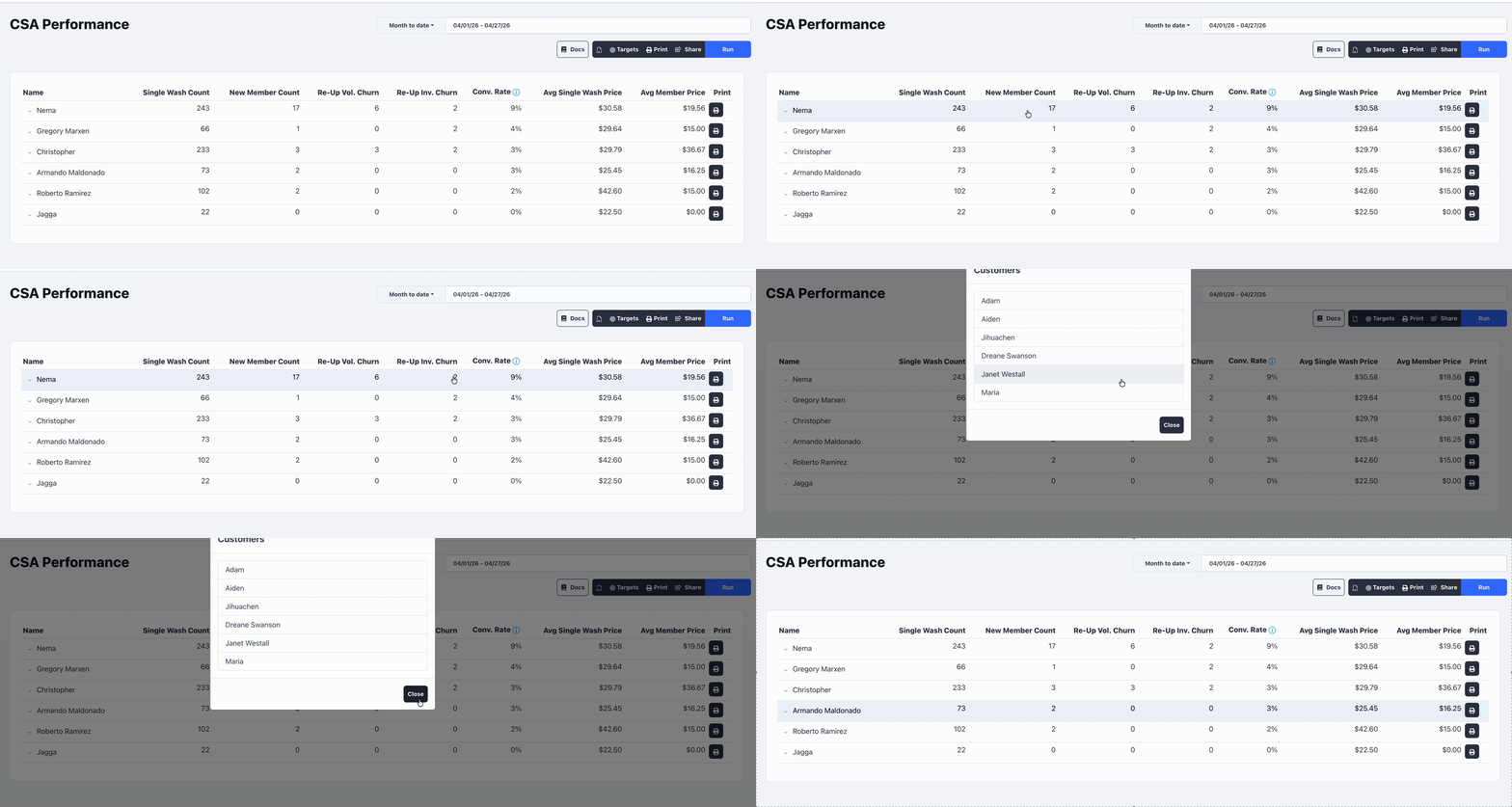
If you hover your mouse over the employee's stats for the "New member count", "Re-up vol. Churn", or "Re-up Inv. Churn", and click on any of those you can view the list of customers associated to each as shown on the capture above.
# Deposits
Source: https://docs.flexwash.com/reports/deposits
Reconcile bank deposits with daily sales and understand exactly where your revenue comes from.
The Deposits report breaks down daily sales into four sections: what you sold,
how customers paid, what Adyen deposited, and your net revenue. Use it to
reconcile your bank account to the penny.
## Accessing the Report
Navigate to **Accounting > Deposits**, select a date range, and click **Run**.

### Sales Performance
Shows what was operationally sold each day.
| Column | Description |
| - | - |
| Gross Sales | Total sales before any adjustments |
| Discounts | Promotions and discounts applied |
| Refunds | Money returned to customers |
| Net Sales | Gross - Discounts - Refunds |
**Net Sales** matches your dashboard and represents what was collected that day.
### Payment Methods
Breaks down Net Sales by how customers paid.
| Column | Description |
| - | - |
| Fleet | Billed separately to fleet accounts at a later date |
| Fleet Invoice Payments | Card payments of [fleet invoices](/configuration/fleets/fleet-invoices). Not counted in Card or in sales, because the washes were already counted under Fleet |
| Prepaids | Gift cards and wash books redeemed (deferred revenue realized) |
| Cash | Cash payments collected |
| Card | Credit and debit card payments |
### Processor Settlement
Shows how Adyen calculates your deposit. Adyen deposits net of fees, so:
**Card - Chargebacks - Fees = Deposit**
| Column | Description |
| - | - |
| Chargebacks | Chargeback activity affecting your deposit (see below) |
| Fees | Adyen processing fees |
| Card Updater Fees | Fees for membership charges saved by the card updater. Shown when any payout in the report includes one. Payouts without a fee show \$0.00. See [Card Updater](/reports/card-updater) |
| Deposits | Amount deposited to your bank account |
FlexWash includes built-in chargeback management through Adyen. The Chargebacks
column reflects both directions: negative when a chargeback is filed or you lose
a dispute, positive when you win a defense and funds are returned.
The Deposits column displays the settlement date range (e.g., "3/2 - 3/2").
Adyen uses a T+2 deposit schedule with funds arriving by **1:30 PM PST via ACH**.
Bank holidays will delay deposits by one business day.
| Sale Day | Deposit Day |
| - | - |
| Monday | Wednesday |
| Tuesday | Thursday |
| Wednesday | Friday |
| Thursday | Monday |
| Friday - Sunday | Tuesday |
This amount should match your bank statement exactly.
> [!WARNING]
>
> This report in FlexWash will reflect the deposit information the evening AFTER
> the deposit is paid.
### Revenue Accounting
Calculates net revenue using accrual accounting principles.
| Column | Description |
| - | - |
| Earned Sales | Revenue recognized from services performed |
| Deferred Sales | Prepaid products sold (gift cards, wash books) not yet redeemed |
| Taxes | Total tax liability for that day \* |
| Net Revenue | Earned Sales - Deferred Sales - Taxes |
**Net Revenue** represents the true revenue earned that day, excluding
prepaid sales that will be recognized when redeemed.
\* **Taxes reflects your tax *liability* for the day, not just the sales
tax *collected* that day.** When an order is refunded, the tax charged on that
order is returned to the customer, so it reduces your tax
liability. That reversal is applied on the **day the refund is issued**.
> [!NOTE]
>
> **Example:** On April 1st a customer pays \$47.93 and \$2.97 in taxes. You refunded
> this order on May 1st. On May 1st your tax liability decreases by \$2.97.
For this reason, the **Taxes** column may not match reports that total the raw
tax line items collected on a given day (such as the Revenue Analytics or Line
Item Detail reports).
# Downsells Analytics
Source: https://docs.flexwash.com/reports/downsells-analytics
See how many cancelling members your save offers rescue, and what those saves are worth in recurring revenue.
The Downsells Analytics report answers three questions about your save offers:
what was offered, who was saved, and what those saves are worth. It is the
companion to [Downsells](/configuration/pricing-and-promotions/downsells), where
the offers themselves are configured.
You can find Downsells Analytics in the sidebar menu under the Reports section.
Access is controlled by the **Downsell Analytics** report permission on the
user's [role](/configuration/users-and-admin/roles). Pair it with the
**Customers** permission, which would be required to drill-in and open
customer records from the report.
## Running the report
Select your location in the top navigation bar. The report runs immediately for today. To see any other period, pick a date range and click **Run**.

> [!NOTE]
>
> Downsell activity over a single day is usually thin, so the default view often
> looks empty. Widen the range to Last 90 Days, Year to Date, or a custom range
> before you read anything into the numbers.
The date range shows the results of every downsell opportunity presented during that time. Selecting several locations rolls them up into one set of numbers.
## Summary tiles
Four tiles summarize the cohort. Each carries an information icon with the
same definition documented here.
| Tile | What it counts |
| - | - |
| **Offers Presented** | Downsell opportunities presented to members at the selected car washes, by the date the offer was made. |
| **Members Saved** | Distinct customers who accepted a downsell. The badge counts the accepted subscriptions that are still active or frozen today. |
| **Success Rate** | Accepted ÷ offered. Opportunities with no response stay in the denominator, so the rate is comparable to the number that used to live on the Downsells config page. |
| **Downsell LTV** | Membership billing revenue on the saved subscription from acceptance until it cancels, accrued to today; excludes post-reactivation revenue. |
### How Success Rate is calculated
Offers that a member never responded to stay in the denominator. That is
deliberate: it keeps this rate comparable to the lifetime success rate that used
to appear on the Downsells configuration page. A range with many pending offers
reads lower than a range where every offer got an answer.
### How LTV is calculated
**Downsell LTV** is the net sum of membership billing on the saved subscription,
from the moment the offer was accepted, and it accrues to today. Three
consequences are worth knowing:
* **It counts membership billing only.** Wash and retail purchases by a saved
member are not included, only their recurring membership charges.
* **It is not clamped to the date range.** The range picks which saves are in the
cohort. The revenue keeps accumulating past the end date, so the same range run
again next month reports a higher LTV.
* **Discounts pull it down, refunds do not.** The discount the downsell granted is
a negative line item on the subscription, so it reduces LTV, which is the point:
the number reflects what the save actually earned. Refunds are not deducted, and
house accounts are not excluded.
* **It stops at a reactivation.** If a saved member later cancels and comes back,
billing from the reactivation onward is not credited to the downsell.
> [!NOTE]
>
> This is not the same figure as the [Membership LTV](/reports/membership-ltv)
> report. That report measures a member's full lifetime value. Downsell LTV
> measures one subscription from the moment a save offer was accepted.
> [!WARNING]
>
> **Still Active** is a snapshot of today, not of the end of your date range.
> Members who accepted an offer inside the range and cancelled afterwards are
> counted in Members Saved but not in Still Active.
## Charts
Three charts sit below the tiles.
* **Offers by Month** plots offers presented per calendar month.
* **Success Rate by Month** plots the monthly accepted share as a percentage.
* **Offer Outcomes** breaks the cohort into accepted, rejected, and no response.
The center of the ring repeats the overall success rate.
## Performance by Downsell
The table breaks the funnel, retention, and revenue out for every downsell
offered in the selected range.
| Column | Definition |
| - | - |
| **Downsell** | The offer's name. A **Deleted** badge marks an offer that has since been deleted from your configuration. |
| **Subscribed Package** | The membership package the offer targets. |
| **Offered** | Opportunities presented for this downsell in the range. |
| **Accepted** | How many of those offers the member accepted. |
| **Success Rate** | Accepted divided by offered for this row. Blank as a dash when nothing was offered. |
| **Members** | Distinct customers behind this row's accepted offers. |
| **Still Active** | Accepted offers whose subscription is active or frozen today. |
| **LTV** | Membership billing earned on this row's saved subscriptions, accrued to today. |
| **Avg LTV / Save** | LTV divided by accepted offers. A dash when nothing was accepted. |
A bold total row closes the table.
> [!NOTE]
>
> The **Members** total is a distinct count across the whole report, not the sum
> of the column above it. A customer who was offered two different downsells
> counts once in the total and once in each row. The same applies to the Members
> Saved tile.
Every downsell you currently have configured gets a row, even one with no
activity in the range. A deleted downsell appears only when it was actually
offered during the range, because its offers still count toward the summary tiles
and the table has to explain them.
## View customers
Each row has a **View customers** link. It opens the customer list filtered to
the distinct customers who accepted that downsell, at the selected car washes,
inside the selected date range. The list shows name, email, phone, and vehicle
plates, sorted by most recent acceptance. Click any customer to open their
profile, or use the CSV button to export the whole cohort rather than the page on
screen.
## Exporting
**Export CSV** in the table header downloads one row per table row, with the same
columns plus a **Deleted** flag. The file covers every downsell in the table, and
is named for the range you ran, for example
`downsells-analytics-2026-06-01-to-2026-08-31.csv`.
> [!TIP]
>
> Pair the export with [Membership LTV](/reports/membership-ltv) when you are
> deciding which save offers to keep: this report tells you what a save earns,
> and Membership LTV tells you what a full-price member earns over the same
> period.
# Fleet Activity
Source: https://docs.flexwash.com/reports/fleet-activity
See fleet usage and unbilled revenue across every account and location, then create an invoice for each account straight from the report.
The Fleet Activity report rolls up how much your fleet accounts are washing and how much you have yet to bill, across all selected locations. It is the companion to [Tender to fleet](/configuration/fleets/tender-to-fleet): wash now, then come here to reconcile and invoice.
You can find Fleet Activity in the sidebar menu under the Reports section.
## Running the report
Confirm the car wash selection in the top navbar, pick a date range, and click **Run**.

## Summary
Four cards summarize the selected period across all chosen locations:
* **Total Washes** in the period
* **Fleet Billable Revenue**, the full value of fleet-tendered washes
* **Revenue Collected**
* **Distinct Vehicles Washed**
## Rewash filtering
To keep counts honest, the report collapses **rewashes**: when the same license plate is rung up again within the rewash window, only one wash is counted. The window defaults to 30 minutes and applies everywhere in the report, including the summary cards, the accounts table, and every CSV export.
To adjust the window:
1. Click **Filters** next to Run.
2. Set **Rewash Filter (minutes)** to the window you want. Enter 0 to turn rewash filtering off.
3. Click **Apply Filters**, then run the report again.

Your setting is saved in the browser, so it sticks across page reloads on that device. It does not follow your account to other devices.
> [!NOTE]
>
> Rewash filtering means the wash counts here reflect distinct service visits, not
> raw order rows, so a vehicle sent back through for a redo is not double-counted
> against the account.
## Invoicing an account
Each account row has an invoice action, so you can bill from the same numbers the report shows.

Click **Create invoice** on an account to create an invoice pre-filled with that account's fleet washes for the selected locations, date range, and rewash window. FlexWash then opens the new invoice so you can adjust it, download the PDF, and track payment. See [Fleet invoices](/configuration/fleets/fleet-invoices).
* Washes that are already on another invoice are skipped. The confirmation message tells you how many.
* An account with no uninvoiced washes in the period does not get an invoice.
When the account already has an invoice whose period overlaps the selected date range, the row shows **Open invoice #N** instead, for the most recent matching invoice. To invoice the days that remain, narrow the date range to just those days and run the report again.
## Exporting
The report also exports to CSV for audits and attachments:
* **Accounts** exports the full account summary table (every account, not just the current page).
* **Order History** exports the underlying fleet-tendered orders for **all** accounts, with plate, vehicle details, services, note, and order total.
* Each account row also has its own **Order History** export for a single account.
**Services** lists the wash package and any add-on services on the order, separated by commas, including ones rung up at \$0. Discounts, tax, tips, and other items are not listed, but the order total still includes them.
> [!TIP]
>
> Use the per-account Order History export to attach a line-item backup to that
> account's invoice, and the all-accounts export for a full-period audit.
# Membership Calculator
Source: https://docs.flexwash.com/reports/membership-calculator
This tool allows you to project your membership growth based on different parameters such as average member sale price, amount of single washes sold, etc.
## Membership Calculator

You can find the Membership Calculator tool under the Reports section on the sidebar menu.
## Date Range

Once you open the tool, you can enter the date range you want to base your calculations from. The drop down menu gives you several predetermined options and you can also input a customized range. \
\
After you select the date range, click on the "Run" button on the right side.
## Projected Membership Growth

On the left side, a graph will appear showing the projected membership growth based on the Parameters that you can set on the right side. The graph details the Total Revenue and the Recurring Revenue.
## Parameters
The Parameters section allows you to edit the projections by changing any of the variables shown on the image above. On the right side you can see the definition of each option. For example, the first one is Average Member Sale Price = the average monthly charge per member.
You can increase the amount by entering the numbers on the left side or by moving the toggle bar on the right. Each change that you make will automatically change the Projected Membership Growth on the left.
## Reset

The Reset button at the bottom allows you to erase any changes and reverse to the data that was generated originally after you selected the date range and ran the report.
# Membership Counts
Source: https://docs.flexwash.com/reports/membership-counts
Know exactly what every membership number in FlexWash counts, so your reports reconcile and your team trusts the data.
FlexWash shows membership numbers on the **Dashboard**, in **Membership Analytics**, and in the **Member Behavior Report**. Each one answers a different question, so the totals do not always match. This page explains what each number counts and why two numbers for the same period can differ.
## How FlexWash Counts a Membership
Every membership count in FlexWash is a count of **vehicle memberships**. A customer with three vehicles on a plan counts as three memberships.
A vehicle membership counts as active when its status is one of these:
| Status | Counted as active |
| - | - |
| Active | Yes |
| Payment Failed | Yes |
| Prepaid Active | Yes |
| Frozen | No |
| Invalid Card | No |
| Cancelled | No |
| Prepaid Expired | No |
House account memberships are not counted.
> [!NOTE]
>
> Payment Failed memberships are included because FlexWash is still retrying the charge. A membership leaves the count when it moves to Invalid Card, Cancelled, Frozen, or Prepaid Expired.
### Snapshot Time
Active counts are a snapshot of each membership's status at midnight, site time:
* The start count is taken at the start of the first day of the date range.
* The end count is taken at the end of the last day, so it includes every change made on that day.
### Sales and Churn
Sales and churn are counted from events in the date range:
* **New:** the first paid membership charge for a vehicle membership.
* **Re-Up:** a paid membership charge for a vehicle membership whose last status was Cancelled or Invalid Card.
* **Prepaid:** each prepaid membership sold.
* **Churn:** an Active membership that moves to Cancelled (voluntary), Invalid Card (involuntary), or Frozen, plus every move to Prepaid Expired.
Sales come from paid charges, so a status change without a charge is never a sale. Unfreezing a membership, or setting it to Active by hand, is not a sale or a Re-Up.
### Site
In a multi-site organization, each number counts toward a site as follows:
| Number | Counts toward |
| - | - |
| Active counts | The site the vehicle membership belongs to. |
| Sales (New, Re-Ups, Prepaid) | The site where the charge or sale was made. |
| Churn | The customer's home site. |
Active counts always use the site the membership belongs to today. If a membership moves to another site, it also moves out of past active counts at the old site.
## Dashboard
The **Aggregate** view shows three membership cards:

| Card | What it counts |
| - | - |
| **Memberships** | Active vehicle memberships at the end of the date range. |
| **Membership Sales** | **New**, **Re-Ups**, and **Prepaid Active** sales in the date range. |
| **Membership Churn** | **Inv. Churn**, **Vol. Churn**, and **Prepaid Exp.** in the date range. Freezes are not included. |
The **KPI by Site** and **Comparison** views show these numbers for each site:
| Number | What it counts |
| - | - |
| **Active Members** (KPI by Site) or **Active Count** (Comparison) | Active vehicle memberships at the end of the date range. |
| **Sales #** (Comparison) | The same sales as **Membership Sales**. |
| **Churn #** (Comparison) | The same churn as **Membership Churn**, plus freezes. |
| **Net Members** | Sales minus churn, including freezes. |
## Membership Analytics
Open **Reports > Memberships > Analytics**, or click any membership card on the Dashboard.

| Card | What it counts |
| - | - |
| **Initial Memberships** | Active vehicle memberships at the start of the date range. |
| **Memberships Sold** | **New Sign-up Online**, **New Sign-up Onsite**, **New Sign-up Manual**, **Re-up (Inv. Churn)**, **Re-up (Vol. Churn)**, and **Prepaids**. The total matches the Dashboard **Membership Sales** card. |
| **Churns** | **Involuntary**, **Voluntary**, **Frozens**, and **Prepaid Expired**. |
| **Resulting Memberships** | Active vehicle memberships at the end of the date range. Matches the Dashboard **Memberships** card. |
**Churns** also shows **Churn Transfers**: Invalid Card memberships that are then cancelled. They are not added to the total. When an Invalid Card membership is cancelled, its move to Invalid Card also stops counting as **Involuntary** churn, so the number for an earlier date range can drop.
## Member Behavior Report
The **Member Behavior Report** (**Reports > Member Behavior Report**) answers a different question: which customers are or were members, and how they wash. Its rows do not reconcile with the Dashboard because:
* **One row per customer.** A customer with several vehicle memberships appears once. The report does not show a per-vehicle **Valid Until** date.
* **Current and lapsed members.** It includes customers with a membership that is Active, Prepaid Active, Payment Failed, Invalid Card, Cancelled, Frozen, or Prepaid Expired.
* **No date range.** It always shows members as of now.
* **Customer home site.** It filters by the customer's home site, not the site each membership belongs to.
* **Different exclusions.** Fleet customers are excluded. House account memberships are included.
**Latest Status** shows the most recent status change on any of the customer's vehicles, so filtering on it does not give an active member count. Use the Dashboard or Membership Analytics for that.
## Why Net Members Can Differ
There are two ways to measure membership growth for a date range:
* **Snapshot difference:** **Resulting Memberships** minus **Initial Memberships** in Membership Analytics.
* **Net Members:** sales minus churn, in the Dashboard **KPI by Site** and **Comparison** views.
Most events change both numbers the same way. These do not:
| Event in the date range | Snapshot difference | Net Members |
| - | - | - |
| A member freezes, then unfreezes | 0 | -1 (the freeze is churn, the unfreeze is not a sale) |
| A member frozen before the range unfreezes | +1 | 0 |
| An Invalid Card membership is cancelled | -1 if it was Active at the start, else 0 | 0 (counted as a Churn Transfer) |
| A membership is set to Active by hand | +1 | 0 (no charge, so no sale). See [Manual Status Changes](/memberships/manual-status-change). |
| Members are imported | +1 each | 0 |
In a multi-site organization, a single site can also differ because active counts, sales, and churn can count toward different sites. See [Site](#site). Totals across all sites are not affected.
### Why the Churn Numbers Differ
The Dashboard **Membership Churn** card leaves out freezes. The **Churns** card in Membership Analytics and the **Churn #** column include them. For the same date range and sites, the difference equals **Frozens**.
# Membership LTV
Source: https://docs.flexwash.com/reports/membership-ltv
This report shows you the Life Time Value of your members.
## Membership LTV
# 
You can find the Membership LTV report under the Reports section of the sidebar menu on the left.
## Date Range

The next step is to select a date range. You can select one or several months. Once the date range is determined simply click on the "Run" button on the right side.
## Total LTV

The first section of the report shows you the Total Life Time Value of your members on the selected date range. It also details the average per member on the bottom left side.
## Average Life

This section shows you the average time your members mantain their membership active. It also details the total of active members during the selected date range.
## Average Wash Price

This section shows you how many washes were redeemed by your members during the selected date range. And what the average price is for a member's wash.
## Median Washes

This section shows you the median washes from your members, and below it also details the average of washes from members. So in this example, members redeemed an average of 4.06 washes during the selected date range.
## Average and Total Churn

These two sections provide you information about the customers that stopped being members during the selected date range. This can include cancellations done or requested by customers, cancellations due to expired credit cards, cancellations due to failed transactions, etc.
On the Average Churn you can see the monthly average, while the Total Churn gives you the total percentage and amount of cancelled memberships during the selected date range.
## Member Retention

This graph shows you the monthly stats of customers that have mantained their memberships active. Hover your mouse around the graph for a breakdown of member amounts, total churns, etc, as shown on the screenshot above.
## Members by Total Wash Count

The final graph on this report groups the amount of members you have by their total wash count over the selected date range. Hover your mouse over each column to see the breakdown of washes and members. On the example above we see that there are 6 members in total that have redeemed a number of 3 washes during the selected date range.
# Membership Roster
Source: https://docs.flexwash.com/reports/membership-roster
See every current member in one list, with this month's projected recharges by bill day, so you know who to call and what revenue is coming.
The Membership Roster lists every current member vehicle across your organization, with contact details, package, status, and key dates. Above the list, **Projected Recharges by Bill Day** shows what your members will be charged on each day of the month.
Use it to:
* Build a call list of members whose card is failing.
* Find frozen members who come back this month.
* See how much membership revenue is still to bill this month.
* Export member contact details for one site or one customer tag.
## Accessing the Report
In the left sidebar, go to **Reports > Memberships > Roster**.
The report always covers your whole organization. It has no date range, car wash selector, or **Run** button. To narrow it to one location, filter by **Home Site**.
### Permission
Viewing the report requires the **Member Behavior Report** permission, the same permission as the Member Behavior Report. An admin can grant it by editing a role and checking **Member Behavior Report** in the **Reports** section. See [Roles](/configuration/users-and-admin/roles).
Users below Support only see customers whose home site is a car wash they have access to.
## Who Is Included
The roster has one row per member vehicle. A customer with two vehicles on a membership has two rows.
| Status | Included |
| - | - |
| **Active** | Yes |
| **Payment Failed** | Yes |
| **Frozen** | Only when the freeze ends this month. Indefinite freezes and freezes that end in a later month are not included. |
Cancelled, pending, invalid card, interim import, and prepaid memberships are not included. House accounts and deleted customers are not included.
The **home site** is the car wash the customer belongs to and is billed under. It is not always the car wash where the membership was sold.
## Projected Recharges by Bill Day
This card shows each member's next recharge, grouped by the day of the month their membership bills. Each amount is the same preview as **Next Recharge** on the customer profile, so it includes any promotion, upsell, or downsell. All amounts are before tax. The card refreshes every 10 minutes.
| Tile | Description |
| - | - |
| **Monthly Recurring** | The total of every member's next charge, and the number of customers. |
| **Rest of This Month** | The total of the bill days from tomorrow to the end of the month. |
| **Payment Failed** | The total for payment-failed members, and the number of customers. FlexWash retries these charges every night, so they are not on a bill day. |

The chart shows the projected amount for each bill day, with a dashed line on today. Hover over a bar to see the charge date, the amount, the number of customers, and the tax.
* **Bill days that have already passed** show each member's next charge, which is next month.
* **Bill days past the end of a short month**, such as the 31st in a 30-day month, bill on the month's last day.
Below the tiles, the card notes how many customers could not be previewed, for example because they have no card on file, and how many have nothing due on their next bill date, for example because they are still frozen then or paid ahead.
## Members
The **Members** table shows 50 rows per page, sorted by customer name. Click a column header to sort by that column. The **Offer** column cannot be sorted. Click a customer's name to open their profile.

| Column | Description |
| - | - |
| **Customer** | The customer's name. |
| **Home Site** | The car wash the customer belongs to. |
| **Phone** | The customer's phone number. |
| **Email** | The customer's email address. |
| **License Plate** | The vehicle's plate. A vehicle without a plate shows **No plate**. |
| **Package** | The membership package. |
| **Offer** | The promotion, upsell, or downsell that applies to the member's next charge, with its type. Blank when no offer applies. |
| **Status** | **Active**, **Payment Failed**, or **Frozen**. Payment Failed shows the number of failed charges, for example **Payment Failed X2**. |
| **Valid Until** | The date the membership is paid through. For frozen members, it shows the date the freeze ends instead. |
| **Status Since** | The date of the vehicle's last status change. |
| **Member Since** | The date the vehicle first became an active member. |
| **Last Order** | The date of the last order for this member vehicle. Open, pending, and voided orders do not count. |
All dates show in the home site's timezone.
### Search and Filters
The search box matches a customer's name, phone number, email address, or license plate.
Click **Filters** to narrow the list, click **+ Add filter**, set the filter, and click **Apply**. When you add more than one filter, a member must match all of them. Click **Clear** to remove every filter.

You can filter by:
* **Home Site**
* **Status**
* **Customer Tags**: customers with any of the selected tags.
* **Failed Charges**: the number of failed charge attempts, for example at least 3.
* **Status Since**, **Valid Until**, **Member Since**, and **Last Order**: before, after, on or before, or on or after a date.
The table header shows how many member vehicles match.
### Export
Click **Export CSV** to download every row that matches your search and filters, not only the current page. The file has the same columns as the table.
# Operating Profit
Source: https://docs.flexwash.com/reports/operating-profit
Model true site operating profitability by pairing your real revenue and wash volume with your own cost assumptions.
The Operating Profit report turns your raw sales into a clear picture of what
your site actually earns. FlexWash supplies the hard numbers it already knows:
your revenue, wash counts, and labor (if connected), and you supply the cost factors only you
know, such as rent, utilities, and supplies. The result is a powerful trend chart that shows
exactly how your operating profit moves day to day.
You can find Operating Profit in the sidebar menu under the Reports section.
> [!NOTE]
>
> This report is a modeling tool. Revenue and wash volumes are pulled from your
> real FlexWash data, but the cost figures are based on the assumptions you enter
> in the Inputs panel. It is meant for planning and "what-if" analysis, not as a
> substitute for your accounting system.
## Running the Report
Pick a date range and confirm the car wash selection in the top navbar, then
click **Run**. The report loads three summary cards, an Inputs panel, and the
profit trend charts.

## Summary Cards
Three cards at the top summarize the selected period. Each shows a headline
figure, a per-car value, and a breakdown chart.
* **Revenue:** total revenue and revenue per car, with a pie chart by package
type. Badges show average total wash price, average member sale price, average
member wash price, and average single wash price.
* **Costs:** total modeled costs and cost per car, with a pie chart of the cost
breakdown. Badges show payroll percentage, payroll per car, variable per car,
and fixed per car.
* **Operating Profit:** revenue minus costs and profit per car, with a profit vs.
cost split. Badges show total washes, single washes, member washes, and average
member usage.
## Inputs
The Inputs panel on the left is where you model your cost structure. Your entries
are saved in your browser, so they carry over the next time you open the report.
### Payroll Factor
| Mode | What it does |
| - | - |
| Integrated | Uses the labor data FlexWash already tracks, then applies a **Labor Increase** percentage to cover taxes, commissions, and similar add-ons. |
| Calculated | You enter a **Total Labor Cost** for the date range, which is spread across the period's washes evenly. |
### Variable Costs
| Mode | What it does |
| - | - |
| Blended Avg. | A single **Cost per Car** covering chemicals, utilities, supplies, and the like. |
| Calculated | Enter totals for **Electric**, **Water**, **Chemicals**, and **Other Supplies** for the range; FlexWash spreads them across your washes. |
### Fixed Costs
| Mode | What it does |
| - | - |
| Blended Avg. | A single **Fixed Cost per Day** covering lease, insurance, internet, and similar bills. |
| Calculated | Enter **Property / Lease**, **Insurances**, **Fixed Bills**, **Debt Servicing**, and **Other**; FlexWash totals them and spreads them across the days in range. |
### Display Options
Toggle **Show site logs** to overlay your [Site Logs](/reports/site-logs) on the
profit trend chart. See [Profit Trend](#profit-trend) below.

## Profit Trend
The main chart stacks revenue above the zero line and costs below it, with a bold
profit line drawn on top so you can see margins at a glance. A second chart below
tracks wash counts (member vs. single) over the same period. The two charts share
a cursor and zoom together, so you can drag to focus on any stretch of dates.
Hover any day to see a full breakdown: revenue by package type, costs by category,
the resulting profit, each as a share of revenue, plus any site log note recorded
for that day.

### Site Log Overlay
When **Show site logs** is enabled, each day that has a [Site Log](/reports/site-logs)
is shaded on the trend chart so you can connect a dip or spike to what actually
happened on the ground.
If a day has more than one flag, the band uses the highest-priority one in the
order Site Down, then Weather, then Operation Change. The day's note appears in
the hover tooltip as shown above.
# Orders
Source: https://docs.flexwash.com/reports/orders
This report helps you find any order processed on your Car Wash.
## Orders report

You can find the option under the report's section located on the sidebar menu on the left.
## Select date range

Once you open the report, select a date range option from the dropdown menu and click on the "run" button on the right.
## Filter by License Plate

Once the date range is set, you have several options to filter the results if needed. For example, you can enter the License Plate of a customer if you need to find a specific order.
## Filter by Last Four Digits of Credit Card

If you have the last four digits of a customer's credit card number, you can enter them here. The results will show all the transactions made during the selected date range that match those last four digits.
## Filter by Package

You can also filter the orders by Package. Select the Package from the dropdown list and then click on the "Run" button.
## Filter by Employee

Use this filter if you want to search only the orders that a specific employee has processed during the selected date range. The dropdown menu will show the list of your employees.
## Download the Report

As you can see on the example above, the report will generate the orders according to your selected date range and filter. Here we are filtering by Package. If you want to download the report in Excel format, you can click on the button on the right side.
# Reports Overview
Source: https://docs.flexwash.com/reports/overview
Every number you need to run your car wash is already in FlexWash. Find the report that answers your question about sales, members, payments, or labor in seconds.
FlexWash reports cover sales, memberships, payments, labor, and site
operations for every location. Use the tables below to find the report that
answers your question, then open it from the path in **Where in the app**.
Most reports use the car wash selector in the top navigation bar and a date range.
Pick both, then click **Run**.
## Sales and Revenue
| Question operators ask | Report | Where in the app |
| - | - | - |
| What was net revenue, and what is the average price per wash across all customers? | [Dashboard](/getting-started/dashboard) | **Dashboard**, **Net Revenue** card |
| Which package types drive my revenue? | [Revenue Analytics](/reports/revenue-analytics) | **Reports > Revenue Analytics** |
| How many single washes and member washes did each package sell? | [Wash Analytics](/reports/wash-analytics) | **Reports > Wash Analytics** |
| How do I find one order by plate, last four card digits, package, or employee? | [Orders](/reports/orders) | **Reports > Orders** |
| How many new customers did a promotion bring in, and how many converted? | [Promotions](/reports/promotions) | **Reports > Promotions** |
| Which upsell offers convert, and what are they worth? | [Upsell Analytics](/reports/upsell-analytics) | **Reports > Upsell Analytics** |
| What is my estimated operating profit after rent, utilities, supplies, and labor? | [Operating Profit](/reports/operating-profit) | **Admin > Operating Profit** |
| How much was refunded, by package? | [Refunds Report](/reports/refunds-report) | **Flex Assist > Suspicious Activity > Refunds** |
## Memberships
| Question operators ask | Report | Where in the app |
| - | - | - |
| How many active members do I have, and how many did I sell and lose? | [Membership Counts](/reports/membership-counts) | **Dashboard**, **Memberships** card, or **Reports > Memberships > Analytics** |
| What is my membership conversion rate? | [Dashboard](/getting-started/dashboard) | **Dashboard**, **Memberships** card, **Conv Rate** |
| Who are my active members, and which package is each one on? | [Membership Roster](/reports/membership-roster) | **Reports > Memberships > Roster** |
| How much membership revenue is still to bill this month? | [Membership Roster](/reports/membership-roster) | **Reports > Memberships > Roster**, **Projected Recharges by Bill Day** |
| What is a member worth over their lifetime, and how long do members stay? | [Membership LTV](/reports/membership-ltv) | **Reports > Membership LTV** |
| What is the average price of a member wash? | [Membership LTV](/reports/membership-ltv) | **Reports > Membership LTV**, **Avg Wash Price** |
| How would my membership revenue grow with a different price or sales volume? | [Membership Calculator](/reports/membership-calculator) | **Reports > Membership Calculator** |
| How many cancelling members did my save offers keep? | [Downsells Analytics](/reports/downsells-analytics) | **Reports > Downsells Analytics** |
| How many memberships did the Card Updater save, and what did it recover? | [Card Updater](/reports/card-updater) | **Reports > Card Updater** |
**Conv Rate** on the Dashboard divides memberships sold by single washes plus
memberships sold. Memberships sold includes new memberships, re-ups, and
prepaid memberships. If two membership numbers do not match, see
[Membership Counts](/reports/membership-counts) for what each report counts.
## Payments and Disputes
| Question operators ask | Report | Where in the app |
| - | - | - |
| Do my bank deposits match my daily sales? | [Deposits](/reports/deposits) | **Reports > Accounting > Deposits** |
| How do I log cash deposits and find cash over or short? | [Cash Deposits](/reports/cash-deposits) | **Reports > Cash Deposits** |
| Which payments were disputed or flagged as fraud? | [Chargebacks](/reports/chargebacks) | **Reports > Accounting > Chargebacks** |
| What balance is left on a wash book or gift card? | [Gift Card & Washbook Balance](/operations/transactions/card-balance) | **Reports > Liabilities**, **Wash Books** or **Gift Cards** tab |
| How much have my fleet accounts washed, and what is not billed yet? | [Fleet Activity](/reports/fleet-activity) | **Reports > Fleet Activity** |
## Labor and Employees
| Question operators ask | Report | Where in the app |
| - | - | - |
| What is my labor cost, labor percentage, and labor per car? | [Dashboard](/getting-started/dashboard) | **Dashboard**, **Labor** card |
| How many hours did each employee work, and what did they cost with overtime? | [Labor Summary](/configuration/users-and-admin/time-clock#reports) | **Time Clock > Reports > Labor Summary** |
| How do payroll taxes and commissions change my labor cost and profit? | [Operating Profit](/reports/operating-profit) | **Admin > Operating Profit**, **Payroll Factor** |
| How do I split tips across everyone who worked? | [Tip Pool](/reports/tip-pool) | **Time Clock > Reports > Tip Pool** |
| Which employees sell the most memberships? | [CSA Performance](/reports/csa-performance) | **Reports > Employees > CSA Performance** |
| How much commission did each employee earn? | [Commissions](/reports/commissions) | **Reports > Accounting > Commissions** |
| How is my team tracking against a membership sales target? | [Sales Leaderboard](/reports/sales-leaderboard) | **Reports > Employees > Sales Leaderboard** |
The Dashboard **Labor** card and the **Labor Summary** report can show
different labor costs. **Labor Summary** calculates from time cards only and
excludes the **Daily Salary Cost**. See [Dashboard](/getting-started/dashboard)
for details.
## Operations
| Question operators ask | Report | Where in the app |
| - | - | - |
| Which days and hours are busiest? | [Wash Analytics](/reports/wash-analytics) | **Reports > Wash Analytics** |
| Are washes started at the controller without a charge? | [Wash Analytics](/reports/wash-analytics) | **Reports > Wash Analytics**, **Car Count** |
| What weather, downtime, or changes explain a swing in my numbers? | [Site Logs](/reports/site-logs) | **Admin > Site Logs** |
**Car Count** compares the POS car count with the controller car count. The
controller count works only with rTc and Laguna controllers.
# Promotions
Source: https://docs.flexwash.com/reports/promotions
This report helps you track the performance of the promotions your Car Wash is offering.
## Promotions

You can find the Promotions report under the "Reports" section on the sidebar menu.
## Select Date Range

The first step is to set a date range. You can select one of the predetermined options from the dropdown menu or you can customize your own. Click on the "Run" button on the right side to generate the report.
## New Customers

The report will show you the list of your promotions. This section shows you the number and percentage of customers that had never been on the Car Wash before until they came by to redeem the promo.
## Conversions

This section shows you the number and percentage of customers that bought a single wash or enrolled on a membership after redeeming the promotion.
## Revenue

This section shows you all the revenue generated from new customers that redeemed that promotion.
# Refunds Report
Source: https://docs.flexwash.com/reports/refunds-report
You can get a breakdown by package and membership type of all the refunds that have been processed on your car wash.
* Click on the “Refunds” option located on the left side taskbar under “Flex Assist” > "Suspicious Activity".

* The next step is to set a range date. You have two ways of doing it, selecting one of the preestablished date ranges that appear when you click on the dropdown menu shown on the screenshot below, such as “today”, “ Last 7 days”, “Last Quarter”, etc; or you can select “Custom”, which allows you to set any particular date range that you want to check.

> [!TIP]
>
> [Click here for instructions on how to process a Partial Refund.](/operations/transactions/partial-refunds)
* You will then be able to see the total amount that has been refunded for the selected date range. Also, a breakdown of Package type, Countt, and amount. If you click on the desired Package Type (single wash or membership), you get the refund details by package.

# Revenue Analytics
Source: https://docs.flexwash.com/reports/revenue-analytics
This report gives you a breakdown of your revenue by wash package type.
## Revenue Analytics

You can find the Revenue Analytics on the sidebar menu, under the "Reports" section.
## Date Range

Select the date range you want the statistics to be pulled from. You can select one of the predetermined options or customize your own. Click on the "Run" button to generate the report.
## Graph
The report is divided in two parts. The first part shows you the data in a graph. By moving your cursor over the graph you can find detailed information of your revenue divided by wash package types. As you can see above, the graph is interactive: by clicking on the upper section you can zoom in within dates for a closer look on the numbers.
## Breakdown by wash package types

The second part of this report shows the data in columns. The data is broken down in Package types, Ticket count, Revenue and Percent.
If you click on any of the Package Types you will see a more detailed breakdown of your revenue per each wash package your car wash offers.
# Sales Leaderboards
Source: https://docs.flexwash.com/reports/sales-leaderboard
Set a sales target for your employees, track and display the results in real time. A great tool to motivate your team and increase your membership numbers!
## Sales Leaderboards report

You can find the Sales Leaderboards option under the "Employees" section located on the sidebar menu. After you open it, click on the "Create Sales Leaderboard" button on the right side to get started.
## Create new Sales Leaderboard

#### Name:
Set the name of the new Sales Leaderboard. This name appears on the display view.
#### Car Washes:
If you have multiple sites, select the locations that you want to include on the new Leaderboard. If you have a single site, it will already appear selected by default.
#### Start Date/ End Date:
Select the desired date range the sales will be considered from.
#### Start Member Count:
This number autopopulates with the exact number of active members you currently have at the moment of creating a Leaderboard.
#### Target Member Count:
Set a goal. How many new members are you aiming to get by the end of the selected date range?
## URL

Once the new Leaderboard is created, you will find it on the list with a URL address on the right side. Click on the link to get the Display view.
## Display

This is how the Display view appears. You can see a breakdown by Employee name of their performance. You can have the link open on a browser and display it on a TV screen or monitor for your employees to check their progress whenever they want. This can be of great motivation and increase your membership sales.
## Sales Leaderboard and CSA Performance Conversions and Opportunities
Leaderboard

CSA Performance

### 1. Eligibility for the Leaderboard: Single Wash Sales
* **Requirement for Single Wash Sales:** If an employee does not record any single wash sales within a given week, they will not appear on the Leaderboard. This rule applies even if the employee has successfully completed membership sales during the same period.
### 2. Opportunities in the Sales Leaderboard
* Opportunities on the Sales Leaderboard represent the total of (single washes + memberships sold + re-ups) by each employee.
### 3. Discrepancies on the Leaderboard
* **Discrepancies in Total Sales Data:** Even if an employee is removed from the employee list on the admin application, the Leaderboard will retain their sales records up to the point of their removal. This ensures a complete historical overview of sales performance. Due to record retention, Leaderboard sales figures may differ from "wash analytics" and "sales summary" reports, which reflect current employee rosters, causing data variations.
* **Accurate Single Wash Calculation:** To accurately reconcile sales, count single wash sales *after* subtracting total sales from opportunities. This isolates direct single wash transactions.
* **Members to Go Updates Daily:** The progress bar and "Members to go" count use the active member total at the start of each day, in the car wash's time zone. Memberships sold today count toward the goal the next morning. The employee columns (Today's Sales, Total Sales, Opportunities) update live. On a leaderboard's first day, the bar shows no progress even if the table shows sales.
### 4. Specific Exclusions from Leaderboard Sales Counts
* **Same-Day Membership Sign-up and Cancellation:** If a customer signs up for a membership and subsequently cancels it on the very same day, that specific sale will *not* be counted towards the employee's performance on the Sales Leaderboard.
* **Membership Reactivations:** Similarly, the reactivation of an existing or previously cancelled membership will *not* count as a new sale on the Sales Leaderboard. The Leaderboard records new customer acquisitions and direct single wash sales, not the re-engagement of prior members.
### 5. Best Practices for Accurate Sales Attribution
* **Employee Login during Member Sign-up:** When signing up a new member, it is highly recommended that the employee facilitating the transaction is properly logged in with their unique employee code.
* **Default Attribution without Login:** Failure to log in with the correct employee code will result in the sale being automatically attributed to whichever employee is currently logged into the system during that specific transaction. This can lead to misattribution and inaccuracies in individual sales performance records.
Refer to this article for membership reassignment.
[https://docs.flexwash.com/memberships/sales-reassign-employee](https://docs.flexwash.com/memberships/sales-reassign-employee)
## **Sales Leaderboard on Pay Tablets**
The Sales Leaderboard is recommended as we've observed it significantly increases conversion rates. Car wash administrators must complete the following steps to display it on the Pay Tablets:
1. Navigate to **Admin** > **Setup** > **Car Washes** within the admin application.

2. For multi-location setups, access the edit car wash settings specifically for the site where the Sales Leaderboard was generated.

3. Save your selection after choosing the Sales Leaderboard from the drop-down menu.

4. To view the Sales Leaderboard, refresh the pay tablet's config.

# Site Logs
Source: https://docs.flexwash.com/reports/site-logs
Record the weather, downtime, and operational changes behind every swing in your numbers.
Numbers only tell half the story. A slow week might be a cold snap, a profit jump
might be the promotion you launched on Monday, and an odd gap might be the
afternoon a pump went down. Site Logs let you capture those events as they happen,
then see them overlaid directly on your [Operating Profit](/reports/operating-profit)
trend so the "why" sits right next to the "what."
You can find Site Logs in the sidebar menu.
## Viewing Logs
Pick a date range and confirm the car wash selection in the top navbar, then click
**Run**. FlexWash lists every log for that period with its date, car wash, type,
and note. Each entry is tagged with color-coded badges for its weather, downtime,
or operational-change flags.

## Recording a Log
Click **Add** to open the log form. Fill in the details and save.
| Field | Required | Notes |
| - | - | - |
| Car Wash | Yes | The site the log applies to |
| Date | Yes | The day the event occurred |
| Weather | No | One of Overcast, Rain, Snow, or Windy |
| Site Down | No | Check when the site was closed or not operating |
| Operation Change | No | Check for changes such as a promo launch, staff change, hours change, or equipment swap |
| Note | No | Free text to describe what happened |
> [!NOTE]
>
> Every log must have at least one of **Weather**, **Site Down**, or **Operation
> Change** set. The **Note** is where the detail lives, for example "Launched \$5
> intro promo" or "New site manager started."

You can edit or delete any log later from the table.
## How Logs Appear on Profitability
Site Logs are designed to be read alongside the [Operating Profit](/reports/operating-profit)
report. Enable **Show site logs** in that report's Inputs panel and each logged
day is shaded on the profit trend chart, with the note shown in the hover tooltip.
The band color reflects the log type:
| Color | Meaning |
| - | - |
| Red | Site Down |
| Gray | Weather: Overcast |
| Blue | Weather: Rain |
| Light gray | Weather: Snow |
| Purple | Weather: Windy |
| Orange | Operation Change |
When a day carries more than one flag, the band uses the highest-priority one in
the order Site Down, then Weather, then Operation Change.
The habit pays off quickly: a few seconds logging weather and operational changes
each day turns your profitability trend from a line of numbers into a clear story
of what drives your business.
# Tip Pool
Source: https://docs.flexwash.com/reports/tip-pool
Pay out tips fairly in minutes. Pool tips across your locations, split them by shift or hours worked, and see exactly what payroll owes each employee.
The Tip Pool report adds up the tips collected at your locations for a pay
period and splits the total across every employee who worked. It shows each
employee's tip share next to their hours and labor cost, so you can hand the
numbers straight to payroll.
## Accessing the Report
Open **Time Clock > Reports > Tip Pool**, select one or more locations and a
date range, and click **Run**. The date range defaults to the last two full
workweeks.
Running the report requires the **Time Clock Reports** permission on the
user's [role](/configuration/users-and-admin/roles).

> [!NOTE]
>
> If an employee is still clocked in during the period, a warning lists them.
> Their hours are incomplete until they clock out, so run the report again
> after the shift ends.
## Tips by Location
The first table shows the tips collected at each selected location. These are
the tips customers added to their payments, counted by payment date in each
location's timezone. Each location's total matches the **Tips** column of the
[Deposits report](/reports/deposits) for the same dates. Click a location to
open its Deposits report.
**Cash tips (entered)** adds tips collected outside FlexWash, such as a tip
box. Enter the amount and it joins the pool. Cash tips are not part of the
Deposits report, and FlexWash does not save the amount: it clears each time
you run the report.
**Pool total** is the location tips plus the cash tips. This is the amount
that is split.

## Labor & Tip Shares
The second table splits the pool across employees. It has one row for each
employee at each location they worked. An employee who worked at two of the
selected locations appears twice. Click an employee to open their time cards
and correct any punches.
### Split Method
Pick how the pool is divided with the toggle above the table:
* **Split equally**: every employee who worked in the period gets the same
share. A row with only sick hours gets no share.
* **Split by hours worked**: shares follow each employee's regular, overtime,
and double overtime hours. Sick hours are not counted toward the share.
Shares are rounded to the cent and add up to the pool total. If no one worked
in the period, the pool is not split and a warning shows. Switching the method
updates the table right away without running the report again.

### Columns
| Column | Description |
| :- | :- |
| **Location** | The location the hours were worked at |
| **Employee** | The employee |
| **External Payroll ID** | The employee's ID in your payroll provider, from their employee profile |
| **Wage** | The employee's hourly wage, or **Not set** |
| **Tip Wage** | The employee's **Tip Wage Minimum**, or **Not set** |
| **Paid Hours** | Regular, overtime, double overtime, and sick hours |
| **Labor Cost** | Pay for the paid hours, including overtime premiums |
| **Tip Share** | The employee's share of the pool |
| **Tip Share / Hr** | Tip share divided by paid hours |
| **Base Pay + Tips / Hr** | Labor cost plus tip share, divided by paid hours |
| **Top Up** | What payroll adds so base pay plus tips reaches the tip wage. See [Top Up](#top-up) |
> [!NOTE]
>
> The table's footer row shows the totals for the period.
>
> **Wage**, **Tip Wage**, **Labor Cost**, **Base Pay + Tips / Hr**, and **Top
> Up** show only for users with the **View And Edit Employee Wages**
> permission. Other users see tip shares and hours, and only the period's
> total labor cost.
### Top Up
Some employees are paid a lower base wage because they earn tips. Set a
**Tip Wage Minimum** on their employee profile: the hourly amount their base
pay plus tips must reach.
When an employee's base pay plus tip share falls below that minimum for their
paid hours, **Top Up** shows the difference payroll needs to add. When they
meet or pass the minimum, it shows \$0.00. If the employee has no hourly wage
or no tip wage minimum, the column shows a dash.
For example, an employee with a \$7.00 wage and a \$15.00 tip wage minimum
works 20 hours. Their labor cost is \$140.00 and their tip share is \$100.00,
so base pay plus tips is \$240.00. The minimum for 20 hours is \$300.00, so
the top up is \$60.00.

## Exporting
Click the CSV icon next to **Run** to export the Labor & Tip Shares table. The file name
includes the date range and the split method used, and the export follows the
same permission rules as the table.
> [!TIP]
>
> The split method and the cash tips stay on the page only. Download the CSV
> for each pay period to keep a record of how the pool was split.
# Upsell Analytics
Source: https://docs.flexwash.com/reports/upsell-analytics
Prove which upsell offers actually earn their place: what was pitched, what converted, and what those conversions are worth.
The Upsell Analytics report answers three questions about your upsell offers:
what was pitched, what converted, and what those conversions are worth. It is the
companion to [Upsells](/configuration/pricing-and-promotions/upsells), where the
offers themselves are configured.
You can find Upsell Analytics in the sidebar menu under the Reports section.
Access is controlled by the **Upsell Analytics** report permission on the user's
[role](/configuration/users-and-admin/roles). Pair it with the
**Customers** permission, which would be required to drill-in and open
customer records from the report.
## Running the report
Select your location in the top navigation bar. The report runs immediately for today. To see any other period, pick a date range and click **Run**.

> [!NOTE]
>
> The date range picker opens on **Today**. Widen it (Last 90 Days, Year to Date,
> or a custom range) before you draw conclusions, since a single day rarely holds
> enough pitches to be meaningful.
The date range selects a **cohort**: the pitches, redeeming orders, and member
sign-ups that happened during the range. Revenue those sign-ups go on to earn is
not limited to the range, so it keeps accruing after the end date. Selecting several locations rolls them up into one set of numbers.
## Summary tiles
Four tiles summarize the cohort. Each carries an information icon with the
same definition documented here.
| Tile | What it counts |
| - | - |
| **Pitches** | Upsell opportunities an attendant recorded pitching at checkout, dated in each car wash's own timezone. Quiet upsells, meaning price changes recorded without a pitch, are not counted here. |
| **Conversions** | Wash orders that redeemed the upsell, plus memberships started on it. Member Signups are included in this count, so the two tiles overlap rather than sum. Because quiet upsells convert with no pitch, the conversion rate can exceed 100%, and it shows a dash when nothing was pitched. |
| **Member Signups** | Subscriptions whose first membership billing carried this upsell. These are the customers behind the **View customers** drill-in. |
| **Upsell LTV** | Membership billing on the subscription that signed up on the upsell, from signup, accruing to today. It stops at a reactivation, so billing after a member cancels and comes back is not credited to the upsell. |
### Quiet upsells and conversion rate
Conversion rate is conversions divided by pitches. Two results surprise people
the first time they see them, and both are correct:
* **A rate above 100%.** A price change recorded without a pitch, sometimes called
a quiet upsell, converts without ever being pitched. Those conversions land in
the numerator with nothing added to the denominator.
* **A dash instead of a rate.** When nothing was pitched, the rate is undefined
rather than zero.
> [!WARNING]
>
> Read pitches as "what attendants recorded", not "every time the offer was
> applied". If an offer converts steadily with few or no pitches, that is a
> configuration and coaching signal, not a data error.
### How LTV is calculated
**Upsell LTV** is the net sum of membership billing on the subscription that
signed up on the upsell, from the sign-up onward, accrued to today. Three
consequences are worth knowing:
* **It is not clamped to the date range.** The range picks which sign-ups are in the
cohort. Their revenue keeps accumulating past the end date, so the same range
run again next month reports a higher LTV.
* **It is net.** The upsell's own discount is a negative line item on the
subscription, so it reduces LTV.
* **It stops at a reactivation.** If the member later cancels and comes back,
billing from the reactivation onward is not credited to the upsell.
A member sign-up is identified by the upsell recorded on the subscription's first
membership billing, so sign-ups stay attributed even after the membership
cancels.
## Charts
Three charts sit below the tiles.
* **Conversion Funnel** stacks Pitches, Conversions, and Member Signups. It is a
funnel by shape only: quiet upsells can push conversions above pitches, so the
stages are not guaranteed to shrink as you go down.
* **Pitches by Month** plots pitches per calendar month.
* **Attributed Order Revenue** ranks the top eight upsells by attributed order
revenue, largest at the top. Upsells with no attributed revenue are left out,
so this chart can be shorter than the table below it.
## Performance by Upsell
The table breaks pitches, conversions, and revenue out for every upsell offered
in the selected range.
| Column | Definition |
| - | - |
| **Upsell** | The offer's name. A **Deleted** badge marks an offer that has since been deleted from your configuration. |
| **Pitches** | Opportunities an attendant recorded pitching this upsell in the range. |
| **Wash Redemptions** | Distinct completed orders in the range where the upsell was applied to a wash. Membership billing is excluded here and counted under Member Signups instead. |
| **Member Signups** | Subscriptions whose first membership billing carried this upsell. |
| **Conversion** | Wash redemptions plus member sign-ups, divided by pitches. A dash when nothing was pitched. |
| **Order Revenue** | Revenue on the orders this upsell was attributed to, after the offer's own discount and before any refunds. |
| **Membership LTV** | Membership billing earned by this row's sign-ups, accrued to today. |
| **Avg LTV / Member** | Membership LTV divided by member sign-ups. A dash when there were no sign-ups. |
A bold total row closes the table. The total Conversion is recalculated from the
totals rather than averaged across rows.
> [!NOTE]
>
> **Order Revenue** and **Membership LTV** answer different questions and should
> not be added together. Order Revenue is what rang up at the register on the
> attributed orders. Membership LTV is recurring billing those sign-ups have
> produced since, and it keeps growing after the range closes.
Orders still open or pending are excluded, so an unfinished cart never counts as
a conversion. Every upsell you currently have configured gets a row, even one
with no activity in the range. A deleted upsell appears only when it saw activity
during the range, because that activity still counts toward the summary tiles and
the table has to explain it.
Tables longer than fifteen rows paginate, and the total row reflects the whole
range rather than the page on screen.
## View customers
Each row has a **View customers** link. It opens the customer list filtered to
the distinct customers who signed up for a membership on that upsell, at the
selected car washes, inside the selected date range. The list shows name, email,
phone, and vehicle plates, sorted by most recent sign-up. Click any customer to
open their profile, or use the CSV button to export the whole cohort rather than
the page on screen.
> [!NOTE]
>
> The drill-in covers member sign-ups only. Customers who redeemed the upsell on a
> single wash are counted in Wash Redemptions but are not part of this list.
## Exporting
**Export CSV** in the table header downloads one row per table row, with the same
columns plus a **Deleted** flag. The file covers every upsell in the table, not
just the current page, and is named for the range you ran, for example
`upsell-analytics-2026-06-01-to-2026-08-31.csv`.
> [!TIP]
>
> Run this report and
> [Downsells Analytics](/reports/downsells-analytics) over the same range to see
> both halves of your offer program: what upsells add on the way in, and what
> downsells save on the way out.
# Wash Analytics
Source: https://docs.flexwash.com/reports/wash-analytics
This report shows you a breakdown of your sales by package type & single vs member washes.
## Wash Analytics Report

You can find the Wash Analytics option on the left sidebar menu, under the Reports section.
## Date Range

Once the Wash Analytics report is open, the first thing you must select is the Date Range. The dropdown menu will show predetermined options and you can also set a customized one. Click on the "Run" button on the right side to generate the report.
## Single vs Member Wash
Depending on the date range you selected, the first graph will you show a weekly, monthly, daily or even hourly comparison of the Single Wash sales vs Member Wash sales. On the example above, we have selected a Week to Date date range.
As you can see, the graph is interactive. You can "zoom in" specific data points to see an even more detailed breakdown of the sales.
## Car Count

On the right side of the Single vs Member Wash graph you will the Car Count. The stats are divided in 3 sections: POS Car Count, Controller Car Count, and Difference.
> [!WARNING]
>
> Controller Count currently only works with locations that have rTc or Laguna controllers.
This can help you identify if washes are potentially being fired on the controller directly without being charged.
## Average Wash Counts by Day

The next graph on the report shows you the amount and percentage of sales per day of the week. This can help you find trends and optimize your marketing campaigns by identifying which days of the week you have more sales vs which days have the lowest.\\
## Average Hourly Wash Count by Day
This graph breaks down the hourly amount of sales by day. You can also interact with it by checking or unchecking the days of the week below, in case you want to make a more specific comparison. The graph will update the data it shows automatically.
## Breakdown by packages

Finally, you can find a detailed breakdown of the wash count by each package that you offer, including the single washes and the membership washes.
# FlexWash API
Source: https://docs.flexwash.com/technical/api/flexwash-apis
Connect your marketing, analytics, and partner tools to FlexWash with a secure REST API that your organization controls.
The FlexWash API lets an approved partner or in-house system read and write
FlexWash data over HTTPS: members, customers, vehicles, promotions, sales, and
analytics. Every request is scoped to the organizations that have explicitly
approved the integration, and each organization can revoke that approval at any
time.
* **Base URL:** `https://api.flexwash.com`
* **Interactive reference:** [api.flexwash.com/rest-docs/external](https://api.flexwash.com/rest-docs/external)
## How access works
Three layers control access. All three are required.
| Layer | What it is | Who controls it |
| - | - | - |
| **Credentials** | A client ID and client secret tied to a named integration | FlexWash |
| **Organization approval** | Each organization enables the integration before any of its data is available | An admin in that organization |
| **Access token** | A short-lived bearer token generated from the credentials | Your backend server |
Credentials on their own grant no data access. An organization admin has to
enable the integration first.
## Get started
**1. Request credentials**
Contact FlexWash support with the name of your integration and the
organizations it needs to access. That name is what organization admins see
when they approve access.
**2. Download your credentials**
You receive an email with a **Download Credentials** button. It downloads
`flexwash-api-credentials.json`, which contains your client ID and client
secret. Store the file in a secrets manager.
> [!WARNING]
>
> The download link expires 12 hours after the email is sent. If it expires,
> contact support to have the credentials reissued.
**3. Have each organization enable access**
An admin in each organization goes to **Admin > Setup > External API
Access**, finds your integration, and clicks **Enable**. FlexWash records
who enabled it and when. The same page has a **Revoke** button that removes
your access to that organization immediately.
Users other than full admins need the **Manage External API Approvals**
permission on their [role](/configuration/users-and-admin/roles).
**4. Get an access token**
Exchange your credentials for an access token. See
[Authentication](#authentication).
**5. Call the API**
Send the token as a bearer token on every request. See
[Making requests](#making-requests).
## Authentication
Request a token from `POST /external/access-token`. This endpoint takes your
credentials and does not need a bearer token.
```bash theme={null}
curl -X POST https://api.flexwash.com/external/access-token \
-H "Content-Type: application/json" \
-d '{"clientId": "YOUR_CLIENT_ID", "clientSecret": "YOUR_CLIENT_SECRET"}'
```
```json theme={null}
{ "accessToken": "eyJhbGciOiJSUzI1NiIs..." }
```
* Tokens are valid for **24 hours** and can be reused across any number of
requests.
* Refresh the token every **12 hours** so a valid token is always available.
* The token endpoint is limited to **75 requests per day** per client ID. Do not
request a new token for each API call. Over the limit, the endpoint returns
`429`.
* Get tokens only from `POST /external/access-token`. Do not request tokens
directly from FlexWash's identity provider with your client ID and secret.
Direct requests are not supported and will stop working.
* Store the token in one shared place, such as a cache or secrets store, that
all of your servers, workers, and scheduled jobs read from. Do not have each
job or worker request its own token. The daily limit counts every request
made with your client ID.
* If a request returns `401`, request one new token, save it to the shared
place, and retry.
* The `audience` value in `flexwash-api-credentials.json` is not used. You only
need `clientId` and `clientSecret`.
## Making requests
Send the access token in the `Authorization` header:
```bash theme={null}
curl -X POST "https://api.flexwash.com/external/car-wash/get-car-washes?organizationId=YOUR_ORGANIZATION_ID" \
-H "Authorization: Bearer YOUR_ACCESS_TOKEN" \
-H "Content-Type: application/json" \
-d '{}'
```
Most endpoints are scoped to one organization or one car wash:
* **Organization-scoped endpoints** take an `organizationId` query parameter.
* **Car wash-scoped endpoints** take a car wash ID as a query or path parameter.
Many also accept a `carWashIds` list in the request body.
Requests for an organization or car wash that has not enabled your integration
return `403 Forbidden`.
### Find your IDs
To copy a car wash ID, go to **Admin > Setup > Car Washes** and click the copy
button on the car wash row. The ID also appears in the `carWashIds[]` parameter
of the dashboard URL while you view that car wash.

## Available endpoints
The [interactive reference](https://api.flexwash.com/rest-docs/external) lists
every available endpoint with its full request and response schema. FlexWash
adds endpoints over time, so check the reference for the current list. To try a call, click
**Authorize**, paste your access token, open an endpoint, edit the request, and
click **Execute**. Copy the generated `curl` command as the starting point for
your integration.
Creating a customer or recording a downsell response writes an entry to the
customer's timeline that names your integration.
## Errors
| Status | Meaning |
| - | - |
| `400` | The request body or parameters are invalid. The response describes the problem. |
| `401` | The access token is missing, invalid, or expired. For the token endpoint, the credentials are invalid. |
| `403` | The organization or car wash has not enabled your integration, or your credentials have been revoked. |
| `404` | The requested record was not found. |
| `429` | The token endpoint's daily limit was reached. |
## Security requirements
> [!WARNING]
>
> Call the FlexWash API only from a backend server you control. Never call it
> from a mobile app, desktop app, or browser JavaScript. Client-side code ships
> your credentials to devices you do not control, where they can be extracted
> or intercepted.
* **Keep the client ID and secret private.** They are your master credentials.
Never commit them to source control or log them.
* **Treat access tokens as short-lived.** A token expires after 24 hours, which
limits the damage if one leaks.
* **IP allowlisting is not available.** Access is controlled by credentials and
organization approval.
If you suspect your credentials are exposed, contact FlexWash support to revoke
and reissue them.
# Controller Integrations
Source: https://docs.flexwash.com/technical/controllers/controller-integrations
Pre-built integrations with the controllers car washes already run on, so you can switch to FlexWash without rewiring your tunnel.
FlexWash connects directly to the leading wash controllers on the market. Most sites can keep their existing controller hardware and gain a modern POS, CRM, and analytics layer on top of it.
## Scope of integration
FlexWash sends vehicles to the controller with a package and any retracts. The controller owns everything inside the tunnel, including chemical applications, arches, blowers, dryers, tunnel lights, and entry/exit signs. We do not wire to or control that equipment directly. Anything the controller drives stays the controller's responsibility; FlexWash tells it which vehicle is coming and which package to run.
## How we integrate
This table shows how we integrate with each controller and what hardware is required. If a controller isn't listed, we don't currently integrate with it, and the wash will need to run manually (non-integrated).
> [!NOTE]
>
> **Legend**
>
> * **Ethernet**: Native IP connection to the controller
> * **Moxa Serial**: Serial-to-Ethernet interface required
> * **Moxa Relay Box**: Relay I/O integration required
| Company | Controller | Connection type | Hardware required | Auto Queue support | Extra function support | Requirements / notes |
| - | - | - | - | - | - | - |
| Laguna | rTC | Ethernet | - | YES | NO | - |
| Kesseltronics | rTC | Ethernet | - | YES | NO | - |
| CleanTrak | - | Ethernet | - | YES | NO | - |
| DRB | TCS1 | Ethernet | USB Dongle\* | NO | YES | PBS\*\*\*\*\* |
| DRB | TCS2 | Ethernet | USB Dongle\* | NO | YES | PBS\*\*\*\*\* |
| Micrologic | - | Ethernet | - | NO | NO | PBS\*\*\*\*\* |
| Sonny's | - | Ethernet | - | YES | NO | PBS\*\*\*\*\* |
| ICS | WBC\*\* | Ethernet | - | YES | NO | PBS\*\*\*\*\* |
| ICS | Tunnel Master Jr.\*\* | Moxa Serial | MOXA Serial | YES | NO | PBS\*\*\*\*\* |
| CompuWash | Commander\*\*\* | Moxa Relay Box | MOXA box | NO | NO | PBS\*\*\*\*\* |
| WashLink\*\*\*\* | - | Moxa Relay Box | MOXA box | NO | NO | PBS\*\*\*\*\* |
\* We require a USB-A dongle from a reputable brand like [StarTech](https://www.amazon.com/dp/B09M7JPRWT). We ship it with our hardware bundle.
\*\* Controllers must be in **Computer Controlled mode** (for TMJ) or **Stack-N-Control mode** (for WBC).
\*\*\* The controller must be set up so a relay signal from a MOXA box triggers a wash.
\*\*\*\* Requires wiring the MOXA to fire a relay to send a wash, and wiring feedback from the controller back to the MOXA.
\*\*\*\*\* PBS = **Push Button Stations**. PBS provides a way to fire commands to the controller directly. If FlexWash is down, PBS provides a way to send washes, and we want all sites to have them as a backup.
## Cabling requirements
We can use existing cables if they match [our spec](/getting-started/equipment-installation/on-prem-installation#ethernet-cables). Otherwise, run a new Ethernet cable from our main [network switch](/getting-started/equipment-installation/on-prem-installation#3-switch) to the controller unit. Depending on the controller, this may be a computer in an office (DRB TCS1) or a unit in an equipment room (DRB TCS2, ICS, etc.).
## Auto Queue support
A standalone controller setup requires an attendant to load a car, select retracts on a screen/PBS, and then press **Send**. To speed up loading, some sites implement **Auto Queueing**, which means the attendant does not need to press **Send**. They load and prep cars, and we automatically send the cars; the attendant only adds retracts as needed.
Auto Queueing with a belt conveyor is based on when the car crosses the photo eyes.
Auto Queueing with a chain over-under conveyor requires separate photo eyes or a tape switch installed by the car wash to trigger a roller-up. This moves a car along the conveyor, and we then auto-queue the wash when it crosses the normal photo eyes.
## Extra function support
On supported controllers, FlexWash can fire additional functions beyond sending a wash and retracts. Common examples:
1. Wet Down
2. Prep Gun activation
3. Extra Roller
4. Roller Up
5. Door Open
Today, extra functions are only supported on **DRB TCS1** and **DRB TCS2**. On every other controller, those functions stay on manual buttons, switches, or the PBS.
# No Controller Integration
Source: https://docs.flexwash.com/technical/controllers/no-controller-integration
Run FlexWash even without a controller integration. Keep your existing signaling workflow and gain a modern POS, CRM, and analytics layer on top of it.
FlexWash works even when we don't integrate directly with your wash controller. You keep using whatever method already sends washes to the tunnel, and FlexWash handles checkout, memberships, and reporting alongside it.
## How it works
Without a controller integration, FlexWash does not send washes to the
controller automatically. The [Wash Queue](/getting-started/equipment-installation/tunnel-tablet) on the
loading screen is optional and informational only. It shows the loader which
package each car is paying for, but the loader is responsible for actually
firing the wash on the controller.
## Signaling the wash
You need an independent mechanism to tell the controller which package to run.
Common approaches we see in the field:
* **Push Button Station (PBS)**: A physical button panel wired to the
controller. The loader presses the button matching the customer's package. This
is the most reliable option and what we recommend for any non-integrated site.
* **Driver-side window markings**: The CSA writes a short code for the package
on the driver-side window with a washable marker. The loader reads the code and
fires the matching wash.
* **Two-way radio**: The CSA radios the package to the loader, who fires the
matching wash.
Use whatever signaling method fits your operation.
> [!NOTE]
>
> See [Controller Integrations](/technical/controllers/controller-integrations) for the list
> of controllers we integrate with directly.
# r-TC (Laguna)
Source: https://docs.flexwash.com/technical/controllers/rtc-laguna
Bring your existing Laguna r-TC tunnel controller onto FlexWash. No hardware replacement, no rewiring the tunnel.
FlexWash sends wash codes to a Laguna Remote Tunnel Controller (r-TC) over Ethernet. The controller keeps running the tunnel. Complete the steps below. FlexWash handles the rest.
> [!WARNING]
>
> **These settings apply to the Laguna r-TC only.** Other r-TC variants use different network parameters.
## Before you start
* The FlexWash switch and coordinator are installed and online. See [On-Prem Installation](/getting-started/equipment-installation/on-prem-installation).
* A contact at Laguna, they normally set the WAN parameters and enables Ethernet on your packages. An experienced technician can do both instead, with the router and r-TC web interface passwords from Laguna.
* Access to the r-TC network if you are performing these steps yourself, either a laptop connected to it or the HMI.
## Step 1. Connect the r-TC router to the FlexWash switch
Run an Ethernet cable from **port 23** on the FlexWash switch to Laguna's router, which sits inside the controller enclosure.
> [!WARNING]
>
> The cable must go into the router's **WAN** port. A LAN port will not work for Laguna's r-TC.

## Step 2. Set the WAN parameters on the r-TC router
**1. Open the router interface**
Navigate to `192.168.1.91`.
**2. Log in**
Credentials vary by site. Factory credentials sometimes work. If they do not, contact Laguna for the password.
### Apply these settings
| Setting | Value |
| - | - |
| WAN connection type | Static IP |
| WAN IP address | `172.162.184.100` |
| Subnet mask | `255.255.255.0` |
| Default gateway | `172.162.184.1` |
| DNS server | `172.162.184.1` |
Port forwarding, both entries required:
| External | Internal |
| - | - |
| `80` | `80` |
| `20250` | `20250` |
> [!WARNING]
>
> The router brand varies between sites. Asus, Cudy, Linksys, and others all appear, so your screens may not match the screenshots below, which come from a Cudy router. The settings and values are the same regardless of brand.


## Step 3. Enable Ethernet in the r-TC web interface
Laguna normally performs this step. An experienced technician can do it instead.
The r-TC web interface is at `192.168.1.80`, the **Ethernet** option must be enabled on every one of your **wash packages** and **retracts**. FlexWash cannot trigger anything without it.

## Step 4. Provide your wash codes
Each wash package carries a numerical **wash code**. Send the codes to your onboarding specialist or to Customer Support. FlexWash maps them to your packages.

## What happens next
FlexWash completes the integration on our side, which includes registering the controller and mapping your wash codes. When that is done, we test a wash and a retract with you before the site goes live.
Once the controller is live, see [Retracts](/configuration/wash-menu/retracts) to configure which equipment can be pulled back per vehicle.
# r-TC Network
Source: https://docs.flexwash.com/technical/controllers/rtc-network
How to connect FlexWash to an r-TC controller
First we'll define some terms.
## Local Area Network (LAN)
A sub network aka subnet, this is a set of devices connected locally to a router
wired and wirelessly.
A LAN has the following properties
* a prefix that all IP addresses in the LAN share e.g. `172.162.184.`
* each device has a local IP address based on the subnet prefix
* a router that defines network parameters and communication between devices and external networks
We create a LAN using the coordinator at each car wash. The devices on this network include
* coordinator (there is a router service inside it)
* wired peripherals (RFID reader, r-TC, LPR cameras)
* wireless peripherals (pay terminals)
## Wide Area Network (WAN)
This is how multiple LANs can be connected. Think of it as a LAN for LANs.
Since the r-TC has it's own LAN this is how we bridge the two.
## r-TC \<> FlexWash WAN
We use a WAN when connecting our network to the r-TC network. We plug a CAT6
cable from our switch to the WAN port on the r-TC router.

After connecting our LAN to the WAN port we need setup the WAN parameters in the
r-TC router.
You’ll need to login in the r-TC router (IP address in printed on the router
usually 192.168.1.91) and the username/password is usually admin/admin or
admin/password.
This is what sample WAN parameters look like at a functioning site.
172.162.184.60 is the IP address we assign for the `Wireless MAC address` in our
subnet. You should be able to ping this static IP address from our network.


We also use port forwarding so traffic from our network to a particular port is
sent from our coordinator to a particular device (the XML API server) in the r-TC
LAN. Note in the example below the service name is Washify because this site was
previously on Washify, this name is just a label it can be ignored.
Also important to have HTTP Server traffic forwarding on port 80, this allows us
to access the Kesseltronics web interface from our network.

You can use the r-TC router’s network tools to verify traffic from the r-TC LAN
can reach our LAN

# Cellular Failover
Source: https://docs.flexwash.com/technical/hardware/cellular-failover
If your Internet Service Provider is down, our system will switch to cellular internet to keep your Car Wash operational.

Every two minutes, our system checks your ISP connection. If it happens to be down, it will switch over to Cellular Internet.
If the system is running on Cellular Internet, it may take up to 10 minutes to switch back to your ISP connection once it is back up. It is set up this way to avoid oscillating back and forth when the ISP connection is spotty.
# Elka Gates
Source: https://docs.flexwash.com/technical/hardware/elka-gates
Specific config for gate queue stacking.
> [!WARNING]
>
> The advice provided here is just advice that we think may help. These gates are high voltage machines and you should always check with a license electrician or contact the manufacturer first. FlexWash assumes no liability for any injury financial or otherwise.
## Installation
### Register Config
All Gates\
These registers need to be set for every gate.
| | Register | Value |
| :- | :- | :- |
| Gateway | P220 | 172 |
| | P221 | 162 |
| | P222 | 184 |
| | P223 | 1 |
| Subnet Mask | P230 | 255 |
| | P231 | 255 |
| | P232 | 255 |
| | P233 | 0 |
| Number of Safety Loops | P630 | Typically 1, but can be more if they have more safety loops. See section below on Safety Loops |
| Safety Loop | P701 | 1 |
| | P702 | 1 |
| | P703 | 1 |
| | P704 | 0 |
Gate 1
| | Register | Value |
| :- | :- | :- |
| IP Address | P210 | 172 |
| | P211 | 162 |
| | P212 | 184 |
| | P213 | 4 |
Gate 2
| | Register | Value |
| :- | :- | :- |
| IP Address | P210 | 172 |
| | P211 | 162 |
| | P212 | 184 |
| | P213 | 5 |
Gate 3 (If you have 3 lanes)
| | Register | Value |
| :- | :- | :- |
| IP Address | P210 | 172 |
| | P211 | 162 |
| | P212 | 184 |
| | P213 | 6 |
Merge Loop (Optional)\
If you have a gate with a merge loop.
| | Register | Value |
| :- | :- | :- |
| IP Address | P711 | 1 |
| | P712 | 0 |
| | P713 | 0 |
| | P714 | 0 |
### Verify IP Settings
Confirm the registers above took effect before leaving the site. This test uses a laptop connected directly to the gate, so it isolates the gate's network configuration from the rest of the site's network.
**1. Connect a laptop directly to the gate**
Run a patch cable from the laptop to the gate's ethernet port.
**2. Set the laptop to the gate's subnet**
Set the laptop's ethernet interface to configure IPv4 manually. Use an address on the same subnet as the gate but different from every gate on site. We use `172.162.184.64` for this purpose. Set the subnet mask to `255.255.255.0` and the router to `172.162.184.1` to match registers P230 to P233 and P220 to P223.

**3. Ping the gate**
Ping the gate at `172.162.184.x`, where `x` is 4, 5, or 6 depending on the value you saved in register P213. Let the test run for a few seconds, then stop it.
```bash theme={null}
ping 172.162.184.4
```
You should see replies from the gate and 0% packet loss:

If the gate does not reply, go back and verify each register value. If the registers are correct and the gate still does not respond, we recommend contacting [Q-SAQ](https://q-saq.com/) directly for more involved hardware assistance.
## Manufacturer Settings
You can see more information about from the manufacturer's manual.

## Troubleshooting Errors
If the gate is misbehaving check these indicator lights, they will fire if there is a mechanical fault.

## Power Cycle the gate
[YouTube video player](https://www.youtube.com/embed/ttXjPV0HJDU?si=SqlrOQ3n21iX9KGh)
1. Unlock the gate and remove the side panel.
2. Flip the breaker to turn the gate off.
3. Flip the breaker again to turn the gate back on.
## Program the Gate
> [!WARNING]
>
> These instructions are here to help but we recommend using a licensed electrician and consulting with the gate manufacturer before attempting any changes.
[https://drive.google.com/file/d/1dDSAVuoARkgTfC3E3bwxp_bAmIsZGEmy/preview](https://drive.google.com/file/d/1dDSAVuoARkgTfC3E3bwxp_bAmIsZGEmy/preview)
1. Press and hold the joystick until the screen shows "P100".
2. Move the joystick up until the screen shows "P200".
3. Press the joystick.
4. Move the joystick up until the screen shows "P210".
5. Press the joystick again.
6. Move the joystick up or down, depending on the number on the screen, until it shows "172".
7. Press the joystick again to save the change.
8. The screen will now show "211". Press the joystick to modify that field.
9. Move the joystick up or down until it shows "162".
10. Again press the joystick to save the change.
11. Repeat the same steps for "212" until "184" shows on the screen and save the change.
12. Repeat the same steps for "213", but the number you will save here will vary depending on the gate you are programming. Gate one will have "4", gate two "5", gate three "6", and so on. Save the change once you set the correct number.
13. To exit the programming mode, move joystick up or down until the screen shows "PPPP" and press the joystick one last time.
## Gate's arm stuck in open position after power outage
These gates come with a "Automatic Opening" module that might get activated after a power outage or power surge. This module will open the gate and it will remain in the open position. You will know if the module has been activated because the LED screen will display "P.OFF".

To get the gate's arm down and working again normally, the power source will have to be changed on the settings.
1. Press and hold the little joystick circled in the image above for a couple of seconds until the LED screen shows "P100".
2. Press the joystick again.
3. Move the joystick up until the screen shows "P103". Then press the joystick.
4. Move the joystick down or up until the number "0" appears. Then press the joystick one last time to save the change.
> [!WARNING]
>
> If this happens to your gate, the Automatic Opening module needs to be replaced in order for it to open again in another power surge or power outage. Please contact Customer Support if you need a replacement.

# LPR and RFID Limitations
Source: https://docs.flexwash.com/technical/hardware/lpr-rfid
Known failures in License Plate Recognition (LPR) and Radio Frequency Identification (RFID), why they occur, and how to resolve them.
LPR and RFID are both highly accurate, but neither reads every vehicle every time. Most failed reads trace back to a small, predictable set of causes; some from the vehicle, some from the site, and some from the installation.
## License Plate Recognition (LPR)

### Plate condition and obstruction
Anything between the camera and the plate can reduces the read rate confidence.
* **Mud, salt spray, and road film:** common in winter and on unpaved roads. A layer of dirt or debris can defeat the plate's retroreflective sheeting, making it illegible even to the eye.
* **Snow and slush:** accumulates in the recessed plate pocket on many vehicles and can cover characters entirely after a single storm.
* **License plate covers:** tinted and smoked covers reduce contrast. Even clear covers can glare or reflect internally, washing out characters under floodlights or direct sun.
* **Plate frames:** dealer, novelty, and decorative frames often crop the top or bottom row of characters, or obscure elements the AI uses to identify the plate format.
* **Physical obstructions:** trailer hitches, ball mounts, bike and cargo racks, rear-mounted spare tires, and towed equipment can block part or all of the plate.
* **Damage and age:** bent, cracked, or repainted plates return lower confidence, as do older plates whose retroreflective sheeting has degraded.
* **Stickers and decals:** bumper sticker clutter around the plate gives the system competing high-contrast text to lock onto, lowering confidence.
### Plate content and format
Some plates are harder to read because of what's on them, not their condition.
* **Ambiguous characters:** our AI is tuned to resolve most ambiguity, but character pairs `0`/`O`, `1`/`I`, `8`/`B`, `5`/`S`, `2`/`Z`, `6`/`G`, and `D`/`O` cause most single-character misreads; for example, `SD0G` read as `SDOG`. These usually produce a near match rather than a no-read, so they surface as a customer whose plate "sometimes works."
* **Vanity plates:** short strings, stacked characters, and state-specific symbols lower confidence. Some states allow `&`, `+`, and `-`, so a plate like `+M&W-` can be hard to read reliably.
* **Temporary paper tags:** dealer tags have no retroreflective layer, fade and curl in sun and rain, and are often taped inside the rear window; these will not read reliably or at all.
### Mounting and optical geometry
* **Missing front plates:** many states don't require one. Front-facing-only installations won't read these vehicles at all; an RFID reader is needed instead.
* **Glare:** a frequent cause of intermittent daytime failures, and easy to miss since it's time-of-day specific. Sources include:
* Low sun angle at dawn and dusk aimed into the camera lens.
* Windshield sun shades and reflective dash panels bouncing light back toward the camera.
* Wet pavement reflecting site lighting or sunlight.
* Rear-mounted light bars and high-output reverse lamps saturating the camera's exposure.
### When a plate cannot be read
> [tab] Site staff
>
> 1. Look up the member by name, plate number, or phone number, and admit them.
> 2. If the plate is dirty, snow-covered, or behind a plate cover, mention it; a quick wipe often resolves it.
> 3. If the vehicle has a temporary tag, confirm whether permanent plates have been issued and update the account.
> 4. If the same vehicle fails repeatedly while others read fine, add a secondary ID method such as RFID.
> [tab] Installer
>
> 1. Confirm camera angle and standoff distance against the installation guide.
> 2. Confirm the camera is online and reachable; if it's saving pictures to transactions, it likely is.
> 3. Clean the camera's dome housing and check for chemical overspray or condensation.
> 4. Glare-driven failures won't reproduce at midday, re-evaluate at the time of day it failed. If not already installed, add the camera hood to help with glare; if glare is still the issue, consider relocating the camera pole.
## Radio Frequency Identification (RFID)

### Why some windshields block tags
Many vehicles use RFID-blocking glass; athermic, solar-reflective, or heated windshields, with a microscopically thin metallic layer bonded within the glass to reflect infrared heat or carry defrost current. That same layer attenuates the radio waves an RFID reader uses, so a tag mounted behind it may read weakly, intermittently, or not at all.
The standard tag location is the bottom driver-side corner of the windshield, clear of defroster lines and outside the wiper rest area. Since this sits at the windshield perimeter, it often falls on or beside the black dot frit band, that's expected and not a problem, since the ceramic dots pass RF. The metallic coating is what blocks the tag.
On affected vehicles, look for a coating-free window. Manufacturers usually omit the metallic coating in one small area so signals can pass; its position varies by model and glass supplier, and it's commonly behind or beside the mirror rather than at the bottom corner. Some vehicles mark this spot, most don't, so test a tag before committing to a location.
Where the OEM owner's manual specifies a transponder location, follow that over general guidance.
> [!TIP]
>
> Before declaring a vehicle incompatible, test the tag by hand at a second location. If the bottom driver-side corner won't read, try behind the rearview mirror, then any marked coating-free cutout.
### Vehicles that may require alternate tag placement
The vehicles below are known to use RFID-blocking technology in at least some trims. Coverage varies by trim and glass supplier, and a replacement windshield may not match the original, so confirm on the vehicle in front of you rather than relying on the table alone.
> [accordion] Vehicles with metallized or heated windshields
>
> | Make | Model | Model years |
> | - | - | - |
> | Aston Martin | Vanquish | 2001-2007 |
> | Aston Martin | Vantage | 2003-2008 |
> | Audi | A4 | 1995-1998 |
> | Audi | A6 | 1998-2013 |
> | Audi | A8 | 1998-2003 |
> | Bentley | Continental | All years |
> | BMW | 128, 5 Series | All years |
> | BMW | 7 Series, X5 | 1999 and newer |
> | BMW | 645 | 2004-2013 |
> | BMW | X3 | 2011 and newer |
> | BMW | X6 | 2008 and newer |
> | Buick | Park Avenue, Roadmaster | 1991-1996 |
> | Buick | LeSabre | 1995-1998 |
> | Buick | Rendezvous | 2001-2005 |
> | Cadillac | DeVille | 1989-1999 |
> | Cadillac | Fleetwood | 1989-1996 |
> | Cadillac | Touring Sedan | 1992-1998 |
> | Cadillac | Eldorado | 1992-2002 |
> | Cadillac | Seville | 1992-1999 |
> | Cadillac | Concours | 1993-1998 |
> | Cadillac | Catera | 1997-2001 |
> | Chevrolet | Lumina APV | All years |
> | Chevrolet | Corvette | 1990-1998 |
> | Chevrolet | Caprice | 1991-1996 |
> | Chevrolet | Impala | 1993-2002 |
> | Chevrolet | Venture | 1997-2007 |
> | Ford | Taurus | 1994 and older |
> | Ford | Crown Victoria | 1987-2006 |
> | Ford | Transit Connect | 2011-2015 |
> | Ford | Mustang Mach-E | All years |
> | Jaguar | S-Type, Vanden Plas, XJ, XK | 1999-2004 |
> | Jeep | Wrangler | All years |
> | Land Rover | Range Rover | 2003-2013 |
> | Land Rover | LR3 | 2004-2016 |
> | Land Rover | LR2 | 2008-2015 |
> | Land Rover | LR4 | 2009-2016 |
> | Lincoln | Continental | 1988-1994, 2001-2002 |
> | Lincoln | Town Car | 1990-1997, 2001-2002 |
> | Maybach | 57, 62 | All years |
> | Mazda | 626, 929 | 1990-1999 |
> | Mercedes-Benz | CLS | All years |
> | Mercedes-Benz | E-Class | Varies by generation |
> | Mercedes-Benz | CL | 1998-2001 |
> | Mercedes-Benz | SL | 2001-2013 |
> | Mercedes-Benz | ML | 2003-2009 |
> | Mercedes-Benz | GL | 2006-2013 |
> | Mercedes-Benz | S-Class | 2007-2013 |
> | Mercedes-Benz | R-Class | 2010-2013 |
> | Mercury | Sable | 1986-1994, 2001-2002 |
> | Mercury | Grand Marquis | 1988-1994, 2001-2002 |
> | Oldsmobile | Eighty-Eight, Silhouette | All years |
> | Oldsmobile | Custom Cruiser | 1990-1992 |
> | Oldsmobile | Ninety-Eight | 1991-1996 |
> | Oldsmobile | LSS | 1994-1999 |
> | Pontiac | Bonneville | 1992 |
> | Pontiac | Montana | 1999-2009 |
> | Pontiac | Aztek | 2001-2006 |
> | Pontiac | Trans Sport | 2001 and older |
> | Porsche | Panamera | All years |
> | Subaru | SVX | All years |
> | Tesla | Model S, Model X | 2015 and older most affected |
> | Volkswagen | Rabbit | 2006-2009 |
> | Volvo | S80, XC90 | Varies by generation |
Some vehicles fail for reasons unrelated to RFID-blocking glass:
* **Roof-mounted equipment:** light bars, roof baskets, and similar accessories can block or interfere with the RFID signal.
* **Upright windshields:** vehicles with a near-vertical windshield, such as the Jeep Wrangler, Toyota FJ Cruiser and 4Runner, Lexus GX, Mercedes-Benz G-Class, and full-size vans, can also cause RFID failures.
### Reader and site interference
Some RFID failures originate at the reader or the site instead of the vehicle.
* **Reader height, angle, and aim** relative to typical tag position, especially in lanes serving both passenger cars and lifted trucks.
* **Cross-reads** from the adjacent lane or the next vehicle in the lane.
* **RF noise** from variable frequency drives, motor controllers, LED lighting drivers, and pump equipment.
> [!NOTE]
>
> Sites running LPR and RFID together get the most benefit from enrolling both identifiers on an account. Most single-method failures, a dirty plate or RFID blocking windshield, don't affect the other method, so accounts carrying both see fewer failed entries than accounts carrying one.
# Magnetic Gates
Source: https://docs.flexwash.com/technical/hardware/magnetic-gates
Basic troubleshooting steps for the Magnetic gates.
> [!WARNING]
>
> The advice provided here is just advice that we think may help. These gates
> are high voltage machines and you should always check with a license
> electrician or contact the manufacturer first. FlexWash assumes no liability
> for any injury financial or otherwise.
## Common symptoms
> [card] [Gate stuck open (Open High Priority)](/technical/troubleshooting/gates-stuck-open)
>
> The gate will not respond to open or close commands. Usually the key switch.
> [card] [Gate opens randomly (Queue Out of Sync)](/technical/troubleshooting/gates-opening-randomly)
>
> The gate cycles open with no car present and the queue backs up.
> [card] [Gate not opening (Programming Mode)](/technical/troubleshooting/gates-not-opening)
>
> The gate works by hand but ignores FlexWash. Usually the programming mode.
If neither matches, work through the sections below.
## Network Configuration
[YouTube video player](https://www.youtube.com/embed/2GzLpUONXPM?si=ZAUiSJhgMohzpMt0)
1. Press the circle button below the screen to open the main menu.
2. Select the "Ethernet" option.
3. Select "Network Settings".
4. Make sure that DHCP is enabled.
5. Power cycle the gate.
6. Repeat the steps and go back to "Network Settings".
7. Make sure that the IP address starts with 172.162.184.X as it is shown in the image below:

## Static IP Address
Some Magnetic gates do not support DHCP, even though the setting is present in the menu. DHCP remains our preferred method, but we can assign a static IP address when necessary. This procedure requires on-prem technical expertise.
**1. Note the gate's current IP address**
Open the main menu on the gate's digital display and go to "Settings > Ethernet > Network Settings". Record the IP address shown. In this example the gate is at `192.168.35.71`.

**2. Connect a laptop directly to the gate**
Plug a laptop into the gate's ethernet module. Set that ethernet interface to configure IPv4 manually and choose an address in the same subnet as the gate, but not identical to it. In this example the laptop uses `192.168.35.64`.

**3. Confirm the connection is stable**
Ping the gate's current IP address. Let the test run for a few seconds, then stop it and confirm 0% packet loss.

**4. Update the gate's network configuration**
In a web browser, navigate to the gate's current IP address over `http` (not `https`). Select "Network Configuration" and enter the new values. The exact IP address depends on the lane, so confirm it with FlexWash support before saving.
> [!WARNING]
>
> Take a photo of these settings before saving them. Incorrect values will
> cut off network access to the gate.

**5. Move the laptop to the FlexWash subnet**
Update the laptop's ethernet settings to match the new FlexWash subnet.

**6. Verify the gate on its new address**
The gate can take up to 5 minutes to apply the change and reboot. Once it finishes, the web interface loads on the new static IP address.

## Ethernet Module

The Ethernet cable from the FlexWash Switch should be plugged into the Ethernet module on the right side of the gate, as shown in the image above.
> [!NOTE]
>
> If your gate does not have an ethernet module, you will need to purchase one.
> We recommend ordering directly from the
> [manufacturer](https://magneticgateopeners.com/store/ethernet-pro-select-mmd-em01.html).
> [!WARNING]
>
> Avoid connecting any cables to the motor port.

## Opening and closing the gate manually

1. Switch the "Service" switch for the "Service" mode. The LED lights red. The display backlighting flashes.
2. Perform one of the following functions:
* Push middle left button : Manually open the barrier.
* Push middle right button : Manually close the barrier.
1. Switch "Service" switch. The LED must light green.
## Turning the gates on and off
[YouTube video player](https://www.youtube.com/embed/fD57wDoHah0?si=dGVQcs0FpaxBp9V8)
1. Remove the barrier housing door.
2. Switch on the barrier via the double pole mains switch.
3. Depending on the settings in the "Start-up behaviour" menu, the barrier arm slowly moves into the top end position or stops.
4. Mount the door.
5. Attach and lock the hood.

## Closing or opening the gate's arm in case of power failure

In case of power failure, the gate's arm may be in the lower or upper dead point. For example, the gate's arm can no longer be easily moved manually. In this case, proceed as follows:
1. Remove the barrier housing hood.
2. Remove the barrier housing door.
3. Press a tool straight into appropriate tool bore. The lever arm is pressed from the dead point.
4. Mount the door if applicable.
5. Attach and lock the hood if applicable.
# Network
Source: https://docs.flexwash.com/technical/hardware/network
FlexWash On Prem Network
## FlexWash LAN
At a high level the FlexWash LAN looks like this.

## Requirements
Every FlexWash site requires a network connection that meets the following minimums.
| Requirement | Specification |
| - | - |
| Addressing | IPv4 |
| Address assignment | DHCP |
| Download speed | 100 Mbit/s or higher |
| Upload speed | 20 to 30 Mbit/s or higher |
| Connection type | Hard-wired (fiber or coax/cable) strongly recommended |
> [!WARNING]
>
> Wireless services, including 5G/LTE fixed wireless and satellite, can meet these
> speed minimums and still cause connectivity issues. Latency spikes, packet loss,
> and outages from weather or network congestion affect transaction processing and
> terminal reliability. If wireless is the only option at your site, expect reduced
> reliability.
#### IP Assignment
Our **FlexWash subnet** is 172.162.184.0/24.
**Static Range:** 172.162.184.1–172.162.184.199 (reserve **.1** for the gateway; **.0** is the network address, **.255** is broadcast, don’t use either). All the devices we know of are programmed in this range.
**Dynamic Range:** 172.162.184.200–172.162.184.254. Devices in this range are assigned by DHCP, which typically means that we don’t recognize them. Devices that we send commands to need to be in the static range, for example the tunnel controller. Devices that only issue commands can be in this range, for example pay tablets.
## Example Installation

A typical site looks like this, comprised of the LAN devices above.
> [!NOTE]
>
> Check our [Flexwash Queues ](/getting-started/equipment-installation/flexwash-queues)article.
## Coordinator Networking Requirements
We typically recommend connecting the coordinator directly to your ISP router to ensure that it has
a direct connection to the internet with minimal interference. To ensure a stable connection, we
require that the network that the coordinator is plugged into support IPv4 (most do by default). If
you are unsure, check with your ISP or network administrator.
> [!NOTE]
>
> *Advanced Users Only:* If you are running a more sophisticated IT setup, you may connect the
> coordinator into your network in the manner you see fit, as long as you have the in-house
> networking expertise to properly support your custom configuration. Our hard requirements are IPv4
> support and that the coordinator have access to the public internet, and we strongly recommend
> against applying outbound firewall rules to the coordinator's internet traffic to avoid any
> potential interference with day-to-day operations.
Either way, **the coordinator MUST NOT be publicly accessible from the internet.** Inbound traffic
from the public internet MUST NOT be allowed to reach the coordinator, except for traffic in
reply to outbound connections established by the coordinator. This is the default for most stock network configurations.
The Ethernet switch(es) and wireless access points that we provide are for the sole purpose of
connecting peripheral devices such as gates, cameras, RFID readers, pay tablets, etc, to the
coordinator. These switches and access points form an internal network that sits behind and is
managed by the coordinator, and is kept separate and isolated from your own network. **Your existing
network MUST NOT be connected to any of the switches we provide.** The coordinator will be the only
new device connected to and visible on your existing network. **Devices other than authorized
peripherals MUST NOT be connected to this internal network, either via Ethernet or Wi-Fi.**
Ignoring these rules can lead to the destabilization of the internal network and the disruption of
your operations.
### UniFi
Some of the networking equipment we ship is UniFi hardware. Treat this as an implementation detail,
not a platform you can build on or integrate with. We choose our hardware based on what serves our
deployments best, and that choice can change at any time.
Two consequences follow from this:
* **You cannot run FlexWash on your own UniFi network.** The internal network behind the coordinator
is provisioned, configured, and monitored by us. Adopting our devices into your own UniFi site, or
connecting our switches and access points to your existing UniFi infrastructure, will break the
deployment.
* **You cannot access the FlexWash UniFi controller.** Access is restricted to FlexWash engineering
and support staff.
* **FlexWash must be complete isolated from other UniFi networks** otherwise the interference will
cause failures and downtime.
These are security requirements, and they are also a technical reality. We do not run a stock UniFi
controller. We have customized ours heavily so we can programmatically manage every deployment in
our fleet from one place, which is not possible with the standard controller. The controller you
would expect to log into does not behave like the one we operate.
## Coordinator Wiring
Depending on the model, the coordinator must be wired according to these specs:


## Switch Wiring
The switch must be wired according to this spec. Note ports 1 and 2 are special.
Make sure unused ports are covered with the provided dust protectors to prevent damage.

## Edge Switch

This small switch is used to reduce the number of cables running to the checkout area from the main switch
The **Edge Switch** is located in the checkout area. You’ll run a single Ethernet cable from the **main switch** (the large one in the network cabinet) to the **Edge Switch**. From the Edge Switch, you can connect other peripherals such as:
* Camera
* RFID Reader
* Access Point
* Gate Controller
> [!WARNING]
>
> Edge Switch Port 1 must be connected back to the main switch.
>
> On the main switch, this cable must be plugged into Port 17 or above.

## Battery Backup & Surge Protection
> [!WARNING]
>
> Car Washes use heavy electrical equipment and 3 phase power supplies. This
> increases the risk of power surges. Just one electrical spike can damage your
> essential equipment. It is very important to make sure you use the provided
> UPC correctly. Make sure ONLY FLEXWASH EQUIPMENT is plugged into this power
> supply. If you overload this power supply it will NOT work correctly.
Make sure the battery terminals are connected before you plug in FlexWash equipment.
All FlexWash equipment must be plugged into the ports labeled Battery + Surge as shown on the image below:

After a power surge, make sure you reset the internal breaker by pressing the button shown below:

> [!NOTE]
>
> The battery backup is only for transient protection but should give you around 30 minutes of failover during a power outage.
# No FlexWash Network
Source: https://docs.flexwash.com/technical/hardware/no-flexwash-network
Running FlexWash without the network stack.
FlexWash can run on your existing router and WiFi network instead of the
dedicated FlexWash network. This option is a good fit for sites that do
not need the fully managed network and are ok with managing their own IT
stack.
> [!WARNING]
>
> This setup requires someone on your team who knows how to configure your
> network. FlexWash support cannot remotely access your site to debug network
> issues on third-party equipment.
## Requirements
Your network must meet all of the following:
* **Single WiFi network for all FlexWash devices.** Pay tablets, pay terminals,
and receipt printers must share the same network so they can discover and talk
to each other.
* **Static IP addresses.** Every FlexWash device needs a known, reserved IP.
Share this list with FlexWash support before go-live.
* **IPv4 only.** Disable IPv6. FlexWash devices communicate over IPv4.
* **Peer-to-peer communication enabled.** Client isolation, AP isolation, and
similar features must be off so FlexWash devices can reach each other directly
on the LAN.
## Troubleshooting
If a pay tablet cannot reach the pay terminal or receipt printer, work through
these steps in order.
### 1. Confirm the network
Verify every FlexWash device is on the same WiFi network and using the static
IP you assigned.
### 2. Power cycle the devices
Reboot the pay tablet, pay terminal, and receipt printer. Many transient
network issues clear after a fresh boot.
### 3. Test connectivity from a known-good device
If the issue persists, test from a computer you control:
1. Get a computer you have root access to.
2. Join the same WiFi network the pay tablet is on. Use WiFi, not Ethernet, so
the test matches the pay tablet's path through the network.
3. Open a terminal or command prompt.
4. Run `ping ` for the pay terminal, then again for the receipt
printer.
If the pings fail, the problem is in your network, not FlexWash. Contact your
IT admin to investigate the router, switch, or access point configuration.
## Limitations
Running FlexWash on your own network changes the support model:
* **You own the network.** Your team or IT admin is responsible for setup,
monitoring, and debugging any network issues.
* **FlexWash support advises, not debugs.** Our team can recommend the steps
in this article, but cannot remotely access third-party network equipment.
* **No cellular failover.** The dedicated FlexWash network includes
[cellular failover](/technical/hardware/cellular-failover) if your ISP goes down. On
your own network, an ISP outage will take FlexWash offline until service is
restored.
# PoE Calculator
Source: https://docs.flexwash.com/technical/hardware/poe-calculator
Check a site's whole device build against its switch budget.
Every powered device at a site draws its watts from the same place: the office
switch. Cameras, RFID readers and access points all pull from one 400W budget,
and every edge switch you add pulls its own load plus its overhead through a
single uplink port.
Build the site below before you order the hardware.
### Why We Plan to 85%
The last 15% of a switch's budget is deliberately left free.
* **Cold-boot inrush.** After a power cut the whole site powers on at once, and
devices transiently draw well above the steady-state wattage on their
datasheet.
* **Cable losses.** Datasheet wattages are what the device consumes. The switch
has to supply more than that over a long outdoor cable run. It is the same
reason 802.3bt is rated "60 W supplied, 51 W delivered".
* **Future additions.** Headroom means the next camera someone adds does not
force a redesign of the whole build.
### Limits
A site runs at most six USW-Flex edge switches. There are eight PoE++ ports
physically, but eight fully-loaded units would draw more than the office
switch's entire budget.
# Receipt Printer
Source: https://docs.flexwash.com/technical/hardware/receipt-printer
Reliable, network-attached receipt printing at every Pay Tablet keeps the lane moving and keeps customers happy.
## Printer Model
FlexWash uses the **Star Micronics TSP143IVUE** thermal receipt printer. The printer connects to the site network over LAN using a CAT5E cable, which enables any authorized Pay Tablet on the network to print without pairing or USB cabling.
## Receipt paper specifications
Use paper rolls that comply with the following specifications.

| Attribute | Specification |
| - | - |
| Paper width (W1) | 79.5 ± 0.5 mm (with attached paper roll guide: 57.5 ± 0.5 mm) |
| Maximum roll diameter (D) | φ83 mm |
| Curling dimension (W2) | 80.0 +0.5, -1 mm / 58.0 +0.5, -1 mm |
| Paper thickness | 49 to 85 µm |
| Axial | Inner diameter: φ12 ± 1, Outer diameter: φ16 ± 1 mm |
| Color surface | Roll exterior |
| Termination process | Do not glue the paper roll and axial wrapper. |
# Relay Gates
Source: https://docs.flexwash.com/technical/hardware/relay-gates
Connect any relay-controlled gate to FlexWash with a two-wire interface.
> [!NOTE]
>
> FlexWash has a network integration for Elka and Magnetic MGC-PRO gates with their ethernet modules. All other gates use the relay integration described on this page. For stoplights, see [Relay Stoplights](/technical/hardware/relay-stoplights).
> [!WARNING]
>
> Have a licensed electrician or gate technician do this work. Incorrect wiring can damage equipment or cause injury or death. The installer should be comfortable with low-voltage control wiring, dry (voltage-free) versus powered contacts, relay terminals (NO, NC, and C), the gate controller's wiring diagram and menu programming, and voltage and continuity checks with a multimeter.
>
> Read the manuals from the gate manufacturer and from Moxa before you start.
FlexWash uses the [Moxa ioLogik E1214](https://www.moxa.com/en/products/industrial-edge-connectivity/controllers-and-ios/universal-controllers-and-i-os/iologik-e1200-series/iologik-e1214) to control relay gates. FlexWash supplies and configures the unit. It gives FlexWash six relay outputs to send open commands and six digital inputs to read the state of your gates.
## Requirements
The FlexWash-provided ioLogik does two things:
1. **Sends an open command.** When a vehicle is cleared to proceed, FlexWash closes a relay contact for 1.5 seconds.
2. **Reads the closed state.** FlexWash reads a dry contact on a digital input. The contact must be closed while the gate is closed and open while the gate is open. This input is required.
FlexWash only sends the open command. It never sends a close command. Your gate must close on its own and report that it has closed. FlexWash [releases the next vehicle](/getting-started/equipment-installation/flexwash-queues#gate-closing) only after every gate reports closed, so a missing or inverted closed signal stalls the queue.
Your gate controller therefore needs:
* An open input that opens the gate when the relay closes.
* Automatic closing, triggered by a safety loop, a timer, or both.
* A closed status output: a dry contact that is closed while the arm is down.
Almost every gate controller has all three. If yours has no status output, your electrician can add a limit switch or an auxiliary contact that closes when the arm is down.

### Responsibilities
| FlexWash | You and your electrician |
| :- | :- |
| Supplies and configures the ioLogik E1214 | Supply the gate and its controller |
| Connects the ioLogik to the FlexWash network | Configure the gate controller: open input, automatic closing, and closed status output |
| Sends open commands, reads the closed state, and runs the gate queue | Supply induction loops and loop detectors |
| Supports the ioLogik interface described on this page | Supply power, enclosures, conduit, and all wiring, including the wiring to the ioLogik terminals |
| | Commission and maintain the gate |
> [!NOTE]
>
> FlexWash supports the ioLogik interface described on this page. We do not design, install, troubleshoot, or support the gate or its controller.
## How the Interface Works

1. **At rest**, the gate is closed. The closed contact is closed, so the digital input reads ON.
2. When a vehicle reaches the front of the gate queue, **FlexWash closes the relay for 1.5 seconds**. The gate controller treats this like a pressed open button.
3. **The gate opens.** The closed contact opens and the digital input reads OFF. FlexWash shows the gate as open.
4. The vehicle drives through. **The gate controller closes the gate** when the safety loop clears or the close timer expires.
5. **The closed contact closes again.** FlexWash marks the gate closed and, after a 2 second settling period, releases the next vehicle.
> [!NOTE]
>
> FlexWash ignores the closed contact for 2 seconds after it sends the open command. The closed contact must open within those 2 seconds. If it still reads closed, FlexWash treats the gate as closed and releases the next vehicle.
## The ioLogik E1214

Mount the unit on a DIN rail inside a climate-controlled enclosure.
| Item | Specification |
| :- | :- |
| Digital inputs | 6 channels, dry contact. A channel reads ON when shorted to GND. |
| Relay outputs | 6 channels, Form A (normally open). Rated 5 A resistive at 250 VAC or 30 VDC. |
| I/O wiring | 16 to 22 AWG, screw terminals |
| Power | 12 to 36 VDC |
| Network | Two Ethernet ports, connected to the FlexWash network |
| Operating temperature | -10 to 60 °C (14 to 140 °F), non-condensing |
FlexWash configures the relay channels for pulse output and manages the network settings. Do not change the ioLogik configuration.
## Relay Output Wiring
Wire the gate controller's open input to the NO and C terminals of the assigned relay. The first gate uses `R0_NO` and `R0_C`.
The relay is a dry contact. It carries whatever the gate controller puts on it, up to 5 A resistive at 250 VAC or 30 VDC. Most open inputs are low-voltage dry contact inputs. Keep line voltage off the ioLogik terminals.
Before you connect the wires to the ioLogik, short them together by hand. The gate should open, then close on its own. If it does not, fix the gate controller settings first.
## Digital Input Wiring
Wire the closed status contact between `DI0` and `GND`. Leave `COM` unconnected.

Before wiring, check the two gate terminals with a multimeter. There must be no voltage across them. There must be continuity when the gate is closed and none when it is open.
**Connections:**
* `DI0` to one side of the closed status contact
* `GND` to the other side of the closed status contact
* `COM` not used
**How it works:**
* Contact closed: DI0 is shorted to GND. The ioLogik reads ON. FlexWash shows the gate closed.
* Contact open: the ioLogik reads OFF. FlexWash shows the gate open.
> [!NOTE]
>
> Dry contact wiring is electrically isolated and needs no external power supply. FlexWash supports dry contacts only. Never put voltage on a digital input.
### Induction Loops
The gate's own loops, such as the safety and closing loops, stay wired to the gate
controller. FlexWash does not need them.
Wire a loop to the ioLogik only when FlexWash must read it, for example a merge
loop that confirms the previous vehicle has moved into the tunnel. Wire the loop
detector's spare presence contact between a spare digital input and `GND` the
same way. The ioLogik reads ON as occupied.
## Multiple Channels
FlexWash supports one E1214 per site, for up to six relay gates or stoplights.
It has six relays (`R0` to `R5`) and six digital inputs (`DI0` to `DI5`). Each
gate uses one relay and one digital input. Wire additional gates to `R1` and
`DI1`, `R2` and `DI2`, and so on. Tell FlexWash support which channels you wired
so our configuration matches.
All six digital inputs share one `GND` terminal. When you add a wire to it, tug
test every wire already in the terminal. Seating a new wire can loosen the others.
## Vendor Specific Instructions
### Giotto
> [!NOTE]
>
> [Click here to download and access Giotto's instruction manual.](https://flexwash-public-assets.s3.us-east-2.amazonaws.com/Giotto+BT+A+U+-+Instruction+manual.pdf)
#### Programming
The keypad has three buttons. From top to bottom: **+**, **-**, and **OK**. To exit the current menu, press **+** and **-** at the same time, then release.

**Set the language**
1. Press **OK** once. The screen shows `LANG`, then the current language.
2. If the language is not `EnG`, use **+** or **-** to select `EnG` and press **OK**.
3. Exit the menu until you are back at the main screen. Do not press **OK** again after you select the language.
**Set the gate logic**
1. Press **OK** twice quickly. The screen shows `hALT` or `ALT`. Press **OK**.
2. The screen scrolls a message such as `FoLLoW thE USEr GUIdE`. Press **OK** to skip it.
3. The screen shows `PArAM`. Use **+** or **-** to go to `LoGIc` and press **OK**.
4. Set each parameter below. For each one, use **+** or **-** to go to the parameter, press **OK**, set the value, and press **OK** again. The screen flashes `PRG` to confirm and returns to the logic menu.
| Parameter | Setting | Value |
| :- | :- | :- |
| `tcA` | Automatic closing time | `000` (disabled) |
| `FASt cLS` | Fast closing | `000` (disabled) |
| `IC1` | Input IC 1, terminals 60 and 61 | `002` (open gate) |
| `AUX3` | Output AUX 3, terminals 26 and 27 | `012` (barrier status output) |
5. Exit the menus until you are back at the main screen.

#### Wiring
With the programming above, wire the Giotto terminals to the ioLogik as follows. The first gate uses relay `R0` and digital input `DI0`.
| Giotto terminals | Function | ioLogik terminals |
| :- | :- | :- |
| 60 and 61 (`IC1`) | Open input | `R0_NO` and `R0_C` |
| 26 and 27 (`AUX3`) | Barrier status output | `DI0` and `GND` |
Before you connect terminals 26 and 27, check them with a multimeter as described in [Digital Input Wiring](#digital-input-wiring).
## Troubleshooting
| Symptom | Likely cause | What to check |
| :- | :- | :- |
| The gate stays closed and the next vehicle is never released | The closed input never reads ON. The closed status contact is not wired, is wired to the wrong terminals, or is inverted (closed while the gate is open) | With the gate closed, check continuity across the closed status contact. Check that it is wired to the assigned `DI` and `GND` |
| One gate holds every lane | FlexWash releases the next vehicle only when every gate reports closed | Check the closed status contact of each gate as described above. FlexWash support can tell you which input reads OFF |
| FlexWash sends the open command, but the gate does not open | Loose wire in the relay terminals, or a gate controller setting | Tighten the screws on the assigned `NO` and `C` terminals and tug test the wires. Short the two wires by hand as described in [Relay Output Wiring](#relay-output-wiring). If the gate opens by hand, contact FlexWash support |
| The gate opens more than once for one open command | ioLogik relay configuration | Contact FlexWash support |
| FlexWash shows the gate opening and closing while the arm does not move | Loose wire on the digital input or on `GND` | Tighten the terminal screws and tug test each wire. Use ferrules on stranded wire |
| FlexWash releases the next vehicle before the gate has opened | The closed contact opened more than 2 seconds after the open command | Check the gate controller for an open delay. The closed contact must open within 2 seconds |
# Relay Stoplights
Source: https://docs.flexwash.com/technical/hardware/relay-stoplights
Control any entrance stoplight from FlexWash with a two-wire relay interface.
> [!NOTE]
>
> Stoplights use the same ioLogik relay interface as gates. For gates, see [Relay Gates](/technical/hardware/relay-gates).
> [!WARNING]
>
> Have a licensed electrician or controls technician do this work. Incorrect wiring can damage equipment or cause injury or death. The installer should be comfortable with low-voltage control wiring, dry (voltage-free) versus powered contacts, relay terminals (NO, NC, and C) and changeover relays, and voltage and continuity checks with a multimeter. The [stop input](#optional-stop-input) also requires programming a logic relay such as the Siemens LOGO! 8.
>
> Read the manuals from the fixture manufacturer, the logic relay manufacturer, and Moxa before you start.
FlexWash uses the [Moxa ioLogik E1214](https://www.moxa.com/en/products/industrial-edge-connectivity/controllers-and-ios/universal-controllers-and-i-os/iologik-e1200-series/iologik-e1214) to control stoplights. FlexWash supplies and configures the unit. It gives FlexWash six relay outputs to send go commands and six digital inputs to read the state of your lights.
## Requirements
The FlexWash-provided ioLogik does two things:
1. **Sends a go command.** When a vehicle is cleared to proceed, FlexWash closes a relay contact. The pulse lasts 1.5 seconds by default. FlexWash support can configure it longer, in steps of 1.5 seconds.
2. **Reads the stop state.** Optional. FlexWash reads a dry contact on a digital input that is closed while the light is red. Most sites skip this. See [Optional: Stop Input](#optional-stop-input).
FlexWash only sends the go command. It never sends a stop command. If you use the digital input, your stoplight must return to red on its own. Otherwise it must return to red when the go command relay opens again.
Without the stop input, the light follows the relay: green while the relay is closed, red while it is open. The pulse length sets the green time. Your electrician wires the ioLogik relay to a changeover relay: the normally open contact feeds the green arrow and the normally closed contact feeds the red X.

### Responsibilities
| FlexWash | You and your electrician |
| :- | :- |
| Supplies and configures the ioLogik E1214 | Supply the stoplight fixture |
| Connects the ioLogik to the FlexWash network | Wire the light to the ioLogik relay, and build the control circuit if you use the stop input |
| Sends go commands, reads the stop state, and runs the gate queue | Supply induction loops and loop detectors |
| Supports the ioLogik interface described on this page | Supply power, enclosures, conduit, and all wiring, including the wiring to the ioLogik terminals |
| | Commission and maintain the stoplight and its control circuit |
> [!NOTE]
>
> FlexWash supports the ioLogik interface described on this page. We do not design, install, troubleshoot, or support the control circuit or the stoplight.
## How the Interface Works

1. **At rest**, the light is red.
2. When a vehicle reaches the front of the gate queue, **FlexWash closes the relay** for the configured pulse length. The light turns green.
3. **The pulse ends.** The relay opens and the light returns to red. The ioLogik then pauses, 1.5 seconds by default, before it reports the pulse finished. FlexWash treats the light as stopped at that point.
4. After a 2 second settling period, FlexWash releases the next vehicle.
At the default settings, the light is green for 1.5 seconds and FlexWash releases the next vehicle about 5 seconds after the go command.
With the optional stop input, FlexWash instead waits until the light reports red. See [Optional: Stop Input](#optional-stop-input).
## Optional: Stop Input
Wire the stop input if you want FlexWash to pace vehicles on the real state of the light instead of the pulse length. The light can then stay green until the vehicle has actually left, and FlexWash waits for red before it releases the next vehicle. We recommend it, but it needs a control circuit.
Most stoplight fixtures are only lamps. They have no input for a go command, no timer, no loop, and no status output. Your electrician adds a control circuit that:
* Turns the light green when the relay closes.
* Returns the light to red on its own, triggered by an induction loop, a timer, or both.
* Closes a dry contact while the light is red. A programmable logic relay provides this with a spare output.

1. **At rest**, the light is red. The stop contact is closed, so the digital input reads ON.
2. **FlexWash closes the relay.** The control circuit turns the light green and opens the stop contact.
3. The vehicle drives through. **The control circuit returns the light to red** when the loop clears or the timer expires.
4. **The stop contact closes again.** FlexWash marks the light stopped and, after a 2 second settling period, releases the next vehicle.
> [!NOTE]
>
> FlexWash ignores the stop contact for 2 seconds after it sends the go command. The stop contact must open within those 2 seconds. If it still reads closed, FlexWash treats the light as stopped and releases the next vehicle.
### Recommended Design
A small programmable logic relay does the job of a gate controller. We recommend the [Siemens LOGO! 8](https://www.siemens.com/global/en/products/automation/systems/industrial/plc/logo.html). Schneider Zelio Logic and IDEC SmartRelay are equivalent alternatives. A loop detector tells it when the vehicle has left, and the fixture needs one line input per symbol.

* **Siemens LOGO! 8** with relay outputs: the 12/24RCE on a 24 VDC supply, or the 230RCE powered from line voltage. It holds the go state, runs the timer, drives the fixture, and provides the stop contact.
* **Vehicle loop detector** with a relay output, and a loop where the waiting vehicle stops. Ends the green as soon as the vehicle leaves.
* **Arrow / X fixture** with one line input per symbol.
Program the logic relay to run this sequence:
1. **Idle.** Red on, green off, stop output closed.
2. **Go.** When the ioLogik relay closes the GO input: red off, green on, stop output open, timer started.
3. **Release.** Green ends when the vehicle leaves the loop or the timer expires (10 to 20 seconds is typical), whichever comes first. Then back to idle.
Wire `R0_NO` and `R0_C` to the logic relay's GO input. Wire a dedicated logic relay output, with no voltage on it, between `DI0` and `GND` as the stop contact.
> [!NOTE]
>
> FlexWash does not provide installation steps, power supply specifications, or vendor-specific wiring for stoplights, loop detectors, or logic relays. We support the ioLogik interface only.
## The ioLogik E1214

Mount the unit on a DIN rail inside a climate-controlled enclosure.
| Item | Specification |
| :- | :- |
| Digital inputs | 6 channels, dry contact. A channel reads ON when shorted to GND. |
| Relay outputs | 6 channels, Form A (normally open). Rated 5 A resistive at 250 VAC or 30 VDC. |
| I/O wiring | 16 to 22 AWG, screw terminals |
| Power | 12 to 36 VDC |
| Network | Two Ethernet ports, connected to the FlexWash network |
| Operating temperature | -10 to 60 °C (14 to 140 °F), non-condensing |
FlexWash configures the relay channels for pulse output and manages the network settings. Do not change the ioLogik configuration.
## Relay Output Wiring
Wire the changeover relay coil, or the control circuit's go input, to the NO and C terminals of the assigned relay. The first stoplight uses `R0_NO` and `R0_C`.
The relay is a dry contact. It carries whatever your control circuit puts on it, up to 5 A resistive at 250 VAC or 30 VDC. Use a 24 VDC control circuit where possible and keep line voltage off the ioLogik terminals.
Before you connect the wires to the ioLogik, short them together by hand. The light should turn green, then return to red when you let go, or on its own if you built the control circuit. If it does not, fix the wiring first.
## Digital Input Wiring
The stop input is optional. See [Optional: Stop Input](#optional-stop-input). If your control circuit provides a stop contact, wire it between `DI0` and `GND`. Leave `COM` unconnected. If it does not, leave the input empty and tell FlexWash support, so we configure the light without it.

Before wiring, check the stop contact with a multimeter. There must be no voltage across it. There must be continuity while the light is red and none while it is green.
**Connections:**
* `DI0` to one side of the stop contact
* `GND` to the other side of the stop contact
* `COM` not used
**How it works:**
* Contact closed: DI0 is shorted to GND. The ioLogik reads ON. FlexWash shows the light stopped.
* Contact open: the ioLogik reads OFF. FlexWash shows the light as go.
> [!NOTE]
>
> Dry contact wiring is electrically isolated and needs no external power supply. FlexWash supports dry contacts only. Never put voltage on a digital input.
## Multiple Channels
FlexWash supports one E1214 per site, for up to six relay gates or stoplights. It has six relays (`R0` to `R5`) and six digital inputs (`DI0` to `DI5`). Each stoplight uses one relay and, if wired, one digital input. Wire additional stoplights to `R1` and `DI1`, `R2` and `DI2`, and so on. Tell FlexWash support which channels you wired so our configuration matches.
All six digital inputs share one `GND` terminal. When you add a wire to it, tug test every wire already in the terminal. Seating a new wire can loosen the others.
## Troubleshooting
| Symptom | Likely cause | What to check |
| :- | :- | :- |
| The light stays red and the next vehicle is never released | FlexWash is configured with a stop input, but the input never reads ON. The stop contact is not wired, is wired to the wrong terminals, or does not close while the light is red | With the light red, check continuity across the stop contact. Check that it is wired to the assigned `DI` and `GND`. If the site has no stop contact, ask FlexWash support to remove the stop input from the configuration |
| One stoplight holds every lane | FlexWash releases the next vehicle only when every light and gate reports stopped or closed | Check the stop contact of each light as described above. FlexWash support can tell you which input reads OFF |
| FlexWash sends the go command, but the light stays red | Loose wire in the relay terminals, or a fault in the control circuit | Tighten the screws on the assigned `NO` and `C` terminals and tug test the wires. Short the two wires by hand as described in [Relay Output Wiring](#relay-output-wiring). If the light works by hand, contact FlexWash support |
| The light flashes green more than once for one go command | ioLogik relay configuration | Contact FlexWash support |
| FlexWash shows the light switching between stopped and go while nothing changes | Loose wire on the digital input or on `GND` | Tighten the terminal screws and tug test each wire. Use ferrules on stranded wire |
| The green time is too short | The pulse length sets the green time when no stop input is wired | Ask FlexWash support for a longer pulse, or add the [stop input](#optional-stop-input) |
# RFID Reader
Source: https://docs.flexwash.com/technical/hardware/rfid-reader
This article describes how to verify and troubleshoot the FlexWash RFID reader.
## Power
**Verify Power Indicator:**
* Confirm that the power indicator light on the RFID reader is illuminated.
* If the indicator is off, trace the power cable to its source and test the power outlet with another device to ensure functionality.
* Try connecting the RFID reader to a different, known-working power outlet.

**Check Cable Connections:**
* Ensure all cables, including power and Ethernet, are securely connected to the RFID scanner.
* Inspect cables for any visible damage or corrosion, as they are often exposed.

## Data
**Inspect Ethernet Port Connection:**
* Trace the Ethernet cable from the scanner to the network switch, and make sure it is connected.
* Verify that the cable is connected to a functional port on the switch. A functional port typically has an illuminated light indicator next to it.

* If there is no light, the port is likely faulty; connect the RFID scanner's Ethernet cable to a different port that is available on the switch.
**Test with a Different Ethernet Cable:**
* Try using a different Ethernet cable.
* If there is a significant distance between the scanner and the switch, temporarily bring the scanner down and place it near the network switch to test it with a shorter, pre-tested Ethernet cable.
> [!TIP]
>
> **Contact Support:**
>
> * If the issue persists after completing all the above steps, please contact the support team for further assistance.
# Switch and Access Point Indicator Lights
Source: https://docs.flexwash.com/technical/hardware/switch-access-point-lights
This article shows you how to read the indicator lights on the Switch and Access Point.
## Switch

Each port on the Switch will have two led lights as shown below. The one on the left side indicates there is a Power over the Ethernet connection established; while the one on the right indicates the speed of that connection.
### Left LED Light
| Light | Meaning |
| - | - |
| Off | No connection established. |
| Amber | Power Over Ethernet connection. |
| Green | 24V Passive Connection. |
### Right LED Light
| Light | Meaning |
| - | - |
| Off | No connection established. |
| Amber | Connection established at 10/100 Mbps. |
| Green | Connection established at 1000 Mbps. |
## Access Point

As indicated on the image above, the indicator lights for the Access Points are located on the top.
| Light | Meaning |
| - | - |
| Blue | Provisioning. |
| Green | Live. |
# Tunnel Tablet
Source: https://docs.flexwash.com/technical/hardware/tunnel-tablet
Load every vehicle into the wash queue with a rugged, flexible loader screen.
This is sometimes referred to as the "Loader Screen."
You can have multiple tunnel tablets at a single car wash.
Once you have the hardware, follow the
[Tunnel Tablet setup guide](/getting-started/equipment-installation/tunnel-tablet) to connect it and open the Wash Queue.
## Network
You will need to run an ethernet cable or have WiFi coverage in the tunnel.
Depending on the structure of your building, it may be necessary to mount an
access point inside the tunnel in a waterproof, non-metal enclosure.
## Variants
There are primarily two ways to set this up: mobile and fixed. Use the one that
works best for your team and site.
### Mobile
For a mobile tunnel tablet, we recommend an iPad in a waterproof case with a
shoulder strap for the employee loading in the tunnel. You may want more than
one so you can keep one on charge while the other is in use.
### Fixed
We recommend the [Aplex Vitam](https://www.aplex.com/index.php/product/list/stainless_steel_panel_pc/vitam_-_9d_series_---_12th-13th_gen._core)
tablet, a panel PC:
* IP66 rated
* Rugged stainless steel
* VESA mountable
* Windows OS
* Ethernet network connection
Many of our customers have liked this model. To go with it, contact Aplex
directly.
### Other Devices
Any touchscreen display device will work as long as it can connect to the
FlexWash network (via ethernet or WiFi) and run the web page described in our
[setup guide](/getting-started/equipment-installation/tunnel-tablet).
The recommended minimum specs for the computer or panel PC are:
* 4 GB RAM
* 32 GB storage
* Intel Celeron CPU or better
# Contact Support from Pay Tablets
Source: https://docs.flexwash.com/technical/troubleshooting/contact-support
You can reach out to our Customer Support team directly from the Pay Tablets.
### Contact Support

To get in touch with our Customer Support team directly from a Pay Tablet, simply tap on the 3 vertical dots located on the upper right corner, and then select the "Contact Support" option.
### Chat

A new window will appear where you can send a message or ask a question. First, our Flexwash AI will try to provide you answers, but if you need or prefer to talk to one of our agents simply ask for one and we will reply in under 3 minutes.
# Controller Issues
Source: https://docs.flexwash.com/technical/troubleshooting/controller-issues
Pinpoint where a wash failure starts so you get back to washing cars fast.
When a car goes through, the FlexWash Coordinator sends a command to your controller specifying which wash package to run, along with any retracts to fire. Your controller then drives the actual equipment.
> [!NOTE]
>
> FlexWash does not send add-on services to the controller. An add-on adds to the sale only, wherever it is sold. If the controller must fire equipment for a service, such as Ceramic or Tire Shine, set it up as a [Retract](/configuration/wash-menu/retracts) with a controller code, and select it on the tunnel tablet when you send the car.
FlexWash does not control the equipment directly. It tells the controller what to do, and the controller runs the wash. Understanding this boundary is the key to troubleshooting quickly.
## Isolating the Issue
When washes are not firing as expected, the first job is to determine where the failure starts. Assuming your Coordinator is online and operational, the failure usually falls into one of three categories:
* Communication between FlexWash and the controller
* A bad wire or port
* An issue with the controller itself
To isolate the cause, we need a way to send wash packages **without** FlexWash.
The best tool for this is a physical PBS (push button station) officially
supported by your controller manufacturer. A PBS confirms whether the controller
can receive and process cars correctly on its own.
> [!WARNING]
>
> If you do not have a physical PBS (push button station) or some other way to
> send washes supported by the controller manufacturer, our ability to
> troubleshoot and isolate issues is *severely limited*.
>
> A PBS also gives you an
> emergency fallback way to wash cars if your FlexWash equipment is down. We
> therefore **strongly** recommend you have a physical PBS or equivalent.
### Reading the Result
Using the PBS, send a full wash package, not just an individual piece of equipment.
* **The controller processes the package.** The controller is healthy, so FlexWash is doing something incorrect. Continue with the FlexWash support steps below.
* **The controller cannot process the package.** FlexWash will not work either. Contact your controller manufacturer and troubleshoot with them.
### Other Ways to Send Washes
Depending on your controller, there may be another way to send washes without
FlexWash. For example, DRB TunnelWatch offers a [virtual push button
station](https://gem-check-6e3.notion.site/DRB-TunnelWatch-Controller-Troubleshooting-33d52579ebe08023a43ff693f38bc762)
you can use as a PBS.
## FlexWash Support Steps
If your fallback (PBS or equivalent) can send washes but FlexWash cannot, the
problem is on the FlexWash side. Our support team will:
* Confirm the Coordinator is reachable with a ping
* Confirm all the required controller settings with you
* Confirm the package codes are correct
* Inspect the logs for errors
After the steps above, if you are still having issues, a controller restart
sometimes resolves the issue. Controllers run a piece of software for receiving
packages that can get into a bad state, and a restart can fix that.
# Gates Not Opening
Source: https://docs.flexwash.com/technical/troubleshooting/gates-not-opening
The gate works by hand but ignores FlexWash? It is almost always the programming mode, and it takes two minutes to fix at the gate.
A gate that opens and closes manually but ignores FlexWash is not a hardware fault. The barrier, motor, and boom are proven working. The problem is upstream: programming mode, a conflicting input, or the network.
Work through this in order. Each step rules out everything before it.
## Step 1. Check for power
Remove the top lid of the gate and look at the screen.

A dark screen means the gate is turned off or has no power. Check the power switch before going further. See [Magnetic Gates](/technical/hardware/magnetic-gates) for the mains switch location.
If the screen is on, continue.
## Step 2. Test the gate manually
Open and close the barrier by hand in service mode. See [Magnetic Gates](/technical/hardware/magnetic-gates) for the service mode procedure.
> [!NOTE]
>
> If the barrier moves manually, the motor and boom are fine and the fault is upstream. If it does not move, stop here. That is a hardware problem, not a configuration problem.
## Step 3. Check the programming mode
The left side of the screen should show the number **7**. Any other number means the gate is in the wrong programming mode and will not accept commands from FlexWash.

To set it:
**1. Open the main menu**
Press the circle button below the screen.
**2. Select Function**

**3. Set the programming mode to 7**
Then press the circle button again to save.
## Step 4. Clear conflicting inputs
> [!WARNING]
>
> An input set to **Ext opening loop exit** breaks programming mode 7. The mode can read 7 and the gate will still fail. Any input with that value must be cleared to `-`.
To check the inputs:
**1. Open the main menu**
Press the circle button below the screen.
**2. Select In-/Outputs**
Go through each input and check its value.

## Step 5. Reseat the ethernet cable
Check the screen for an error icon . If one is present:
**1. Turn the gate off**
Power it down before touching the cabling.
**2. Reseat the ethernet cable at the gate**
Unplug it and plug it back in, confirming it seats fully.
**3. Check the other end**
Confirm the cable is seated on the FlexWash switch inside the office.
**4. Turn the gate back on**
Then retry a command from FlexWash.
## Other gate symptoms
> [card] [Gate stuck open (Open High Priority)](/technical/troubleshooting/gates-stuck-open)
>
> The gate will not respond to open or close commands. Usually the key switch.
> [card] [Gate opens randomly (Queue Out of Sync)](/technical/troubleshooting/gates-opening-randomly)
>
> The gate cycles open with no car present and the queue backs up.
# Gates Opening Randomly
Source: https://docs.flexwash.com/technical/troubleshooting/gates-opening-randomly
Also known as 'Gate Queue Out of Sync', this issue occurs when a tunnel gate opens on its own and backs up the queue.
## Symptom
One of the tunnel gates (Gate 1, Gate 2, or Gate 3) opens on its own — repeatedly and at random throughout the day — even when no car should be triggering it. The extra opens back up the gate queue and clog the tunnel.
## Cause
The gate queue has gotten **out of sync**. The most common reason is that an operator is **manually opening the gate for members** at the entrance. Each manual open adds a car to the gate queue that never gets matched and cleared, so the queue keeps growing and the gate keeps firing.
## How to fix it from the tunnel tablet
**1. Open the main menu**
On the tunnel tablet, tap the **Coordinator** link in the top left to return to the main menu.
**2. Go to Gate Control**
From the menu, tap **Gate Control**.

**3. Find the backed-up gate**
You'll see Gate 1, Gate 2, and Gate 3 with cars stacked beneath them (license plate + photo). The gate with several cars queued under it is the one that's out of sync.
**4. Drain the queue**
For each stacked car, tap **Move to Wash Queue**. This moves the cars out of the gate queue and into the wash queue, clearing the backup so the gate stops firing on its own.

These are stale, unmatched entries, so once they're in the wash queue you can delete them from there.
**5. Clear the merge loop if needed**
If the banner **"Waiting for close signal…"** is showing across the top, tap **Clear Merge Loop** to reset it.
## If the gate is still misbehaving
As a reset, **restart the web service** to flush the queue. This clears the backup immediately — but if the underlying behavior continues, the queue will fill up again, so treat it as a quick fix rather than the cure.
## Prevention
**Stop manually opening the gate for members.** Manual opens are the usual root cause. Let the system match members through the normal flow instead of opening the gate by hand. If a member needs to be let through, move them through the wash queue rather than manually triggering the gate.
## When to escalate
If the queue keeps backing up after you've drained it and stopped manual opens, contact FlexWash support.
## Other gate symptoms
> [card] [Gate not opening (Programming Mode)](/technical/troubleshooting/gates-not-opening)
>
> The gate works by hand but ignores FlexWash. Usually the programming mode.
> [card] [Gate stuck open (Open High Priority)](/technical/troubleshooting/gates-stuck-open)
>
> The gate will not respond to open or close commands. Usually the key switch.
# Gates Stuck Open
Source: https://docs.flexwash.com/technical/troubleshooting/gates-stuck-open
A gate that will not move is usually a key switch someone left turned, not a fault. Check it before anything else.
A gate that will not respond to open or close commands is usually held by the key switch on the barrier housing, not by a controller or loop fault. Check the switch before anything else.
## The key switch
Magnetic barriers ship with a keyed override switch on the housing, marked with an up arrow and a down arrow. Up holds the barrier open. Down closes it. The switch is wired to the controller's **Open High Priority** input.
This is a safety device, commonly called a fire fighter switch. It exists so emergency services can force the barrier open and keep it open, which is why it overrides every other command.

> [!WARNING]
>
> A key switch left in the up position holds the barrier open and blocks every close command. Nothing in FlexWash reports this. The gate simply stops responding to open and close commands.
Keys are often left sitting in the switch, so anyone can turn it. Confirm the switch is turned down before troubleshooting anything else.
## Open High Priority
`IN4` on terminal block `-X1` is **Open High Priority**. Key switches, fire fighter switches, and emergency opening contacts all wire to this input.
While a signal is present on IN4 the barrier opens and stays open, ignoring every close command until the signal clears.
> [!TIP]
>
> A red LED above IN4 lights whenever the input is active. Pop the lid and look. If it is lit, something is holding the input on, and that is your answer. If the LED is on while the key switch is turned down, the signal is coming from somewhere else and it is a wiring problem.


## Input reference
| Input | Function |
| - | - |
| `IN1` | Open low priority |
| `IN2` | Open low priority |
| `IN3` | Open with vend count |
| `IN4` | **Open high priority** |
| `IN5` | External opening loop exit |
| `IN6` | Close |
| `IN7` | Close |
| `IN8` | Boom contact |
> [!NOTE]
>
> If the gate cycles open repeatedly with no car present and the queue backs up, that is a different problem. See [Gates Opening Randomly](/technical/troubleshooting/gates-opening-randomly).
## Other gate symptoms
> [card] [Gate not opening (Programming Mode)](/technical/troubleshooting/gates-not-opening)
>
> The gate works by hand but ignores FlexWash. Usually the programming mode.
> [card] [Gate opens randomly (Queue Out of Sync)](/technical/troubleshooting/gates-opening-randomly)
>
> The gate cycles open with no car present and the queue backs up.
# Member Lane Not Opening
Source: https://docs.flexwash.com/technical/troubleshooting/member-lane-not-opening
Members waiting at a closed gate? Most cases clear in under a minute from the Pay Tablet or the Coordinator app, with no technician visit.
When a member pulls up, the LPR camera or RFID reader identifies the vehicle and FlexWash opens the gate. If the gate stays closed, find the symptom below that matches what you see.
> [!NOTE]
>
> First confirm the gate itself works. On the Pay Tablet, open **Gate Control** and tap **Open** for the lane. If the gate does not open, the fault is the gate, not the camera. Go to [Gates Not Opening](/technical/troubleshooting/gates-not-opening).
## Let a waiting member through now
If a member is waiting at the gate, redeem the wash on the Pay Tablet while you troubleshoot:
**1. Select the vehicle**
On the checkout screen, tap **Select** on the vehicle card in its lane.
**2. Fix the plate if needed**
If LPR misread the plate, tap **Edit** on the selected card, enter the correct plate, and tap **Save**.
**3. Redeem the wash**
Tap **REDEEM WASH**. FlexWash records a \$0 order for the member and opens the gate for that lane.
**REDEEM WASH** appears only when the order total is \$0, for example a wash the membership already covers.

## No plates read early in the morning or in the evening
LPR runs only during your site's business hours, in your site's local time. It starts 30 minutes before opening time and stops 30 minutes after closing time. Outside that window, the LPR cameras do not read plates, so members identified by plate are not recognized.
RFID tags, **REDEEM WASH**, and **Gate Control** keep working outside business hours.
Business hours are 6:00 AM to 8:00 PM unless Support has set different hours for your site. With the 30 minute margin, LPR runs from 5:30 AM to 8:30 PM.
If members arrive outside this window, contact Support to change your site's business hours.
## Members appear in the lane but the gate stays closed
FlexWash opens the gate on its own only when both of these are true:
* The lane is set to **Unattended**.
* The vehicle belongs to an active member whose membership includes a wash package.
In an attended lane, a member's vehicle waits in the lane on the Pay Tablet until an attendant taps **REDEEM WASH**.
To check the lane mode, go to **Setup > Car Washes**, select **Edit** next to the site, and find **Lanes**. Turn on **Unattended** for each lane members should drive through on their own, then select **Save**. The change takes effect without a restart. See [Car Wash Config](/configuration/users-and-admin/car-wash-config#lane-config).

If the lane is unattended and the member still waits, check the membership. A lapsed or paused membership, or one with no wash package, does not open the gate. See [Auto-Queue](/operations/transactions/auto-queue#when-auto-queue-applies).
## A corrected plate leaves the old read in the lane
After you fix a misread plate and redeem the wash, the original read can stay in the lane. Remove it in the Coordinator app:
**1. Open the Coordinator app**
On the Pay Tablet home screen, open **Coordinator**.
**2. Go to Checkout Queue**
Tap **Checkout Queue**. The page lists each vehicle waiting at checkout with its license plate, status, and photo.
**3. Delete the stale entry**
Tap **Delete** next to the vehicle that should not be there. FlexWash removes it right away, with no confirmation.
If you leave it, FlexWash removes an entry on its own 5 to 10 minutes after its last read.
If vehicles stack up under a gate in **Gate Control** instead, see [Gates Opening Randomly](/technical/troubleshooting/gates-opening-randomly).
## No read appears for the vehicle
If the vehicle never appears in its lane during business hours, the camera is likely off or offline.
* Confirm the ethernet cable is fully seated at the camera and at the FlexWash switch.
* Check camera placement and angle. See [LPR and RFID](/technical/hardware/lpr-rfid).
## The wrong gate opens after a gate board swap
FlexWash reaches each gate through the network address of its control board, and the address belongs to the board. If you move a board to a different gate, for example to replace a failed board, FlexWash keeps sending the original lane's opens to that board. Members in Lane 1 can then open the Lane 2 gate.
After any board swap:
**1. Contact Support**
Tell Support which board moved to which gate. Support remaps the gates in FlexWash.
**2. Power cycle the gate**
Turn the gate off and back on after Support confirms the change.
## Still not opening
Power cycle the Coordinator. See [On Prem Issues](/technical/troubleshooting/prem-issues#power-cycle).
If the lane still does not open, [contact Support](/technical/troubleshooting/contact-support). Support can restart individual Coordinator services remotely and check the camera feed for your lane.
## Related
> [card] [Gates Not Opening](/technical/troubleshooting/gates-not-opening)
>
> The gate ignores FlexWash, even when opened from the Pay Tablet.
> [card] [Gates Opening Randomly](/technical/troubleshooting/gates-opening-randomly)
>
> The gate opens with no car present and the queue backs up.
# Network Issues
Source: https://docs.flexwash.com/technical/troubleshooting/network-issues
Diagnose a network problem at your site, and factory reset an access point or switch when that is the fix.
A factory reset clears a device's configuration and takes it offline until it is brought back onto the network. It fixes a narrow set of problems. Work the table below first, because most issues are power, cabling, or a recent change.
## Check these first
| Symptom | Likely cause | What to do |
| - | - | - |
| No lights on the device | No power or a bad cable | Reseat the cable at both ends, then try another port or power adapter |
| Lights on, nothing works | Cable damage or a bad port | Swap the cable, recrimp cable ends, change ports |
| One area lost Wi-Fi | That access point is offline | Check its lights and cable |
| Whole site offline | Upstream switch, internet, or power event | Do not reset anything. Contact ISP first, then FlexWash |
| Slow or dropping Wi-Fi | Placement, interference, bad cable | Does not require a reset, attempt steps above. Did placement change, move it back to recommended area near check out area |
| Stopped working right after a change | Document the change | Revert it to knwon good state |
| Offline after a reboot | Normal reconnect delay | Wait 5 minutes |
> [!NOTE]
>
> A reset never fixes power, cabling or interference. It also does not update firmware.
## When to reset
* **Equipment from another deployment.** A device previously set up at another site or by a previous owner still belongs to that deployment and will not join yours until it is cleared.
* **Stuck adopting.** The device cycles between adopting and failed after cabling, power, and firmware have been ruled out.
* **Corrupted configuration.** The device will not finish starting up after a power loss during an update.
## Before you reset
* **Identify the device.** Read the model line on its label: `U6-Mesh`, `U7-Pro-Outdoor`, `USW-Pro-24-PoE`, or `USW-Flex`. Steps differ between them.
* **Close the lane.** Do this before opening or after close, never with cars in the tunnel.
* **Reset one device at a time,** then confirm it came back before touching another.
## Reset the device
Every one of these devices resets the same way: hold the recessed "reset" button until the indicator changes, release, and wait for steady white.
**1. Leave the device powered**
It must stay powered for the whole reset. Never hold the button while plugging it in, which starts recovery mode instead of a reset.
**2. Press and hold the reset button**
Use a paperclip or SIM tool if the button is recessed. Hold until the indicator changes, then release immediately. About five seconds. Do not exceed ten.
**3. Wait for the restart**
The device powers down its indicator, boots, then settles on steady white. Steady white means it is cleared and ready to be brought back onto the network.
### Where the button is, and what to watch
| Device | Button location | Hold for | Confirms success |
| - | - | - | - |
| `U6-Mesh` | Recessed pinhole in the cable recess at the base | About 5 seconds | Steady white light |
| `U7-Pro-Outdoor` | Inside the port compartment, behind the weatherproof door | About 5 seconds | Steady white on the power light |
| `USW-Pro-24-PoE` | Rear panel, beside the power connections | More than 5 seconds | Steady white on the front screen |
| `USW-Flex` | Rear panel | More than 10 seconds | Solidly lit and then it turns off |
### Device Layout
**`U6-Mesh`.**

**`U7-Pro-Outdoor`.**

**`USW-Pro-24-PoE`.**

**`USW-Flex`.**

> [!WARNING]
>
> Resetting either switch drops network settings and power to everything connected to it at once, which can include tunnel controllers, terminals, gates, cameras, and readers. Photograph the front of the switch with all cables in place before you start.
## Confirm it worked
Watch for the restart, not just the light. A device that was never set up also sits at steady white, so the proof is seeing the lights go out, the device boot, and then settle.
## After the reset
The device is cleared but not yet on your network. Contact support to finish it. We clear it from the deployment that previously managed it, bring it onto your site, re-apply port and wireless settings, and update firmware if that was the original problem.
# Pay Tablet Issues
Source: https://docs.flexwash.com/technical/troubleshooting/pay-tablet-troubleshooting
This guide covers troubleshooting a FlexWash Pay Tablet.
## FlexWash WiFi
Make sure that both the Pay Tablet and the Payment Terminal terminal are turned on and connected to the FlexWash WiFi.
### Network Settings
Please ensure these settings are turned off so you do not experience connection
issues on your iPad.
In Settings > Battery *Low Power Mode* is turned off.

In Settings > Wi-Fi *Low Data Mode*, *Private Wi-Fi Address*, *Limit IP Address Tracking* are turned off.

## Health Check

You can verify if the Pay Tablet and the Payment Terminal have communication by tapping on the 3 vertical dots located on the upper right corner of Flexwash App, and then tapping on the "Health Check" option.\
\
If the devices are communicating as expected, you will get a message like the one in the screenshot below showing "Reachable" for both the Pay Terminal and the Coordinator. If you get a not reachable message for the Pay Terminal continue with the troubleshooting steps below.

### Terminal ID Mismatch

If you get the "Terminal ID Mismatch" error message, that indicates that the wrong Pay Terminal is being used with this Pay Tablet. Make sure you pair the devices accordingly. If this is a new or replacement Pay terminal, please contact Support for further assistance.
## Permissions
Make sure the FlexWash app has the necessary permissions enabled.
1. Open the settings and select Apps.

2. Find and select the FlexWash POS app.

3. Make sure all three permissions are enabled (audio, camera, local device communication).

> [!WARNING]
>
> **If you still get the "Terminal Not Reachable" error after enabling the permissions, please try restarting both the Pay Tablet and the Pay Terminal.**
## Update the Pay Terminal
If you are getting an error indicating that a Credit Card is not supported or something similar, verify that the Pay Terminal is updated.
### Settings

Open the Settings app on the Payment Terminal.
### Configuration

Select the "Configuration" option.
### Check Status

If there is an update pending in the "Status" section proceed to install it and run a Health Check again.
## Removing Pay Terminal from the Pay Tablet's case
[https://drive.google.com/file/d/1qekcf2tj2G6cKeGWntnMSpv_gj2E0sz7/preview](https://drive.google.com/file/d/1qekcf2tj2G6cKeGWntnMSpv_gj2E0sz7/preview)
As shown on the video above, the Pay Terminal is a separate device from the Pay Tablet, and it can be detached from the case.\
\
Press down on the lever located on the top of the Pay Terminal's compartment. You will hear a clicking noise and the device will come right out. \
\
To put the device back in, put it top first and then push on the bottom until it clicks again.
## How to insert and remove the Pay Tablet from its case
[https://drive.google.com/file/d/1HXp9MkFhBQJLoVTs2ltQLSljJs1yZF4O/preview](https://drive.google.com/file/d/1HXp9MkFhBQJLoVTs2ltQLSljJs1yZF4O/preview)
**Removing the iPad from the Case**
1. Flip the case over and push back the small clip on the top of the case.
2. The tablet will slide out.
3. To open the inner portion of the case, locate the small clip and push it down while pulling up, which allows the tablet to come out.
**Putting the iPad Back into the Case**
1. Slide the iPad back into the inner part of the case until it is "pretty snug".
2. Clip the inner case closed on the top, making sure it clips on both sides.
3. When putting the unit back into the outer case, first clip the top part and then push on the bottom until you hear a click.
## Network Issues
You should also rule out potential coordinator and network issues that we cover in [these docs](/technical/troubleshooting/prem-issues).
# Pay Terminal Issues
Source: https://docs.flexwash.com/technical/troubleshooting/pay-terminal-issues
Built-in hardware diagnostics and clear recovery steps keep your Pay Terminals taking payments.
This guide covers troubleshooting steps for the FlexWash Pay Terminal, including hardware diagnostics and recovery from common start-up errors.
## Hardware Diagnostics
If a Pay Terminal cannot read a customer's card, run the built-in hardware diagnostics to identify which reader is failing. The terminal can test the NFC antenna, chip card reader, and swipe reader independently.
**1. Open Diagnostics**
On the Pay Terminal, open `Settings` and tap `Diagnostics`.
**2. Scroll to the Hardware section**
The Hardware section lists the three card readers along with the battery status.

**3. Test each reader**
Tap a reader and follow the on-screen prompt. You will need a card to tap, insert, or swipe.
> [tab] NFC antenna
>
> Tap a contactless card against the back of the terminal.
>
> 
> [tab] Chip card reader
>
> Insert a chip card into the bottom slot.
>
> 
> [tab] Swipe reader
>
> Swipe a card through the magnetic stripe reader.
>
> 
**4. Confirm the result**
A working reader reports a `Success` status. Any other result indicates a hardware fault with that specific component.

> [!TIP]
>
> If one reader fails but the others pass, customers can still pay using a different card method while you arrange a replacement. [Contact FlexWash Support](/technical/troubleshooting/contact-support) with the failing component name.
## Staging Unsuccessful Error

If this message appears on one of your Pay Terminals, please follow these steps:
**1. Power off the Pay Terminal**
Hold the power button and shut the device down.
**2. Remove the battery**
Open the back cover and take the battery out.
**3. Reinsert the battery**
Place the battery back in and close the cover.
**4. Power the terminal back on**
Confirm the device starts cleanly and the error is gone.
If the error returns, repeat the reset one more time. If it persists after the second attempt, [contact FlexWash Support](/technical/troubleshooting/contact-support).
## SE Connect Fail

The `SE Connect Fail` warning indicates the secure element inside the Pay Terminal is unresponsive. Common causes:
* Physical tampering with the device
* A hardware defect or impact damage
* An unresponsive secure module
**1. Reboot the terminal**
Restart the device and check whether the warning clears.
**2. Perform a battery reset**
If the reboot does not resolve it:
1. Power off the terminal.
2. Remove the battery.
3. Wait 5 minutes.
4. Reinsert the battery.
5. Power the device back on.
If the warning persists, [contact FlexWash Support](/technical/troubleshooting/contact-support) to arrange a replacement.
# On Prem Issues
Source: https://docs.flexwash.com/technical/troubleshooting/prem-issues
Basic troubleshooting steps for your FlexWash devices.
## Unable to Process Transactions or Slowness
If you see network error messages on the pay tablet or you are unable to process cars and transactions these are the troubleshooting steps.
### Power Cycle
> [!WARNING]
>
> Restarting the Coordinator will cause all the devices to go down for up to 3 minutes.
The first troubleshooting step we recommend is restarting the Coordinator. This
should resolve most issues.
#### Find the Coordinator
The Coordinator is the small computer that manages the FlexWash network on
site. Staff often call it "the NUC". It sits with the rest of the FlexWash office
equipment, typically in an office, server rack, or cupboard. It is plugged into
the FlexWash power supply next to the switch, the large box with numbered
network ports.
FlexWash ships three Coordinator models: A, B and C. Check the lid and the
back to identify yours.
**Model A** has a flat lid and one built-in Ethernet port on the back:

**Model B** has a flat lid and two built-in Ethernet ports on the back:

**Model C** has a raised section on the lid and two built-in Ethernet ports
on the back. The power button is on the front:


For wiring details, see [Connect Office Devices](/getting-started/equipment-installation/on-prem-installation#4-connect-office-devices).
#### Before You Restart
Wait until the cars in the lane have cleared before you restart the
Coordinator.
#### Soft Reboot
Soft reboot is preferred. Press the power button and wait for the power light on
the button to go off. This usually takes a few seconds, but give it up to a
minute. Then push the power button again to turn it back on.
If no one on site can reach the Coordinator, contact FlexWash support.
Support can reboot it remotely while it is still online.
#### Hard Reboot
If soft reboot does not work then you can do a hard reboot by pressing and
holding the power button on the front for 3 seconds. Then push the power button
again to turn it back on.
Make sure to try the soft reboot first as doing this too many times can damage
your hardware.
### Confirm Network Cables
Confirm all the cables are plugged into the correct ports according to our [installation instructions](/getting-started/equipment-installation/on-prem-installation#4-connect-office-devices). Then take a picture of the back side, our support will want to see this.
### Verify LAN
Next make sure our coordinator and switch are plugged into our power supply and nothing else is plugged into our power supply.
Verify coordinator is plugged into port 1 on the big switch
* verify port 2 is empty
* verify there is nothing non-FlexWash plugged into our switch, for example plugging another network or router into our switch will cause issues
### Verify ISP
If you verified all of the above and still have issues, confirm your ISP and router are working. Connect a computer to the **same** Ethernet port, turn off that computer's WiFi, and try to reach the internet. If the computer cannot connect, contact your ISP.
The coordinator requires the following:
| Requirement | Specification |
| - | - |
| Addressing | IPv4 |
| Address assignment | DHCP |
| Download speed | 100 Mbit/s or higher |
| Upload speed | 20 to 30 Mbit/s or higher |
| Connection type | Hard-wired (fiber or coax/cable) strongly recommended |
> [!WARNING]
>
> Wireless services, including 5G/LTE fixed wireless and satellite, can meet these speed minimums and still cause connectivity issues. Latency spikes, packet loss, and outages from weather or network congestion affect coordinator reliability.
For full network specifications, see [Network](/technical/hardware/network).
## Coordinator Overheating

> [!WARNING]
>
> Overheating may cause system issues. Place the Coordinator in a ventilated spot and keep the vents on the sides and back clean.
> [!TIP]
>
> Please visit our [Network article](/technical/hardware/network) which includes a diagram of the correct wiring.
## Gates not opening for members

If the gates do not open automatically for a member, the first thing we want to verify is if it is due to a mechanical fault. Try to open the gate manually from **Gate Control** on the Pay Tablet.
* If it opens manually, the gate works and FlexWash is not sending the open. Follow [Member Lane Not Opening](/technical/troubleshooting/member-lane-not-opening) to check business hours, the lane mode, the Checkout Queue, and the camera.
* If it does not open manually, the gate itself is the issue. Troubleshoot the gate.
> [!TIP]
>
> Magnetic Gates: [click here for Troubleshooting steps.](/technical/hardware/magnetic-gates)\
> Elka Gates: [click here for troubleshooting steps. ](/technical/hardware/elka-gates)
## RFID not reading tags

* If the RFID scanner is not reading tags, the first thing we want to check is if it has power. Is there a red or green light on the circle highlighted on the image above? If there is no light on then that means it has no power. Verify that the cable is well connected on the other end. If possible, use a cable tester to make sure that it works.
* Some vehicle makes and models are known to not scan properly with RFID scanners. Read our article on LPR and RFID limitations for more information:
> [!TIP]
>
> [Click here to visit our LPR and RFID limitations article.](/technical/hardware/lpr-rfid)
## Washes not firing on the tunnel

If the washes are not firing inside the tunnel after a member goes through or a car is sent, we want to verify if the problem is on the controller's end or if it is on our end.
* In order to determine that, you must send a wash directly from your controller. Depending on the make and model you have the way you send them will vary. Most, like the example above, have a keypad that allows you to fire a wash directly.
* If the wash is still not firing directly from the controller, then you must contact the controller's manufacturer.
# Refresh Config
Source: https://docs.flexwash.com/technical/troubleshooting/refresh-config
After updating wash packages, prices, or other settings, it is necessary to select the Refresh Config option to ensure the changes are visible on the pay tablet.
***

On the Pay Tablets, tap on the 3 vertical dots located on the upper right corner of the screen and then select the "Refresh Config" option. \
\
This will update the wash options, prices, or any other changes made to the wash packages that appear on the Pay Tablet.
#### PAX handhelds

First, tap on the 3 vertical dots that appear on the upper right corner of the screen and then tap on the option named "Refresh Wash Menu".\
\
This will update the wash options, prices, or any other changes made to the wash packages that appear on the handheld device.
# Tunnel Tablet Issues
Source: https://docs.flexwash.com/technical/troubleshooting/tunnel-tablet-issues
Keep cars moving by quickly diagnosing a stalled tunnel tablet.
The tunnel tablet runs the [Wash Queue](/getting-started/equipment-installation/tunnel-tablet) and
polls your FlexWash Coordinator continuously for the latest queue. When it cannot
reach the Coordinator, the tablet cannot load cars and washing stops.
## Recognizing the Problem
The most common sign is an error on the Wash Queue screen:

You may also see the page fail to open at all. Both point to the same root
cause: the tablet cannot reach the Coordinator.
## Isolating the Issue
Because the tablet depends on a live connection to the Coordinator, the failure
almost always falls into one of three categories:
* **Bad network signal.** If the tablet is on WiFi, weak or intermittent signal
can drop the connection.
* **Bad wire.** If the tablet uses ethernet, a faulty cable or port can break the
connection.
* **Coordinator offline.** If the Coordinator is down, no device on the network
can reach it.
### Test the Network Connection
Connect a different device to the same network connection the tablet uses and try
to open the [Wash Queue](/getting-started/equipment-installation/tunnel-tablet#link). If the second
device also fails to load the queue, the problem is with the network/wire or the
Coordinator, not the tablet.
### Test Internet Access
From that same device, try to open any public website.
* **The public site loads.** Your network is working, so the issue is with the
Coordinator. Continue with the support steps below.
* **The public site fails.** The network itself is down. Check the WiFi signal or
the ethernet wire and port.
## Next Steps
If the network is healthy but the Coordinator is unreachable, the problem is on
the Coordinator. See [On Prem Issues](/technical/troubleshooting/prem-issues).