> ## Documentation Index
> Fetch the complete documentation index at: https://docs.flexwash.com/llms.txt
> Use this file to discover all available pages before exploring further.
# RFID Reader
> Aim the read zone at the right vehicle so members glide through and the gate opens for the right car, every time.
 At an automatic checkout lane, the RFID reader identifies the member at the
head of the queue and triggers the gate. Getting the read zone right is the
difference between a smooth, hands-free entry and a frustrated member at a
closed gate, or worse, a gate that opens for the wrong car.
RFID readers and tags are useful if do not want to use [LPR](/getting-started/equipment-installation/lpr-installation)
or if a particular license plate is too difficult to read, e.g. it has a privacy cover.
## Read Zone
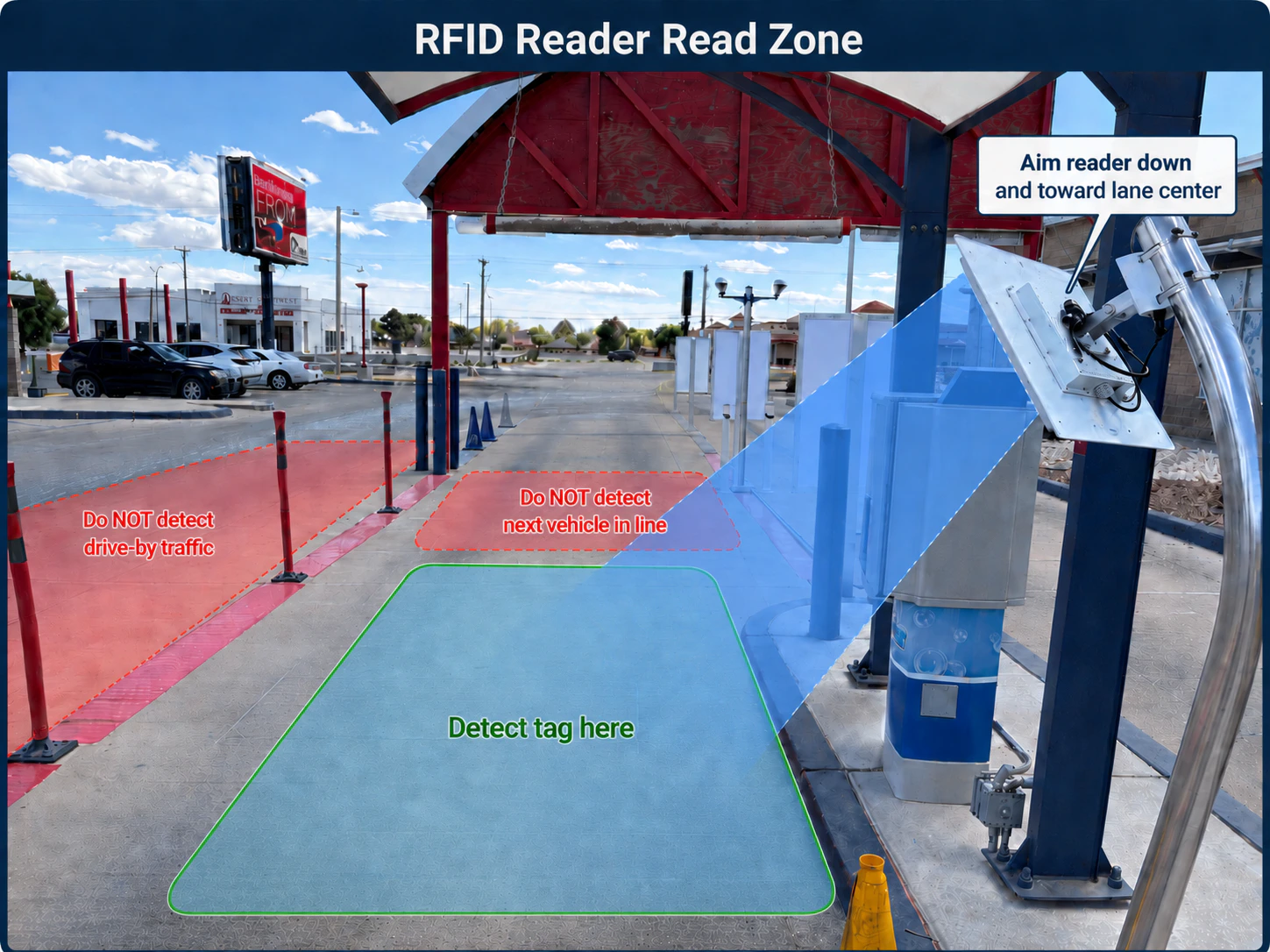
The RFID reader emits a directional beam of radio energy, typically referred
to as the antenna's **read zone**. A tag is detected only when it sits inside
this zone with enough signal strength to respond.
### What to Detect
A correctly aimed read zone covers a single goal.
* Detect the tag of a vehicle stopped directly in front of the gate, i.e. at the **head of the queue**.
### What to Avoid
* The **next vehicle in line**, waiting behind the lead car. Reading this tag
early opens the gate for the wrong member.
* **Drive-by traffic** in adjacent lanes, parking areas, or the street. Stray
reads trigger unwanted gate opens and inflate visit counts.
## Mounting and Aim
Two mounting approaches reliably contain the read zone to the lead vehicle:
### Side Mount, Angled Down and Inward
Mount the reader on a post or pole beside the lane, at roughly windshield
height. Aim the antenna **down and toward the center of the lane**, so the
beam intersects the pavement just in front of the gate.
This is the most common installation. The downward tilt prevents the beam from
reaching the next car in line. The inward angle keeps it off adjacent traffic.
### Overhead Mount, Pointing Straight Down
Mount the reader on a canopy or arch directly above the stop position, with
the antenna pointing **straight down**. The read zone forms a tight footprint
on the pavement directly under the antenna.
Overhead mounting is the cleanest option when the site has existing structure
to support it.
## Network
Our RFID readers are PoE (Power over Ethernet). A single CAT5E cable carries
both power and data, so the only wire you run to the mounting location is the
CAT5E. There is no need for a separate power circuit or outlet at the reader.
Terminate the CAT5E at a PoE switch or PoE injector on the network side.
## Verifying the Read Zone
After installation, walk a test tag through the lane to confirm:
1. The tag reads when held inside a vehicle stopped at the gate.
2. The tag does **not** read from the next stop position behind the gate.
3. The tag does **not** read from adjacent lanes or drive-by paths.
If reads occur outside the intended zone, adjust the tilt, reduce the
reader's transmit power, or both. Small angle changes have a large effect on
where the beam lands.
For troubleshooting power, network, and read failures on an installed reader,
see [RFID Reader](/technical/hardware/rfid-reader). For vehicles that
interfere with RFID at the windshield, see [LPR and RFID Limitations](/technical/hardware/lpr-rfid).
At an automatic checkout lane, the RFID reader identifies the member at the
head of the queue and triggers the gate. Getting the read zone right is the
difference between a smooth, hands-free entry and a frustrated member at a
closed gate, or worse, a gate that opens for the wrong car.
RFID readers and tags are useful if do not want to use [LPR](/getting-started/equipment-installation/lpr-installation)
or if a particular license plate is too difficult to read, e.g. it has a privacy cover.
## Read Zone
The RFID reader emits a directional beam of radio energy, typically referred
to as the antenna's **read zone**. A tag is detected only when it sits inside
this zone with enough signal strength to respond.
### What to Detect
A correctly aimed read zone covers a single goal.
* Detect the tag of a vehicle stopped directly in front of the gate, i.e. at the **head of the queue**.
### What to Avoid
* The **next vehicle in line**, waiting behind the lead car. Reading this tag
early opens the gate for the wrong member.
* **Drive-by traffic** in adjacent lanes, parking areas, or the street. Stray
reads trigger unwanted gate opens and inflate visit counts.
## Mounting and Aim
Two mounting approaches reliably contain the read zone to the lead vehicle:
### Side Mount, Angled Down and Inward
Mount the reader on a post or pole beside the lane, at roughly windshield
height. Aim the antenna **down and toward the center of the lane**, so the
beam intersects the pavement just in front of the gate.
This is the most common installation. The downward tilt prevents the beam from
reaching the next car in line. The inward angle keeps it off adjacent traffic.
### Overhead Mount, Pointing Straight Down
Mount the reader on a canopy or arch directly above the stop position, with
the antenna pointing **straight down**. The read zone forms a tight footprint
on the pavement directly under the antenna.
Overhead mounting is the cleanest option when the site has existing structure
to support it.
## Network
Our RFID readers are PoE (Power over Ethernet). A single CAT5E cable carries
both power and data, so the only wire you run to the mounting location is the
CAT5E. There is no need for a separate power circuit or outlet at the reader.
Terminate the CAT5E at a PoE switch or PoE injector on the network side.
## Verifying the Read Zone
After installation, walk a test tag through the lane to confirm:
1. The tag reads when held inside a vehicle stopped at the gate.
2. The tag does **not** read from the next stop position behind the gate.
3. The tag does **not** read from adjacent lanes or drive-by paths.
If reads occur outside the intended zone, adjust the tilt, reduce the
reader's transmit power, or both. Small angle changes have a large effect on
where the beam lands.
For troubleshooting power, network, and read failures on an installed reader,
see [RFID Reader](/technical/hardware/rfid-reader). For vehicles that
interfere with RFID at the windshield, see [LPR and RFID Limitations](/technical/hardware/lpr-rfid).