> ## Documentation Index
> Fetch the complete documentation index at: https://docs.flexwash.com/llms.txt
> Use this file to discover all available pages before exploring further.
# Wash Book Import
> Migrate prepaid wash bundles from a legacy system without losing partial usage or customer-attached history.
The [Wash Book](/configuration/wash-menu/washbooks) importer takes a CSV of codes and
use-counts and creates these books in your FlexWash organization. Legacy
systems may call these multi-packs, coupon books, or prepaid wash packages.
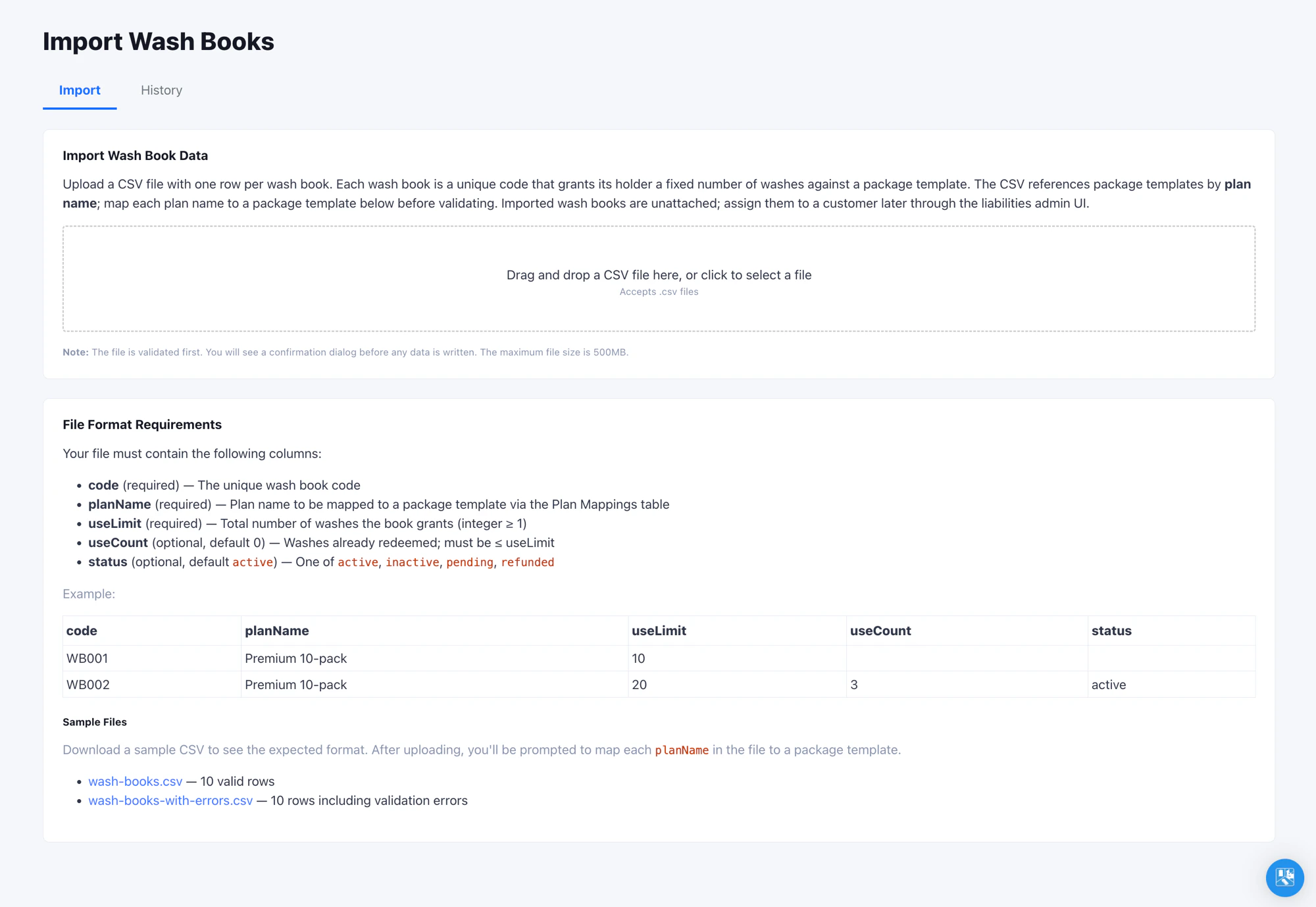 ## Where to Find It
Open **Admin -> Import -> Wash Books** in the left navigation. Access
requires the **Edit Liabilities Reports** permission - the same permission
that controls editing on the Liabilities admin page. Ask your organization
administrator if the page is not visible.
## Where Imported Wash Books Show Up
Imported wash books land in the organization's pool unattached to any
customer. To find them, open **Reports -> Liabilities** and switch to
the **Wash Books** tab. Search by code to confirm a specific book
imported correctly.
## Re-Importing and Updating Books
Re-import the same file as many times as you need. Wash books are matched
by code, and the latest upload wins: a code already in your organization
has its plan, use limit, and use count overwritten, while new codes are
added. Re-running never creates duplicate books.
Use this to correct remaining-use counts or refresh balances that shifted
in your legacy system between exports. Update the CSV and upload it again.
## Verify the Import
Run an end-to-end test before committing to a full file:
1. Upload a 5 to 10 row test CSV.
2. On the pay tablet, enter the plate, tap **Wash Book** on the top row,
then scan or enter a code from the test file.
3. Confirm the book's package is selected with a 100% discount applied.
## Tips
* If a plan name has multiple variants in your legacy data (e.g.
`Premium 10-pack` vs `premium 10-pack`), normalize them to one casing
before exporting. Plan mappings are case-sensitive.
* The same plan mapping table is shared with the Vehicles importer.
Mapping a plan once benefits both importers.
## Where to Find It
Open **Admin -> Import -> Wash Books** in the left navigation. Access
requires the **Edit Liabilities Reports** permission - the same permission
that controls editing on the Liabilities admin page. Ask your organization
administrator if the page is not visible.
## Where Imported Wash Books Show Up
Imported wash books land in the organization's pool unattached to any
customer. To find them, open **Reports -> Liabilities** and switch to
the **Wash Books** tab. Search by code to confirm a specific book
imported correctly.
## Re-Importing and Updating Books
Re-import the same file as many times as you need. Wash books are matched
by code, and the latest upload wins: a code already in your organization
has its plan, use limit, and use count overwritten, while new codes are
added. Re-running never creates duplicate books.
Use this to correct remaining-use counts or refresh balances that shifted
in your legacy system between exports. Update the CSV and upload it again.
## Verify the Import
Run an end-to-end test before committing to a full file:
1. Upload a 5 to 10 row test CSV.
2. On the pay tablet, enter the plate, tap **Wash Book** on the top row,
then scan or enter a code from the test file.
3. Confirm the book's package is selected with a 100% discount applied.
## Tips
* If a plan name has multiple variants in your legacy data (e.g.
`Premium 10-pack` vs `premium 10-pack`), normalize them to one casing
before exporting. Plan mappings are case-sensitive.
* The same plan mapping table is shared with the Vehicles importer.
Mapping a plan once benefits both importers.