> ## Documentation Index
> Fetch the complete documentation index at: https://docs.flexwash.com/llms.txt
> Use this file to discover all available pages before exploring further.
# Non-Member Imports
> Bulk-load gift cards, wash books, promotion codes, and vehicles into FlexWash with a validate-first workflow that protects your data.
FlexWash provides four self-serve CSV importers for the data that operators
most often arrive with: gift cards, wash books, promotion codes, and vehicles
(including fleet and house accounts). Each importer follows the same
validate-then-confirm flow, retains the original file for audit, and writes
nothing to your database until you explicitly confirm.
## Where to Find the Importers
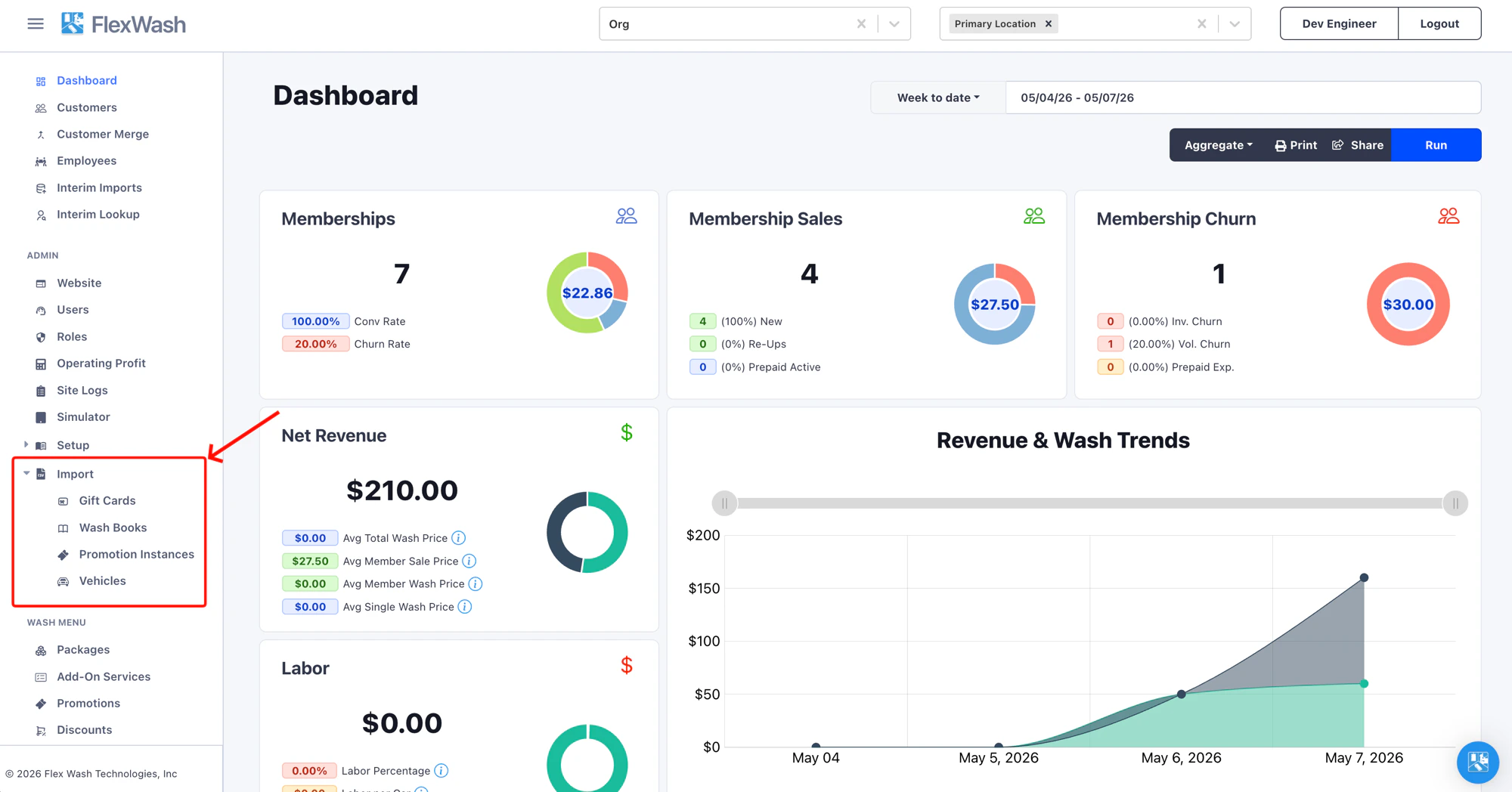
Open the left navigation, expand **Admin**, then expand **Import**. The four
importers appear as direct links.
 ## Choosing the Right Importer
Operators routinely confuse the importers because the source data often looks
similar. Use this table to pick the right tool before building a file.
| You have... | Use this |
| ----------------------------------------------------------------------------- | -------------------------------------------------------------- |
| A list of pre-printed gift card codes with starting balances in dollars | [Gift Cards](/data-import/gift-cards-import) |
| Prepaid wash bundles (e.g. "Buy 5, get 1 free" books) | [Wash Books](/data-import/wash-books-import) |
| A batch of single-use promo codes for a Wash Codes promotion | [Promotion Instances](/data-import/promotion-instances-import) |
| A fleet roster, house accounts, or any vehicle list with optional memberships | [Vehicles](/data-import/vehicles-import) |
| A daily membership feed from your legacy POS | [Interim Imports](/data-import/interim-import) |
| Existing credit card tokens from your previous processor | [Member Token Migration](/data-import/member-token-migration) |
Re-import the same file as often as you need. Each row is matched by
its code (or license plate for vehicles), and the most recent upload
wins: records already in your organization are updated in place and
new rows are added. Re-running never creates duplicates.
## Upload History
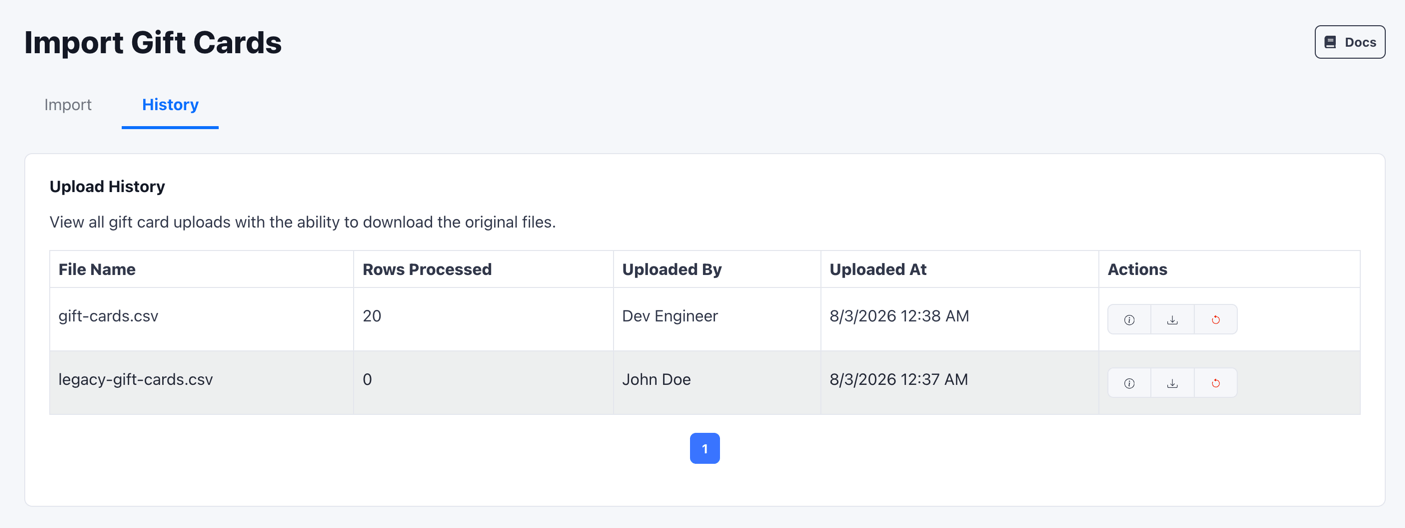
Every importer has a **History** tab next to **Import** at the top of the
page. The tab shows every file ever uploaded for that importer in this
organization, who uploaded it, when, and how many rows were imported.
## Choosing the Right Importer
Operators routinely confuse the importers because the source data often looks
similar. Use this table to pick the right tool before building a file.
| You have... | Use this |
| ----------------------------------------------------------------------------- | -------------------------------------------------------------- |
| A list of pre-printed gift card codes with starting balances in dollars | [Gift Cards](/data-import/gift-cards-import) |
| Prepaid wash bundles (e.g. "Buy 5, get 1 free" books) | [Wash Books](/data-import/wash-books-import) |
| A batch of single-use promo codes for a Wash Codes promotion | [Promotion Instances](/data-import/promotion-instances-import) |
| A fleet roster, house accounts, or any vehicle list with optional memberships | [Vehicles](/data-import/vehicles-import) |
| A daily membership feed from your legacy POS | [Interim Imports](/data-import/interim-import) |
| Existing credit card tokens from your previous processor | [Member Token Migration](/data-import/member-token-migration) |
Re-import the same file as often as you need. Each row is matched by
its code (or license plate for vehicles), and the most recent upload
wins: records already in your organization are updated in place and
new rows are added. Re-running never creates duplicates.
## Upload History
Every importer has a **History** tab next to **Import** at the top of the
page. The tab shows every file ever uploaded for that importer in this
organization, who uploaded it, when, and how many rows were imported.
 Click **Download** on any row to retrieve the original CSV. This is the
canonical record for audits, accounting reconciliation, and after-the-fact
debugging.
## Rolling Back an Import
Every row in the **History** tab has a **Rollback** option in the **Actions**
column. Rollback removes what a specific upload created, so you can remove a
bad file's imports yourself.
Click **Download** on any row to retrieve the original CSV. This is the
canonical record for audits, accounting reconciliation, and after-the-fact
debugging.
## Rolling Back an Import
Every row in the **History** tab has a **Rollback** option in the **Actions**
column. Rollback removes what a specific upload created, so you can remove a
bad file's imports yourself.
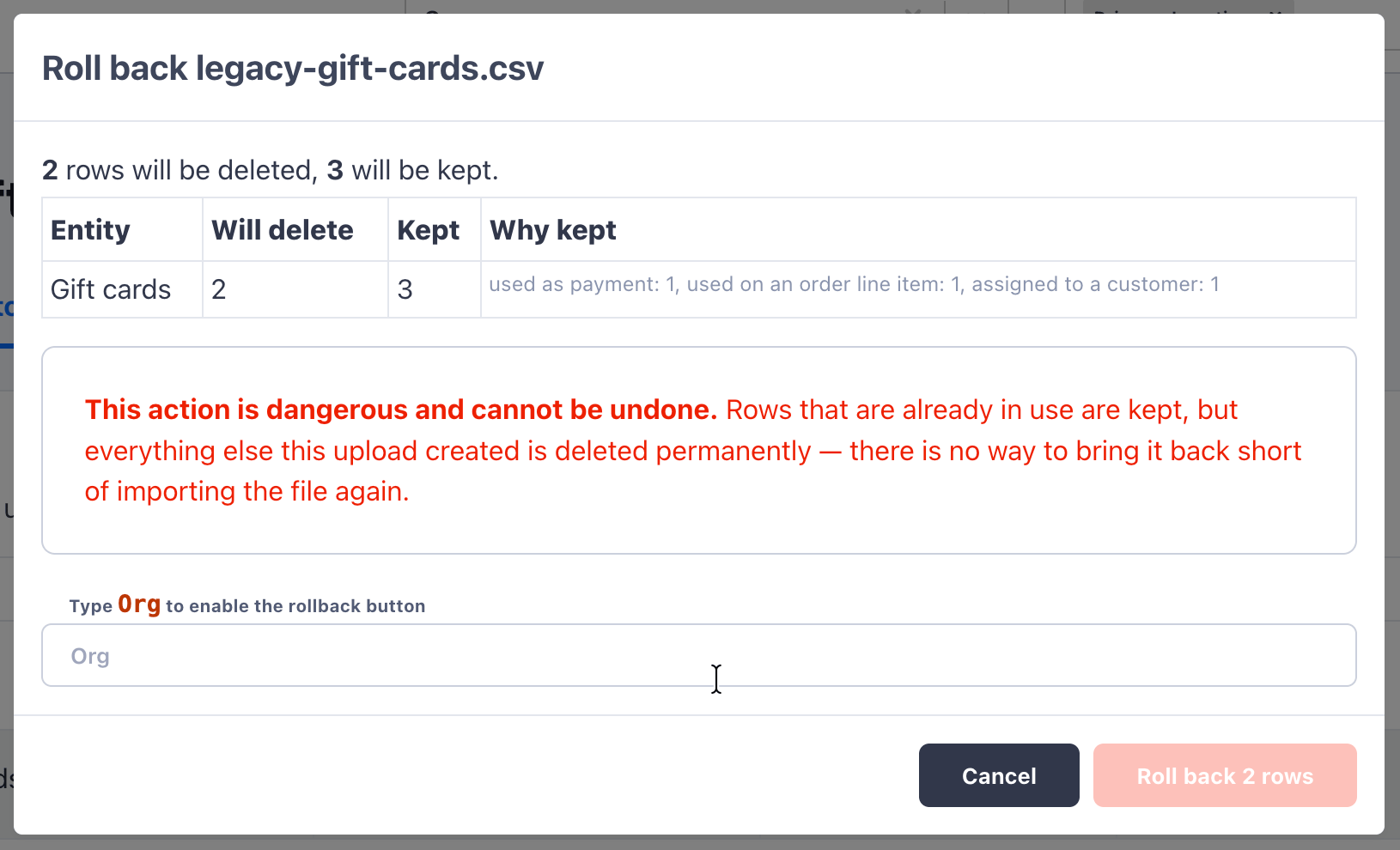 The confirmation modal shows exactly what will happen before you commit:
* **How many rows will be deleted.** These are rows the upload created that
are not referenced anywhere else in FlexWash.
* **How many rows will be kept, and why.** A row is kept if it's already in
use, for example as a payment, on an order line item, or assigned to a
customer. FlexWash never deletes a record that would break existing data.
Rollback is permanent. To confirm, type your organization name into the field
provided, then click **Roll back \[n] rows**.
## Per-Importer Guides
Bulk-load pre-printed gift cards with starting balances.
Import prepaid wash bundles tied to a package template.
Generate batches of single-use codes for a Wash Codes promotion.
Load fleets, house accounts, and one-shot vehicle rosters with optional memberships.
The confirmation modal shows exactly what will happen before you commit:
* **How many rows will be deleted.** These are rows the upload created that
are not referenced anywhere else in FlexWash.
* **How many rows will be kept, and why.** A row is kept if it's already in
use, for example as a payment, on an order line item, or assigned to a
customer. FlexWash never deletes a record that would break existing data.
Rollback is permanent. To confirm, type your organization name into the field
provided, then click **Roll back \[n] rows**.
## Per-Importer Guides
Bulk-load pre-printed gift cards with starting balances.
Import prepaid wash bundles tied to a package template.
Generate batches of single-use codes for a Wash Codes promotion.
Load fleets, house accounts, and one-shot vehicle rosters with optional memberships.