> ## Documentation Index
> Fetch the complete documentation index at: https://docs.flexwash.com/llms.txt
> Use this file to discover all available pages before exploring further.
# Contact Import
> Bring your contacts into FlexWash in minutes and start marketing to consent-verified lists right away.
Your contact list is the foundation of every marketing campaign you run. The
Contact Import tool lets you upload that list yourself, in minutes, without
waiting on a migration ticket.
Import is self-serve, consent-aware, and safe. FlexWash validates your file
before writing anything, tracks SMS and email consent on every contact, and
drops the whole list straight into a CRM List that is ready to use the moment
the import finishes.
 Upload a CSV and import in minutes. No onboarding ticket required.
Capture SMS and email consent per contact, with a signed attestation on
every import.
Every contact lands in the CRM List you choose, ready for marketing.
## Before You Start
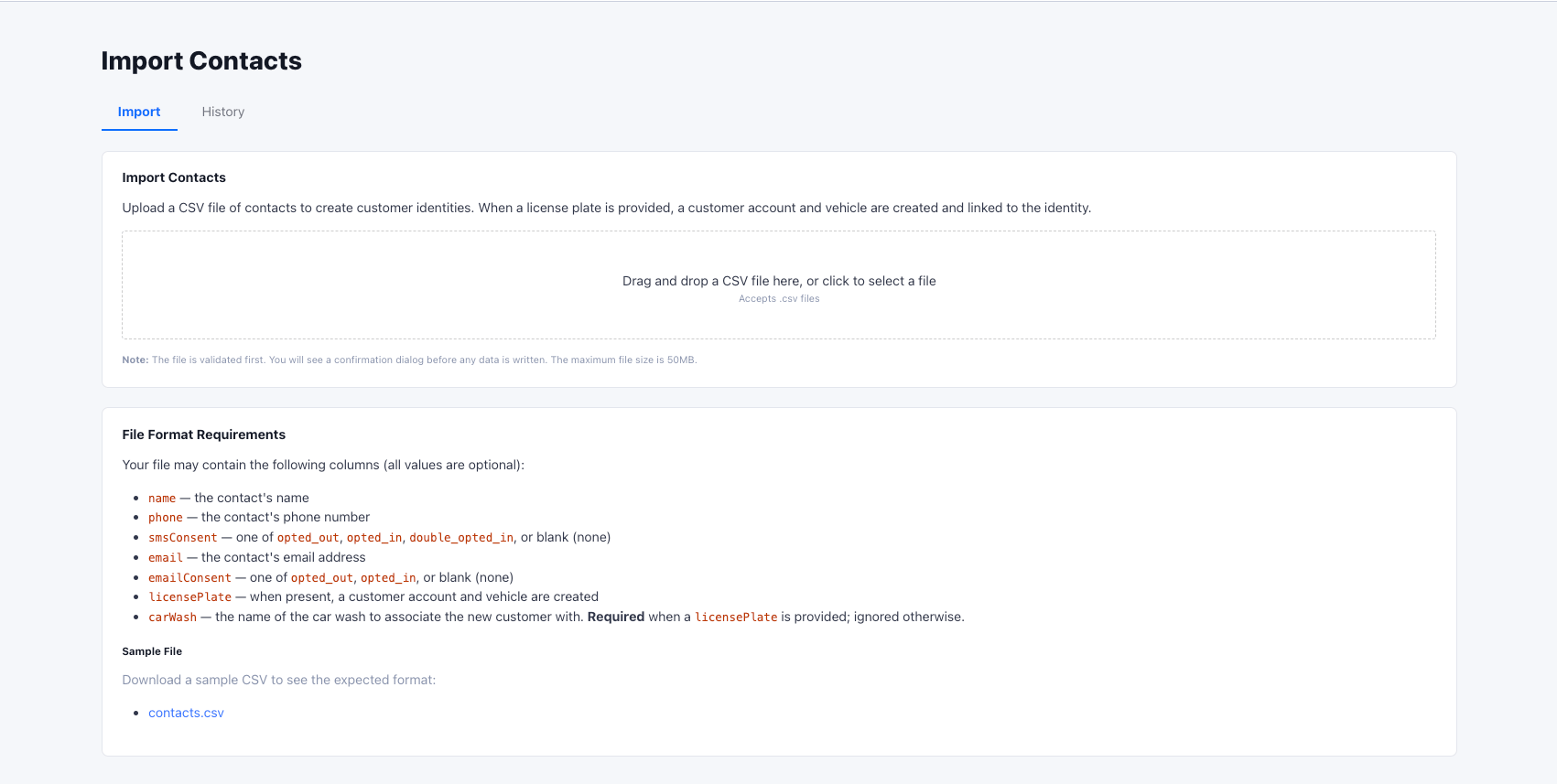
Contact Import is available to **Admin** users. You will find it in the
FlexWash app under **Import** then **Contacts**.
You import contacts from a CSV file. Keep these limits in mind:
* The file must be a `.csv` file.
* The maximum file size is **50MB**.
* Every row needs at least a phone number or an email address.
## Prepare Your File
Your CSV may contain the columns below. Every value is optional on its own, but
the row-level rules that follow still apply. The Contacts import page includes a
downloadable sample CSV so you can see the exact format.
| Column | Description |
| -------------- | ------------------------------------------------------------------------------------------------------------------------------- |
| `name` | The contact's name. |
| `phone` | The contact's phone number. Reduced to digits automatically. |
| `email` | The contact's email address. |
| `smsConsent` | SMS consent status. One of `opted_out`, `opted_in`, `double_opted_in`, or blank. |
| `emailConsent` | Email consent status. One of `opted_out`, `opted_in`, or blank. |
| `licensePlate` | When present, FlexWash also creates a customer account and vehicle for the contact. |
| `carWash` | The name of the car wash to associate the new customer with. Required when a `licensePlate` is provided, and ignored otherwise. |
### Row Rules
FlexWash checks each row against a small set of rules so your data lands clean:
* **Reachable contact.** Each row must have a `phone`, an `email`, or both.
* **Consent needs its channel.** Set `smsConsent` only when the row has a
`phone`. Set `emailConsent` only when the row has an `email`.
* **Plates need a car wash.** When a row has a `licensePlate`, it must also have
a `carWash`, and that name must match a car wash in your organization. The
match is case-insensitive.
`double_opted_in` applies to SMS only. The `emailConsent` column accepts
`opted_out`, `opted_in`, or blank.
## How It Works
Drag and drop your file onto the Contacts import page, or click to select
it. FlexWash validates the file before writing any data.
FlexWash shows how many contacts it found, how many carry a license plate,
and a full breakdown of SMS and email consent. Any problem rows are listed
with the row number and the reason.
Pick the CRM List that every imported contact will be added to. This is
where your new contacts live and where your campaigns draw from.
Confirm that you have verifiable proof of opt-in and double-opt-in consent
for the relevant contacts, then sign to attest. The import button stays
disabled until a CRM List, both certifications, and a signature are
provided.
The import runs in the background. When it finishes, you receive a summary
of everything that was created.
## Validation Catches Problems First
Nothing is written to your database until you confirm the import, and a file
with any errors cannot be imported at all. FlexWash reports each problem row
with its row number, the contact's name, and a clear message, such as:
* `phone or email is required`
* `phone is required when smsConsent is set`
* `carWash is required when a licensePlate is provided`
* `Car wash "..." not found in this organization`
Fix the flagged rows in your CSV, then upload the file again. Once the preview
is clean, you can proceed.
## Duplicate Handling
FlexWash protects your existing data by skipping contacts you already have:
* **Existing phone or email.** If a row's phone or email already exists in your
organization, that row is skipped and no identity is created.
* **Existing license plate.** If a plated row's license plate already exists,
the contact identity is still created, but a duplicate vehicle is not.
The import summary reports how many contacts and license plates were actually
created, so the effect of skipped duplicates is always visible.
## Compliance and Audit Trail
Marketing to imported contacts carries consent obligations, so FlexWash records
the proof alongside the data:
* You certify verifiable proof of opt-in and double-opt-in before importing.
* Your signature is captured and saved with the import.
* The consent breakdown is preserved in the import summary.
This gives you a durable record of who imported the list, what they attested to,
and the consent state of every contact at the time of import.
## Upload History
The **History** tab lists every contact import for your organization, showing
the file name, rows processed, who uploaded it, and when. From there you can:
* Open the **Details** view to see the import summary, the captured signature,
and the consent attestation.
* **Download** the original CSV file.
This keeps a complete, reviewable trail of every list you have brought into
FlexWash.
Upload a CSV and import in minutes. No onboarding ticket required.
Capture SMS and email consent per contact, with a signed attestation on
every import.
Every contact lands in the CRM List you choose, ready for marketing.
## Before You Start
Contact Import is available to **Admin** users. You will find it in the
FlexWash app under **Import** then **Contacts**.
You import contacts from a CSV file. Keep these limits in mind:
* The file must be a `.csv` file.
* The maximum file size is **50MB**.
* Every row needs at least a phone number or an email address.
## Prepare Your File
Your CSV may contain the columns below. Every value is optional on its own, but
the row-level rules that follow still apply. The Contacts import page includes a
downloadable sample CSV so you can see the exact format.
| Column | Description |
| -------------- | ------------------------------------------------------------------------------------------------------------------------------- |
| `name` | The contact's name. |
| `phone` | The contact's phone number. Reduced to digits automatically. |
| `email` | The contact's email address. |
| `smsConsent` | SMS consent status. One of `opted_out`, `opted_in`, `double_opted_in`, or blank. |
| `emailConsent` | Email consent status. One of `opted_out`, `opted_in`, or blank. |
| `licensePlate` | When present, FlexWash also creates a customer account and vehicle for the contact. |
| `carWash` | The name of the car wash to associate the new customer with. Required when a `licensePlate` is provided, and ignored otherwise. |
### Row Rules
FlexWash checks each row against a small set of rules so your data lands clean:
* **Reachable contact.** Each row must have a `phone`, an `email`, or both.
* **Consent needs its channel.** Set `smsConsent` only when the row has a
`phone`. Set `emailConsent` only when the row has an `email`.
* **Plates need a car wash.** When a row has a `licensePlate`, it must also have
a `carWash`, and that name must match a car wash in your organization. The
match is case-insensitive.
`double_opted_in` applies to SMS only. The `emailConsent` column accepts
`opted_out`, `opted_in`, or blank.
## How It Works
Drag and drop your file onto the Contacts import page, or click to select
it. FlexWash validates the file before writing any data.
FlexWash shows how many contacts it found, how many carry a license plate,
and a full breakdown of SMS and email consent. Any problem rows are listed
with the row number and the reason.
Pick the CRM List that every imported contact will be added to. This is
where your new contacts live and where your campaigns draw from.
Confirm that you have verifiable proof of opt-in and double-opt-in consent
for the relevant contacts, then sign to attest. The import button stays
disabled until a CRM List, both certifications, and a signature are
provided.
The import runs in the background. When it finishes, you receive a summary
of everything that was created.
## Validation Catches Problems First
Nothing is written to your database until you confirm the import, and a file
with any errors cannot be imported at all. FlexWash reports each problem row
with its row number, the contact's name, and a clear message, such as:
* `phone or email is required`
* `phone is required when smsConsent is set`
* `carWash is required when a licensePlate is provided`
* `Car wash "..." not found in this organization`
Fix the flagged rows in your CSV, then upload the file again. Once the preview
is clean, you can proceed.
## Duplicate Handling
FlexWash protects your existing data by skipping contacts you already have:
* **Existing phone or email.** If a row's phone or email already exists in your
organization, that row is skipped and no identity is created.
* **Existing license plate.** If a plated row's license plate already exists,
the contact identity is still created, but a duplicate vehicle is not.
The import summary reports how many contacts and license plates were actually
created, so the effect of skipped duplicates is always visible.
## Compliance and Audit Trail
Marketing to imported contacts carries consent obligations, so FlexWash records
the proof alongside the data:
* You certify verifiable proof of opt-in and double-opt-in before importing.
* Your signature is captured and saved with the import.
* The consent breakdown is preserved in the import summary.
This gives you a durable record of who imported the list, what they attested to,
and the consent state of every contact at the time of import.
## Upload History
The **History** tab lists every contact import for your organization, showing
the file name, rows processed, who uploaded it, and when. From there you can:
* Open the **Details** view to see the import summary, the captured signature,
and the consent attestation.
* **Download** the original CSV file.
This keeps a complete, reviewable trail of every list you have brought into
FlexWash.