> ## Documentation Index
> Fetch the complete documentation index at: https://docs.flexwash.com/llms.txt
> Use this file to discover all available pages before exploring further.
# Tender to Fleet
> Let fleet vehicles wash now and invoice later, even where the license plates are not fixed like a rental fleet.
Tender to fleet defers billing: the vehicle washes today, the order is recorded against the fleet account at full value, and you invoice the account on your own cycle. It works for a fixed roster of plates or with a **fleet code** for an open list of plates that changes constantly, such as a rental company's vehicles.
## Set up the account
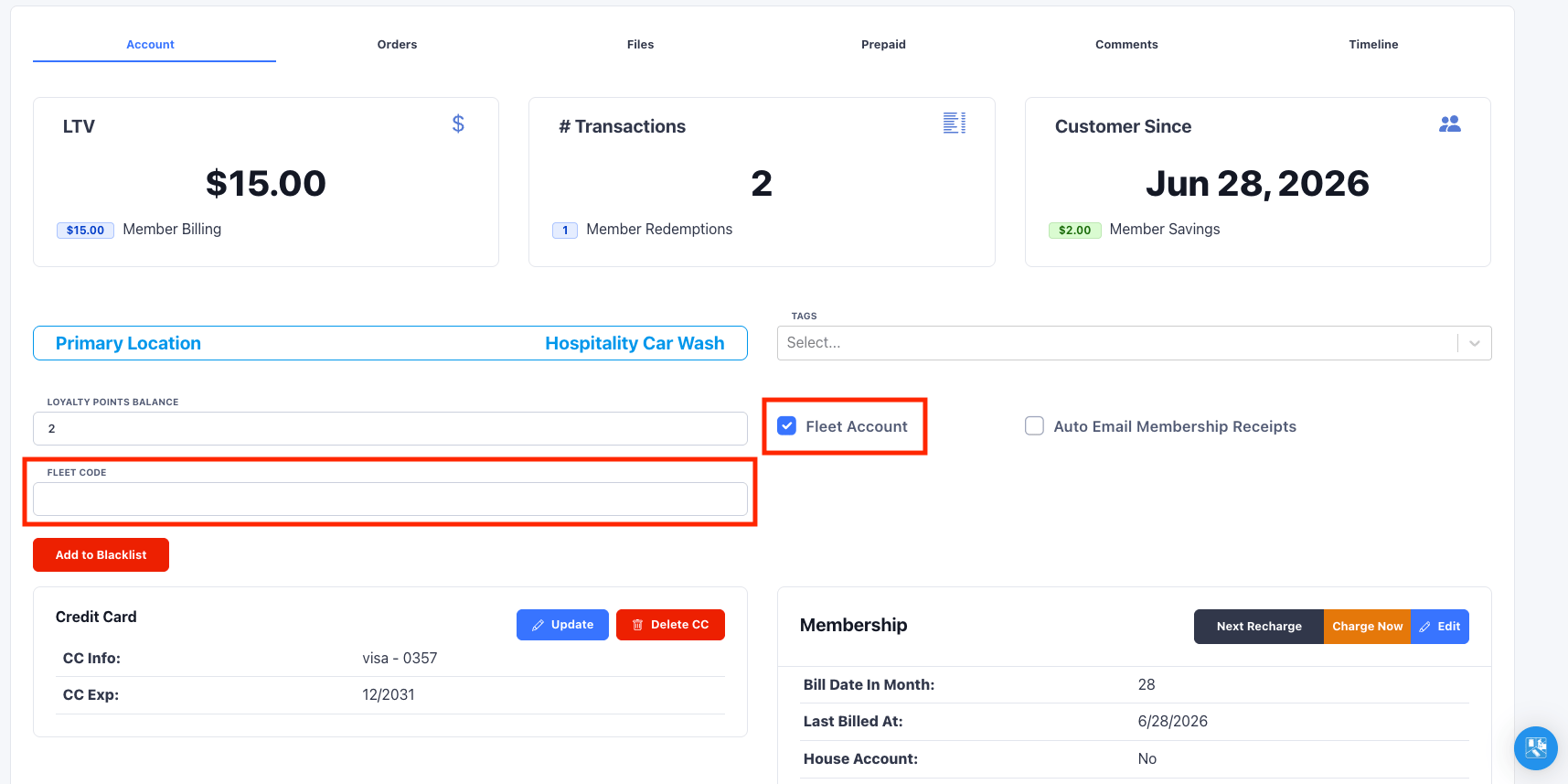
On the customer profile, check **Fleet Account**.
When Fleet Account is enabled, a **Fleet Code** field appears. Enter a short, memorable code (or print it as a barcode) that staff will use to ring vehicles up against this account at the lane. A fleet code is **not required** and should only be used if the account will be ringing up a non fixed list of vehicles.
 For a fixed roster of vehicles also add the account's license plates or RFID tags.
## Tender at the lane
There are two ways a wash gets tendered to a fleet account:
1. **Known vehicle on site.** When a vehicle on the account comes through and is looked up by LPR/RFID, the pay tablet presents a **Fleet** tender. Billing is deferred in FlexWash; you invoice on your side.
For a fixed roster of vehicles also add the account's license plates or RFID tags.
## Tender at the lane
There are two ways a wash gets tendered to a fleet account:
1. **Known vehicle on site.** When a vehicle on the account comes through and is looked up by LPR/RFID, the pay tablet presents a **Fleet** tender. Billing is deferred in FlexWash; you invoice on your side.
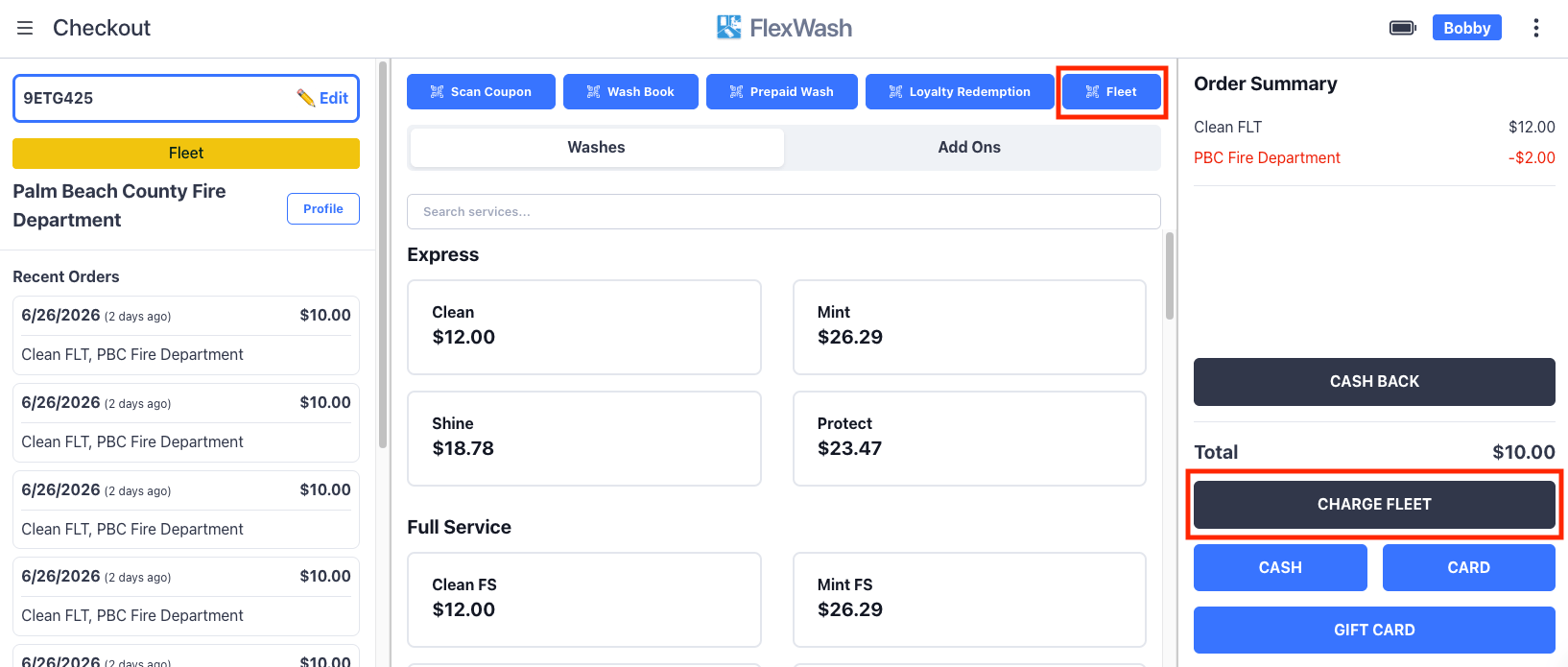 2. **Open plate list (the Fleet button).** Tap **Fleet** on the checkout menu to enter or scan a fleet code. FlexWash looks up the account, confirms the match, and tenders the order to that fleet account.
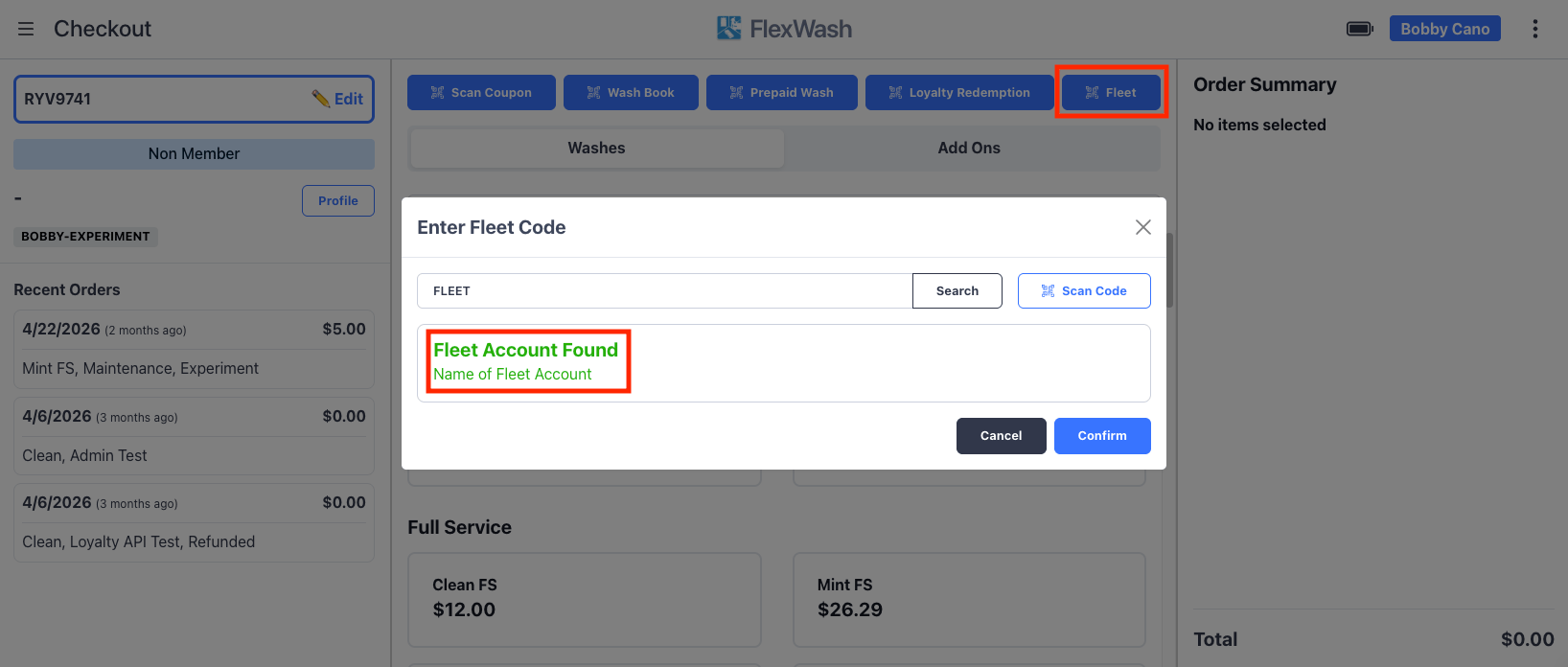 The Fleet button is what makes open rosters work: a rental agency can run any plate through under one fleet code without you maintaining a vehicle list.
When you ring up a plate this way, FlexWash saves the license plate
details **on the order**, but it does **not** create a vehicle on the fleet
account. The wash is attributed to the account for billing, while the plate is
captured for that order's record only. This is by design for open, changing
fleets.
## Invoice and reconcile
Fleet-tendered washes are deferred revenue: count them when the wash happens, then invoice and collect outside FlexWash.
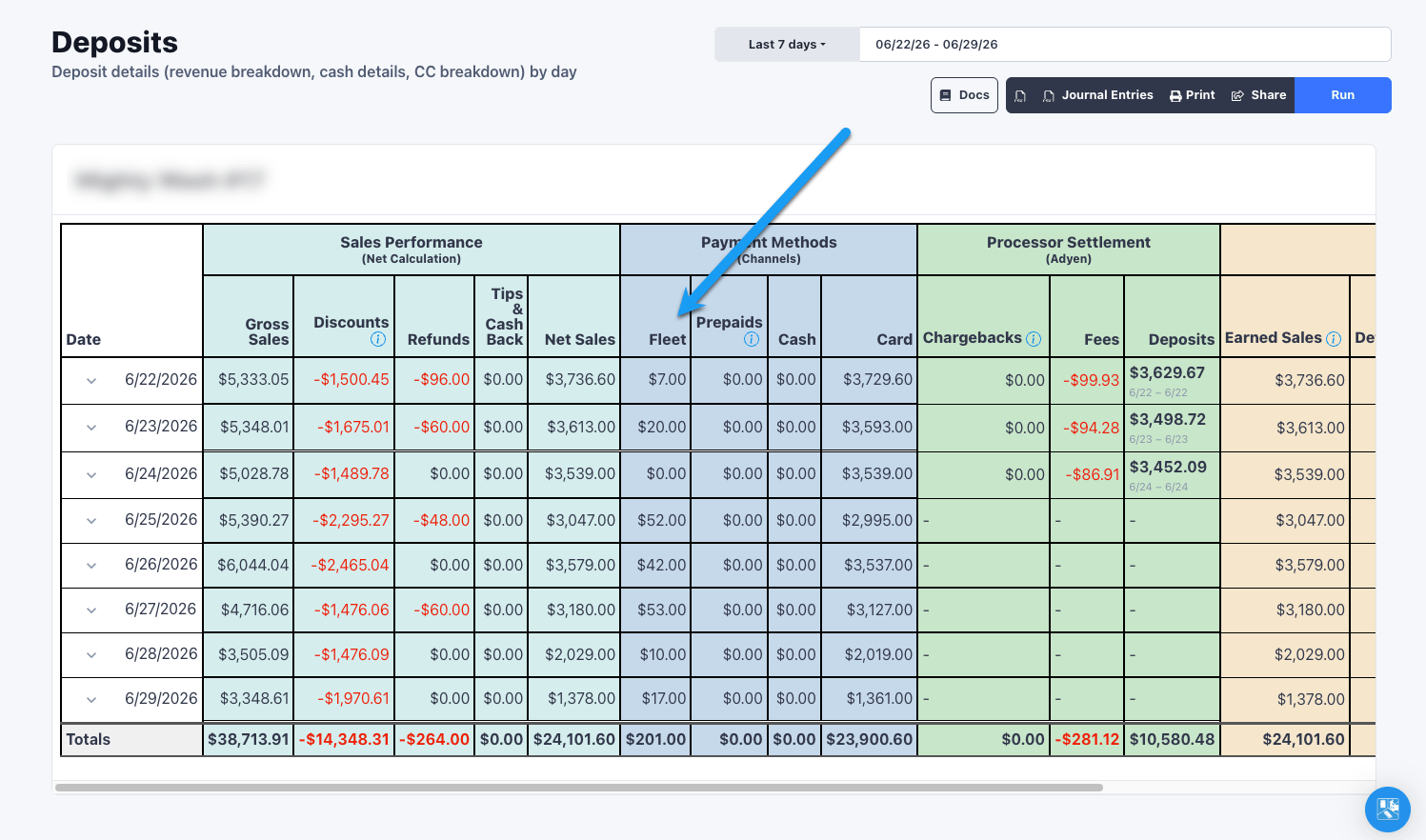
The deposits report attributes these washes to the **Fleet** payment channel so you see revenue when the wash happened. Treat that revenue as deferred until you invoice and collect.
The Fleet button is what makes open rosters work: a rental agency can run any plate through under one fleet code without you maintaining a vehicle list.
When you ring up a plate this way, FlexWash saves the license plate
details **on the order**, but it does **not** create a vehicle on the fleet
account. The wash is attributed to the account for billing, while the plate is
captured for that order's record only. This is by design for open, changing
fleets.
## Invoice and reconcile
Fleet-tendered washes are deferred revenue: count them when the wash happens, then invoice and collect outside FlexWash.
The deposits report attributes these washes to the **Fleet** payment channel so you see revenue when the wash happened. Treat that revenue as deferred until you invoice and collect.
 For a roll-up across every fleet account and location, including how much is still unbilled, use the [Fleet Activity report](/reports/fleet-activity).
## Unattended lane usage
Fleet tender also works hands-free at unattended lanes, just like an unlimited
member. With the right setup, a fleet vehicle is recognized by LPR or RFID,
washes at its contract rate, and the charge is recorded against the account
automatically, with no attendant and no card on file.
To set this up for an account with a fixed roster of plates or RFID tags:
1. **Set the contract rate with a membership package.** Create a [Membership package](/configuration/wash-menu/membership-package) whose benefit discounts the wash to the agreed price using a membership benefit. Make this package disabled so it can't be sold to non-fleet customers on the pay tablet.
2. **Check Fleet Account** on the customer profile, and add the account's license plates and RFID tags as vehicles.
3. **Assign the membership package** to those vehicles.
4. **Set House Account on the membership.** Because the account pays per wash and should not be billed monthly like a normal member, mark the membership as a house account.
For a roll-up across every fleet account and location, including how much is still unbilled, use the [Fleet Activity report](/reports/fleet-activity).
## Unattended lane usage
Fleet tender also works hands-free at unattended lanes, just like an unlimited
member. With the right setup, a fleet vehicle is recognized by LPR or RFID,
washes at its contract rate, and the charge is recorded against the account
automatically, with no attendant and no card on file.
To set this up for an account with a fixed roster of plates or RFID tags:
1. **Set the contract rate with a membership package.** Create a [Membership package](/configuration/wash-menu/membership-package) whose benefit discounts the wash to the agreed price using a membership benefit. Make this package disabled so it can't be sold to non-fleet customers on the pay tablet.
2. **Check Fleet Account** on the customer profile, and add the account's license plates and RFID tags as vehicles.
3. **Assign the membership package** to those vehicles.
4. **Set House Account on the membership.** Because the account pays per wash and should not be billed monthly like a normal member, mark the membership as a house account.
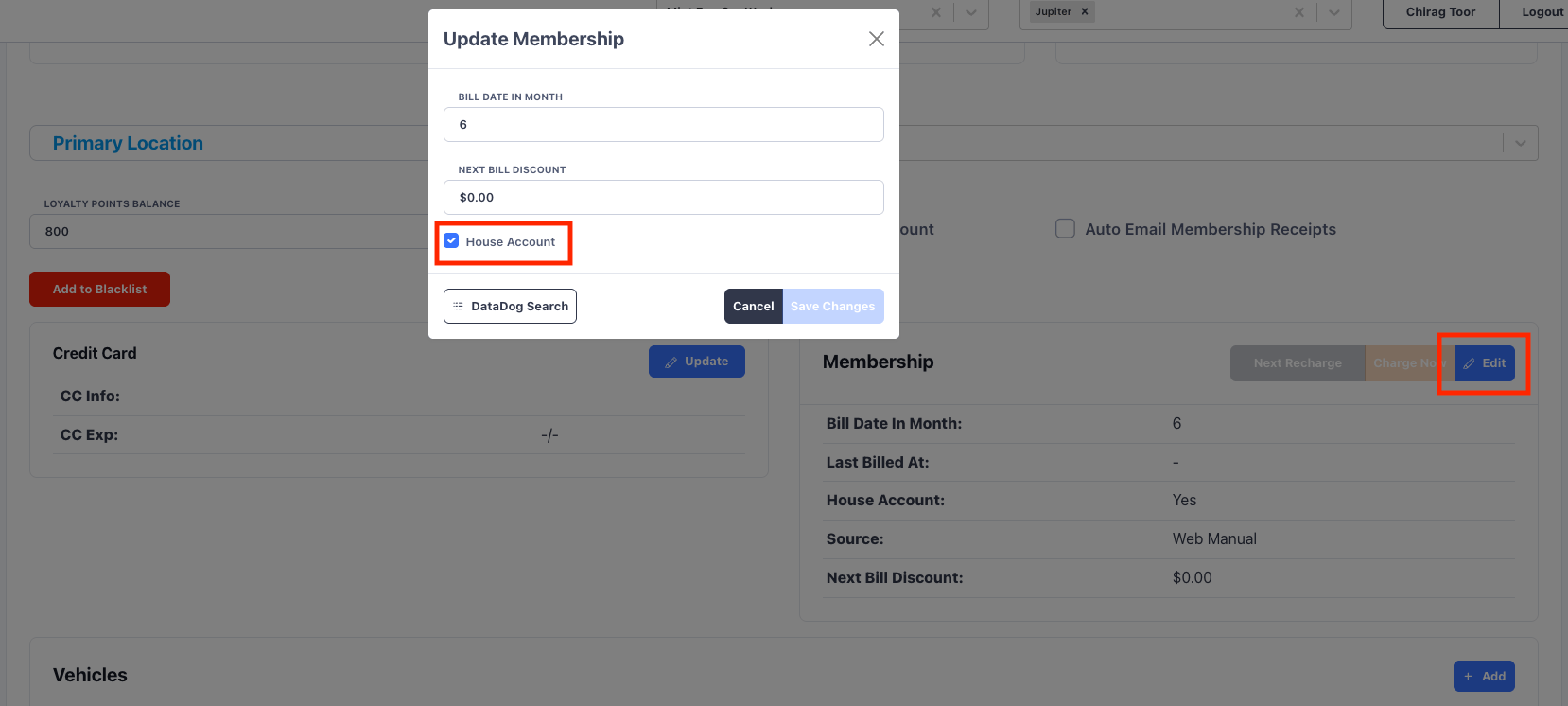 Once configured, when one of these vehicles comes on site, LPR or RFID recognizes it and, because **Fleet Account** is set, FlexWash records a paid fleet tendered order at the contract rate the account. **House Account** keeps the membership out of the monthly billing cycle, so the account is only ever billed per wash through your invoicing.
The wash still counts as a member wash and appears in the [Fleet Activity
report](/reports/fleet-activity) and deposits, so unattended fleet
visits reconcile the same way as attended ones.
House Account stops the monthly membership charge. If you forget it, the account
will be billed for the membership on its bill date in addition to washing at the
contract rate. Always set House Account for per-wash fleet vehicles.
## Managing fleet accounts in bulk
Setting up plates, RFID tags, and packages one vehicle at a time is slow for a large fleet. Use [Vehicle Import](/data-import/vehicles-import) to upload and manage fleet vehicles in bulk: add an account's full roster, assign packages, and apply changes across many vehicles at once instead of editing each profile by hand.
Once configured, when one of these vehicles comes on site, LPR or RFID recognizes it and, because **Fleet Account** is set, FlexWash records a paid fleet tendered order at the contract rate the account. **House Account** keeps the membership out of the monthly billing cycle, so the account is only ever billed per wash through your invoicing.
The wash still counts as a member wash and appears in the [Fleet Activity
report](/reports/fleet-activity) and deposits, so unattended fleet
visits reconcile the same way as attended ones.
House Account stops the monthly membership charge. If you forget it, the account
will be billed for the membership on its bill date in addition to washing at the
contract rate. Always set House Account for per-wash fleet vehicles.
## Managing fleet accounts in bulk
Setting up plates, RFID tags, and packages one vehicle at a time is slow for a large fleet. Use [Vehicle Import](/data-import/vehicles-import) to upload and manage fleet vehicles in bulk: add an account's full roster, assign packages, and apply changes across many vehicles at once instead of editing each profile by hand.